Remove hidden Admin account, help


Go to search or press the Windows key +R
type sysdm.cpl and press Enter.
Click the Advanced Tab. Under User Profiles, click the Settings button.
If the account you want to remove is listed, Select it and press the Delete Key.
Restart the computer.
 

My Computer My Computer

At a glance

Windows 11 Pro Insider 64 bit 25H2 26200.5742Intel Core i7 9700K 3.6016 GBnVidia GEForce RTX 2060 Super
OS
Windows 11 Pro Insider 64 bit 25H2 26200.5742
Computer type
PC/Desktop
Manufacturer/Model
Gigabyte Z390 UD
CPU
Intel Core i7 9700K 3.60
Motherboard
Gigabyte Z390 UD
Memory
16 GB
Graphics Card(s)
nVidia GEForce RTX 2060 Super
Sound Card
onboard
Monitor(s) Displays
Two 27" Dell 4K monitors
Screen Resolution
3840 x 2160
Hard Drives
M.2 NVME SSD, 500 GB; Two 2TB Mechanical HDD's
PSU
850w PSU
Case
Cyberpower PC
Cooling
Water cooled
Keyboard
Backlit Cyberpower gaming keyboard
Mouse
Backlit Cyberpower gaming mouse
Internet Speed
1 GB mbps
Browser
Brave
Antivirus
Windows Security
Yes it does.
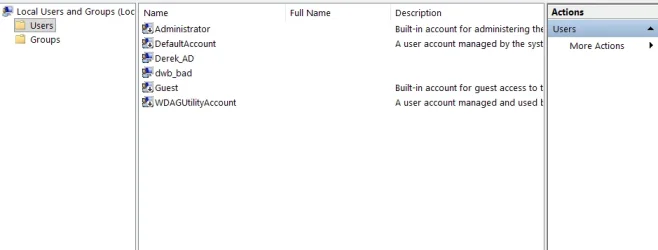
View attachment 150153


You cannot mix up accounts with profiles.
Those folders are associated with accounts but they are folders belonging to profiles; they are not accounts.
Your three accounts are shown in the diagram above.


There's no telling when an incident happened that caused the Administrator.AdminDerek13500 profile [& folder] to appear.


You tried to change the password of the Built-in Admin, the account with the username Administrator?
Or are you referring to Derek_AD, dwb-bad?
I have not heard of using an anti-malware utility to change account passwords.

Your Built-in Admin, the account with the username Administrator, is normally disabled. You have enabled yours.
Does it have a password?
I suggest you find out and then disable it again.


All the best,
Denis
Good advice, I've disabled adminDerek13500 while I search for more information. Bit defender has a security option to scan for vulnerabilities and recommended changing the password. You can choose to be reminded later or taken to the login screen.
 

Attachments

  • Admin012.webp
    Admin012.webp
    18.4 KB · Views: 2

My Computer My Computer

At a glance

Window 11I5 1350032 G ddr4
OS
Window 11
Computer type
PC/Desktop
Manufacturer/Model
MSI
CPU
I5 13500
Motherboard
MSI B760 Tomahawk
Memory
32 G ddr4

My Computer My Computer

At a glance

Windows 11 Home x64 Version 25H2 Build 26200....
OS
Windows 11 Home x64 Version 25H2 Build 26200.8037
Oh and, by the way, you don't have to quote entire posts. You can just select relevant text that you want to quote and, after a moment, you can click on the Quote cmd that appears.
Quote selection example 3.webp


Denis
 

My Computer My Computer

At a glance

Windows 11 Home x64 Version 25H2 Build 26200....
OS
Windows 11 Home x64 Version 25H2 Build 26200.8037

Latest Support Threads

Back
Top Bottom