Removing Dell Recovery and Diagnostics partitions from a Dell Inspiron 5770


dbookbinder

Well-known member
Member
Local time
2:41 PM
Posts
101
OS
Windows 11 Pro, 23H2, Build 22631.4317
I have a five-year-old Dell Inspiron 5770 and want to free up space on the 256GB SSD. In another thread, I've been getting help with partition issues on drive cloned with Samsung Magician, and it inspired me to clean up this drive, too.

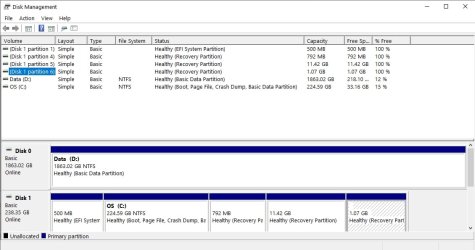
I see that the Dell Recovery partition takes up 11GB and the Dell Diagnostics partition 1GB. I have never used the Dell Diagnostics and will never want to revert back to the factory state. These partitions come after the WinRE partition, as in the attached screenshot. Without messing anything up, can I:
  1. Delete both Dell partitions (5 and 6)
  2. Save the winre.wim file from the WinRE partition to the Recovery folder in System32 and then delete that partition
  3. Extend my C: drive
  4. Then re-create the WinRE partition after Drive C with DiskGenius and reagentc?
I do have a recent Macrium backup of the drive.
 
Windows Build/Version
Windows 11 Pro, 23H2

Attachments

  • Dell Inspiron Partitions.jpg
    Dell Inspiron Partitions.jpg
    69.2 KB · Views: 2

My Computers My Computers

  • At a glance

    Windows 11 Pro, 23H2, Build 22631.4317i7-1355U64GBIntel IRIS 1GB
    OS
    Windows 11 Pro, 23H2, Build 22631.4317
    Computer type
    Laptop
    Manufacturer/Model
    HP
    CPU
    i7-1355U
    Motherboard
    HP
    Memory
    64GB
    Graphics Card(s)
    Intel IRIS 1GB
    Sound Card
    Realtek (internal)
    Monitor(s) Displays
    Stock and external 27" Acer monitor
    Screen Resolution
    1080p
    Hard Drives
    m.2 2TB (Windows), 2TB SATA SSD (Data)
    PSU
    Stock
    Case
    Stock
    Cooling
    Stock
    Keyboard
    Stock and external HP keyboard
    Mouse
    Trackpad and external Logitech wired mouse
    Internet Speed
    FIOS 1GB
    Browser
    Chrome, Edge, Brave, Opera, Firefox
    Antivirus
    Microsoft Defender
    Other Info
    2TB Samsung 990 Pro, 2TB Samsung 870 EVO
  • At a glance

    Windows 10Intel i7-8550U32GBAMD Radeon 530
    Operating System
    Windows 10
    Computer type
    Laptop
    Manufacturer/Model
    Dell Inspiron 5770
    CPU
    Intel i7-8550U
    Motherboard
    Dell
    Memory
    32GB
    Graphics card(s)
    AMD Radeon 530
    Sound Card
    Realtek
    Monitor(s) Displays
    Laptop screen
    Screen Resolution
    1920x1080
    Hard Drives
    256GB Samsung SDD, 2TB Western Digital HDD
    Keyboard
    Arteck wireless
    Mouse
    Logitech wired
    Internet Speed
    FIOS 1GB
    Browser
    Chrome, Edge
    Antivirus
    Microsoft Defender
Please run: disk par info and tuneup plus > post share links


My Computer My Computer

At a glance

Windows 10Intel(R) Core(TM) i7-4800MQ CPU @ 2.70GHz16 GB Total: Manufacturer : Samsung MemoryTyp...NVIDIA Quadro K3100M; Intel(R) HD Graphics 4600
OS
Windows 10
Computer type
Laptop
Manufacturer/Model
HP
CPU
Intel(R) Core(TM) i7-4800MQ CPU @ 2.70GHz
Motherboard
Product : 190A Version : KBC Version 94.56
Memory
16 GB Total: Manufacturer : Samsung MemoryType : DDR3 FormFactor : SODIMM Capacity : 8GB Speed : 1600
Graphics Card(s)
NVIDIA Quadro K3100M; Intel(R) HD Graphics 4600
Sound Card
IDT High Definition Audio CODEC; PNP Device ID HDAUDIO\FUNC_01&VEN_111D&DEV_76E0
Hard Drives
Model Hitachi HTS727575A9E364
Antivirus
Microsoft Defender
Other Info
Mobile Workstation
Please run: disk par info and tuneup plus > post share links


I'm not sure why you're requesting I run these programs. I'm asking about WinRE, not experiencing a BSOD. In any case, I did the above, except I recreated the WinRE partition after Drive C: using Disk Management and diskpart rather than Disk Genius. It's all working fine.
 

My Computers My Computers

  • At a glance

    Windows 11 Pro, 23H2, Build 22631.4317i7-1355U64GBIntel IRIS 1GB
    OS
    Windows 11 Pro, 23H2, Build 22631.4317
    Computer type
    Laptop
    Manufacturer/Model
    HP
    CPU
    i7-1355U
    Motherboard
    HP
    Memory
    64GB
    Graphics Card(s)
    Intel IRIS 1GB
    Sound Card
    Realtek (internal)
    Monitor(s) Displays
    Stock and external 27" Acer monitor
    Screen Resolution
    1080p
    Hard Drives
    m.2 2TB (Windows), 2TB SATA SSD (Data)
    PSU
    Stock
    Case
    Stock
    Cooling
    Stock
    Keyboard
    Stock and external HP keyboard
    Mouse
    Trackpad and external Logitech wired mouse
    Internet Speed
    FIOS 1GB
    Browser
    Chrome, Edge, Brave, Opera, Firefox
    Antivirus
    Microsoft Defender
    Other Info
    2TB Samsung 990 Pro, 2TB Samsung 870 EVO
  • At a glance

    Windows 10Intel i7-8550U32GBAMD Radeon 530
    Operating System
    Windows 10
    Computer type
    Laptop
    Manufacturer/Model
    Dell Inspiron 5770
    CPU
    Intel i7-8550U
    Motherboard
    Dell
    Memory
    32GB
    Graphics card(s)
    AMD Radeon 530
    Sound Card
    Realtek
    Monitor(s) Displays
    Laptop screen
    Screen Resolution
    1920x1080
    Hard Drives
    256GB Samsung SDD, 2TB Western Digital HDD
    Keyboard
    Arteck wireless
    Mouse
    Logitech wired
    Internet Speed
    FIOS 1GB
    Browser
    Chrome, Edge
    Antivirus
    Microsoft Defender
The scripts required names and are used for non-BSODs.
 

My Computer My Computer

At a glance

Windows 10Intel(R) Core(TM) i7-4800MQ CPU @ 2.70GHz16 GB Total: Manufacturer : Samsung MemoryTyp...NVIDIA Quadro K3100M; Intel(R) HD Graphics 4600
OS
Windows 10
Computer type
Laptop
Manufacturer/Model
HP
CPU
Intel(R) Core(TM) i7-4800MQ CPU @ 2.70GHz
Motherboard
Product : 190A Version : KBC Version 94.56
Memory
16 GB Total: Manufacturer : Samsung MemoryType : DDR3 FormFactor : SODIMM Capacity : 8GB Speed : 1600
Graphics Card(s)
NVIDIA Quadro K3100M; Intel(R) HD Graphics 4600
Sound Card
IDT High Definition Audio CODEC; PNP Device ID HDAUDIO\FUNC_01&VEN_111D&DEV_76E0
Hard Drives
Model Hitachi HTS727575A9E364
Antivirus
Microsoft Defender
Other Info
Mobile Workstation
The scripts required names and are used for non-BSODs.
I looked through the scripts and see what they do, gather information about system health, partitions, and boot records. If I ever have a problem relevant to these issues, I'll be sure to run them. In this case, I was just trying to get verification that what I was proposing made sense, not trying to debug a problem. Anyway, I went ahead and everything works fine.
 

My Computers My Computers

  • At a glance

    Windows 11 Pro, 23H2, Build 22631.4317i7-1355U64GBIntel IRIS 1GB
    OS
    Windows 11 Pro, 23H2, Build 22631.4317
    Computer type
    Laptop
    Manufacturer/Model
    HP
    CPU
    i7-1355U
    Motherboard
    HP
    Memory
    64GB
    Graphics Card(s)
    Intel IRIS 1GB
    Sound Card
    Realtek (internal)
    Monitor(s) Displays
    Stock and external 27" Acer monitor
    Screen Resolution
    1080p
    Hard Drives
    m.2 2TB (Windows), 2TB SATA SSD (Data)
    PSU
    Stock
    Case
    Stock
    Cooling
    Stock
    Keyboard
    Stock and external HP keyboard
    Mouse
    Trackpad and external Logitech wired mouse
    Internet Speed
    FIOS 1GB
    Browser
    Chrome, Edge, Brave, Opera, Firefox
    Antivirus
    Microsoft Defender
    Other Info
    2TB Samsung 990 Pro, 2TB Samsung 870 EVO
  • At a glance

    Windows 10Intel i7-8550U32GBAMD Radeon 530
    Operating System
    Windows 10
    Computer type
    Laptop
    Manufacturer/Model
    Dell Inspiron 5770
    CPU
    Intel i7-8550U
    Motherboard
    Dell
    Memory
    32GB
    Graphics card(s)
    AMD Radeon 530
    Sound Card
    Realtek
    Monitor(s) Displays
    Laptop screen
    Screen Resolution
    1920x1080
    Hard Drives
    256GB Samsung SDD, 2TB Western Digital HDD
    Keyboard
    Arteck wireless
    Mouse
    Logitech wired
    Internet Speed
    FIOS 1GB
    Browser
    Chrome, Edge
    Antivirus
    Microsoft Defender
The diskpar info script was designed to run bcdedit, reagentc, diskpart, disk, volume, partition commands, run in the background, and provide a text result.
 

My Computer My Computer

At a glance

Windows 10Intel(R) Core(TM) i7-4800MQ CPU @ 2.70GHz16 GB Total: Manufacturer : Samsung MemoryTyp...NVIDIA Quadro K3100M; Intel(R) HD Graphics 4600
OS
Windows 10
Computer type
Laptop
Manufacturer/Model
HP
CPU
Intel(R) Core(TM) i7-4800MQ CPU @ 2.70GHz
Motherboard
Product : 190A Version : KBC Version 94.56
Memory
16 GB Total: Manufacturer : Samsung MemoryType : DDR3 FormFactor : SODIMM Capacity : 8GB Speed : 1600
Graphics Card(s)
NVIDIA Quadro K3100M; Intel(R) HD Graphics 4600
Sound Card
IDT High Definition Audio CODEC; PNP Device ID HDAUDIO\FUNC_01&VEN_111D&DEV_76E0
Hard Drives
Model Hitachi HTS727575A9E364
Antivirus
Microsoft Defender
Other Info
Mobile Workstation
The diskpar info script was designed to run bcdedit, reagentc, diskpart, disk, volume, partition commands, run in the background, and provide a text result.
Yes, I see that. I read through both of the scripts. They seem like a quick way to gather a lot of information, though they are not relevant to my current question.
 

My Computers My Computers

  • At a glance

    Windows 11 Pro, 23H2, Build 22631.4317i7-1355U64GBIntel IRIS 1GB
    OS
    Windows 11 Pro, 23H2, Build 22631.4317
    Computer type
    Laptop
    Manufacturer/Model
    HP
    CPU
    i7-1355U
    Motherboard
    HP
    Memory
    64GB
    Graphics Card(s)
    Intel IRIS 1GB
    Sound Card
    Realtek (internal)
    Monitor(s) Displays
    Stock and external 27" Acer monitor
    Screen Resolution
    1080p
    Hard Drives
    m.2 2TB (Windows), 2TB SATA SSD (Data)
    PSU
    Stock
    Case
    Stock
    Cooling
    Stock
    Keyboard
    Stock and external HP keyboard
    Mouse
    Trackpad and external Logitech wired mouse
    Internet Speed
    FIOS 1GB
    Browser
    Chrome, Edge, Brave, Opera, Firefox
    Antivirus
    Microsoft Defender
    Other Info
    2TB Samsung 990 Pro, 2TB Samsung 870 EVO
  • At a glance

    Windows 10Intel i7-8550U32GBAMD Radeon 530
    Operating System
    Windows 10
    Computer type
    Laptop
    Manufacturer/Model
    Dell Inspiron 5770
    CPU
    Intel i7-8550U
    Motherboard
    Dell
    Memory
    32GB
    Graphics card(s)
    AMD Radeon 530
    Sound Card
    Realtek
    Monitor(s) Displays
    Laptop screen
    Screen Resolution
    1920x1080
    Hard Drives
    256GB Samsung SDD, 2TB Western Digital HDD
    Keyboard
    Arteck wireless
    Mouse
    Logitech wired
    Internet Speed
    FIOS 1GB
    Browser
    Chrome, Edge
    Antivirus
    Microsoft Defender

Latest Support Threads

Back
Top Bottom