Rename External drive


Bikeit

Well-known member
Member
VIP
Local time
4:27 PM
Posts
259
OS
Windows 11 pro
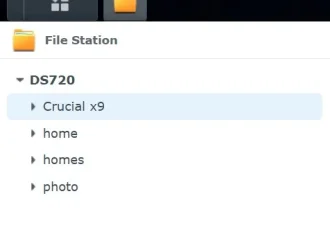
I have a NAS which has an external drive Crucial X9 attached to it as a back up of the NAS, i want to rename the Crucial X9 drive so it appears last on the list, will this cause any issues?
Screenshot 2025-04-30 114229.webp Screenshot 2025-04-30 114854.webp
 

My Computer My Computer

At a glance

Windows 11 proIntel(R) Core(TM) i7-8850H CPU @ 2.60GHz 2.59...32GBNvidia Quadro P3200
OS
Windows 11 pro
Computer type
Laptop
Manufacturer/Model
HP Zbook
CPU
Intel(R) Core(TM) i7-8850H CPU @ 2.60GHz 2.59 GHz
Motherboard
HP 842D
Memory
32GB
Graphics Card(s)
Nvidia Quadro P3200
Hard Drives
Samsung 980 1TB M.2
Toshiba KXG50ZNV512G M.2
Crucial P5 Plus 2TB M.2
Mouse
MX Master 3
Internet Speed
500MBPS
Browser
Chrome, Edge
Antivirus
Windows defender
In general changing the volume name should make no difference. Only reason that I say in general is because there may be the rare program that actually looks at the volume label. As an example there is a program called free file sync it will let you reference the volume label rather than a drive letter for copying files. The reason for this is that sometimes you may have something like a thumb drive where the drive letter is subject to change. Referencing the volume label instead of a drive letter we no longer care if the drive letter changes. But again, this is exceedingly rare and if for some reason you find that it does cause a problem you can always change the volume label back again. But I change volume labels all the time and have never ever had it cause a single problem.
 

My Computers My Computers

  • At a glance

    Win11 Pro 25H2 (RTM+)Intel i7-14650HX32 GBNo GPU - Built-in Intel Graphics
    OS
    Win11 Pro 25H2 (RTM+)
    Computer type
    PC/Desktop
    Manufacturer/Model
    Acemagic
    CPU
    Intel i7-14650HX
    Memory
    32 GB
    Graphics Card(s)
    No GPU - Built-in Intel Graphics
    Sound Card
    Integrated
    Monitor(s) Displays
    Varies as machine will often be moved to locations with different monitors
    Screen Resolution
    Varies
    Hard Drives
    1 x 1TB Gen 4 NVMe SSD
    PSU
    120W Power Brick
    Keyboard
    Corsair K70 Max RGB Magnetic Keyboard
    Mouse
    Logitech MX Master 3
    Internet Speed
    1Gb Up / 1 Gb Down
    Browser
    Edge
    Antivirus
    Windows Defender
  • At a glance

    Win11 Pro 25H2 (RTM+)Intel i7-1255U16 GBIntel Iris Xe Graphics
    Operating System
    Win11 Pro 25H2 (RTM+)
    Computer type
    Laptop
    Manufacturer/Model
    Lenovo ThinkBook 13x Gen 2
    CPU
    Intel i7-1255U
    Memory
    16 GB
    Graphics card(s)
    Intel Iris Xe Graphics
    Sound Card
    Realtek® ALC3306-CG codec
    Monitor(s) Displays
    13.3-inch IPS Display
    Screen Resolution
    WQXGA (2560 x 1600)
    Hard Drives
    2 TB 4 x 4 NVMe SSD
    PSU
    USB-C / Thunderbolt 4 Power / Charging
    Keyboard
    Backlit, spill resistant keyboard
    Mouse
    Buttonless Glass Precision Touchpad
    Internet Speed
    1Gb Up / 1Gb Down
    Browser
    Edge
    Antivirus
    Windows Defender
    Other Info
    WiFi 6e / Bluetooth 5.1 / Facial Recognition / Fingerprint Sensor / ToF (Time of Flight) Human Presence Sensor
I think I'd try x9 Crucial. My NAS drive years ago used Z: at the first setup then any additional NAS drives added would work back up the alphabet, even today if I Map a new folder on the drive it will show as Y:. But the key is to Map a folder on the drive, not the drive itself.

1746017260512.webp
 

My Computers My Computers

  • At a glance

    Win11 Pro RTM Version 24H2 Build 26100.4202Intel Core i5 11th Gen. 2.40GHz12GB
    OS
    Win11 Pro RTM Version 24H2 Build 26100.4202
    Computer type
    Laptop
    Manufacturer/Model
    Dell Vostro 3400
    CPU
    Intel Core i5 11th Gen. 2.40GHz
    Memory
    12GB
    Hard Drives
    256GB SSD NVMe M.2
  • At a glance

    Win11 Pro RTM Version 24H2 Build 26100.4202Intel Core i5 10th Gen. 2.90GHz16GBOnboard, no VGA, using a DisplayPort-to-VGA a...
    Operating System
    Win11 Pro RTM Version 24H2 Build 26100.4202
    Computer type
    PC/Desktop
    Manufacturer/Model
    Dell Vostro 5890
    CPU
    Intel Core i5 10th Gen. 2.90GHz
    Memory
    16GB
    Graphics card(s)
    Onboard, no VGA, using a DisplayPort-to-VGA adapter
    Monitor(s) Displays
    24" Dell
    Hard Drives
    512GB SSD NVMe, 4TB Seagate HDD
    Browser
    Firefox, Edge
    Antivirus
    Windows Defender/Microsoft Security

Latest Support Threads

Back
Top Bottom