Solved Replace the built-in Bluetooth on my PC with adapter


kapriss

Member
Local time
8:28 PM
Posts
37
Location
Paris
OS
Windows 11 Pro 25H2
Hello,
The Bluetooth on my PC breaks as soon as I go a few meters away.
I want to use the Nano USB adapter I used on my former PC which has a much better range.

Now, the instructions are to disable all existing Bluetooth devices before inserting the adapter and installing the driver.
I did all this but can’t manage either to connect with my Bluetooth devices (which are still listed - from the built-in Bluetooth ?), or to remove the devices... I tried with speaker and phone.... no go to remove or connect.

Why doesn’ it work ?
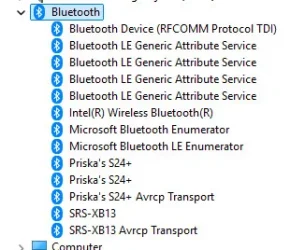
I only disabled the Intel Bluetooth... Should have I disabled more on the list ?Bluetooth.webp
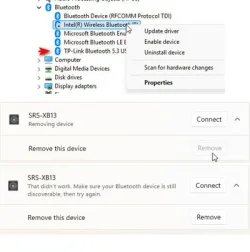
No idea.... I count on you ! :-)
 

My Computers

System One System Two

  • OS
    Windows 11 Pro 25H2
    Computer type
    PC/Desktop
    CPU
    Intel(R) Core(TM) i5-14600K (3.50 GHz)
    Motherboard
    MSI B760M GAMING PLUS WIFI
    Memory
    16.0 GB (15.7 GB usable)
    Screen Resolution
    1920 x 1080
    Hard Drives
    SDD Kingston NV3 - 2 To
    Seagate BarraCuda - 4 To - 256 Mo
    PSU
    Fox Spirit HG 650
    Case
    Fractal Design Node 804 Black Window
    Cooling
    be quiet! Pure Rock 3 Black
    Keyboard
    azerty
    Browser
    Chrome
  • Operating System
    Windows 11 Pro Version 24H2
    Computer type
    Laptop
    Manufacturer/Model
    THINKPAD-7HMUUS84
    CPU
    Intel(R) Core(TM) i5-10400H CPU @ 2.60GHz (2.59 GHz)
    Screen Resolution
    3840 X 2160
Don't try to remove them, just disable them.
 

My Computers

System One System Two

  • OS
    Win 11 Pro 25H2, Build 26200.8655
    Computer type
    PC/Desktop
    Manufacturer/Model
    Home Brew
    CPU
    Intel Core i5 14500
    Motherboard
    Gigabyte B760M G P WIFI
    Memory
    64GB DDR4
    Graphics Card(s)
    GeForce RTX 4060
    Sound Card
    Chipset Realtek
    Monitor(s) Displays
    LG 45" Ultragear, Acer 24" 1080p
    Screen Resolution
    5120x1440, 1920x1080
    Hard Drives
    Crucial P310 2TB 2280 PCIe Gen4 3D NAND NVMe M.2 SSD (O/S)
    Silicon Power 2TB US75 NVMe PCIe Gen4 M.2 2280 SSD (backup)
    Crucial BX500 2TB 3D NAND (2nd backup)
    Seagate 4TB Ironwolf, rotating HDD archive files
    External off-line backup Drives: 2 NVMe 4TB drives in external enclosures
    PSU
    Thermaltake Toughpower GF3 750W
    Case
    LIAN LI LANCOOL 216 E-ATX PC Case
    Cooling
    Lots of fans!
    Keyboard
    Microsoft Comfort Curve 2000
    Mouse
    Logitech G305
    Internet Speed
    Verizon FiOS 1GB
    Browser
    Firefox
    Antivirus
    Malware Bytes & Windows Defender Security
  • Operating System
    Win 11 Pro 25H2, Build 26200.8524
    Computer type
    PC/Desktop
    Manufacturer/Model
    Home Brew
    CPU
    Intel Core i5 14400
    Motherboard
    Gigabyte B760M DS3H AX
    Memory
    32GB DDR5
    Graphics card(s)
    Intel 700 Embedded GPU
    Sound Card
    Realtek Embedded
    Monitor(s) Displays
    27" HP 1080p
    Screen Resolution
    1920x1080
    Hard Drives
    Crucial P310 2TB 2280 PCIe Gen4 eD NAND PCIe SSD
    Samsung EVO 990 2TB NVMe Gen4 SSD
    Samsung 2TB SATA SSD
    PSU
    Thermaltake Smart BM3 650W
    Case
    Okinos Micro ATX Case
    Cooling
    Fans
    Keyboard
    Microsoft Comfort Curve 2000
    Mouse
    Logitech G305
    Internet Speed
    Verizon FiOS 1GB
    Browser
    Firefox
    Antivirus
    Malware Bytes & Windows Defender Security
Don't try to remove them, just disable them.
By "them" do you mean the Bluetooth devices ?
There is no possibility to disable them, only CONNECT or REMOVE .... and I can't do either !

APOLOGIES : I see that I can disable them in the device manager...
But what else should I disable before I install the adapter ?

device mngr.webp
 
Last edited:

My Computers

System One System Two

  • OS
    Windows 11 Pro 25H2
    Computer type
    PC/Desktop
    CPU
    Intel(R) Core(TM) i5-14600K (3.50 GHz)
    Motherboard
    MSI B760M GAMING PLUS WIFI
    Memory
    16.0 GB (15.7 GB usable)
    Screen Resolution
    1920 x 1080
    Hard Drives
    SDD Kingston NV3 - 2 To
    Seagate BarraCuda - 4 To - 256 Mo
    PSU
    Fox Spirit HG 650
    Case
    Fractal Design Node 804 Black Window
    Cooling
    be quiet! Pure Rock 3 Black
    Keyboard
    azerty
    Browser
    Chrome
  • Operating System
    Windows 11 Pro Version 24H2
    Computer type
    Laptop
    Manufacturer/Model
    THINKPAD-7HMUUS84
    CPU
    Intel(R) Core(TM) i5-10400H CPU @ 2.60GHz (2.59 GHz)
    Screen Resolution
    3840 X 2160
Disconnect all of your Bluetooth devices including the USB adapter if connected. Then go into Device Manager and disable any Bluetooth adapters listed then restart your computer. Once the computer boots try plugging in you USB Bluetooth adapter. Then try pairing your Bluetooth device.
 

My Computers

System One System Two

  • OS
    Windows 11 Pro 25H2
    Computer type
    PC/Desktop
    Manufacturer/Model
    PowerSpec B746
    CPU
    Intel Core i7-10700K
    Motherboard
    ASRock Z490 Phantom Gaming 4/ax
    Memory
    16GB (8GB PC4-19200 DDR4 SDRAM x2)
    Graphics Card(s)
    NVIDIA GeForce GTX 1050 TI
    Sound Card
    Realtek Audio
    Monitor(s) Displays
    #1. LG ULTRAWIDE 34" #2. AOC Q32G2WG3 32"
    Screen Resolution
    #1. 3440 X 1440 #2. 1920 x 1080
    Hard Drives
    NVMe WDC WDS100T2B0C-00PXH0 1TB
    Samsung SSD 860 EVO 1TB
    PSU
    750 Watts (62.5A)
    Case
    PowerSpec/Lian Li ATX 205
    Keyboard
    Logitech K270
    Mouse
    Logitech M185
    Browser
    Microsoft Edge and Firefox
    Antivirus
    Webroot SecureAnywhere CE 26.1
  • Operating System
    Windows 11 Canary Channel
    Computer type
    PC/Desktop
    Manufacturer/Model
    PowerSpec G156
    CPU
    Intel Core i5-8400 CPU @ 2.80GHz
    Motherboard
    AsusTeK Prime B360M-A
    Memory
    16 MB DDR 4-2666
    Monitor(s) Displays
    23" Speptre HDMI 75Hz
    Screen Resolution
    1920x1080
    Hard Drives
    Samsung 970 EVO 500GB NVMe
    Keyboard
    Logitek K270
    Mouse
    Logitek M185
    Browser
    Firefox, Edge and Edge Canary
    Antivirus
    Windows Defender
Thanks to whomever moved this thread to the relevant forum 🙏
Even before I switch to the Bluetooth adapter, I would like to understand a few things.

Before I tried installing the adapter (without success) I had two ways Bluetooth send / receive between my android phone and my PC.
Now it works PC –> phone, but not the other way around... Why ?

I noticed the phone is listed twice in the devices manager. I had uninstalled one. It did not change anything about communication phone / PC.... and the phone is listed twice again. Is that normal ?

Now, about using the USB adapter instead of the built in Bluetooth :
Winuser advises me to disable all Bluetooth adapters listed.
I see only one adapter : the Intel® Wireless Bluetooth®. This is the only one I had disabled when I first tried. It did not work.
No clue what is all the rest.

I went there :
Multiple Bluetooth Le Generic Attribute Service - Is It Normal? - UMA Technology
Wow ! Way above my head !
Should I disable those also ?
And what about the Microsoft Enumerators (LE or not LE) ?

I'm in the dark !!! :rolleyes: Any light on this will be very appreciated ! :-)
 

My Computers

System One System Two

  • OS
    Windows 11 Pro 25H2
    Computer type
    PC/Desktop
    CPU
    Intel(R) Core(TM) i5-14600K (3.50 GHz)
    Motherboard
    MSI B760M GAMING PLUS WIFI
    Memory
    16.0 GB (15.7 GB usable)
    Screen Resolution
    1920 x 1080
    Hard Drives
    SDD Kingston NV3 - 2 To
    Seagate BarraCuda - 4 To - 256 Mo
    PSU
    Fox Spirit HG 650
    Case
    Fractal Design Node 804 Black Window
    Cooling
    be quiet! Pure Rock 3 Black
    Keyboard
    azerty
    Browser
    Chrome
  • Operating System
    Windows 11 Pro Version 24H2
    Computer type
    Laptop
    Manufacturer/Model
    THINKPAD-7HMUUS84
    CPU
    Intel(R) Core(TM) i5-10400H CPU @ 2.60GHz (2.59 GHz)
    Screen Resolution
    3840 X 2160

My Computers

System One System Two

  • OS
    Windows 11 Pro 25H2
    Computer type
    PC/Desktop
    CPU
    Intel(R) Core(TM) i5-14600K (3.50 GHz)
    Motherboard
    MSI B760M GAMING PLUS WIFI
    Memory
    16.0 GB (15.7 GB usable)
    Screen Resolution
    1920 x 1080
    Hard Drives
    SDD Kingston NV3 - 2 To
    Seagate BarraCuda - 4 To - 256 Mo
    PSU
    Fox Spirit HG 650
    Case
    Fractal Design Node 804 Black Window
    Cooling
    be quiet! Pure Rock 3 Black
    Keyboard
    azerty
    Browser
    Chrome
  • Operating System
    Windows 11 Pro Version 24H2
    Computer type
    Laptop
    Manufacturer/Model
    THINKPAD-7HMUUS84
    CPU
    Intel(R) Core(TM) i5-10400H CPU @ 2.60GHz (2.59 GHz)
    Screen Resolution
    3840 X 2160
Have you tried to use the USB Bluetooth adapter?

I use an ASUS BT500 Bluetooth adapter with my one desktop that does not have Bluetooth. BTW, I used to use a TP-Link UB400 Bluetooth adapter but it started to connect intermittently.

ASUS BT500.webp

I am not sure but I think the phone normally uses Bluetooth for sound. That is what I read about Phone Link. It connects with WiFi for data and Bluetooth for audio.

I don't know what the range of my Bluetooth is but it seems to be about 5-10 meters.
 

My Computers

System One System Two

  • OS
    Windows 11 Pro 25H2 (26200.6901)
    Computer type
    Laptop
    Manufacturer/Model
    ASUS TUF Gaming A15 (2022)
    CPU
    AMD Ryzen 7 6800H with Radeon 680M GPU (486MB RAM)
    Memory
    Crucial DDR5-4800 (2400MHz) 32GB (2 x 16GB)
    Graphics Card(s)
    NVIDIA RTX 3060 Laptop (6GB RAM)
    Sound Card
    n/a
    Monitor(s) Displays
    15.6-inch
    Screen Resolution
    1920x1080 300Hz
    Hard Drives
    2 x Samsung 990 Evo Plus (2TB M.2 NVME SSD)
    PSU
    n/a
    Mouse
    Wireless Mouse M510
    Internet Speed
    2100Mbps/300Mbps
    Browser
    Firefox
    Antivirus
    Malwarebytes
  • Operating System
    Windows 11 Pro 25H2 (26200.8246)
    Computer type
    PC/Desktop
    Manufacturer/Model
    Custom build
    CPU
    AMD Ryzen 7 5700X3D
    Motherboard
    ASUS ROG Strix B550-F Gaming WiFi II
    Memory
    G.SKILL Flare X 32GB (2x16GB) DDR4
    Graphics card(s)
    ASUS ROG-STRIX-RTX3060TI-08G-V2-GAMING (RTX 3060-Ti, 8GB RAM)
    Monitor(s) Displays
    Samsung G50D IPS 27"
    Screen Resolution
    1440p/180Hz
    Hard Drives
    SAMSUNG 990 EVO Plus (2TB] M.2 NVME SSD
    SAMSUNG 990 EVO Plus (4TB) M.2 NVME SSD
    PSU
    Corsair RM750x (750 watts)
    Case
    Cooler Master MasterCase 5
    Cooling
    Scythe Mugen 6
    Keyboard
    Logitech K520 (MK540 keyboard/mouse combo)
    Mouse
    Logitech M310 (MK540 keyboard/mouse combo)
    Internet Speed
    2100 Mbps down / 300 Mbps up
    Browser
    Firefox, Edge, Chrome
    Antivirus
    Malwarebytes (Premium)
    Other Info
    ASUS Blu-ray Burner BW-16D1HT (SATA) || Western Digital Easystore 20TB USB 3.0 external hard drive used with Acronis True Image 2025 backup software || HP OfficeJet Pro 6975 Printer/Scanner
@MisterEd
Yes, I tried with the TP-link UB500 which worked fine on my former PC, Win10Pro, and gave me a good range at home
Obviously, TP-link have problems with Win 11Pro 25H2
I'll look at other adapters - The built-in Bluetooth on my PC is ok only as long as I keep the speakers on my desk...
Thanks for suggesting the ASUS which works for you ! :-)
 

My Computers

System One System Two

  • OS
    Windows 11 Pro 25H2
    Computer type
    PC/Desktop
    CPU
    Intel(R) Core(TM) i5-14600K (3.50 GHz)
    Motherboard
    MSI B760M GAMING PLUS WIFI
    Memory
    16.0 GB (15.7 GB usable)
    Screen Resolution
    1920 x 1080
    Hard Drives
    SDD Kingston NV3 - 2 To
    Seagate BarraCuda - 4 To - 256 Mo
    PSU
    Fox Spirit HG 650
    Case
    Fractal Design Node 804 Black Window
    Cooling
    be quiet! Pure Rock 3 Black
    Keyboard
    azerty
    Browser
    Chrome
  • Operating System
    Windows 11 Pro Version 24H2
    Computer type
    Laptop
    Manufacturer/Model
    THINKPAD-7HMUUS84
    CPU
    Intel(R) Core(TM) i5-10400H CPU @ 2.60GHz (2.59 GHz)
    Screen Resolution
    3840 X 2160
@MisterEd
Thanks again for your advice.
The ASUS BT500 is perfect with Win 11Pro 25H2, and gives me a very good range ! :-)
 

My Computers

System One System Two

  • OS
    Windows 11 Pro 25H2
    Computer type
    PC/Desktop
    CPU
    Intel(R) Core(TM) i5-14600K (3.50 GHz)
    Motherboard
    MSI B760M GAMING PLUS WIFI
    Memory
    16.0 GB (15.7 GB usable)
    Screen Resolution
    1920 x 1080
    Hard Drives
    SDD Kingston NV3 - 2 To
    Seagate BarraCuda - 4 To - 256 Mo
    PSU
    Fox Spirit HG 650
    Case
    Fractal Design Node 804 Black Window
    Cooling
    be quiet! Pure Rock 3 Black
    Keyboard
    azerty
    Browser
    Chrome
  • Operating System
    Windows 11 Pro Version 24H2
    Computer type
    Laptop
    Manufacturer/Model
    THINKPAD-7HMUUS84
    CPU
    Intel(R) Core(TM) i5-10400H CPU @ 2.60GHz (2.59 GHz)
    Screen Resolution
    3840 X 2160
Back
Top Bottom