Replacing NAS With Windows PC - Need Recommended Custom-Build Site


Consider win server or LTCE workstation so you get an LTSC version that will be long term stable instead of pro that is a rolling version that will have bad uprolls as it have had in the past. it will get in the future.... as MS wont change its approach on pushing updates that isn't really ready to be pushed.
What would you recommend for a minimum NAS system? I dont need one but it would be something to do.
I see a Dell PowerEdge T110 Server - Intel Xeon Quad X3430-2.4GHz - 8GB RAM, 4 x 300GB SAS on eBay for $100 but at 95 watts it might cost $600 in electricity in 2-3 years if I leave it turned on.
 

My Computers

System One System Two

  • OS
    Windows 11 (up to date)
    Computer type
    PC/Desktop
    Manufacturer/Model
    Custom
    CPU
    Intel i5 12400
    Motherboard
    Gigabyte Z690 UA
    Memory
    Corsair Vengeance LPX 16GB
    Graphics Card(s)
    On Board the Z690
    Sound Card
    On Board
    Monitor(s) Displays
    43" Samsung tu7000
    Screen Resolution
    2560 x 1440
    Hard Drives
    SAMSUNG SSD 1TB NVMe M.2
    PSU
    Thermaltake smart 500w 80+
    Case
    LIAN LANCOOL_205M
    Cooling
    Bunch of fans . . . :o) (lights dont work)
    Keyboard
    Unicomp: Ultra Classic White Buckling Spring USB
    Mouse
    M510
    Internet Speed
    50mbps on Ethernet
    Browser
    Fire Fox
    Antivirus
    Windows
    Other Info
    Love this computer but I still prefer Win-7 like I love my old Lazy Boy Recliner . . . it just feels better.
  • Operating System
    WIN-7-64BIT and Win-11 pro for testing on unsupported hardware
    Computer type
    PC/Desktop
    Manufacturer/Model
    Home built
    CPU
    i5-3570K CPU @ 3.40GHz, 3801 Mhz, 4 Core(s), 4 Logical Processor(s)
    Motherboard
    GA-Z77-HD3
    Memory
    16 GB - Crucial Ballistick 4GB PC3-14900 DDR3-1333 MHz
    Graphics card(s)
    NVIDIA GeForce GTX 1050
    Sound Card
    On Board
    Monitor(s) Displays
    ASUS VP278
    Screen Resolution
    1920 x 1080
    Hard Drives
    4 - internal Samsung 2.5" SSD, 1 WD HDD 7200 and some external drives
    PSU
    EVGA 550w
    Case
    Old Gygabyte Tower
    Cooling
    Yes
    Keyboard
    Unicomp - UNIOP4A USB (like the old IBM Model H that I started with)
    Mouse
    M510
    Internet Speed
    50mbps
    Browser
    Firefox
    Antivirus
    Windows
    Other Info
    The only thing it lack is USB-3.2 on the front face but it has 3.0 on the back
What would you recommend for a minimum NAS system? I dont need one but it would be something to do.
I see a Dell PowerEdge T110 Server - Intel Xeon Quad X3430-2.4GHz - 8GB RAM, 4 x 300GB SAS on eBay for $100 but at 95 watts it might cost $600 in electricity in 2-3 years if I leave it turned on.
It all depends on its usage and your network.
How fast is your Lan. 1Gbit, 2,5Gbit.. etc.
What do you plan to use. Only network storage or to run VM's on and other services.
Do you want to use the platform as a steppingstone for learning.

A lot of people doing home labs have started to scale down to save the electric bill using NUCs and mini PC's.
as for motherboard with a lot of disk connectors.. you can go for an I/O raid card instead, then you get more motherboard to choose from.
When running a server/nas and you want a big disk pool you want to minimize errors, so a full ECC system is a nice thing. More expensive, but more stable as you have the error correction. With SAS you also have ECC all the way in the system and it also have better speed then Sata as its full duplex channel instead of simplex that Sata is using.

as for recomending.. I'm not up to date on the latest hardware as i have not worked in IT for years now.
But this is the setup I'm working on for a low energy home-lab solution.
I have 7 laptop motherboards i plan on setting up as a cluster to get coputing power. Then i have one older mini PC that will act diskpool, so in that one i will use an LSI SAS raid controller for 8 disks, and i will run ZFS and raidz1.. of those eight drives will use 7 7200rpm HDD's(cmr) and one SSD for SLOG to get better performance on the pool. That way i get a lot of storage for low price, byt the pool shuld give around 9Gbit/s in speed so i will need a 10Gbit NIC and a 8port 10Gbit switch.. so with 1Gbit/laptop i get 7Gbit flow that the pool can handle at the same time.

But this is just a home-lab just because its fun to do stuff with old hardware people have upgraded from.. not that i have any real usage for it. *LOL* 🤓😇😅

So it all boils down to.. what will you use the NAS for and how much "fun" are you looking for? or is it no fun involed at all and just a practical usecase.
 

My Computers

System One System Two

  • OS
    Linux: Debian, Kali-linux, Alma, Win: 7, 8.1,2012R
    Manufacturer/Model
    HP Elitebook 840, AsusX53, Aspire E1-572. AsusUX32A, HP Pro3130mt+3010mt, HP Proliant ML150, 3xCustom-PC, i3, i5, i7
    CPU
    i3, i5 and i7 From 2gen to 9th gen... Server dual Xenon
    Hard Drives
    Sata, M.2, SAS
  • Operating System
    Retro: 2003server.XPpro, Win2000, Win98SE, Win95, Win3.11, MS-DOS, IBM-DOS
    Manufacturer/Model
    Commodore, AST, Fujitsu, Compaq, etc etc. etc Around 15 desktops and 20 laptops in the collection
    CPU
    Oldest intel 8088 up to P4 dual core
    Hard Drives
    MFM, IDE, SCSI
It all depends on its usage and your network.
How fast is your Lan. 1Gbit, 2,5Gbit.. etc.
What do you plan to use. Only network storage or to run VM's on and other services.
Do you want to use the platform as a steppingstone for learning.

A lot of people doing home labs have started to scale down to save the electric bill using NUCs and mini PC's.
as for motherboard with a lot of disk connectors.. you can go for an I/O raid card instead, then you get more motherboard to choose from.
When running a server/nas and you want a big disk pool you want to minimize errors, so a full ECC system is a nice thing. More expensive, but more stable as you have the error correction. With SAS you also have ECC all the way in the system and it also have better speed then Sata as its full duplex channel instead of simplex that Sata is using.

as for recomending.. I'm not up to date on the latest hardware as i have not worked in IT for years now.
But this is the setup I'm working on for a low energy home-lab solution.
I have 7 laptop motherboards i plan on setting up as a cluster to get coputing power. Then i have one older mini PC that will act diskpool, so in that one i will use an LSI SAS raid controller for 8 disks, and i will run ZFS and raidz1.. of those eight drives will use 7 7200rpm HDD's(cmr) and one SSD for SLOG to get better performance on the pool. That way i get a lot of storage for low price, byt the pool shuld give around 9Gbit/s in speed so i will need a 10Gbit NIC and a 8port 10Gbit switch.. so with 1Gbit/laptop i get 7Gbit flow that the pool can handle at the same time.

But this is just a home-lab just because its fun to do stuff with old hardware people have upgraded from.. not that i have any real usage for it. *LOL* 🤓😇😅

So it all boils down to.. what will you use the NAS for and how much "fun" are you looking for? or is it no fun involed at all and just a practical usecase.
Took me a while to look it up but it seems my LAN speed for my Verizon Fios Router model 9100EM
(also known as the Westell UltraLine Series3 9100EM) is only 100 Mbps so I guess I need more hardware than I thought.
 

My Computers

System One System Two

  • OS
    Windows 11 (up to date)
    Computer type
    PC/Desktop
    Manufacturer/Model
    Custom
    CPU
    Intel i5 12400
    Motherboard
    Gigabyte Z690 UA
    Memory
    Corsair Vengeance LPX 16GB
    Graphics Card(s)
    On Board the Z690
    Sound Card
    On Board
    Monitor(s) Displays
    43" Samsung tu7000
    Screen Resolution
    2560 x 1440
    Hard Drives
    SAMSUNG SSD 1TB NVMe M.2
    PSU
    Thermaltake smart 500w 80+
    Case
    LIAN LANCOOL_205M
    Cooling
    Bunch of fans . . . :o) (lights dont work)
    Keyboard
    Unicomp: Ultra Classic White Buckling Spring USB
    Mouse
    M510
    Internet Speed
    50mbps on Ethernet
    Browser
    Fire Fox
    Antivirus
    Windows
    Other Info
    Love this computer but I still prefer Win-7 like I love my old Lazy Boy Recliner . . . it just feels better.
  • Operating System
    WIN-7-64BIT and Win-11 pro for testing on unsupported hardware
    Computer type
    PC/Desktop
    Manufacturer/Model
    Home built
    CPU
    i5-3570K CPU @ 3.40GHz, 3801 Mhz, 4 Core(s), 4 Logical Processor(s)
    Motherboard
    GA-Z77-HD3
    Memory
    16 GB - Crucial Ballistick 4GB PC3-14900 DDR3-1333 MHz
    Graphics card(s)
    NVIDIA GeForce GTX 1050
    Sound Card
    On Board
    Monitor(s) Displays
    ASUS VP278
    Screen Resolution
    1920 x 1080
    Hard Drives
    4 - internal Samsung 2.5" SSD, 1 WD HDD 7200 and some external drives
    PSU
    EVGA 550w
    Case
    Old Gygabyte Tower
    Cooling
    Yes
    Keyboard
    Unicomp - UNIOP4A USB (like the old IBM Model H that I started with)
    Mouse
    M510
    Internet Speed
    50mbps
    Browser
    Firefox
    Antivirus
    Windows
    Other Info
    The only thing it lack is USB-3.2 on the front face but it has 3.0 on the back
Took me a while to look it up but it seems my LAN speed for my Verizon Fios Router model 9100EM
(also known as the Westell UltraLine Series3 9100EM) is only 100 Mbps so I guess I need more hardware than I thought.
100/100 Mbit is a bit low, but if you only have a 100Mbit internet connection and dont plan on getting faster internet. You can just get a small switch 1Gbit or 2,5Gbit you hook up to the router and then all your devices as desktop, laptop and nas to the switch to get higher internal speed. But then you is locked to wired Lan only as your router wifi cant do that speed over to the LAN
 

My Computers

System One System Two

  • OS
    Linux: Debian, Kali-linux, Alma, Win: 7, 8.1,2012R
    Manufacturer/Model
    HP Elitebook 840, AsusX53, Aspire E1-572. AsusUX32A, HP Pro3130mt+3010mt, HP Proliant ML150, 3xCustom-PC, i3, i5, i7
    CPU
    i3, i5 and i7 From 2gen to 9th gen... Server dual Xenon
    Hard Drives
    Sata, M.2, SAS
  • Operating System
    Retro: 2003server.XPpro, Win2000, Win98SE, Win95, Win3.11, MS-DOS, IBM-DOS
    Manufacturer/Model
    Commodore, AST, Fujitsu, Compaq, etc etc. etc Around 15 desktops and 20 laptops in the collection
    CPU
    Oldest intel 8088 up to P4 dual core
    Hard Drives
    MFM, IDE, SCSI
Took me a while to look it up but it seems my LAN speed for my Verizon Fios Router model 9100EM
(also known as the Westell UltraLine Series3 9100EM) is only 100 Mbps so I guess I need more hardware than I thought.

Verizon will give you a faster router if you buy faster speeds.
They want to look good on speed tests. ^^

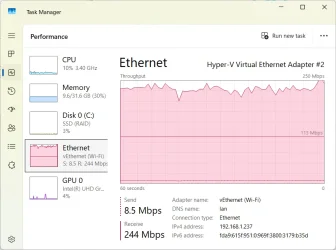
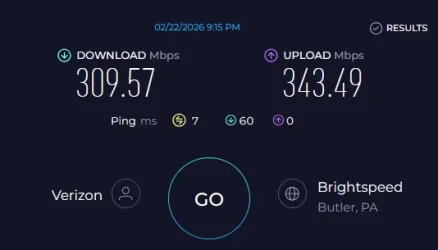
I pay for 300/300... I only use one computer so I don't use a router.
I run CAT6e straight from the ONT to the computer.

Image1.webp


More info...
The following website(s) are the successor to DSL Reports which ended in 2025.


And particularly...

 
Last edited:

My Computers

System One System Two

  • OS
    Win 11 Home ♦♦♦26200.8457 ♦♦♦♦♦♦♦25H2
    Computer type
    PC/Desktop
    Manufacturer/Model
    Built by Ghot® [May 2020]
    CPU
    AMD Ryzen 7 3700X
    Motherboard
    Asus Pro WS X570-ACE (BIOS 5302)
    Memory
    G.Skill (F4-3200C14D-16GTZKW)
    Graphics Card(s)
    EVGA RTX 2070 (08G-P4-2171-KR)
    Sound Card
    Realtek ALC1220P / ALC S1220A
    Monitor(s) Displays
    Dell U3011 30"
    Screen Resolution
    2560 x 1600
    Hard Drives
    2x Samsung 860 EVO 500GB,
    WD 4TB Black FZBX - SATA III,
    WD 8TB Black FZBX - SATA III,
    DRW-24B1ST CD/DVD Burner
    PSU
    PC Power & Cooling 750W Quad EPS12V
    Case
    Cooler Master ATCS 840 Tower
    Cooling
    CM Hyper 212 EVO (push/pull)
    Keyboard
    Ducky DK9008 Shine II Blue LED
    Mouse
    Logitech Optical M-100
    Internet Speed
    300/300
    Browser
    Firefox (latest)
    Antivirus
    Bitdefender Total Security
    Other Info
    Speakers: Klipsch Pro Media 2.1
  • Operating System
    Windows XP Pro 32bit w/SP3
    Computer type
    PC/Desktop
    Manufacturer/Model
    Built by Ghot® (not in use)
    CPU
    AMD Athlon 64 X2 5000+ (OC'd @ 3.2Ghz)
    Motherboard
    ASUS M2N32-SLI Deluxe Wireless Edition
    Memory
    TWIN2X2048-6400C4DHX (2 x 1GB, DDR2 800)
    Graphics card(s)
    EVGA 256-P2-N758-TR GeForce 8600GT SSC
    Sound Card
    Onboard
    Monitor(s) Displays
    ViewSonic G90FB Black 19" Professional (CRT)
    Screen Resolution
    up to 2048 x 1536
    Hard Drives
    WD 36GB 10,000rpm Raptor SATA
    Seagate 80GB 7200rpm SATA
    Lite-On LTR-52246S CD/RW
    Lite-On LH-18A1P CD/DVD Burner
    PSU
    PC Power & Cooling Silencer 750 Quad EPS12V
    Case
    Generic Beige case, 80mm fans
    Cooling
    ZALMAN 9500A 92mm CPU Cooler
    Keyboard
    Logitech Classic Keybooard 200
    Mouse
    Logitech Optical M-BT96a
    Internet Speed
    300/300
    Browser
    Firefox 3.x ??
    Antivirus
    Symantec (Norton)
    Other Info
    Still assembled, still runs. Haven't turned it on for 15 years?
100/100 Mbit is a bit low, but if you only have a 100Mbit internet connection and dont plan on getting faster internet. You can just get a small switch 1Gbit or 2,5Gbit you hook up to the router and then all your devices as desktop, laptop and nas to the switch to get higher internal speed. But then you is locked to wired Lan only as your router wifi cant do that speed over to the LAN
I'm already wired, I only use the WiFi for my phone or I would turn it off so I should look into that. Maybe I could use my old Dell Vostro laptop, I dont use it for anything else any more. I almost forgot I had it. It's only got 2GB RAM (but I can buy 4GB for $16) and an Intel Core 2 Duo T7100.
 
Last edited:

My Computers

System One System Two

  • OS
    Windows 11 (up to date)
    Computer type
    PC/Desktop
    Manufacturer/Model
    Custom
    CPU
    Intel i5 12400
    Motherboard
    Gigabyte Z690 UA
    Memory
    Corsair Vengeance LPX 16GB
    Graphics Card(s)
    On Board the Z690
    Sound Card
    On Board
    Monitor(s) Displays
    43" Samsung tu7000
    Screen Resolution
    2560 x 1440
    Hard Drives
    SAMSUNG SSD 1TB NVMe M.2
    PSU
    Thermaltake smart 500w 80+
    Case
    LIAN LANCOOL_205M
    Cooling
    Bunch of fans . . . :o) (lights dont work)
    Keyboard
    Unicomp: Ultra Classic White Buckling Spring USB
    Mouse
    M510
    Internet Speed
    50mbps on Ethernet
    Browser
    Fire Fox
    Antivirus
    Windows
    Other Info
    Love this computer but I still prefer Win-7 like I love my old Lazy Boy Recliner . . . it just feels better.
  • Operating System
    WIN-7-64BIT and Win-11 pro for testing on unsupported hardware
    Computer type
    PC/Desktop
    Manufacturer/Model
    Home built
    CPU
    i5-3570K CPU @ 3.40GHz, 3801 Mhz, 4 Core(s), 4 Logical Processor(s)
    Motherboard
    GA-Z77-HD3
    Memory
    16 GB - Crucial Ballistick 4GB PC3-14900 DDR3-1333 MHz
    Graphics card(s)
    NVIDIA GeForce GTX 1050
    Sound Card
    On Board
    Monitor(s) Displays
    ASUS VP278
    Screen Resolution
    1920 x 1080
    Hard Drives
    4 - internal Samsung 2.5" SSD, 1 WD HDD 7200 and some external drives
    PSU
    EVGA 550w
    Case
    Old Gygabyte Tower
    Cooling
    Yes
    Keyboard
    Unicomp - UNIOP4A USB (like the old IBM Model H that I started with)
    Mouse
    M510
    Internet Speed
    50mbps
    Browser
    Firefox
    Antivirus
    Windows
    Other Info
    The only thing it lack is USB-3.2 on the front face but it has 3.0 on the back
Took me a while to look it up but it seems my LAN speed for my Verizon Fios Router model 9100EM
(also known as the Westell UltraLine Series3 9100EM) is only 100 Mbps so I guess I need more hardware than I thought.
100/100 Mbit is a bit low, but if you only have a 100Mbit internet connection and dont plan on getting faster internet. You can just get a small switch 1Gbit or 2,5Gbit you hook up to the router and then all your devices as desktop, laptop and nas to the switch to get higher internal speed. But then you is locked to wired Lan only as your router wifi cant do that speed over to the LAN
I'm already wired, I only use the WiFi for my phone or I would turn it off
Everything on my network is on WiFi. When I switched to a fibre to the house ISP I only paid for 150Mbps, but the Adtran 854-v6 router they supplied can achieve up to 250Mbps for my internal network.

1771815535143.webp
 

My Computers

System One System Two

  • OS
    Windows 11 Home
    Computer type
    Laptop
    Manufacturer/Model
    Acer Aspire 3 A315-23-R9VY
    CPU
    AMD Athlon Silver 3050U
    Memory
    8GB
    Graphics Card(s)
    Radeon Graphics
    Monitor(s) Displays
    laptop screen
    Screen Resolution
    1366x768 native resolution, up to 2560x1440 with Radeon Virtual Super Resolution
    Hard Drives
    1TB Samsung EVO 870 SSD (from April 2026: 250GB EVO 850)
    Internet Speed
    150 Mbps
    Browser
    Edge, Firefox
    Antivirus
    Defender
    Other Info
    fully 'Windows 11 ready' laptop. Windows 10 C: partition migrated from my old unsupported 'main machine' then upgraded to 11. A test migration ran Insider builds for 2 months. When 11 was released on 5th October 2021 it was re-imaged back to 10 and was offered the upgrade in Windows Update on 20th October. Windows Update offered the 22H2 Feature Update on 20th September 2022. It got the 23H2 Feature Update on 4th November 2023 through Windows Update, 24H2 on 3rd October 2024 through Windows Update by setting the Target Release Version for 24H2, and 25H2 on 30th September 2025 through Windows Update by setting the Target Release Version for 25H2.

    UPDATE - 11 April 2026: due to mechanical deterioration this PC has been retired from active duty. The OS with all software and files has been migrated to my System Seven below to carry on as my general purpose 'main machine'.

    My SYSTEM THREE is a Dell Latitude 5410, i7-10610U, 32GB RAM, 512GB NVMe ssd, supported device running Windows 11 Pro.

    My SYSTEM FOUR is a 2-in-1 convertible Lenovo Yoga 11e 20DA, Celeron N2930, 8GB RAM, 256GB ssd. Unsupported device: currently running Win10 Pro, plus Win11 Pro RTM and Insider Dev, Beta, and RP 24H2 as native boot vhdx.

    My SYSTEM FIVE is a Dell Latitude 3190 2-in-1, Pentium Silver N5030, 8GB RAM, 1TB NVMe ssd, supported device running Windows 11 Pro, plus Insider Beta, Dev, and Canary builds (and a few others) as a native boot .vhdx.

    My SYSTEM SIX is a Dell Latitude 5550, Core Ultra 7 165H, 64GB RAM, 1TB NVMe SSD, supported device, Windows 11 Pro 24H2, Hyper-V host machine. Updated to 25H2 on 30th September 2025.

    My SYSTEM SEVEN is a Lenovo Thinkpad T580, Intel Core i7-8650U, 16GB RAM, 512GB NVMe SSD + 2nd 512GB NVMe SSD, a supported device for Windows 11. This is my current general purpose 'main machine'. The installed Windows 11 Home from my System One has been migrated to this machine.
  • Operating System
    Windows 11 Pro
    Computer type
    Laptop
    Manufacturer/Model
    Dell Latitude E4310
    CPU
    Intel® Core™ i5-520M
    Motherboard
    0T6M8G
    Memory
    8GB
    Graphics card(s)
    (integrated graphics) Intel HD Graphics
    Screen Resolution
    1366x768
    Hard Drives
    500GB Crucial MX500 SSD
    Browser
    Firefox, Edge
    Antivirus
    Defender
    Other Info
    unsupported machine: Legacy bios, MBR, TPM 1.2, upgraded from W10 to W11 using W10/W11 hybrid install media workaround. In-place upgrade to 22H2 using ISO and a workaround. Feature Update to 23H2 by manually installing the Enablement Package. In-place upgrade to 24H2 using hybrid 23H2/24H2 install media. Upgraded to 25H2 by Enablement Package. Also running Insider Dev, and Canary builds and Windows 10 as native boot .vhdx.

    My SYSTEM THREE is a Dell Latitude 5410, i7-10610U, 32GB RAM, 512GB NVMe ssd, supported device running Windows 11 Pro.

    My SYSTEM FOUR is a 2-in-1 convertible Lenovo Yoga 11e 20DA, Celeron N2930, 8GB RAM, 256GB ssd. Unsupported device: currently running Win10 Pro, plus Win11 Pro RTM and Insider Dev, Beta, and RP 24H2 as native boot vhdx.

    My SYSTEM FIVE is a Dell Latitude 3190 2-in-1, Pentium Silver N5030, 8GB RAM, 1TB NVMe ssd, supported device running Windows 11 Pro, plus Insider Beta, Dev, and Canary builds (and a few others) as a native boot .vhdx.

    My SYSTEM SIX is a Dell Latitude 5550, Core Ultra 7 165H, 64GB RAM, 1TB NVMe SSD, supported device, Windows 11 Pro 24H2, Hyper-V host machine. Updated to 25H2 on 30th September 2025.

    My SYSTEM SEVEN is a Lenovo Thinkpad T580, Intel Core i7-8650U, 16GB RAM, 512GB NVMe SSD + 2nd 512GB NVMe SSD, a supported device for Windows 11. This is my current general purpose 'main machine'. The installed Windows 11 Home from my System One has been migrated to this machine.
That i totally understand. 🤓(y)
There is two reasons for go way overkill.. For education purposes and the second one, the pure nerd factor.. just because i can. :cool:
as 16GB ram and HDD's 7200rpms in raid5/6 would work fine up to 2.5Gbit Lan.. Sata3 SSD's up to almost 25Gbit Lan.
But for the nerd factor.. Then i just say.. Go for it. ;-)
Consider win server or LTSC workstation so you get an LTSC version that will be long term stable instead of pro that is a rolling version that will have bad uprolls as it have had in the past. it will get in the future.... as MS wont change its approach on pushing updates that isn't really ready to be pushed.
I was bored and just happened to be paging through the dictionary and I landed on the word "overkill." Next to it was a picture of a Windows Server and LTSC workstation! 🤣🤣🤣

Seriously, though, thanks for the helpful information. 🙏

But I truly have always just used my NAS as a file server to primarily store copies of my backup files and other important files/documents. Once in a while, something will "happen" that will make me enable the media server, but it's usually temporary--except a few months ago, when I bought a new TV and I ended up installing the Plex Media Server on my QNAP for better integration with my TV (it has the Plex app installed). 😊

I do my weekly backups on Fridays and once the files are copied to the NAS, I usually just power it off, unless I anticipate streaming content from it over the weekend. It's a very important server for me and I have it setup as RAID5.

The problem is that I have had it with QNAP making me struggle and/or find hacks/workarounds and/or give up functionality to integrate with my Microsoft 365 and Windows environments. They end-of-life their hardware too quickly and, when they do, it essentially means no more OS or app updates. Here's just one simple example: OneDrive upload file size limit is currently 250GB and the QNAP app is artificially limiting it to 10GB! I submitted a ticket and included that the app respects the GCP upload file size limit and it should do the same for OneDrive. Two+ years later, they have not addressed my ticket because my machine is EOL. 🤬

Solution: Rclone. That worked great...that is, until an upload exceeded 24 hours, causing the token to be invalidated, which then caused the upload to restart! All the recommended fixes I tried all failed and there's no way I was going to modify my backup app to start splitting files at 10GB (my biggest backup file is 140GB).

I can honestly say that my issues started when I decided to get more entrenched in the Microsoft ecosystem: I used to have GCP for my cloud environment and all my QNAP-to-GCP processes were working fine. It was only when I dropped GCP for M365 that my processes started to break or I'm having to find some sort of workaround.

So, I've just reached the point where I'm looking for one consistent OS and UI across my landscape, seamlessly using the same apps, scripts, etc. For example, with a Windows-based NAS, I can back it up using Macrium, just like I do for my laptops. That's why changing to Linux or TrueNAS or whatever isn't going to really help because I'm looking for a box that will seamlessly integrate into my landscape and that I can seamlessly manage like the other clients.

I have to admit that when I was younger, hacking and writing all sorts of scripts or whatever was fun, but now I'm old, simplicity is more important. 😁
 

My Computer

System One

  • OS
    Windows 11 Pro
    Computer type
    Laptop
    Manufacturer/Model
    Microsoft Surface Laptop Studio
    Memory
    32GB
    Hard Drives
    1TB
I was bored and just happened to be paging through the dictionary and I landed on the word "overkill." Next to it was a picture of a Windows Server and LTSC workstation! 🤣🤣🤣
That was funny
 

My Computers

System One System Two

  • OS
    Windows 11 (up to date)
    Computer type
    PC/Desktop
    Manufacturer/Model
    Custom
    CPU
    Intel i5 12400
    Motherboard
    Gigabyte Z690 UA
    Memory
    Corsair Vengeance LPX 16GB
    Graphics Card(s)
    On Board the Z690
    Sound Card
    On Board
    Monitor(s) Displays
    43" Samsung tu7000
    Screen Resolution
    2560 x 1440
    Hard Drives
    SAMSUNG SSD 1TB NVMe M.2
    PSU
    Thermaltake smart 500w 80+
    Case
    LIAN LANCOOL_205M
    Cooling
    Bunch of fans . . . :o) (lights dont work)
    Keyboard
    Unicomp: Ultra Classic White Buckling Spring USB
    Mouse
    M510
    Internet Speed
    50mbps on Ethernet
    Browser
    Fire Fox
    Antivirus
    Windows
    Other Info
    Love this computer but I still prefer Win-7 like I love my old Lazy Boy Recliner . . . it just feels better.
  • Operating System
    WIN-7-64BIT and Win-11 pro for testing on unsupported hardware
    Computer type
    PC/Desktop
    Manufacturer/Model
    Home built
    CPU
    i5-3570K CPU @ 3.40GHz, 3801 Mhz, 4 Core(s), 4 Logical Processor(s)
    Motherboard
    GA-Z77-HD3
    Memory
    16 GB - Crucial Ballistick 4GB PC3-14900 DDR3-1333 MHz
    Graphics card(s)
    NVIDIA GeForce GTX 1050
    Sound Card
    On Board
    Monitor(s) Displays
    ASUS VP278
    Screen Resolution
    1920 x 1080
    Hard Drives
    4 - internal Samsung 2.5" SSD, 1 WD HDD 7200 and some external drives
    PSU
    EVGA 550w
    Case
    Old Gygabyte Tower
    Cooling
    Yes
    Keyboard
    Unicomp - UNIOP4A USB (like the old IBM Model H that I started with)
    Mouse
    M510
    Internet Speed
    50mbps
    Browser
    Firefox
    Antivirus
    Windows
    Other Info
    The only thing it lack is USB-3.2 on the front face but it has 3.0 on the back
Everything on my network is on WiFi. When I switched to a fibre to the house ISP I only paid for 150Mbps, but the Adtran 854-v6 router they supplied can achieve up to 250Mbps for my internal network.
I would buy a router as I just dont need any faster internet than 50Mbps. A budget router is about $150 to $175.
 

My Computers

System One System Two

  • OS
    Windows 11 (up to date)
    Computer type
    PC/Desktop
    Manufacturer/Model
    Custom
    CPU
    Intel i5 12400
    Motherboard
    Gigabyte Z690 UA
    Memory
    Corsair Vengeance LPX 16GB
    Graphics Card(s)
    On Board the Z690
    Sound Card
    On Board
    Monitor(s) Displays
    43" Samsung tu7000
    Screen Resolution
    2560 x 1440
    Hard Drives
    SAMSUNG SSD 1TB NVMe M.2
    PSU
    Thermaltake smart 500w 80+
    Case
    LIAN LANCOOL_205M
    Cooling
    Bunch of fans . . . :o) (lights dont work)
    Keyboard
    Unicomp: Ultra Classic White Buckling Spring USB
    Mouse
    M510
    Internet Speed
    50mbps on Ethernet
    Browser
    Fire Fox
    Antivirus
    Windows
    Other Info
    Love this computer but I still prefer Win-7 like I love my old Lazy Boy Recliner . . . it just feels better.
  • Operating System
    WIN-7-64BIT and Win-11 pro for testing on unsupported hardware
    Computer type
    PC/Desktop
    Manufacturer/Model
    Home built
    CPU
    i5-3570K CPU @ 3.40GHz, 3801 Mhz, 4 Core(s), 4 Logical Processor(s)
    Motherboard
    GA-Z77-HD3
    Memory
    16 GB - Crucial Ballistick 4GB PC3-14900 DDR3-1333 MHz
    Graphics card(s)
    NVIDIA GeForce GTX 1050
    Sound Card
    On Board
    Monitor(s) Displays
    ASUS VP278
    Screen Resolution
    1920 x 1080
    Hard Drives
    4 - internal Samsung 2.5" SSD, 1 WD HDD 7200 and some external drives
    PSU
    EVGA 550w
    Case
    Old Gygabyte Tower
    Cooling
    Yes
    Keyboard
    Unicomp - UNIOP4A USB (like the old IBM Model H that I started with)
    Mouse
    M510
    Internet Speed
    50mbps
    Browser
    Firefox
    Antivirus
    Windows
    Other Info
    The only thing it lack is USB-3.2 on the front face but it has 3.0 on the back
I'm already wired, I only use the WiFi for my phone or I would turn it off so I should look into that. Maybe I could use my old Dell Vostro laptop, I dont use it for anything else any more. I almost forgot I had it. It's only got 2GB RAM and an Intel Core 2 Duo T7100.
Me, too!

Many years ago, I had my contractor run ethernet cables under the house to the various rooms so that I could have wired connections via switches for my various devices. Today, my phone, refrigerator, kitchen faucet, and security cameras are the only ones that use the WiFi connection; however, that's all about to change this year when I complete some remodeling, cut all those cables, and plug their holes! 😁
 

My Computer

System One

  • OS
    Windows 11 Pro
    Computer type
    Laptop
    Manufacturer/Model
    Microsoft Surface Laptop Studio
    Memory
    32GB
    Hard Drives
    1TB
It is after 5:30 AM over here and i should have been offline at latest 5am so i can get some sleep before i need to get up again.

So i will drop i tomorrow (or later today depending on how you all defines time) to answer all posts. :-)

Take care everyone and see you after my sleep and after my two cups of my morning-coffee
 

My Computers

System One System Two

  • OS
    Linux: Debian, Kali-linux, Alma, Win: 7, 8.1,2012R
    Manufacturer/Model
    HP Elitebook 840, AsusX53, Aspire E1-572. AsusUX32A, HP Pro3130mt+3010mt, HP Proliant ML150, 3xCustom-PC, i3, i5, i7
    CPU
    i3, i5 and i7 From 2gen to 9th gen... Server dual Xenon
    Hard Drives
    Sata, M.2, SAS
  • Operating System
    Retro: 2003server.XPpro, Win2000, Win98SE, Win95, Win3.11, MS-DOS, IBM-DOS
    Manufacturer/Model
    Commodore, AST, Fujitsu, Compaq, etc etc. etc Around 15 desktops and 20 laptops in the collection
    CPU
    Oldest intel 8088 up to P4 dual core
    Hard Drives
    MFM, IDE, SCSI
It is after 5:30 AM over here and i should have been offline at latest 5am so i can get some sleep before i need to get up again.

We are on opposite schedules . . . I go to bed at 8pm and get up at 4-5am but I was wide awake at 3:30am so I'm making coffee and then will go to the gym for an hour.
 

My Computers

System One System Two

  • OS
    Windows 11 (up to date)
    Computer type
    PC/Desktop
    Manufacturer/Model
    Custom
    CPU
    Intel i5 12400
    Motherboard
    Gigabyte Z690 UA
    Memory
    Corsair Vengeance LPX 16GB
    Graphics Card(s)
    On Board the Z690
    Sound Card
    On Board
    Monitor(s) Displays
    43" Samsung tu7000
    Screen Resolution
    2560 x 1440
    Hard Drives
    SAMSUNG SSD 1TB NVMe M.2
    PSU
    Thermaltake smart 500w 80+
    Case
    LIAN LANCOOL_205M
    Cooling
    Bunch of fans . . . :o) (lights dont work)
    Keyboard
    Unicomp: Ultra Classic White Buckling Spring USB
    Mouse
    M510
    Internet Speed
    50mbps on Ethernet
    Browser
    Fire Fox
    Antivirus
    Windows
    Other Info
    Love this computer but I still prefer Win-7 like I love my old Lazy Boy Recliner . . . it just feels better.
  • Operating System
    WIN-7-64BIT and Win-11 pro for testing on unsupported hardware
    Computer type
    PC/Desktop
    Manufacturer/Model
    Home built
    CPU
    i5-3570K CPU @ 3.40GHz, 3801 Mhz, 4 Core(s), 4 Logical Processor(s)
    Motherboard
    GA-Z77-HD3
    Memory
    16 GB - Crucial Ballistick 4GB PC3-14900 DDR3-1333 MHz
    Graphics card(s)
    NVIDIA GeForce GTX 1050
    Sound Card
    On Board
    Monitor(s) Displays
    ASUS VP278
    Screen Resolution
    1920 x 1080
    Hard Drives
    4 - internal Samsung 2.5" SSD, 1 WD HDD 7200 and some external drives
    PSU
    EVGA 550w
    Case
    Old Gygabyte Tower
    Cooling
    Yes
    Keyboard
    Unicomp - UNIOP4A USB (like the old IBM Model H that I started with)
    Mouse
    M510
    Internet Speed
    50mbps
    Browser
    Firefox
    Antivirus
    Windows
    Other Info
    The only thing it lack is USB-3.2 on the front face but it has 3.0 on the back
I've never been to a Micro Center but the closest one to me is 35 miles away.

But, oh, how I long for the days where I could run to RadioShack, CompUSA, Circuit City, The Good Guys, and Fry's! 😭
To add to the list, there use to be a TigerDirect store about 20 minutes from my house.
 

My Computers

System One System Two

  • OS
    Windows 11 Pro 25H2
    Computer type
    PC/Desktop
    Manufacturer/Model
    PowerSpec B746
    CPU
    Intel Core i7-10700K
    Motherboard
    ASRock Z490 Phantom Gaming 4/ax
    Memory
    16GB (8GB PC4-19200 DDR4 SDRAM x2)
    Graphics Card(s)
    NVIDIA GeForce GTX 1050 TI
    Sound Card
    Realtek Audio
    Monitor(s) Displays
    #1. LG ULTRAWIDE 34" #2. AOC Q32G2WG3 32"
    Screen Resolution
    #1. 3440 X 1440 #2. 1920 x 1080
    Hard Drives
    NVMe WDC WDS100T2B0C-00PXH0 1TB
    Samsung SSD 860 EVO 1TB
    PSU
    750 Watts (62.5A)
    Case
    PowerSpec/Lian Li ATX 205
    Keyboard
    Logitech K270
    Mouse
    Logitech M185
    Browser
    Microsoft Edge and Firefox
    Antivirus
    Webroot SecureAnywhere CE 26.1
  • Operating System
    Windows 11 Canary Channel
    Computer type
    PC/Desktop
    Manufacturer/Model
    PowerSpec G156
    CPU
    Intel Core i5-8400 CPU @ 2.80GHz
    Motherboard
    AsusTeK Prime B360M-A
    Memory
    16 MB DDR 4-2666
    Monitor(s) Displays
    23" Speptre HDMI 75Hz
    Screen Resolution
    1920x1080
    Hard Drives
    Samsung 970 EVO 500GB NVMe
    Keyboard
    Logitek K270
    Mouse
    Logitek M185
    Browser
    Firefox, Edge and Edge Canary
    Antivirus
    Windows Defender
To add to the list, there use to be a TigerDirect store about 20 minutes from my house.
Yes!!!

I can't remember what issue I was having but at the time I was commuting to Florida for work and it was TigerDirect to the rescue! 👏
 

My Computer

System One

  • OS
    Windows 11 Pro
    Computer type
    Laptop
    Manufacturer/Model
    Microsoft Surface Laptop Studio
    Memory
    32GB
    Hard Drives
    1TB
Yes!!!

I can't remember what issue I was having but at the time I was commuting to Florida for work and it was TigerDirect to the rescue! 👏
I was sad when I heard that the TigerDirect store was closing. The building is now an animal hospital.
 

My Computers

System One System Two

  • OS
    Windows 11 Pro 25H2
    Computer type
    PC/Desktop
    Manufacturer/Model
    PowerSpec B746
    CPU
    Intel Core i7-10700K
    Motherboard
    ASRock Z490 Phantom Gaming 4/ax
    Memory
    16GB (8GB PC4-19200 DDR4 SDRAM x2)
    Graphics Card(s)
    NVIDIA GeForce GTX 1050 TI
    Sound Card
    Realtek Audio
    Monitor(s) Displays
    #1. LG ULTRAWIDE 34" #2. AOC Q32G2WG3 32"
    Screen Resolution
    #1. 3440 X 1440 #2. 1920 x 1080
    Hard Drives
    NVMe WDC WDS100T2B0C-00PXH0 1TB
    Samsung SSD 860 EVO 1TB
    PSU
    750 Watts (62.5A)
    Case
    PowerSpec/Lian Li ATX 205
    Keyboard
    Logitech K270
    Mouse
    Logitech M185
    Browser
    Microsoft Edge and Firefox
    Antivirus
    Webroot SecureAnywhere CE 26.1
  • Operating System
    Windows 11 Canary Channel
    Computer type
    PC/Desktop
    Manufacturer/Model
    PowerSpec G156
    CPU
    Intel Core i5-8400 CPU @ 2.80GHz
    Motherboard
    AsusTeK Prime B360M-A
    Memory
    16 MB DDR 4-2666
    Monitor(s) Displays
    23" Speptre HDMI 75Hz
    Screen Resolution
    1920x1080
    Hard Drives
    Samsung 970 EVO 500GB NVMe
    Keyboard
    Logitek K270
    Mouse
    Logitek M185
    Browser
    Firefox, Edge and Edge Canary
    Antivirus
    Windows Defender

My Computers

System One System Two

  • OS
    11 Home
    Computer type
    Laptop
    Manufacturer/Model
    Asus TUF Gaming F16 (2024)
    CPU
    i7 13650HX
    Memory
    16GB DDR5
    Graphics Card(s)
    GeForce RTX 4060 Mobile
    Sound Card
    Eastern Electric MiniMax DAC Supreme; Emotiva UMC-200; Astell & Kern AK240
    Monitor(s) Displays
    Sony Bravia XR-55X90J
    Screen Resolution
    3840×2160
    Hard Drives
    512GB SSD internal
    37TB external
    PSU
    Li-ion
    Cooling
    2× Arc Flow Fans, 4× exhaust vents, 5× heatpipes
    Keyboard
    Logitech K800
    Mouse
    Logitech G402
    Internet Speed
    30Mbit/s up, 500Mbit/s down
    Browser
    FF
    Antivirus
    What's an antivirus?
  • Operating System
    11 Home
    Computer type
    Laptop
    Manufacturer/Model
    Medion S15450
    CPU
    i5 1135G7
    Memory
    16GB DDR4
    Graphics card(s)
    Intel Iris Xe
    Sound Card
    Eastern Electric MiniMax DAC Supreme; Emotiva UMC-200; Astell & Kern AK240
    Monitor(s) Displays
    Sony Bravia XR-55X90J
    Screen Resolution
    3840×2160
    Hard Drives
    2TB SSD internal
    37TB external
    PSU
    Li-ion
    Keyboard
    Logitech K800
    Mouse
    Logitech G402
    Internet Speed
    30Mbit/s up, 500Mbit/s down
    Browser
    FF
Thanks!

I dabbled into the Mini PC world last year as a stopgap measure to perform the tasks that I would want my PC NAS to do. The Beelink definitely has the storage capacity I'm looking for, but my overall concern remains the CPU and (number and type of) ports.

Just recently, I had to buy a new laptop and I ended up replacing my Mini PC with my old laptop; it performs so much faster than the Mini PC. However, the form factor of the Mini PC is definitely a great selling point~
 

My Computer

System One

  • OS
    Windows 11 Pro
    Computer type
    Laptop
    Manufacturer/Model
    Microsoft Surface Laptop Studio
    Memory
    32GB
    Hard Drives
    1TB

My Computers

System One System Two

  • OS
    Windows 11 Pro 25H2
    Computer type
    PC/Desktop
    Manufacturer/Model
    PowerSpec B746
    CPU
    Intel Core i7-10700K
    Motherboard
    ASRock Z490 Phantom Gaming 4/ax
    Memory
    16GB (8GB PC4-19200 DDR4 SDRAM x2)
    Graphics Card(s)
    NVIDIA GeForce GTX 1050 TI
    Sound Card
    Realtek Audio
    Monitor(s) Displays
    #1. LG ULTRAWIDE 34" #2. AOC Q32G2WG3 32"
    Screen Resolution
    #1. 3440 X 1440 #2. 1920 x 1080
    Hard Drives
    NVMe WDC WDS100T2B0C-00PXH0 1TB
    Samsung SSD 860 EVO 1TB
    PSU
    750 Watts (62.5A)
    Case
    PowerSpec/Lian Li ATX 205
    Keyboard
    Logitech K270
    Mouse
    Logitech M185
    Browser
    Microsoft Edge and Firefox
    Antivirus
    Webroot SecureAnywhere CE 26.1
  • Operating System
    Windows 11 Canary Channel
    Computer type
    PC/Desktop
    Manufacturer/Model
    PowerSpec G156
    CPU
    Intel Core i5-8400 CPU @ 2.80GHz
    Motherboard
    AsusTeK Prime B360M-A
    Memory
    16 MB DDR 4-2666
    Monitor(s) Displays
    23" Speptre HDMI 75Hz
    Screen Resolution
    1920x1080
    Hard Drives
    Samsung 970 EVO 500GB NVMe
    Keyboard
    Logitek K270
    Mouse
    Logitek M185
    Browser
    Firefox, Edge and Edge Canary
    Antivirus
    Windows Defender
Thanks!

I dabbled into the Mini PC world last year as a stopgap measure to perform the tasks that I would want my PC NAS to do. The Beelink definitely has the storage capacity I'm looking for, but my overall concern remains the CPU and (number and type of) ports.

Just recently, I had to buy a new laptop and I ended up replacing my Mini PC with my old laptop; it performs so much faster than the Mini PC. However, the form factor of the Mini PC is definitely a great selling point~
The Intel N150 CPU and 16GB DDR5 is powerful enough to run Windows 11 Pro with BitLocker Drive Encryption using XTS-AES 128-bit which allows the N150 CPU to use its AES-NI instruction set so BitLocker can keep up with the speed of a single 5G Ethernet connection (~625 MB/s) without getting seriously bogged down. The Beelink has an Intel I226-V controller with dual 2.5G Ethernet, but Windows doesn't support NIC bonding, BUT... the Beelink also has a USB 3.2 Gen 2 (10 Gbps) port so, this will work: https://www.amazon.com/UGREEN-Ethernet-Aluminum-Thunderbolt-Compatible/dp/B0DNSTHRGQ
The Realtek RTL8157 chip supports checksum offloading, it means that the N150 CPU will need to work a bit less hard during sustained transfers of large data over the 5G Ethernet connection. (Personally, I, wouldn't invest in 10G Ethernet network gear right now, but then, it isn't my choice to make, so...)

My suggestion: use StableBit DrivePool instead of Storage Spaces. Use Group Policy Editor to select XTS-AES 128-bit for BitLocker. Configure BitLocker Drive Encryption to encrypt only "Used Space". Ensure that TRIM is enabled on the SSDs for BitLocker. The 5G Ethernet connection (~625 MB/s) will still be the bottleneck with this setup, as even just a single M.2 MVMe PCIe 3.0 x1 slot already gives you ~850 MB/s. 10G Ethernet (~1,250 MB/s) would saturate the 400GB pSLC cache of the 2TB Crucial P310 in roughly five and a half minutes, but as the drive fills up, the pSLC cache gets smaller, and, once this cache saturates, the drive enters a folding state of ~310 MB/s (in PCIe 3.0 mode) or ~336 MB/s (in PCIe 4.0 mode) sustained write speed, AND the drive is slow to recover from this. The 2TB P310 cannot hold a candle against the 2TB Samsung 990 EVO Plus (which, currently, sets you back ~$323 a pop on Amazon), but neither can a single 10G Ethernet connection. With or without throwing in a lot faster CPU and extra RAM, that is.
 

My Computers

System One System Two

  • OS
    11 Home
    Computer type
    Laptop
    Manufacturer/Model
    Asus TUF Gaming F16 (2024)
    CPU
    i7 13650HX
    Memory
    16GB DDR5
    Graphics Card(s)
    GeForce RTX 4060 Mobile
    Sound Card
    Eastern Electric MiniMax DAC Supreme; Emotiva UMC-200; Astell & Kern AK240
    Monitor(s) Displays
    Sony Bravia XR-55X90J
    Screen Resolution
    3840×2160
    Hard Drives
    512GB SSD internal
    37TB external
    PSU
    Li-ion
    Cooling
    2× Arc Flow Fans, 4× exhaust vents, 5× heatpipes
    Keyboard
    Logitech K800
    Mouse
    Logitech G402
    Internet Speed
    30Mbit/s up, 500Mbit/s down
    Browser
    FF
    Antivirus
    What's an antivirus?
  • Operating System
    11 Home
    Computer type
    Laptop
    Manufacturer/Model
    Medion S15450
    CPU
    i5 1135G7
    Memory
    16GB DDR4
    Graphics card(s)
    Intel Iris Xe
    Sound Card
    Eastern Electric MiniMax DAC Supreme; Emotiva UMC-200; Astell & Kern AK240
    Monitor(s) Displays
    Sony Bravia XR-55X90J
    Screen Resolution
    3840×2160
    Hard Drives
    2TB SSD internal
    37TB external
    PSU
    Li-ion
    Keyboard
    Logitech K800
    Mouse
    Logitech G402
    Internet Speed
    30Mbit/s up, 500Mbit/s down
    Browser
    FF
Back
Top Bottom