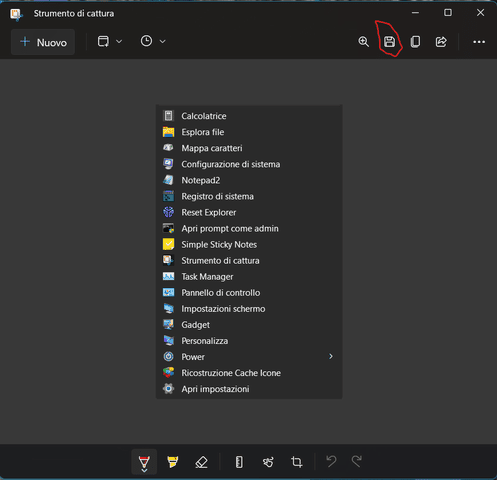
[Request] Capture tool in context menu


DMD

Well-known member
Member
Local time
1:44 PM
Posts
218
OS
W11
Good morning.
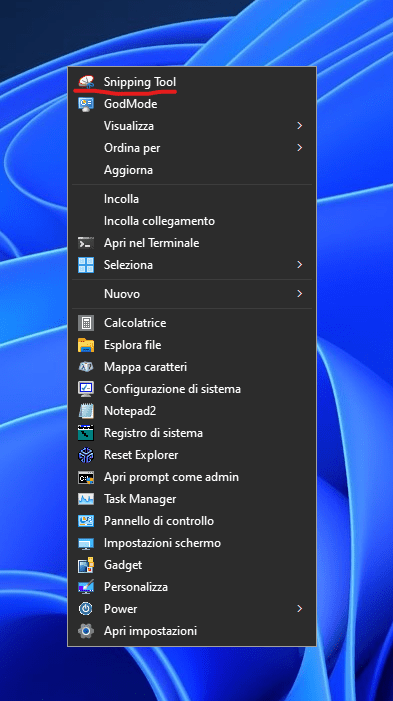
I ask how to insert the Capture Tool App in the context menu, I have searched in the specific section of the forum, but I have not found it.
Thank you
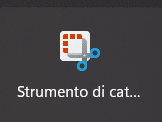
Immagine-2023-06-30-193528.png
 

My Computer My Computer

At a glance

W11CPU AMD Ryzen 9 7950XG.Skill Flare X5 32GB Kit DDR5-6000 CL32 (F5-...
OS
W11
Computer type
PC/Desktop
CPU
CPU AMD Ryzen 9 7950X
Motherboard
ASUS ROG Strix X670E-F Gaming WiFi
Memory
G.Skill Flare X5 32GB Kit DDR5-6000 CL32 (F5-6000J3238F16GX2-FX5)
Monitor(s) Displays
LG E2381VR
Screen Resolution
1920x1080
Hard Drives
1x Samsung Memorie MZ-V8P1T0B 980 PRO SSD 1TB
2x Western Digital WD Red Nas 4TB
PSU
SEASONIC FOCUS PX-850 Plus Platinum
Case
Corsair 4000D Airflow
Cooling
ARCTIC Liquid Freezer II 280 A-RGB
Keyboard
Logitech G510
Mouse
Logitech G502 HERO
Browser
Firefox
Antivirus
Avg free
Other Info
Download: 90 Mbps
Upload: 20Mbps
Windows + Shift + S, unless you don't like keyboard shortcuts.
 

My Computer My Computer

At a glance

Windows 7
OS
Windows 7
Windows 10 tut. Should work in Win 11 though not tried it.


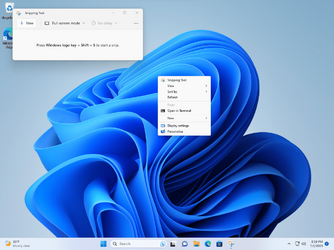
Just tried it and it still works but only on the desktop.
 

My Computers My Computers

  • At a glance

    Win 11 ProAMD Ryzen™ 7 7730U24GB Dual-Channel DDR4 @ 1596MHz (22-22-22-52)512MB ATI AMD Radeon Graphics (ASUStek Comput...
    OS
    Win 11 Pro
    Computer type
    Laptop
    Manufacturer/Model
    ASUS Vivobook
    CPU
    AMD Ryzen™ 7 7730U
    Motherboard
    M1605YA
    Memory
    24GB Dual-Channel DDR4 @ 1596MHz (22-22-22-52)
    Graphics Card(s)
    512MB ATI AMD Radeon Graphics (ASUStek Computer Inc)
    Monitor(s) Displays
    Generic PnP Monitor (1920x1200@60Hz) - P1 PLUS (1920x1080@59Hz)
    Screen Resolution
    1920 X 1200
    Hard Drives
    953GB Western Digital WD
    PSU
    45 Watts
    Mouse
    Lenovo Bluetooth.
    Internet Speed
    500 Mbps
    Browser
    Edge
    Antivirus
    Defender
  • At a glance

    Windows 11AMD Ryzen 7 5800H / 3.2 GHz32 GB DDR4 SDRAM 3200 MHzNVIDIA GeForce RTX 3060 6 GB GDDR6 SDRAM
    Operating System
    Windows 11
    Computer type
    Laptop
    Manufacturer/Model
    ACER NITRO
    CPU
    AMD Ryzen 7 5800H / 3.2 GHz
    Motherboard
    CZ Scala_CAS (FP6)
    Memory
    32 GB DDR4 SDRAM 3200 MHz
    Graphics card(s)
    NVIDIA GeForce RTX 3060 6 GB GDDR6 SDRAM
    Sound Card
    Realtek Audio. NVIDIA High Definition Audio
    Monitor(s) Displays
    15.6" LED backlight 1920 x 1080 (Full HD) 144 Hz
    Screen Resolution
    1920 x 1080 (Full HD)
    Hard Drives
    Samsung 970 Evo Plus 2TB NVMe M.2
    PSU
    180 Watt, 19.5 V
    Mouse
    Lenovo Bluetooth
    Internet Speed
    500 Mbps
    Browser
    Edge
    Antivirus
    Defender
I thank you, but it doesn't work with the App version
 

My Computer My Computer

At a glance

W11CPU AMD Ryzen 9 7950XG.Skill Flare X5 32GB Kit DDR5-6000 CL32 (F5-...
OS
W11
Computer type
PC/Desktop
CPU
CPU AMD Ryzen 9 7950X
Motherboard
ASUS ROG Strix X670E-F Gaming WiFi
Memory
G.Skill Flare X5 32GB Kit DDR5-6000 CL32 (F5-6000J3238F16GX2-FX5)
Monitor(s) Displays
LG E2381VR
Screen Resolution
1920x1080
Hard Drives
1x Samsung Memorie MZ-V8P1T0B 980 PRO SSD 1TB
2x Western Digital WD Red Nas 4TB
PSU
SEASONIC FOCUS PX-850 Plus Platinum
Case
Corsair 4000D Airflow
Cooling
ARCTIC Liquid Freezer II 280 A-RGB
Keyboard
Logitech G510
Mouse
Logitech G502 HERO
Browser
Firefox
Antivirus
Avg free
Other Info
Download: 90 Mbps
Upload: 20Mbps
My Computers My Computers

  • At a glance

    Windows 11 Pro
    OS
    Windows 11 Pro
    Computer type
    PC/Desktop
    Manufacturer/Model
    ASUS ROG Strix
  • At a glance

    Windows 11 Pro
    Operating System
    Windows 11 Pro
    Computer type
    Laptop
    Manufacturer/Model
    ASUS VivoBook
  • ASUS VivoBook 'Lite' ~ Windows 11 Home

My Computers My Computers

  • At a glance

    Windows 11 Pro
    OS
    Windows 11 Pro
    Computer type
    PC/Desktop
    Manufacturer/Model
    ASUS ROG Strix
  • At a glance

    Windows 11 Pro
    Operating System
    Windows 11 Pro
    Computer type
    Laptop
    Manufacturer/Model
    ASUS VivoBook
  • ASUS VivoBook 'Lite' ~ Windows 11 Home
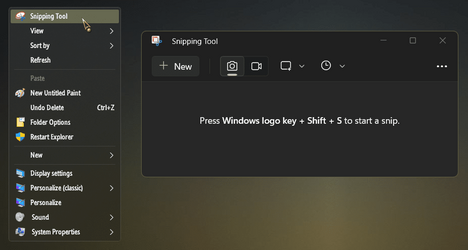
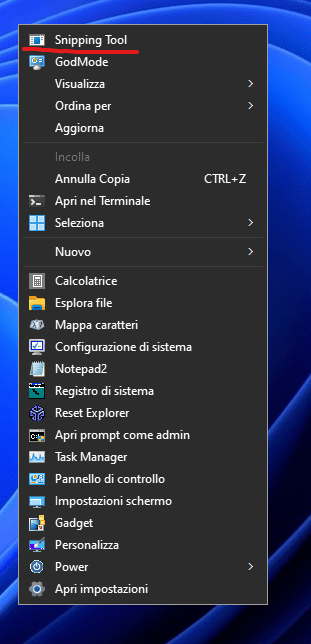
Screenshot 2023-07-01 210001.png

I needed to add 3 new files to make this context menu less janky:
  • reg file for the context menu
  • VBS script to silently launch Screen Sketch (so a CMD shell doesn't flash)
  • copy of the old SnippingTool.exe (for displaying an icon)
1. Create Add_Context_Menu.reg:
Code:
Windows Registry Editor Version 5.00

[HKEY_LOCAL_MACHINE\SOFTWARE\Classes\Directory\Background\shell\ScreenSketch]
@="Snipping Tool"
"Icon"="C:\\Users\\GARLIN\\Downloads\\SnippingTool.exe"
"Position"="Top"

[HKEY_LOCAL_MACHINE\SOFTWARE\Classes\Directory\Background\shell\ScreenSketch\command]
@="wscript.exe C:\\Users\\GARLIN\\Downloads\\ScreenSketch.vbs"

2. Create ScreenSketch.vbs in a folder:
Code:
CreateObject("Wscript.Shell").Run "cmd.exe /c start ms-screensketch:", 0, False

3. Extract \Windows\System32\SnippingTool.exe from an older W10 ISO (with 7-Zip). We're not running it, just need it to show an icon. Otherwise you don't have access to Screen Sketch's protected visual Assets. I'm sure someone else can figure which graphics file is the right one, but it won't be me.
 
Last edited:

My Computer My Computer

At a glance

Windows 7
OS
Windows 7
Code:
Windows Registry Editor Version 5.00

[HKEY_CLASSES_ROOT\Directory\Background\shell\SnippingTool]
@="&Snipping Tool"
"Icon"="%programfiles%\\WindowsApps\\Microsoft.ScreenSketch_11.2303.17.0_x64__8wekyb3d8bbwe\\SnippingTool\\SnippingTool.exe,0"
"Position"="Top"

[HKEY_CLASSES_ROOT\Directory\Background\shell\SnippingTool\command]
@="C:\\Windows\\explorer.exe ms-screenclip:"
 

My Computers My Computers

  • At a glance

    11 Homei7 13650HX16GB DDR5GeForce RTX 4060 Mobile
    OS
    11 Home
    Computer type
    Laptop
    Manufacturer/Model
    Asus TUF Gaming F16 (2024)
    CPU
    i7 13650HX
    Memory
    16GB DDR5
    Graphics Card(s)
    GeForce RTX 4060 Mobile
    Sound Card
    Eastern Electric MiniMax DAC Supreme; Emotiva UMC-200; Astell & Kern AK240
    Monitor(s) Displays
    Sony Bravia XR-55X90J
    Screen Resolution
    3840×2160
    Hard Drives
    512GB SSD internal
    37TB external
    PSU
    Li-ion
    Cooling
    2× Arc Flow Fans, 4× exhaust vents, 5× heatpipes
    Keyboard
    Logitech K800
    Mouse
    Logitech G402
    Internet Speed
    30Mbit/s up, 500Mbit/s down
    Browser
    FF
    Antivirus
    What's an antivirus?
  • At a glance

    11 Homei5 1135G716GB DDR4Intel Iris Xe
    Operating System
    11 Home
    Computer type
    Laptop
    Manufacturer/Model
    Medion S15450
    CPU
    i5 1135G7
    Memory
    16GB DDR4
    Graphics card(s)
    Intel Iris Xe
    Sound Card
    Eastern Electric MiniMax DAC Supreme; Emotiva UMC-200; Astell & Kern AK240
    Monitor(s) Displays
    Sony Bravia XR-55X90J
    Screen Resolution
    3840×2160
    Hard Drives
    2TB SSD internal
    37TB external
    PSU
    Li-ion
    Keyboard
    Logitech K800
    Mouse
    Logitech G402
    Internet Speed
    30Mbit/s up, 500Mbit/s down
    Browser
    FF
Code:
Windows Registry Editor Version 5.00

[HKEY_CLASSES_ROOT\Directory\Background\shell\SnippingTool]
@="&Snipping Tool"
"Icon"="%programfiles%\\WindowsApps\\Microsoft.ScreenSketch_11.2303.17.0_x64__8wekyb3d8bbwe\\SnippingTool\\SnippingTool.exe,0"
"Position"="Top"

[HKEY_CLASSES_ROOT\Directory\Background\shell\SnippingTool\command]
@="C:\\Windows\\explorer.exe ms-screenclip:"
It works, but the icon remains empty.

Immagine-2023-07-02-084558.png


I checked in the path "C:\Program Files\WindowsApps"
the file appears with different name "Microsoft.ScreenSketch_11.2201.12.0_x64__8wekyb3d8bbwe"
I assume this is relative to each Windows installation.
Even replacing with this name the icon remains empty, I don't understand where I'm going wrong.
Thank you
 

My Computer My Computer

At a glance

W11CPU AMD Ryzen 9 7950XG.Skill Flare X5 32GB Kit DDR5-6000 CL32 (F5-...
OS
W11
Computer type
PC/Desktop
CPU
CPU AMD Ryzen 9 7950X
Motherboard
ASUS ROG Strix X670E-F Gaming WiFi
Memory
G.Skill Flare X5 32GB Kit DDR5-6000 CL32 (F5-6000J3238F16GX2-FX5)
Monitor(s) Displays
LG E2381VR
Screen Resolution
1920x1080
Hard Drives
1x Samsung Memorie MZ-V8P1T0B 980 PRO SSD 1TB
2x Western Digital WD Red Nas 4TB
PSU
SEASONIC FOCUS PX-850 Plus Platinum
Case
Corsair 4000D Airflow
Cooling
ARCTIC Liquid Freezer II 280 A-RGB
Keyboard
Logitech G510
Mouse
Logitech G502 HERO
Browser
Firefox
Antivirus
Avg free
Other Info
Download: 90 Mbps
Upload: 20Mbps
It works, but the icon remains empty.

Immagine-2023-07-02-084558.png


I checked in the path "C:\Program Files\WindowsApps"
the file appears with different name "Microsoft.ScreenSketch_11.2201.12.0_x64__8wekyb3d8bbwe"
I assume this is relative to each Windows installation.
Even replacing with this name the icon remains empty, I don't understand where I'm going wrong.
Thank you
Open Microsoft Store app and go to Library (icon near the bottom left). Update your apps (button in the top right corner).
 

My Computers My Computers

  • At a glance

    11 Homei7 13650HX16GB DDR5GeForce RTX 4060 Mobile
    OS
    11 Home
    Computer type
    Laptop
    Manufacturer/Model
    Asus TUF Gaming F16 (2024)
    CPU
    i7 13650HX
    Memory
    16GB DDR5
    Graphics Card(s)
    GeForce RTX 4060 Mobile
    Sound Card
    Eastern Electric MiniMax DAC Supreme; Emotiva UMC-200; Astell & Kern AK240
    Monitor(s) Displays
    Sony Bravia XR-55X90J
    Screen Resolution
    3840×2160
    Hard Drives
    512GB SSD internal
    37TB external
    PSU
    Li-ion
    Cooling
    2× Arc Flow Fans, 4× exhaust vents, 5× heatpipes
    Keyboard
    Logitech K800
    Mouse
    Logitech G402
    Internet Speed
    30Mbit/s up, 500Mbit/s down
    Browser
    FF
    Antivirus
    What's an antivirus?
  • At a glance

    11 Homei5 1135G716GB DDR4Intel Iris Xe
    Operating System
    11 Home
    Computer type
    Laptop
    Manufacturer/Model
    Medion S15450
    CPU
    i5 1135G7
    Memory
    16GB DDR4
    Graphics card(s)
    Intel Iris Xe
    Sound Card
    Eastern Electric MiniMax DAC Supreme; Emotiva UMC-200; Astell & Kern AK240
    Monitor(s) Displays
    Sony Bravia XR-55X90J
    Screen Resolution
    3840×2160
    Hard Drives
    2TB SSD internal
    37TB external
    PSU
    Li-ion
    Keyboard
    Logitech K800
    Mouse
    Logitech G402
    Internet Speed
    30Mbit/s up, 500Mbit/s down
    Browser
    FF
Open Microsoft Store app and go to Library (icon near the bottom left). Update your apps (button in the top right corner).

Avoiding connecting with Microsoft Store, I solved with an intermediate solution.
I copied the file "SnippingTool.exe" in the path "C:\Windows\System32" and I modified the registry key:
Code:
Windows Registry Editor Version 5.00

[HKEY_CLASSES_ROOT\Directory\Background\shell\SnippingTool]
@="Snipping Tool"
"icon"="%windir%\\system32\\SnippingTool.exe"
"Position"="Top"

[HKEY_CLASSES_ROOT\Directory\Background\shell\SnippingTool\command]
@="C:\\Windows\\explorer.exe ms-screenclip:"

Immagine-2023-07-02-084558.png
 

My Computer My Computer

At a glance

W11CPU AMD Ryzen 9 7950XG.Skill Flare X5 32GB Kit DDR5-6000 CL32 (F5-...
OS
W11
Computer type
PC/Desktop
CPU
CPU AMD Ryzen 9 7950X
Motherboard
ASUS ROG Strix X670E-F Gaming WiFi
Memory
G.Skill Flare X5 32GB Kit DDR5-6000 CL32 (F5-6000J3238F16GX2-FX5)
Monitor(s) Displays
LG E2381VR
Screen Resolution
1920x1080
Hard Drives
1x Samsung Memorie MZ-V8P1T0B 980 PRO SSD 1TB
2x Western Digital WD Red Nas 4TB
PSU
SEASONIC FOCUS PX-850 Plus Platinum
Case
Corsair 4000D Airflow
Cooling
ARCTIC Liquid Freezer II 280 A-RGB
Keyboard
Logitech G510
Mouse
Logitech G502 HERO
Browser
Firefox
Antivirus
Avg free
Other Info
Download: 90 Mbps
Upload: 20Mbps
Avoiding connecting with Microsoft Store, I solved with an intermediate solution.
I copied the file "SnippingTool.exe" in the path "C:\Windows\System32" and I modified the registry key:
Code:
Windows Registry Editor Version 5.00

[HKEY_CLASSES_ROOT\Directory\Background\shell\SnippingTool]
@="Snipping Tool"
"icon"="%windir%\\system32\\SnippingTool.exe"
"Position"="Top"

[HKEY_CLASSES_ROOT\Directory\Background\shell\SnippingTool\command]
@="C:\\Windows\\explorer.exe ms-screenclip:"

Immagine-2023-07-02-084558.png
Manually copying files to C:\Windows\System32 is not recommended. If you prefer, you can upgrade just the Snipping Tool app by opening an elevated command prompt and running this command:
winget upgrade -h --id Microsoft.ScreenSketch_8wekyb3d8bbwe

...Or, alternatively, edit the .reg file so it points to your outdated version of the Snipping Tool:
"Icon"="%programfiles%\\WindowsApps\\Microsoft.ScreenSketch_11.2201.12.0_x64__8wekyb3d8bbwe\\SnippingTool\\SnippingTool.exe,0"
 
Last edited:

My Computers My Computers

  • At a glance

    11 Homei7 13650HX16GB DDR5GeForce RTX 4060 Mobile
    OS
    11 Home
    Computer type
    Laptop
    Manufacturer/Model
    Asus TUF Gaming F16 (2024)
    CPU
    i7 13650HX
    Memory
    16GB DDR5
    Graphics Card(s)
    GeForce RTX 4060 Mobile
    Sound Card
    Eastern Electric MiniMax DAC Supreme; Emotiva UMC-200; Astell & Kern AK240
    Monitor(s) Displays
    Sony Bravia XR-55X90J
    Screen Resolution
    3840×2160
    Hard Drives
    512GB SSD internal
    37TB external
    PSU
    Li-ion
    Cooling
    2× Arc Flow Fans, 4× exhaust vents, 5× heatpipes
    Keyboard
    Logitech K800
    Mouse
    Logitech G402
    Internet Speed
    30Mbit/s up, 500Mbit/s down
    Browser
    FF
    Antivirus
    What's an antivirus?
  • At a glance

    11 Homei5 1135G716GB DDR4Intel Iris Xe
    Operating System
    11 Home
    Computer type
    Laptop
    Manufacturer/Model
    Medion S15450
    CPU
    i5 1135G7
    Memory
    16GB DDR4
    Graphics card(s)
    Intel Iris Xe
    Sound Card
    Eastern Electric MiniMax DAC Supreme; Emotiva UMC-200; Astell & Kern AK240
    Monitor(s) Displays
    Sony Bravia XR-55X90J
    Screen Resolution
    3840×2160
    Hard Drives
    2TB SSD internal
    37TB external
    PSU
    Li-ion
    Keyboard
    Logitech K800
    Mouse
    Logitech G402
    Internet Speed
    30Mbit/s up, 500Mbit/s down
    Browser
    FF
WHERE( ??) does this tool saves the pictures it made ............?? :unsure:
 

My Computers My Computers

  • At a glance

    Windows11 Pro 25H2i732GBnVidia
    OS
    Windows11 Pro 25H2
    Computer type
    PC/Desktop
    Manufacturer/Model
    Asus
    CPU
    i7
    Motherboard
    z97k
    Memory
    32GB
    Graphics Card(s)
    nVidia
    Sound Card
    Realtek
    Hard Drives
    3
    Cooling
    air
    Browser
    Edge
    Antivirus
    ESET
  • At a glance

    Windows11 ProIntel i516GBIntel
    Operating System
    Windows11 Pro
    Computer type
    PC/Desktop
    Manufacturer/Model
    ASUS
    CPU
    Intel i5
    Motherboard
    ASUS Basic
    Memory
    16GB
    Graphics card(s)
    Intel
    Sound Card
    Realtek
    Monitor(s) Displays
    Samsung
    Hard Drives
    one intern , 0ne extern, OS on SSD
    Cooling
    air
    Keyboard
    wireless Logitech
    Mouse
    wireless Logitech
    Internet Speed
    1GB
    Browser
    Edge
    Antivirus
    ESET
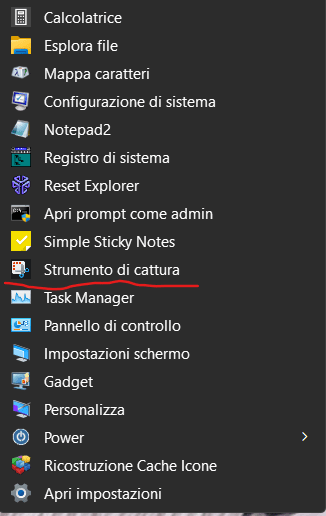
I inserted the original ScreenSketch App icon and changed the name to system language (IT)

Immagine-2023-07-02-104535.png

Code:
Windows Registry Editor Version 5.00

[HKEY_CLASSES_ROOT\Directory\Background\shell\SnippingTool.exe]
@="SnippingTool.exe"
"icon"="%windir%\\SysWOW64\\ScreenSketch-ico.ico"
"Position"="Bottom"

[HKEY_CLASSES_ROOT\Directory\Background\shell\SnippingTool.exe\command]
@="C:\\Windows\\explorer.exe ms-screenclip:"
 

Attachments

Last edited:

My Computer My Computer

At a glance

W11CPU AMD Ryzen 9 7950XG.Skill Flare X5 32GB Kit DDR5-6000 CL32 (F5-...
OS
W11
Computer type
PC/Desktop
CPU
CPU AMD Ryzen 9 7950X
Motherboard
ASUS ROG Strix X670E-F Gaming WiFi
Memory
G.Skill Flare X5 32GB Kit DDR5-6000 CL32 (F5-6000J3238F16GX2-FX5)
Monitor(s) Displays
LG E2381VR
Screen Resolution
1920x1080
Hard Drives
1x Samsung Memorie MZ-V8P1T0B 980 PRO SSD 1TB
2x Western Digital WD Red Nas 4TB
PSU
SEASONIC FOCUS PX-850 Plus Platinum
Case
Corsair 4000D Airflow
Cooling
ARCTIC Liquid Freezer II 280 A-RGB
Keyboard
Logitech G510
Mouse
Logitech G502 HERO
Browser
Firefox
Antivirus
Avg free
Other Info
Download: 90 Mbps
Upload: 20Mbps
WHERE( ??) does this tool saves the pictures it made ............?? :unsure:
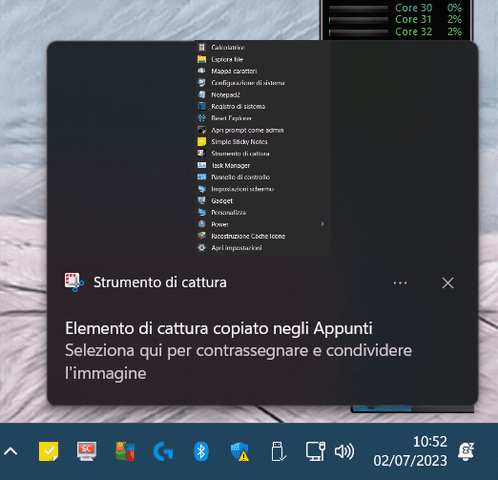
When you make the selection re appears at the bottom of the notification and then you decide where to save it.

Ridimensiona-di-Screenshot-001.png


Ridimensiona-di-Ridimensiona-di-Screenshot-002.png
 

My Computer My Computer

At a glance

W11CPU AMD Ryzen 9 7950XG.Skill Flare X5 32GB Kit DDR5-6000 CL32 (F5-...
OS
W11
Computer type
PC/Desktop
CPU
CPU AMD Ryzen 9 7950X
Motherboard
ASUS ROG Strix X670E-F Gaming WiFi
Memory
G.Skill Flare X5 32GB Kit DDR5-6000 CL32 (F5-6000J3238F16GX2-FX5)
Monitor(s) Displays
LG E2381VR
Screen Resolution
1920x1080
Hard Drives
1x Samsung Memorie MZ-V8P1T0B 980 PRO SSD 1TB
2x Western Digital WD Red Nas 4TB
PSU
SEASONIC FOCUS PX-850 Plus Platinum
Case
Corsair 4000D Airflow
Cooling
ARCTIC Liquid Freezer II 280 A-RGB
Keyboard
Logitech G510
Mouse
Logitech G502 HERO
Browser
Firefox
Antivirus
Avg free
Other Info
Download: 90 Mbps
Upload: 20Mbps
WHERE( ??) does this tool saves the pictures it made ............?? :unsure:
Shell folder location:
shell:screenshots
By default, that one points to:
%userprofile%\Pictures\Screenshots
You can, however, change this default location of Screenshots by moving this entire folder somewhere else. To find out how, see the explanation at the bottom of Section 2 in this article:
 

My Computers My Computers

  • At a glance

    11 Homei7 13650HX16GB DDR5GeForce RTX 4060 Mobile
    OS
    11 Home
    Computer type
    Laptop
    Manufacturer/Model
    Asus TUF Gaming F16 (2024)
    CPU
    i7 13650HX
    Memory
    16GB DDR5
    Graphics Card(s)
    GeForce RTX 4060 Mobile
    Sound Card
    Eastern Electric MiniMax DAC Supreme; Emotiva UMC-200; Astell & Kern AK240
    Monitor(s) Displays
    Sony Bravia XR-55X90J
    Screen Resolution
    3840×2160
    Hard Drives
    512GB SSD internal
    37TB external
    PSU
    Li-ion
    Cooling
    2× Arc Flow Fans, 4× exhaust vents, 5× heatpipes
    Keyboard
    Logitech K800
    Mouse
    Logitech G402
    Internet Speed
    30Mbit/s up, 500Mbit/s down
    Browser
    FF
    Antivirus
    What's an antivirus?
  • At a glance

    11 Homei5 1135G716GB DDR4Intel Iris Xe
    Operating System
    11 Home
    Computer type
    Laptop
    Manufacturer/Model
    Medion S15450
    CPU
    i5 1135G7
    Memory
    16GB DDR4
    Graphics card(s)
    Intel Iris Xe
    Sound Card
    Eastern Electric MiniMax DAC Supreme; Emotiva UMC-200; Astell & Kern AK240
    Monitor(s) Displays
    Sony Bravia XR-55X90J
    Screen Resolution
    3840×2160
    Hard Drives
    2TB SSD internal
    37TB external
    PSU
    Li-ion
    Keyboard
    Logitech K800
    Mouse
    Logitech G402
    Internet Speed
    30Mbit/s up, 500Mbit/s down
    Browser
    FF
ms-screenclip: is the same as Windows + Shift + S
sigh.
 

My Computer My Computer

At a glance

Windows 7
OS
Windows 7

Latest Support Threads

Back
Top Bottom