Requesting guidance to investigate C:\WINDOWS\system32\rgnu (possibly: rgnupdt.exe) CMD popup


olspookishmagus

New member
Local time
1:23 AM
Posts
4
Location
Multiverse
OS
GNU/Linux
Hello everyone and a special hello to elevenforum.com regulars.


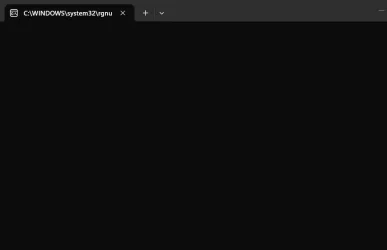
This is my first post and I would like to request some help into investigating a weird CMD window popup I had while booting into my Windows 11 VM (Version: 24H2 (OS Build: 26100.7480)).


When I booted I got a few seconds CMD window popped up and I managed to get a screenshot of it:

As one can see that window reads: C:\WINDOWS\system32\rgnu.


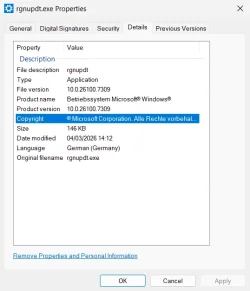
Later looking into that directory I could NOT see an executable with that name. But there was a similar one named: rgnupdt.exe.


Its Properties can be found here:

It's interesting that property values are in German and the system is installed from US International ISO.


Now, is it possible that when that C:\WINDOWS\system32\rgnupdt.exe was executed that the CMD window would be labeled as C:\WINDOWS\system32\rgnu?

Is there an executable property for me to confirm this against?


I also got that rgnupdt.exe file's SHA512SUM which was:
Code:
48C2BC51A900844FCBEDFC7DEBA07B1D7B6C7E6827679AF1A4A6A9371E54F2BB73165EFA40F0C92A83E79F270F150345789F84FDA54BC431E333B063B5869F8C
.


I checked that SHA512SUM against virustotal.com and I found no matches.


So, any ideas/tips on how to further investigate this?


Thanks in advance for your time and energy.
 
Windows Build/Version
26100.7480, 24H2

My Computer

System One

  • OS
    GNU/Linux
    Computer type
    PC/Desktop
it looks like the full path of the executable is just cut off, something that happens by default with Terminal.

View attachment 164966

If you set the tab width setting to "Title Length" in the Terminal settings, it will show the full path.

View attachment 164967

View attachment 164969


My Computer

System One

  • OS
    Windows 11 Pro 25H2
    Computer type
    PC/Desktop
    Manufacturer/Model
    Intel NUC12WSHi7
    CPU
    12th Gen Core i7-1260P
    Motherboard
    NUC12WSBi7
    Memory
    64 GB Micron PC4-25600
    Graphics Card(s)
    Intel Iris Xe Graphics
    Sound Card
    on-board Realtek HD Audio
    Monitor(s) Displays
    Dell U3219Q
    Screen Resolution
    3840 x 2160
    Hard Drives
    Samsung SSD 990 PRO 1TB
    Crucial MX500 2 TB
    Antivirus
    Microsoft Defender

Imgmur is not accessible everywhere.
I'm in the UK and this is one of the places it cannot be accessed from.

I suggest you post any pictures & files within your post.
Upload and Attach Images and Files in Post - ElevenForumTutorials


Denis


Welcome to ElevenForum.

It's really worth making time to browse through the ElevenForum Tutorial index - there's a shortcut to it at the top of every ElevenForum page [within the Tutorials dropdown list].
- At the foot of the ElevenForum Tutorial index is a shortcut to download it as a spreadsheet.
- I download a new copy each month.
- By downloading it as a spreadsheet I can benefit from Excel's excellent filtering capabilities when I search for topics of interest.
- ElevenForum tutorials are also listed at Tutorials and there's a shortcut to that at the top of every page.

You can search ElevenForum using the search box in the top-right corner of all ElevenForum webpages or using Advanced Search - ElevenForum
- You can also search ElevenForum threads in many general search engines, such as Google, by adding site:elevenforum.com after your search term. For example,
Taskbar setup site:elevenforum.com
- [This is what the search box in the top-right corner of ElevenForum webpages does automatically]
 

My Computer

System One

  • OS
    Windows 11 Home x64 Version 25H2 Build 26200.8037
Imgmur is not accessible everywhere.
I'm in the UK and this is one of the places it cannot be accessed from.

I suggest you post any pictures & files within your post.
Upload and Attach Images and Files in Post - ElevenForumTutorials

Fair enough @Try3.
Please excuse me, I didn't know this was a mandatory policy.
Images attached as requested.

The trimming of the CMD window title could've been the culprit (thanks again @pseymour ).

But for future reference, I've checked with another source and as this file is signed by Microsoft is most probably legit.

Some details follow for another version of this file:
Code:
File description:
rgnupdt

File version:
10.0.22621.5547

SHA-256:
643DCC7A9057A03800248CAA41D662275D6B7C8F5AA841C9612528BFDFF9946E

SHA-512:
CAF6345B1B87B7893A74D039127455F6835A57633D51D3772B6B3680EADEFD40A9EA112019281C4308CBBF84D3E77DAC4399C2CD66531BC466CC6400C76FFF65

Searching against these hashes on virustotal.com produces results, namely:
https://www.virustotal.com/gui/file/643dcc7a9057a03800248caa41d662275d6b7c8f5aa841c9612528bfdff9946e/details
 

Attachments

  • 9MkXhEvl.webp
    9MkXhEvl.webp
    3.4 KB · Views: 1
  • zTIcksIl.webp
    zTIcksIl.webp
    26.3 KB · Views: 1

My Computer

System One

  • OS
    GNU/Linux
    Computer type
    PC/Desktop
Yep, I was more commenting on the difference between what the window showed and the actual path of the file.

As for the executable, if it’s signed, it’s probably legit. Unless the cert’s been stolen of course. 😂
 

My Computer

System One

  • OS
    Windows 11 Pro 25H2
    Computer type
    PC/Desktop
    Manufacturer/Model
    Intel NUC12WSHi7
    CPU
    12th Gen Core i7-1260P
    Motherboard
    NUC12WSBi7
    Memory
    64 GB Micron PC4-25600
    Graphics Card(s)
    Intel Iris Xe Graphics
    Sound Card
    on-board Realtek HD Audio
    Monitor(s) Displays
    Dell U3219Q
    Screen Resolution
    3840 x 2160
    Hard Drives
    Samsung SSD 990 PRO 1TB
    Crucial MX500 2 TB
    Antivirus
    Microsoft Defender
Can you zip the file with the password "infected", upload it somewhere and DM me a download link?
 

My Computer

System One

  • OS
    Linux Mint
    Computer type
    Laptop
    Manufacturer/Model
    System76 Lemur Pro
a mandatory policy
It's just that posting pictures that way enhances your comments & aids our understanding.
Attachments cannot be seen within the post and cannot be seen at the same time as your comments.

By posting your first one within your post, for example,
9MkXhEvl.webp
you'd have been able to make comments related specifically to that diagram.

And so for the second one.
zTIcksIl.webp
which increases the chances of your being given useful replies.


Best of luck,
Denis
 

My Computer

System One

  • OS
    Windows 11 Home x64 Version 25H2 Build 26200.8037
Your VirusTotal link fails.

That link is seriously messed up, somehow 'elevenforum.com' got added to the start of the URL (and a [/code] tag).

1772727602436.webp

There is a URL hidden in there though, it's this:
https://www.virustotal.com/gui/file...662275d6b7c8f5aa841c9612528bfdff9946e/details
 

My Computers

System One System Two

  • OS
    Windows 11 Home
    Computer type
    Laptop
    Manufacturer/Model
    Acer Aspire 3 A315-23-R9VY
    CPU
    AMD Athlon Silver 3050U
    Memory
    8GB
    Graphics Card(s)
    Radeon Graphics
    Monitor(s) Displays
    laptop screen
    Screen Resolution
    1366x768 native resolution, up to 2560x1440 with Radeon Virtual Super Resolution
    Hard Drives
    1TB Samsung EVO 870 SSD (from April 2026: 250GB EVO 850)
    Internet Speed
    150 Mbps
    Browser
    Edge, Firefox
    Antivirus
    Defender
    Other Info
    fully 'Windows 11 ready' laptop. Windows 10 C: partition migrated from my old unsupported 'main machine' then upgraded to 11. A test migration ran Insider builds for 2 months. When 11 was released on 5th October 2021 it was re-imaged back to 10 and was offered the upgrade in Windows Update on 20th October. Windows Update offered the 22H2 Feature Update on 20th September 2022. It got the 23H2 Feature Update on 4th November 2023 through Windows Update, 24H2 on 3rd October 2024 through Windows Update by setting the Target Release Version for 24H2, and 25H2 on 30th September 2025 through Windows Update by setting the Target Release Version for 25H2.

    UPDATE - 11 April 2026: due to mechanical deterioration this PC has been retired from active duty. The OS with all software and files has been migrated to my System Seven below to carry on as my general purpose 'main machine'.

    My SYSTEM THREE is a Dell Latitude 5410, i7-10610U, 32GB RAM, 512GB NVMe ssd, supported device running Windows 11 Pro.

    My SYSTEM FOUR is a 2-in-1 convertible Lenovo Yoga 11e 20DA, Celeron N2930, 8GB RAM, 256GB ssd. Unsupported device: currently running Win10 Pro, plus Win11 Pro RTM and Insider Dev, Beta, and RP 24H2 as native boot vhdx.

    My SYSTEM FIVE is a Dell Latitude 3190 2-in-1, Pentium Silver N5030, 8GB RAM, 1TB NVMe ssd, supported device running Windows 11 Pro, plus Insider Beta, Dev, and Canary builds (and a few others) as a native boot .vhdx.

    My SYSTEM SIX is a Dell Latitude 5550, Core Ultra 7 165H, 64GB RAM, 1TB NVMe SSD, supported device, Windows 11 Pro 24H2, Hyper-V host machine. Updated to 25H2 on 30th September 2025.

    My SYSTEM SEVEN is a Lenovo Thinkpad T580, Intel Core i7-8650U, 16GB RAM, 512GB NVMe SSD + 2nd 512GB NVMe SSD, a supported device for Windows 11. This is my current general purpose 'main machine'. The installed Windows 11 Home from my System One has been migrated to this machine.
  • Operating System
    Windows 11 Pro
    Computer type
    Laptop
    Manufacturer/Model
    Dell Latitude E4310
    CPU
    Intel® Core™ i5-520M
    Motherboard
    0T6M8G
    Memory
    8GB
    Graphics card(s)
    (integrated graphics) Intel HD Graphics
    Screen Resolution
    1366x768
    Hard Drives
    500GB Crucial MX500 SSD
    Browser
    Firefox, Edge
    Antivirus
    Defender
    Other Info
    unsupported machine: Legacy bios, MBR, TPM 1.2, upgraded from W10 to W11 using W10/W11 hybrid install media workaround. In-place upgrade to 22H2 using ISO and a workaround. Feature Update to 23H2 by manually installing the Enablement Package. In-place upgrade to 24H2 using hybrid 23H2/24H2 install media. Upgraded to 25H2 by Enablement Package. Also running Insider Dev, and Canary builds and Windows 10 as native boot .vhdx.

    My SYSTEM THREE is a Dell Latitude 5410, i7-10610U, 32GB RAM, 512GB NVMe ssd, supported device running Windows 11 Pro.

    My SYSTEM FOUR is a 2-in-1 convertible Lenovo Yoga 11e 20DA, Celeron N2930, 8GB RAM, 256GB ssd. Unsupported device: currently running Win10 Pro, plus Win11 Pro RTM and Insider Dev, Beta, and RP 24H2 as native boot vhdx.

    My SYSTEM FIVE is a Dell Latitude 3190 2-in-1, Pentium Silver N5030, 8GB RAM, 1TB NVMe ssd, supported device running Windows 11 Pro, plus Insider Beta, Dev, and Canary builds (and a few others) as a native boot .vhdx.

    My SYSTEM SIX is a Dell Latitude 5550, Core Ultra 7 165H, 64GB RAM, 1TB NVMe SSD, supported device, Windows 11 Pro 24H2, Hyper-V host machine. Updated to 25H2 on 30th September 2025.

    My SYSTEM SEVEN is a Lenovo Thinkpad T580, Intel Core i7-8650U, 16GB RAM, 512GB NVMe SSD + 2nd 512GB NVMe SSD, a supported device for Windows 11. This is my current general purpose 'main machine'. The installed Windows 11 Home from my System One has been migrated to this machine.
rgnupdt.exe is a legitimate Windows file that's included in KB5077181 (26100.7840). MS publishes the W11 Updates History portal, which lists every released Monthly Update. On the very bottom of every KB's page is a link to a CSV file containing the names of every file included in that update.

February 10, 2026—KB5077181 (OS Builds 26200.7840 and 26100.7840) - Microsoft Support
Code:
"rgnupdt.exe","10.0.26100.7309","06-Feb-2026","19:08","137,424"
"rgnupdt.exe","10.0.26100.7309","06-Feb-2026","19:16","150,192"

There are no published hashes in the CSV. But if you run "SFC /scannow", Windows will check if the installed file is consistent with the installed update and replace it as needed.
 

My Computer

System One

  • OS
    Windows 7
I have rgnupdt.exe in System32 on my en-gb install. Looks legitimate.

1772728524272.webp
 

My Computers

System One System Two

  • OS
    Windows 11 Home
    Computer type
    Laptop
    Manufacturer/Model
    Acer Aspire 3 A315-23-R9VY
    CPU
    AMD Athlon Silver 3050U
    Memory
    8GB
    Graphics Card(s)
    Radeon Graphics
    Monitor(s) Displays
    laptop screen
    Screen Resolution
    1366x768 native resolution, up to 2560x1440 with Radeon Virtual Super Resolution
    Hard Drives
    1TB Samsung EVO 870 SSD (from April 2026: 250GB EVO 850)
    Internet Speed
    150 Mbps
    Browser
    Edge, Firefox
    Antivirus
    Defender
    Other Info
    fully 'Windows 11 ready' laptop. Windows 10 C: partition migrated from my old unsupported 'main machine' then upgraded to 11. A test migration ran Insider builds for 2 months. When 11 was released on 5th October 2021 it was re-imaged back to 10 and was offered the upgrade in Windows Update on 20th October. Windows Update offered the 22H2 Feature Update on 20th September 2022. It got the 23H2 Feature Update on 4th November 2023 through Windows Update, 24H2 on 3rd October 2024 through Windows Update by setting the Target Release Version for 24H2, and 25H2 on 30th September 2025 through Windows Update by setting the Target Release Version for 25H2.

    UPDATE - 11 April 2026: due to mechanical deterioration this PC has been retired from active duty. The OS with all software and files has been migrated to my System Seven below to carry on as my general purpose 'main machine'.

    My SYSTEM THREE is a Dell Latitude 5410, i7-10610U, 32GB RAM, 512GB NVMe ssd, supported device running Windows 11 Pro.

    My SYSTEM FOUR is a 2-in-1 convertible Lenovo Yoga 11e 20DA, Celeron N2930, 8GB RAM, 256GB ssd. Unsupported device: currently running Win10 Pro, plus Win11 Pro RTM and Insider Dev, Beta, and RP 24H2 as native boot vhdx.

    My SYSTEM FIVE is a Dell Latitude 3190 2-in-1, Pentium Silver N5030, 8GB RAM, 1TB NVMe ssd, supported device running Windows 11 Pro, plus Insider Beta, Dev, and Canary builds (and a few others) as a native boot .vhdx.

    My SYSTEM SIX is a Dell Latitude 5550, Core Ultra 7 165H, 64GB RAM, 1TB NVMe SSD, supported device, Windows 11 Pro 24H2, Hyper-V host machine. Updated to 25H2 on 30th September 2025.

    My SYSTEM SEVEN is a Lenovo Thinkpad T580, Intel Core i7-8650U, 16GB RAM, 512GB NVMe SSD + 2nd 512GB NVMe SSD, a supported device for Windows 11. This is my current general purpose 'main machine'. The installed Windows 11 Home from my System One has been migrated to this machine.
  • Operating System
    Windows 11 Pro
    Computer type
    Laptop
    Manufacturer/Model
    Dell Latitude E4310
    CPU
    Intel® Core™ i5-520M
    Motherboard
    0T6M8G
    Memory
    8GB
    Graphics card(s)
    (integrated graphics) Intel HD Graphics
    Screen Resolution
    1366x768
    Hard Drives
    500GB Crucial MX500 SSD
    Browser
    Firefox, Edge
    Antivirus
    Defender
    Other Info
    unsupported machine: Legacy bios, MBR, TPM 1.2, upgraded from W10 to W11 using W10/W11 hybrid install media workaround. In-place upgrade to 22H2 using ISO and a workaround. Feature Update to 23H2 by manually installing the Enablement Package. In-place upgrade to 24H2 using hybrid 23H2/24H2 install media. Upgraded to 25H2 by Enablement Package. Also running Insider Dev, and Canary builds and Windows 10 as native boot .vhdx.

    My SYSTEM THREE is a Dell Latitude 5410, i7-10610U, 32GB RAM, 512GB NVMe ssd, supported device running Windows 11 Pro.

    My SYSTEM FOUR is a 2-in-1 convertible Lenovo Yoga 11e 20DA, Celeron N2930, 8GB RAM, 256GB ssd. Unsupported device: currently running Win10 Pro, plus Win11 Pro RTM and Insider Dev, Beta, and RP 24H2 as native boot vhdx.

    My SYSTEM FIVE is a Dell Latitude 3190 2-in-1, Pentium Silver N5030, 8GB RAM, 1TB NVMe ssd, supported device running Windows 11 Pro, plus Insider Beta, Dev, and Canary builds (and a few others) as a native boot .vhdx.

    My SYSTEM SIX is a Dell Latitude 5550, Core Ultra 7 165H, 64GB RAM, 1TB NVMe SSD, supported device, Windows 11 Pro 24H2, Hyper-V host machine. Updated to 25H2 on 30th September 2025.

    My SYSTEM SEVEN is a Lenovo Thinkpad T580, Intel Core i7-8650U, 16GB RAM, 512GB NVMe SSD + 2nd 512GB NVMe SSD, a supported device for Windows 11. This is my current general purpose 'main machine'. The installed Windows 11 Home from my System One has been migrated to this machine.
Your VirusTotal link fails.

...

That link is seriously messed up, somehow 'elevenforum.com' got added to the start of the URL (and a [/code] tag).

View attachment 164993

There is a URL hidden in there though, it's this:
https://www.virustotal.com/gui/file...662275d6b7c8f5aa841c9612528bfdff9946e/details

IIRC when I was trying to put the link it was selecting the above line as well. Either something got garbled up or I had too much (or too little) caffeine on my system at that time.

The proper link is:
VirusTotal

I'm afraid I can't edit my previous post.

...


Have you installed any German language software or hardware [drivers]?
No, not at all.

Can you zip the file with the password "infected", upload it somewhere and DM me a download link?

The installation comes from an English International 24H2 ISO.
So this maybe is why this is labeled as German.

And you could extract it out of it @neemobeer or give me a day or two and I'll get back to you.
 

My Computer

System One

  • OS
    GNU/Linux
    Computer type
    PC/Desktop

Latest Support Threads

Back
Top Bottom