

usualjuptier
New member
- Local time
- 2:48 PM
- Posts
- 6
- OS
- Windows 11
Hello everyone,
I'm researching how Windows enumerates network cards through the PCI driver stack (pci.sys) and registers their drivers during the boot process. As part of this, I'm trying to gather real-world examples of the device instance path that Windows assigns to NICs across as many brands and models as possible.
So far I've noticed that many Realtek cards end up sharing the same instance ID (e.g. …\01000000684CE00000), since Realtek doesn't seem to serialize them uniquely. I'd really like to compare how other vendors handle it — especially Intel, but anything is welcome (Broadcom, Marvell, Aquantia, Mellanox, etc.) because i ran out of friends to ask .
.
If you have a spare minute, I'd be very grateful if you could share your network adapter's device instance path. Brand and model don't matter — every example helps.
How to find it (Windows):
It looks roughly like: PCI\VEN_8086&DEV_15F3&SUBSYS_xxxxxxxx&REV_xx\……
Thank you so much — this really helps the research!
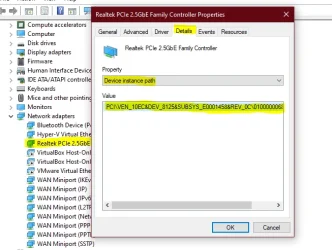
I'm researching how Windows enumerates network cards through the PCI driver stack (pci.sys) and registers their drivers during the boot process. As part of this, I'm trying to gather real-world examples of the device instance path that Windows assigns to NICs across as many brands and models as possible.
So far I've noticed that many Realtek cards end up sharing the same instance ID (e.g. …\01000000684CE00000), since Realtek doesn't seem to serialize them uniquely. I'd really like to compare how other vendors handle it — especially Intel, but anything is welcome (Broadcom, Marvell, Aquantia, Mellanox, etc.) because i ran out of friends to ask
.If you have a spare minute, I'd be very grateful if you could share your network adapter's device instance path. Brand and model don't matter — every example helps.
How to find it (Windows):
- Open Device Manager
- Expand Network adapters → right-click your NIC → Properties
- Open the Details tab
- Under Property, choose Device instance path
- Right-click the value → Copy, then paste it in a reply
It looks roughly like: PCI\VEN_8086&DEV_15F3&SUBSYS_xxxxxxxx&REV_xx\……
Thank you so much — this really helps the research!
My Computer
At a glance
Windows 11
- OS
- Windows 11
- Computer type
- PC/Desktop






