Restore or reinitiate the Windows 11


Kicker

New member
Local time
6:21 AM
Posts
4
OS
Windows 11
Hello,
I just bought a new PC (Windows 11) I found the sound is no good, so I restore the Realtek, but my PC lost the sound,
I have no any solution to link the Realtek,
I wish to know whether I restore Windows 11 will refind the sound ? and how to restore ( reinitiate ) ?
TYhank you for your suggestions !
 

My Computer My Computer

At a glance

Windows 11
OS
Windows 11
Computer type
PC/Desktop
Manufacturer/Model
Danew
Hello,
I just bought a new PC (Windows 11) I found the sound is no good, so I restore the Realtek, but my PC lost the sound,
I have no any solution to link the Realtek,
I wish to know whether I restore Windows 11 will refind the sound ? and how to restore ( reinitiate ) ?
TYhank you for your suggestions !

Hi Kicker,

Can you tell me what you mean by "restore" the Realtek? Did you uninstall and reinstall the driver?

Kind regards,
1770654919061.webp
 

My Computer My Computer

At a glance

Windows 11 Pro 25H2 build 26200.8457Intel i7 8750H @ 2.2 GHz16 GB (all Samsung) DDR4-3200 SODIMM (non-ECC...Intel UHD Graphics 630 & NVIDIA Quadro P600
OS
Windows 11 Pro 25H2 build 26200.8457
Computer type
Laptop
Manufacturer/Model
Lenovo ThinkPad Workstation P72
CPU
Intel i7 8750H @ 2.2 GHz
Motherboard
Lenovo 01YU291
Memory
16 GB (all Samsung) DDR4-3200 SODIMM (non-ECC) PCIe 3
Graphics Card(s)
Intel UHD Graphics 630 & NVIDIA Quadro P600
Sound Card
Realtek ALC3286 & Focusrite Saffire 24 Pro DSP
Monitor(s) Displays
17.3"
Screen Resolution
3840x2160
Hard Drives
1TB SSD Samsung 860 EVO SATA 3
1TB SSD Samsung 970 EVO M.2 NVMe PCIe 3 x 4
2TB SSD Samsung 990 PRO M.2 NVMe PCIe 3 x 4
PSU
230W
Cooling
fan
Keyboard
UltraNav
Mouse
Kensington wireless Orbit
Internet Speed
640Mbps
Browser
DuckDuckGo and Firefox
Antivirus
Defender
Other Info
CM246 Chipset

My Computer My Computer

At a glance

Windows 11AMD Ryzen 7 5700GMicron Technology DDR4-3200 16GBNVIDIA GeForce RTX 3060
OS
Windows 11
Computer type
PC/Desktop
Manufacturer/Model
HP Pavilion
CPU
AMD Ryzen 7 5700G
Motherboard
Erica6
Memory
Micron Technology DDR4-3200 16GB
Graphics Card(s)
NVIDIA GeForce RTX 3060
Sound Card
Realtek ALC671
Monitor(s) Displays
Samsung SyncMaster U28E590
Screen Resolution
3840 x 2160
Hard Drives
SAMSUNG MZVLQ1T0HALB-000H1
Step by step, exactly what did you do prior to losing sound?
 

My Computer My Computer

At a glance

W11
OS
W11
Computer type
PC/Desktop
Manufacturer/Model
2 HP Desktops, 1 Dell Desktop, 2 Dell XPS Laptops, 1 HP Laptop
Keyboard
Logitech
Mouse
Logitech MX Master 4 & 3
Internet Speed
500 mps
Browser
Firefox
Antivirus
Bitdefender
I do not like the sound quality in Windows 11 either and even dual booting with the same hardware and drivers it just does not sound right. Changing drivers did not help but using an equalizer does help some.
Windows 11 adds too much base to the sound. Windows 7 and 10 are better. And yes, I lost my sound for a while poking around trying to see if anything helped.

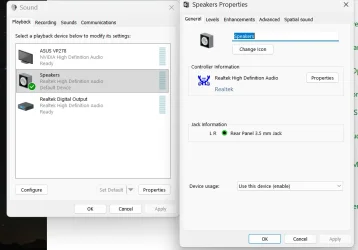
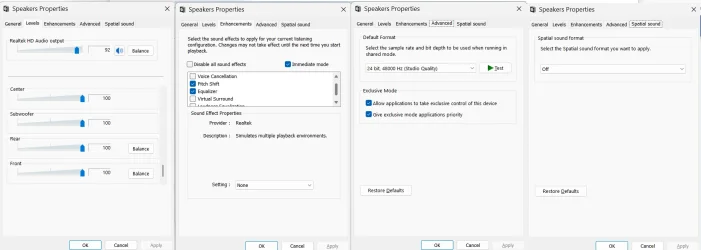
Go to control panel and select sound

This is what I have (just basic speakers with woofer plugged in to the back of the PC)

1770657932534.webp

1770658544703.webp
 
Last edited:

My Computers My Computers

  • At a glance

    Windows 11 (up to date)Intel i5 12400Corsair Vengeance LPX 16GBOn Board the Z690
    OS
    Windows 11 (up to date)
    Computer type
    PC/Desktop
    Manufacturer/Model
    Custom
    CPU
    Intel i5 12400
    Motherboard
    Gigabyte Z690 UA
    Memory
    Corsair Vengeance LPX 16GB
    Graphics Card(s)
    On Board the Z690
    Sound Card
    On Board
    Monitor(s) Displays
    43" Samsung tu7000
    Screen Resolution
    2560 x 1440
    Hard Drives
    SAMSUNG SSD 1TB NVMe M.2
    PSU
    Thermaltake smart 500w 80+
    Case
    LIAN LANCOOL_205M
    Cooling
    Bunch of fans . . . :o) (lights dont work)
    Keyboard
    Unicomp: Ultra Classic White Buckling Spring USB
    Mouse
    M510
    Internet Speed
    50mbps on Ethernet
    Browser
    Fire Fox
    Antivirus
    Windows
    Other Info
    Love this computer but I still prefer Win-7 like I love my old Lazy Boy Recliner . . . it just feels better.
  • At a glance

    WIN-7-64BIT and Win-11 pro for testing on uns...i5-3570K CPU @ 3.40GHz, 3801 Mhz, 4 Core(s), ...16 GB - Crucial Ballistick 4GB PC3-14900 DDR3...NVIDIA GeForce GTX 1050
    Operating System
    WIN-7-64BIT and Win-11 pro for testing on unsupported hardware
    Computer type
    PC/Desktop
    Manufacturer/Model
    Home built
    CPU
    i5-3570K CPU @ 3.40GHz, 3801 Mhz, 4 Core(s), 4 Logical Processor(s)
    Motherboard
    GA-Z77-HD3
    Memory
    16 GB - Crucial Ballistick 4GB PC3-14900 DDR3-1333 MHz
    Graphics card(s)
    NVIDIA GeForce GTX 1050
    Sound Card
    On Board
    Monitor(s) Displays
    ASUS VP278
    Screen Resolution
    1920 x 1080
    Hard Drives
    4 - internal Samsung 2.5" SSD, 1 WD HDD 7200 and some external drives
    PSU
    EVGA 550w
    Case
    Old Gygabyte Tower
    Cooling
    Yes
    Keyboard
    Unicomp - UNIOP4A USB (like the old IBM Model H that I started with)
    Mouse
    M510
    Internet Speed
    50mbps
    Browser
    Firefox
    Antivirus
    Windows
    Other Info
    The only thing it lack is USB-3.2 on the front face but it has 3.0 on the back
Hi, Thank you everyone,
Yes, I have uninstalled and reinstalled Realtek, because the sound quality is no good, but after having resinstalled Realtek, I hear nothing,
Thank you very much !
 

My Computer My Computer

At a glance

Windows 11
OS
Windows 11
Computer type
PC/Desktop
Manufacturer/Model
Danew
Hi, Thank you everyone,
Yes, I have uninstalled and reinstalled Realtek, because the sound quality is no good, but after having resinstalled Realtek, I hear nothing,
Thank you very much !

Hi Kicker,

Uh, sorry? Not to be sophistic, but where did you get the driver? I recommend you get your drivers from the PC manufacturer.

Kind regards,
1770715457555.webp
 

My Computer My Computer

At a glance

Windows 11 Pro 25H2 build 26200.8457Intel i7 8750H @ 2.2 GHz16 GB (all Samsung) DDR4-3200 SODIMM (non-ECC...Intel UHD Graphics 630 & NVIDIA Quadro P600
OS
Windows 11 Pro 25H2 build 26200.8457
Computer type
Laptop
Manufacturer/Model
Lenovo ThinkPad Workstation P72
CPU
Intel i7 8750H @ 2.2 GHz
Motherboard
Lenovo 01YU291
Memory
16 GB (all Samsung) DDR4-3200 SODIMM (non-ECC) PCIe 3
Graphics Card(s)
Intel UHD Graphics 630 & NVIDIA Quadro P600
Sound Card
Realtek ALC3286 & Focusrite Saffire 24 Pro DSP
Monitor(s) Displays
17.3"
Screen Resolution
3840x2160
Hard Drives
1TB SSD Samsung 860 EVO SATA 3
1TB SSD Samsung 970 EVO M.2 NVMe PCIe 3 x 4
2TB SSD Samsung 990 PRO M.2 NVMe PCIe 3 x 4
PSU
230W
Cooling
fan
Keyboard
UltraNav
Mouse
Kensington wireless Orbit
Internet Speed
640Mbps
Browser
DuckDuckGo and Firefox
Antivirus
Defender
Other Info
CM246 Chipset
Hi, John 1955,
My Windows 11 is French version, I could find as yours in the sound speakers. which cannot be showed Realtek as yours.
Thank you !
 

My Computer My Computer

At a glance

Windows 11
OS
Windows 11
Computer type
PC/Desktop
Manufacturer/Model
Danew

My Computers My Computers

  • At a glance

    Windows 11 Pro 25H2 Build 26200.8655Intel(R) Core(TM) i7-4770K CPU @ 3.50GHz32.0 GB of I forget and the box is in storage.Gigabyte nVidia GeForce GTX 1660 Super OC 6GB
    OS
    Windows 11 Pro 25H2 Build 26200.8655
    Computer type
    PC/Desktop
    Manufacturer/Model
    Sin-built 2013
    CPU
    Intel(R) Core(TM) i7-4770K CPU @ 3.50GHz
    Motherboard
    ASUS ROG Maximus VI Formula
    Memory
    32.0 GB of I forget and the box is in storage.
    Graphics Card(s)
    Gigabyte nVidia GeForce GTX 1660 Super OC 6GB
    Sound Card
    ROG SupremeFX Formula 8-Channel High Definition Audio
    Monitor(s) Displays
    5 x LG 25MS500-B - 1 x 24MK430H-B - 1 x Wacom Pro 22" Touch Screen Tablet
    Screen Resolution
    All over the place
    Hard Drives
    Too many to list. OS on Samsung 1TB 870 QVO SATA
    PSU
    Silverstone 1500
    Case
    NZXT Phantom 820 Full-Tower Case
    Cooling
    Noctua NH-D15 Elite Class Dual Tower CPU Cooler / 6 x EziDIY 120mm / 2 x Corsair 140mm somethings / 1 x 140mm Thermaltake something / 2 x 200mm Corsair.
    Keyboard
    Corsair K95 / Logitech diNovo Edge Wireless
    Mouse
    Logitech: G402 / G502 / Mx Masters / Mx Air Cordless
    Internet Speed
    2000/500Mbps
    Browser
    All sorts
    Antivirus
    Kaspersky Premium
    Other Info
    ㅤㅤㅤㅤㅤㅤㅤㅤㅤㅤㅤㅤㅤㅤㅤㅤㅤㅤㅤㅤㅤㅤㅤㅤㅤㅤㅤㅤㅤㅤㅤㅤㅤㅤㅤㅤㅤㅤㅤㅤ⠀⠀⠀⠀⠀⠀⠀⠀⠀⠀
    TP-Link BE9300 WiFi 7 Bluetooth 5.4 (Archer TBE550E)
    TP-Link TX201 V1 2.5GB Lan

    Grandstream HT812 - VoIP
    ASUS DSL-AX82U - Mesh
    ASUS RT-AC68U - Mesh
    ASUS RT-BE88U Router

    Brother MFC-L2880DW Printer

    I’m on a horse.
  • At a glance

    Windows 11 Pro 25H2 Build 26200.8655 (Wifes)13th Generation Intel® Core™ i5-1340P Process...16GB LPDDR5-52001x Intel® Iris® Xe Graphics
    Operating System
    Windows 11 Pro 25H2 Build 26200.8655 (Wifes)
    Computer type
    Laptop
    Manufacturer/Model
    LENOVO Yoga 7 14IRL8 - Type 82YL
    CPU
    13th Generation Intel® Core™ i5-1340P Processor(Core™ i5-1340P)
    Memory
    16GB LPDDR5-5200
    Graphics card(s)
    1x Intel® Iris® Xe Graphics
    Sound Card
    Optimized with Dolby Atmos®
    Screen Resolution
    QHD 2880 x 1800 OLED
    Hard Drives
    M.2 512 GB SSD PCIe
    Mouse
    Logiteck MX Master 3S
    Internet Speed
    2000/500
    Antivirus
    Defender / Malwarebytes
    Other Info
    …still on a horse.


    Wireless Network: Wi-Fi 6E 2x2 AX; Bluetooth® 5.1 or above
    Ports: 1x 1 Novo button; 2 in 1 Audio Combo jack; Micro SD Card Reader; HDMI 1.4b; 2 x USB Type-C (TBT4)
    USB 3.2 Gen 2 DP 1.4a
    PD 3.0); 1 x USB 3.2 Gen1 Type A
    Camera
    1x 1080P FHD IR/RGB Hybrid with Privacy Shutter and Dual Array Microphone
    Graphics
    1x Intel® Iris® Xe Graphics
    Monitor
    14" WUXGA
    Form Factor
    Convertible Notebook
  • Windows 11 Pro 25H2 Build 26200.8655 (Wifes)

    Yoga 7 2-in-1 14IML9 - Type 83DJ

    Processor: Intel® Core™ Ultra 7 155H Processor(Core™ Ultra 7 155H)

    Memory: 32GB LPD5X-7467

    Hard Drive: 1 TB SSD PCIe

    Wireless Network: 1x Wi-Fi 6E 2x2 AX; Bluetooth® 5.1 or above

    Ports: 1 x HDMI 2.1 TMDS; 1 x Novo Button; 1 x Combo Audio Jack
    2 x USB-C (USB 4.0)
    1 x USB-A 3.2 Gen 1

    Camera: 1080P FHD IR Hybrid with Dual Microphone

    Graphics: Intel® Arc™ Graphics

    Monitor: 14" 2.8K

    ...Where's my horse?
  • Like
Reactions: Gas
If you want sound quality you likely need a discrete sound card, although some onboard solutions are quite good. In one of these I've used XP, Vista and now Win7, there're differences among the OSs but not enough to alter the quality level. In XP I liked more the "Soft" equalizer setting, while in Vista and 7 I prefer "Rock". "Powerful" may fit for some masterings and for recordings that don't have a lot of quality, but in general it's excessive bass. These are the 3 usable equalizers of this solution, basically they go from "more treble" to "more bass" consistently. I've also tried to do a custom one between "Rock" and "Powerful" but imo a manual equalizer tends to lose consistency.

My best audio solution is a Sound Blaster Audigy FX v2. I think it competes in quality with the expensive HiFi tower I used to have. This card has a sw equalizer that I haven't touched and a preset called "Music" from where I haven't moved it. The other presets are mainly for gaming but here I've done like with my "best" speakers, bought in 1996: they have presets for "Game", "Theater" and "Music", a physical switch, but the switch has always been in "Music" although I've used them mainly for gaming (I think my most modern speakers, that are "basic" and somewhat cheap and with some hiss, compete with these b/c time has passed a lot less for them, do speakers "expire"?).

Before this card I used the onboard sound for 1 year or so (Windows 10 system, not compatible w/ 11 officially, booting in Legacy mode then). I researched the drivers versions at my disposal, I tried several and I ended up with the oldest one b/c it had a user panel to set sound options. Sound quality was too poor anyway and I purchased the discrete sound card.

To replace the onboard sound with a discrete sound card you have to:

1. Uninstall the onboard sound drivers.
2. Reboot to the BIOS.
3. Disable onboard sound.
4. Boot to Windows. Let it assume there isn't sound in the system for the moment (translated: don't try to save 5 seconds here, be patient, it's not a race that you must win and you might lose for a **** millisecond, let it boot well).
5. Shut down, install the card physically, boot up and install the drivers (the card will be detected automatically and Windows might be very avid to install the drivers of its choice, other times it might just add yellow marks to the Device Manager and you have to run an installer from the manufacturer; if you want to install a driver of your choice I believe you have to uncheck an option about Windows Update and drivers and maybe other settings, the more modern the OS the more complicated).

----------------------------------------

To recover the sound I'd do the above but adapting the step 5. Instead of installing a new card, you have to boot to the BIOS and re-enable the onboard sound. I wouldn't save the shutdown before and I'd let the computer off like one minute. You might prefer the default drivers this time, I cannot help there as I don't know the "structure" of drivers versions here. When I was a gamer and I used to update the "Catalysts" (monthly versions of drivers for ATi/AMD gfx cards many years ago) under XP or Vista32 I could uninstall, reboot, cancel the automatic prompt (not sure now if there was one) and run the new version installer.

 

My Computer My Computer

At a glance

Windows 11Celeron J4125 (10th gen)8GB DDR4
OS
Windows 11
Manufacturer/Model
MeLE Quieter 2Q (fanless miniPC)
CPU
Celeron J4125 (10th gen)
Memory
8GB DDR4
Monitor(s) Displays
Samsung SyncMaster T260
Screen Resolution
1920x1200
Hard Drives
256GB eMMC (Windows)
2TB USB3 HDD Toshiba (Data)
Hi, Thank you everyone,
Yes, I have uninstalled and reinstalled Realtek, because the sound quality is no good, but after having resinstalled Realtek, I hear nothing,
Thank you very much !
That's the classic bug when you install incompatible audio drivers. You either have distorted sound or no sound at all. Use a utility such as Speccy or Aida64 to confirm the model of your audio card. Sometimes non-Realtek cards are detected as Realtek and Windows Update installs the driver, but of course there is no sound. If indeed is a Realtek, make sure you download the proper driver from Realtek. If this doesn't work, as a last resort download the audio driver from the computer (motherboard) manufacturer.
 

My Computers My Computers

  • At a glance

    Windows 11 Pro 23H2 (5699), 25H2 (8655)Mobile DualCore Intel Core 2 Duo T7250, 2000 MHz4GBMobile Intel(R) GMA 4500M (Mobile 4 series)
    OS
    Windows 11 Pro 23H2 (5699), 25H2 (8655)
    Computer type
    Laptop
    Manufacturer/Model
    Acer Extensa 5630EZ
    CPU
    Mobile DualCore Intel Core 2 Duo T7250, 2000 MHz
    Motherboard
    Acer Extensa 5630
    Memory
    4GB
    Graphics Card(s)
    Mobile Intel(R) GMA 4500M (Mobile 4 series)
    Sound Card
    Realtek ALC268 @ Intel 82801IB ICH9 - High Definition Audio Controller
    Monitor(s) Displays
    1
    Screen Resolution
    1280x800
    Hard Drives
    Samsung SSD 850 EVO 250GB SATA Device (250 GB, SATA-III)
    Internet Speed
    VDSL 50 Mbps
    Browser
    MICROSOFT EDGE
    Antivirus
    WINDOWS DEFENDER
    Other Info
    Legacy MBR installation, no TPM, no Secure Boot, no WDDM 2.0 graphics drivers, no SSE4.2, cannot get more unsupported ;) This is only my test laptop. I had installed Windows 11 here before upgrading my main PC. For my main PC I use everyday see my 2nd system specs.
  • At a glance

    Windows 11 Pro v25H2 (build 26200.8655)Intel Core-i7 3770 3.40GHz s1155 (3rd generat...2x Kingston Hyper-X Blu 8GB DDR3-1600GIGABYTE GeForce RTX 3050 WINDFORCE OC V2 6GB...
    Operating System
    Windows 11 Pro v25H2 (build 26200.8655)
    Computer type
    PC/Desktop
    Manufacturer/Model
    Custom-built PC
    CPU
    Intel Core-i7 3770 3.40GHz s1155 (3rd generation)
    Motherboard
    Asus P8H61 s1155 ATX
    Memory
    2x Kingston Hyper-X Blu 8GB DDR3-1600
    Graphics card(s)
    GIGABYTE GeForce RTX 3050 WINDFORCE OC V2 6GB (GV-N3050WF2OCV2-6GD)
    Sound Card
    Realtek HD audio (ALC887)
    Monitor(s) Displays
    Sony Bravia KDL-19L4000 19" LCD TV via VGA
    Screen Resolution
    1440x900 32-bit 60Hz
    Hard Drives
    WD Blue SA510 2.5 1000GB SSD as system disk, Western Digital Caviar Purple 4TB SATA III (WD40PURZ) as second
    PSU
    Thermaltake Litepower RGB 550W Full Wired
    Case
    SUPERCASE MIDI-TOWER
    Cooling
    Deepcool Gamma Archer CPU cooler, 1x 8cm fan at the back
    Keyboard
    Mitsumi 101-key PS/2
    Mouse
    Sunnyline OptiEye PS/2
    Internet Speed
    100Mbps
    Browser
    Microsoft Edge, Mozilla Firefox
    Antivirus
    Microsoft Windows Defender
    Other Info
    Legacy BIOS (MBR) installation, no TPM, no Secure Boot, WDDM 3.0 graphics drivers, WEI score 7.4

Hi spapakons,​

Thank you for your reply, I may restore the Windows11, because my computer is new,
Thank you so much !
 

My Computer My Computer

At a glance

Windows 11
OS
Windows 11
Computer type
PC/Desktop
Manufacturer/Model
Danew
Have you checked to see if the correct audio output is selected? When either one of my desktops gets a major update the default sound outputs always get changed and I have to manually select the correct output. Click on the speaker icon then in the pop-up box look for the speaker icon and click on the sliders icon on the right. If that doesn't work I would try the driver from the OEM's website. Once you get the sound working you can use an equalizer program to help with the sound quality. I use FxSound. Download FxSound - Boost Your Sound On Windows Also the quality of the speakers have a lot to do with the sound.
 

My Computers My Computers

  • At a glance

    Windows 11 Pro 25H2Intel Core i7-10700K16GB (8GB PC4-19200 DDR4 SDRAM x2)NVIDIA GeForce GTX 1050 TI
    OS
    Windows 11 Pro 25H2
    Computer type
    PC/Desktop
    Manufacturer/Model
    PowerSpec B746
    CPU
    Intel Core i7-10700K
    Motherboard
    ASRock Z490 Phantom Gaming 4/ax
    Memory
    16GB (8GB PC4-19200 DDR4 SDRAM x2)
    Graphics Card(s)
    NVIDIA GeForce GTX 1050 TI
    Sound Card
    Realtek Audio
    Monitor(s) Displays
    #1. LG ULTRAWIDE 34" #2. AOC Q32G2WG3 32"
    Screen Resolution
    #1. 3440 X 1440 #2. 1920 x 1080
    Hard Drives
    NVMe WDC WDS100T2B0C-00PXH0 1TB
    Samsung SSD 860 EVO 1TB
    PSU
    750 Watts (62.5A)
    Case
    PowerSpec/Lian Li ATX 205
    Keyboard
    Logitech K270
    Mouse
    Logitech M185
    Browser
    Microsoft Edge and Firefox
    Antivirus
    Webroot SecureAnywhere CE 26.1
  • At a glance

    Windows 11 Canary ChannelIntel Core i5-8400 CPU @ 2.80GHz16 MB DDR 4-2666
    Operating System
    Windows 11 Canary Channel
    Computer type
    PC/Desktop
    Manufacturer/Model
    PowerSpec G156
    CPU
    Intel Core i5-8400 CPU @ 2.80GHz
    Motherboard
    AsusTeK Prime B360M-A
    Memory
    16 MB DDR 4-2666
    Monitor(s) Displays
    23" Speptre HDMI 75Hz
    Screen Resolution
    1920x1080
    Hard Drives
    Samsung 970 EVO 500GB NVMe
    Keyboard
    Logitek K270
    Mouse
    Logitek M185
    Browser
    Firefox, Edge and Edge Canary
    Antivirus
    Windows Defender
Back
Top Bottom