I've got a permanent drive mapping of Z: to a network drive (it's a USB drive that is plugged into a Synology NAS that's always switched on).
After waking up my Windows 11 Pro (25H2 26200.7462) from its "Sleep", that message below always pops up. After clicking OK and going to Explorer, I see the drive Z is there and accessible. There seems to be a window of time where it tries to connect and is unable to, pops up that message, and then some short time after that it finds it is unable to. If it wasn't a modal dialog it might have the ability to take it away.
Thoughts - this has been a very frequent thing for me, I've had it when that drive was plugged directly into my router, and on my previous Windows computers too. In the case of this particular one, I disabled the built-in wifi because it was too slow and have a much faster external USB wifi thing with antennas on it. I wonder if connecting to the remote drive happens before that USB is enabled. I doubt this because it happened prior to having this. I don't suspect the Synology NAS because it also happened when I had the drive plugged into the router (but stopped that because transfer rates were slow).
I'm hoping I can delay that reconnecting to the drive by a second and then this won't happen. Any ideas? Oh, and yes I do realize that "if this is my only problem I should feel grateful", yes I do, but it doesn't hurt to ask if this is a known issue.
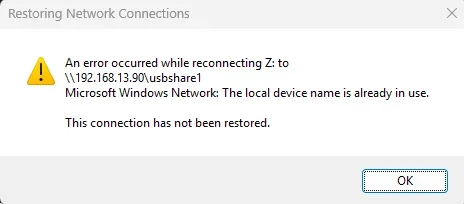
After waking up my Windows 11 Pro (25H2 26200.7462) from its "Sleep", that message below always pops up. After clicking OK and going to Explorer, I see the drive Z is there and accessible. There seems to be a window of time where it tries to connect and is unable to, pops up that message, and then some short time after that it finds it is unable to. If it wasn't a modal dialog it might have the ability to take it away.
Thoughts - this has been a very frequent thing for me, I've had it when that drive was plugged directly into my router, and on my previous Windows computers too. In the case of this particular one, I disabled the built-in wifi because it was too slow and have a much faster external USB wifi thing with antennas on it. I wonder if connecting to the remote drive happens before that USB is enabled. I doubt this because it happened prior to having this. I don't suspect the Synology NAS because it also happened when I had the drive plugged into the router (but stopped that because transfer rates were slow).
I'm hoping I can delay that reconnecting to the drive by a second and then this won't happen. Any ideas? Oh, and yes I do realize that "if this is my only problem I should feel grateful", yes I do, but it doesn't hurt to ask if this is a known issue.
My Computer
At a glance
Win11 Pro 25H2Intel Core Ultra 9 275HX32GBNVIDIA® GeForce RTX™ 5060 Laptop GPU
- OS
- Win11 Pro 25H2
- Computer type
- Laptop
- Manufacturer/Model
- Lenovo ThinkBook 16p G6 IAX
- CPU
- Intel Core Ultra 9 275HX
- Memory
- 32GB
- Graphics Card(s)
- NVIDIA® GeForce RTX™ 5060 Laptop GPU
- Monitor(s) Displays
- 3 external monitors, Samsung 43" super widescreen (providing 2x 1080p via separate inputs), 1x LG 27" 1080p
- Screen Resolution
- 2560x1600 and 3x 1920x1080
- Hard Drives
- 1TB SSD internal, 2x4TB SSD external
- Keyboard
- Logitech illuminated and silent thing
- Mouse
- Traditional MS Intellimouse
- Internet Speed
- 256Mb down/50Mb up
- Browser
- Chrome mostly, Edge for PDF's, Brave for YouTube
- Antivirus
- MalwareBytes/Defender
- Other Info
- Also an m4 Mac Mini for work dev stuff that I operate remotely via HelpWire.