Revoking vulnerable Windows boot managers


 Windows IT Pro Blog:

Editor's note 6.27.2024 – Microsoft's timeline for enforcement of the changes outlined in this post is currently under evaluation. We will provide an update once timing has been confirmed.

If you're worried about the BlackLotus UEFI bootkit vulnerability (CVE-2023-24932) and how it might affect your device's security, you'll be pleased to learn about the measures Microsoft is taking to help keep you safe.

Back in February, we shared steps you can take to prepare to update the Secure Boot trust anchors for Windows, as the existing ones are approaching expiry. With the update to the Secure Boot trust anchor, we can address the threat of all previous, potentially vulnerable Windows boot components by revoking the old trust anchor. To this effect, the April 9 security updates includes a new Secure Boot revocation update (DBX).

If you're interested in applying this revocation on systems with the updated trust anchors, this article describes how to do just that. For now, we strongly recommend the steps in this article for testing and validation only.

The security benefits of Secure Boot​

Secure Boot is a security feature in the Unified Extensible Firmware Interface (UEFI) that helps ensure that only trusted software runs during the system's boot sequence. We recommend the use of Secure Boot to help make a safe and trusted path from UEFI through the Windows kernels' Trusted Boot sequence.

As an industry standard, UEFI's Secure Boot defines how platform firmware manages certificates and authenticates firmware, and how the operating system (OS) interfaces with this process. For more details on UEFI and Secure Boot, refer to the Secure Boot page.

Secure Boot's main focus is to help protect the pre-boot environment from bootkit malware. A bootkit is a malicious program designed to load as early as possible in a device's boot sequence. Secure Boot helps ensure that only verified code executes before Windows. Verified code is firmware that runs early in the boot sequence, initializes the PC prior to the launch of Windows OS, and is trusted based on certificates configured in the firmware. Examples include UEFI firmware drivers, bootloaders, applications, and option ROMs (Read-Only Memory). Disabling Secure Boot puts a device at high risk of infection by bootkit malware.


Addressing the BlackLotus malware​

The BlackLotus malware exploits a known security vulnerability called “Baton Drop,” tracked by CVE-2022-21894. It bypasses Secure Boot and then installs malicious files to the EFI (Extensible Firmware Interface) System Partition (ESP), which are then launched by the UEFI firmware. Baton Drop allows rollback of Windows boot managers to previous vulnerable versions that are not in the Secure Boot Forbidden Signature Database (DBX). It then exploits the vulnerability in Windows boot manager as part of an attack. For more information, refer to Guidance for investigating attacks using CVE-2022-21894: The BlackLotus campaign.

Windows boot manager mitigations that we released previously​

To address this vulnerability, as part of the May 2023 servicing updates, we introduced a code integrity policy that blocked vulnerable Windows boot managers based on their version number. For versions of Windows boot manager that remained unaffected by this fix, we added them to the DBX.

However, we have found multiple cases that can bypass the rollback protections released during the May 2023 servicing updates. As a result, we are putting forth a more comprehensive solution that involves revoking the Microsoft Windows Production PCA (Product Certificate Authority) 2011.

New measures to help secure Windows boot managers​

Here are the next steps to help protect against the malicious abuse of vulnerable Windows boot managers:
  • What we're doing: As our current trust anchors are expiring in 2026, we're already migrating to new ones (catch up on this in KB5036210: Deploying Windows UEFI CA 2023 certificate to Secure Boot Allowed Signature Database). This transition allows us to revoke trust for the Windows signing certificate, Microsoft Windows Production PCA 2011. This Product Certificate authority (PCA) is currently used to authorize trust for all Windows boot managers in Secure Boot.
  • What you can do: Once you've followed the steps in KB5036210 to add the new Windows trust anchor, you can follow the optional steps below to revoke trust in the Windows Production PCA 2011. Note that the earlier KB cautions that these updates should be done on “representative sample test devices” first. At this time, we strongly recommend the same cautious approach. Take the steps described in this article on “representative sample test devices” before attempting to perform these steps on production devices.

Guidelines for evaluating the Secure Boot DBX update​

Understand the upcoming changes​

By applying the DBX update to a secure boot enabled device, that device will no longer be able to boot from any Windows boot manager signed by the Microsoft Windows Production PCA 2011. This includes booting through existing recovery media, USB media, and network boot (WSD/PXE/HTTP) servers that do not have updated boot manager components. PXE boot is especially likely to be impacted. That's because you cannot update the binaries served by PXE until all machines supported by the network boot server are updated to run with the new DB update.

Plan the deployment​

To prepare your device to receive the DBX update package, ensure that you have applied the DB update package first and deployed the new updated boot manager components signed by the Microsoft Windows UEFI CA 2023. Refer to KB5025885: How to manage the Windows boot manager revocations for Secure Boot changes associated wit... for more details.
  1. Confirm that your device has successfully applied the DB update package first. Open a PowerShell console and ensure that PowerShell is running as an administrator before running the following command:

    [System.Text.Encoding]::ASCII.GetString((Get-SecureBootUEFI db).bytes) -match ‘Windows UEFI CA 2023'

    large

    Screenshot of a PowerShell console with a command string.

    If the command returns “True,” the update was successful. In the case of errors while applying the DB update, refer to the article, KB5016061: Addressing vulnerable and revoked Boot Managers.
  2. After applying the April servicing updates, begin by testing the updates with individual devices. Test on the same firmware and specifications in the enterprise environment to minimize the risks in the case of firmware bugs in your devices.
  3. Verify that your UEFI firmware version is the most recent available version by your firmware vendor or OEM.
  4. For data backup steps, refer to this guide.
  5. If you use BitLocker, or if your enterprise has deployed BitLocker on your machine, Back up your BitLocker recovery key. See this portal to ensure that your BitLocker keys are backed up before your next reboot for your selfhost device. In the unlikely event that device becomes inoperable after receiving the update, you can still unlock the hard drive.
  6. For devices with third party full device or disk encryption, check with your disk encryption provider to perform your own set of tests before applying the update packages.
  7. For detailed instructions on applying the DBX updates, refer to KB5025885: How to manage the Windows boot manager revocations for Secure Boot changes associated wit....

Why you need to update the DB before applying the DBX update​

Note: You cannot apply the DBX update package through Windows updates on a device without first applying the DB update.

As part of the planning for the DB and DBX update packages, Microsoft, in collaboration with some of our OEM partners, has conducted extensive testing on various device configurations to detect and resolve any bugs in firmware implementations that could cause system failures or render a device unreceptive to these update packages. Despite our thorough testing, we acknowledge that we cannot cover every possible device configuration, so we strongly recommend customers to perform their own tests on their devices before applying the DB and DBX update packages.

Some of the associated risks with applying the DBX update package before updating the DB update package include:
  • The device firmware might encounter difficulties in processing the DB and DBX updates, leading to operational issues. In the handful of cases that we've encountered, we've notified the OEMs of the issue and blocked those devices from applying both DB and DBX updates until the issue can be remedied.
  • While unlikely, you might inadvertently cause BitLocker to enter recovery and lose Virtualization-based Security (VBS) protected secrets that are used by Windows Hello or Credential Guard.
  • Updating the PXE server to use 2023 signed binaries without applying the DB update first will cause the system to fail to boot, and inversely, applying the DBX update package will prevent any 2011 signed media from booting.
DO NOT apply the DBX to a device without DB update through manual update, using set-securebootuefi, as the system will not boot. Specifically, this will bypass the safety checks included in our servicing tool (Windows Updates) to guard against breaking issues. Update your device by relying on our published mitigations.

Continuing the journey of trust​

In short, to establish new trust anchors, you need to untrust the Microsoft Windows Production PCA 2011. These updates are only a part of Microsoft's ongoing dedication to security. Microsoft anticipates releasing DBX updates in the future, with a goal of achieving mandatory enforcement no sooner than January 2025. We encourage IT admins and enterprise customers to invest in building workflows that ensure an efficient rollout of these updates across their device fleet.

Make sure you're getting the most out of your security experience by checking out the following resources:

 Source:

 
Last edited:
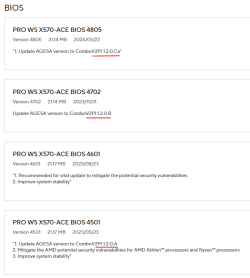
Sure enough. ASUS just released a new BIOS for my motherboard 30 days ago. :/

I see a "C" in the version number. ^^
I wonder what the lower case "a" after the "C" means? Alpha?
The older "A" and "B" versions, don't have a lower case "a" after the "A" or the "B".

Image1.png
 
Last edited:

My Computers My Computers

  • At a glance

    Win 11 Home ♦♦♦26200.8875 ♦♦♦♦♦♦♦25H2AMD Ryzen 7 3700XG.Skill (F4-3200C14D-16GTZKW)EVGA RTX 2070 (08G-P4-2171-KR)
    OS
    Win 11 Home ♦♦♦26200.8875 ♦♦♦♦♦♦♦25H2
    Computer type
    PC/Desktop
    Manufacturer/Model
    Built by Ghot® [May 2020]
    CPU
    AMD Ryzen 7 3700X
    Motherboard
    Asus Pro WS X570-ACE (BIOS 5302)
    Memory
    G.Skill (F4-3200C14D-16GTZKW)
    Graphics Card(s)
    EVGA RTX 2070 (08G-P4-2171-KR)
    Sound Card
    Realtek ALC1220P / ALC S1220A
    Monitor(s) Displays
    Dell U3011 30"
    Screen Resolution
    2560 x 1600
    Hard Drives
    2x Samsung 860 EVO 500GB,
    WD 4TB Black FZBX - SATA III,
    WD 8TB Black FZBX - SATA III,
    DRW-24B1ST CD/DVD Burner
    PSU
    PC Power & Cooling 750W Quad EPS12V
    Case
    Cooler Master ATCS 840 Tower
    Cooling
    CM Hyper 212 EVO (push/pull)
    Keyboard
    Ducky DK9008 Shine II Blue LED
    Mouse
    Logitech Optical M-100
    Internet Speed
    300/300
    Browser
    Firefox (latest)
    Antivirus
    Bitdefender Total Security
    Other Info
    Speakers: Klipsch Pro Media 2.1
  • At a glance

    Windows XP Pro 32bit w/SP3AMD Athlon 64 X2 5000+ (OC'd @ 3.2Ghz)TWIN2X2048-6400C4DHX (2 x 1GB, DDR2 800)EVGA 256-P2-N758-TR GeForce 8600GT SSC
    Operating System
    Windows XP Pro 32bit w/SP3
    Computer type
    PC/Desktop
    Manufacturer/Model
    Built by Ghot® (not in use)
    CPU
    AMD Athlon 64 X2 5000+ (OC'd @ 3.2Ghz)
    Motherboard
    ASUS M2N32-SLI Deluxe Wireless Edition
    Memory
    TWIN2X2048-6400C4DHX (2 x 1GB, DDR2 800)
    Graphics card(s)
    EVGA 256-P2-N758-TR GeForce 8600GT SSC
    Sound Card
    Onboard
    Monitor(s) Displays
    ViewSonic G90FB Black 19" Professional (CRT)
    Screen Resolution
    up to 2048 x 1536
    Hard Drives
    WD 36GB 10,000rpm Raptor SATA
    Seagate 80GB 7200rpm SATA
    Lite-On LTR-52246S CD/RW
    Lite-On LH-18A1P CD/DVD Burner
    PSU
    PC Power & Cooling Silencer 750 Quad EPS12V
    Case
    Generic Beige case, 80mm fans
    Cooling
    ZALMAN 9500A 92mm CPU Cooler
    Keyboard
    Logitech Classic Keybooard 200
    Mouse
    Logitech Optical M-BT96a
    Internet Speed
    300/300
    Browser
    Firefox 3.x ??
    Antivirus
    Symantec (Norton)
    Other Info
    Still assembled, still runs. Haven't turned it on for 15 years?
Sure enough. ASUS just released a new BIOS for my motherboard 30 days ago. :/

I see a "C" in the version number. ^^
I wonder what the lower case "a" after the "C" means? Alpha?
The older "A" and "B" versions, don't have a lower case "a" after the "A" or the "B".

View attachment 94377
the lower case letter probably indicates it's a Beta BIOS
 

My Computer My Computer

At a glance

Windows 11 Pro 25H2 (RP channel)AMD Ryzen 7 9800X3D 8-core64GB Corsair Titanium 6000/CL30MSI Suprim 5080 SOC
OS
Windows 11 Pro 25H2 (RP channel)
Computer type
PC/Desktop
Manufacturer/Model
MSI
CPU
AMD Ryzen 7 9800X3D 8-core
Motherboard
MEG X870E Godlike
Memory
64GB Corsair Titanium 6000/CL30
Graphics Card(s)
MSI Suprim 5080 SOC
Sound Card
Soundblaster AE-9
Monitor(s) Displays
ASUS TUF Gaming VG289Q
Screen Resolution
3840x2160
Hard Drives
Samsung 9100 Pro 4TB (gen 5 x4, system drive/games)
Samsung 990 Pro 2TB
Samsung 980 Pro 2TB
Samsung 870 Evo 4TB
Samsung 870 Evo 2TB
Samsung T9 4TB
PSU
Seasonic PX-2200
Case
Bequiet! Dark Base Pro 901
Cooling
Noctua NH-D15S Chromax black
Keyboard
Logitech G915 X (wired)
Mouse
Logitech G903 with PowerPlay charger
Internet Speed
900Mb/sec
Browser
Microsoft Edge
Antivirus
Windows Defender
That command fails on my 4 year old HP laptop. I'm not inclined to fiddle in case I break something.
 

My Computer My Computer

At a glance

Windows 11 ProCore i7-13700K64 GB Kingston Fury Beast DDR5Gigabyte GeForce RTX 2060 Super Gaming OC 8G
OS
Windows 11 Pro
Computer type
PC/Desktop
Manufacturer/Model
Self build
CPU
Core i7-13700K
Motherboard
Asus TUF Gaming Plus WiFi Z790
Memory
64 GB Kingston Fury Beast DDR5
Graphics Card(s)
Gigabyte GeForce RTX 2060 Super Gaming OC 8G
Sound Card
Realtek S1200A
Monitor(s) Displays
Viewsonic VP2770 & Dell (secondary)
Screen Resolution
2560 x 1440
Hard Drives
Kingston KC3000 2TB NVME SSD & SATA HDDs & SSD
PSU
EVGA SuperNova G2 850W
Case
Nanoxia Deep Silence 1
Cooling
Noctua NH-D14
Keyboard
Microsoft Digital Media Pro
Mouse
Logitech Wireless
Internet Speed
80 Mb / s
Browser
Chrome
Antivirus
Defender, Malwarebytes Free & AdwCleaner
@Ghot

ASUS just released a new BIOS for my motherboard 30 days ago


Thanks for that information.

Have you installed the new BIOS ? If yes, has it made any difference to USB boot methods ?

It seems to me that this whole cluster is full of jargon and double negatives. For example, we first have to "untrust" something or other, So I'm concerned that installing a new BIOS (in my case, from HP) will make unlisted but irrevocable changes that I may not want.
 

My Computer My Computer

At a glance

Windows 11Intel i5 10210U16GbIntel UHD
OS
Windows 11
Computer type
Laptop
Manufacturer/Model
HP 15s_du1xxx
CPU
Intel i5 10210U
Motherboard
85F1
Memory
16Gb
Graphics Card(s)
Intel UHD
Sound Card
Realtek
Screen Resolution
1920 x 1080
@Ghot

ASUS just released a new BIOS for my motherboard 30 days ago

Thanks for that information.

Have you installed the new BIOS ? If yes, has it made any difference to USB boot methods ?

It seems to me that this whole cluster is full of jargon and double negatives. For example, we first have to "untrust" something or other, So I'm concerned that installing a new BIOS (in my case, from HP) will make unlisted but irrevocable changes that I may not want.


As usual, I don't think MS is even trying to be clear on this.

But this is sort of like... renewing your drivers license?
MS wants us to toss out the old Secure Boot "certifications", and put some new ones in.

Supposedly, this will help protect our systems.

The really short version is like this... Just wait and see. If you have trouble with things that are supposed to be able to boot... like Windows or backup software rescue media, etc., just temporarily disable Secure Boot in the BIOS.
Then you should be able to boot.


Personally, I think MS is going to have to come up with a better solution, for the "regular" consumer.
This is more like... IT department stuff.

Me... I'm gonna wait a bit and hope MS does come up with a better solution.
They've got about 9 months to work on it. I'm not even going to flash the BIOS right away.

I'm thinking they should make something like the Enablement Packages with some simple instructions like...
Go into your BIOS, disable Secure Boot... apply the "Revocation Enablement Package", then re-enable Secure Boot?


One can only hope... I guess. :-)

Attn: @Brink
 

My Computers My Computers

  • At a glance

    Win 11 Home ♦♦♦26200.8875 ♦♦♦♦♦♦♦25H2AMD Ryzen 7 3700XG.Skill (F4-3200C14D-16GTZKW)EVGA RTX 2070 (08G-P4-2171-KR)
    OS
    Win 11 Home ♦♦♦26200.8875 ♦♦♦♦♦♦♦25H2
    Computer type
    PC/Desktop
    Manufacturer/Model
    Built by Ghot® [May 2020]
    CPU
    AMD Ryzen 7 3700X
    Motherboard
    Asus Pro WS X570-ACE (BIOS 5302)
    Memory
    G.Skill (F4-3200C14D-16GTZKW)
    Graphics Card(s)
    EVGA RTX 2070 (08G-P4-2171-KR)
    Sound Card
    Realtek ALC1220P / ALC S1220A
    Monitor(s) Displays
    Dell U3011 30"
    Screen Resolution
    2560 x 1600
    Hard Drives
    2x Samsung 860 EVO 500GB,
    WD 4TB Black FZBX - SATA III,
    WD 8TB Black FZBX - SATA III,
    DRW-24B1ST CD/DVD Burner
    PSU
    PC Power & Cooling 750W Quad EPS12V
    Case
    Cooler Master ATCS 840 Tower
    Cooling
    CM Hyper 212 EVO (push/pull)
    Keyboard
    Ducky DK9008 Shine II Blue LED
    Mouse
    Logitech Optical M-100
    Internet Speed
    300/300
    Browser
    Firefox (latest)
    Antivirus
    Bitdefender Total Security
    Other Info
    Speakers: Klipsch Pro Media 2.1
  • At a glance

    Windows XP Pro 32bit w/SP3AMD Athlon 64 X2 5000+ (OC'd @ 3.2Ghz)TWIN2X2048-6400C4DHX (2 x 1GB, DDR2 800)EVGA 256-P2-N758-TR GeForce 8600GT SSC
    Operating System
    Windows XP Pro 32bit w/SP3
    Computer type
    PC/Desktop
    Manufacturer/Model
    Built by Ghot® (not in use)
    CPU
    AMD Athlon 64 X2 5000+ (OC'd @ 3.2Ghz)
    Motherboard
    ASUS M2N32-SLI Deluxe Wireless Edition
    Memory
    TWIN2X2048-6400C4DHX (2 x 1GB, DDR2 800)
    Graphics card(s)
    EVGA 256-P2-N758-TR GeForce 8600GT SSC
    Sound Card
    Onboard
    Monitor(s) Displays
    ViewSonic G90FB Black 19" Professional (CRT)
    Screen Resolution
    up to 2048 x 1536
    Hard Drives
    WD 36GB 10,000rpm Raptor SATA
    Seagate 80GB 7200rpm SATA
    Lite-On LTR-52246S CD/RW
    Lite-On LH-18A1P CD/DVD Burner
    PSU
    PC Power & Cooling Silencer 750 Quad EPS12V
    Case
    Generic Beige case, 80mm fans
    Cooling
    ZALMAN 9500A 92mm CPU Cooler
    Keyboard
    Logitech Classic Keybooard 200
    Mouse
    Logitech Optical M-BT96a
    Internet Speed
    300/300
    Browser
    Firefox 3.x ??
    Antivirus
    Symantec (Norton)
    Other Info
    Still assembled, still runs. Haven't turned it on for 15 years?
Ghot

just temporarily disable Secure Boot in the BIOS

Yeah, that's where I'm at and staying there until, as you are, sunlight beams down us.

Appreciate your answer, especially on the BIOS "upgrade". We seem to share the same unease.

Just to increase that unease, it happened to me about 15 months ago that I finished reinstalling a full Macrium image (I'd fouled up a new CAD upgrade, being courageous in the Yes Minister sense) - no worries, done that many times - but on the required reboot and with no warning or foreknowledge the screen suddenly froze with a big notice from HP (so it said) that a BIOS upgrade was occurring and the PC was not to be turned off. Since I had never requested or even inquired on this, this provoked a most uneasy time. Took so long I thought it had fouled up but eventually the PC rebooted and settled on the Macrium image install. To this day, I do not know what that forced "upgrade" achieved since I have not detected any change in the BIOS UEFI menus.

As you say, we can hope.
 

My Computer My Computer

At a glance

Windows 11Intel i5 10210U16GbIntel UHD
OS
Windows 11
Computer type
Laptop
Manufacturer/Model
HP 15s_du1xxx
CPU
Intel i5 10210U
Motherboard
85F1
Memory
16Gb
Graphics Card(s)
Intel UHD
Sound Card
Realtek
Screen Resolution
1920 x 1080
To this day, I do not know what that forced "upgrade" achieved since I have not detected any change in the BIOS UEFI menus.


You won't "see" any obvious changes in the BIOS. It will be just the normally invisible Secure Boot certifications.


Here's the last time this came up. July or August, last year...


When MS changed the Secure Boot certifications, any bootable media... stopped booting.
So we had to either... disable Secure Boot, or recreate the bootable media... with MS's new Win 11 PE download.


The 3rd paragraph in the first post of this topic.... pretty much says it all...

If you're interested in applying this revocation on systems with the updated trust anchors, this article describes how to do just that. For now, we strongly recommend the steps in this article for testing and validation only.


So I would suggest that everyone just.... wait and see.
99% of us are not really on the hacker's to-do lists anyway.
The hackers are after the Fortune 500 folk and those that control things like the electrical grid... etc. :-)


Remember: This is a "News" article... not a tutorial.
 
Last edited:

My Computers My Computers

  • At a glance

    Win 11 Home ♦♦♦26200.8875 ♦♦♦♦♦♦♦25H2AMD Ryzen 7 3700XG.Skill (F4-3200C14D-16GTZKW)EVGA RTX 2070 (08G-P4-2171-KR)
    OS
    Win 11 Home ♦♦♦26200.8875 ♦♦♦♦♦♦♦25H2
    Computer type
    PC/Desktop
    Manufacturer/Model
    Built by Ghot® [May 2020]
    CPU
    AMD Ryzen 7 3700X
    Motherboard
    Asus Pro WS X570-ACE (BIOS 5302)
    Memory
    G.Skill (F4-3200C14D-16GTZKW)
    Graphics Card(s)
    EVGA RTX 2070 (08G-P4-2171-KR)
    Sound Card
    Realtek ALC1220P / ALC S1220A
    Monitor(s) Displays
    Dell U3011 30"
    Screen Resolution
    2560 x 1600
    Hard Drives
    2x Samsung 860 EVO 500GB,
    WD 4TB Black FZBX - SATA III,
    WD 8TB Black FZBX - SATA III,
    DRW-24B1ST CD/DVD Burner
    PSU
    PC Power & Cooling 750W Quad EPS12V
    Case
    Cooler Master ATCS 840 Tower
    Cooling
    CM Hyper 212 EVO (push/pull)
    Keyboard
    Ducky DK9008 Shine II Blue LED
    Mouse
    Logitech Optical M-100
    Internet Speed
    300/300
    Browser
    Firefox (latest)
    Antivirus
    Bitdefender Total Security
    Other Info
    Speakers: Klipsch Pro Media 2.1
  • At a glance

    Windows XP Pro 32bit w/SP3AMD Athlon 64 X2 5000+ (OC'd @ 3.2Ghz)TWIN2X2048-6400C4DHX (2 x 1GB, DDR2 800)EVGA 256-P2-N758-TR GeForce 8600GT SSC
    Operating System
    Windows XP Pro 32bit w/SP3
    Computer type
    PC/Desktop
    Manufacturer/Model
    Built by Ghot® (not in use)
    CPU
    AMD Athlon 64 X2 5000+ (OC'd @ 3.2Ghz)
    Motherboard
    ASUS M2N32-SLI Deluxe Wireless Edition
    Memory
    TWIN2X2048-6400C4DHX (2 x 1GB, DDR2 800)
    Graphics card(s)
    EVGA 256-P2-N758-TR GeForce 8600GT SSC
    Sound Card
    Onboard
    Monitor(s) Displays
    ViewSonic G90FB Black 19" Professional (CRT)
    Screen Resolution
    up to 2048 x 1536
    Hard Drives
    WD 36GB 10,000rpm Raptor SATA
    Seagate 80GB 7200rpm SATA
    Lite-On LTR-52246S CD/RW
    Lite-On LH-18A1P CD/DVD Burner
    PSU
    PC Power & Cooling Silencer 750 Quad EPS12V
    Case
    Generic Beige case, 80mm fans
    Cooling
    ZALMAN 9500A 92mm CPU Cooler
    Keyboard
    Logitech Classic Keybooard 200
    Mouse
    Logitech Optical M-BT96a
    Internet Speed
    300/300
    Browser
    Firefox 3.x ??
    Antivirus
    Symantec (Norton)
    Other Info
    Still assembled, still runs. Haven't turned it on for 15 years?
I said it before and I'll say it again...Despite all their "extensive testing" with different configurations, before it's over with, this whole secure boot revocation ball and wax will cause misery for some users. There's entirely too much double-talk and gray area involved for John Q Public to understand what the hell is going on.

Here's what I wonder. For those of us who choose to keep secure boot off, will we be denied future release upgrades (ie 24h2). I think we will. I think 24h2 will include not only the DB update package, but the DBX update package as well. It's my thought when windows update detects secure boot to be off, the upgrade will fail...or won't be offered in the first place until the user turns secure boot on as well as be running the latest UEFI bios version.

Does my reasoning hold water?
 

My Computers My Computers

  • At a glance

    Windows 11 Pro 25H2 26200.8875i9-10900 10 core 20 threads32 gbnone-Intel UHD Graphics 630
    OS
    Windows 11 Pro 25H2 26200.8875
    Computer type
    PC/Desktop
    Manufacturer/Model
    Dell Optiplex 7080
    CPU
    i9-10900 10 core 20 threads
    Motherboard
    DELL 0J37VM
    Memory
    32 gb
    Graphics Card(s)
    none-Intel UHD Graphics 630
    Sound Card
    Integrated Realtek
    Monitor(s) Displays
    Benq 27
    Screen Resolution
    2560x1440
    Hard Drives
    2x1tb Solidigm m.2 nvme /External drives 512gb Samsung m.2 sata+2tb Kingston m2.nvme
    PSU
    500w
    Case
    MT
    Cooling
    Dell Premium
    Keyboard
    Logitech wired
    Mouse
    Logitech wireless
    Internet Speed
    so slow I'm too embarrassed to tell
    Browser
    #1 Edge #2 Firefox
    Antivirus
    Defender+MWB Premium
  • At a glance

    Windows 11 Pro 24H2 26200.8875AMD Ryzen 7 6800U32 gbintegrated
    Operating System
    Windows 11 Pro 24H2 26200.8875
    Computer type
    PC/Desktop
    Manufacturer/Model
    Beelink Mini PC SER5
    CPU
    AMD Ryzen 7 6800U
    Memory
    32 gb
    Graphics card(s)
    integrated
    Sound Card
    integrated
    Monitor(s) Displays
    Benq 27
    Screen Resolution
    2560x1440
    Hard Drives
    1TB Crucial nvme
    Keyboard
    Logitech wired
    Mouse
    Logitech wireless
    Internet Speed
    still too embarrassed to tell
    Browser
    Firefox
    Antivirus
    Defender
    Other Info
    System 3 is non compliant Dell 9020 i7-4770/24gb ram Win11 PRO 26200.8875
I said it before and I'll say it again...Despite all their "extensive testing" with different configurations, before it's over with, this whole secure boot revocation ball and wax will cause misery for some users. There's entirely too much double-talk and gray area involved for John Q Public to understand what the hell is going on.

Here's what I wonder. For those of us who choose to keep secure boot off, will we be denied future release upgrades (ie 24h2). I think we will. I think 24h2 will include not only the DB update package, but the DBX update package as well. It's my thought when windows update detects secure boot to be off, the upgrade will fail...or won't be offered in the first place until the user turns secure boot on as well as be running the latest UEFI bios version.

Does my reasoning hold water?
I can run 24H2 on my VirtualBox VM that doesn't even have a TPM (I used a workaround to install it) but it does run.
I *hope* secure boot doesn't become a requirement
 

My Computer My Computer

At a glance

Windows 11 Pro 25H2 (RP channel)AMD Ryzen 7 9800X3D 8-core64GB Corsair Titanium 6000/CL30MSI Suprim 5080 SOC
OS
Windows 11 Pro 25H2 (RP channel)
Computer type
PC/Desktop
Manufacturer/Model
MSI
CPU
AMD Ryzen 7 9800X3D 8-core
Motherboard
MEG X870E Godlike
Memory
64GB Corsair Titanium 6000/CL30
Graphics Card(s)
MSI Suprim 5080 SOC
Sound Card
Soundblaster AE-9
Monitor(s) Displays
ASUS TUF Gaming VG289Q
Screen Resolution
3840x2160
Hard Drives
Samsung 9100 Pro 4TB (gen 5 x4, system drive/games)
Samsung 990 Pro 2TB
Samsung 980 Pro 2TB
Samsung 870 Evo 4TB
Samsung 870 Evo 2TB
Samsung T9 4TB
PSU
Seasonic PX-2200
Case
Bequiet! Dark Base Pro 901
Cooling
Noctua NH-D15S Chromax black
Keyboard
Logitech G915 X (wired)
Mouse
Logitech G903 with PowerPlay charger
Internet Speed
900Mb/sec
Browser
Microsoft Edge
Antivirus
Windows Defender
A note:
If a user has TPM 2.0 then Microsoft want those affected to not apply the fix.
 

My Computers My Computers

  • At a glance

    Windows 11 Pro 64bit6th Gen Intel Core i7-6700HQ Quad Core proces...16GB HyperX IMPACT 1600MHz SODIMM DDR3 (2 x 8GB)NVIDIA® GeForce® GTX 960M - 2.0GB DDR5 Video ...
    OS
    Windows 11 Pro 64bit
    Computer type
    Laptop
    Manufacturer/Model
    PC Specialist Optimus VII V17-960 Gaming Laptop.
    CPU
    6th Gen Intel Core i7-6700HQ Quad Core processor.
    Memory
    16GB HyperX IMPACT 1600MHz SODIMM DDR3 (2 x 8GB)
    Graphics Card(s)
    NVIDIA® GeForce® GTX 960M - 2.0GB DDR5 Video RAM - DirectX® 12
    Sound Card
    Intel 2 Channel High Def. Audio + SoundBlaster™ Cinema 2 & Realtek
    Monitor(s) Displays
    Optimus Series: 17.3" Matte Full HD IPS LED Widescreen (1920x1080)
    Screen Resolution
    Full HD IPS display (1920 x 1080).
    Hard Drives
    4TB SSD (internal).
    1x 1TB & 1x 5TB external HDDs.
    Cooling
    STANDARD THERMAL PASTE FOR SUFFICIENT COOLING
    Keyboard
    Logitech K800 wireless keyboard
    Mouse
    Logitech M705 wireless mouse
    Internet Speed
    Upto 100Mbps
    Browser
    Edge.
    Antivirus
    Windows Defender & MalwareBytes pro.
  • At a glance

    IOS 14.6
    Operating System
    IOS 14.6
    Computer type
    Tablet
    Manufacturer/Model
    Apple
A note:
If a user has TPM 2.0 then Microsoft want those affected to not apply the fix.
I believe that is only for Windows Server 2012 and Windows Server 2012 R2. My Windows 11 Pro in Beta channel got and installed these perfectly fine.
 

My Computer My Computer

At a glance

Windows 11 Pro 64bit (release preview channel)i5 840016 GB DDR4RTX 3060 Ti
OS
Windows 11 Pro 64bit (release preview channel)
Computer type
PC/Desktop
Manufacturer/Model
Asus
CPU
i5 8400
Motherboard
ROG STRIX Z370-H GAMING
Memory
16 GB DDR4
Graphics Card(s)
RTX 3060 Ti
Sound Card
On Board
Monitor(s) Displays
Acer VG242Y P
Screen Resolution
1080p
Hard Drives
Intel 660p SSD
PSU
800w
Internet Speed
1000 Mbps
I believe that is only for Windows Server 2012 and Windows Server 2012 R2. My Windows 11 Pro in Beta channel got and installed these perfectly fine.
Thanks. I did see those mentioned but knowing Microsoft thought it may affect Home/Pro users as well.
 

My Computers My Computers

  • At a glance

    Windows 11 Pro 64bit6th Gen Intel Core i7-6700HQ Quad Core proces...16GB HyperX IMPACT 1600MHz SODIMM DDR3 (2 x 8GB)NVIDIA® GeForce® GTX 960M - 2.0GB DDR5 Video ...
    OS
    Windows 11 Pro 64bit
    Computer type
    Laptop
    Manufacturer/Model
    PC Specialist Optimus VII V17-960 Gaming Laptop.
    CPU
    6th Gen Intel Core i7-6700HQ Quad Core processor.
    Memory
    16GB HyperX IMPACT 1600MHz SODIMM DDR3 (2 x 8GB)
    Graphics Card(s)
    NVIDIA® GeForce® GTX 960M - 2.0GB DDR5 Video RAM - DirectX® 12
    Sound Card
    Intel 2 Channel High Def. Audio + SoundBlaster™ Cinema 2 & Realtek
    Monitor(s) Displays
    Optimus Series: 17.3" Matte Full HD IPS LED Widescreen (1920x1080)
    Screen Resolution
    Full HD IPS display (1920 x 1080).
    Hard Drives
    4TB SSD (internal).
    1x 1TB & 1x 5TB external HDDs.
    Cooling
    STANDARD THERMAL PASTE FOR SUFFICIENT COOLING
    Keyboard
    Logitech K800 wireless keyboard
    Mouse
    Logitech M705 wireless mouse
    Internet Speed
    Upto 100Mbps
    Browser
    Edge.
    Antivirus
    Windows Defender & MalwareBytes pro.
  • At a glance

    IOS 14.6
    Operating System
    IOS 14.6
    Computer type
    Tablet
    Manufacturer/Model
    Apple
To those who have Macrium & have applied the revocation & therefore updated the boot manager:
Have you tested the Macrium boot USB/media? For me the USB no longer works unless I turn off secure boot but the Macrium boot entry when starting Windows works fine.
Seems Macrium need to update their USB recovery media or I need to check up on how to do this with my USB.
 

My Computers My Computers

  • At a glance

    Windows 11 Pro 64bit6th Gen Intel Core i7-6700HQ Quad Core proces...16GB HyperX IMPACT 1600MHz SODIMM DDR3 (2 x 8GB)NVIDIA® GeForce® GTX 960M - 2.0GB DDR5 Video ...
    OS
    Windows 11 Pro 64bit
    Computer type
    Laptop
    Manufacturer/Model
    PC Specialist Optimus VII V17-960 Gaming Laptop.
    CPU
    6th Gen Intel Core i7-6700HQ Quad Core processor.
    Memory
    16GB HyperX IMPACT 1600MHz SODIMM DDR3 (2 x 8GB)
    Graphics Card(s)
    NVIDIA® GeForce® GTX 960M - 2.0GB DDR5 Video RAM - DirectX® 12
    Sound Card
    Intel 2 Channel High Def. Audio + SoundBlaster™ Cinema 2 & Realtek
    Monitor(s) Displays
    Optimus Series: 17.3" Matte Full HD IPS LED Widescreen (1920x1080)
    Screen Resolution
    Full HD IPS display (1920 x 1080).
    Hard Drives
    4TB SSD (internal).
    1x 1TB & 1x 5TB external HDDs.
    Cooling
    STANDARD THERMAL PASTE FOR SUFFICIENT COOLING
    Keyboard
    Logitech K800 wireless keyboard
    Mouse
    Logitech M705 wireless mouse
    Internet Speed
    Upto 100Mbps
    Browser
    Edge.
    Antivirus
    Windows Defender & MalwareBytes pro.
  • At a glance

    IOS 14.6
    Operating System
    IOS 14.6
    Computer type
    Tablet
    Manufacturer/Model
    Apple
If you use Macrium Free, you will have to continue disabling secure boot for its boot media to work. If you use paid Macrium 8.1 here's how to create new boot media that addresses the secure boot revocations but this will not work in 8.0.
 

My Computers My Computers

  • At a glance

    Windows 11 Pro 25H2 26200.8875i9-10900 10 core 20 threads32 gbnone-Intel UHD Graphics 630
    OS
    Windows 11 Pro 25H2 26200.8875
    Computer type
    PC/Desktop
    Manufacturer/Model
    Dell Optiplex 7080
    CPU
    i9-10900 10 core 20 threads
    Motherboard
    DELL 0J37VM
    Memory
    32 gb
    Graphics Card(s)
    none-Intel UHD Graphics 630
    Sound Card
    Integrated Realtek
    Monitor(s) Displays
    Benq 27
    Screen Resolution
    2560x1440
    Hard Drives
    2x1tb Solidigm m.2 nvme /External drives 512gb Samsung m.2 sata+2tb Kingston m2.nvme
    PSU
    500w
    Case
    MT
    Cooling
    Dell Premium
    Keyboard
    Logitech wired
    Mouse
    Logitech wireless
    Internet Speed
    so slow I'm too embarrassed to tell
    Browser
    #1 Edge #2 Firefox
    Antivirus
    Defender+MWB Premium
  • At a glance

    Windows 11 Pro 24H2 26200.8875AMD Ryzen 7 6800U32 gbintegrated
    Operating System
    Windows 11 Pro 24H2 26200.8875
    Computer type
    PC/Desktop
    Manufacturer/Model
    Beelink Mini PC SER5
    CPU
    AMD Ryzen 7 6800U
    Memory
    32 gb
    Graphics card(s)
    integrated
    Sound Card
    integrated
    Monitor(s) Displays
    Benq 27
    Screen Resolution
    2560x1440
    Hard Drives
    1TB Crucial nvme
    Keyboard
    Logitech wired
    Mouse
    Logitech wireless
    Internet Speed
    still too embarrassed to tell
    Browser
    Firefox
    Antivirus
    Defender
    Other Info
    System 3 is non compliant Dell 9020 i7-4770/24gb ram Win11 PRO 26200.8875
I have applied the current revocations to my Windows 11 install and thru trial and error finally got the Macrium rescue flash drive to boot without having to disable Secure Boot in the Bios. The correct boot manger files with the Windows UEFI CA 2023 certificates were not being copied to my flash drive. I copied the correct files from the EFI/System partition from my Windows drive. I then copied those files to the Macrium rescue drive. I was then able to boot the rescue drive with Secure Boot enabled. Macrium needs to update their software.
 

My Computer My Computer

At a glance

Windows 11i9-12900KCorsair DDR5 5600MHzAsus 3080
OS
Windows 11
Computer type
PC/Desktop
CPU
i9-12900K
Motherboard
Asus Apex Z690
Memory
Corsair DDR5 5600MHz
Graphics Card(s)
Asus 3080
Sound Card
Creativelabs ZxR
Monitor(s) Displays
Dell Alienware AW3418DW
Hard Drives
Firecuda 530 NVMe
PSU
Corsair AX1600i
Cooling
Corsair H170i
Antivirus
Norton
I have applied the current revocations to my Windows 11 install and thru trial and error finally got the Macrium rescue flash drive to boot without having to disable Secure Boot in the Bios. The correct boot manger files with the Windows UEFI CA 2023 certificates were not being copied to my flash drive. I copied the correct files from the EFI/System partition from my Windows drive. I then copied those files to the Macrium rescue drive. I was then able to boot the rescue drive with Secure Boot enabled. Macrium needs to update their software.
Can you supply step by step instructions?
 

My Computers My Computers

  • At a glance

    Windows 11 Pro 64bit6th Gen Intel Core i7-6700HQ Quad Core proces...16GB HyperX IMPACT 1600MHz SODIMM DDR3 (2 x 8GB)NVIDIA® GeForce® GTX 960M - 2.0GB DDR5 Video ...
    OS
    Windows 11 Pro 64bit
    Computer type
    Laptop
    Manufacturer/Model
    PC Specialist Optimus VII V17-960 Gaming Laptop.
    CPU
    6th Gen Intel Core i7-6700HQ Quad Core processor.
    Memory
    16GB HyperX IMPACT 1600MHz SODIMM DDR3 (2 x 8GB)
    Graphics Card(s)
    NVIDIA® GeForce® GTX 960M - 2.0GB DDR5 Video RAM - DirectX® 12
    Sound Card
    Intel 2 Channel High Def. Audio + SoundBlaster™ Cinema 2 & Realtek
    Monitor(s) Displays
    Optimus Series: 17.3" Matte Full HD IPS LED Widescreen (1920x1080)
    Screen Resolution
    Full HD IPS display (1920 x 1080).
    Hard Drives
    4TB SSD (internal).
    1x 1TB & 1x 5TB external HDDs.
    Cooling
    STANDARD THERMAL PASTE FOR SUFFICIENT COOLING
    Keyboard
    Logitech K800 wireless keyboard
    Mouse
    Logitech M705 wireless mouse
    Internet Speed
    Upto 100Mbps
    Browser
    Edge.
    Antivirus
    Windows Defender & MalwareBytes pro.
  • At a glance

    IOS 14.6
    Operating System
    IOS 14.6
    Computer type
    Tablet
    Manufacturer/Model
    Apple
If you use Macrium Free, you will have to continue disabling secure boot for its boot media to work. If you use paid Macrium 8.1 here's how to create new boot media that addresses the secure boot revocations but this will not work in 8.0.
Thanks glasscutter but those seem to be out of date for use after enabling the revocation.
I will try it although I have rebuilt the media.
 

My Computers My Computers

  • At a glance

    Windows 11 Pro 64bit6th Gen Intel Core i7-6700HQ Quad Core proces...16GB HyperX IMPACT 1600MHz SODIMM DDR3 (2 x 8GB)NVIDIA® GeForce® GTX 960M - 2.0GB DDR5 Video ...
    OS
    Windows 11 Pro 64bit
    Computer type
    Laptop
    Manufacturer/Model
    PC Specialist Optimus VII V17-960 Gaming Laptop.
    CPU
    6th Gen Intel Core i7-6700HQ Quad Core processor.
    Memory
    16GB HyperX IMPACT 1600MHz SODIMM DDR3 (2 x 8GB)
    Graphics Card(s)
    NVIDIA® GeForce® GTX 960M - 2.0GB DDR5 Video RAM - DirectX® 12
    Sound Card
    Intel 2 Channel High Def. Audio + SoundBlaster™ Cinema 2 & Realtek
    Monitor(s) Displays
    Optimus Series: 17.3" Matte Full HD IPS LED Widescreen (1920x1080)
    Screen Resolution
    Full HD IPS display (1920 x 1080).
    Hard Drives
    4TB SSD (internal).
    1x 1TB & 1x 5TB external HDDs.
    Cooling
    STANDARD THERMAL PASTE FOR SUFFICIENT COOLING
    Keyboard
    Logitech K800 wireless keyboard
    Mouse
    Logitech M705 wireless mouse
    Internet Speed
    Upto 100Mbps
    Browser
    Edge.
    Antivirus
    Windows Defender & MalwareBytes pro.
  • At a glance

    IOS 14.6
    Operating System
    IOS 14.6
    Computer type
    Tablet
    Manufacturer/Model
    Apple
All of this is in the Microsoft KB5025885: How to manage the Windows Boot Manager revocations for Secure Boot changes associated with CVE-2023-24932


Mount the EFI partition to copy

Admin Command Prompt Type: mountvol s: /s


Copy the Boot Manger Files

Admin Command Prompt Type:

copy s:\EFI\Boot\bootx64.efi c:\bootx64.efi

copy S:\EFI\Microsoft\Boot\bootmgfw.efi c:\bootmgfw.efi

You should have the two files bootx64.efi and bootmgfw.efi in the root of the C drive


If you get an error copying the files "mountvol s: /s The directory is not empty"

Admin Command Prompt Type: mountvol s: /d

Try the copy command again


View the properties of the two files to verify the Digital Signatures

Click Properties of the File

Select the Digital Signature Tab

In the Signature list click Microsoft Windows and the click "Details" and then click "View Certificate"

The Certificate information should show

Issued by: Windows UEFI CA 2023 (if it shows Windows UEFI CA 2011 you have not updated the boot manager files correctly to the EFI/System partition)


The location of these two files in my Macrium Rescue flash drive (N) are

\EFI\Boot\bootx64.efi

\EFI\Microsoft\Boot\bootmgfw.efi


I first replaced the existing "bootx64.efi" in the Rescue Flash drive directory with the extracted "bootx64.efi" file. I verified the certificate again because I'm paranoid.

I was able to boot the Macrium Rescue flash drive wit Secure Boot enabled and without getting the Bios error ""Secure Boot Violation" The System found unauthorized changes on the Firmware, Operation System, or UEFI drivers"

Since I was able to boot the Rescue drive I did not need to also replace the "bootmgfw.efi" file.

I also tried rebuilding the Rescue flash drive and the current version of the Macrium software overwrote the "bootx64.efi" with the older version with the revoked certificate 2011.
 

My Computer My Computer

At a glance

Windows 11i9-12900KCorsair DDR5 5600MHzAsus 3080
OS
Windows 11
Computer type
PC/Desktop
CPU
i9-12900K
Motherboard
Asus Apex Z690
Memory
Corsair DDR5 5600MHz
Graphics Card(s)
Asus 3080
Sound Card
Creativelabs ZxR
Monitor(s) Displays
Dell Alienware AW3418DW
Hard Drives
Firecuda 530 NVMe
PSU
Corsair AX1600i
Cooling
Corsair H170i
Antivirus
Norton
Thank you @catch36, worked a treat.
I read the instructions on the MS site but wondered whether it would work for Macrium. May now try updating the installation media.
 

My Computers My Computers

  • At a glance

    Windows 11 Pro 64bit6th Gen Intel Core i7-6700HQ Quad Core proces...16GB HyperX IMPACT 1600MHz SODIMM DDR3 (2 x 8GB)NVIDIA® GeForce® GTX 960M - 2.0GB DDR5 Video ...
    OS
    Windows 11 Pro 64bit
    Computer type
    Laptop
    Manufacturer/Model
    PC Specialist Optimus VII V17-960 Gaming Laptop.
    CPU
    6th Gen Intel Core i7-6700HQ Quad Core processor.
    Memory
    16GB HyperX IMPACT 1600MHz SODIMM DDR3 (2 x 8GB)
    Graphics Card(s)
    NVIDIA® GeForce® GTX 960M - 2.0GB DDR5 Video RAM - DirectX® 12
    Sound Card
    Intel 2 Channel High Def. Audio + SoundBlaster™ Cinema 2 & Realtek
    Monitor(s) Displays
    Optimus Series: 17.3" Matte Full HD IPS LED Widescreen (1920x1080)
    Screen Resolution
    Full HD IPS display (1920 x 1080).
    Hard Drives
    4TB SSD (internal).
    1x 1TB & 1x 5TB external HDDs.
    Cooling
    STANDARD THERMAL PASTE FOR SUFFICIENT COOLING
    Keyboard
    Logitech K800 wireless keyboard
    Mouse
    Logitech M705 wireless mouse
    Internet Speed
    Upto 100Mbps
    Browser
    Edge.
    Antivirus
    Windows Defender & MalwareBytes pro.
  • At a glance

    IOS 14.6
    Operating System
    IOS 14.6
    Computer type
    Tablet
    Manufacturer/Model
    Apple

Latest Support Threads

Back
Top Bottom