hellothere
New member
- Local time
- 4:55 AM
- Posts
- 2
- OS
- Windows 11
Hello
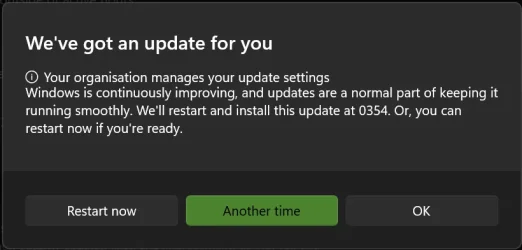
I have been trying for a while to find a way to prevent the fullscreen-intruding Windows update pop-up as pictured below.
"We've got an update for you" and three buttons: Restart Now, Another Time, and OK.
Windows presents this annoying distraction while I am concentrating on something and typing, where I sometimes immediately hit the spacebar and accidentally dismiss it. This last time, I was watching a movie and during a pivotal moment (the music stops and the characters go silent) "We've got an update for you" pops up.
I'm starting to feel that kind of paranoia in which the expectation of an interruption at any time becomes itself an interruption.
So far I have followed the steps in this article: Turn off windows update pop up window - Microsoft Q&A
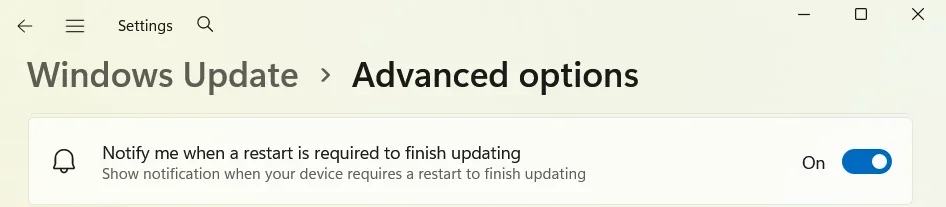
All update notification related settings in Settings are disabled. This particular message box remains undefeated.
I did a search here but couldn't find any related topics. I don't want to pause updates for 5 weeks (maximum in the list), but I might do that if nobody has a way of preventing this message box from appearing. Thank you for reading this far and giving this some consideration.
I have been trying for a while to find a way to prevent the fullscreen-intruding Windows update pop-up as pictured below.
"We've got an update for you" and three buttons: Restart Now, Another Time, and OK.
Windows presents this annoying distraction while I am concentrating on something and typing, where I sometimes immediately hit the spacebar and accidentally dismiss it. This last time, I was watching a movie and during a pivotal moment (the music stops and the characters go silent) "We've got an update for you" pops up.
I'm starting to feel that kind of paranoia in which the expectation of an interruption at any time becomes itself an interruption.
So far I have followed the steps in this article: Turn off windows update pop up window - Microsoft Q&A
All update notification related settings in Settings are disabled. This particular message box remains undefeated.
I did a search here but couldn't find any related topics. I don't want to pause updates for 5 weeks (maximum in the list), but I might do that if nobody has a way of preventing this message box from appearing. Thank you for reading this far and giving this some consideration.
- Windows Build/Version
- 25H2
Attachments
My Computer
At a glance
Windows 11
- OS
- Windows 11
- Computer type
- PC/Desktop