
Right Click on Start, several items not working. Also Run As Administrator "mostly" not working.


suchy101

Member
Local time
7:47 AM
Posts
7
OS
Windows 11 25H2 26200.7705
Hello,

I have a very old Windows 11 install. At least 4-5 years old. Have had to run in-place reinstall once on it, a long, long time ago, it was successful. Did not have any issues for years.

Recently however I started noticing a couple of things.
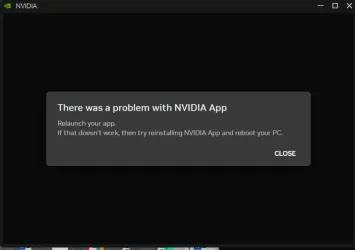
First it was the nVidia APP - when I try to launch it, it opens its window, I get the green spinning wheel for a while and then an error message "There was a problem with NVIDIA App.
1770196849121.webp

its asking to reinstall. When doing so sometimes it would launch straight after install, most times it wont, and most definitely after a restart it does not anymore.

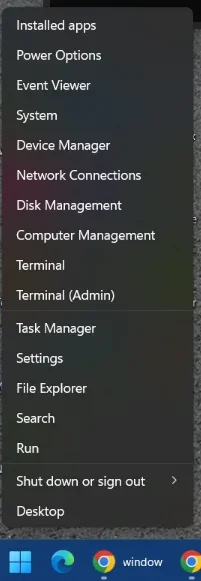
I am mentioning this only because seemingly it coincided with the other issues I am having - when I right-click on the start button
1770196953472.webp

Several items do not respond, as In the popup disappears and nothing happens. Those are Event Viewer, Device Manager, Disk Management, Computer Management, Task Manager, File Explorer,

When I right-click on the taskbar and pick Task Manager from there, it opens normally.

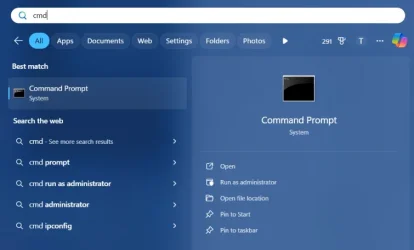
Then if I type CMD after clicking the START button and click on the "Run as administrator" on the right, nothing happens. All the other items work, such as "Open", "Open File Location" etc.
1770197116266.webp

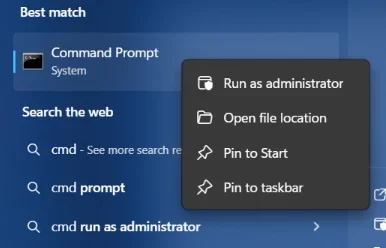
Right Click on this CMD and selecting Run As Administrator also does not work, other items here still work.
1770197230942.webp

If I follow "open File Location" from here,:
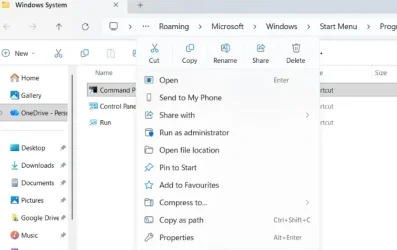
1770197351357.webp

Run As Administrator still does not work. But If I do "Open File Location " again from here:
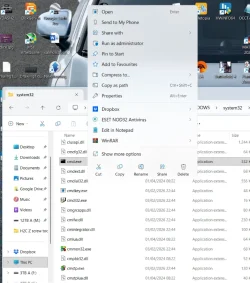
1770197413576.webp

doing right click on the actual EXE and Run As Administrator does work from here ...

So this is my problem, or at least the extent of it as far as what I noticed so far.

Steps I took so far:
- Confirmed my account is Admin (well Run As Admin does work, just not from certain locations)
- ran SFC SCANNOW. First instance did find issues and fixed them, Subsequent runs complete with no errors. No difference to the issue.
- ran DISM /Online /Cleanup-Image /RestoreHealth. Completes without errors. No difference to the issue.
- Ran in-place Win11 reinstall/repair. No difference.

Please help.
 

My Computer

System One

  • OS
    Windows 11 25H2 26200.7705
    Computer type
    PC/Desktop
    Manufacturer/Model
    custom
    CPU
    i9 14900K
    Motherboard
    Asus ROG Maximus Z790 Hero
    Memory
    32 GB
    Graphics Card(s)
    4090
    Sound Card
    Sound Blaster ZXR
    Monitor(s) Displays
    Asus PG279Q
    Screen Resolution
    2160x1440
    Hard Drives
    1TB Samsung 990 Pro SSD + several HDDs
    PSU
    Asus ROG Thor 1200W
    Case
    Coolermaster Cosmos 2
    Cooling
    water
    Keyboard
    Wooting 80HE
    Mouse
    GPX
    Internet Speed
    900MB full fibre
    Browser
    Chrome
    Antivirus
    Eset NOD32
Test using another user account.
Also, please complete the device specifications section of your forum user profile. Include version and build of Windows.
 

My Computers

System One System Two

  • OS
    Windows 11 Pro 25H2
    Computer type
    PC/Desktop
    Manufacturer/Model
    Dell Optiplex 7080
    CPU
    i9-10900 10 core 20 threads
    Motherboard
    DELL 0J37VM
    Memory
    32 gb
    Graphics Card(s)
    none-Intel UHD Graphics 630
    Sound Card
    Integrated Realtek
    Monitor(s) Displays
    Benq 27
    Screen Resolution
    2560x1440
    Hard Drives
    2x1tb Solidigm m.2 nvme /External drives 512gb Samsung m.2 sata+2tb Kingston m2.nvme
    PSU
    500w
    Case
    MT
    Cooling
    Dell Premium
    Keyboard
    Logitech wired
    Mouse
    Logitech wireless
    Internet Speed
    so slow I'm too embarrassed to tell
    Browser
    #1 Edge #2 Firefox
    Antivirus
    Defender+MWB Premium
  • Operating System
    Windows 11 Pro 24H2 26200.8457
    Computer type
    PC/Desktop
    Manufacturer/Model
    Beelink Mini PC SER5
    CPU
    AMD Ryzen 7 6800U
    Memory
    32 gb
    Graphics card(s)
    integrated
    Sound Card
    integrated
    Monitor(s) Displays
    Benq 27
    Screen Resolution
    2560x1440
    Hard Drives
    1TB Crucial nvme
    Keyboard
    Logitech wired
    Mouse
    Logitech wireless
    Internet Speed
    still too embarrassed to tell
    Browser
    Firefox
    Antivirus
    Defender
    Other Info
    System 3 is non compliant Dell 9020 i7-4770/24gb ram Win11 PRO 26200.8457
Done.

Added a test admin account. Same story on that one.
 

My Computer

System One

  • OS
    Windows 11 25H2 26200.7705
    Computer type
    PC/Desktop
    Manufacturer/Model
    custom
    CPU
    i9 14900K
    Motherboard
    Asus ROG Maximus Z790 Hero
    Memory
    32 GB
    Graphics Card(s)
    4090
    Sound Card
    Sound Blaster ZXR
    Monitor(s) Displays
    Asus PG279Q
    Screen Resolution
    2160x1440
    Hard Drives
    1TB Samsung 990 Pro SSD + several HDDs
    PSU
    Asus ROG Thor 1200W
    Case
    Coolermaster Cosmos 2
    Cooling
    water
    Keyboard
    Wooting 80HE
    Mouse
    GPX
    Internet Speed
    900MB full fibre
    Browser
    Chrome
    Antivirus
    Eset NOD32
Do you per chance use any 3rd party app that alters the GUI? If so uninstall it and restart. See if the issue still exists.
 

My Computers

System One System Two

  • OS
    Windows 11 Pro 25H2
    Computer type
    PC/Desktop
    Manufacturer/Model
    Dell Optiplex 7080
    CPU
    i9-10900 10 core 20 threads
    Motherboard
    DELL 0J37VM
    Memory
    32 gb
    Graphics Card(s)
    none-Intel UHD Graphics 630
    Sound Card
    Integrated Realtek
    Monitor(s) Displays
    Benq 27
    Screen Resolution
    2560x1440
    Hard Drives
    2x1tb Solidigm m.2 nvme /External drives 512gb Samsung m.2 sata+2tb Kingston m2.nvme
    PSU
    500w
    Case
    MT
    Cooling
    Dell Premium
    Keyboard
    Logitech wired
    Mouse
    Logitech wireless
    Internet Speed
    so slow I'm too embarrassed to tell
    Browser
    #1 Edge #2 Firefox
    Antivirus
    Defender+MWB Premium
  • Operating System
    Windows 11 Pro 24H2 26200.8457
    Computer type
    PC/Desktop
    Manufacturer/Model
    Beelink Mini PC SER5
    CPU
    AMD Ryzen 7 6800U
    Memory
    32 gb
    Graphics card(s)
    integrated
    Sound Card
    integrated
    Monitor(s) Displays
    Benq 27
    Screen Resolution
    2560x1440
    Hard Drives
    1TB Crucial nvme
    Keyboard
    Logitech wired
    Mouse
    Logitech wireless
    Internet Speed
    still too embarrassed to tell
    Browser
    Firefox
    Antivirus
    Defender
    Other Info
    System 3 is non compliant Dell 9020 i7-4770/24gb ram Win11 PRO 26200.8457
I do not, no
 

My Computer

System One

  • OS
    Windows 11 25H2 26200.7705
    Computer type
    PC/Desktop
    Manufacturer/Model
    custom
    CPU
    i9 14900K
    Motherboard
    Asus ROG Maximus Z790 Hero
    Memory
    32 GB
    Graphics Card(s)
    4090
    Sound Card
    Sound Blaster ZXR
    Monitor(s) Displays
    Asus PG279Q
    Screen Resolution
    2160x1440
    Hard Drives
    1TB Samsung 990 Pro SSD + several HDDs
    PSU
    Asus ROG Thor 1200W
    Case
    Coolermaster Cosmos 2
    Cooling
    water
    Keyboard
    Wooting 80HE
    Mouse
    GPX
    Internet Speed
    900MB full fibre
    Browser
    Chrome
    Antivirus
    Eset NOD32
ran SFC SCANNOW. First instance did find issues and fixed them, Subsequent runs complete with no errors. No difference to the issue.
- ran DISM /Online /Cleanup-Image /RestoreHealth. Completes without errors. No difference to the issue.
Do this one more time, except run the same DISM command first. (Make surre you are running the command prompt as administrator)
Restart
Then open command prompt as admin again and run the SFC /SCANNOW command.

If the problem still exists, and since you already did a repair install without success, I have only 3 other suggestions.
1. See if it happens in clean boot. If it doesn't happen in a clean boot, you have some software conflicting with Windows. You have to use process of elimination to find which software it is.. Perform a Clean Boot in Windows 11 to Troubleshoot Software Conflicts Tutorial

2. If you have a backup plan in place, as most of us here do, the best thing in cases like this is to restore an image made prior to when you started having issues.

3. If you don't have a backup, perform a reset. If you have bitlocker enabled, I strongly suggest you disable bitlocker first.
Choose the reset and keep files option. Reset your PC - Microsoft Support
This keeps your files. but reinstalls windows. All 3rd party apps and user settings are also removed..
An alternative to a reset is a clean install.
I strongy suggest you backup your personal files first in case somethig goes awry. I always remember Murphy's Law.

By the way, you have a really nice setup there
 

My Computers

System One System Two

  • OS
    Windows 11 Pro 25H2
    Computer type
    PC/Desktop
    Manufacturer/Model
    Dell Optiplex 7080
    CPU
    i9-10900 10 core 20 threads
    Motherboard
    DELL 0J37VM
    Memory
    32 gb
    Graphics Card(s)
    none-Intel UHD Graphics 630
    Sound Card
    Integrated Realtek
    Monitor(s) Displays
    Benq 27
    Screen Resolution
    2560x1440
    Hard Drives
    2x1tb Solidigm m.2 nvme /External drives 512gb Samsung m.2 sata+2tb Kingston m2.nvme
    PSU
    500w
    Case
    MT
    Cooling
    Dell Premium
    Keyboard
    Logitech wired
    Mouse
    Logitech wireless
    Internet Speed
    so slow I'm too embarrassed to tell
    Browser
    #1 Edge #2 Firefox
    Antivirus
    Defender+MWB Premium
  • Operating System
    Windows 11 Pro 24H2 26200.8457
    Computer type
    PC/Desktop
    Manufacturer/Model
    Beelink Mini PC SER5
    CPU
    AMD Ryzen 7 6800U
    Memory
    32 gb
    Graphics card(s)
    integrated
    Sound Card
    integrated
    Monitor(s) Displays
    Benq 27
    Screen Resolution
    2560x1440
    Hard Drives
    1TB Crucial nvme
    Keyboard
    Logitech wired
    Mouse
    Logitech wireless
    Internet Speed
    still too embarrassed to tell
    Browser
    Firefox
    Antivirus
    Defender
    Other Info
    System 3 is non compliant Dell 9020 i7-4770/24gb ram Win11 PRO 26200.8457
Hello,

I have a very old Windows 11 install. At least 4-5 years old. Have had to run in-place reinstall once on it, a long, long time ago,
You must be VERY YOUNG to say 4-5 years is a long time ago ;-)

When was the first time you noticed this and can you restore to a point before that date?
Anything newly installed around that time?
 

My Computers

System One System Two

  • OS
    Windows 11 (up to date)
    Computer type
    PC/Desktop
    Manufacturer/Model
    Custom
    CPU
    Intel i5 12400
    Motherboard
    Gigabyte Z690 UA
    Memory
    Corsair Vengeance LPX 16GB
    Graphics Card(s)
    On Board the Z690
    Sound Card
    On Board
    Monitor(s) Displays
    43" Samsung tu7000
    Screen Resolution
    2560 x 1440
    Hard Drives
    SAMSUNG SSD 1TB NVMe M.2
    PSU
    Thermaltake smart 500w 80+
    Case
    LIAN LANCOOL_205M
    Cooling
    Bunch of fans . . . :o) (lights dont work)
    Keyboard
    Unicomp: Ultra Classic White Buckling Spring USB
    Mouse
    M510
    Internet Speed
    50mbps on Ethernet
    Browser
    Fire Fox
    Antivirus
    Windows
    Other Info
    Love this computer but I still prefer Win-7 like I love my old Lazy Boy Recliner . . . it just feels better.
  • Operating System
    WIN-7-64BIT and Win-11 pro for testing on unsupported hardware
    Computer type
    PC/Desktop
    Manufacturer/Model
    Home built
    CPU
    i5-3570K CPU @ 3.40GHz, 3801 Mhz, 4 Core(s), 4 Logical Processor(s)
    Motherboard
    GA-Z77-HD3
    Memory
    16 GB - Crucial Ballistick 4GB PC3-14900 DDR3-1333 MHz
    Graphics card(s)
    NVIDIA GeForce GTX 1050
    Sound Card
    On Board
    Monitor(s) Displays
    ASUS VP278
    Screen Resolution
    1920 x 1080
    Hard Drives
    4 - internal Samsung 2.5" SSD, 1 WD HDD 7200 and some external drives
    PSU
    EVGA 550w
    Case
    Old Gygabyte Tower
    Cooling
    Yes
    Keyboard
    Unicomp - UNIOP4A USB (like the old IBM Model H that I started with)
    Mouse
    M510
    Internet Speed
    50mbps
    Browser
    Firefox
    Antivirus
    Windows
    Other Info
    The only thing it lack is USB-3.2 on the front face but it has 3.0 on the back
Do this one more time, except run the same DISM command first. (Make surre you are running the command prompt as administrator)
Restart
Then open command prompt as admin again and run the SFC /SCANNOW command.
Did as instructed, no change. Moved on to the numbered suggestions:
1. No change after Clean Boot
2. No backup plan. I am an idiot.
3. Hesitant about Resetting. I have no issue doing it (well, maybe a little, so much crap accumulated ...) but I have been dabbling in PC's long enough to expect that even a nuclear option will not fix it, apart from a clean install. Which is such a PITA. Which is why I am hesitating. WIll keep chipping away trying to find solution before resorting to this.

By the way, you have a really nice setup there
Thanks. I checked what details people put in there I thought I will do the same, did not mean to brag or anything. It did cost an arm and a leg. Got reference 4090 at MSRP and never looked back. So happy I did, considering the state of things with GPUs and now RAM ...
 

My Computer

System One

  • OS
    Windows 11 25H2 26200.7705
    Computer type
    PC/Desktop
    Manufacturer/Model
    custom
    CPU
    i9 14900K
    Motherboard
    Asus ROG Maximus Z790 Hero
    Memory
    32 GB
    Graphics Card(s)
    4090
    Sound Card
    Sound Blaster ZXR
    Monitor(s) Displays
    Asus PG279Q
    Screen Resolution
    2160x1440
    Hard Drives
    1TB Samsung 990 Pro SSD + several HDDs
    PSU
    Asus ROG Thor 1200W
    Case
    Coolermaster Cosmos 2
    Cooling
    water
    Keyboard
    Wooting 80HE
    Mouse
    GPX
    Internet Speed
    900MB full fibre
    Browser
    Chrome
    Antivirus
    Eset NOD32
You must be VERY YOUNG to say 4-5 years is a long time ago ;-)

When was the first time you noticed this and can you restore to a point before that date?
Anything newly installed around that time?
Actually - not ... I am a child of the 80s. I just remember times when Windows (95, 98, XP) reinstall was basically a weekly thing. So having a system that holds up for a year, let alone 5, with a catastrophic failures requiring a repair in between, which worked to my amazement - is something to behold in my eyes. Hence the "very, very old" comment.

Will look into restore. Hate doing it as I have bad experience - tried it a few times in the past, broke things that were working (like new installs) but did not fix whatever was the reason for running it ...

As for any new installs now - no, nothing I can think of.

One thing to note though : I am going on some really dodgy websites littered with malware daily. Was relying on my AV for protection, and more recently started doing it from inside of VM which has no AV on it. However im there, my host AV (NOD32) keeps picking up threats. Can malware jump out of VM environment and infect host ?

Perhaps I should run some additional scans with different AV's ?

EDIT:
Ran some additional AV scanners - nah. all good. Back to square 1.


P.S. I just noticed that right click on any desktop icon -> OPEN also does not work. Nor does Pin To Start.
so annoying
 
Last edited:

My Computer

System One

  • OS
    Windows 11 25H2 26200.7705
    Computer type
    PC/Desktop
    Manufacturer/Model
    custom
    CPU
    i9 14900K
    Motherboard
    Asus ROG Maximus Z790 Hero
    Memory
    32 GB
    Graphics Card(s)
    4090
    Sound Card
    Sound Blaster ZXR
    Monitor(s) Displays
    Asus PG279Q
    Screen Resolution
    2160x1440
    Hard Drives
    1TB Samsung 990 Pro SSD + several HDDs
    PSU
    Asus ROG Thor 1200W
    Case
    Coolermaster Cosmos 2
    Cooling
    water
    Keyboard
    Wooting 80HE
    Mouse
    GPX
    Internet Speed
    900MB full fibre
    Browser
    Chrome
    Antivirus
    Eset NOD32
You started this thread by mentioning that your Nvidia APP was a problem.
I think that your CPU has internal graphics capabilities.
As a troubleshooting step, try removing your graphics card and running on the built-in UHD graphics of the CPU to see if there are any differences in overall computer behavior.
 

My Computer

System One

  • OS
    Windows 11 Pro 26200.8457
    Computer type
    PC/Desktop
    Manufacturer/Model
    Home Built
    CPU
    Ryzen 5 5600G
    Motherboard
    ASUS X470 Prime Pro
    Memory
    24GB
    Monitor(s) Displays
    Alienware 2518HF
    Screen Resolution
    1920 x 1080
    Hard Drives
    Boot: NVME WDC WDS500G; ASUS M.2 Riser card with 3 additional NVME drives
    Various Internal SDD (Samsung and WDC) and HDD drives mostly Western Digital
    PSU
    Seasonic Focus Gold 650W
    Case
    Corsair 200R
    Cooling
    Noctua PWM fans x 3
    Keyboard
    Corsair K60 SE Pro
    Mouse
    Corsair Dark Core RGB Pro SE
    Internet Speed
    500/500
    Browser
    MS Edge
    Antivirus
    Malwarebytes Premium
You started this thread by mentioning that your Nvidia APP was a problem.
I think that your CPU has internal graphics capabilities.
As a troubleshooting step, try removing your graphics card and running on the built-in UHD graphics of the CPU to see if there are any differences in overall computer behavior.

I got a hard-tube water cooled setup. Removing the GPU is definatelly at the end of my list of potential checks. But thank you for the suggestion

I would try Windows Reset and then a clean install befoire that.

That NV App is misbehaving, but not 100% broken. If I reboot. Uninstall it. Reinstall, It works fine. Untill next reboot. Then it wont start properly anymore.

I am also playing games every night and did not notice anything off to be honest.
 

My Computer

System One

  • OS
    Windows 11 25H2 26200.7705
    Computer type
    PC/Desktop
    Manufacturer/Model
    custom
    CPU
    i9 14900K
    Motherboard
    Asus ROG Maximus Z790 Hero
    Memory
    32 GB
    Graphics Card(s)
    4090
    Sound Card
    Sound Blaster ZXR
    Monitor(s) Displays
    Asus PG279Q
    Screen Resolution
    2160x1440
    Hard Drives
    1TB Samsung 990 Pro SSD + several HDDs
    PSU
    Asus ROG Thor 1200W
    Case
    Coolermaster Cosmos 2
    Cooling
    water
    Keyboard
    Wooting 80HE
    Mouse
    GPX
    Internet Speed
    900MB full fibre
    Browser
    Chrome
    Antivirus
    Eset NOD32
I got a hard-tube water cooled setup. Removing the GPU is definatelly at the end of my list of potential checks. But thank you for the suggestion

I would try Windows Reset and then a clean install befoire that.

That NV App is misbehaving, but not 100% broken. If I reboot. Uninstall it. Reinstall, It works fine. Untill next reboot. Then it wont start properly anymore.

I am also playing games every night and did not notice anything off to be honest.

What about not reinstalling the NV app for a while?
Is that app part of the problem or is it a victim of some other issue
Any unusual errors in the event log that started about the same time?
 

My Computers

System One System Two

  • OS
    Windows 11 (up to date)
    Computer type
    PC/Desktop
    Manufacturer/Model
    Custom
    CPU
    Intel i5 12400
    Motherboard
    Gigabyte Z690 UA
    Memory
    Corsair Vengeance LPX 16GB
    Graphics Card(s)
    On Board the Z690
    Sound Card
    On Board
    Monitor(s) Displays
    43" Samsung tu7000
    Screen Resolution
    2560 x 1440
    Hard Drives
    SAMSUNG SSD 1TB NVMe M.2
    PSU
    Thermaltake smart 500w 80+
    Case
    LIAN LANCOOL_205M
    Cooling
    Bunch of fans . . . :o) (lights dont work)
    Keyboard
    Unicomp: Ultra Classic White Buckling Spring USB
    Mouse
    M510
    Internet Speed
    50mbps on Ethernet
    Browser
    Fire Fox
    Antivirus
    Windows
    Other Info
    Love this computer but I still prefer Win-7 like I love my old Lazy Boy Recliner . . . it just feels better.
  • Operating System
    WIN-7-64BIT and Win-11 pro for testing on unsupported hardware
    Computer type
    PC/Desktop
    Manufacturer/Model
    Home built
    CPU
    i5-3570K CPU @ 3.40GHz, 3801 Mhz, 4 Core(s), 4 Logical Processor(s)
    Motherboard
    GA-Z77-HD3
    Memory
    16 GB - Crucial Ballistick 4GB PC3-14900 DDR3-1333 MHz
    Graphics card(s)
    NVIDIA GeForce GTX 1050
    Sound Card
    On Board
    Monitor(s) Displays
    ASUS VP278
    Screen Resolution
    1920 x 1080
    Hard Drives
    4 - internal Samsung 2.5" SSD, 1 WD HDD 7200 and some external drives
    PSU
    EVGA 550w
    Case
    Old Gygabyte Tower
    Cooling
    Yes
    Keyboard
    Unicomp - UNIOP4A USB (like the old IBM Model H that I started with)
    Mouse
    M510
    Internet Speed
    50mbps
    Browser
    Firefox
    Antivirus
    Windows
    Other Info
    The only thing it lack is USB-3.2 on the front face but it has 3.0 on the back
What about not reinstalling the NV app for a while?
Is that app part of the problem or is it a victim of some other issue
Any unusual errors in the event log that started about the same time?

ah, very good points.

I will try getting rid of the NVApp and check. My initial thoughts were it was a victim of whatever is wrong with the system but will confirm.

As far as Logs - I am not proficient in reading them at all. Any chance/way to get some assistance please ?
 

My Computer

System One

  • OS
    Windows 11 25H2 26200.7705
    Computer type
    PC/Desktop
    Manufacturer/Model
    custom
    CPU
    i9 14900K
    Motherboard
    Asus ROG Maximus Z790 Hero
    Memory
    32 GB
    Graphics Card(s)
    4090
    Sound Card
    Sound Blaster ZXR
    Monitor(s) Displays
    Asus PG279Q
    Screen Resolution
    2160x1440
    Hard Drives
    1TB Samsung 990 Pro SSD + several HDDs
    PSU
    Asus ROG Thor 1200W
    Case
    Coolermaster Cosmos 2
    Cooling
    water
    Keyboard
    Wooting 80HE
    Mouse
    GPX
    Internet Speed
    900MB full fibre
    Browser
    Chrome
    Antivirus
    Eset NOD32
ah, very good points.

I will try getting rid of the NVApp and check. My initial thoughts were it was a victim of whatever is wrong with the system but will confirm.

As far as Logs - I am not proficient in reading them at all. Any chance/way to get some assistance please ?
Not many are proficient. I had the same set of errors in mine for YEARS and only just a week or two ago was able to figure out what was causing them by asking Google AI. It could not say exactly what was causing it but it did tell me that it was probably certificates . . . A light-bulb came on in my head, it was my Eudora Email app. It was always 5 errors multiple times a day and I have 5 email addresses that it checks every time I opened Eudora.

So first look for errors that were not there before this issue happened and then see if Google AI or ChatGPT has a possible answer for them by copy pasting the error details . . . it MIGHT point you in the right direction.

My Quickbooks causes erros as well but it's been doing that in every OS Ive had for 10 years in Windows XP, 7, 10 and 11. It's probably Quickbooks trying to "call home" which I have disabled
 

My Computers

System One System Two

  • OS
    Windows 11 (up to date)
    Computer type
    PC/Desktop
    Manufacturer/Model
    Custom
    CPU
    Intel i5 12400
    Motherboard
    Gigabyte Z690 UA
    Memory
    Corsair Vengeance LPX 16GB
    Graphics Card(s)
    On Board the Z690
    Sound Card
    On Board
    Monitor(s) Displays
    43" Samsung tu7000
    Screen Resolution
    2560 x 1440
    Hard Drives
    SAMSUNG SSD 1TB NVMe M.2
    PSU
    Thermaltake smart 500w 80+
    Case
    LIAN LANCOOL_205M
    Cooling
    Bunch of fans . . . :o) (lights dont work)
    Keyboard
    Unicomp: Ultra Classic White Buckling Spring USB
    Mouse
    M510
    Internet Speed
    50mbps on Ethernet
    Browser
    Fire Fox
    Antivirus
    Windows
    Other Info
    Love this computer but I still prefer Win-7 like I love my old Lazy Boy Recliner . . . it just feels better.
  • Operating System
    WIN-7-64BIT and Win-11 pro for testing on unsupported hardware
    Computer type
    PC/Desktop
    Manufacturer/Model
    Home built
    CPU
    i5-3570K CPU @ 3.40GHz, 3801 Mhz, 4 Core(s), 4 Logical Processor(s)
    Motherboard
    GA-Z77-HD3
    Memory
    16 GB - Crucial Ballistick 4GB PC3-14900 DDR3-1333 MHz
    Graphics card(s)
    NVIDIA GeForce GTX 1050
    Sound Card
    On Board
    Monitor(s) Displays
    ASUS VP278
    Screen Resolution
    1920 x 1080
    Hard Drives
    4 - internal Samsung 2.5" SSD, 1 WD HDD 7200 and some external drives
    PSU
    EVGA 550w
    Case
    Old Gygabyte Tower
    Cooling
    Yes
    Keyboard
    Unicomp - UNIOP4A USB (like the old IBM Model H that I started with)
    Mouse
    M510
    Internet Speed
    50mbps
    Browser
    Firefox
    Antivirus
    Windows
    Other Info
    The only thing it lack is USB-3.2 on the front face but it has 3.0 on the back
Back
Top Bottom


