
Hello,
I have a very old Windows 11 install. At least 4-5 years old. Have had to run in-place reinstall once on it, a long, long time ago, it was successful. Did not have any issues for years.
Recently however I started noticing a couple of things.
First it was the nVidia APP - when I try to launch it, it opens its window, I get the green spinning wheel for a while and then an error message "There was a problem with NVIDIA App.
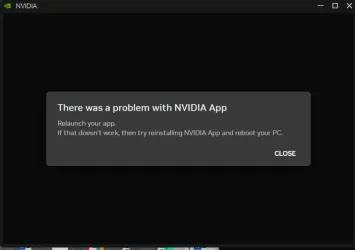
its asking to reinstall. When doing so sometimes it would launch straight after install, most times it wont, and most definitely after a restart it does not anymore.
I am mentioning this only because seemingly it coincided with the other issues I am having - when I right-click on the start button
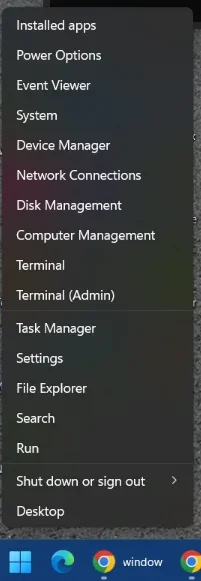
Several items do not respond, as In the popup disappears and nothing happens. Those are Event Viewer, Device Manager, Disk Management, Computer Management, Task Manager, File Explorer,
When I right-click on the taskbar and pick Task Manager from there, it opens normally.
Then if I type CMD after clicking the START button and click on the "Run as administrator" on the right, nothing happens. All the other items work, such as "Open", "Open File Location" etc.
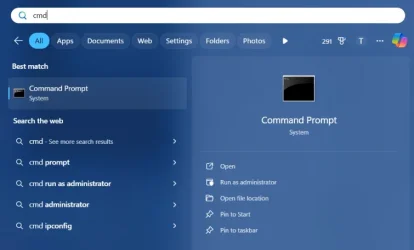
Right Click on this CMD and selecting Run As Administrator also does not work, other items here still work.
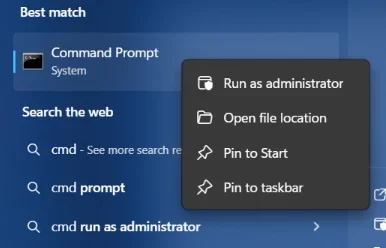
If I follow "open File Location" from here,:
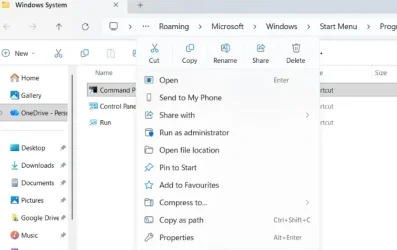
Run As Administrator still does not work. But If I do "Open File Location " again from here:
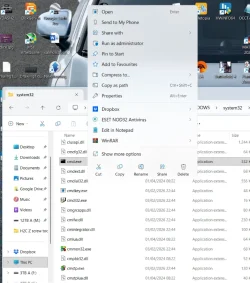
doing right click on the actual EXE and Run As Administrator does work from here ...
So this is my problem, or at least the extent of it as far as what I noticed so far.
Steps I took so far:
- Confirmed my account is Admin (well Run As Admin does work, just not from certain locations)
- ran SFC SCANNOW. First instance did find issues and fixed them, Subsequent runs complete with no errors. No difference to the issue.
- ran DISM /Online /Cleanup-Image /RestoreHealth. Completes without errors. No difference to the issue.
- Ran in-place Win11 reinstall/repair. No difference.
Please help.
I have a very old Windows 11 install. At least 4-5 years old. Have had to run in-place reinstall once on it, a long, long time ago, it was successful. Did not have any issues for years.
Recently however I started noticing a couple of things.
First it was the nVidia APP - when I try to launch it, it opens its window, I get the green spinning wheel for a while and then an error message "There was a problem with NVIDIA App.
its asking to reinstall. When doing so sometimes it would launch straight after install, most times it wont, and most definitely after a restart it does not anymore.
I am mentioning this only because seemingly it coincided with the other issues I am having - when I right-click on the start button
Several items do not respond, as In the popup disappears and nothing happens. Those are Event Viewer, Device Manager, Disk Management, Computer Management, Task Manager, File Explorer,
When I right-click on the taskbar and pick Task Manager from there, it opens normally.
Then if I type CMD after clicking the START button and click on the "Run as administrator" on the right, nothing happens. All the other items work, such as "Open", "Open File Location" etc.
Right Click on this CMD and selecting Run As Administrator also does not work, other items here still work.
If I follow "open File Location" from here,:
Run As Administrator still does not work. But If I do "Open File Location " again from here:
doing right click on the actual EXE and Run As Administrator does work from here ...
So this is my problem, or at least the extent of it as far as what I noticed so far.
Steps I took so far:
- Confirmed my account is Admin (well Run As Admin does work, just not from certain locations)
- ran SFC SCANNOW. First instance did find issues and fixed them, Subsequent runs complete with no errors. No difference to the issue.
- ran DISM /Online /Cleanup-Image /RestoreHealth. Completes without errors. No difference to the issue.
- Ran in-place Win11 reinstall/repair. No difference.
Please help.
My Computer
At a glance
Windows 11 25H2 26200.7705i9 14900K32 GB4090
- OS
- Windows 11 25H2 26200.7705
- Computer type
- PC/Desktop
- Manufacturer/Model
- custom
- CPU
- i9 14900K
- Motherboard
- Asus ROG Maximus Z790 Hero
- Memory
- 32 GB
- Graphics Card(s)
- 4090
- Sound Card
- Sound Blaster ZXR
- Monitor(s) Displays
- Asus PG279Q
- Screen Resolution
- 2160x1440
- Hard Drives
- 1TB Samsung 990 Pro SSD + several HDDs
- PSU
- Asus ROG Thor 1200W
- Case
- Coolermaster Cosmos 2
- Cooling
- water
- Keyboard
- Wooting 80HE
- Mouse
- GPX
- Internet Speed
- 900MB full fibre
- Browser
- Chrome
- Antivirus
- Eset NOD32






