Robocopy task scheduler "running"


Quid

New member
Local time
10:23 PM
Posts
2
OS
Win11pro
win11pro, 22h2

In brief.
I have a batch file with robocopy commands which seems works fine when launched manually; but, if I have it launch from the task scheduler, it seems to fully run and disappears (expected behavior), but according to the system scheduler, it keeps running.

Details
I have what should be a simple thing to do.
I want to mirror some of my AppDATA onto a folder on another internal HDD. This is to backup the appdata in case of a system failure.

I am running Robocopy commands in a batch file:
Code:
Robocopy AppDATA_folder Target_folder  /MIR /E /R:0 /DCOPY:T
exit

(probably not relevant: The target folder is monitored by SyncThing, and then synced with another PC on my LAN. This target folder is internal to my system, via SATA. The c drive is on an NVMe drive.

I have changed to highest privileges, no change.
I have changed the run as to Win10, no change.
I have added the location of the bat file in the "action" section ("start in"), no change.

It seems to complete it's run in the scheduler, but it says it's still running. This is to be scheduled to run once a day, but if it's still running, I am unsure that it will start up again.

thanks
 

My Computer My Computer

At a glance

Win11pro
OS
Win11pro
Computer type
PC/Desktop
Have you checked Task Manager to see if the robocopy process is still actually running?

How long does the robocopy process normally take to copy the files?

In your scheduled task, what do you have configured on the triggers tab?

On the settings tab, have you set:

Stop the task if it runs longer than: or have you set that on the triggers tab
If the running task does not end when requested, force it to stop


I doubt that SyncThing has anything to do with your issue.
 

My Computer My Computer

At a glance

Windows 11 ProRyzen 9 3900XG-Skill RipjawsV F4-3600C18 (16GB x 2)Gigabyte RX 5700 XT Gaming OC
OS
Windows 11 Pro
Computer type
PC/Desktop
CPU
Ryzen 9 3900X
Motherboard
ASUS ROG Strix X570-E Gaming
Memory
G-Skill RipjawsV F4-3600C18 (16GB x 2)
Graphics Card(s)
Gigabyte RX 5700 XT Gaming OC
Sound Card
Realtek ALC1220P
Monitor(s) Displays
ASUS VE278 (x 2)
Screen Resolution
1920x1080
Hard Drives
Samsung 850 Pro 256GB
Samsung 970 Pro NVMe 512GB (x 2)
ST10000VN0004 10TB (x 2)
ST10000VN0008 10TB (x 2)
ST4000VN000 4TB (x 2)
PSU
Corsair HX1000
Case
Corsair Carbide 400R
Cooling
AMD Wraith Prism (Stock)
Keyboard
Logitech G213
Mouse
Logitech G502
Internet Speed
100Mbps down / 40Mbps up
Browser
Firefox - Chrome - Edge
Antivirus
Windows Defender - Clamwin
Press F5 in Task Scheduler to refresh it manually. (The problem is just that it doesn't refresh itself automatically after the batchfile exits.) As a possible workaround, you can make an Action that runs %windir%\System32\wscript.exe as the program/script with the full path to a .vbs file (enclosed in doublequotes) as the parameters. Then in the .vbs file,
Code:
Set wshShell = CreateObject("WScript.Shell")
wshShell.Run """%windir%\System32\cmd.exe"" /c start """" ""C:\My scripts\My batchfile.bat"""
...where C:\My scripts\My batchfile.bat is the path to the batchfile. As an aside, it also is possible to make the batchfile run in an invisible command window by adding , 0 at the end of the 2nd line.

Also keep in mind that the Windows Script Host (wscript.exe) will soon no longer be enabled by default on Windows 11, but you can still re-enable it of course.

Finally, on some systems the Windows Script Host may have been blocked:

QUpB4.png

To remove this restriction from the registry, you can (from an elevated command prompt), run the following commands one by one:
reg delete "HKCU\SOFTWARE\Microsoft\Windows Script Host\Settings" /v Enabled /f
reg delete "HKLM\SOFTWARE\Microsoft\Windows Script Host\Settings" /v Enabled /f
 

My Computers My Computers

  • At a glance

    11 Homei7 13650HX16GB DDR5GeForce RTX 4060 Mobile
    OS
    11 Home
    Computer type
    Laptop
    Manufacturer/Model
    Asus TUF Gaming F16 (2024)
    CPU
    i7 13650HX
    Memory
    16GB DDR5
    Graphics Card(s)
    GeForce RTX 4060 Mobile
    Sound Card
    Eastern Electric MiniMax DAC Supreme; Emotiva UMC-200; Astell & Kern AK240
    Monitor(s) Displays
    Sony Bravia XR-55X90J
    Screen Resolution
    3840×2160
    Hard Drives
    512GB SSD internal
    37TB external
    PSU
    Li-ion
    Cooling
    2× Arc Flow Fans, 4× exhaust vents, 5× heatpipes
    Keyboard
    Logitech K800
    Mouse
    Logitech G402
    Internet Speed
    30Mbit/s up, 500Mbit/s down
    Browser
    FF
    Antivirus
    What's an antivirus?
  • At a glance

    11 Homei5 1135G716GB DDR4Intel Iris Xe
    Operating System
    11 Home
    Computer type
    Laptop
    Manufacturer/Model
    Medion S15450
    CPU
    i5 1135G7
    Memory
    16GB DDR4
    Graphics card(s)
    Intel Iris Xe
    Sound Card
    Eastern Electric MiniMax DAC Supreme; Emotiva UMC-200; Astell & Kern AK240
    Monitor(s) Displays
    Sony Bravia XR-55X90J
    Screen Resolution
    3840×2160
    Hard Drives
    2TB SSD internal
    37TB external
    PSU
    Li-ion
    Keyboard
    Logitech K800
    Mouse
    Logitech G402
    Internet Speed
    30Mbit/s up, 500Mbit/s down
    Browser
    FF
if I have it launch from the task scheduler, it seems to fully run and disappears (expected behavior), but according to the system scheduler, it keeps running.
Task scheduler automatically detects when a task starts and then shows its status as Running.
It does not automatically tell you when the task completes & it will keep showing the status as Running until you click on Refresh [on the right-hand side of the TS window] or press the F5 key.


All the best,
Denis
 
Last edited:

My Computer My Computer

At a glance

Windows 11 Home x64 Version 25H2 Build 26200....
OS
Windows 11 Home x64 Version 25H2 Build 26200.8037
Press F5 in Task Scheduler to refresh it manually. (The problem is just that it doesn't refresh itself automatically after the batchfile exits.) As a possible workaround, you can make an Action that runs %windir%\System32\wscript.exe as the program/script with the full path to a .vbs file (enclosed in doublequotes) as the parameters. Then in the .vbs file,
Code:
Set wshShell = CreateObject("WScript.Shell")
wshShell.Run """%windir%\System32\cmd.exe"" /c start """" ""C:\My scripts\My batchfile.bat"""
...where C:\My scripts\My batchfile.bat is the path to the batchfile. As an aside, it also is possible to make the batchfile run in an invisible command window by adding , 0 at the end of the 2nd line.

Also keep in mind that the Windows Script Host (wscript.exe) will soon no longer be enabled by default on Windows 11, but you can still re-enable it of course.

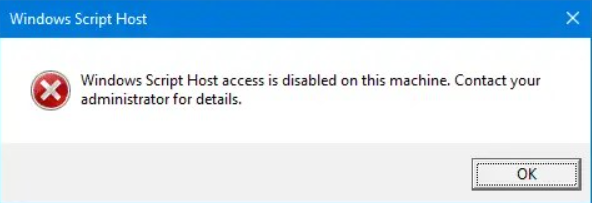
Finally, on some systems the Windows Script Host may have been blocked:

QUpB4.png

To remove this restriction from the registry, you can (from an elevated command prompt), run the following commands one by one:
reg delete "HKCU\SOFTWARE\Microsoft\Windows Script Host\Settings" /v Enabled /f
reg delete "HKLM\SOFTWARE\Microsoft\Windows Script Host\Settings" /v Enabled /f
Thanks. F5 showed it had stopped.

Regarding Windows script host being deprecated, what does this effect?

I ask because I sometimes use Powershell in the terminal to do simple tasks and have a Perl script running every day.
Does it effect all terminal commands or just stopping script execution?
I presume this effects native windows scripting languages, but will it effect non-native installed languages, such as python and perl?
 

My Computer My Computer

At a glance

Win11pro
OS
Win11pro
Computer type
PC/Desktop
It affects scripts hosted by the Windows Script Host, so VBScript and JScript, and if you ever loaded other languages for WSH.

It does not affect PowerShell, batch, or other hosts like those that run python or perl.
 

My Computer My Computer

At a glance

Windows 11 Enterprise 25H2 [rev. 8893]
OS
Windows 11 Enterprise 25H2 [rev. 8893]
Regarding Windows script host being deprecated, what does this effect?

I ask because I sometimes use Powershell in the terminal to do simple tasks and have a Perl script running every day.
Does it effect all terminal commands or just stopping script execution?
I presume this effects native windows scripting languages, but will it effect non-native installed languages, such as python and perl?
It doesn't affect Windows Terminal excepting only if you use Windows Terminal to run the kind of commands and/or scripts that rely on their being able to run wscript.exe in which case you'd need to re-enable that feature after it will be disabled by default. Deprecated means it is no longer under active development and might be later removed through a future Windows update, just like how wmic.exe will also be removed at some point according to Microsoft. But wscript.exe is still a very useful tool IMO, and, I don't think it will be removed anytime soon yet (or so I hope). wscript
 

My Computers My Computers

  • At a glance

    11 Homei7 13650HX16GB DDR5GeForce RTX 4060 Mobile
    OS
    11 Home
    Computer type
    Laptop
    Manufacturer/Model
    Asus TUF Gaming F16 (2024)
    CPU
    i7 13650HX
    Memory
    16GB DDR5
    Graphics Card(s)
    GeForce RTX 4060 Mobile
    Sound Card
    Eastern Electric MiniMax DAC Supreme; Emotiva UMC-200; Astell & Kern AK240
    Monitor(s) Displays
    Sony Bravia XR-55X90J
    Screen Resolution
    3840×2160
    Hard Drives
    512GB SSD internal
    37TB external
    PSU
    Li-ion
    Cooling
    2× Arc Flow Fans, 4× exhaust vents, 5× heatpipes
    Keyboard
    Logitech K800
    Mouse
    Logitech G402
    Internet Speed
    30Mbit/s up, 500Mbit/s down
    Browser
    FF
    Antivirus
    What's an antivirus?
  • At a glance

    11 Homei5 1135G716GB DDR4Intel Iris Xe
    Operating System
    11 Home
    Computer type
    Laptop
    Manufacturer/Model
    Medion S15450
    CPU
    i5 1135G7
    Memory
    16GB DDR4
    Graphics card(s)
    Intel Iris Xe
    Sound Card
    Eastern Electric MiniMax DAC Supreme; Emotiva UMC-200; Astell & Kern AK240
    Monitor(s) Displays
    Sony Bravia XR-55X90J
    Screen Resolution
    3840×2160
    Hard Drives
    2TB SSD internal
    37TB external
    PSU
    Li-ion
    Keyboard
    Logitech K800
    Mouse
    Logitech G402
    Internet Speed
    30Mbit/s up, 500Mbit/s down
    Browser
    FF
Back
Top Bottom