Solved Ryzen CPU (no TPM) installed win 11 pro by rufus. But Update wants to install repair windows update


Silencious

Well-known member
Local time
5:56 AM
Posts
22
OS
windows 11
I have a Ryzen 7 3800XT 8-core processor and 16 GB RAM. Windows 11 Pro 25H2 (OS Build) 26200.8117. Since I cannot install without TPM due to the CPU and have no confidence in updating the BIOS. The windows update asks for me to update Windows and repair it, which I feel will cause issues due to the TPM issue mentioned. What should I do?
 

My Computer

System One

  • OS
    windows 11
I can't make much from the minimal information you've provided.

However, the Ryzen 7 3800XT is on the supported CPUs list.


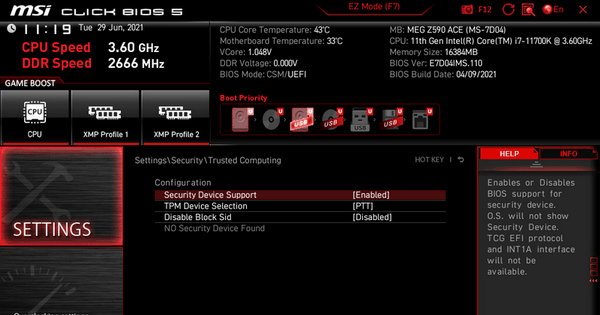
I wonder if there's a BIOS setting to enable the firmware TPM?

(Some motherboard BIOS updates enabled it by default.)
 

My Computers

System One System Two

  • OS
    Windows 11 26200.8728
    Computer type
    PC/Desktop
    Manufacturer/Model
    homebuilt
    CPU
    Amd Threadripper 7970X
    Motherboard
    Gigabyte TRX50 Aero D Rev. 1.0
    Memory
    128GB (4 X 32) G.Skill DDR5 6400 (RDIMM)
    Graphics Card(s)
    Gigabyte RTX 4090 OC
    Sound Card
    none (USB to speakers), Realtek
    Monitor(s) Displays
    Innocn 32" OLED
    Screen Resolution
    3840 X 2160 @ 60Hz
    Hard Drives
    Crucial T700 2TB M.2 NVME SSD
    WD 4TB Blue SATA SSD
    Seagate 18TB IronWolf Pro
    PSU
    BeQuiet! Straight Power 12 1500W
    Case
    Lian Li 011 Dynamic Evo XL
    Cooling
    SilverStone Technology XE360-TR5, with 3 Phanteks T30 fans
    Keyboard
    Cherry KC 500 MX LP (mechanical)
    Mouse
    Logitech M500s (wired)
    Internet Speed
    2000/250 Mbps (down/up)
    Other Info
    xFinity gateway
  • Operating System
    windows 11 26200.8728
    Computer type
    PC/Desktop
    Manufacturer/Model
    homebuilt
    CPU
    Intel I9-13900K
    Motherboard
    Asus RoG Strix Z690-E
    Memory
    64GB G.Skill DDR5-6000
    Graphics card(s)
    Gigabyte RTX 3090 ti
    Sound Card
    built in Realtek
    Monitor(s) Displays
    Philips 27E1N8900 27" OLED
    Screen Resolution
    3840 X 2160 @60Hz
    Hard Drives
    WDC SN850 1TB
    8TB Seagate Ironwolf
    4TB Seagate Ironwolf
    PSU
    eVGA SuperNOVA 1300 GT
    Case
    Lian Li 011 Dynamic Evo
    Cooling
    Corsair iCUE H150i ELITE CAPELLIX Liquid CPU Cooler
    Keyboard
    Cherry Streaming (wired)
    Mouse
    Logitech M500s (wired)
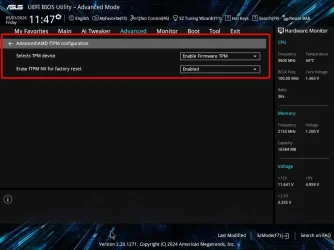
I have an ASUS PRIME X370-PRO motherboard I bought in April 2017 with a Ryzen 7 1700X CPU. In August 2021, right before Windows 11 was released, the motherboard had a BIOS update to automatically configure the BIOS for Windows 11. This included enabling TPM.

In October 2021 I upgraded the CPU to an AMD Ryzen 3700X which is compatible with Windows 11. I had no problem upgrading to Windows 11 Pro after it came out. I didn't like Windows 11 at first so went back to Windows 10 Pro. After I bought a laptop with Windows 11 in October 2022 I learned Windows 11 well enough that I upgraded the desktop to Windows 11 Pro again. It is still that way.

Here is how TPM is enabled with my motherboard:

ASUS-TPM-Web.webp
 
Last edited:

My Computers

System One System Two

  • OS
    Windows 11 Pro 25H2 (26200.6901)
    Computer type
    Laptop
    Manufacturer/Model
    ASUS TUF Gaming A15 (2022)
    CPU
    AMD Ryzen 7 6800H with Radeon 680M GPU (486MB RAM)
    Memory
    Crucial DDR5-4800 (2400MHz) 32GB (2 x 16GB)
    Graphics Card(s)
    NVIDIA RTX 3060 Laptop (6GB RAM)
    Sound Card
    n/a
    Monitor(s) Displays
    15.6-inch
    Screen Resolution
    1920x1080 300Hz
    Hard Drives
    2 x Samsung 990 Evo Plus (2TB M.2 NVME SSD)
    PSU
    n/a
    Mouse
    Wireless Mouse M510
    Internet Speed
    2100Mbps/300Mbps
    Browser
    Firefox
    Antivirus
    Malwarebytes
  • Operating System
    Windows 11 Pro 25H2 (26200.8246)
    Computer type
    PC/Desktop
    Manufacturer/Model
    Custom build
    CPU
    AMD Ryzen 7 5700X3D
    Motherboard
    ASUS ROG Strix B550-F Gaming WiFi II
    Memory
    G.SKILL Flare X 32GB (2x16GB) DDR4
    Graphics card(s)
    ASUS ROG-STRIX-RTX3060TI-08G-V2-GAMING (RTX 3060-Ti, 8GB RAM)
    Monitor(s) Displays
    Samsung G50D IPS 27"
    Screen Resolution
    1440p/180Hz
    Hard Drives
    SAMSUNG 990 EVO Plus (2TB] M.2 NVME SSD
    SAMSUNG 990 EVO Plus (4TB) M.2 NVME SSD
    PSU
    Corsair RM750x (750 watts)
    Case
    Cooler Master MasterCase 5
    Cooling
    Scythe Mugen 6
    Keyboard
    Logitech K520 (MK540 keyboard/mouse combo)
    Mouse
    Logitech M310 (MK540 keyboard/mouse combo)
    Internet Speed
    2100 Mbps down / 300 Mbps up
    Browser
    Firefox, Edge, Chrome
    Antivirus
    Malwarebytes (Premium)
    Other Info
    ASUS Blu-ray Burner BW-16D1HT (SATA) || Western Digital Easystore 20TB USB 3.0 external hard drive used with Acronis True Image 2025 backup software || HP OfficeJet Pro 6975 Printer/Scanner


My Computers

System One System Two

  • OS
    Windows 11 Pro
    Computer type
    PC/Desktop
    CPU
    AMD Ryzen 9 9950X3D
    Motherboard
    ASRock B650E Taichi Lite
    Memory
    Kingston FURY Beast 64GB (2x32GB) DDR5 6000MT/s
    Graphics Card(s)
    ASUS TUF Gaming Radeon RX 9070 OC Edition 16GB GDDR6
    Hard Drives
    Solidigm P44 Pro 2TB M.2 NVMe SSD
  • Operating System
    Windows 11 Home
    Computer type
    Laptop
    Manufacturer/Model
    Lenovo Legion Pro 7i Gen 10 16"
    CPU
    Intel Core Ultra 9 275HX
    Memory
    64GB (2x 32GB) DDR5-6400
    Graphics card(s)
    NVIDIA GeForce RTX 5080 16GB GDDR7 Laptop GPU
    Hard Drives
    2x 1TB M.2 NVMe SSD (SK Hynix)


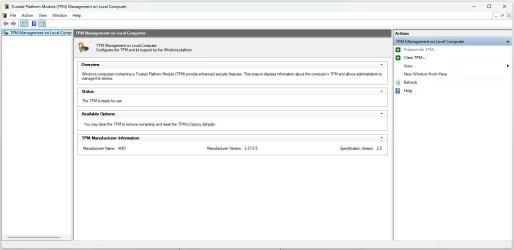
Thanks, guys. I finally found my AMD CPU FTPM in the BIOS under the peripherals on a Gigabyte motherboard. I enable it, but my motherboard is a AB350-Gaming 3, the BIOS version is F42a, with the last update on 07/31/2019, and the BIOS ID is 8AD6BG08. The main issue I have now is that it is so laggy for loading programs, and the advice I seem to find is that it's best to disable the fTPM. I checked that my SSD is GPT and not MBR, so I didn't need to convert. But as I said before, I'm not sure how to get the correct BIOS update to flash, unless someone can help me put it on a USB stick and flash it that way. Thanks again
 

Attachments

  • TPM.webp
    TPM.webp
    39.5 KB · Views: 1

My Computer

System One

  • OS
    windows 11
- Download the BIOS file F54
- Extract the AB350Gaming3.F54 file and save to a USB Fat32 drive
- Restart the computer, press Delete during POST to enter BIOS.
- Launch Q-Flash and point to the AB350Gaming3.F54 file on the USB drive
It will update the BIOS to version F54
 
Last edited:

My Computers

System One System Two

  • OS
    Windows 11 Pro - Windows 7 HP 64 - Lubuntu
    Computer type
    PC/Desktop
    Manufacturer/Model
    custom build
    CPU
    i5 6600K - 800MHz to 4400MHz
    Motherboard
    GA-Z170-HD3P
    Memory
    4+4G GSkill DDR4 3000
    Graphics Card(s)
    IG - Intel 530
    Monitor(s) Displays
    Samsung 226BW
    Screen Resolution
    1680x1050
    Hard Drives
    (1) -1 SM951 – 128GB M.2 AHCI PCIe SSD drive for Win 11
    (2) -1 WD SATA 3 - 1T for Data
    (3) -1 WD SATA 3 - 1T for backup
    (4) -1 BX500 SSD - 256G for Windows 7 and Lubuntu
    PSU
    Thermaltake 450W TR2 gold
    Keyboard
    Old and good Chicony mechanical keyboard
    Mouse
    Logitech mX performance - 9 buttons (had to disable some)
    Internet Speed
    500 Mb/s
    Browser
    Firefox 64
  • Operating System
    Windows 11 Pro
    Computer type
    Laptop
    Manufacturer/Model
    Asus Q550LF
    CPU
    i7-4500U 800- 3000MHz
    Motherboard
    Asus Q550LF
    Memory
    (4+4)G DDR3 1600
    Graphics card(s)
    IG intel 4400 + NVIDIA GeForce GT 745M
    Sound Card
    Realtek
    Monitor(s) Displays
    LG Display LP156WF4-SPH1
    Screen Resolution
    1920 x 1080
    Hard Drives
    BX500 120G SSD for Windows and programs
    & 1T HDD for data
    Internet Speed
    500 Mb/s
    Browser
    Firefox 64
The main issue I have now is that it is so laggy for loading programs, and the advice I seem to find is that it's best to disable the fTPM.

ChatGPT:

Why enabling fTPM can make the system feel slow​


On your Gigabyte GA-AB350-Gaming 3, the TPM you’re enabling is actually firmware TPM (fTPM) built into the CPU—not a separate chip.

The root cause (common on older AMD systems)​

This lag issue is tied to a well-known AMD problem:
  • fTPM uses the motherboard’s SPI flash memory
  • That same flash is also used by the BIOS
  • Access is slow and blocking
So when fTPM needs to:
  • generate random numbers
  • access security keys
  • validate system state
…it can briefly stall the CPU, causing:
  • app launch lag
  • stuttering
  • system pauses
This issue became widely known around Windows 11 adoption.

The official explanation​

AMD acknowledged that:
  • fTPM can cause intermittent stuttering
  • especially on older AM4 boards like B350/X370
They fixed it in newer BIOS updates by:
  • improving firmware handling
  • reducing blocking operations

Why your BIOS version matters​

You’re on:
  • F42a (2019)very old
Later BIOS versions (like F54):
  • include updated AGESA firmware
  • improve CPU compatibility
  • fix fTPM stutter issues
👉 In other words:
Your lag is very likely because your BIOS is too old—not because TPM itself is “bad”.

 

My Computers

System One System Two

  • OS
    Windows 11 Pro
    Computer type
    PC/Desktop
    CPU
    AMD Ryzen 9 9950X3D
    Motherboard
    ASRock B650E Taichi Lite
    Memory
    Kingston FURY Beast 64GB (2x32GB) DDR5 6000MT/s
    Graphics Card(s)
    ASUS TUF Gaming Radeon RX 9070 OC Edition 16GB GDDR6
    Hard Drives
    Solidigm P44 Pro 2TB M.2 NVMe SSD
  • Operating System
    Windows 11 Home
    Computer type
    Laptop
    Manufacturer/Model
    Lenovo Legion Pro 7i Gen 10 16"
    CPU
    Intel Core Ultra 9 275HX
    Memory
    64GB (2x 32GB) DDR5-6400
    Graphics card(s)
    NVIDIA GeForce RTX 5080 16GB GDDR7 Laptop GPU
    Hard Drives
    2x 1TB M.2 NVMe SSD (SK Hynix)
- Download the BIOS file F54
- Extract the AB350Gaming3.F54 file and save to a USB Fat32 drive
- Restart the computer, press Delete during POST to enter BIOS.
- Launch Q-Flash and point to the AB350Gaming3.F54 file on the USB drive
It will update the BIOS to version F54
Thank you so much for helping me. It was a bit nerve-wracking, but that file you sent caused no issues, and now I have a fully compliant and up-to-date PC. Thank you, thank you. I did realise that fast boot was disabled and CSM for some reason was re-enabled, so I changed it back to what I remember seeing the last time I looked at the BIOS. Also I had to enable Bitlocking on my drives...but no biggie
 

My Computer

System One

  • OS
    windows 11
CSM for some reason was re-enabled

CSM was re-enabled after the BIOS update because it is the default setting on many older motherboards.

CSM (Compatibility Support Module)
- Enabled: Both legacy BIOS and UEFI boot modes are available.
- Disabled: Only UEFI boot mode is available.

On many systems, Secure Boot cannot be enabled until CSM is disabled, so disabling CSM is recommended.

On modern motherboards, the CSM is either disabled by default or not included at all (e.g. on Z890 motherboards).
 

My Computers

System One System Two

  • OS
    Windows 11 Pro
    Computer type
    PC/Desktop
    CPU
    AMD Ryzen 9 9950X3D
    Motherboard
    ASRock B650E Taichi Lite
    Memory
    Kingston FURY Beast 64GB (2x32GB) DDR5 6000MT/s
    Graphics Card(s)
    ASUS TUF Gaming Radeon RX 9070 OC Edition 16GB GDDR6
    Hard Drives
    Solidigm P44 Pro 2TB M.2 NVMe SSD
  • Operating System
    Windows 11 Home
    Computer type
    Laptop
    Manufacturer/Model
    Lenovo Legion Pro 7i Gen 10 16"
    CPU
    Intel Core Ultra 9 275HX
    Memory
    64GB (2x 32GB) DDR5-6400
    Graphics card(s)
    NVIDIA GeForce RTX 5080 16GB GDDR7 Laptop GPU
    Hard Drives
    2x 1TB M.2 NVMe SSD (SK Hynix)
Thank you so much for helping me. It was a bit nerve-wracking, but that file you sent caused no issues, and now I have a fully compliant and up-to-date PC. Thank you, thank you. I did realise that fast boot was disabled and CSM for some reason was re-enabled, so I changed it back to what I remember seeing the last time I looked at the BIOS. Also I had to enable Bitlocking on my drives...but no biggie
Glad to see that you have it running as it should be.
Please mark this thread as Solved
 

My Computers

System One System Two

  • OS
    Windows 11 Pro - Windows 7 HP 64 - Lubuntu
    Computer type
    PC/Desktop
    Manufacturer/Model
    custom build
    CPU
    i5 6600K - 800MHz to 4400MHz
    Motherboard
    GA-Z170-HD3P
    Memory
    4+4G GSkill DDR4 3000
    Graphics Card(s)
    IG - Intel 530
    Monitor(s) Displays
    Samsung 226BW
    Screen Resolution
    1680x1050
    Hard Drives
    (1) -1 SM951 – 128GB M.2 AHCI PCIe SSD drive for Win 11
    (2) -1 WD SATA 3 - 1T for Data
    (3) -1 WD SATA 3 - 1T for backup
    (4) -1 BX500 SSD - 256G for Windows 7 and Lubuntu
    PSU
    Thermaltake 450W TR2 gold
    Keyboard
    Old and good Chicony mechanical keyboard
    Mouse
    Logitech mX performance - 9 buttons (had to disable some)
    Internet Speed
    500 Mb/s
    Browser
    Firefox 64
  • Operating System
    Windows 11 Pro
    Computer type
    Laptop
    Manufacturer/Model
    Asus Q550LF
    CPU
    i7-4500U 800- 3000MHz
    Motherboard
    Asus Q550LF
    Memory
    (4+4)G DDR3 1600
    Graphics card(s)
    IG intel 4400 + NVIDIA GeForce GT 745M
    Sound Card
    Realtek
    Monitor(s) Displays
    LG Display LP156WF4-SPH1
    Screen Resolution
    1920 x 1080
    Hard Drives
    BX500 120G SSD for Windows and programs
    & 1T HDD for data
    Internet Speed
    500 Mb/s
    Browser
    Firefox 64
Back
Top Bottom