'Safe mode'


ludlowboy

Active member
Local time
12:39 AM
Posts
27
OS
win 11
I'm a little stuck, due to an uninstall problem I tried to reboot in 'safe mode' and nothing works. I am running Win 11 pro (64 bit) 21H2 OS build 22000.2538on an HP prodesk 600G.
Computer goes to 'restarting' and just shuts down, thats it. To bring it back it is necessary to unplug / replug, turn on, then it starts in normal mode, I never see 'choose an option' for troubleshooting.
Any help would be much appreciated.
Thanks.
 

My Computer

System One

  • OS
    win 11
    Computer type
    PC/Desktop
    Manufacturer/Model
    HP
1 There are several ways of getting into Safe mode. Perhaps one of the other ways will work for you.
Boot to Safe Mode - ElevenForumTutorials

2 What was the 'uninstall problem'?

3 Is there a particulr reason for your being so far behind on Windows updates?


Best of luck,
Denis
 

My Computer

System One

  • OS
    Windows 11 Home x64 Version 25H2 Build 26200.8037
Hi Denis,

Thankyou very much for replying,

Re 1)

None of the standard ways worked, I read the tutorial and will now try from ‘command prompt’.

Re 2)

I tried to uninstall ‘Bitdefender antivirus free’ using ‘Revo uninstaller’, it removed some, but left stuff behind, which I then located in C:/ program files / common files..? It would not ‘delete’, and I could not give ‘administrator permission’ Then I found online ‘Bitdefender uninstall tool’, downloaded and it worked fine (phew)!

Re 3)

Have been to Settings> windows update> check for updates…..You are up to date. Am I missing something?


I wanted to get into ‘safe mode’ because I thought it would give me the option of ‘forced uninstall’. Accepting I no longer need to remove it, I would still like to find out how I can get into ‘safe mode’ just in case!

Thanks again for your help.

Terry
 

My Computer

System One

  • OS
    win 11
    Computer type
    PC/Desktop
    Manufacturer/Model
    HP
Terry,

1 Good luck. I think you should concentrate on that before updating your system [my para 3 below].

2 That Bitdefender uninstall tool was the appropriate tool for the job. Generally-speaking, removing any anti-malware application requires use of their specialist uninstall tool unless they say otherwise. I once had problems that were traced back four years to my failure to have used the Norton uninstall tool.

3 Computers that do not fulfil the Windows 11 system requirements will get routine updates for the Windows 11 Version that they are on - in your case 21H2. But they will not automatically get updates to new Versions. Is that the situation you are in, a non-compliant computer? I also have a non-compliant computer running Windows 11.
Such Version updates have to be done manually by downloading the latest ISO file & following the Repair install [aka In-place upgrade] procedure -
Get ready for Windows 11 version 25H2 - ISO downloads available - Eleven ForumNews
Repair Install Windows 11 with an In-place Upgrade - ElevenForumTutorials
And do make a system image & backup your own files before doing the Version update.


All the best,
Denis


Welcome to ElevenForum.

It's really worth making time to browse through the ElevenForum Tutorial index - there's a shortcut to it at the top of every ElevenForum page [within the Tutorials dropdown list].
- At the foot of the ElevenForum Tutorial index is a shortcut to download it as a spreadsheet.
- I download a new copy each month.
- By downloading it as a spreadsheet I can benefit from Excel's excellent filtering capabilities when I search for topics of interest.
- ElevenForum tutorials are also listed at Tutorials and there's a shortcut to that at the top of every page.

You can search ElevenForum using the search box in the top-right corner of all ElevenForum webpages or using Advanced Search - ElevenForum
- You can also search ElevenForum threads in many general search engines, such as Google, by adding site:elevenforum.com after your search term. For example,
Taskbar setup site:elevenforum.com
- [This is what the search box in the top-right corner of ElevenForum webpages does automatically]

 

My Computer

System One

  • OS
    Windows 11 Home x64 Version 25H2 Build 26200.8037
Denis

Thanks again for your help,

As you suggest I think I have a ‘non compliant’ computer. I am very hesitant to do manual upgrades, as I don’t really know what I am doing, auto update is fine. I would probably mess up more than I fix!

Control panel tells me I am administrator, but try to delete stuff, I need administrator permission ?

I don’t really have the confidence to jump into the unknown.

I will leave well enough alone,

Thanks for everything,

Terry

(I’m English, living in Cyprus and 77 yrs old) ✓
 

My Computer

System One

  • OS
    win 11
    Computer type
    PC/Desktop
    Manufacturer/Model
    HP
Download CPU-Z and check if your CPU has SSE4.2 instructions. If it does, you can upgrade to 24H2 and 25H2, otherwise you can install either Windows 10 22H2 or Windows 11 23H2 maximum and just keep Windows Defender updated. An easy way to restart in Safe Mode is to hold the SHIFT key on the keyboard and restart. Wait a few seconds and you should see the troubleshooting screen. Select "Troubleshoot" and then "Advanced Startup Options". From the list select "4 Safe Mode" or "5 Safe Mode with networking" if you need internet access.
 
Last edited:

My Computers

System One System Two

  • OS
    Windows 11 Pro 23H2 (5699), 25H2 (8457)
    Computer type
    Laptop
    Manufacturer/Model
    Acer Extensa 5630EZ
    CPU
    Mobile DualCore Intel Core 2 Duo T7250, 2000 MHz
    Motherboard
    Acer Extensa 5630
    Memory
    4GB
    Graphics Card(s)
    Mobile Intel(R) GMA 4500M (Mobile 4 series)
    Sound Card
    Realtek ALC268 @ Intel 82801IB ICH9 - High Definition Audio Controller
    Monitor(s) Displays
    1
    Screen Resolution
    1280x800
    Hard Drives
    Samsung SSD 850 EVO 250GB SATA Device (250 GB, SATA-III)
    Internet Speed
    VDSL 50 Mbps
    Browser
    MICROSOFT EDGE
    Antivirus
    WINDOWS DEFENDER
    Other Info
    Legacy MBR installation, no TPM, no Secure Boot, no WDDM 2.0 graphics drivers, no SSE4.2, cannot get more unsupported ;) This is only my test laptop. I had installed Windows 11 here before upgrading my main PC. For my main PC I use everyday see my 2nd system specs.
  • Operating System
    Windows 11 Pro v25H2 (build 26200.8457)
    Computer type
    PC/Desktop
    Manufacturer/Model
    Custom-built PC
    CPU
    Intel Core-i7 3770 3.40GHz s1155 (3rd generation)
    Motherboard
    Asus P8H61 s1155 ATX
    Memory
    2x Kingston Hyper-X Blu 8GB DDR3-1600
    Graphics card(s)
    GIGABYTE GeForce RTX 3050 WINDFORCE OC V2 6GB (GV-N3050WF2OCV2-6GD)
    Sound Card
    Realtek HD audio (ALC887)
    Monitor(s) Displays
    Sony Bravia KDL-19L4000 19" LCD TV via VGA
    Screen Resolution
    1440x900 32-bit 60Hz
    Hard Drives
    WD Blue SA510 2.5 1000GB SSD as system disk, Western Digital Caviar Purple 4TB SATA III (WD40PURZ) as second
    PSU
    Thermaltake Litepower RGB 550W Full Wired
    Case
    SUPERCASE MIDI-TOWER
    Cooling
    Deepcool Gamma Archer CPU cooler, 1x 8cm fan at the back
    Keyboard
    Mitsumi 101-key PS/2
    Mouse
    Sunnyline OptiEye PS/2
    Internet Speed
    100Mbps
    Browser
    Microsoft Edge, Mozilla Firefox
    Antivirus
    Microsoft Windows Defender
    Other Info
    Legacy BIOS (MBR) installation, no TPM, no Secure Boot, WDDM 3.0 graphics drivers, WEI score 7.4
I would probably mess up more than I fix!
Not if you follow the tutorial procedure.
Try doing the ISO file download first and ask me any questions you want while you're doing it.
Oh - the CPU-Z check Spapakons suggested ought to be done first to check that your computer can handle Ver24H2, 25H2. I can guide you through that - see my next post.

I am very hesitant to do manual upgrades
I have done manual updates for a decade. You just run a file instead of telling WU to do it for you.
I will leave well enough alone,
Your computer is currently not being updated & can therefore be vulnerable to intrusion. It went out of support on the 10th of Oct 2023.
The only way to get it updated automatically again is, once a year, to do the Version update manually. Once you've done it once, you'll find it is so straightforward that you'll get bored.

auto update is fine
You are not getting any auto-updates [except Windows Defender].

living in Cyprus
Ah. I wondered about the time difference.


All the best,
Denis
 
Last edited:

My Computer

System One

  • OS
    Windows 11 Home x64 Version 25H2 Build 26200.8037
Downloading & running CPU-Z

1 Download its portable version from CPU-Z Portable - PortableApps
- "Portable" just means you run it without any formal installation being necessary.
- It will download into the folder you have designated as your Downloads folder as file CPU-ZPortable_2.16_English.paf.exe

2 Double-click on the file.
- It will guide you through "installation" which actually just means copying it to a folder for you after you've agreed to their terms.
- On the final screen [of only 2 or was it 3?], click the box Run CPU-Z portable then click on Finish.

3 CPU-Z runs
- Look down the left and you'll see a label Instructions [meaning what "Instruction sets" does the CPU have]
- Does that line include SSE (..... 4.2 ...) / SSE4.2 / or not?
- If it does then you can update to Windows 11 Version 25H2.
- If you get confused, just post a screenshot of the CPU-Z results screen - but do trim it first because it helps to read it if it is not swamped by the size of your whole screen.
- Here's mine
CPU-Z results.webp


Denis
 

My Computer

System One

  • OS
    Windows 11 Home x64 Version 25H2 Build 26200.8037
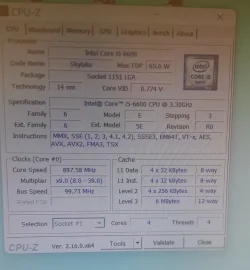
I don't know how made the CPU-Z screenshot.....the best I could figure out is attach photo....sorry
 

Attachments

  • CPU-Z.webp
    CPU-Z.webp
    218.1 KB · Views: 4

My Computer

System One

  • OS
    win 11
    Computer type
    PC/Desktop
    Manufacturer/Model
    HP
I don't know how made the CPU-Z screenshot.....the best I could figure out is attach photo....sorry


To post a screenshot on this forum...​

1. Take the screenshot, (or camera pic), edit it as desired, save to your desktop as .png or .jpg (max. size = 2MB)
2. Left click in your post, where you want to place the screenshot.
3. Click the Attach Files button at lower left, browse to your image and select it.
4. Then click Insert, I usually choose the Thumbnail (smaller) option, or there is a Full Image (larger) option.

If the "new" PrtSc key function is not to your liking... here is how to set it back to it's classic function...


My Computers

System One System Two

  • OS
    Win 11 Home ♦♦♦26200.8457 ♦♦♦♦♦♦♦25H2
    Computer type
    PC/Desktop
    Manufacturer/Model
    Built by Ghot® [May 2020]
    CPU
    AMD Ryzen 7 3700X
    Motherboard
    Asus Pro WS X570-ACE (BIOS 5302)
    Memory
    G.Skill (F4-3200C14D-16GTZKW)
    Graphics Card(s)
    EVGA RTX 2070 (08G-P4-2171-KR)
    Sound Card
    Realtek ALC1220P / ALC S1220A
    Monitor(s) Displays
    Dell U3011 30"
    Screen Resolution
    2560 x 1600
    Hard Drives
    2x Samsung 860 EVO 500GB,
    WD 4TB Black FZBX - SATA III,
    WD 8TB Black FZBX - SATA III,
    DRW-24B1ST CD/DVD Burner
    PSU
    PC Power & Cooling 750W Quad EPS12V
    Case
    Cooler Master ATCS 840 Tower
    Cooling
    CM Hyper 212 EVO (push/pull)
    Keyboard
    Ducky DK9008 Shine II Blue LED
    Mouse
    Logitech Optical M-100
    Internet Speed
    300/300
    Browser
    Firefox (latest)
    Antivirus
    Bitdefender Total Security
    Other Info
    Speakers: Klipsch Pro Media 2.1
  • Operating System
    Windows XP Pro 32bit w/SP3
    Computer type
    PC/Desktop
    Manufacturer/Model
    Built by Ghot® (not in use)
    CPU
    AMD Athlon 64 X2 5000+ (OC'd @ 3.2Ghz)
    Motherboard
    ASUS M2N32-SLI Deluxe Wireless Edition
    Memory
    TWIN2X2048-6400C4DHX (2 x 1GB, DDR2 800)
    Graphics card(s)
    EVGA 256-P2-N758-TR GeForce 8600GT SSC
    Sound Card
    Onboard
    Monitor(s) Displays
    ViewSonic G90FB Black 19" Professional (CRT)
    Screen Resolution
    up to 2048 x 1536
    Hard Drives
    WD 36GB 10,000rpm Raptor SATA
    Seagate 80GB 7200rpm SATA
    Lite-On LTR-52246S CD/RW
    Lite-On LH-18A1P CD/DVD Burner
    PSU
    PC Power & Cooling Silencer 750 Quad EPS12V
    Case
    Generic Beige case, 80mm fans
    Cooling
    ZALMAN 9500A 92mm CPU Cooler
    Keyboard
    Logitech Classic Keybooard 200
    Mouse
    Logitech Optical M-BT96a
    Internet Speed
    300/300
    Browser
    Firefox 3.x ??
    Antivirus
    Symantec (Norton)
    Other Info
    Still assembled, still runs. Haven't turned it on for 15 years?
I don't know how made the CPU-Z screenshot
Well, you made it.
And you posted it.
And it confirms that your CPU can run SSE4.2 and hence Version 25H2.
So now I suggest you return to my post #7 above and follow the tutorial to download the ISO file.


Denis
 

My Computer

System One

  • OS
    Windows 11 Home x64 Version 25H2 Build 26200.8037
None of the standard ways worked, I read the tutorial and will now try from ‘command prompt’.
Oh, I see we had not finished with the booting into Safe mode issue.
Or is that already solved?


Denis
 

My Computer

System One

  • OS
    Windows 11 Home x64 Version 25H2 Build 26200.8037
Thanks Spapakons,
I tried every way to reboot in safe, nothing worked, it said restarting and just shut down.
Is this Speccy thing any help
 

My Computer

System One

  • OS
    win 11
    Computer type
    PC/Desktop
    Manufacturer/Model
    HP
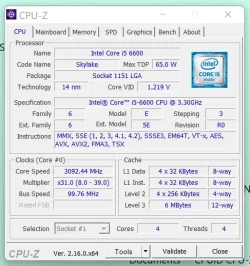
Made this, working on Speccy
 

Attachments

  • CPU-Z.webp
    CPU-Z.webp
    41.2 KB · Views: 1

My Computer

System One

  • OS
    win 11
    Computer type
    PC/Desktop
    Manufacturer/Model
    HP
Terry,

Control panel tells me I am administrator, but try to delete stuff, I need administrator permission ?
I missed this comment before.
It is how Windows works.
- You are an Admin yet Windows will still ask you, when relevant, to confirm that you want to exercise your authority as an Admin.
- And, because it knows you are an Admin, it will just ask you to click on an OK button. If you were not an Admin it would ask for an Admin's username & password instead.
- It will ask when you try to do something that would affect other users [even if there are no other users]. So expect to be challenged if you try to alter / delete a file outside of your own user folders, if you try to alter a Windows setting that will affect others and if you try to run an application that has the capability of doing one of these things.

working on Speccy
No, you made that when running CPU-Z.
Speccy is an entirely separate utility. I used to use it ages ago to monitor disk temperatures, I think.


I tried every way to reboot in safe, nothing worked, it said restarting and just shut down
You tried all 4 ways of getting into Safe mode? Even method 4 [its option 2, which itself lists 9 ways of getting into Advanced startup options]?
Boot to Safe Mode - ElevenForumTutorials
It's hard to identify where, in the procedure, things are going wrong. Do you know somebody who could lean over your shoulder to guide you?


Denis
 

My Computer

System One

  • OS
    Windows 11 Home x64 Version 25H2 Build 26200.8037
Made this, working on Speccy
You have a 6th generation Core-i5 CPU and as expected, it supports SSE4.2 and therefore Windows 11 24H2 and 25H2. For everyone else, if you have at least 1st generation Core-i3 or equivalent AMD, then it supports SSE4.2, verify with CPU-Z. If it is an Atom or Pentium, then it depends, early models did not support SSE4.2, so always verify with CPU-Z first. For anything older without SSE4.2, your best option is Windows 10 22H2 or Windows 11 23H2. There are sites that recommend to upgrade from Windows 10 Home/Pro to Windows 10 IoT Enterprise LTSC which has official support up to 2032, but I don't know of any legit method to get this version, so I cannot guide you, it would be against forum rules. Similarly Windows 11 Enterprise 23H2 should be supported until October 2026 (better than nothing), but again there is no legit method to get it, so my mouth is sealed...

Zip it emoticon.webp
 

My Computers

System One System Two

  • OS
    Windows 11 Pro 23H2 (5699), 25H2 (8457)
    Computer type
    Laptop
    Manufacturer/Model
    Acer Extensa 5630EZ
    CPU
    Mobile DualCore Intel Core 2 Duo T7250, 2000 MHz
    Motherboard
    Acer Extensa 5630
    Memory
    4GB
    Graphics Card(s)
    Mobile Intel(R) GMA 4500M (Mobile 4 series)
    Sound Card
    Realtek ALC268 @ Intel 82801IB ICH9 - High Definition Audio Controller
    Monitor(s) Displays
    1
    Screen Resolution
    1280x800
    Hard Drives
    Samsung SSD 850 EVO 250GB SATA Device (250 GB, SATA-III)
    Internet Speed
    VDSL 50 Mbps
    Browser
    MICROSOFT EDGE
    Antivirus
    WINDOWS DEFENDER
    Other Info
    Legacy MBR installation, no TPM, no Secure Boot, no WDDM 2.0 graphics drivers, no SSE4.2, cannot get more unsupported ;) This is only my test laptop. I had installed Windows 11 here before upgrading my main PC. For my main PC I use everyday see my 2nd system specs.
  • Operating System
    Windows 11 Pro v25H2 (build 26200.8457)
    Computer type
    PC/Desktop
    Manufacturer/Model
    Custom-built PC
    CPU
    Intel Core-i7 3770 3.40GHz s1155 (3rd generation)
    Motherboard
    Asus P8H61 s1155 ATX
    Memory
    2x Kingston Hyper-X Blu 8GB DDR3-1600
    Graphics card(s)
    GIGABYTE GeForce RTX 3050 WINDFORCE OC V2 6GB (GV-N3050WF2OCV2-6GD)
    Sound Card
    Realtek HD audio (ALC887)
    Monitor(s) Displays
    Sony Bravia KDL-19L4000 19" LCD TV via VGA
    Screen Resolution
    1440x900 32-bit 60Hz
    Hard Drives
    WD Blue SA510 2.5 1000GB SSD as system disk, Western Digital Caviar Purple 4TB SATA III (WD40PURZ) as second
    PSU
    Thermaltake Litepower RGB 550W Full Wired
    Case
    SUPERCASE MIDI-TOWER
    Cooling
    Deepcool Gamma Archer CPU cooler, 1x 8cm fan at the back
    Keyboard
    Mitsumi 101-key PS/2
    Mouse
    Sunnyline OptiEye PS/2
    Internet Speed
    100Mbps
    Browser
    Microsoft Edge, Mozilla Firefox
    Antivirus
    Microsoft Windows Defender
    Other Info
    Legacy BIOS (MBR) installation, no TPM, no Secure Boot, WDDM 3.0 graphics drivers, WEI score 7.4
Here's the command to type in the Admin DOS console to restart in Safe mode:

bcdedit /set {current} safeboot minimal
.
 

My Computer

System One

  • OS
    Windows 11 24H2
    Computer type
    Laptop
    Manufacturer/Model
    Dell Inspiron 16 Plus 7640
OldGrantonian,
I tried your advice.....'Access Denied'

maybe I need a 'Team Viewer' to help me out ?

maybe I need to accept what I have and leave it at that. I don't know.
 

My Computer

System One

  • OS
    win 11
    Computer type
    PC/Desktop
    Manufacturer/Model
    HP
go to search and type msconfig and press enter.
Go to the Boot tab and put a check in Safe Boot. Apply and OK Restart the computer.
It should boot into Safe Mode. Be sure to go back to msconfig/boot tab to uncheck that box to boot normally again.
 

My Computer

System One

  • OS
    Windows 11 Pro Insider 64 bit 25H2 26200.5742
    Computer type
    PC/Desktop
    Manufacturer/Model
    Gigabyte Z390 UD
    CPU
    Intel Core i7 9700K 3.60
    Motherboard
    Gigabyte Z390 UD
    Memory
    16 GB
    Graphics Card(s)
    nVidia GEForce RTX 2060 Super
    Sound Card
    onboard
    Monitor(s) Displays
    Two 27" Dell 4K monitors
    Screen Resolution
    3840 x 2160
    Hard Drives
    M.2 NVME SSD, 500 GB; Two 2TB Mechanical HDD's
    PSU
    850w PSU
    Case
    Cyberpower PC
    Cooling
    Water cooled
    Keyboard
    Backlit Cyberpower gaming keyboard
    Mouse
    Backlit Cyberpower gaming mouse
    Internet Speed
    1 GB mbps
    Browser
    Brave
    Antivirus
    Windows Security
Back
Top Bottom