Solved Safely remove internal HDDs ?


pietcorus2

Well-known member
Power User
VIP
Local time
11:30 AM
Posts
1,599
Location
Netherlands
OS
Windows11 Pro 25H2
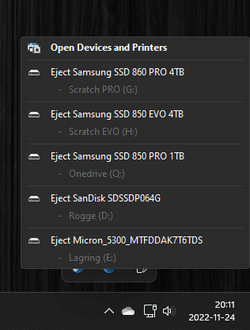
My fresh installed Win11 , on a new PC , shows my internal HDD in the taskbar , item ; " safely remove " directing to my internal HDD !
I wonder why (?) anyone should remove his own internal HDDs anyway ........
So Im searching for an easy way to bypass my own internal hardware for the "safely remove" icon in the taskbar !
Im pretty sure more people faced this strange behaviour , will wait and search for a solution..........;)
 

My Computers My Computers

  • At a glance

    Windows11 Pro 25H2i732GBnVidia
    OS
    Windows11 Pro 25H2
    Computer type
    PC/Desktop
    Manufacturer/Model
    Asus
    CPU
    i7
    Motherboard
    z97k
    Memory
    32GB
    Graphics Card(s)
    nVidia
    Sound Card
    Realtek
    Hard Drives
    3
    Cooling
    air
    Browser
    Edge
    Antivirus
    ESET
  • At a glance

    Windows11 ProIntel i516GBIntel
    Operating System
    Windows11 Pro
    Computer type
    PC/Desktop
    Manufacturer/Model
    ASUS
    CPU
    Intel i5
    Motherboard
    ASUS Basic
    Memory
    16GB
    Graphics card(s)
    Intel
    Sound Card
    Realtek
    Monitor(s) Displays
    Samsung
    Hard Drives
    one intern , 0ne extern, OS on SSD
    Cooling
    air
    Keyboard
    wireless Logitech
    Mouse
    wireless Logitech
    Internet Speed
    1GB
    Browser
    Edge
    Antivirus
    ESET
First thing I would check is whether there are options in the BIOS for PCIe hot plug that are enabled by default.
Other than that it could be an issue with the chipset disk controller driver, is it showing as fully supported in device manager?
 

My Computer My Computer

At a glance

Windows 11 Pro 22H2, build: 22621.521Intel i7-12700K 3.6GHz Base (5.0GHz Turbo)64GB DDR 3600MhzAsus Tuff RTX 3080 10GB OC
OS
Windows 11 Pro 22H2, build: 22621.521
Computer type
PC/Desktop
Manufacturer/Model
Scan 3XS Custom 1700
CPU
Intel i7-12700K 3.6GHz Base (5.0GHz Turbo)
Motherboard
Asus ProArt Creator B660 D4
Memory
64GB DDR 3600Mhz
Graphics Card(s)
Asus Tuff RTX 3080 10GB OC
Sound Card
Onboard Realtek
Monitor(s) Displays
Gigabyte G32QC 32inch 16:9 curved @2560 x 1440p 165Hz Freesync Premium Pro/ Dell SE2422H 24inch 16:9 1920 x 1080p 75Hz Freesync
Screen Resolution
2560 x 1440p & 1920 x 1080p
Hard Drives
WD SN570 1TB NVME (Boot), Samsung 870QVO 1TB (SSD), SanDisk 3D Ultra 500Gb (SSD) x2, Seagate 3Tb Expansion Desk (Ext HDD), 2x Toshiba 1Tb P300 (Ext HDD)
PSU
Corsair RM1000X Modular
Case
Corsair 4000D Airflow Desktop
Cooling
Corsair Hydro H150i RGB Pro XT 360mm Liquid Cooler, 3 x 120mm fans, 1x Exhaust
Keyboard
Microsoft Ergonomic
Mouse
Logitech G402
Internet Speed
800Mbs
Browser
Edge Chromium
Antivirus
Defender, Malwarebytes
" I would check is whether there are options in the BIOS for PCIe hot plug that are enabled by default." ........should it be enabled/disabled ?
" chipset disk controller driver, is it showing as fully supported in device manager? " ............whats the adviced setting ??
 

My Computers My Computers

  • At a glance

    Windows11 Pro 25H2i732GBnVidia
    OS
    Windows11 Pro 25H2
    Computer type
    PC/Desktop
    Manufacturer/Model
    Asus
    CPU
    i7
    Motherboard
    z97k
    Memory
    32GB
    Graphics Card(s)
    nVidia
    Sound Card
    Realtek
    Hard Drives
    3
    Cooling
    air
    Browser
    Edge
    Antivirus
    ESET
  • At a glance

    Windows11 ProIntel i516GBIntel
    Operating System
    Windows11 Pro
    Computer type
    PC/Desktop
    Manufacturer/Model
    ASUS
    CPU
    Intel i5
    Motherboard
    ASUS Basic
    Memory
    16GB
    Graphics card(s)
    Intel
    Sound Card
    Realtek
    Monitor(s) Displays
    Samsung
    Hard Drives
    one intern , 0ne extern, OS on SSD
    Cooling
    air
    Keyboard
    wireless Logitech
    Mouse
    wireless Logitech
    Internet Speed
    1GB
    Browser
    Edge
    Antivirus
    ESET
Hot plug should be off, unless you are using a hot plug capable system. In theory you need hot plug capable BIOS, drives, motherboard and OS to make it work, but Windows may be detecting the setting being on in BIOS if it is there.
If the disk controller in device manager doesn't show a yellow exclamation mark it should be good.
If neither of these are the cause of your issue then I am sure someone else will be along with better ideas.
Meanwhile if you go to tenforums and search for the issue there, the solution will probably work with Win11 as well, if one is listed.
 

My Computer My Computer

At a glance

Windows 11 Pro 22H2, build: 22621.521Intel i7-12700K 3.6GHz Base (5.0GHz Turbo)64GB DDR 3600MhzAsus Tuff RTX 3080 10GB OC
OS
Windows 11 Pro 22H2, build: 22621.521
Computer type
PC/Desktop
Manufacturer/Model
Scan 3XS Custom 1700
CPU
Intel i7-12700K 3.6GHz Base (5.0GHz Turbo)
Motherboard
Asus ProArt Creator B660 D4
Memory
64GB DDR 3600Mhz
Graphics Card(s)
Asus Tuff RTX 3080 10GB OC
Sound Card
Onboard Realtek
Monitor(s) Displays
Gigabyte G32QC 32inch 16:9 curved @2560 x 1440p 165Hz Freesync Premium Pro/ Dell SE2422H 24inch 16:9 1920 x 1080p 75Hz Freesync
Screen Resolution
2560 x 1440p & 1920 x 1080p
Hard Drives
WD SN570 1TB NVME (Boot), Samsung 870QVO 1TB (SSD), SanDisk 3D Ultra 500Gb (SSD) x2, Seagate 3Tb Expansion Desk (Ext HDD), 2x Toshiba 1Tb P300 (Ext HDD)
PSU
Corsair RM1000X Modular
Case
Corsair 4000D Airflow Desktop
Cooling
Corsair Hydro H150i RGB Pro XT 360mm Liquid Cooler, 3 x 120mm fans, 1x Exhaust
Keyboard
Microsoft Ergonomic
Mouse
Logitech G402
Internet Speed
800Mbs
Browser
Edge Chromium
Antivirus
Defender, Malwarebytes
" PCIe hot plug that are enabled by default. "..............should it be enabled/disabled ?
" chipset disk controller driver, is it showing as fully supported in device manager? "..........adviced settings ?
 

My Computers My Computers

  • At a glance

    Windows11 Pro 25H2i732GBnVidia
    OS
    Windows11 Pro 25H2
    Computer type
    PC/Desktop
    Manufacturer/Model
    Asus
    CPU
    i7
    Motherboard
    z97k
    Memory
    32GB
    Graphics Card(s)
    nVidia
    Sound Card
    Realtek
    Hard Drives
    3
    Cooling
    air
    Browser
    Edge
    Antivirus
    ESET
  • At a glance

    Windows11 ProIntel i516GBIntel
    Operating System
    Windows11 Pro
    Computer type
    PC/Desktop
    Manufacturer/Model
    ASUS
    CPU
    Intel i5
    Motherboard
    ASUS Basic
    Memory
    16GB
    Graphics card(s)
    Intel
    Sound Card
    Realtek
    Monitor(s) Displays
    Samsung
    Hard Drives
    one intern , 0ne extern, OS on SSD
    Cooling
    air
    Keyboard
    wireless Logitech
    Mouse
    wireless Logitech
    Internet Speed
    1GB
    Browser
    Edge
    Antivirus
    ESET
Just checked in Win11-bios ; PCI Subsystem Settings ; Above 4G Decoding- Enabled
There are no yellow marks in dev.man.
I would also have my CD/DVD burner as the second boot-option ...........I have the SSD ( with OS) only ( first bootdevice ) , while no second is mentioned.
There is a "boot-override " also , its the SSD .
What does "override " mean , can I ad my CD-drive as the second boot-option ?

btw; the internal HDD shows as a portable (?) device in the dev.man. !
 
Last edited:

My Computers My Computers

  • At a glance

    Windows11 Pro 25H2i732GBnVidia
    OS
    Windows11 Pro 25H2
    Computer type
    PC/Desktop
    Manufacturer/Model
    Asus
    CPU
    i7
    Motherboard
    z97k
    Memory
    32GB
    Graphics Card(s)
    nVidia
    Sound Card
    Realtek
    Hard Drives
    3
    Cooling
    air
    Browser
    Edge
    Antivirus
    ESET
  • At a glance

    Windows11 ProIntel i516GBIntel
    Operating System
    Windows11 Pro
    Computer type
    PC/Desktop
    Manufacturer/Model
    ASUS
    CPU
    Intel i5
    Motherboard
    ASUS Basic
    Memory
    16GB
    Graphics card(s)
    Intel
    Sound Card
    Realtek
    Monitor(s) Displays
    Samsung
    Hard Drives
    one intern , 0ne extern, OS on SSD
    Cooling
    air
    Keyboard
    wireless Logitech
    Mouse
    wireless Logitech
    Internet Speed
    1GB
    Browser
    Edge
    Antivirus
    ESET
You can just remove the icon from the tray if you want.
Taskbar Settings>Taskbar Corner Overflow
Turn off the Windows Explorer option.
 
Last edited:

My Computers My Computers

  • At a glance

    Windows 11 ProIntel Core i9 9900XGSkill Trident Z RGB 32GB 3600 16-16-16-36 (F...EVGA RTX 3080 12GB FTW3 Ultra Gaming (12G-P5-...
    OS
    Windows 11 Pro
    Computer type
    PC/Desktop
    Manufacturer/Model
    Skylake Special X299
    CPU
    Intel Core i9 9900X
    Motherboard
    Asus ROG Strix X299-E Gaming II
    Memory
    GSkill Trident Z RGB 32GB 3600 16-16-16-36 (F4-3600C16Q-32GTZR)
    Graphics Card(s)
    EVGA RTX 3080 12GB FTW3 Ultra Gaming (12G-P5-4877-KL)
    Sound Card
    Supreme FX
    Monitor(s) Displays
    Asus PG279Q
    Screen Resolution
    2560 x 1440 165Hz
    Hard Drives
    Samsung 980 Pro 500GB x2, Seagate Barracuda 4TB x2, Western Digital Black 4TB x1
    PSU
    EVGA 1200 P2, EVGA Black Custom Braided Cables
    Case
    Thermaltake View 31 Tempered Glass Limited Edition
    Cooling
    Corsair H115i, Thermal Grizzly Kryonaut
    Keyboard
    Logitech G910 Orion Spark
    Mouse
    Logitech G700s, Asus ROG GX860 Buzzard
    Internet Speed
    Verizon Fios Quantum Gateway 75/75
    Browser
    Edge
    Antivirus
    Windows Defender, Malwarebytes 4.5.2
    Other Info
    Thermaltake Riing Duo 14 x3, Thermaltake Riing Plus 14 x2, Corsair HS70 Pro Wireless Headset
  • At a glance

    Windows 10 ProIntel Core i7 6700KGSkill Trident Z RGB 16GB 3600 16-16-16-36 (F...EVGA GTX 980 Ti SC x2, EVGA Pro SLI Bridge
    Operating System
    Windows 10 Pro
    Computer type
    PC/Desktop
    Manufacturer/Model
    Skylake Special Z170
    CPU
    Intel Core i7 6700K
    Motherboard
    Asus Sabertooth Z170 Mark 1
    Memory
    GSkill Trident Z RGB 16GB 3600 16-16-16-36 (F4-3600C16D-16GTZR)
    Graphics card(s)
    EVGA GTX 980 Ti SC x2, EVGA Pro SLI Bridge
    Sound Card
    Realtek High Definition
    Monitor(s) Displays
    AOC G2460PG
    Screen Resolution
    1920 x 1080 144Hz
    Hard Drives
    Samsung 870 Evo 500GB, Seagate Barracuda 4TB x2
    PSU
    EVGA 1000 P2, EVGA White Custom Braided Cables
    Case
    Corsair Vengeance C70 Gunmetal Black
    Cooling
    Corsair H100i v2, Corsair ML120 x2, Thermal Grizzly Kryonaut
    Keyboard
    Logitech G910 Orion Spectrum
    Mouse
    Logitech G500s
    Internet Speed
    Verizon Fios Quantum Gateway 75/75
    Browser
    Edge
    Antivirus
    Windows Defender, Malwarebytes 4.5.2
    Other Info
    Corsair SP120 x4, LG Blu-ray Drive, Durabrand HT-395 100 Watt Dolby Digital Amp
Should be able to, but bear in mind if the system boots as UEFI with no CSM support, it may cause issues trying to boot from CD/ DVD.
 

My Computer My Computer

At a glance

Windows 11 Pro 22H2, build: 22621.521Intel i7-12700K 3.6GHz Base (5.0GHz Turbo)64GB DDR 3600MhzAsus Tuff RTX 3080 10GB OC
OS
Windows 11 Pro 22H2, build: 22621.521
Computer type
PC/Desktop
Manufacturer/Model
Scan 3XS Custom 1700
CPU
Intel i7-12700K 3.6GHz Base (5.0GHz Turbo)
Motherboard
Asus ProArt Creator B660 D4
Memory
64GB DDR 3600Mhz
Graphics Card(s)
Asus Tuff RTX 3080 10GB OC
Sound Card
Onboard Realtek
Monitor(s) Displays
Gigabyte G32QC 32inch 16:9 curved @2560 x 1440p 165Hz Freesync Premium Pro/ Dell SE2422H 24inch 16:9 1920 x 1080p 75Hz Freesync
Screen Resolution
2560 x 1440p & 1920 x 1080p
Hard Drives
WD SN570 1TB NVME (Boot), Samsung 870QVO 1TB (SSD), SanDisk 3D Ultra 500Gb (SSD) x2, Seagate 3Tb Expansion Desk (Ext HDD), 2x Toshiba 1Tb P300 (Ext HDD)
PSU
Corsair RM1000X Modular
Case
Corsair 4000D Airflow Desktop
Cooling
Corsair Hydro H150i RGB Pro XT 360mm Liquid Cooler, 3 x 120mm fans, 1x Exhaust
Keyboard
Microsoft Ergonomic
Mouse
Logitech G402
Internet Speed
800Mbs
Browser
Edge Chromium
Antivirus
Defender, Malwarebytes
When you click on override it will boot to that device.
All you need in the list is your OS drive.
You can use the Boot menu to boot to anything else that`ll show up in the list.
 

My Computers My Computers

  • At a glance

    Windows 11 ProIntel Core i9 9900XGSkill Trident Z RGB 32GB 3600 16-16-16-36 (F...EVGA RTX 3080 12GB FTW3 Ultra Gaming (12G-P5-...
    OS
    Windows 11 Pro
    Computer type
    PC/Desktop
    Manufacturer/Model
    Skylake Special X299
    CPU
    Intel Core i9 9900X
    Motherboard
    Asus ROG Strix X299-E Gaming II
    Memory
    GSkill Trident Z RGB 32GB 3600 16-16-16-36 (F4-3600C16Q-32GTZR)
    Graphics Card(s)
    EVGA RTX 3080 12GB FTW3 Ultra Gaming (12G-P5-4877-KL)
    Sound Card
    Supreme FX
    Monitor(s) Displays
    Asus PG279Q
    Screen Resolution
    2560 x 1440 165Hz
    Hard Drives
    Samsung 980 Pro 500GB x2, Seagate Barracuda 4TB x2, Western Digital Black 4TB x1
    PSU
    EVGA 1200 P2, EVGA Black Custom Braided Cables
    Case
    Thermaltake View 31 Tempered Glass Limited Edition
    Cooling
    Corsair H115i, Thermal Grizzly Kryonaut
    Keyboard
    Logitech G910 Orion Spark
    Mouse
    Logitech G700s, Asus ROG GX860 Buzzard
    Internet Speed
    Verizon Fios Quantum Gateway 75/75
    Browser
    Edge
    Antivirus
    Windows Defender, Malwarebytes 4.5.2
    Other Info
    Thermaltake Riing Duo 14 x3, Thermaltake Riing Plus 14 x2, Corsair HS70 Pro Wireless Headset
  • At a glance

    Windows 10 ProIntel Core i7 6700KGSkill Trident Z RGB 16GB 3600 16-16-16-36 (F...EVGA GTX 980 Ti SC x2, EVGA Pro SLI Bridge
    Operating System
    Windows 10 Pro
    Computer type
    PC/Desktop
    Manufacturer/Model
    Skylake Special Z170
    CPU
    Intel Core i7 6700K
    Motherboard
    Asus Sabertooth Z170 Mark 1
    Memory
    GSkill Trident Z RGB 16GB 3600 16-16-16-36 (F4-3600C16D-16GTZR)
    Graphics card(s)
    EVGA GTX 980 Ti SC x2, EVGA Pro SLI Bridge
    Sound Card
    Realtek High Definition
    Monitor(s) Displays
    AOC G2460PG
    Screen Resolution
    1920 x 1080 144Hz
    Hard Drives
    Samsung 870 Evo 500GB, Seagate Barracuda 4TB x2
    PSU
    EVGA 1000 P2, EVGA White Custom Braided Cables
    Case
    Corsair Vengeance C70 Gunmetal Black
    Cooling
    Corsair H100i v2, Corsair ML120 x2, Thermal Grizzly Kryonaut
    Keyboard
    Logitech G910 Orion Spectrum
    Mouse
    Logitech G500s
    Internet Speed
    Verizon Fios Quantum Gateway 75/75
    Browser
    Edge
    Antivirus
    Windows Defender, Malwarebytes 4.5.2
    Other Info
    Corsair SP120 x4, LG Blu-ray Drive, Durabrand HT-395 100 Watt Dolby Digital Amp
" the system boots as UEFI with no CSM support " .........this is indeed the case !
CSM-support is greyed out , cant enable it........
I can also boot , option ; "Other OS " ( and "EUFI" , second choise)
So its not possible to make my CD-drive as the second boot-option , in BIOS ??
 

My Computers My Computers

  • At a glance

    Windows11 Pro 25H2i732GBnVidia
    OS
    Windows11 Pro 25H2
    Computer type
    PC/Desktop
    Manufacturer/Model
    Asus
    CPU
    i7
    Motherboard
    z97k
    Memory
    32GB
    Graphics Card(s)
    nVidia
    Sound Card
    Realtek
    Hard Drives
    3
    Cooling
    air
    Browser
    Edge
    Antivirus
    ESET
  • At a glance

    Windows11 ProIntel i516GBIntel
    Operating System
    Windows11 Pro
    Computer type
    PC/Desktop
    Manufacturer/Model
    ASUS
    CPU
    Intel i5
    Motherboard
    ASUS Basic
    Memory
    16GB
    Graphics card(s)
    Intel
    Sound Card
    Realtek
    Monitor(s) Displays
    Samsung
    Hard Drives
    one intern , 0ne extern, OS on SSD
    Cooling
    air
    Keyboard
    wireless Logitech
    Mouse
    wireless Logitech
    Internet Speed
    1GB
    Browser
    Edge
    Antivirus
    ESET
You can`t use those options with UEFI
The only thing you need on the list is your drive.
And with UEFI it`ll say Windows Boot Manager (your OS drive) etc etc, that`s all you need listed.
 

My Computers My Computers

  • At a glance

    Windows 11 ProIntel Core i9 9900XGSkill Trident Z RGB 32GB 3600 16-16-16-36 (F...EVGA RTX 3080 12GB FTW3 Ultra Gaming (12G-P5-...
    OS
    Windows 11 Pro
    Computer type
    PC/Desktop
    Manufacturer/Model
    Skylake Special X299
    CPU
    Intel Core i9 9900X
    Motherboard
    Asus ROG Strix X299-E Gaming II
    Memory
    GSkill Trident Z RGB 32GB 3600 16-16-16-36 (F4-3600C16Q-32GTZR)
    Graphics Card(s)
    EVGA RTX 3080 12GB FTW3 Ultra Gaming (12G-P5-4877-KL)
    Sound Card
    Supreme FX
    Monitor(s) Displays
    Asus PG279Q
    Screen Resolution
    2560 x 1440 165Hz
    Hard Drives
    Samsung 980 Pro 500GB x2, Seagate Barracuda 4TB x2, Western Digital Black 4TB x1
    PSU
    EVGA 1200 P2, EVGA Black Custom Braided Cables
    Case
    Thermaltake View 31 Tempered Glass Limited Edition
    Cooling
    Corsair H115i, Thermal Grizzly Kryonaut
    Keyboard
    Logitech G910 Orion Spark
    Mouse
    Logitech G700s, Asus ROG GX860 Buzzard
    Internet Speed
    Verizon Fios Quantum Gateway 75/75
    Browser
    Edge
    Antivirus
    Windows Defender, Malwarebytes 4.5.2
    Other Info
    Thermaltake Riing Duo 14 x3, Thermaltake Riing Plus 14 x2, Corsair HS70 Pro Wireless Headset
  • At a glance

    Windows 10 ProIntel Core i7 6700KGSkill Trident Z RGB 16GB 3600 16-16-16-36 (F...EVGA GTX 980 Ti SC x2, EVGA Pro SLI Bridge
    Operating System
    Windows 10 Pro
    Computer type
    PC/Desktop
    Manufacturer/Model
    Skylake Special Z170
    CPU
    Intel Core i7 6700K
    Motherboard
    Asus Sabertooth Z170 Mark 1
    Memory
    GSkill Trident Z RGB 16GB 3600 16-16-16-36 (F4-3600C16D-16GTZR)
    Graphics card(s)
    EVGA GTX 980 Ti SC x2, EVGA Pro SLI Bridge
    Sound Card
    Realtek High Definition
    Monitor(s) Displays
    AOC G2460PG
    Screen Resolution
    1920 x 1080 144Hz
    Hard Drives
    Samsung 870 Evo 500GB, Seagate Barracuda 4TB x2
    PSU
    EVGA 1000 P2, EVGA White Custom Braided Cables
    Case
    Corsair Vengeance C70 Gunmetal Black
    Cooling
    Corsair H100i v2, Corsair ML120 x2, Thermal Grizzly Kryonaut
    Keyboard
    Logitech G910 Orion Spectrum
    Mouse
    Logitech G500s
    Internet Speed
    Verizon Fios Quantum Gateway 75/75
    Browser
    Edge
    Antivirus
    Windows Defender, Malwarebytes 4.5.2
    Other Info
    Corsair SP120 x4, LG Blu-ray Drive, Durabrand HT-395 100 Watt Dolby Digital Amp
Another option ; fast boot enabled ..........is this the right choise , " disabled" seems better ??
 

My Computers My Computers

  • At a glance

    Windows11 Pro 25H2i732GBnVidia
    OS
    Windows11 Pro 25H2
    Computer type
    PC/Desktop
    Manufacturer/Model
    Asus
    CPU
    i7
    Motherboard
    z97k
    Memory
    32GB
    Graphics Card(s)
    nVidia
    Sound Card
    Realtek
    Hard Drives
    3
    Cooling
    air
    Browser
    Edge
    Antivirus
    ESET
  • At a glance

    Windows11 ProIntel i516GBIntel
    Operating System
    Windows11 Pro
    Computer type
    PC/Desktop
    Manufacturer/Model
    ASUS
    CPU
    Intel i5
    Motherboard
    ASUS Basic
    Memory
    16GB
    Graphics card(s)
    Intel
    Sound Card
    Realtek
    Monitor(s) Displays
    Samsung
    Hard Drives
    one intern , 0ne extern, OS on SSD
    Cooling
    air
    Keyboard
    wireless Logitech
    Mouse
    wireless Logitech
    Internet Speed
    1GB
    Browser
    Edge
    Antivirus
    ESET
Leave it enabled, you won`t even know what it does until you research it.


My Computers My Computers

  • At a glance

    Windows 11 ProIntel Core i9 9900XGSkill Trident Z RGB 32GB 3600 16-16-16-36 (F...EVGA RTX 3080 12GB FTW3 Ultra Gaming (12G-P5-...
    OS
    Windows 11 Pro
    Computer type
    PC/Desktop
    Manufacturer/Model
    Skylake Special X299
    CPU
    Intel Core i9 9900X
    Motherboard
    Asus ROG Strix X299-E Gaming II
    Memory
    GSkill Trident Z RGB 32GB 3600 16-16-16-36 (F4-3600C16Q-32GTZR)
    Graphics Card(s)
    EVGA RTX 3080 12GB FTW3 Ultra Gaming (12G-P5-4877-KL)
    Sound Card
    Supreme FX
    Monitor(s) Displays
    Asus PG279Q
    Screen Resolution
    2560 x 1440 165Hz
    Hard Drives
    Samsung 980 Pro 500GB x2, Seagate Barracuda 4TB x2, Western Digital Black 4TB x1
    PSU
    EVGA 1200 P2, EVGA Black Custom Braided Cables
    Case
    Thermaltake View 31 Tempered Glass Limited Edition
    Cooling
    Corsair H115i, Thermal Grizzly Kryonaut
    Keyboard
    Logitech G910 Orion Spark
    Mouse
    Logitech G700s, Asus ROG GX860 Buzzard
    Internet Speed
    Verizon Fios Quantum Gateway 75/75
    Browser
    Edge
    Antivirus
    Windows Defender, Malwarebytes 4.5.2
    Other Info
    Thermaltake Riing Duo 14 x3, Thermaltake Riing Plus 14 x2, Corsair HS70 Pro Wireless Headset
  • At a glance

    Windows 10 ProIntel Core i7 6700KGSkill Trident Z RGB 16GB 3600 16-16-16-36 (F...EVGA GTX 980 Ti SC x2, EVGA Pro SLI Bridge
    Operating System
    Windows 10 Pro
    Computer type
    PC/Desktop
    Manufacturer/Model
    Skylake Special Z170
    CPU
    Intel Core i7 6700K
    Motherboard
    Asus Sabertooth Z170 Mark 1
    Memory
    GSkill Trident Z RGB 16GB 3600 16-16-16-36 (F4-3600C16D-16GTZR)
    Graphics card(s)
    EVGA GTX 980 Ti SC x2, EVGA Pro SLI Bridge
    Sound Card
    Realtek High Definition
    Monitor(s) Displays
    AOC G2460PG
    Screen Resolution
    1920 x 1080 144Hz
    Hard Drives
    Samsung 870 Evo 500GB, Seagate Barracuda 4TB x2
    PSU
    EVGA 1000 P2, EVGA White Custom Braided Cables
    Case
    Corsair Vengeance C70 Gunmetal Black
    Cooling
    Corsair H100i v2, Corsair ML120 x2, Thermal Grizzly Kryonaut
    Keyboard
    Logitech G910 Orion Spectrum
    Mouse
    Logitech G500s
    Internet Speed
    Verizon Fios Quantum Gateway 75/75
    Browser
    Edge
    Antivirus
    Windows Defender, Malwarebytes 4.5.2
    Other Info
    Corsair SP120 x4, LG Blu-ray Drive, Durabrand HT-395 100 Watt Dolby Digital Amp
Ok, its solved by making a task in the scheduler , which points to the reg.item of this HDD.
Task starts at logon , its no longer visible in the "safely remove-icon " ( taskbar )..............:)
 

My Computers My Computers

  • At a glance

    Windows11 Pro 25H2i732GBnVidia
    OS
    Windows11 Pro 25H2
    Computer type
    PC/Desktop
    Manufacturer/Model
    Asus
    CPU
    i7
    Motherboard
    z97k
    Memory
    32GB
    Graphics Card(s)
    nVidia
    Sound Card
    Realtek
    Hard Drives
    3
    Cooling
    air
    Browser
    Edge
    Antivirus
    ESET
  • At a glance

    Windows11 ProIntel i516GBIntel
    Operating System
    Windows11 Pro
    Computer type
    PC/Desktop
    Manufacturer/Model
    ASUS
    CPU
    Intel i5
    Motherboard
    ASUS Basic
    Memory
    16GB
    Graphics card(s)
    Intel
    Sound Card
    Realtek
    Monitor(s) Displays
    Samsung
    Hard Drives
    one intern , 0ne extern, OS on SSD
    Cooling
    air
    Keyboard
    wireless Logitech
    Mouse
    wireless Logitech
    Internet Speed
    1GB
    Browser
    Edge
    Antivirus
    ESET
Ok, its solved by making a task in the scheduler , which points to the reg.item of this HDD.
Task starts at logon , its no longer visible in the "safely remove-icon " ( taskbar )..............:)

How did you do it?

I have the same issue and am looking for a solution. :)

1669317080342.png
 

My Computer My Computer

At a glance

Windows 11 Pro for WorkstationsIntel Xeon w5-2465X (3.10 GHz)128 GBNvidia RTX A5000
OS
Windows 11 Pro for Workstations
Computer type
PC/Desktop
Manufacturer/Model
HP
CPU
Intel Xeon w5-2465X (3.10 GHz)
Motherboard
HP Z4 G5
Memory
128 GB
Graphics Card(s)
Nvidia RTX A5000
Sound Card
On board, Realtek
Monitor(s) Displays
ASUS Swift PG279Q (27")
Screen Resolution
2560x1440
Hard Drives
Samsung MZVL21T0HCLR-00BH1 m.2 1TB, Samsung 990 Pro m.2 4TB, Kingston SFYRD m.2 4TB, Corsair MP510 m.2 4TB, Corsair MP600 Pro m.2 8TB, Corsair MP600 Pro m.2 8TB, Micron 5300 SATA SSD 8TB.
Other Info
This is a HP Z4 G5 Workstation.
I have that because I enabled hot swap in bios. I use it often.

I don't like having several disks powered on when they are not being used.
 

My Computers My Computers

  • At a glance

    Win7,Win11i7-97002x16gb 3600mhz
    OS
    Win7,Win11
    Computer type
    PC/Desktop
    CPU
    i7-9700
    Motherboard
    gigabyte b365m ds3h
    Memory
    2x16gb 3600mhz
    Monitor(s) Displays
    benq gw2480
    PSU
    bequiet pure power 11 400CM
    Cooling
    cryorig m9i
  • At a glance

    win7,win11i5-84002x8gb 3200
    Operating System
    win7,win11
    Computer type
    PC/Desktop
    CPU
    i5-8400
    Motherboard
    gigabyte b365m ds3h
    Memory
    2x8gb 3200
    PSU
    xfx pro 450
Back
Top Bottom