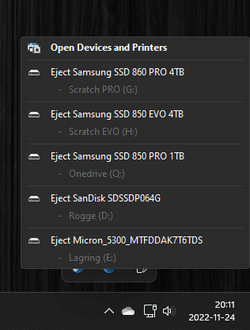
My fresh installed Win11 , on a new PC , shows my internal HDD in the taskbar , item ; " safely remove " directing to my internal HDD !
I wonder why (?) anyone should remove his own internal HDDs anyway ........
So Im searching for an easy way to bypass my own internal hardware for the "safely remove" icon in the taskbar !
Im pretty sure more people faced this strange behaviour , will wait and search for a solution..........
I wonder why (?) anyone should remove his own internal HDDs anyway ........
So Im searching for an easy way to bypass my own internal hardware for the "safely remove" icon in the taskbar !
Im pretty sure more people faced this strange behaviour , will wait and search for a solution..........
My Computers
-
At a glance
Windows11 Pro 25H2i732GBnVidia- OS
- Windows11 Pro 25H2
- Computer type
- PC/Desktop
- Manufacturer/Model
- Asus
- CPU
- i7
- Motherboard
- z97k
- Memory
- 32GB
- Graphics Card(s)
- nVidia
- Sound Card
- Realtek
- Hard Drives
- 3
- Cooling
- air
- Browser
- Edge
- Antivirus
- ESET
-
At a glance
Windows11 ProIntel i516GBIntel- Operating System
- Windows11 Pro
- Computer type
- PC/Desktop
- Manufacturer/Model
- ASUS
- CPU
- Intel i5
- Motherboard
- ASUS Basic
- Memory
- 16GB
- Graphics card(s)
- Intel
- Sound Card
- Realtek
- Monitor(s) Displays
- Samsung
- Hard Drives
- one intern , 0ne extern, OS on SSD
- Cooling
- air
- Keyboard
- wireless Logitech
- Mouse
- wireless Logitech
- Internet Speed
- 1GB
- Browser
- Edge
- Antivirus
- ESET