Samsung Nvme 980 Pro SSD very slow on Windows 11


AlexDeLarge68

Member
Local time
1:07 PM
Posts
7
OS
Windows 11
Hello.
Even though we've got various updates during the last months, my Samsung 980 Pro still performs very bad on Windows 11.
Obviously the drivers are the Intel RST VMD, since Samsung after almost 2 years hasn't updated the Nvme drivers to include 980 Pro.
The HD is installed on an almost last generation notebook: an Acer Aspire A515-56G, with an Intel i7-1165G7, 24 GB RAM.
After a lot of months in which my notebook performances was far lower than the desktop PCs I used at office (not so new as mine - I think 3-4-5 generation older, but with Windows 10 and some sort of SSD drive clearly), I finally decided to execute the classic benchmarks, and the results were disheartening.
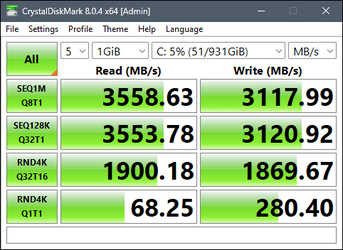
This is my CrystalDiskMark:
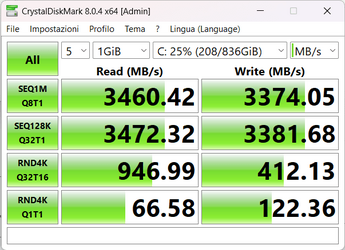
CrystaDiskMark.png

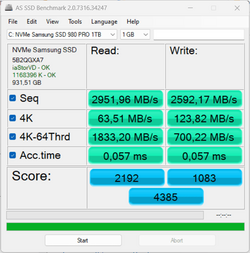
And this is my AS SSD Benchmark:

ASSSDBenchmark.png

With respect with results found on Internet, they are very bad, less than half for almost all values.
Actually the notebook is not speedy as it should be, even though it's absolutely usable.
Being Generation 11th, it's compatible with PCIe 4 and the nvme port should be linked to that bus.
Does anyone encountered similar results? I suspect residual problems in Windows 11 with nvme hard disk (despite they said that they were more or less solved), or with Intel RST driver, that is the only one I can use with Samsung 980.

Help!

Thanks.
 
Windows Build/Version
Build 25211 (Dev Insider Program

My Computer My Computer

At a glance

Windows 11Intel Core i7-1165G724 GBIntel Iris Xe Graphics + NVIDIA GeForce MX350
OS
Windows 11
Computer type
Laptop
Manufacturer/Model
Acer Aspire A515-56G
CPU
Intel Core i7-1165G7
Motherboard
TGL Iris_TL 1.30
Memory
24 GB
Graphics Card(s)
Intel Iris Xe Graphics + NVIDIA GeForce MX350
Sound Card
Realtek Audio
Screen Resolution
Full HD
Hard Drives
Samsung 980 Pro SSD Nvme
The CPU might support PCIe gen 4 but I bet being a laptop that the motherboard is only Gen 3
 

My Computer My Computer

At a glance

Windows 11 Pro 25H2 (RP channel)AMD Ryzen 7 9800X3D 8-core64GB Corsair Titanium 6000/CL30MSI Suprim 5080 SOC
OS
Windows 11 Pro 25H2 (RP channel)
Computer type
PC/Desktop
Manufacturer/Model
MSI
CPU
AMD Ryzen 7 9800X3D 8-core
Motherboard
MEG X870E Godlike
Memory
64GB Corsair Titanium 6000/CL30
Graphics Card(s)
MSI Suprim 5080 SOC
Sound Card
Soundblaster AE-9
Monitor(s) Displays
ASUS TUF Gaming VG289Q
Screen Resolution
3840x2160
Hard Drives
Samsung 9100 Pro 4TB (gen 5 x4, system drive/games)
Samsung 990 Pro 2TB
Samsung 980 Pro 2TB
Samsung 870 Evo 4TB
Samsung 870 Evo 2TB
Samsung T9 4TB
PSU
Seasonic PX-2200
Case
Bequiet! Dark Base Pro 901
Cooling
Noctua NH-D15S Chromax black
Keyboard
Logitech G915 X (wired)
Mouse
Logitech G903 with PowerPlay charger
Internet Speed
900Mb/sec
Browser
Microsoft Edge
Antivirus
Windows Defender

My Computers My Computers

  • At a glance

    Windows 11 26200.8728Amd Threadripper 7970X128GB (4 X 32) G.Skill DDR5 6400 (RDIMM)Gigabyte RTX 4090 OC
    OS
    Windows 11 26200.8728
    Computer type
    PC/Desktop
    Manufacturer/Model
    homebuilt
    CPU
    Amd Threadripper 7970X
    Motherboard
    Gigabyte TRX50 Aero D Rev. 1.0
    Memory
    128GB (4 X 32) G.Skill DDR5 6400 (RDIMM)
    Graphics Card(s)
    Gigabyte RTX 4090 OC
    Sound Card
    none (USB to speakers), Realtek
    Monitor(s) Displays
    Innocn 32" OLED
    Screen Resolution
    3840 X 2160 @ 60Hz
    Hard Drives
    Crucial T700 2TB M.2 NVME SSD
    WD 4TB Blue SATA SSD
    Seagate 18TB IronWolf Pro
    PSU
    BeQuiet! Straight Power 12 1500W
    Case
    Lian Li 011 Dynamic Evo XL
    Cooling
    SilverStone Technology XE360-TR5, with 3 Phanteks T30 fans
    Keyboard
    Cherry KC 500 MX LP (mechanical)
    Mouse
    Logitech M500s (wired)
    Internet Speed
    2000/250 Mbps (down/up)
    Other Info
    xFinity gateway
  • At a glance

    windows 11 26200.8728Intel I9-13900K64GB G.Skill DDR5-6000Gigabyte RTX 3090 ti
    Operating System
    windows 11 26200.8728
    Computer type
    PC/Desktop
    Manufacturer/Model
    homebuilt
    CPU
    Intel I9-13900K
    Motherboard
    Asus RoG Strix Z690-E
    Memory
    64GB G.Skill DDR5-6000
    Graphics card(s)
    Gigabyte RTX 3090 ti
    Sound Card
    built in Realtek
    Monitor(s) Displays
    Philips 27E1N8900 27" OLED
    Screen Resolution
    3840 X 2160 @60Hz
    Hard Drives
    WDC SN850 1TB
    8TB Seagate Ironwolf
    4TB Seagate Ironwolf
    PSU
    eVGA SuperNOVA 1300 GT
    Case
    Lian Li 011 Dynamic Evo
    Cooling
    Corsair iCUE H150i ELITE CAPELLIX Liquid CPU Cooler
    Keyboard
    Cherry Streaming (wired)
    Mouse
    Logitech M500s (wired)
The CPU might support PCIe gen 4 but I bet being a laptop that the motherboard is only Gen 3

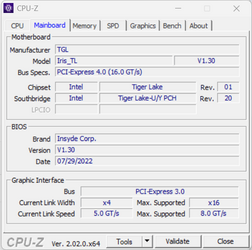
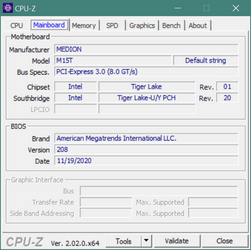
This is CPU-Z screen:

CPUZ.png

It seems to be motherboard Gen 4.

Do you think it's possible to have motherboard Gen 4 and M.2 slot Gen 3?
I was quite sure that it was all Gen 4 when I bought it in the first half of 2021.

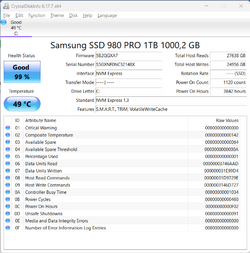
It's even difficult to understand from CrystalDiskInfo, I guess because of the Intel VMD driver instead of a Samsung one (the transfer mode is undefined):

CrystalDiskInfo.png
 

My Computer My Computer

At a glance

Windows 11Intel Core i7-1165G724 GBIntel Iris Xe Graphics + NVIDIA GeForce MX350
OS
Windows 11
Computer type
Laptop
Manufacturer/Model
Acer Aspire A515-56G
CPU
Intel Core i7-1165G7
Motherboard
TGL Iris_TL 1.30
Memory
24 GB
Graphics Card(s)
Intel Iris Xe Graphics + NVIDIA GeForce MX350
Sound Card
Realtek Audio
Screen Resolution
Full HD
Hard Drives
Samsung 980 Pro SSD Nvme
I usually find it difficult to get the full specs for most Acer products.

One online review (https://laptopmedia.com/review/acer...h-hardware-this-must-be-worth-it/#specs-sheet) claims that the M.2 slot is Gen 3. The speeds you're getting are consistent with that.

I'd hesitate to call that "very slow".

For random read and write and for access time it seems quite slow.
And while working (accountancy ERP, Outlook, Excel, a lot of browser sessions... tens of windows), the difference in responsivity with machines older a few years with Windows 10 is quite strong... I'm thinking to try to come back to Windows 10, after a year of Windows 11. It's a lot of work I don't feel like doing it (even if I have all my data in cloud), but if I don't find a different solution I'll have to do it.
My model is slightly different from the review you posted, it's a A515-56G-71WT, with an i7 processor... maybe it doesn't count for the M.2 port and you're right, I don't know...
 

My Computer My Computer

At a glance

Windows 11Intel Core i7-1165G724 GBIntel Iris Xe Graphics + NVIDIA GeForce MX350
OS
Windows 11
Computer type
Laptop
Manufacturer/Model
Acer Aspire A515-56G
CPU
Intel Core i7-1165G7
Motherboard
TGL Iris_TL 1.30
Memory
24 GB
Graphics Card(s)
Intel Iris Xe Graphics + NVIDIA GeForce MX350
Sound Card
Realtek Audio
Screen Resolution
Full HD
Hard Drives
Samsung 980 Pro SSD Nvme
I am using a WDC M.2 drive, not Samsung.

WDC's Dashboard utility reports the drive's interface, and what it's running at.

Does Samsung Magician do the same?
 

My Computers My Computers

  • At a glance

    Windows 11 26200.8728Amd Threadripper 7970X128GB (4 X 32) G.Skill DDR5 6400 (RDIMM)Gigabyte RTX 4090 OC
    OS
    Windows 11 26200.8728
    Computer type
    PC/Desktop
    Manufacturer/Model
    homebuilt
    CPU
    Amd Threadripper 7970X
    Motherboard
    Gigabyte TRX50 Aero D Rev. 1.0
    Memory
    128GB (4 X 32) G.Skill DDR5 6400 (RDIMM)
    Graphics Card(s)
    Gigabyte RTX 4090 OC
    Sound Card
    none (USB to speakers), Realtek
    Monitor(s) Displays
    Innocn 32" OLED
    Screen Resolution
    3840 X 2160 @ 60Hz
    Hard Drives
    Crucial T700 2TB M.2 NVME SSD
    WD 4TB Blue SATA SSD
    Seagate 18TB IronWolf Pro
    PSU
    BeQuiet! Straight Power 12 1500W
    Case
    Lian Li 011 Dynamic Evo XL
    Cooling
    SilverStone Technology XE360-TR5, with 3 Phanteks T30 fans
    Keyboard
    Cherry KC 500 MX LP (mechanical)
    Mouse
    Logitech M500s (wired)
    Internet Speed
    2000/250 Mbps (down/up)
    Other Info
    xFinity gateway
  • At a glance

    windows 11 26200.8728Intel I9-13900K64GB G.Skill DDR5-6000Gigabyte RTX 3090 ti
    Operating System
    windows 11 26200.8728
    Computer type
    PC/Desktop
    Manufacturer/Model
    homebuilt
    CPU
    Intel I9-13900K
    Motherboard
    Asus RoG Strix Z690-E
    Memory
    64GB G.Skill DDR5-6000
    Graphics card(s)
    Gigabyte RTX 3090 ti
    Sound Card
    built in Realtek
    Monitor(s) Displays
    Philips 27E1N8900 27" OLED
    Screen Resolution
    3840 X 2160 @60Hz
    Hard Drives
    WDC SN850 1TB
    8TB Seagate Ironwolf
    4TB Seagate Ironwolf
    PSU
    eVGA SuperNOVA 1300 GT
    Case
    Lian Li 011 Dynamic Evo
    Cooling
    Corsair iCUE H150i ELITE CAPELLIX Liquid CPU Cooler
    Keyboard
    Cherry Streaming (wired)
    Mouse
    Logitech M500s (wired)
I am using a WDC M.2 drive, not Samsung.

WDC's Dashboard utility reports the drive's interface, and what it's running at.

Does Samsung Magician do the same?

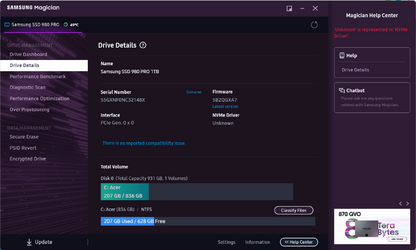
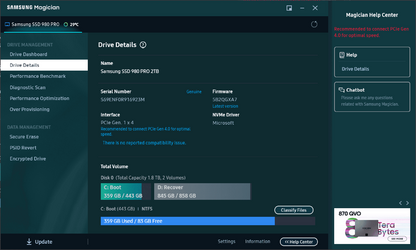
Unfortunately not, always because of the lack of a native Samsung driver, I believe :(( :

Samsung Magician.png
 

My Computer My Computer

At a glance

Windows 11Intel Core i7-1165G724 GBIntel Iris Xe Graphics + NVIDIA GeForce MX350
OS
Windows 11
Computer type
Laptop
Manufacturer/Model
Acer Aspire A515-56G
CPU
Intel Core i7-1165G7
Motherboard
TGL Iris_TL 1.30
Memory
24 GB
Graphics Card(s)
Intel Iris Xe Graphics + NVIDIA GeForce MX350
Sound Card
Realtek Audio
Screen Resolution
Full HD
Hard Drives
Samsung 980 Pro SSD Nvme
My 11th gen desktop running a 980 Pro is working fine using the Windows stock Microsoft NVMe driver. Not using the last Samsung NVMe driver. Not sure it's required to use the RST driver.
 

My Computer My Computer

At a glance

Win 7/10/11
OS
Win 7/10/11
Computer type
PC/Desktop
Other Info
I'm a computer enthusiast so have quite a few systems that I run. More like an advanced hobby.
The WDC and Sabrent Gen 4 drives I have use no custom NVME drivers.

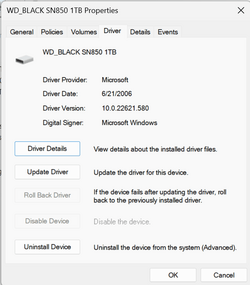
This is what I get for drivers in Device Manager for the WDC drive:

NVME.png

I doubt that the driver is really from 2006.
 

My Computers My Computers

  • At a glance

    Windows 11 26200.8728Amd Threadripper 7970X128GB (4 X 32) G.Skill DDR5 6400 (RDIMM)Gigabyte RTX 4090 OC
    OS
    Windows 11 26200.8728
    Computer type
    PC/Desktop
    Manufacturer/Model
    homebuilt
    CPU
    Amd Threadripper 7970X
    Motherboard
    Gigabyte TRX50 Aero D Rev. 1.0
    Memory
    128GB (4 X 32) G.Skill DDR5 6400 (RDIMM)
    Graphics Card(s)
    Gigabyte RTX 4090 OC
    Sound Card
    none (USB to speakers), Realtek
    Monitor(s) Displays
    Innocn 32" OLED
    Screen Resolution
    3840 X 2160 @ 60Hz
    Hard Drives
    Crucial T700 2TB M.2 NVME SSD
    WD 4TB Blue SATA SSD
    Seagate 18TB IronWolf Pro
    PSU
    BeQuiet! Straight Power 12 1500W
    Case
    Lian Li 011 Dynamic Evo XL
    Cooling
    SilverStone Technology XE360-TR5, with 3 Phanteks T30 fans
    Keyboard
    Cherry KC 500 MX LP (mechanical)
    Mouse
    Logitech M500s (wired)
    Internet Speed
    2000/250 Mbps (down/up)
    Other Info
    xFinity gateway
  • At a glance

    windows 11 26200.8728Intel I9-13900K64GB G.Skill DDR5-6000Gigabyte RTX 3090 ti
    Operating System
    windows 11 26200.8728
    Computer type
    PC/Desktop
    Manufacturer/Model
    homebuilt
    CPU
    Intel I9-13900K
    Motherboard
    Asus RoG Strix Z690-E
    Memory
    64GB G.Skill DDR5-6000
    Graphics card(s)
    Gigabyte RTX 3090 ti
    Sound Card
    built in Realtek
    Monitor(s) Displays
    Philips 27E1N8900 27" OLED
    Screen Resolution
    3840 X 2160 @60Hz
    Hard Drives
    WDC SN850 1TB
    8TB Seagate Ironwolf
    4TB Seagate Ironwolf
    PSU
    eVGA SuperNOVA 1300 GT
    Case
    Lian Li 011 Dynamic Evo
    Cooling
    Corsair iCUE H150i ELITE CAPELLIX Liquid CPU Cooler
    Keyboard
    Cherry Streaming (wired)
    Mouse
    Logitech M500s (wired)
The WDC and Sabrent Gen 4 drives I have use no custom NVME drivers.

This is what I get for drivers in Device Manager for the WDC drive:

View attachment 41336

I doubt that the driver is really from 2006.
I show almost exactly the same driver for my 980 Pro. Except mine has the last numbers as .317. Oddly however I show the exact same driver for the WD HDD in the system. Win11 Pro 22H2.

And btw you have to look under the Storage Controllers to see the NVMe drivers.
 

My Computer My Computer

At a glance

Win 7/10/11
OS
Win 7/10/11
Computer type
PC/Desktop
Other Info
I'm a computer enthusiast so have quite a few systems that I run. More like an advanced hobby.
Unfortunately not, always because of the lack of a native Samsung driver, I believe :(( :

View attachment 41306
Just disable VMD like explained here:
Next, the NVMe controller of your Samsung 980 Pro should "magically" appear:

NVMe Driver.png

If the M.2 slot on your laptop's motherboard is only PCIe 3.0, probably it's because of the fact that the Elpis controller on the Samsung 980 Pro can push up to 8 watts of power and early Tiger Lake UP3 laptops (from late 2020 till early 2021) usually didn't have the thermal specs for that kind of stuff yet─and neither does mine.
 
Last edited:

My Computers My Computers

  • At a glance

    11 Homei7 13650HX16GB DDR5GeForce RTX 4060 Mobile
    OS
    11 Home
    Computer type
    Laptop
    Manufacturer/Model
    Asus TUF Gaming F16 (2024)
    CPU
    i7 13650HX
    Memory
    16GB DDR5
    Graphics Card(s)
    GeForce RTX 4060 Mobile
    Sound Card
    Eastern Electric MiniMax DAC Supreme; Emotiva UMC-200; Astell & Kern AK240
    Monitor(s) Displays
    Sony Bravia XR-55X90J
    Screen Resolution
    3840×2160
    Hard Drives
    512GB SSD internal
    37TB external
    PSU
    Li-ion
    Cooling
    2× Arc Flow Fans, 4× exhaust vents, 5× heatpipes
    Keyboard
    Logitech K800
    Mouse
    Logitech G402
    Internet Speed
    30Mbit/s up, 500Mbit/s down
    Browser
    FF
    Antivirus
    What's an antivirus?
  • At a glance

    11 Homei5 1135G716GB DDR4Intel Iris Xe
    Operating System
    11 Home
    Computer type
    Laptop
    Manufacturer/Model
    Medion S15450
    CPU
    i5 1135G7
    Memory
    16GB DDR4
    Graphics card(s)
    Intel Iris Xe
    Sound Card
    Eastern Electric MiniMax DAC Supreme; Emotiva UMC-200; Astell & Kern AK240
    Monitor(s) Displays
    Sony Bravia XR-55X90J
    Screen Resolution
    3840×2160
    Hard Drives
    2TB SSD internal
    37TB external
    PSU
    Li-ion
    Keyboard
    Logitech K800
    Mouse
    Logitech G402
    Internet Speed
    30Mbit/s up, 500Mbit/s down
    Browser
    FF

My Computers My Computers

  • At a glance

    11 Homei7 13650HX16GB DDR5GeForce RTX 4060 Mobile
    OS
    11 Home
    Computer type
    Laptop
    Manufacturer/Model
    Asus TUF Gaming F16 (2024)
    CPU
    i7 13650HX
    Memory
    16GB DDR5
    Graphics Card(s)
    GeForce RTX 4060 Mobile
    Sound Card
    Eastern Electric MiniMax DAC Supreme; Emotiva UMC-200; Astell & Kern AK240
    Monitor(s) Displays
    Sony Bravia XR-55X90J
    Screen Resolution
    3840×2160
    Hard Drives
    512GB SSD internal
    37TB external
    PSU
    Li-ion
    Cooling
    2× Arc Flow Fans, 4× exhaust vents, 5× heatpipes
    Keyboard
    Logitech K800
    Mouse
    Logitech G402
    Internet Speed
    30Mbit/s up, 500Mbit/s down
    Browser
    FF
    Antivirus
    What's an antivirus?
  • At a glance

    11 Homei5 1135G716GB DDR4Intel Iris Xe
    Operating System
    11 Home
    Computer type
    Laptop
    Manufacturer/Model
    Medion S15450
    CPU
    i5 1135G7
    Memory
    16GB DDR4
    Graphics card(s)
    Intel Iris Xe
    Sound Card
    Eastern Electric MiniMax DAC Supreme; Emotiva UMC-200; Astell & Kern AK240
    Monitor(s) Displays
    Sony Bravia XR-55X90J
    Screen Resolution
    3840×2160
    Hard Drives
    2TB SSD internal
    37TB external
    PSU
    Li-ion
    Keyboard
    Logitech K800
    Mouse
    Logitech G402
    Internet Speed
    30Mbit/s up, 500Mbit/s down
    Browser
    FF
...And neither does the Samsung 980 Pro.
I'm fairly sure that the OP knew that.

My point was that some Gen 4 NVME drives get full performance using only the Microsoft drivers.
 

My Computers My Computers

  • At a glance

    Windows 11 26200.8728Amd Threadripper 7970X128GB (4 X 32) G.Skill DDR5 6400 (RDIMM)Gigabyte RTX 4090 OC
    OS
    Windows 11 26200.8728
    Computer type
    PC/Desktop
    Manufacturer/Model
    homebuilt
    CPU
    Amd Threadripper 7970X
    Motherboard
    Gigabyte TRX50 Aero D Rev. 1.0
    Memory
    128GB (4 X 32) G.Skill DDR5 6400 (RDIMM)
    Graphics Card(s)
    Gigabyte RTX 4090 OC
    Sound Card
    none (USB to speakers), Realtek
    Monitor(s) Displays
    Innocn 32" OLED
    Screen Resolution
    3840 X 2160 @ 60Hz
    Hard Drives
    Crucial T700 2TB M.2 NVME SSD
    WD 4TB Blue SATA SSD
    Seagate 18TB IronWolf Pro
    PSU
    BeQuiet! Straight Power 12 1500W
    Case
    Lian Li 011 Dynamic Evo XL
    Cooling
    SilverStone Technology XE360-TR5, with 3 Phanteks T30 fans
    Keyboard
    Cherry KC 500 MX LP (mechanical)
    Mouse
    Logitech M500s (wired)
    Internet Speed
    2000/250 Mbps (down/up)
    Other Info
    xFinity gateway
  • At a glance

    windows 11 26200.8728Intel I9-13900K64GB G.Skill DDR5-6000Gigabyte RTX 3090 ti
    Operating System
    windows 11 26200.8728
    Computer type
    PC/Desktop
    Manufacturer/Model
    homebuilt
    CPU
    Intel I9-13900K
    Motherboard
    Asus RoG Strix Z690-E
    Memory
    64GB G.Skill DDR5-6000
    Graphics card(s)
    Gigabyte RTX 3090 ti
    Sound Card
    built in Realtek
    Monitor(s) Displays
    Philips 27E1N8900 27" OLED
    Screen Resolution
    3840 X 2160 @60Hz
    Hard Drives
    WDC SN850 1TB
    8TB Seagate Ironwolf
    4TB Seagate Ironwolf
    PSU
    eVGA SuperNOVA 1300 GT
    Case
    Lian Li 011 Dynamic Evo
    Cooling
    Corsair iCUE H150i ELITE CAPELLIX Liquid CPU Cooler
    Keyboard
    Cherry Streaming (wired)
    Mouse
    Logitech M500s (wired)
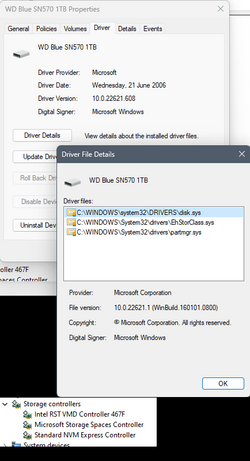
I have a Gen4 board with a Western Digital Blue SN570, I also have Intel's RST drivers installed and loaded (the board has Intel RAID available) but the WD is using the Windows default NVME driver.
WD_NVME_03.png

CrystalDisk gives these results, they are pretty close to the OP's, the WD Blue is Gen3x4 on a Gen4x4 connection:

CrystalDiskMark_20221002230248.png

Unless the OP needs the RST drivers for an Optane cache or for running Intel RAID they could possibly be removed, first checking they are not boot critical, but that is probably not worth while in this instance.
 

My Computer My Computer

At a glance

Windows 11 Pro 22H2, build: 22621.521Intel i7-12700K 3.6GHz Base (5.0GHz Turbo)64GB DDR 3600MhzAsus Tuff RTX 3080 10GB OC
OS
Windows 11 Pro 22H2, build: 22621.521
Computer type
PC/Desktop
Manufacturer/Model
Scan 3XS Custom 1700
CPU
Intel i7-12700K 3.6GHz Base (5.0GHz Turbo)
Motherboard
Asus ProArt Creator B660 D4
Memory
64GB DDR 3600Mhz
Graphics Card(s)
Asus Tuff RTX 3080 10GB OC
Sound Card
Onboard Realtek
Monitor(s) Displays
Gigabyte G32QC 32inch 16:9 curved @2560 x 1440p 165Hz Freesync Premium Pro/ Dell SE2422H 24inch 16:9 1920 x 1080p 75Hz Freesync
Screen Resolution
2560 x 1440p & 1920 x 1080p
Hard Drives
WD SN570 1TB NVME (Boot), Samsung 870QVO 1TB (SSD), SanDisk 3D Ultra 500Gb (SSD) x2, Seagate 3Tb Expansion Desk (Ext HDD), 2x Toshiba 1Tb P300 (Ext HDD)
PSU
Corsair RM1000X Modular
Case
Corsair 4000D Airflow Desktop
Cooling
Corsair Hydro H150i RGB Pro XT 360mm Liquid Cooler, 3 x 120mm fans, 1x Exhaust
Keyboard
Microsoft Ergonomic
Mouse
Logitech G402
Internet Speed
800Mbs
Browser
Edge Chromium
Antivirus
Defender, Malwarebytes
I have a Gen4 board with a Western Digital Blue SN570, I also have Intel's RST drivers installed and loaded (the board has Intel RAID available) but the WD is using the Windows default NVME driver.
View attachment 41396

CrystalDisk gives these results, they are pretty close to the OP's, the WD Blue is Gen3x4 on a Gen4x4 connection:

View attachment 41397

Unless the OP needs the RST drivers for an Optane cache or for running Intel RAID they could possibly be removed, first checking they are not boot critical, but that is probably not worth while in this instance.
Per the article I linked in my 1st reply to this thread, disabling VMD can give you noticeably faster boot times (3 seconds vs 6 seconds in that example so 2× faster). I'd say it's definitely worth disabling VMD when possible to be disabled, as it's such an easy "fix" anyway.

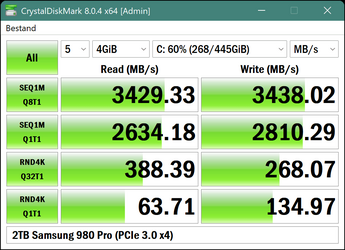
2TB Samsung 980 Pro (PCIe 3.0 x4).png
CPU-Z, motherboard tab.png

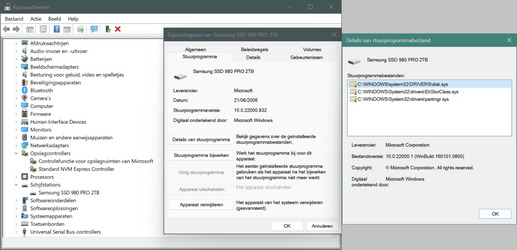
Device Manager, Samsung 980 Pro.png
 
Last edited:

My Computers My Computers

  • At a glance

    11 Homei7 13650HX16GB DDR5GeForce RTX 4060 Mobile
    OS
    11 Home
    Computer type
    Laptop
    Manufacturer/Model
    Asus TUF Gaming F16 (2024)
    CPU
    i7 13650HX
    Memory
    16GB DDR5
    Graphics Card(s)
    GeForce RTX 4060 Mobile
    Sound Card
    Eastern Electric MiniMax DAC Supreme; Emotiva UMC-200; Astell & Kern AK240
    Monitor(s) Displays
    Sony Bravia XR-55X90J
    Screen Resolution
    3840×2160
    Hard Drives
    512GB SSD internal
    37TB external
    PSU
    Li-ion
    Cooling
    2× Arc Flow Fans, 4× exhaust vents, 5× heatpipes
    Keyboard
    Logitech K800
    Mouse
    Logitech G402
    Internet Speed
    30Mbit/s up, 500Mbit/s down
    Browser
    FF
    Antivirus
    What's an antivirus?
  • At a glance

    11 Homei5 1135G716GB DDR4Intel Iris Xe
    Operating System
    11 Home
    Computer type
    Laptop
    Manufacturer/Model
    Medion S15450
    CPU
    i5 1135G7
    Memory
    16GB DDR4
    Graphics card(s)
    Intel Iris Xe
    Sound Card
    Eastern Electric MiniMax DAC Supreme; Emotiva UMC-200; Astell & Kern AK240
    Monitor(s) Displays
    Sony Bravia XR-55X90J
    Screen Resolution
    3840×2160
    Hard Drives
    2TB SSD internal
    37TB external
    PSU
    Li-ion
    Keyboard
    Logitech K800
    Mouse
    Logitech G402
    Internet Speed
    30Mbit/s up, 500Mbit/s down
    Browser
    FF
Even at Gen 3 speeds, the overall snappiness and usable performance of your laptop should still be top notch. The difference between 3,000, 4500, or 7000 MBps is pretty much non-existent as far as overall OS booting and launching applications goes.
 

My Computers My Computers

  • At a glance

    Windows 11 ProIntel Core i5-8279u32GB DDR4 2666MhzIntel Iris Plus 655
    OS
    Windows 11 Pro
    Computer type
    PC/Desktop
    Manufacturer/Model
    Beelink SEI8
    CPU
    Intel Core i5-8279u
    Motherboard
    AZW SEI
    Memory
    32GB DDR4 2666Mhz
    Graphics Card(s)
    Intel Iris Plus 655
    Sound Card
    Intel SST
    Monitor(s) Displays
    Asus ProArt PA278QV
    Screen Resolution
    2560x1440
    Hard Drives
    512GB NVMe
    PSU
    NA
    Case
    NA
    Cooling
    NA
    Keyboard
    NA
    Mouse
    NA
    Internet Speed
    500/50
    Browser
    Edge
    Antivirus
    Defender
    Other Info
    Mini PC used for testing Windows 11.
  • At a glance

    Windows 10 ProRyzen 9 5900x64GB DDR4-3600EVGA GeForce 3080 FT3 Ultra
    Operating System
    Windows 10 Pro
    Computer type
    PC/Desktop
    Manufacturer/Model
    Custom
    CPU
    Ryzen 9 5900x
    Motherboard
    Asus Rog Strix X570-E Gaming
    Memory
    64GB DDR4-3600
    Graphics card(s)
    EVGA GeForce 3080 FT3 Ultra
    Sound Card
    Onboard
    Monitor(s) Displays
    ASUS TUF Gaming VG27AQ. ASUS ProArt Display PA278QV 27” WQHD
    Screen Resolution
    2560x1440
    Hard Drives
    2TB WD SN850 PCI-E Gen 4 NVMe
    2TB Sandisk Ultra 2.5" SATA SSD
    PSU
    Seasonic Focus 850
    Case
    Fractal Meshify S2 in White
    Cooling
    Dark Rock Pro CPU cooler, 3 x 140mm case fans
    Keyboard
    Corsiar K65 RGB Lux
    Mouse
    Logitech G9 Laser Mouse
    Internet Speed
    500/50
    Browser
    Chrome
    Antivirus
    Defender.
I'm fairly sure that the OP knew that.

My point was that some Gen 4 NVME drives get full performance using only the Microsoft drivers.

Intel RST drivers provide full speed.

The OP is running at Gen 3 speed of the lanes from chipset. The processor provides Gen 4 lanes, but probably only for the graphics.

Around 3500 is the maximum for Gen3. The fact it isn't quite there is probably a motherboard or processor limitation, not Intel RST drivers.
 
Last edited:

My Computers My Computers

  • At a glance

    Windows 11 Pro x64i9 14900K P/E 5.8/4.5 GHz, cache 5.0 GHz96GB (2x48) G.skill Ripjaws 6800 MT/sAsus ROG Strix 4070 Ti OC
    OS
    Windows 11 Pro x64
    Computer type
    PC/Desktop
    Manufacturer/Model
    📷🔈🎧 🪛 DIY Photoshop/Audio/Game/tinker
    CPU
    i9 14900K P/E 5.8/4.5 GHz, cache 5.0 GHz
    Motherboard
    Asus ROG Maximus Z790 Dark Hero
    Memory
    🐏 96GB (2x48) G.skill Ripjaws 6800 MT/s
    Graphics Card(s)
    Asus ROG Strix 4070 Ti OC
    Sound Card
    🔊Bowers & Wilkins 606 S3 speakers; Audiolabs 7000a integrated amp; RSL 10S Mk2 sub; Creative Pebble Pro Minimilist
    Monitor(s) Displays
    🖥️🖥️ Eizo CG2730 ColorEdge, ViewSonic VP2768
    Screen Resolution
    🖥️🖥️ 2560 x 1440p x 2
    Hard Drives
    💾 WDC SN850X 4TB nvme, SN850 1TB nvme, SK-Hynix 2 TB P41 nvme,. Sabrent USB-C DS-SC5B 5-bay docking station: 6TB WDC Black, 6TB Ironwolf Pro; 2x 2TB WDC Black HDD
    PSU
    ⚡️ 850W Seasonic Vertex PX-850 ATX 3.0/PCI-E 5.0
    Case
    Fractal Design North XL Mesh, Black Walnut
    Cooling
    ❄️ EK Nucleus black 360 AIO w/Phanteks T30-120 fans, 2 Noctua NF-A14 Chromax case fan, 1 T30-120 fan cooling memory
    Keyboard
    ⌨️ Keychron Q3 Max TKL with custom GMK Redsuns Red Samuri keycaps, TX Stabs
    Mouse
    🖱️ Logitech G305 wireless gaming
    Internet Speed
    ⬇️ 500 Mb/s ⬆️ 12 Mb/s
    Browser
    🔥🦊 Firefox
    Antivirus
    🦺 Defender, Macrium Reflect X 🏆
    Other Info
    Phangkey Amaterasu V2 Desk Mat
  • At a glance

    Apple M1
    Computer type
    Laptop
    Manufacturer/Model
    💻 Apple 13" Macbook Pro 2020 (m1)
    CPU
    Apple M1
    Screen Resolution
    2560x1600
    Browser
    Firefox
AFAIK it is a motherboard design limitation in the particular sense that this particular CPU (i7-1165G7) supports four lanes of PCIe 4.0 directly off the CPU, but the southbridge that this CPU uses, which is of the On-Package variety so it uses OPI (On Package Interface), is still limited to twelve HSIO lanes─that the manufacturer has to configure with the "FIT"─so it gives three PCIe 3.0 controllers to work with.

See:
Mine uses PCIe Root Port 9 for the M.2 slot so PnPUtil gives me this:
Code:
C:\>pnputil /enum-devices /relations /class diskdrive
Microsoft PnP Utility

Instance ID:                SCSI\Disk&Ven_NVMe&Prod_Samsung_SSD_980\5&10af3918&0&000000
Device Description:         Samsung SSD 980 PRO 2TB
Class Name:                 DiskDrive
Class GUID:                 {4d36e967-e325-11ce-bfc1-08002be10318}
Manufacturer Name:          (Standaardschijfstations)
Status:                     Started
Driver Name:                disk.inf
Parent:                     PCI\VEN_144D&DEV_A80A&SUBSYS_A801144D&REV_00\4&8a0518e&0&00E8


C:\>pnputil /enum-devices /relations /instanceid "PCI\VEN_144D&DEV_A80A&SUBSYS_A801144D&REV_00\4&8a0518e&0&00E8"
Microsoft PnP Utility

Instance ID:                PCI\VEN_144D&DEV_A80A&SUBSYS_A801144D&REV_00\4&8a0518e&0&00E8
Device Description:         Standard NVM Express Controller
Class Name:                 SCSIAdapter
Class GUID:                 {4d36e97b-e325-11ce-bfc1-08002be10318}
Manufacturer Name:          Standard NVM Express Controller
Status:                     Started
Driver Name:                stornvme.inf
Parent:                     PCI\VEN_8086&DEV_A0B0&SUBSYS_A0251E39&REV_20\3&11583659&5&E8
Children:                   SCSI\Disk&Ven_NVMe&Prod_Samsung_SSD_980\5&10af3918&0&000000


C:\>pnputil /enum-devices /instanceid "PCI\VEN_8086&DEV_A0B0&SUBSYS_A0251E39&REV_20\3&11583659&5&E8"
Microsoft PnP Utility

Instance ID:                PCI\VEN_8086&DEV_A0B0&SUBSYS_A0251E39&REV_20\3&11583659&5&E8
Device Description:         Intel(R) PCI Express Root Port #9 - A0B0
Class Name:                 System
Class GUID:                 {4d36e97d-e325-11ce-bfc1-08002be10318}
Manufacturer Name:          INTEL
Status:                     Started
Driver Name:                oem48.inf
Extension Driver Names:     oem20.inf


C:\>
For some additional reading. As of Skylake-U, OPI became the new norm in Intel mobile CPUs designed for laptops:
 
Last edited:

My Computers My Computers

  • At a glance

    11 Homei7 13650HX16GB DDR5GeForce RTX 4060 Mobile
    OS
    11 Home
    Computer type
    Laptop
    Manufacturer/Model
    Asus TUF Gaming F16 (2024)
    CPU
    i7 13650HX
    Memory
    16GB DDR5
    Graphics Card(s)
    GeForce RTX 4060 Mobile
    Sound Card
    Eastern Electric MiniMax DAC Supreme; Emotiva UMC-200; Astell & Kern AK240
    Monitor(s) Displays
    Sony Bravia XR-55X90J
    Screen Resolution
    3840×2160
    Hard Drives
    512GB SSD internal
    37TB external
    PSU
    Li-ion
    Cooling
    2× Arc Flow Fans, 4× exhaust vents, 5× heatpipes
    Keyboard
    Logitech K800
    Mouse
    Logitech G402
    Internet Speed
    30Mbit/s up, 500Mbit/s down
    Browser
    FF
    Antivirus
    What's an antivirus?
  • At a glance

    11 Homei5 1135G716GB DDR4Intel Iris Xe
    Operating System
    11 Home
    Computer type
    Laptop
    Manufacturer/Model
    Medion S15450
    CPU
    i5 1135G7
    Memory
    16GB DDR4
    Graphics card(s)
    Intel Iris Xe
    Sound Card
    Eastern Electric MiniMax DAC Supreme; Emotiva UMC-200; Astell & Kern AK240
    Monitor(s) Displays
    Sony Bravia XR-55X90J
    Screen Resolution
    3840×2160
    Hard Drives
    2TB SSD internal
    37TB external
    PSU
    Li-ion
    Keyboard
    Logitech K800
    Mouse
    Logitech G402
    Internet Speed
    30Mbit/s up, 500Mbit/s down
    Browser
    FF
My guess is that having enabled VMD in the BIOS won't help you achieve PCIe 4.0 on the M.2 slot, when the slot has been soldered to the PCIe 3.0 controller that's in the On-Package PCH-LP as opposed to has been soldered to the VMD port of the CPU. Hence, the "Direct CPU Attach" (verbiage that you see in the bottom left corner of the 2nd pic in the article linked below) doesn't apply to the actual slot in question─probably due to thermal constraints [of the system design] like I tried to explain previously in the thread. Or if it does, the BIOS still prevents GT4 so as a result you're stuck with GT2 which means you'll get two lanes of PCIe 4.0 so, still not four lanes of PCIe 4.0 and so it still boils down to the same, speed wise.
 

My Computers My Computers

  • At a glance

    11 Homei7 13650HX16GB DDR5GeForce RTX 4060 Mobile
    OS
    11 Home
    Computer type
    Laptop
    Manufacturer/Model
    Asus TUF Gaming F16 (2024)
    CPU
    i7 13650HX
    Memory
    16GB DDR5
    Graphics Card(s)
    GeForce RTX 4060 Mobile
    Sound Card
    Eastern Electric MiniMax DAC Supreme; Emotiva UMC-200; Astell & Kern AK240
    Monitor(s) Displays
    Sony Bravia XR-55X90J
    Screen Resolution
    3840×2160
    Hard Drives
    512GB SSD internal
    37TB external
    PSU
    Li-ion
    Cooling
    2× Arc Flow Fans, 4× exhaust vents, 5× heatpipes
    Keyboard
    Logitech K800
    Mouse
    Logitech G402
    Internet Speed
    30Mbit/s up, 500Mbit/s down
    Browser
    FF
    Antivirus
    What's an antivirus?
  • At a glance

    11 Homei5 1135G716GB DDR4Intel Iris Xe
    Operating System
    11 Home
    Computer type
    Laptop
    Manufacturer/Model
    Medion S15450
    CPU
    i5 1135G7
    Memory
    16GB DDR4
    Graphics card(s)
    Intel Iris Xe
    Sound Card
    Eastern Electric MiniMax DAC Supreme; Emotiva UMC-200; Astell & Kern AK240
    Monitor(s) Displays
    Sony Bravia XR-55X90J
    Screen Resolution
    3840×2160
    Hard Drives
    2TB SSD internal
    37TB external
    PSU
    Li-ion
    Keyboard
    Logitech K800
    Mouse
    Logitech G402
    Internet Speed
    30Mbit/s up, 500Mbit/s down
    Browser
    FF
Just disable VMD like explained here:
Next, the NVMe controller of your Samsung 980 Pro should "magically" appear:

View attachment 41384

If the M.2 slot on your laptop's motherboard is only PCIe 3.0, probably it's because of the fact that the Elpis controller on the Samsung 980 Pro can push up to 8 watts of power and early Tiger Lake UP3 laptops (from late 2020 till early 2021) usually didn't have the thermal specs for that kind of stuff yet─and neither does mine.

OK, tried everything. With NVM Standard Express it's possible to see the hardware configuration in HWINFO and in Samsung Magician: you were right, Acer is a theoretically s PCI gen4 but has a nvme Gen3. So the results about the nvme SSD are more or less OK, just a little slow I think. But the difference for everyday work between Windows 10 and Windows 11 is still huge. I guess it's a problem with this Acer i7-1165G7. I will revert to Windows 10, after one year of use, in the next weeks when I will have time enough.
I'm quite convinced it was not a good Acer generation for the price at the beginning of 2021.
Anyway, the NVM Express gives nothing more than Intel VMD, and moreover the system seems less stable. I completely disagree that is a good solution, at least for this machine.
But it's not possible to come back to Intel VMD, activating it in the BIOS and restart in safe mode (while this method worked passing to NVM Standard controller). The system doesn't find the drivers (and I didn't erase them), so the system doesn't boot up.
Any hint on how to reload the RST VMD drivers before booting the machine?

Thanks in advance
Alex
 

My Computer My Computer

At a glance

Windows 11Intel Core i7-1165G724 GBIntel Iris Xe Graphics + NVIDIA GeForce MX350
OS
Windows 11
Computer type
Laptop
Manufacturer/Model
Acer Aspire A515-56G
CPU
Intel Core i7-1165G7
Motherboard
TGL Iris_TL 1.30
Memory
24 GB
Graphics Card(s)
Intel Iris Xe Graphics + NVIDIA GeForce MX350
Sound Card
Realtek Audio
Screen Resolution
Full HD
Hard Drives
Samsung 980 Pro SSD Nvme

Latest Support Threads

Back
Top Bottom