Solved Sanity check for manual offline update to fresh 26100.1 install


Updates are cumulative, so the latest Setup DU replaces all previous versions of the same update category.
 

My Computer

System One

  • OS
    Windows 7
So the answer, at this time, for March 2026 is yes I will need to use the February 2026 Setup DU since there is none for March 2026, correct?
 

My Computer

System One

  • OS
    Windows 11
The only thing that's guaranteed to be released every month is the LCU, since it's Monthly. All other updates like Setup DU or the SSU are shipped as needed. Usually it changes every few months, but there's no specific frequency. You just check for the latest version within each category.
 

My Computer

System One

  • OS
    Windows 7
Okay .. feel like this is the last question that I have for this thread. :D

Today. Patch Tuesday.

View attachment 165458

At this time, since only the LCU and the Safe OS DU are listed, this means that I do not need to fetch the Setup DU from the previous month, correct?
If you are updating a build prior than the build targeted by the Setup DU, then you will want to include it. Otherwise, you can skip it.

I always include it even if I am on a newer build because DISM will figure out that the update is not needed if you apply it and it is already present. This is especially useful if you are using a script to perform the updates. This way you can include all the updates (the LCU, Setup and Safe OS Dynamic Updates, etc.) and only those pieces that are actually needed will get applied.

Just for reference, my updates today (March Patch Tuesday, Mar 10, 2026) look like this:

Latest Cumulative Update: KB5043080 - Checkpoint Update AND KB5079473 - Differential Update
.NET Update: KB5074828
Safe OS DU: KB5079471
Setup DU: KB5079271

EDIT: One additional note. Since the LCU may contain more than one update (The checkpoint update AND the differential update), I name them so that the checkpoint update is first alphabetically. This ensures that DISM will process that update first. For example, here are the names that I use:

1 - KB5043080 - Win 11 25H2 Checkpoint Update [26100.1742].msu
2 - KB5079473 - Win 11 25H2 Differential Update [26200.8037].msu

 

My Computers

System One System Two

  • OS
    Win11 Pro 25H2 (RTM+)
    Computer type
    PC/Desktop
    Manufacturer/Model
    Acemagic
    CPU
    Intel i7-14650HX
    Memory
    32 GB
    Graphics Card(s)
    No GPU - Built-in Intel Graphics
    Sound Card
    Integrated
    Monitor(s) Displays
    Varies as machine will often be moved to locations with different monitors
    Screen Resolution
    Varies
    Hard Drives
    1 x 1TB Gen 4 NVMe SSD
    PSU
    120W Power Brick
    Keyboard
    Corsair K70 Max RGB Magnetic Keyboard
    Mouse
    Logitech MX Master 3
    Internet Speed
    1Gb Up / 1 Gb Down
    Browser
    Edge
    Antivirus
    Windows Defender
  • Operating System
    Win11 Pro 25H2 (RTM+)
    Computer type
    Laptop
    Manufacturer/Model
    Lenovo ThinkBook 13x Gen 2
    CPU
    Intel i7-1255U
    Memory
    16 GB
    Graphics card(s)
    Intel Iris Xe Graphics
    Sound Card
    Realtek® ALC3306-CG codec
    Monitor(s) Displays
    13.3-inch IPS Display
    Screen Resolution
    WQXGA (2560 x 1600)
    Hard Drives
    2 TB 4 x 4 NVMe SSD
    PSU
    USB-C / Thunderbolt 4 Power / Charging
    Keyboard
    Backlit, spill resistant keyboard
    Mouse
    Buttonless Glass Precision Touchpad
    Internet Speed
    1Gb Up / 1Gb Down
    Browser
    Edge
    Antivirus
    Windows Defender
    Other Info
    WiFi 6e / Bluetooth 5.1 / Facial Recognition / Fingerprint Sensor / ToF (Time of Flight) Human Presence Sensor
Using the Windows Update Catalog keyword search of "Windows 11 version 24H2" x64 2026-03 .. it returns two results:

1. March 2026 LCU
2. March 2026 Safe OS DU

Since I am updating a 26100.1 image I need the February 2026 Setup DU .. agreed?
 

My Computer

System One

  • OS
    Windows 11
Special thanks to @garlin and @hsehestedt for all of the help in answering questions about the offline updating process after ignoring it for over 10+ years.

Given how long it took me to understand it I dont blame you if you didnt want to directly answer my final few questions. :-)

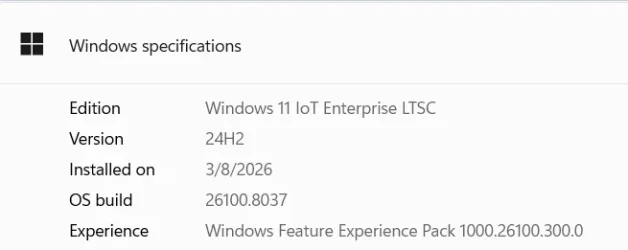
So I went ahead and just went with it and ended up at 26100.8037:

1773296733948.webp


I am happy to report that, at this particular point in time, yes the March 2026 LCU, the March 2026 SafeOS DU and the February 2026 Setup DU files are needed.

With particular emphasis on the fact (for future readers) that the February 2026 Setup DU must be selected since there is no March 2026 Setup DU.
 

My Computer

System One

  • OS
    Windows 11
Just don't commit the mistake of trying to apply 25H2's Enablement Package to LTSC 2024. People do that for some weird reason. Yes, it installs but it's not a supported configuration (EP on top of LTSC).
 

My Computer

System One

  • OS
    Windows 7
Just don't commit the mistake of trying to apply 25H2's Enablement Package to LTSC 2024. People do that for some weird reason. Yes, it installs but it's not a supported configuration (EP on top of LTSC).
Now I am going to need to find out what an Enablement Package is! :D

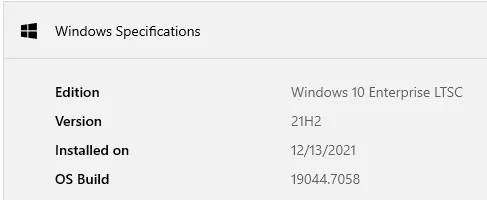
Thanks for the tip however I am not in a hurry to start running any non-LTSC version to be honest. I am consistently shocked when I see other peoples install of Windows. The only reason why I am here is because I figured it was time to start thinking about getting off of 21H2:

1773406134905.webp

.. and I needed to stop ignoring what was under the hood of Windows.

Now it is time to move on to learning about unattended.xml to lose that ridiculous OOBE and whack telemetry.

Thanks again for the help!
 

My Computer

System One

  • OS
    Windows 11
The EP is what converts an updated 24H2 image, into 25H2.

LTSC is never intended to change its version (which is why LTSC stands for Long Term Servicing Channel). For LTSC 2024 it's to stay on 24H2, for the entirety of its service lifetime. Sometimes MS isn't always careful about blocking KB updates from installing on the wrong builds.
 

My Computer

System One

  • OS
    Windows 7
Back
Top Bottom