Solved Secure boot certificate 2023 valid but event present


Here's my honest opinion: cjee21's scripts are technically accurate, but terrible in presenting info.

Some certs are flagged, because they don't exist. But some of them are fully optional (like the Option ROM). That doesn't deserve a red mark.

Instead of "revoked: False", the script should just highlight which certs are revoked. Why confuse the user when you can have the script make an intelligent conclusion for them?

I can't tell people not to run cjee21's script. It does report the truth, but half the users draw the wrong conclusions after reading the output. I can only suggest they use my script because it's presented in a more logical manner.
I've disabled SB again now but I'm guessing I can now feel safe in the knowledge that if I enable it again everything will still work...
 

My Computer

System One

  • OS
    Windows 11 Pro 25H2 (RP channel)
    Computer type
    PC/Desktop
    Manufacturer/Model
    MSI
    CPU
    AMD Ryzen 7 9800X3D 8-core
    Motherboard
    MEG X870E Godlike
    Memory
    64GB Corsair Titanium 6000/CL30
    Graphics Card(s)
    MSI Suprim 5080 SOC
    Sound Card
    Soundblaster AE-9
    Monitor(s) Displays
    ASUS TUF Gaming VG289Q
    Screen Resolution
    3840x2160
    Hard Drives
    Samsung 9100 Pro 4TB (gen 5 x4, system drive/games)
    Samsung 990 Pro 2TB
    Samsung 980 Pro 2TB
    Samsung 870 Evo 4TB
    Samsung 870 Evo 2TB
    Samsung T9 4TB
    PSU
    Seasonic PX-2200
    Case
    Bequiet! Dark Base Pro 901
    Cooling
    Noctua NH-D15S Chromax black
    Keyboard
    Logitech G915 X (wired)
    Mouse
    Logitech G903 with PowerPlay charger
    Internet Speed
    900Mb/sec
    Browser
    Microsoft Edge
    Antivirus
    Windows Defender
Two things I like about the script though. First is it tells me ALL the certs loaded in the databases, even the non-Microsoft certs that have no business being there (IMO). It appears yours does too but this was the first one I used that did.
My script's default view hides the custom vendor certs. They're not involved in the Windows Secure Boot migration.

-Verbose mode will list every installed cert, and I don't want to overload the UEFI cert listings, with the "actionable" comments. That gets into information overload for first-time users.

Another is it reports on contents of the 'Defaults' that will be loaded should they toggle the "Restore Defaults" in their UEFI BIOS screens. It will confuse most people if they don't understand what it means I suppose, which it does not do either. But it's probably a good idea they do understand it to not do it accidentally... as I have done before when it didn't matter.
The problem about Defaults is it's a double-edged sword. Just because you don't have some certs in the factory default does not imply you can't update the UEFI. There are two possible workarounds:

1. Manually apply the KEK CA 2023, if your BIOS allows for import. My script copies the cert to the EFI partition, and you can load it from there without needing to scrounge for a FAT32-formatted USB drive.

2. Enter Setup Mode, and allow the script to use the Windows OEM Device certs (as released by MS) as a complete replacement for the factory certs. MS created the Windows OEM Device certs as a fallback in case your vendor abandoned you.

So in both cases, an UEFI with no factory support could still be updated. This is why I prefer not to display all the factory certs in non-verbose mode; it leads people to make the wrong conclusions. But we don't know, until you at least try.
 

My Computer

System One

  • OS
    Windows 7
My script's default view hides the custom vendor certs. They're not involved in the Windows Secure Boot migration.

-Verbose mode will list every installed cert, and I don't want to overload the UEFI cert listings, with the "actionable" comments. That gets into information overload for first-time users.


The problem about Defaults is it's a double-edged sword. Just because you don't have some certs in the factory default does not imply you can't update the UEFI. There are two possible workarounds:

1. Manually apply the KEK CA 2023, if your BIOS allows for import. My script copies the cert to the EFI partition, and you can load it from there without needing to scrounge for a FAT32-formatted USB drive.

2. Enter Setup Mode, and allow the script to use the Windows OEM Device certs (as released by MS) as a complete replacement for the factory certs. MS created the Windows OEM Device certs as a fallback in case your vendor abandoned you.

So in both cases, an UEFI with no factory support could still be updated. This is why I prefer not to display all the factory certs in non-verbose mode; it leads people to make the wrong conclusions. But we don't know, until you at least try.
Okay, is there any difference between your script and cjee21? If I use his or yours, will I have to do anything in June?
 

My Computer

System One

  • OS
    Windows 11
    Computer type
    PC/Desktop
    Manufacturer/Model
    Asrock b760 pro rs
Yes. I just explained the differences. cjee21's script works fine if you have a supported PC (compatible BIOS). But if you have a problem BIOS, then it's not going to help you figure out why, or help you update it.
 

My Computer

System One

  • OS
    Windows 7
Yes. I just explained the differences. cjee21's script works fine if you have a supported PC (compatible BIOS). But if you have a problem BIOS, then it's not going to help you figure out why, or help you update it.
1773362144086.webp

Thank you, so its fine yea?
 

My Computer

System One

  • OS
    Windows 11
    Computer type
    PC/Desktop
    Manufacturer/Model
    Asrock b760 pro rs

My Computers

System One System Two

  • OS
    Win 11 Home ♦♦♦26200.8457 ♦♦♦♦♦♦♦25H2
    Computer type
    PC/Desktop
    Manufacturer/Model
    Built by Ghot® [May 2020]
    CPU
    AMD Ryzen 7 3700X
    Motherboard
    Asus Pro WS X570-ACE (BIOS 5302)
    Memory
    G.Skill (F4-3200C14D-16GTZKW)
    Graphics Card(s)
    EVGA RTX 2070 (08G-P4-2171-KR)
    Sound Card
    Realtek ALC1220P / ALC S1220A
    Monitor(s) Displays
    Dell U3011 30"
    Screen Resolution
    2560 x 1600
    Hard Drives
    2x Samsung 860 EVO 500GB,
    WD 4TB Black FZBX - SATA III,
    WD 8TB Black FZBX - SATA III,
    DRW-24B1ST CD/DVD Burner
    PSU
    PC Power & Cooling 750W Quad EPS12V
    Case
    Cooler Master ATCS 840 Tower
    Cooling
    CM Hyper 212 EVO (push/pull)
    Keyboard
    Ducky DK9008 Shine II Blue LED
    Mouse
    Logitech Optical M-100
    Internet Speed
    300/300
    Browser
    Firefox (latest)
    Antivirus
    Bitdefender Total Security
    Other Info
    Speakers: Klipsch Pro Media 2.1
  • Operating System
    Windows XP Pro 32bit w/SP3
    Computer type
    PC/Desktop
    Manufacturer/Model
    Built by Ghot® (not in use)
    CPU
    AMD Athlon 64 X2 5000+ (OC'd @ 3.2Ghz)
    Motherboard
    ASUS M2N32-SLI Deluxe Wireless Edition
    Memory
    TWIN2X2048-6400C4DHX (2 x 1GB, DDR2 800)
    Graphics card(s)
    EVGA 256-P2-N758-TR GeForce 8600GT SSC
    Sound Card
    Onboard
    Monitor(s) Displays
    ViewSonic G90FB Black 19" Professional (CRT)
    Screen Resolution
    up to 2048 x 1536
    Hard Drives
    WD 36GB 10,000rpm Raptor SATA
    Seagate 80GB 7200rpm SATA
    Lite-On LTR-52246S CD/RW
    Lite-On LH-18A1P CD/DVD Burner
    PSU
    PC Power & Cooling Silencer 750 Quad EPS12V
    Case
    Generic Beige case, 80mm fans
    Cooling
    ZALMAN 9500A 92mm CPU Cooler
    Keyboard
    Logitech Classic Keybooard 200
    Mouse
    Logitech Optical M-BT96a
    Internet Speed
    300/300
    Browser
    Firefox 3.x ??
    Antivirus
    Symantec (Norton)
    Other Info
    Still assembled, still runs. Haven't turned it on for 15 years?
-Verbose mode will list every installed cert, and I don't want to overload the UEFI cert listings, with the "actionable" comments. That gets into information overload for first-time users.
When I run it in -Verbose mode it does show me the factory default certs for KEK and DB but for the factory default PK it says there are (NONE). I know that there is a factory default PK cert (Gigabyte) since that came with the updated BIOS, it was restored when I tested the Restore Defaults function after the first time I ran MOSBY on this BIOS revision, Cjee21 's script shows it, and there simply has to be one for the Chain of Trust to work properly with the other factory default certs. It's probably just a quirk with my motherboard BIOS, a Gigabyte AB350M-Gaming 3.

I do see how your scripts make a good package to help someone get through this process of updating the certs. Especially so for a problem/orphan board lacking any sort of BIOS updates from the manufacturer and so long as they are comfortable with the factory PK cert and vendor (non-Microsoft) certs. I also think it's good to have more ways to check what is actually in BIOS, something that was not available for the longest time.
 
Last edited:

My Computers

System One System Two

  • OS
    Windows 11 Pro
    Computer type
    PC/Desktop
    Manufacturer/Model
    DIY
    CPU
    Ryzen 7 5800X
    Motherboard
    Gigabyte B550M Aorus Pro
    Memory
    GSkill 3200, 2x8GB
    Graphics Card(s)
    MSI RX 6800 XT Gaming Z
    Sound Card
    on-board Realtek
    Monitor(s) Displays
    MSI 180hz
    Screen Resolution
    1440p
    Hard Drives
    Samsung 980 Pro, Samsung 870 Evo, generic PCIe NVME, WD 1TB 2.5" laptop spinner
    PSU
    Corsair RM 650
    Case
    mATX
    Cooling
    BeQuiet 240mm AIO and a bunch of case fans
    Keyboard
    one that clacks softly
    Mouse
    logitech
    Internet Speed
    bunches of bps
    Browser
    Firefox
    Antivirus
    Windows' own
  • Operating System
    Win11 Pro
    Computer type
    PC/Desktop
    Manufacturer/Model
    DIY
    CPU
    Ryzen 7 1700
    Motherboard
    GA-AB350M G-3
    Memory
    16GB DDR4
    Graphics card(s)
    RX-480
    Sound Card
    In-Built Realtek
    Monitor(s) Displays
    Samsung
    Screen Resolution
    1440p
    Hard Drives
    NVME/SSD's
    PSU
    Thermaltake BX1 550W
    Case
    Some junky thing
    Cooling
    ThermalTake Assassin(?)
    Browser
    FF/Edge
    Antivirus
    Whatever Windows does
    Other Info
    Secure Boot enabled updated to 2023 CA keys, TPM2.0 enabled with system drive Bitlocker'd.

Attachments

  • Screenshot 2026-03-13 191437.webp
    Screenshot 2026-03-13 191437.webp
    30.7 KB · Views: 2

My Computer

System One

  • OS
    Windows 11 Pro 25H2 (RP channel)
    Computer type
    PC/Desktop
    Manufacturer/Model
    MSI
    CPU
    AMD Ryzen 7 9800X3D 8-core
    Motherboard
    MEG X870E Godlike
    Memory
    64GB Corsair Titanium 6000/CL30
    Graphics Card(s)
    MSI Suprim 5080 SOC
    Sound Card
    Soundblaster AE-9
    Monitor(s) Displays
    ASUS TUF Gaming VG289Q
    Screen Resolution
    3840x2160
    Hard Drives
    Samsung 9100 Pro 4TB (gen 5 x4, system drive/games)
    Samsung 990 Pro 2TB
    Samsung 980 Pro 2TB
    Samsung 870 Evo 4TB
    Samsung 870 Evo 2TB
    Samsung T9 4TB
    PSU
    Seasonic PX-2200
    Case
    Bequiet! Dark Base Pro 901
    Cooling
    Noctua NH-D15S Chromax black
    Keyboard
    Logitech G915 X (wired)
    Mouse
    Logitech G903 with PowerPlay charger
    Internet Speed
    900Mb/sec
    Browser
    Microsoft Edge
    Antivirus
    Windows Defender

My Computer

System One

  • OS
    Windows 11 Pro 25H2 (RP channel)
    Computer type
    PC/Desktop
    Manufacturer/Model
    MSI
    CPU
    AMD Ryzen 7 9800X3D 8-core
    Motherboard
    MEG X870E Godlike
    Memory
    64GB Corsair Titanium 6000/CL30
    Graphics Card(s)
    MSI Suprim 5080 SOC
    Sound Card
    Soundblaster AE-9
    Monitor(s) Displays
    ASUS TUF Gaming VG289Q
    Screen Resolution
    3840x2160
    Hard Drives
    Samsung 9100 Pro 4TB (gen 5 x4, system drive/games)
    Samsung 990 Pro 2TB
    Samsung 980 Pro 2TB
    Samsung 870 Evo 4TB
    Samsung 870 Evo 2TB
    Samsung T9 4TB
    PSU
    Seasonic PX-2200
    Case
    Bequiet! Dark Base Pro 901
    Cooling
    Noctua NH-D15S Chromax black
    Keyboard
    Logitech G915 X (wired)
    Mouse
    Logitech G903 with PowerPlay charger
    Internet Speed
    900Mb/sec
    Browser
    Microsoft Edge
    Antivirus
    Windows Defender
0x282 does include 0x200 (it's a sum of the different flags). But like I said, many times the task can be laggy. Sometimes it waits for a reboot to confirm other settings are in place before it proceeds.
 

My Computer

System One

  • OS
    Windows 7
0x282 does include 0x200 (it's a sum of the different flags). But like I said, many times the task can be laggy. Sometimes it waits for a reboot to confirm other settings are in place before it proceeds.
OK thanks. I did 4 reboots yesterday!
 

My Computer

System One

  • OS
    Windows 11 Pro 25H2 (RP channel)
    Computer type
    PC/Desktop
    Manufacturer/Model
    MSI
    CPU
    AMD Ryzen 7 9800X3D 8-core
    Motherboard
    MEG X870E Godlike
    Memory
    64GB Corsair Titanium 6000/CL30
    Graphics Card(s)
    MSI Suprim 5080 SOC
    Sound Card
    Soundblaster AE-9
    Monitor(s) Displays
    ASUS TUF Gaming VG289Q
    Screen Resolution
    3840x2160
    Hard Drives
    Samsung 9100 Pro 4TB (gen 5 x4, system drive/games)
    Samsung 990 Pro 2TB
    Samsung 980 Pro 2TB
    Samsung 870 Evo 4TB
    Samsung 870 Evo 2TB
    Samsung T9 4TB
    PSU
    Seasonic PX-2200
    Case
    Bequiet! Dark Base Pro 901
    Cooling
    Noctua NH-D15S Chromax black
    Keyboard
    Logitech G915 X (wired)
    Mouse
    Logitech G903 with PowerPlay charger
    Internet Speed
    900Mb/sec
    Browser
    Microsoft Edge
    Antivirus
    Windows Defender
I did 0x200 command and with the second command, the scheduled task, in powershell as administrator.

Without rebooting, the SVN update was applied immediately.

I had to do this because I updated the BIOS and the SVN installation disappeared. The rest remains the same, like the 431 dbx files.

Edit: You open the event viewer after running the commands and you will see a tpm wmi entry indicating that svn is applied
 
Last edited:

My Computer

System One

  • OS
    windows 11
Try this version of my script, it works around the Gigabyte PK reported as (NONE).
garlin's PowerShell scripts for updating Secure Boot CA 2023

Gigabyte did a poor job of defining the Subject line to their cert, all it will say is "GIGABYTE".
Works as it should: found all defaults and active certs!

The only "required action" was to revoke the PCA 2011 cert, which I'm deferring on right now.

BTW, I like that it includes disabling bitlocker protectors for a boot cycle in the list of commands to do it. That's going to avoid a lot of heartburn for anybody who doesn't have their recovery key handy!
 

My Computers

System One System Two

  • OS
    Windows 11 Pro
    Computer type
    PC/Desktop
    Manufacturer/Model
    DIY
    CPU
    Ryzen 7 5800X
    Motherboard
    Gigabyte B550M Aorus Pro
    Memory
    GSkill 3200, 2x8GB
    Graphics Card(s)
    MSI RX 6800 XT Gaming Z
    Sound Card
    on-board Realtek
    Monitor(s) Displays
    MSI 180hz
    Screen Resolution
    1440p
    Hard Drives
    Samsung 980 Pro, Samsung 870 Evo, generic PCIe NVME, WD 1TB 2.5" laptop spinner
    PSU
    Corsair RM 650
    Case
    mATX
    Cooling
    BeQuiet 240mm AIO and a bunch of case fans
    Keyboard
    one that clacks softly
    Mouse
    logitech
    Internet Speed
    bunches of bps
    Browser
    Firefox
    Antivirus
    Windows' own
  • Operating System
    Win11 Pro
    Computer type
    PC/Desktop
    Manufacturer/Model
    DIY
    CPU
    Ryzen 7 1700
    Motherboard
    GA-AB350M G-3
    Memory
    16GB DDR4
    Graphics card(s)
    RX-480
    Sound Card
    In-Built Realtek
    Monitor(s) Displays
    Samsung
    Screen Resolution
    1440p
    Hard Drives
    NVME/SSD's
    PSU
    Thermaltake BX1 550W
    Case
    Some junky thing
    Cooling
    ThermalTake Assassin(?)
    Browser
    FF/Edge
    Antivirus
    Whatever Windows does
    Other Info
    Secure Boot enabled updated to 2023 CA keys, TPM2.0 enabled with system drive Bitlocker'd.
0x282 does include 0x200 (it's a sum of the different flags). But like I said, many times the task can be laggy. Sometimes it waits for a reboot to confirm other settings are in place before it proceeds.
OK I just ran it again with 0x200 and SB enabled.

Still showing the same as post #50 when I check it.

I'm not concerned as SB will work if/when I need it. Hopefully never.
 

My Computer

System One

  • OS
    Windows 11 Pro 25H2 (RP channel)
    Computer type
    PC/Desktop
    Manufacturer/Model
    MSI
    CPU
    AMD Ryzen 7 9800X3D 8-core
    Motherboard
    MEG X870E Godlike
    Memory
    64GB Corsair Titanium 6000/CL30
    Graphics Card(s)
    MSI Suprim 5080 SOC
    Sound Card
    Soundblaster AE-9
    Monitor(s) Displays
    ASUS TUF Gaming VG289Q
    Screen Resolution
    3840x2160
    Hard Drives
    Samsung 9100 Pro 4TB (gen 5 x4, system drive/games)
    Samsung 990 Pro 2TB
    Samsung 980 Pro 2TB
    Samsung 870 Evo 4TB
    Samsung 870 Evo 2TB
    Samsung T9 4TB
    PSU
    Seasonic PX-2200
    Case
    Bequiet! Dark Base Pro 901
    Cooling
    Noctua NH-D15S Chromax black
    Keyboard
    Logitech G915 X (wired)
    Mouse
    Logitech G903 with PowerPlay charger
    Internet Speed
    900Mb/sec
    Browser
    Microsoft Edge
    Antivirus
    Windows Defender
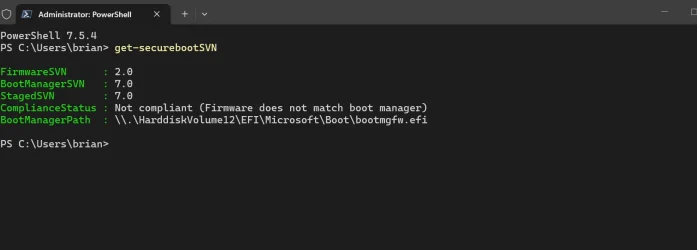
Over on the garlin's scripts thread, there's a discussion where we think it's a reporting bug. Get-SecureBootSVN might not be pulling the highest SVN from the DBX variable, and returning an answer based on the order the SVN's were written.

In the UEFI model, you don't explicitly delete old entries but push out a superseding entry to replace it. So there's SVN 2.0 & 7.0 entries floating in the DBX, and PowerShell is arbitrarily picking one of the two. But the model is designed so if a new SVN is required (to ban the current boot manager), yet another SVN will get pushed to DBX.

Therefore PS needs to get its act together. Just remember, it's the first time this command has appeared.
 

My Computer

System One

  • OS
    Windows 7
Over on the garlin's scripts thread, there's a discussion where we think it's a reporting bug. Get-SecureBootSVN might not be pulling the highest SVN from the DBX variable, and returning an answer based on the order the SVN's were written.

In the UEFI model, you don't explicitly delete old entries but push out a superseding entry to replace it. So there's SVN 2.0 & 7.0 entries floating in the DBX, and PowerShell is arbitrarily picking one of the two. But the model is designed so if a new SVN is required (to ban the current boot manager), yet another SVN will get pushed to DBX.

Therefore PS needs to get its act together. Just remember, it's the first time this command has appeared.
OK I can go with that explanation.
Everything seems good, registry is showing no updates needed.
I've disabled SB again and not gonna mess with it any more!

If I ever come across something that needs it I'll enable it again.
Thanks again.
 

My Computer

System One

  • OS
    Windows 11 Pro 25H2 (RP channel)
    Computer type
    PC/Desktop
    Manufacturer/Model
    MSI
    CPU
    AMD Ryzen 7 9800X3D 8-core
    Motherboard
    MEG X870E Godlike
    Memory
    64GB Corsair Titanium 6000/CL30
    Graphics Card(s)
    MSI Suprim 5080 SOC
    Sound Card
    Soundblaster AE-9
    Monitor(s) Displays
    ASUS TUF Gaming VG289Q
    Screen Resolution
    3840x2160
    Hard Drives
    Samsung 9100 Pro 4TB (gen 5 x4, system drive/games)
    Samsung 990 Pro 2TB
    Samsung 980 Pro 2TB
    Samsung 870 Evo 4TB
    Samsung 870 Evo 2TB
    Samsung T9 4TB
    PSU
    Seasonic PX-2200
    Case
    Bequiet! Dark Base Pro 901
    Cooling
    Noctua NH-D15S Chromax black
    Keyboard
    Logitech G915 X (wired)
    Mouse
    Logitech G903 with PowerPlay charger
    Internet Speed
    900Mb/sec
    Browser
    Microsoft Edge
    Antivirus
    Windows Defender
I still don't understand why some people insist on using scripts without trying to understand the problem.

As for me, I updated the BIOS, deleted the Secure Boot keys and installed the default Secure Boot keys in the BIOS.

When Windows restarted, error 1801 changed to event 1808, confirming that the 2023 certificates had indeed been installed.

I haven’t seen any error messages for over a month now ✅
 

My Computer

System One

  • OS
    Windows 11
I still don't understand why some people insist on using scripts without trying to understand the problem.

As for me, I updated the BIOS, deleted the Secure Boot keys and installed the default Secure Boot keys in the BIOS.

When Windows restarted, error 1801 changed to event 1808, confirming that the 2023 certificates had indeed been installed.

I haven’t seen any error messages for over a month now ✅
I would completely agree the best course of action should start with updating BIOS to get the 2023 keys, even if the Microsoft process is working properly for a system. But that's not always possible when you have, or fear you have, a system that's been abandoned by the mfr. for reasons that are not usually obvious. That is doubtless what draws people to these threads in the first place.

For them, the first problem is probably understanding if they even have a problem: for that there is a script that can tell them if they do or do not have all the 2023 secure boot keys installed in BIOS. If any are missing (the OpROM and KEK are commonly missing), the next problem becomes how to get them: the script helps there, and points to more scripts that satisfy the solutions given. Problem(s) identified, understood (at a high level perhaps) and solved.

But then others want to accelerate the Microsoft process and get all the way to revoking the 2011 cert for their own reasons. Microsoft is progressing very slowly and methodically to include the maximum number of systems and avoid bricking millions with a rushed solution. As a result, they continue to defer the revocation phase. These peoples' problem is they want to get all the keys now along with the 2023 boot files, and revoke the 2011 key, MS be da**ed. That's most likely a problem unique to their needs which only they understand well.

Other people just like messing with this sort of thing; for us the problem is an itch we need to scratch. We see this thread, get interested and start looking at stuff with the informational scripts provided. Then start to wonder if there's a potential problem... and fix it before it becomes an actual problem. It's an innate behavior of all living things: even if there is no problem right now and you don't fully understand why it might become one make things as right as you can now because in the future it might not be possible, or at least far more difficult.
 
Last edited:

My Computers

System One System Two

  • OS
    Windows 11 Pro
    Computer type
    PC/Desktop
    Manufacturer/Model
    DIY
    CPU
    Ryzen 7 5800X
    Motherboard
    Gigabyte B550M Aorus Pro
    Memory
    GSkill 3200, 2x8GB
    Graphics Card(s)
    MSI RX 6800 XT Gaming Z
    Sound Card
    on-board Realtek
    Monitor(s) Displays
    MSI 180hz
    Screen Resolution
    1440p
    Hard Drives
    Samsung 980 Pro, Samsung 870 Evo, generic PCIe NVME, WD 1TB 2.5" laptop spinner
    PSU
    Corsair RM 650
    Case
    mATX
    Cooling
    BeQuiet 240mm AIO and a bunch of case fans
    Keyboard
    one that clacks softly
    Mouse
    logitech
    Internet Speed
    bunches of bps
    Browser
    Firefox
    Antivirus
    Windows' own
  • Operating System
    Win11 Pro
    Computer type
    PC/Desktop
    Manufacturer/Model
    DIY
    CPU
    Ryzen 7 1700
    Motherboard
    GA-AB350M G-3
    Memory
    16GB DDR4
    Graphics card(s)
    RX-480
    Sound Card
    In-Built Realtek
    Monitor(s) Displays
    Samsung
    Screen Resolution
    1440p
    Hard Drives
    NVME/SSD's
    PSU
    Thermaltake BX1 550W
    Case
    Some junky thing
    Cooling
    ThermalTake Assassin(?)
    Browser
    FF/Edge
    Antivirus
    Whatever Windows does
    Other Info
    Secure Boot enabled updated to 2023 CA keys, TPM2.0 enabled with system drive Bitlocker'd.

Latest Support Threads

Back
Top Bottom