Solved Secure boot certificate 2023 valid but event present


Not everyone is fortunate to have their OEM provide a fully supported BIOS update.

There's understandable concern about Secure Boot updates, which could have been avoided by clearer messaging between MS and the OEM's. But that would include having to throw some of the OEM's under the bus, for not updating your BIOS or providing a simple KEK update to MS if they weren't going to provide a new BIOS.

MS has promised a later update to the Windows Security Center, so you can see your Secure Boot certs at a glance. Until then, the lack of visibility is why 3rd-party scripts are needed.
 

My Computer

System One

  • OS
    Windows 7
OK I did a BIOS update today and now have this: @garlin

Secure boot is disabled
 

Attachments

  • Screenshot 2026-04-02 064952.webp
    Screenshot 2026-04-02 064952.webp
    13.8 KB · Views: 2

My Computer

System One

  • OS
    Windows 11 Pro 25H2 (RP channel)
    Computer type
    PC/Desktop
    Manufacturer/Model
    MSI
    CPU
    AMD Ryzen 7 9800X3D 8-core
    Motherboard
    MEG X870E Godlike
    Memory
    64GB Corsair Titanium 6000/CL30
    Graphics Card(s)
    MSI Suprim 5080 SOC
    Sound Card
    Soundblaster AE-9
    Monitor(s) Displays
    ASUS TUF Gaming VG289Q
    Screen Resolution
    3840x2160
    Hard Drives
    Samsung 9100 Pro 4TB (gen 5 x4, system drive/games)
    Samsung 990 Pro 2TB
    Samsung 980 Pro 2TB
    Samsung 870 Evo 4TB
    Samsung 870 Evo 2TB
    Samsung T9 4TB
    PSU
    Seasonic PX-2200
    Case
    Bequiet! Dark Base Pro 901
    Cooling
    Noctua NH-D15S Chromax black
    Keyboard
    Logitech G915 X (wired)
    Mouse
    Logitech G903 with PowerPlay charger
    Internet Speed
    900Mb/sec
    Browser
    Microsoft Edge
    Antivirus
    Windows Defender
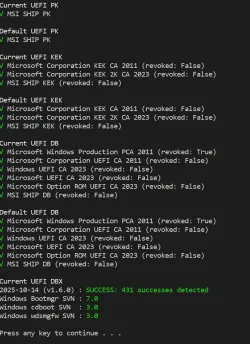
The full check script's output is more interesting (after you've done a BIOS update).

What's useful is confirming if your BIOS update granted you all of the CA 2023 certs. Some OEM's will skip the optional MS UEFI CA 2023 (for Linux) and the Option ROM (for some graphics cards with signed firmware). You can add them if those two are missing.

You have no SVN, that implies you have not revoked CA 2011 (which is still optional for now) or applied the SVN 7.0 update.
 

My Computer

System One

  • OS
    Windows 7
The full check script's output is more interesting (after you've done a BIOS update).

What's useful is confirming if your BIOS update granted you all of the CA 2023 certs. Some OEM's will skip the optional MS UEFI CA 2023 (for Linux) and the Option ROM (for some graphics cards with signed firmware). You can add them if those two are missing.

You have no SVN, that implies you have not revoked CA 2011 (which is still optional for now) or applied the SVN 7.0 update.
Update: just ran the script with 0x0282, enabled secure boot and all is good again.
 

Attachments

  • Screenshot 2026-04-02 071649.webp
    Screenshot 2026-04-02 071649.webp
    98.6 KB · Views: 1

My Computer

System One

  • OS
    Windows 11 Pro 25H2 (RP channel)
    Computer type
    PC/Desktop
    Manufacturer/Model
    MSI
    CPU
    AMD Ryzen 7 9800X3D 8-core
    Motherboard
    MEG X870E Godlike
    Memory
    64GB Corsair Titanium 6000/CL30
    Graphics Card(s)
    MSI Suprim 5080 SOC
    Sound Card
    Soundblaster AE-9
    Monitor(s) Displays
    ASUS TUF Gaming VG289Q
    Screen Resolution
    3840x2160
    Hard Drives
    Samsung 9100 Pro 4TB (gen 5 x4, system drive/games)
    Samsung 990 Pro 2TB
    Samsung 980 Pro 2TB
    Samsung 870 Evo 4TB
    Samsung 870 Evo 2TB
    Samsung T9 4TB
    PSU
    Seasonic PX-2200
    Case
    Bequiet! Dark Base Pro 901
    Cooling
    Noctua NH-D15S Chromax black
    Keyboard
    Logitech G915 X (wired)
    Mouse
    Logitech G903 with PowerPlay charger
    Internet Speed
    900Mb/sec
    Browser
    Microsoft Edge
    Antivirus
    Windows Defender
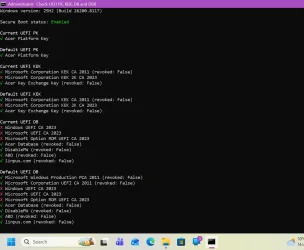
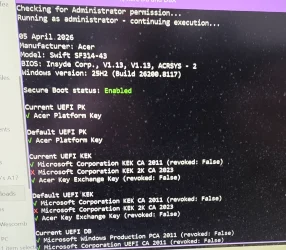
@garlin This is my mum's Acer laptop, bought a few years ago.
Do I need to do anything here? Not shown on the screenshot it the SVNs which all show 'none' in red, but has the correct 431 DBX count.
There is a BIOS update available, but according to HWInfo it already has BIOS 1.13 but I think this one is newer.

There doesn't seem to be a way to disable secure boot, I looked yesterday.

Windows 11 Home (upgraded from Windows 10)
 

Attachments

  • Screenshot (1).webp
    Screenshot (1).webp
    97.7 KB · Views: 3
  • Screenshot (2).webp
    Screenshot (2).webp
    98.4 KB · Views: 2

My Computer

System One

  • OS
    Windows 11 Pro 25H2 (RP channel)
    Computer type
    PC/Desktop
    Manufacturer/Model
    MSI
    CPU
    AMD Ryzen 7 9800X3D 8-core
    Motherboard
    MEG X870E Godlike
    Memory
    64GB Corsair Titanium 6000/CL30
    Graphics Card(s)
    MSI Suprim 5080 SOC
    Sound Card
    Soundblaster AE-9
    Monitor(s) Displays
    ASUS TUF Gaming VG289Q
    Screen Resolution
    3840x2160
    Hard Drives
    Samsung 9100 Pro 4TB (gen 5 x4, system drive/games)
    Samsung 990 Pro 2TB
    Samsung 980 Pro 2TB
    Samsung 870 Evo 4TB
    Samsung 870 Evo 2TB
    Samsung T9 4TB
    PSU
    Seasonic PX-2200
    Case
    Bequiet! Dark Base Pro 901
    Cooling
    Noctua NH-D15S Chromax black
    Keyboard
    Logitech G915 X (wired)
    Mouse
    Logitech G903 with PowerPlay charger
    Internet Speed
    900Mb/sec
    Browser
    Microsoft Edge
    Antivirus
    Windows Defender
This PC is missing a KEK CA 2023, which is the heart of the update process. If there's a newer BIOS, I would try installing it.

I get the feeling this PC is more than "a few years old". linpus.com was a Taiwanese Linux that shipped on early Acer's as a low-cost Windows alternative, but they disappeared around 2014. It's seriously old if linpus is a factory default.

Unless you find CA 2023 certs, it doesn't matter if there's 431 DBX entries. Due to quirks in the UEFI security model, it's easy to update the 431 DBX entries while not making progress on the CA 2023 certs. The two actions are not linked to each other.

If you can't find the Secure Boot menus (guessing because it's a really old PC), then it's a poor candidate for Setup mode. Maybe your mum deserves a newer (or less old) laptop. Try confirming you're looking at the correct support page.
 

My Computer

System One

  • OS
    Windows 7
This PC is missing a KEK CA 2023, which is the heart of the update process. If there's a newer BIOS, I would try installing it.

I get the feeling this PC is more than "a few years old". linpus.com was a Taiwanese Linux that shipped on early Acer's as a low-cost Windows alternative, but they disappeared around 2014. It's seriously old if linpus is a factory default.

Unless you find CA 2023 certs, it doesn't matter if there's 431 DBX entries. Due to quirks in the UEFI security model, it's easy to update the 431 DBX entries while not making progress on the CA 2023 certs. The two actions are not linked to each other.

If you can't find the Secure Boot menus (guessing because it's a really old PC), then it's a poor candidate for Setup mode. Maybe your mum deserves a newer (or less old) laptop. Try confirming you're looking at the correct support page.
It's about 5 years old I think. It's never had any Linux install, it shipped with Windows 10 and was upgraded to Windows 11 a couple of years ago

Secure boot is in the BIOS menu but I can't tab or arrow down to select the option for some reason. Maybe Acer have locked it

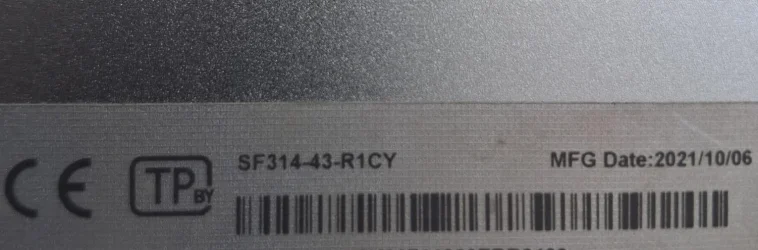
Launched in 2019, the model is Acer Swift SF314-43

Current BIOS is from April 2025 I think but mum's had it longer than a year and I've never manually updated the BIOS
 

Attachments

  • 20260405_134851.webp
    20260405_134851.webp
    306.6 KB · Views: 2

My Computer

System One

  • OS
    Windows 11 Pro 25H2 (RP channel)
    Computer type
    PC/Desktop
    Manufacturer/Model
    MSI
    CPU
    AMD Ryzen 7 9800X3D 8-core
    Motherboard
    MEG X870E Godlike
    Memory
    64GB Corsair Titanium 6000/CL30
    Graphics Card(s)
    MSI Suprim 5080 SOC
    Sound Card
    Soundblaster AE-9
    Monitor(s) Displays
    ASUS TUF Gaming VG289Q
    Screen Resolution
    3840x2160
    Hard Drives
    Samsung 9100 Pro 4TB (gen 5 x4, system drive/games)
    Samsung 990 Pro 2TB
    Samsung 980 Pro 2TB
    Samsung 870 Evo 4TB
    Samsung 870 Evo 2TB
    Samsung T9 4TB
    PSU
    Seasonic PX-2200
    Case
    Bequiet! Dark Base Pro 901
    Cooling
    Noctua NH-D15S Chromax black
    Keyboard
    Logitech G915 X (wired)
    Mouse
    Logitech G903 with PowerPlay charger
    Internet Speed
    900Mb/sec
    Browser
    Microsoft Edge
    Antivirus
    Windows Defender
From Acer's community forum, it's a different model but close enough.

For the Acer Swift SF314-42, BIOS version V1.11 (released in 2022) is the final official firmware update provided by Acer, and it does not include a built-in mechanism to refresh or update Secure Boot or TPM keys to the 2023/2024 standards.
Status of Keys in BIOS V1.11
Frozen Certificates: The Secure Boot certificate store is fixed at the 2022 level. It lacks newer certificates like the Microsoft KEK 2K CA 2023 and Windows UEFI CA 2023.
Official Support: There are currently no official channels or subsequent BIOS updates from Acer to refresh these specific keys for this model.
TPM 2.0: While TPM 2.0 is supported and can be toggled, the underlying firmware keys cannot be manually updated by the user through the standard Insyde BIOS interface.

Management Options in BIOS
If you need to manage existing Secure Boot or TPM settings, follow these steps:
Enter BIOS: Power on and repeatedly press F2.
Unlock Settings: Many Secure Boot options are hidden until a Supervisor Password is set in the Security tab.
Secure Boot Control:
Navigate to the Boot or Security tab.
Change "Secure Boot Mode" to Custom to reveal options like "Restore Factory Keys" (this only restores the 2022-era keys).
TPM Management: In the Security tab, look for TPM or AMD fTPM to ensure it is enabled.
 

My Computer

System One

  • OS
    Windows 7
From Acer's community forum, it's a different model but close enough.
Could be stuck then. It's definitely got a 2025 BIOS on it that I've never installed
I've never used or set a Supervisor password. It was bought new at a retail store

It's correct that there is no newer BIOS for the -42 model but the -43 DOES have a newer BIOS available. I'll have to test it and see/hope for the best

Next time I'm at mum's I will try the update and post here if it works or not.

Manufactured in 2021 so not that old
 

Attachments

  • Screenshot 2026-04-06 171242.webp
    Screenshot 2026-04-06 171242.webp
    54.6 KB · Views: 2
  • shared image.webp
    shared image.webp
    123.3 KB · Views: 2
Last edited:

My Computer

System One

  • OS
    Windows 11 Pro 25H2 (RP channel)
    Computer type
    PC/Desktop
    Manufacturer/Model
    MSI
    CPU
    AMD Ryzen 7 9800X3D 8-core
    Motherboard
    MEG X870E Godlike
    Memory
    64GB Corsair Titanium 6000/CL30
    Graphics Card(s)
    MSI Suprim 5080 SOC
    Sound Card
    Soundblaster AE-9
    Monitor(s) Displays
    ASUS TUF Gaming VG289Q
    Screen Resolution
    3840x2160
    Hard Drives
    Samsung 9100 Pro 4TB (gen 5 x4, system drive/games)
    Samsung 990 Pro 2TB
    Samsung 980 Pro 2TB
    Samsung 870 Evo 4TB
    Samsung 870 Evo 2TB
    Samsung T9 4TB
    PSU
    Seasonic PX-2200
    Case
    Bequiet! Dark Base Pro 901
    Cooling
    Noctua NH-D15S Chromax black
    Keyboard
    Logitech G915 X (wired)
    Mouse
    Logitech G903 with PowerPlay charger
    Internet Speed
    900Mb/sec
    Browser
    Microsoft Edge
    Antivirus
    Windows Defender
Hello, after fresh windows install 23h2 (22631.6936) got that: why now i got FAIL 154 failures? before fresh installation that was all green full success.
1776424344448.webp
 

My Computer

System One

  • OS
    Windows 11
    Computer type
    PC/Desktop
    Manufacturer/Model
    Asrock b760 pro rs
Hello, after fresh windows install 23h2 (22631.6936) got that: why now i got FAIL 154 failures? before fresh installation that was all green full success.
View attachment 169061
It's obviously missing SVN 7.0. Have you allowed Windows to post all it's updates? it might come with a Security update that hasn't posted yet. But then, 23H2 (Home and Pro) reached End of Servicing on Nov. 11 2025; that may have something to do with not receiving it.

But separately, assuming it had SVN 7.0 in DBX previously it's strange to me that a fresh install could clear it out.

You could try running Garlin's script it push it into EFI.
 
Last edited:

My Computers

System One System Two

  • OS
    Windows 11 Pro
    Computer type
    PC/Desktop
    Manufacturer/Model
    DIY
    CPU
    Ryzen 7 5800X
    Motherboard
    Gigabyte B550M Aorus Pro
    Memory
    GSkill 3200, 2x8GB
    Graphics Card(s)
    MSI RX 6800 XT Gaming Z
    Sound Card
    on-board Realtek
    Monitor(s) Displays
    MSI 180hz
    Screen Resolution
    1440p
    Hard Drives
    Samsung 980 Pro, Samsung 870 Evo, generic PCIe NVME, WD 1TB 2.5" laptop spinner
    PSU
    Corsair RM 650
    Case
    mATX
    Cooling
    BeQuiet 240mm AIO and a bunch of case fans
    Keyboard
    one that clacks softly
    Mouse
    logitech
    Internet Speed
    bunches of bps
    Browser
    Firefox
    Antivirus
    Windows' own
  • Operating System
    Win11 Pro
    Computer type
    PC/Desktop
    Manufacturer/Model
    DIY
    CPU
    Ryzen 7 1700
    Motherboard
    GA-AB350M G-3
    Memory
    16GB DDR4
    Graphics card(s)
    RX-480
    Sound Card
    In-Built Realtek
    Monitor(s) Displays
    Samsung
    Screen Resolution
    1440p
    Hard Drives
    NVME/SSD's
    PSU
    Thermaltake BX1 550W
    Case
    Some junky thing
    Cooling
    ThermalTake Assassin(?)
    Browser
    FF/Edge
    Antivirus
    Whatever Windows does
    Other Info
    Secure Boot enabled updated to 2023 CA keys, TPM2.0 enabled with system drive Bitlocker'd.
Re-installing Windows will not clear any Secure Boot variables. Windows can only append data, it cannot remove existing certs since the UEFI specifically blocks deletion whenever a valid Platform Key (PK) is installed.
 

My Computer

System One

  • OS
    Windows 7
It's obviously missing SVN 7.0. Have you allowed Windows to post all it's updates? it might come with a Security update that hasn't posted yet. But then, 23H2 (Home and Pro) reached End of Servicing on Nov. 11 2025; that may have something to do with not receiving it.

But separately, assuming it had SVN 7.0 in DBX previously it's strange to me that a fresh install could clear it out.

You could try running Garland's script it push it into EFI.
23h2 from march already has that SVN 7.0, but from april no, I tried clearing secure boot keys, again new windows reinstall but still same issue. Before fresh windows install I cleared secure boot keys
 

My Computer

System One

  • OS
    Windows 11
    Computer type
    PC/Desktop
    Manufacturer/Model
    Asrock b760 pro rs
Before fresh windows install I cleared secure boot keys
That explains it.

Use Garlin's script to install it if needed immediately, but I have to think it will get it along with all the DBX revocation updates at some point.

EDIT: BTW: why did you feel the need to clear secure boot keys first?
 

My Computers

System One System Two

  • OS
    Windows 11 Pro
    Computer type
    PC/Desktop
    Manufacturer/Model
    DIY
    CPU
    Ryzen 7 5800X
    Motherboard
    Gigabyte B550M Aorus Pro
    Memory
    GSkill 3200, 2x8GB
    Graphics Card(s)
    MSI RX 6800 XT Gaming Z
    Sound Card
    on-board Realtek
    Monitor(s) Displays
    MSI 180hz
    Screen Resolution
    1440p
    Hard Drives
    Samsung 980 Pro, Samsung 870 Evo, generic PCIe NVME, WD 1TB 2.5" laptop spinner
    PSU
    Corsair RM 650
    Case
    mATX
    Cooling
    BeQuiet 240mm AIO and a bunch of case fans
    Keyboard
    one that clacks softly
    Mouse
    logitech
    Internet Speed
    bunches of bps
    Browser
    Firefox
    Antivirus
    Windows' own
  • Operating System
    Win11 Pro
    Computer type
    PC/Desktop
    Manufacturer/Model
    DIY
    CPU
    Ryzen 7 1700
    Motherboard
    GA-AB350M G-3
    Memory
    16GB DDR4
    Graphics card(s)
    RX-480
    Sound Card
    In-Built Realtek
    Monitor(s) Displays
    Samsung
    Screen Resolution
    1440p
    Hard Drives
    NVME/SSD's
    PSU
    Thermaltake BX1 550W
    Case
    Some junky thing
    Cooling
    ThermalTake Assassin(?)
    Browser
    FF/Edge
    Antivirus
    Whatever Windows does
    Other Info
    Secure Boot enabled updated to 2023 CA keys, TPM2.0 enabled with system drive Bitlocker'd.
If you cleared your Secure Boot keys, then you need to repeat the revoke steps.
 

My Computer

System One

  • OS
    Windows 7
Thank you, but Microsoft should give them by June 2026?
That's perhaps a better question for one of the Pro's... but it will get them for sure when they start revoking permissions. That may or may not come in June and probably doesn't have to.

What little I get to read suggests Microsoft's still having problems that revoking them globally through updates could make seriously bad. I have no idea what, but I do understand their position with hundreds of millions of users and just as many different installed configurations to anticipate.
 

My Computers

System One System Two

  • OS
    Windows 11 Pro
    Computer type
    PC/Desktop
    Manufacturer/Model
    DIY
    CPU
    Ryzen 7 5800X
    Motherboard
    Gigabyte B550M Aorus Pro
    Memory
    GSkill 3200, 2x8GB
    Graphics Card(s)
    MSI RX 6800 XT Gaming Z
    Sound Card
    on-board Realtek
    Monitor(s) Displays
    MSI 180hz
    Screen Resolution
    1440p
    Hard Drives
    Samsung 980 Pro, Samsung 870 Evo, generic PCIe NVME, WD 1TB 2.5" laptop spinner
    PSU
    Corsair RM 650
    Case
    mATX
    Cooling
    BeQuiet 240mm AIO and a bunch of case fans
    Keyboard
    one that clacks softly
    Mouse
    logitech
    Internet Speed
    bunches of bps
    Browser
    Firefox
    Antivirus
    Windows' own
  • Operating System
    Win11 Pro
    Computer type
    PC/Desktop
    Manufacturer/Model
    DIY
    CPU
    Ryzen 7 1700
    Motherboard
    GA-AB350M G-3
    Memory
    16GB DDR4
    Graphics card(s)
    RX-480
    Sound Card
    In-Built Realtek
    Monitor(s) Displays
    Samsung
    Screen Resolution
    1440p
    Hard Drives
    NVME/SSD's
    PSU
    Thermaltake BX1 550W
    Case
    Some junky thing
    Cooling
    ThermalTake Assassin(?)
    Browser
    FF/Edge
    Antivirus
    Whatever Windows does
    Other Info
    Secure Boot enabled updated to 2023 CA keys, TPM2.0 enabled with system drive Bitlocker'd.
MS doesn't have any problems in revoking certs. That's not the problem.

If Windows cannot install the CA 2023 certs, then it won't even try to revoke PCA 2011. There are safety checks in place. The next version of Security Center will have stronger warning that you're stuck because you don't have the CA 2023 certs (unsupported BIOS).
 

My Computer

System One

  • OS
    Windows 7
MS doesn't have any problems in revoking certs. That's not the problem.

If Windows cannot install the CA 2023 certs, then it won't even try to revoke PCA 2011. There are safety checks in place. The next version of Security Center will have stronger warning that you're stuck because you don't have the CA 2023 certs (unsupported BIOS).
Thank you, ASRock doesn’t include (B760 Pro RS) CA 2023. But if I use script I can get it. In event viewer I got: “More data needed” so I guess I get it later?
Also, can u give me link to your script?
 

My Computer

System One

  • OS
    Windows 11
    Computer type
    PC/Desktop
    Manufacturer/Model
    Asrock b760 pro rs
If Windows cannot install the CA 2023 certs, then it won't even try to revoke PCA 2011.
Do you mean ALL the certs? even the 2023 KEK, which is the stickler for so many systems?
 

My Computers

System One System Two

  • OS
    Windows 11 Pro
    Computer type
    PC/Desktop
    Manufacturer/Model
    DIY
    CPU
    Ryzen 7 5800X
    Motherboard
    Gigabyte B550M Aorus Pro
    Memory
    GSkill 3200, 2x8GB
    Graphics Card(s)
    MSI RX 6800 XT Gaming Z
    Sound Card
    on-board Realtek
    Monitor(s) Displays
    MSI 180hz
    Screen Resolution
    1440p
    Hard Drives
    Samsung 980 Pro, Samsung 870 Evo, generic PCIe NVME, WD 1TB 2.5" laptop spinner
    PSU
    Corsair RM 650
    Case
    mATX
    Cooling
    BeQuiet 240mm AIO and a bunch of case fans
    Keyboard
    one that clacks softly
    Mouse
    logitech
    Internet Speed
    bunches of bps
    Browser
    Firefox
    Antivirus
    Windows' own
  • Operating System
    Win11 Pro
    Computer type
    PC/Desktop
    Manufacturer/Model
    DIY
    CPU
    Ryzen 7 1700
    Motherboard
    GA-AB350M G-3
    Memory
    16GB DDR4
    Graphics card(s)
    RX-480
    Sound Card
    In-Built Realtek
    Monitor(s) Displays
    Samsung
    Screen Resolution
    1440p
    Hard Drives
    NVME/SSD's
    PSU
    Thermaltake BX1 550W
    Case
    Some junky thing
    Cooling
    ThermalTake Assassin(?)
    Browser
    FF/Edge
    Antivirus
    Whatever Windows does
    Other Info
    Secure Boot enabled updated to 2023 CA keys, TPM2.0 enabled with system drive Bitlocker'd.

Latest Support Threads

Back
Top Bottom