Solved Secure boot update HowTo


Hello - I followed the directions perfectly (hopefully), but status is showing "InProgress". Is there something I need to do to finish this process?
UPDATE: After another RESTART, am finally showing UPDATED! Thank You!!!
 
Last edited:

My Computer

System One

  • OS
    Windows 11 Professional (x64) Version 25H2 (build
    Computer type
    PC/Desktop
    Manufacturer/Model
    custom - ASUS motherboard
    CPU
    3.00 gigahertz Intel Core i7-9700F
    Motherboard
    ASUSTeKCOMPUTERINC.TUFZ390-PLUSGAMING(WI-FI)
    Memory
    32gb
    Graphics Card(s)
    NVIDIA GeForce RTX 2060 SUPER
    Sound Card
    on motherboard
    Monitor(s) Displays
    Samsung C32R50x
    Screen Resolution
    1920 x 1080
    Hard Drives
    CT1000MX500SSD1 1.00 TB SSD 2016E29B78BA 1 Healthy
    Samsung SSD 980 PRO with Heatsink 1TB 1.00 TB NVMe S6WSNS0TB06391D _0006 2
    ST1000DM010-2EP102 1.00 TB HDD ZN1FAZPY 0 Healthy
    Browser
    Vivaldi
    Antivirus
    Bitdefender
Hello - I followed the directions perfectly (hopefully), but status is showing "InProgress". Is there something I need to do to finish this process?
UPDATE: After another RESTART, am finally showing UPDATED! Thank You!!!
You show this error; you may search for the error code on the web. Good luck!

1764094868434.webp
 

My Computer

System One

  • OS
    Windows 11 Pro 25H2
    Computer type
    PC/Desktop
    Manufacturer/Model
    Dell XPS 8930
    CPU
    Intel I9-9900K
    Memory
    64GB
    Graphics Card(s)
    NVIDIA RTX 2060
    Sound Card
    NVIDIA High Definition Audio
    Monitor(s) Displays
    4k Samsung
    Screen Resolution
    3840 x 2160
    Hard Drives
    512GB NVMe, ADATA SU 800, 2TB HDD

My Computers

System One System Two

  • OS
    Windows 11 Home 25H2
    Computer type
    Laptop
    Manufacturer/Model
    HP Pavilion 14-ce3606sa
    CPU
    Core i5-1035G1
    Memory
    32gb
    Hard Drives
    Samsung 870 evo sata ssd
    Cooling
    Could be better
    Internet Speed
    50 mbps Starlink
    Browser
    Firefox
    Other Info
    Originally came installed with a 500gb H10 Optane ssd
  • Operating System
    Windows 11 Home
    Computer type
    Laptop
    Manufacturer/Model
    HP Pavilion ce3606sa
    CPU
    Intel Core i5-1035G1
    Memory
    16gb
    Hard Drives
    Hynix Gold P31 2TB
    Internet Speed
    200mbps Starlink
    Browser
    Firefox
    Antivirus
    Defender

My Computer

System One

  • OS
    Windows 11 Professional (x64) Version 25H2 (build
    Computer type
    PC/Desktop
    Manufacturer/Model
    custom - ASUS motherboard
    CPU
    3.00 gigahertz Intel Core i7-9700F
    Motherboard
    ASUSTeKCOMPUTERINC.TUFZ390-PLUSGAMING(WI-FI)
    Memory
    32gb
    Graphics Card(s)
    NVIDIA GeForce RTX 2060 SUPER
    Sound Card
    on motherboard
    Monitor(s) Displays
    Samsung C32R50x
    Screen Resolution
    1920 x 1080
    Hard Drives
    CT1000MX500SSD1 1.00 TB SSD 2016E29B78BA 1 Healthy
    Samsung SSD 980 PRO with Heatsink 1TB 1.00 TB NVMe S6WSNS0TB06391D _0006 2
    ST1000DM010-2EP102 1.00 TB HDD ZN1FAZPY 0 Healthy
    Browser
    Vivaldi
    Antivirus
    Bitdefender
On that list

View attachment 154310

So what exactly will that mean? Insecurity? No further security updates for secure boot?
Depending on who you ask, it could be a curse, or a blessing. It seems to be a common developing myth that devices will not be able to boot once the certificates expire, just look at all the threads and posts in this forum.
 

My Computer

System One

  • OS
    Windows 11
Depending on who you ask, it could be a curse, or a blessing. It seems to be a common developing myth that devices will not be able to boot once the certificates expire, just look at all the threads and posts in this forum.
This is the MS response.

secureboot faq4.webp


UPDATE: Dell are giving the same answer as MS. See 3rd question.


We will find out the real answer later on in 2026. ⏱️
 
Last edited:

My Computers

System One System Two

  • OS
    Windows 11 Pro 25H2
    Computer type
    PC/Desktop
    Manufacturer/Model
    Homebuilt
    CPU
    Intel Core i9 13900K
    Motherboard
    Asus ProArt Z790 Creator WiFi - Bios 3107
    Memory
    Corsair Dominator Platinum 64gb 5600MT/s DDR5 Dual Channel
    Graphics Card(s)
    Sapphire NITRO+ AMD Radeon RX 7900 XTX Vapor-X 24GB
    Sound Card
    External DAC: Cambridge Audio DACMagic200M - Headphone Amp: Topping L50
    Monitor(s) Displays
    Panasonic MX950 Mini LED 55" TV 120hz
    Screen Resolution
    3840 x 2160 120hz
    Hard Drives
    Samsung 980 Pro 2TB (OS)
    Samsung 980 Pro 1TB (Files)
    Lexar NZ790 4TB
    LaCie d2 Professional 6TB external - USB 3.1
    Seagate Expansion 16TB external - USB 3.2
    Seagate One Touch 18TB external HD - USB 3.0
    PSU
    Corsair RM1200x Shift
    Case
    Corsair RGB Smart Case 5000x (white)
    Cooling
    Corsair iCue H150i Elite Capellix XT
    Keyboard
    Incase Ergonomic USB (Microsoft clone)
    Mouse
    Logitech MX Master 3S
    Internet Speed
    Fibre 900/500 Mbps
    Browser
    Microsoft Edge Chromium
    Antivirus
    Bitdefender Total Security
    Other Info
    AMD Radeon Software & Drivers 26.1.1
    Hasleo Backup Suite
    Dashlane password manager
    Kensington Verimark fingerprint reader
    Logitech Brio 4K webcam
    Orico 10-port powered USB 3.0 hub
  • Operating System
    Windows 11 Pro 25H2
    Computer type
    Laptop
    Manufacturer/Model
    Asus Vivobook X1605VA
    CPU
    Intel® Core™ i9-13900H
    Motherboard
    Asus X1605VA bios 309
    Memory
    32GB DDR4-3200 Dual channel
    Graphics card(s)
    *Intel Iris Xᵉ Graphics G7
    Sound Card
    Realtek | Intel SST Bluetooth & USB
    Monitor(s) Displays
    16.0-inch, WUXGA 16:10 aspect ratio, IPS-level Panel
    Screen Resolution
    1920 x 1200 60hz
    Hard Drives
    512GB M.2 NVMe™ PCIe® 3.0 SSD
    Mouse
    Logitech MX Ergo Trackball
    Antivirus
    Bitdefender Total Security
    Other Info
    720p Webcam
    WiFi & USB to ethernet

My Computers

System One System Two

  • OS
    Win 11 Pro 25H2, Build 26200.8524
    Computer type
    PC/Desktop
    Manufacturer/Model
    Home Brew
    CPU
    Intel Core i5 14500
    Motherboard
    Gigabyte B760M G P WIFI
    Memory
    64GB DDR4
    Graphics Card(s)
    GeForce RTX 4060
    Sound Card
    Chipset Realtek
    Monitor(s) Displays
    LG 45" Ultragear, Acer 24" 1080p
    Screen Resolution
    5120x1440, 1920x1080
    Hard Drives
    Crucial P310 2TB 2280 PCIe Gen4 3D NAND NVMe M.2 SSD (O/S)
    Silicon Power 2TB US75 NVMe PCIe Gen4 M.2 2280 SSD (backup)
    Crucial BX500 2TB 3D NAND (2nd backup)
    Seagate 4TB Ironwolf, rotating HDD archive files
    External off-line backup Drives: 2 NVMe 4TB drives in external enclosures
    PSU
    Thermaltake Toughpower GF3 750W
    Case
    LIAN LI LANCOOL 216 E-ATX PC Case
    Cooling
    Lots of fans!
    Keyboard
    Microsoft Comfort Curve 2000
    Mouse
    Logitech G305
    Internet Speed
    Verizon FiOS 1GB
    Browser
    Firefox
    Antivirus
    Malware Bytes & Windows Defender Security
  • Operating System
    Win 11 Pro 25H2, Build 26200.8524
    Computer type
    PC/Desktop
    Manufacturer/Model
    Home Brew
    CPU
    Intel Core i5 14400
    Motherboard
    Gigabyte B760M DS3H AX
    Memory
    32GB DDR5
    Graphics card(s)
    Intel 700 Embedded GPU
    Sound Card
    Realtek Embedded
    Monitor(s) Displays
    27" HP 1080p
    Screen Resolution
    1920x1080
    Hard Drives
    Crucial P310 2TB 2280 PCIe Gen4 eD NAND PCIe SSD
    Samsung EVO 990 2TB NVMe Gen4 SSD
    Samsung 2TB SATA SSD
    PSU
    Thermaltake Smart BM3 650W
    Case
    Okinos Micro ATX Case
    Cooling
    Fans
    Keyboard
    Microsoft Comfort Curve 2000
    Mouse
    Logitech G305
    Internet Speed
    Verizon FiOS 1GB
    Browser
    Firefox
    Antivirus
    Malware Bytes & Windows Defender Security
According to Mosby:

"Whereas, in itself, this [expiration] will not prevent existing Secure Boot signed bootloaders from validating (as long as they haven't been revoked through other means) it will however prevent any newer UEFI bootloader from doing so which basically means that, if your OS or OS installer was produced after those DB certificates expire, and you don't have the additional 2023 DB certificates installed (see below), then, come the second half of 2026,you will not be able to boot or even install a Secure Boot compatible OS in a Secure Boot enabled environment!"
 
Last edited:

My Computer

System One

  • OS
    Windows 10
According to Mosby:

Whereas, in itself, this [expiration] will not prevent existing Secure Boot signed bootloaders from validating (as long as they haven't been revoked through other means) it will however prevent any newer UEFI bootloader from doing so which basically means that, if your OS or OS installer was produced after those DB certificates expire, and you don't have the additional 2023 DB certificates installed (see below), then, come the second half of 2026,you will not be able to boot or even install a Secure Boot compatible OS in a Secure Boot enabled environment!
So at the very minimum, if you have Windows UEFI CA 2023 installed, then come the second half of 2026, you'll be able to install or boot a future Secure Boot compatible OS in the Secure Boot environment? Do I have that right?
 

My Computer

System One

  • OS
    Windows 11
i would hazard a guess that if you dont have the secure boot 2023 cert in place and available for the system
you wont be able to directly upgrade too or clean install Windows 12 when it becomes available.

im sure workarounds can and will be found, just my thoughts.
best of luck Steve ..
 

My Computers

System One System Two

  • OS
    Windows 11 Home
    Computer type
    PC/Desktop
    Manufacturer/Model
    HP 24" AiO
    CPU
    Ryzen 7 5825u
    Motherboard
    HP
    Memory
    64GB DDR4 3200
    Graphics Card(s)
    Ryzen 7 5825u
    Sound Card
    RealTek
    Monitor(s) Displays
    24" HP AiO
    Screen Resolution
    1920 x 1080 @60 Hz
    Hard Drives
    1TB WD Blue SN580 M2 SSD Partitioned.
    2x 1TB USB HDD External Backup/Storage.
    PSU
    90W external power brick
    Case
    24" All in One
    Cooling
    Default Air Cooling
    Keyboard
    HP WiFi UK extended
    Mouse
    HP WiFi 3 Button
    Internet Speed
    1GB full fibre
    Browser
    Edge & Firefox
    Antivirus
    AVG Internet Security/Windows Defender
    Other Info
    Mainly Open Source Software
  • Operating System
    Ubuntu 22.04.5 LTS
    Computer type
    Laptop
    Manufacturer/Model
    Dell 13" Latitude 2017
    CPU
    i5 7200u
    Motherboard
    Dell
    Memory
    16GB DDR4
    Graphics card(s)
    Intel
    Sound Card
    Intel
    Monitor(s) Displays
    13" Dell Laptop
    Hard Drives
    250GB Crucial 2.5" SSD
    Mouse
    Generic WiFi 3 button
    Internet Speed
    WiFi only
    Browser
    Firefox
    Antivirus
    ClamAV TK
    Other Info
    Mainly Open Source Software
i would hazard a guess that if you dont have the secure boot 2023 cert in place and available for the system
you wont be able to directly upgrade too or clean install Windows 12 when it becomes available.

im sure workarounds can and will be found, just my thoughts.
best of luck Steve ..
Just like the hard un by passable requirement for SSE 4.2 for 24H2 and beyond, I wouldn't be shocked if future versions of Windows 11 or Windows 12 have a requirement to have CA 2023 secure boot certificate.
 

My Computers

System One System Two

  • OS
    Windows 11 Pro 25H2
    Computer type
    PC/Desktop
    Manufacturer/Model
    Geekom AX7 Pro
    CPU
    AMD Ryzen 9 7940HS
    Memory
    32 GB
    Graphics Card(s)
    Radeon 780M Graphics
    Monitor(s) Displays
    Dell S2425H 24"
    Screen Resolution
    1920 x 1080
    Hard Drives
    2 TB NVMe SSD
    Internet Speed
    100 Mbs
    Browser
    Microsoft Edge / Firefox
    Antivirus
    F-Secure Security Suite
  • Operating System
    Windows 11 Pro 25H2
    Computer type
    PC/Desktop
    Manufacturer/Model
    Dell Inspiron 3910
    CPU
    12th Gen Intel Core i7-12700 processor (12-Core, 25M Cache, 2.1GHz to 4.8GHz)
    Motherboard
    Dell 0KHP4K
    Memory
    16 GB
    Graphics card(s)
    Intel(R) UHD Graphics 770 with shared graphics memory
    Monitor(s) Displays
    Dell 27" Monitor S2721DS,
    Screen Resolution
    QHD 2560 x 1440 @ 75 Hz
    Hard Drives
    1TB M.2, PCIe NVMe, SSD
    Internet Speed
    100 Mbps
    Browser
    Edge
    Antivirus
    F-Secure Security Suite
Worked for me as follows...

1. Download the script at the bottom of this post.
2. Extract the Check-SecureBootCerts.ps1 script and place it on your desktop.
3. Go to: C:\Users\your account name\Desktop and right click Desktop and choose: Open in Terminal
4. In the powershell windows that pops up, type the following...

.\Check-SecureBootCerts.ps1 and hit the ENTER key.

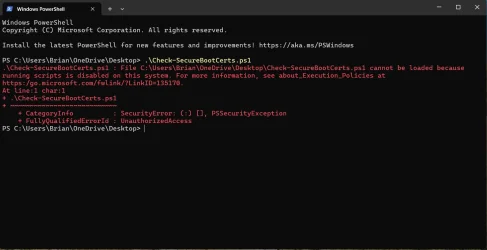
This is what I get when following the instructions exactly except my Desktop is in the OneDrive folder.
 

Attachments

  • Screenshot 2025-11-26 134558.webp
    Screenshot 2025-11-26 134558.webp
    62 KB · Views: 11

My Computer

System One

  • OS
    Windows 11 Pro 25H2
    Computer type
    Laptop
    Manufacturer/Model
    HP 15s-fq5xxx
    CPU
    12th Gen Intel(R) Core(TM) i7-1255U (1.70 GHz
    Memory
    16.0 GB
    Graphics Card(s)
    Intel iRIS Xe
    Screen Resolution
    1920 x 1080
    Hard Drives
    Samsung SSD 512 GB
    Mouse
    Logitech Pebble
    Internet Speed
    500/50 Mb/sec
    Browser
    Chrome
    Antivirus
    Defender
This is what I get when following the instructions exactly except my Desktop is in the OneDrive folder.

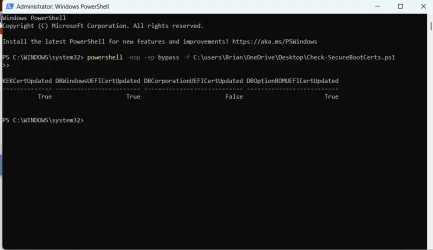
Try in powershell:

Code:
powershell -nop -ep bypass -f "C:\users\Brian\OneDrive\Desktop\Check-SecureBootCerts.ps1"
 

My Computer

System One

  • OS
    Windows 11 Pro
This is what I get when following the instructions exactly except my Desktop is in the OneDrive folder.
I think you get that red message if you don't open PS as Administrator. 😵‍💫🤷‍♂️
 

My Computer

System One

  • OS
    Windows 11 Pro 25H2
    Computer type
    PC/Desktop
    Manufacturer/Model
    Dell XPS 8930
    CPU
    Intel I9-9900K
    Memory
    64GB
    Graphics Card(s)
    NVIDIA RTX 2060
    Sound Card
    NVIDIA High Definition Audio
    Monitor(s) Displays
    4k Samsung
    Screen Resolution
    3840 x 2160
    Hard Drives
    512GB NVMe, ADATA SU 800, 2TB HDD
Try in powershell:

powershell -nop -ep bypass -f "C:\users\Brian\OneDrive\Desktop\Check-SecureBootCerts.ps1"

Thanks, That worked :-)
 

Attachments

  • Screenshot 2025-11-26 141855.webp
    Screenshot 2025-11-26 141855.webp
    33.4 KB · Views: 4

My Computer

System One

  • OS
    Windows 11 Pro 25H2
    Computer type
    Laptop
    Manufacturer/Model
    HP 15s-fq5xxx
    CPU
    12th Gen Intel(R) Core(TM) i7-1255U (1.70 GHz
    Memory
    16.0 GB
    Graphics Card(s)
    Intel iRIS Xe
    Screen Resolution
    1920 x 1080
    Hard Drives
    Samsung SSD 512 GB
    Mouse
    Logitech Pebble
    Internet Speed
    500/50 Mb/sec
    Browser
    Chrome
    Antivirus
    Defender
I think you get that red message if you don't open PS as Administrator. 😵‍💫🤷‍♂️
Actually, you just have to enable running scripts in PowerShell. Open PowerShell as Admin and use the following command.

To allow just signed scripts...

Set-ExecutionPolicy RemoteSigned

To allow any script...

Set-ExecutionPolicy Unrestricted
 

My Computers

System One System Two

  • OS
    Win 11 Pro 25H2, Build 26200.8524
    Computer type
    PC/Desktop
    Manufacturer/Model
    Home Brew
    CPU
    Intel Core i5 14500
    Motherboard
    Gigabyte B760M G P WIFI
    Memory
    64GB DDR4
    Graphics Card(s)
    GeForce RTX 4060
    Sound Card
    Chipset Realtek
    Monitor(s) Displays
    LG 45" Ultragear, Acer 24" 1080p
    Screen Resolution
    5120x1440, 1920x1080
    Hard Drives
    Crucial P310 2TB 2280 PCIe Gen4 3D NAND NVMe M.2 SSD (O/S)
    Silicon Power 2TB US75 NVMe PCIe Gen4 M.2 2280 SSD (backup)
    Crucial BX500 2TB 3D NAND (2nd backup)
    Seagate 4TB Ironwolf, rotating HDD archive files
    External off-line backup Drives: 2 NVMe 4TB drives in external enclosures
    PSU
    Thermaltake Toughpower GF3 750W
    Case
    LIAN LI LANCOOL 216 E-ATX PC Case
    Cooling
    Lots of fans!
    Keyboard
    Microsoft Comfort Curve 2000
    Mouse
    Logitech G305
    Internet Speed
    Verizon FiOS 1GB
    Browser
    Firefox
    Antivirus
    Malware Bytes & Windows Defender Security
  • Operating System
    Win 11 Pro 25H2, Build 26200.8524
    Computer type
    PC/Desktop
    Manufacturer/Model
    Home Brew
    CPU
    Intel Core i5 14400
    Motherboard
    Gigabyte B760M DS3H AX
    Memory
    32GB DDR5
    Graphics card(s)
    Intel 700 Embedded GPU
    Sound Card
    Realtek Embedded
    Monitor(s) Displays
    27" HP 1080p
    Screen Resolution
    1920x1080
    Hard Drives
    Crucial P310 2TB 2280 PCIe Gen4 eD NAND PCIe SSD
    Samsung EVO 990 2TB NVMe Gen4 SSD
    Samsung 2TB SATA SSD
    PSU
    Thermaltake Smart BM3 650W
    Case
    Okinos Micro ATX Case
    Cooling
    Fans
    Keyboard
    Microsoft Comfort Curve 2000
    Mouse
    Logitech G305
    Internet Speed
    Verizon FiOS 1GB
    Browser
    Firefox
    Antivirus
    Malware Bytes & Windows Defender Security
I got the same thing too, when not using PowerShell.

The PowerShell script that was around for a while:

->But, I still don't have the Microsoft UEFI CA 2023 !


Code:
Secure Boot: ON

BitLocker on (C:) OFF


UEFI KEK Certs

--------------

    Microsoft Corporation KEK CA 2011

    Microsoft Corporation KEK 2K CA 2023


UEFI DB Certs

-------------

    Microsoft Corporation UEFI CA 2011

    Microsoft Windows Production PCA 2011

    Windows UEFI CA 2023


UEFI DBX Certs

--------------

    Microsoft Windows Production PCA 2011


EFI Files

---------

    Disk 0: Boot Manager [Windows UEFI CA 2023] is ALLOWED.


    Registry: WindowsUEFICA2023Capable = 2

        [Windows UEFI CA 2023] is in UEFI DB, and Windows is starting from CA 2023 Boot Manager.
 
Last edited:

My Computers

System One System Two

  • OS
    Windows 11 Pro x64 24H2
    Computer type
    PC/Desktop
    CPU
    Ryzen 9 5900X
    Motherboard
    ASRock B550 PG Velocita (UEFI-BIOS 3.90)
    Memory
    64 GB G.Skill RipJaws V F4-3200C16D-64GVK
    Graphics Card(s)
    ASRock Steel Legend Arc B580 12 GB
    Monitor(s) Displays
    Alienware AW3423DWF OLED ultrawide
    Hard Drives
    Samsung 990 Pro 1 TB NVMe SSD
    PSU
    eVGA Supernova 750 G3
    Case
    Corsair 275R
    Internet Speed
    VTel FTTH 1 Gb down and 1 Gb up
  • Computer type
    PC/Desktop
    CPU
    Ryzen 7 5800X3D
    Motherboard
    Asus ROG Strix B550-F Gaming (UEFI-BIOS version 3607)
    Memory
    32 GB (2x16 GB G.Skill TridentZ Neo)
    Graphics card(s)
    Sapphire Nitro+ Radeon RX 6750 XT
    Hard Drives
    Samsung 970 Pro 512 GB NVMe SSD
    PSU
    Corsair RM850x
    Case
    Fractal Focus G
->But, I still don't have the Microsoft UEFI CA 2023 !
Your Windows is booting with a CA 2023 boot manager now, which is validated and authorized by the Windows UEFI CA 2023 key to run with Secure Boot enabled. It's not really a requirement for Windows itself, it's used with many Linux distro's, some bootable utilities and some hardware option ROMs. In other words, to validate certain third party softwares (other than Windows) that are signed with a Microsoft Corp UEFI CA 2023 certificate. Any softwares you currently have that are signed by the Microsoft Corp UEFI CA 2011 key will continue to function since it's not had trust revoked.

You also don't have the Option ROM CA 2023 key.

I think some of the updated BIOS's with 2023 keys come this way: either missing the Microsoft key, or the OpROM key or both. One of the BIOS updates for my machines did at least.
 
Last edited:

My Computers

System One System Two

  • OS
    Windows 11 Pro
    Computer type
    PC/Desktop
    Manufacturer/Model
    DIY
    CPU
    Ryzen 7 5800X
    Motherboard
    Gigabyte B550M Aorus Pro
    Memory
    GSkill 3200, 2x8GB
    Graphics Card(s)
    MSI RX 6800 XT Gaming Z
    Sound Card
    on-board Realtek
    Monitor(s) Displays
    MSI 180hz
    Screen Resolution
    1440p
    Hard Drives
    Samsung 980 Pro, Samsung 870 Evo, generic PCIe NVME, WD 1TB 2.5" laptop spinner
    PSU
    Corsair RM 650
    Case
    mATX
    Cooling
    BeQuiet 240mm AIO and a bunch of case fans
    Keyboard
    one that clacks softly
    Mouse
    logitech
    Internet Speed
    bunches of bps
    Browser
    Firefox
    Antivirus
    Windows' own
  • Operating System
    Win11 Pro
    Computer type
    PC/Desktop
    Manufacturer/Model
    DIY
    CPU
    Ryzen 7 1700
    Motherboard
    GA-AB350M G-3
    Memory
    16GB DDR4
    Graphics card(s)
    RX-480
    Sound Card
    In-Built Realtek
    Monitor(s) Displays
    Samsung
    Screen Resolution
    1440p
    Hard Drives
    NVME/SSD's
    PSU
    Thermaltake BX1 550W
    Case
    Some junky thing
    Cooling
    ThermalTake Assassin(?)
    Browser
    FF/Edge
    Antivirus
    Whatever Windows does
    Other Info
    Secure Boot enabled updated to 2023 CA keys, TPM2.0 enabled with system drive Bitlocker'd.
Your Windows is booting with a CA 2023 boot manager now, which is validated and authorized by the Windows UEFI CA 2023 key to run with Secure Boot enabled. It's not really a requirement for Windows itself, it's used with many Linux distro's, some bootable utilities and some hardware option ROMs.

You also don't have the Option ROM CA 2023 key.
Yeah, I did mention that, but replaced it with that line. I forgot to say that the one for option ROMs, wasn't added, either.

I wondered if missing the "Microsoft UEFI CA 2023" would cause video drivers to not work anymore in 2026.
I have "Windows UEFI CA 2023", OTOH, but, apparently, I'm still not off the hook.
 

My Computers

System One System Two

  • OS
    Windows 11 Pro x64 24H2
    Computer type
    PC/Desktop
    CPU
    Ryzen 9 5900X
    Motherboard
    ASRock B550 PG Velocita (UEFI-BIOS 3.90)
    Memory
    64 GB G.Skill RipJaws V F4-3200C16D-64GVK
    Graphics Card(s)
    ASRock Steel Legend Arc B580 12 GB
    Monitor(s) Displays
    Alienware AW3423DWF OLED ultrawide
    Hard Drives
    Samsung 990 Pro 1 TB NVMe SSD
    PSU
    eVGA Supernova 750 G3
    Case
    Corsair 275R
    Internet Speed
    VTel FTTH 1 Gb down and 1 Gb up
  • Computer type
    PC/Desktop
    CPU
    Ryzen 7 5800X3D
    Motherboard
    Asus ROG Strix B550-F Gaming (UEFI-BIOS version 3607)
    Memory
    32 GB (2x16 GB G.Skill TridentZ Neo)
    Graphics card(s)
    Sapphire Nitro+ Radeon RX 6750 XT
    Hard Drives
    Samsung 970 Pro 512 GB NVMe SSD
    PSU
    Corsair RM850x
    Case
    Fractal Focus G

Latest Support Threads

Back
Top Bottom