
Navigation
Install the app
How to install the app on iOS
Follow along with the video below to see how to install our site as a web app on your home screen.
Note: This feature may not be available in some browsers.
More options
Style variation
System
Light
Dark
You are using an out of date browser. It may not display this or other websites correctly.
You should upgrade or use an alternative browser.
You should upgrade or use an alternative browser.
Solved Secure boot update HowTo
- Thread starter XxXxX
- Start date

Hi again and thanks for all this help and information, So I have another Issue.
As I have said I have been playing with different bios versions, I'm now on the latest bios version, but have noticed my NVME's (Disc drives) are not listed in the bios for boot options, when secure boot is enabled. If I press F12 at boot for boot options, I get a blank option window.
Now I am thinking and maybe wrong, but by me messing with the bios, its prob made it like legacy boot or corrupted it, as they are shown in CSM, if so anyone know what to do, thinking its all secure boot related as its when I enable secure boot they vanish. it still boots windows fine, and when I plug a USB in it works as expected on seeing the USB?
As I have said I have been playing with different bios versions, I'm now on the latest bios version, but have noticed my NVME's (Disc drives) are not listed in the bios for boot options, when secure boot is enabled. If I press F12 at boot for boot options, I get a blank option window.
Now I am thinking and maybe wrong, but by me messing with the bios, its prob made it like legacy boot or corrupted it, as they are shown in CSM, if so anyone know what to do, thinking its all secure boot related as its when I enable secure boot they vanish. it still boots windows fine, and when I plug a USB in it works as expected on seeing the USB?
My Computer
At a glance
Windows 11 ProIntel i7 9700k OC 5.0ghz32gb Gskill 3200mhz OC 3600mhzNvidia RTX 4070 Super FE
- OS
- Windows 11 Pro
- Computer type
- PC/Desktop
- Manufacturer/Model
- Self built
- CPU
- Intel i7 9700k OC 5.0ghz
- Motherboard
- Gigabyte Z390 Master, Rev1.0, F13f GF
- Memory
- 32gb Gskill 3200mhz OC 3600mhz
- Graphics Card(s)
- Nvidia RTX 4070 Super FE
- Sound Card
- Onboard ESS Saber
- Monitor(s) Displays
- QHD LG 27" 165hz, OC 180hz, Asus 27" 144hz
- Screen Resolution
- 2k
- Hard Drives
- Nvme SSD Samsung 990 Pro 2TB, 970 echo plus 1tb + 970 echo 256gb.
- PSU
- EVGA SuperNova platinum 800w
- Case
- NZXT H500 sweat box, modified.
- Cooling
- NZXT Kraken x63.
- Keyboard
- Logitech G810
- Mouse
- Logitech G403
- Internet Speed
- 1.1gb down 110mb up
Not sure if it matters, but I am on windows 11 pro, latest public version.
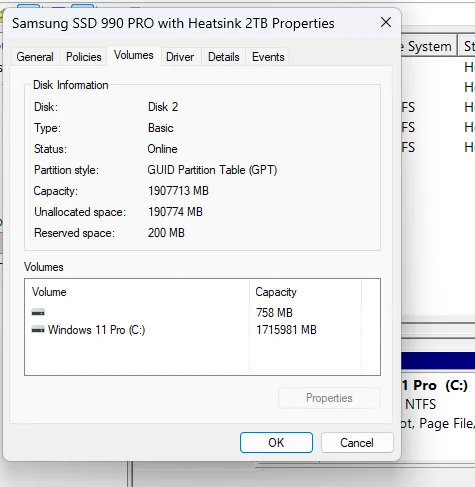
thinking its when I went back to Bios F9, that was a 2019 bios and secure boot would not work, so I disabled secure boot and enabled CSM.
Yet think before I had disabled secure-boot and reenabled and not noticed before.
Maybe a Clean Windows 11 install would be better?
Also notice that the device order is wrong device 0 should be the NVME I have linked yet its backwards, but that would be a windows issue.
thinking its when I went back to Bios F9, that was a 2019 bios and secure boot would not work, so I disabled secure boot and enabled CSM.
Yet think before I had disabled secure-boot and reenabled and not noticed before.
Maybe a Clean Windows 11 install would be better?
Also notice that the device order is wrong device 0 should be the NVME I have linked yet its backwards, but that would be a windows issue.
My Computer
At a glance
Windows 11 ProIntel i7 9700k OC 5.0ghz32gb Gskill 3200mhz OC 3600mhzNvidia RTX 4070 Super FE
- OS
- Windows 11 Pro
- Computer type
- PC/Desktop
- Manufacturer/Model
- Self built
- CPU
- Intel i7 9700k OC 5.0ghz
- Motherboard
- Gigabyte Z390 Master, Rev1.0, F13f GF
- Memory
- 32gb Gskill 3200mhz OC 3600mhz
- Graphics Card(s)
- Nvidia RTX 4070 Super FE
- Sound Card
- Onboard ESS Saber
- Monitor(s) Displays
- QHD LG 27" 165hz, OC 180hz, Asus 27" 144hz
- Screen Resolution
- 2k
- Hard Drives
- Nvme SSD Samsung 990 Pro 2TB, 970 echo plus 1tb + 970 echo 256gb.
- PSU
- EVGA SuperNova platinum 800w
- Case
- NZXT H500 sweat box, modified.
- Cooling
- NZXT Kraken x63.
- Keyboard
- Logitech G810
- Mouse
- Logitech G403
- Internet Speed
- 1.1gb down 110mb up
If we review your previous posts, you have KEK CA 2023 installed and revoked PCA 2011. Which means if you have the CA 2011 boot manager installed, then it's not recognized when Secure Boot is enabled.
Run my check script again (using -Verbose on the command line). It maybe as simple as having the wrong version of the boot file.
Run my check script again (using -Verbose on the command line). It maybe as simple as having the wrong version of the boot file.
My Computer
At a glance
Windows 7
- OS
- Windows 7
So I did as you requested, and my output was.
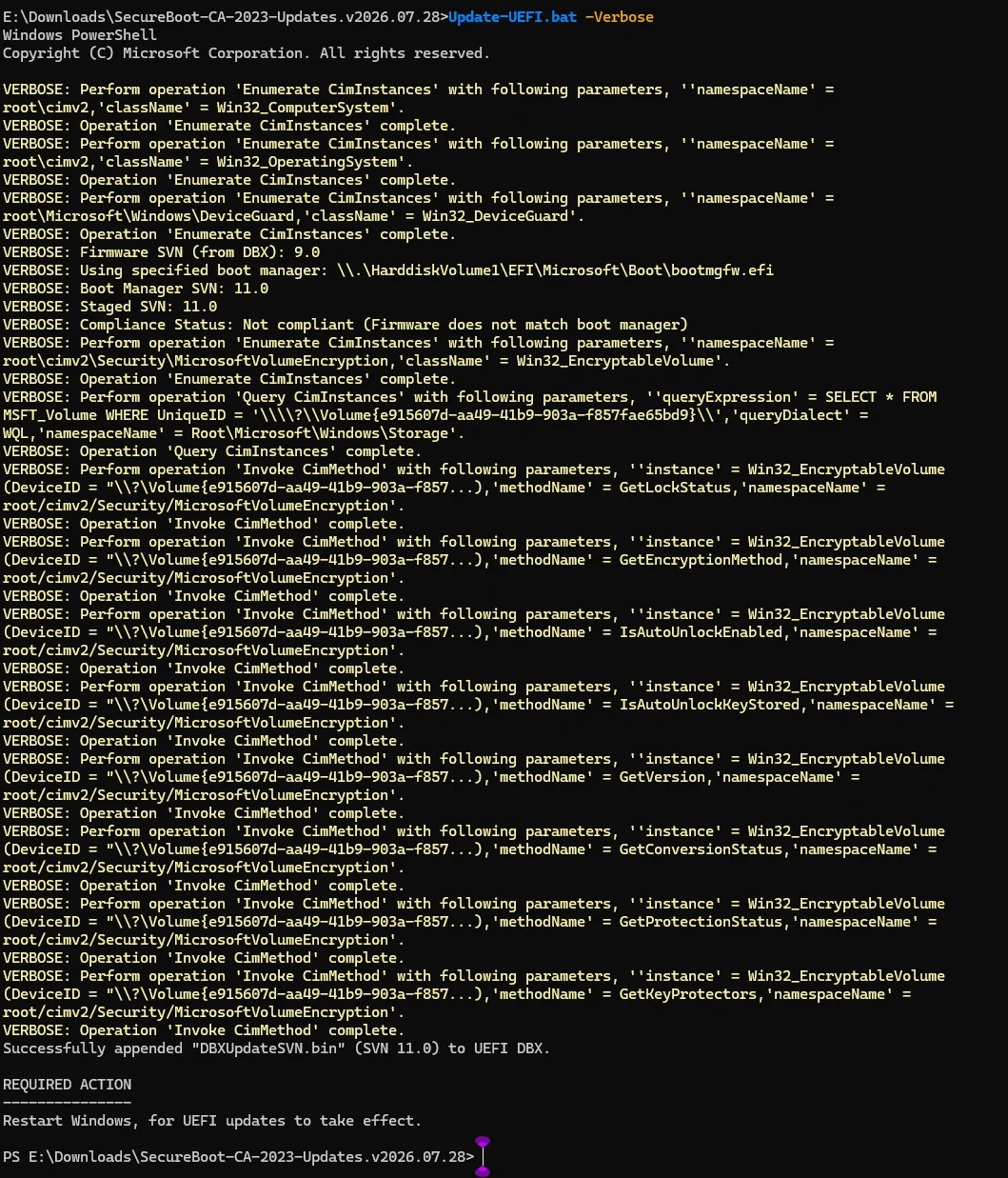
I will now reboot as requested then reboot again and check the bios see if anything new.
P.s. There was no changed in the bios for the boot process order.
I will now reboot as requested then reboot again and check the bios see if anything new.
P.s. There was no changed in the bios for the boot process order.
My Computer
At a glance
Windows 11 ProIntel i7 9700k OC 5.0ghz32gb Gskill 3200mhz OC 3600mhzNvidia RTX 4070 Super FE
- OS
- Windows 11 Pro
- Computer type
- PC/Desktop
- Manufacturer/Model
- Self built
- CPU
- Intel i7 9700k OC 5.0ghz
- Motherboard
- Gigabyte Z390 Master, Rev1.0, F13f GF
- Memory
- 32gb Gskill 3200mhz OC 3600mhz
- Graphics Card(s)
- Nvidia RTX 4070 Super FE
- Sound Card
- Onboard ESS Saber
- Monitor(s) Displays
- QHD LG 27" 165hz, OC 180hz, Asus 27" 144hz
- Screen Resolution
- 2k
- Hard Drives
- Nvme SSD Samsung 990 Pro 2TB, 970 echo plus 1tb + 970 echo 256gb.
- PSU
- EVGA SuperNova platinum 800w
- Case
- NZXT H500 sweat box, modified.
- Cooling
- NZXT Kraken x63.
- Keyboard
- Logitech G810
- Mouse
- Logitech G403
- Internet Speed
- 1.1gb down 110mb up
So thought I would show what I mean more and add some pictures. to help any other in the future if I can fix.
I have a issue with the Boot Options in the Bios, So before it was.
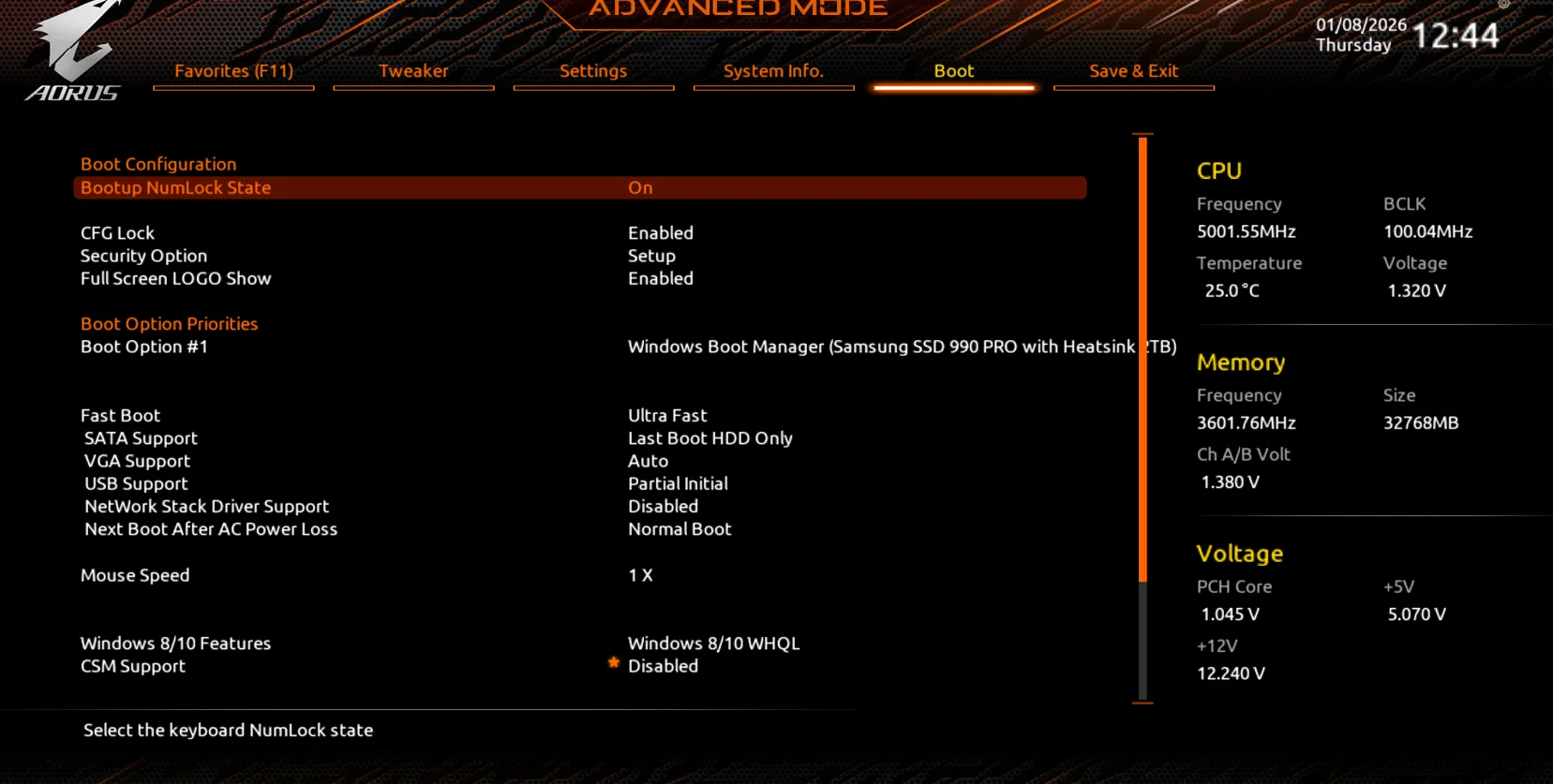
Now I dont get anything listed.

My issue's was caused by me flashing a old bios F9 with very old secure- boot certs, and with secure boot enabled I got a pop up saying certs are bad,
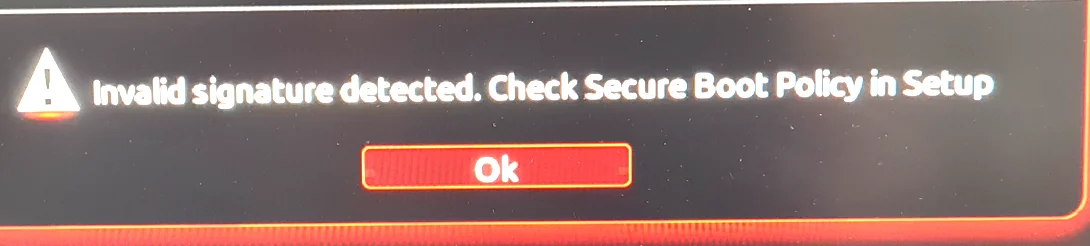
I could not boot in to windows, so to get around this, I then went in bios changed secure boot to disable and left CSM disabled windows booted i have also used CSM in the past and it seems to be all ok. but now it booted ok, and I did what I needed to do in windows, soon as I flashed back to my latest bios with all the newest secure-boot certs, every thing looked fine.
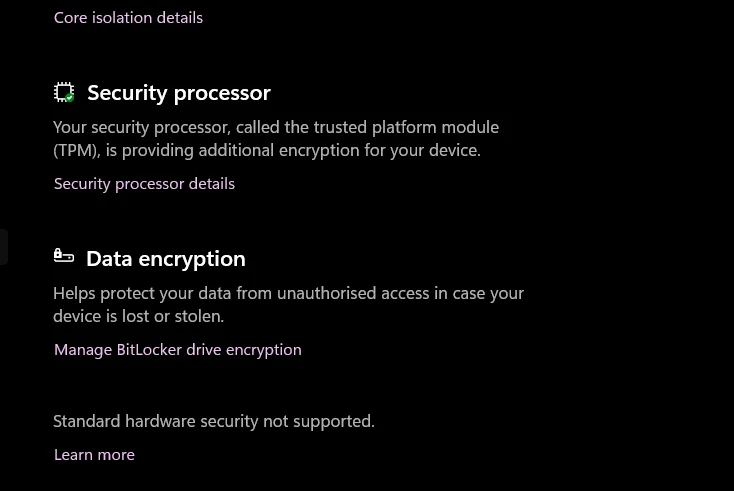
At the moment windows 11 repots secure-boot is working and is fully updated, then i noticed in the bios that the boot option priorities, it was now empty.

if I disable secure boot in bios, the above just dose not show, in security, the secure- boot in windows its just missing.
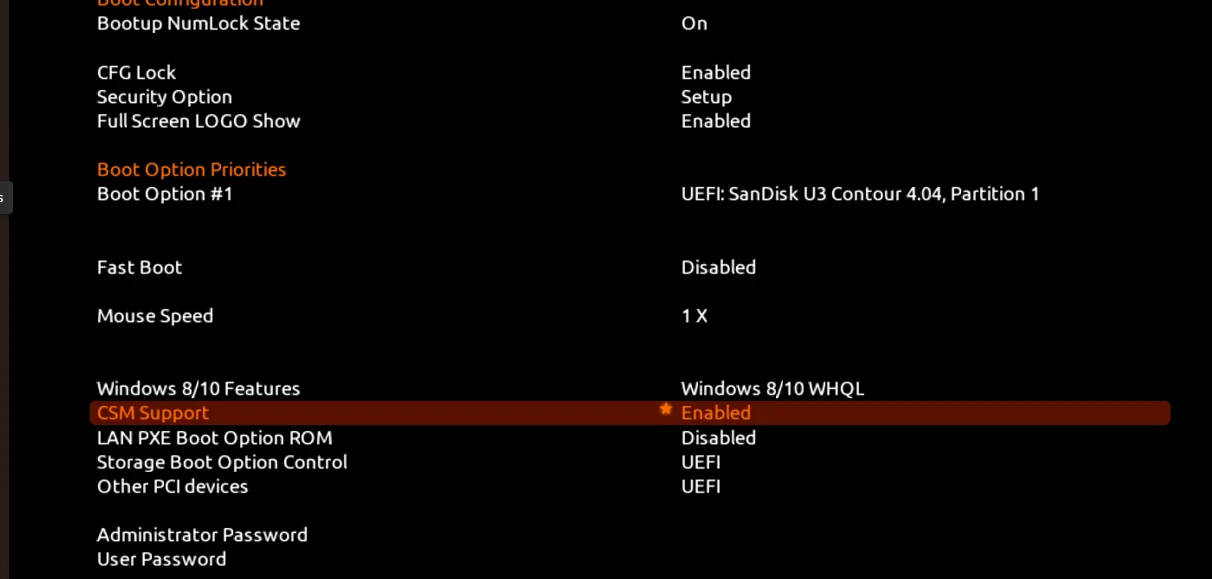
below is a picture of my bios with secure-boot disabled, pre enabling CSM. the UEFI device in the boot opt, is my USB stick I take the picture on.
This is what my bios looks like with CSM enabled.
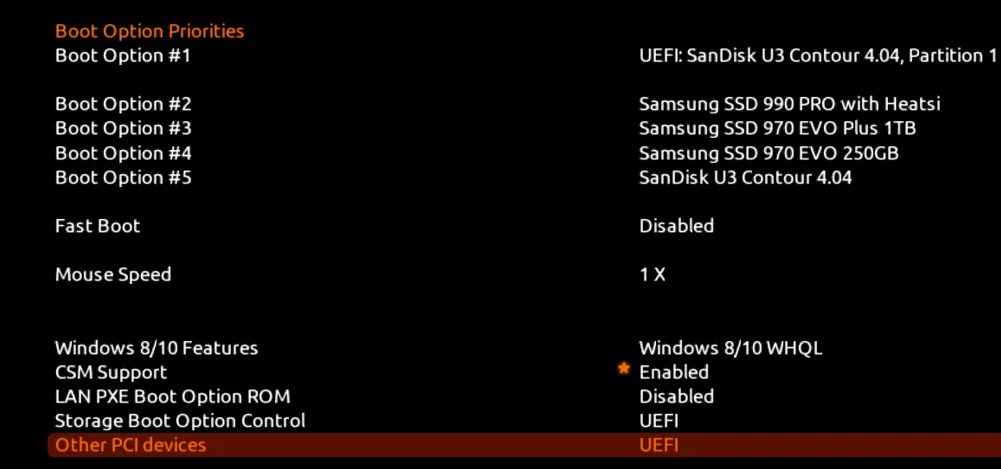
as you see once CSM in enabled and running it shows all my drives, yet there not UEFI, very strange, when i installed windows 11 last, it was via the media creation tool.
At the moment i have tried using diskpart to mount the vol and the used bcdboot, that failed. I will google more, if anyone has any advice that would be great, else i will reinstall my windows again.
what it seems like, is it is there, just with no name, so like invisible, when I press f12, I can then click a blank windows and it loads, will post picture.
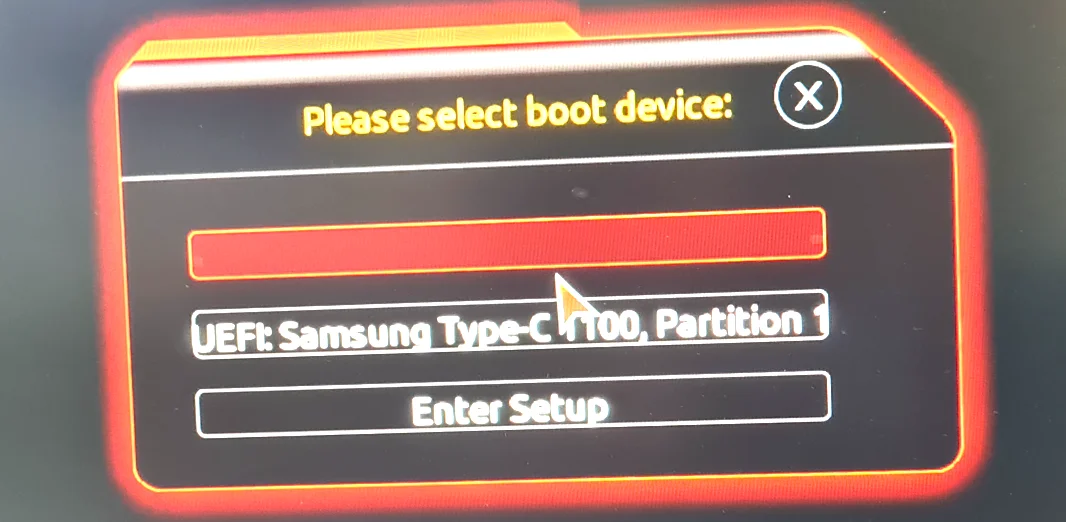
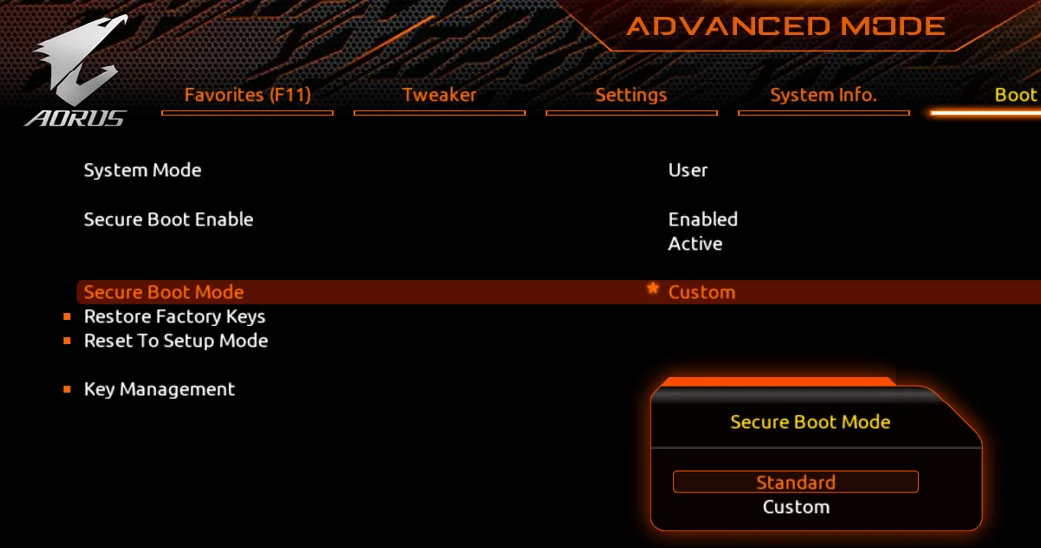
So I tried to boot from my windows 11 USB and got secure boot cert bad, went in to bios and I reset again by changing from standard to custom
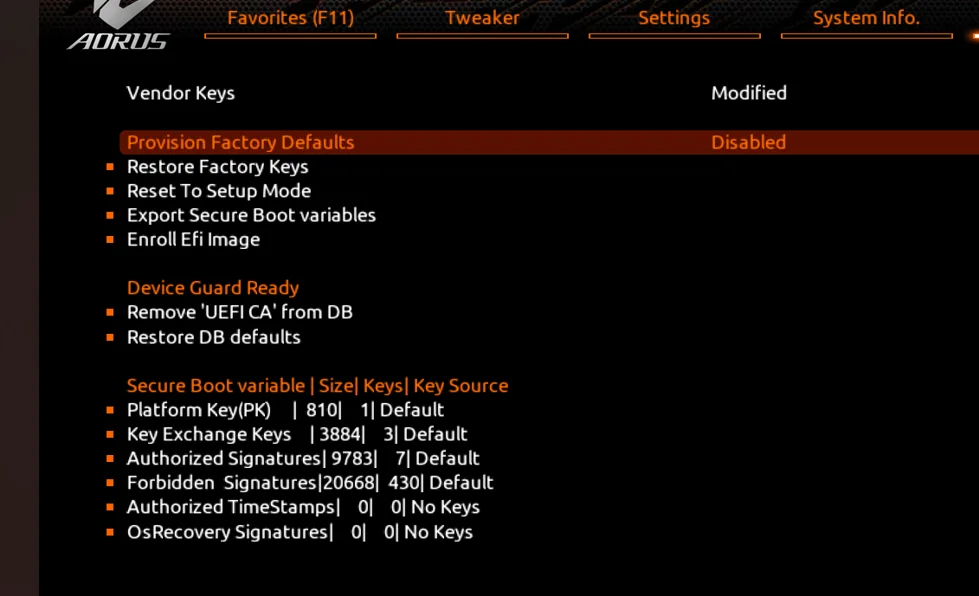
then in key management I Enabled Provision Factory Defaults, rebooted then Disabled Provision Factory Defaults, norice that my vendor keys are now modified, use to say valid.
then swapped secure boot back to user and then tried rebooted via the windows usb and it worked, yet clicking repair the pc, it would restart the pc and just load the USB again..
I have a issue with the Boot Options in the Bios, So before it was.
Now I dont get anything listed.
My issue's was caused by me flashing a old bios F9 with very old secure- boot certs, and with secure boot enabled I got a pop up saying certs are bad,
I could not boot in to windows, so to get around this, I then went in bios changed secure boot to disable and left CSM disabled windows booted i have also used CSM in the past and it seems to be all ok. but now it booted ok, and I did what I needed to do in windows, soon as I flashed back to my latest bios with all the newest secure-boot certs, every thing looked fine.
At the moment windows 11 repots secure-boot is working and is fully updated, then i noticed in the bios that the boot option priorities, it was now empty.
if I disable secure boot in bios, the above just dose not show, in security, the secure- boot in windows its just missing.
below is a picture of my bios with secure-boot disabled, pre enabling CSM. the UEFI device in the boot opt, is my USB stick I take the picture on.
This is what my bios looks like with CSM enabled.
as you see once CSM in enabled and running it shows all my drives, yet there not UEFI, very strange, when i installed windows 11 last, it was via the media creation tool.
At the moment i have tried using diskpart to mount the vol and the used bcdboot, that failed. I will google more, if anyone has any advice that would be great, else i will reinstall my windows again.
what it seems like, is it is there, just with no name, so like invisible, when I press f12, I can then click a blank windows and it loads, will post picture.
So I tried to boot from my windows 11 USB and got secure boot cert bad, went in to bios and I reset again by changing from standard to custom
then in key management I Enabled Provision Factory Defaults, rebooted then Disabled Provision Factory Defaults, norice that my vendor keys are now modified, use to say valid.
then swapped secure boot back to user and then tried rebooted via the windows usb and it worked, yet clicking repair the pc, it would restart the pc and just load the USB again..
Last edited:
My Computer
At a glance
Windows 11 ProIntel i7 9700k OC 5.0ghz32gb Gskill 3200mhz OC 3600mhzNvidia RTX 4070 Super FE
- OS
- Windows 11 Pro
- Computer type
- PC/Desktop
- Manufacturer/Model
- Self built
- CPU
- Intel i7 9700k OC 5.0ghz
- Motherboard
- Gigabyte Z390 Master, Rev1.0, F13f GF
- Memory
- 32gb Gskill 3200mhz OC 3600mhz
- Graphics Card(s)
- Nvidia RTX 4070 Super FE
- Sound Card
- Onboard ESS Saber
- Monitor(s) Displays
- QHD LG 27" 165hz, OC 180hz, Asus 27" 144hz
- Screen Resolution
- 2k
- Hard Drives
- Nvme SSD Samsung 990 Pro 2TB, 970 echo plus 1tb + 970 echo 256gb.
- PSU
- EVGA SuperNova platinum 800w
- Case
- NZXT H500 sweat box, modified.
- Cooling
- NZXT Kraken x63.
- Keyboard
- Logitech G810
- Mouse
- Logitech G403
- Internet Speed
- 1.1gb down 110mb up
So I've noticed if I reset secure boot I can then use the windows 11 USB stick, If i run your above script, Update-uefi.bat - revoke, that is then blocking my install USB saying invalid boot certs.
So I have fixed it, what I did was reset secure boot to provision factory defaults. then booted from the WIn 11 install USB, then I got the command prompt up by Shift F10 think it was, then I used Diskpart, List vol.
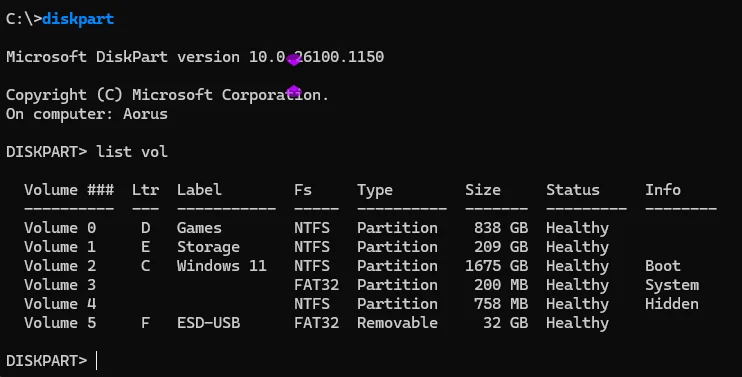
From this I can see my FAT32-system is volume 3, so I then typed select vol 3. I then I then format.
once I have formated i then type exit and go back to the command prompt, then at the command prompt seeing above my windows is Ltr C I typed
bcdboot c:\windows
Once I had rebooted, I can now see the drive in the bios.
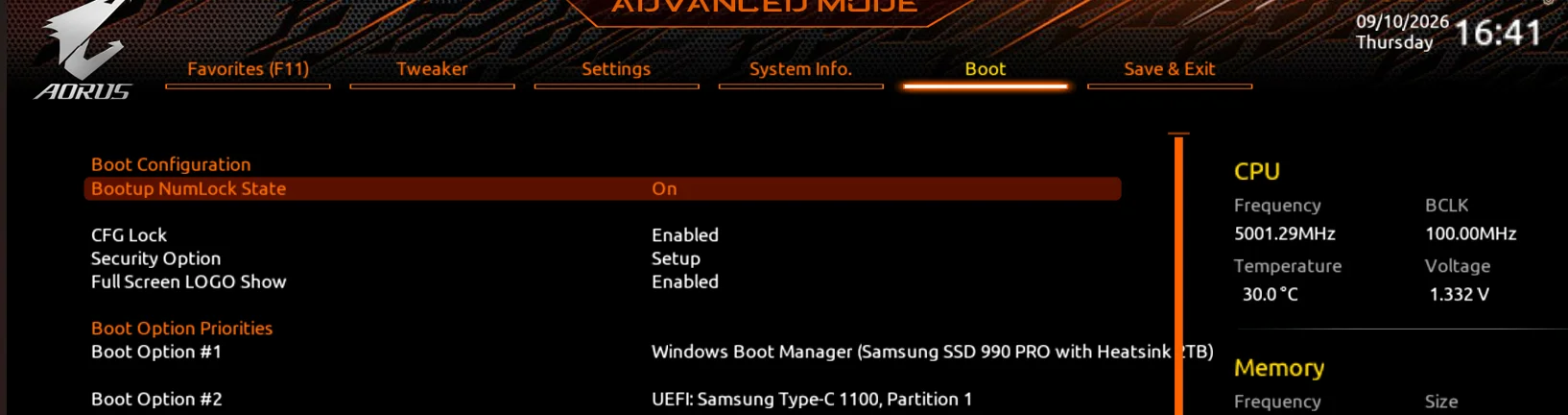
These leads to my next question, why when I run the Update-UEFI.bat, to fix the below, its blocking USB device's?

So I have fixed it, what I did was reset secure boot to provision factory defaults. then booted from the WIn 11 install USB, then I got the command prompt up by Shift F10 think it was, then I used Diskpart, List vol.
From this I can see my FAT32-system is volume 3, so I then typed select vol 3. I then I then format.
once I have formated i then type exit and go back to the command prompt, then at the command prompt seeing above my windows is Ltr C I typed
bcdboot c:\windows
Once I had rebooted, I can now see the drive in the bios.
These leads to my next question, why when I run the Update-UEFI.bat, to fix the below, its blocking USB device's?
Last edited:
My Computer
At a glance
Windows 11 ProIntel i7 9700k OC 5.0ghz32gb Gskill 3200mhz OC 3600mhzNvidia RTX 4070 Super FE
- OS
- Windows 11 Pro
- Computer type
- PC/Desktop
- Manufacturer/Model
- Self built
- CPU
- Intel i7 9700k OC 5.0ghz
- Motherboard
- Gigabyte Z390 Master, Rev1.0, F13f GF
- Memory
- 32gb Gskill 3200mhz OC 3600mhz
- Graphics Card(s)
- Nvidia RTX 4070 Super FE
- Sound Card
- Onboard ESS Saber
- Monitor(s) Displays
- QHD LG 27" 165hz, OC 180hz, Asus 27" 144hz
- Screen Resolution
- 2k
- Hard Drives
- Nvme SSD Samsung 990 Pro 2TB, 970 echo plus 1tb + 970 echo 256gb.
- PSU
- EVGA SuperNova platinum 800w
- Case
- NZXT H500 sweat box, modified.
- Cooling
- NZXT Kraken x63.
- Keyboard
- Logitech G810
- Mouse
- Logitech G403
- Internet Speed
- 1.1gb down 110mb up

So I've noticed if I reset secure boot I can then use the windows 11 USB stick, If i run your above script, Update-uefi.bat - revoke, that is then blocking my install USB saying invalid boot certs.
@garlin
My Computers
-
At a glance
Win 11 Home 26H2 26300.9711AMD Ryzen 7 3700XG.Skill (F4-3200C14D-16GTZKW)EVGA RTX 2070 (08G-P4-2171-KR)- OS
- Win 11 Home 26H2 26300.9711
- Computer type
- PC/Desktop
- Manufacturer/Model
- Built by Ghot® [May 2020]
- CPU
- AMD Ryzen 7 3700X
- Motherboard
- Asus Pro WS X570-ACE (BIOS 5302)
- Memory
- G.Skill (F4-3200C14D-16GTZKW)
- Graphics Card(s)
- EVGA RTX 2070 (08G-P4-2171-KR)
- Sound Card
- Realtek ALC1220P / ALC S1220A
- Monitor(s) Displays
- Dell U3011 30"
- Screen Resolution
- 2560 x 1600
- Hard Drives
- 2x Samsung 860 EVO 500GB,
WD 4TB Black FZBX - SATA III,
WD 8TB Black FZBX - SATA III,
DRW-24B1ST CD/DVD Burner
- PSU
- PC Power & Cooling 750W Quad EPS12V
- Case
- Cooler Master ATCS 840 Tower
- Cooling
- CM Hyper 212 EVO (push/pull)
- Keyboard
- Ducky DK9008 Shine II Blue LED
- Mouse
- Logitech Optical M-100
- Internet Speed
- 300/300
- Browser
- Firefox (latest)
- Antivirus
- Bitdefender Total Security
- Other Info
- Speakers: Klipsch Pro Media 2.1
-
At a glance
Windows XP Pro 32bit w/SP3AMD Athlon 64 X2 5000+ (OC'd @ 3.2Ghz)TWIN2X2048-6400C4DHX (2 x 1GB, DDR2 800)EVGA 256-P2-N758-TR GeForce 8600GT SSC- Operating System
- Windows XP Pro 32bit w/SP3
- Computer type
- PC/Desktop
- Manufacturer/Model
- Built by Ghot® (not in use)
- CPU
- AMD Athlon 64 X2 5000+ (OC'd @ 3.2Ghz)
- Motherboard
- ASUS M2N32-SLI Deluxe Wireless Edition
- Memory
- TWIN2X2048-6400C4DHX (2 x 1GB, DDR2 800)
- Graphics card(s)
- EVGA 256-P2-N758-TR GeForce 8600GT SSC
- Sound Card
- Onboard
- Monitor(s) Displays
- ViewSonic G90FB Black 19" Professional (CRT)
- Screen Resolution
- up to 2048 x 1536
- Hard Drives
- WD 36GB 10,000rpm Raptor SATA
Seagate 80GB 7200rpm SATA
Lite-On LTR-52246S CD/RW
Lite-On LH-18A1P CD/DVD Burner
- PSU
- PC Power & Cooling Silencer 750 Quad EPS12V
- Case
- Generic Beige case, 80mm fans
- Cooling
- ZALMAN 9500A 92mm CPU Cooler
- Keyboard
- Logitech Classic Keybooard 200
- Mouse
- Logitech Optical M-BT96a
- Internet Speed
- 300/300
- Browser
- Firefox 3.x ??
- Antivirus
- Symantec (Norton)
- Other Info
- Still assembled, still runs. Haven't turned it on for 15 years?
I think you have either a bad BIOS firmware or bad BIOS chip. It's known that certain PC's have an internal design limitation, where the amount of NVRAM space allocated to Secure Boot variables (mostly the DBX variable) can overflow with too much assigned data. When that happens, the truncated data fails a BIOS self-check, and things stop working correctly.
The problem is there's no way to reliably predict this behavior, unless you're the BIOS vendor (or the PC OEM), or some poor soul who tried to update and revoke the certs and is the first person to inform everyone else. Sometimes it's not the amount of total free NVRAM space, but a limitation on how much DBX data can be applied.
For the most part, this problem affects a smaller number of PC models. But it sucks if that's your model.
Normally a BIOS update is required to reprogram around the problem, but that won't happen with outdated PC's. It may be you're stuck with never revoking the certs in order for this PC to properly boot.
In that case, you should disable the Secure Boot update task as a precaution (so it doesn't try revoking at some future date).
Not banning PCA 2011 is less secure, but at least you can keep up with future Monthly Updates. If you do need to update the Windows Boot Manager, the same update script will perform that. As long as you don't use the -Revoke flag, you should be safe.
The problem is there's no way to reliably predict this behavior, unless you're the BIOS vendor (or the PC OEM), or some poor soul who tried to update and revoke the certs and is the first person to inform everyone else. Sometimes it's not the amount of total free NVRAM space, but a limitation on how much DBX data can be applied.
For the most part, this problem affects a smaller number of PC models. But it sucks if that's your model.
Normally a BIOS update is required to reprogram around the problem, but that won't happen with outdated PC's. It may be you're stuck with never revoking the certs in order for this PC to properly boot.
In that case, you should disable the Secure Boot update task as a precaution (so it doesn't try revoking at some future date).
Code:
schtasks /change /tn "\Microsoft\Windows\PI\Secure-Boot-Update" /disableNot banning PCA 2011 is less secure, but at least you can keep up with future Monthly Updates. If you do need to update the Windows Boot Manager, the same update script will perform that. As long as you don't use the -Revoke flag, you should be safe.
My Computer
At a glance
Windows 7
- OS
- Windows 7
I don't get it, when I installed windows the UEFI DBX was fine, but missing 1 key, when I played with the bios, going back to a old bios then swapped back, it then changed, now I'm on a bios dated last month, if you can explain more for me to tell gigabyte the issue that would be great, its not a chip issue, its just when I'm using your update-uefi.bat - revoke. else it looks like this for now. I will reinstall windows tomorrow when i get time and show a picture after.
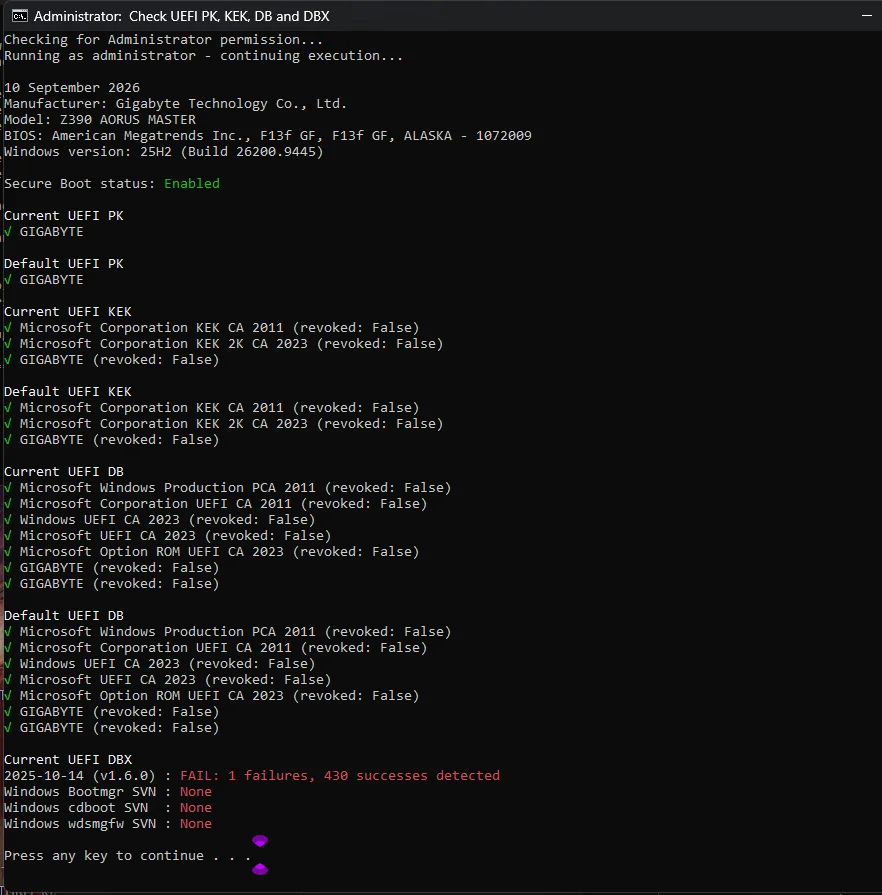
P.s and its just the Windows 11 install USB, any other USB works it seems.
P.s and its just the Windows 11 install USB, any other USB works it seems.
Last edited:
My Computer
At a glance
Windows 11 ProIntel i7 9700k OC 5.0ghz32gb Gskill 3200mhz OC 3600mhzNvidia RTX 4070 Super FE
- OS
- Windows 11 Pro
- Computer type
- PC/Desktop
- Manufacturer/Model
- Self built
- CPU
- Intel i7 9700k OC 5.0ghz
- Motherboard
- Gigabyte Z390 Master, Rev1.0, F13f GF
- Memory
- 32gb Gskill 3200mhz OC 3600mhz
- Graphics Card(s)
- Nvidia RTX 4070 Super FE
- Sound Card
- Onboard ESS Saber
- Monitor(s) Displays
- QHD LG 27" 165hz, OC 180hz, Asus 27" 144hz
- Screen Resolution
- 2k
- Hard Drives
- Nvme SSD Samsung 990 Pro 2TB, 970 echo plus 1tb + 970 echo 256gb.
- PSU
- EVGA SuperNova platinum 800w
- Case
- NZXT H500 sweat box, modified.
- Cooling
- NZXT Kraken x63.
- Keyboard
- Logitech G810
- Mouse
- Logitech G403
- Internet Speed
- 1.1gb down 110mb up
Normally if you reset to factory defaults, it should clear the certs and only copy the smaller list of certs to NVRAM.
Adding the CA 2023 certs doesn't take up much more space.
Adding the revocations, which include one PCA 2011 certs + hundreds of EFI signatures is what overflows the UEFI's assigned space.
When there's a hidden, internal BIOS error, that's when you get strange behavior like drives not showing up.
To the UEFI, what's on the drive doesn't matter. It's just a device that's recognized and presented. If you have an invalid boot file (banned by Secure Boot), that doesn't get evaluated until the PC actually tries booting from the device. Meaning it finds out at run time. The UEFI doesn't pre-scan all of your drives and decides not to show them, based on Secure Boot mode.
Based on feedback from other Gigabyte owners with similar aged motherboards who have updated, they don't report so many problems. It's back to either funky firmware, or weird chip issues. We need to track down another Z390 AORUS owner to see if their experience is the same.
Adding the CA 2023 certs doesn't take up much more space.
Adding the revocations, which include one PCA 2011 certs + hundreds of EFI signatures is what overflows the UEFI's assigned space.
When there's a hidden, internal BIOS error, that's when you get strange behavior like drives not showing up.
To the UEFI, what's on the drive doesn't matter. It's just a device that's recognized and presented. If you have an invalid boot file (banned by Secure Boot), that doesn't get evaluated until the PC actually tries booting from the device. Meaning it finds out at run time. The UEFI doesn't pre-scan all of your drives and decides not to show them, based on Secure Boot mode.
Based on feedback from other Gigabyte owners with similar aged motherboards who have updated, they don't report so many problems. It's back to either funky firmware, or weird chip issues. We need to track down another Z390 AORUS owner to see if their experience is the same.
My Computer
At a glance
Windows 7
- OS
- Windows 7
I see when i check forbidden it's 430.
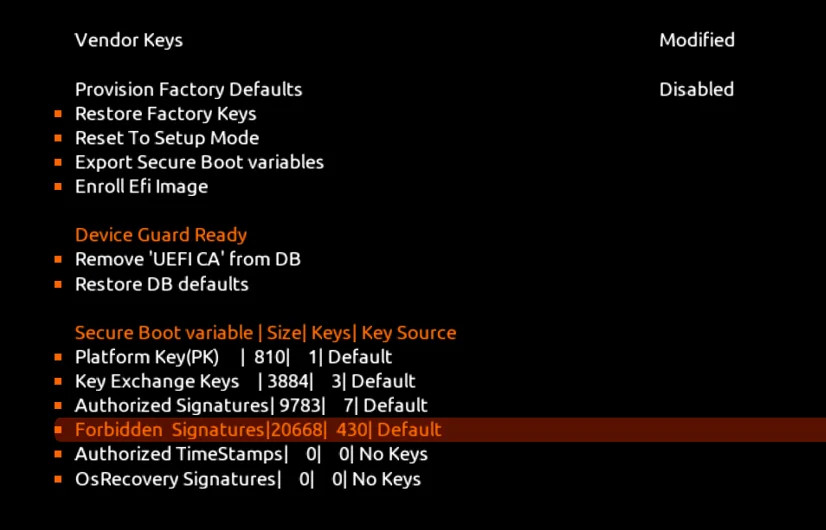
then once I update with your update-uefi.bat it takes it to 450, so am kind of confused as it says 431 in the check UEFI.
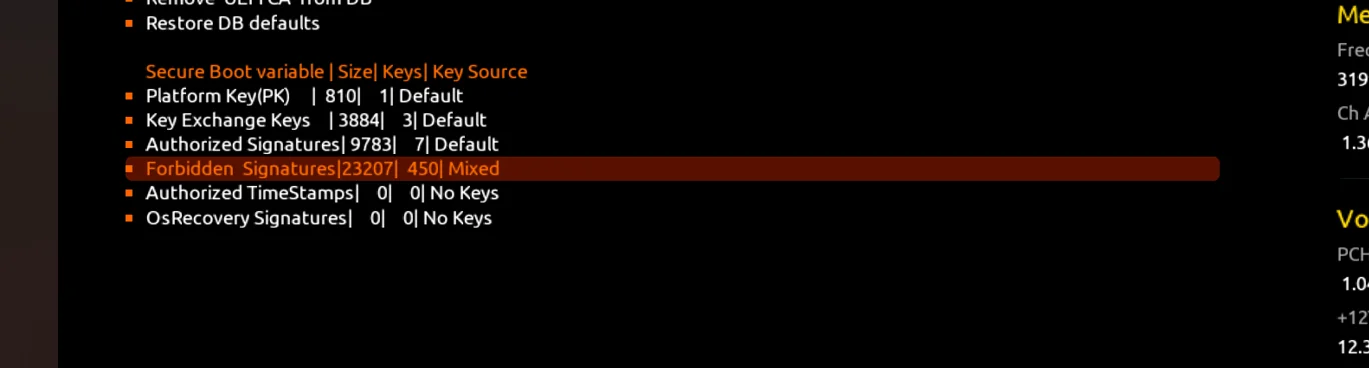
then once I update with your update-uefi.bat it takes it to 450, so am kind of confused as it says 431 in the check UEFI.
My Computer
At a glance
Windows 11 ProIntel i7 9700k OC 5.0ghz32gb Gskill 3200mhz OC 3600mhzNvidia RTX 4070 Super FE
- OS
- Windows 11 Pro
- Computer type
- PC/Desktop
- Manufacturer/Model
- Self built
- CPU
- Intel i7 9700k OC 5.0ghz
- Motherboard
- Gigabyte Z390 Master, Rev1.0, F13f GF
- Memory
- 32gb Gskill 3200mhz OC 3600mhz
- Graphics Card(s)
- Nvidia RTX 4070 Super FE
- Sound Card
- Onboard ESS Saber
- Monitor(s) Displays
- QHD LG 27" 165hz, OC 180hz, Asus 27" 144hz
- Screen Resolution
- 2k
- Hard Drives
- Nvme SSD Samsung 990 Pro 2TB, 970 echo plus 1tb + 970 echo 256gb.
- PSU
- EVGA SuperNova platinum 800w
- Case
- NZXT H500 sweat box, modified.
- Cooling
- NZXT Kraken x63.
- Keyboard
- Logitech G810
- Mouse
- Logitech G403
- Internet Speed
- 1.1gb down 110mb up
Forbidden Signatures is the DBX. The DBX is a catch-all variable for storing multiple types of data:
1. Complete X509 certs (like the PCA 2011)
2. Banned files in the form of a EFI signature hash (no cert, just a computed hash)
3. SVN numbers which are stored as "fake" EFI signature hashes.
When the script counts, it filters out the X509 certs (a vendor can self-ban other certs besides PCA 2011) and returns the sum of the last two categories
1. Complete X509 certs (like the PCA 2011)
2. Banned files in the form of a EFI signature hash (no cert, just a computed hash)
3. SVN numbers which are stored as "fake" EFI signature hashes.
When the script counts, it filters out the X509 certs (a vendor can self-ban other certs besides PCA 2011) and returns the sum of the last two categories
My Computer
At a glance
Windows 7
- OS
- Windows 7
- Local time
- 4:51 PM
- Posts
- 622
- OS
- Windows 11 Pro 26H2
I would suggest using garlin's Check_BootMedia.ps1 or Check-BootMedia.bat scripts, instead of the cjee21 script in your screenshot.and its just the Windows 11 install USB
My Computer
At a glance
Windows 11 Pro 26H2
- OS
- Windows 11 Pro 26H2
- Computer type
- Laptop
- Manufacturer/Model
- Toshiba
- Antivirus
- Defender
@garlin sorry for the slow reply, not at the pc at the time was using my mobile, and it died.
So what more than likely is, is that for forbidden keys cache is full, and I need to ask gigabyte to check if that is the case for the bios nvram settings?
Would the Back up bios share the same Nvram, its per chip thinking of how duel bios works?
also why dose it now say modified even when I reset to defaults, any idea?
last off could you link to you latest scripts please.
@Banjoman301 yes I should, I must be using the old scripts.
P.s So I've have a little play, not sure if it matters but, if I just update the UEFI DBX 2025-10-14, I can use the windows install media, soon as I update the windows bootmgr svn and the other two SVN's it then gives the issue when using the windows install media. am now going to try a window 11 pro reinstall, just to check.
So what more than likely is, is that for forbidden keys cache is full, and I need to ask gigabyte to check if that is the case for the bios nvram settings?
Would the Back up bios share the same Nvram, its per chip thinking of how duel bios works?
also why dose it now say modified even when I reset to defaults, any idea?
last off could you link to you latest scripts please.
@Banjoman301 yes I should, I must be using the old scripts.
P.s So I've have a little play, not sure if it matters but, if I just update the UEFI DBX 2025-10-14, I can use the windows install media, soon as I update the windows bootmgr svn and the other two SVN's it then gives the issue when using the windows install media. am now going to try a window 11 pro reinstall, just to check.
Last edited:
My Computer
At a glance
Windows 11 ProIntel i7 9700k OC 5.0ghz32gb Gskill 3200mhz OC 3600mhzNvidia RTX 4070 Super FE
- OS
- Windows 11 Pro
- Computer type
- PC/Desktop
- Manufacturer/Model
- Self built
- CPU
- Intel i7 9700k OC 5.0ghz
- Motherboard
- Gigabyte Z390 Master, Rev1.0, F13f GF
- Memory
- 32gb Gskill 3200mhz OC 3600mhz
- Graphics Card(s)
- Nvidia RTX 4070 Super FE
- Sound Card
- Onboard ESS Saber
- Monitor(s) Displays
- QHD LG 27" 165hz, OC 180hz, Asus 27" 144hz
- Screen Resolution
- 2k
- Hard Drives
- Nvme SSD Samsung 990 Pro 2TB, 970 echo plus 1tb + 970 echo 256gb.
- PSU
- EVGA SuperNova platinum 800w
- Case
- NZXT H500 sweat box, modified.
- Cooling
- NZXT Kraken x63.
- Keyboard
- Logitech G810
- Mouse
- Logitech G403
- Internet Speed
- 1.1gb down 110mb up
- Local time
- 4:51 PM
- Posts
- 622
- OS
- Windows 11 Pro 26H2
link to you latest scripts
GitHub - garlin-cant-code/SecureBoot-CA-2023-Updates: PowerShell scripts for checking and applying Secure Boot CA 2023 updates for Windows.
PowerShell scripts for checking and applying Secure Boot CA 2023 updates for Windows. - garlin-cant-code/SecureBoot-CA-2023-Updates
 github.com
My Computer
At a glance
Windows 11 Pro 26H2
- OS
- Windows 11 Pro 26H2
- Computer type
- Laptop
- Manufacturer/Model
- Toshiba
- Antivirus
- Defender
Whether you're using an older copy of the scripts won't matter in this case.@garlin sorry for the slow reply, not at the pc at the time was using my mobile, and it died.
So what more than likely is, is that for forbidden keys cache is full, and I need to ask gigabyte to check if that is the case for the bios nvram settings?
Would the Back up bios share the same Nvram, its per chip thinking of how duel bios works?
also why dose it now say modified even when I reset to defaults, any idea?
last off could you link to you latest scripts please.
The fundamental question if you're asking ASUS support, is why is there a problem when you fully update the certs? That action by itself should not impact which drive devices are listed. If resetting back to default fixes the problem there's something wrong in the firmware implementation.
My Computer
At a glance
Windows 7
- OS
- Windows 7
@garlin thanks for all the help.
what I've done now is, reflashed the motherboard bios, and then installed windows, run the secure boot updates, using the commands at start of this topic, it says its all updated, yer the 3 windows SVN are not installed, my bios vendor keys still say valid. So maybe something else was modding keys, as before it would say modified. Am out of time at mo back in 2 hrs, will try your update file, see what happens.
At one point I added nvstrapper, and other stuff to the bios uefi. So could of been up to something, with the nvme drive, why I've started fresh And clean
I will get on to Gigabyte, if this still fails, but I'm still waiting on them to sort the bios issue I have.
Other day my 4.6ghz CPU by default was 6.3ghz. Plus other bits. To be honest I'm not to sure Gigabyte know what there doing, but that's another big story.
@Banjoman301
Thanks
what I've done now is, reflashed the motherboard bios, and then installed windows, run the secure boot updates, using the commands at start of this topic, it says its all updated, yer the 3 windows SVN are not installed, my bios vendor keys still say valid. So maybe something else was modding keys, as before it would say modified. Am out of time at mo back in 2 hrs, will try your update file, see what happens.
At one point I added nvstrapper, and other stuff to the bios uefi. So could of been up to something, with the nvme drive, why I've started fresh And clean
I will get on to Gigabyte, if this still fails, but I'm still waiting on them to sort the bios issue I have.
Other day my 4.6ghz CPU by default was 6.3ghz. Plus other bits. To be honest I'm not to sure Gigabyte know what there doing, but that's another big story.
@Banjoman301
Thanks
My Computer
At a glance
Windows 11 ProIntel i7 9700k OC 5.0ghz32gb Gskill 3200mhz OC 3600mhzNvidia RTX 4070 Super FE
- OS
- Windows 11 Pro
- Computer type
- PC/Desktop
- Manufacturer/Model
- Self built
- CPU
- Intel i7 9700k OC 5.0ghz
- Motherboard
- Gigabyte Z390 Master, Rev1.0, F13f GF
- Memory
- 32gb Gskill 3200mhz OC 3600mhz
- Graphics Card(s)
- Nvidia RTX 4070 Super FE
- Sound Card
- Onboard ESS Saber
- Monitor(s) Displays
- QHD LG 27" 165hz, OC 180hz, Asus 27" 144hz
- Screen Resolution
- 2k
- Hard Drives
- Nvme SSD Samsung 990 Pro 2TB, 970 echo plus 1tb + 970 echo 256gb.
- PSU
- EVGA SuperNova platinum 800w
- Case
- NZXT H500 sweat box, modified.
- Cooling
- NZXT Kraken x63.
- Keyboard
- Logitech G810
- Mouse
- Logitech G403
- Internet Speed
- 1.1gb down 110mb up
@TrebleTA:
On modern motherboards, CSM is either disabled by default (e.g. AMD X870) or not included at all (e.g. Intel Z890). On older motherboards, including the GIGABYTE Z390, CSM is enabled by default.
CSM (Compatibility Support Module)
- Enabled: Both legacy/CSM and native UEFI booting are available.
- Disabled: Only native UEFI booting is available.
On many systems, Secure Boot cannot be enabled until CSM is disabled.
ChatGPT:
You repaired it correctly with bcdboot. However, formatting the EFI system partition is normally unnecessary.
How to Repair a Missing or Corrupt "Windows Boot Manager" Entry
While the system will boot correctly using the fallback boot path method (
Run the following command (change the drive letter if necessary):
On a UEFI system, bcdboot copies/repairs the required UEFI boot-environment files on the EFI system partition, creates or repairs the BCD store, and adds/updates the firmware NVRAM entry pointing to Windows Boot Manager (
BCDBoot Command-Line Options - Microsoft Learn
GIGABYTE Z390 AORUS MASTER (Rev. 1.0)
CSM Support
Enables or disables UEFI CSM (Compatibility Support Module) to support a legacy PC boot process.
- Enabled: Enables UEFI CSM. (Default)
- Disabled: Disables UEFI CSM and supports UEFI BIOS boot process only.
Secure Boot
Allows you to enable or disable Secure Boot and configure related settings. This item is configurable only when CSM Support is set to Disabled.
On modern motherboards, CSM is either disabled by default (e.g. AMD X870) or not included at all (e.g. Intel Z890). On older motherboards, including the GIGABYTE Z390, CSM is enabled by default.
CSM (Compatibility Support Module)
- Enabled: Both legacy/CSM and native UEFI booting are available.
- Disabled: Only native UEFI booting is available.
On many systems, Secure Boot cannot be enabled until CSM is disabled.
what it seems like, is it is there, just with no name, so like invisible, when I press f12, I can then click a blank windows and it loads, will post picture.
ChatGPT:
A UEFI boot entry for Windows Boot Manager can be represented conceptually as:
Code:Boot0000 Description: Windows Boot Manager Device path: EFI System Partition on the NVMe SSD File: \EFI\Microsoft\Boot\bootmgfw.efi
The actual UEFI NVRAM entry contains a description and a device path identifying the EFI executable to be loaded. During startup, the firmware reads the boot entry from NVRAM, locates the EFI System Partition (ESP), and loads the specified EFI executable.
Therefore, "Windows Boot Manager" is not the NVMe drive itself. It is the name of a UEFI firmware boot entry that points to Microsoft's Windows boot manager (bootmgfw.efi) on the ESP.
In this case, because the F12 boot menu contained a blank selectable entry that successfully booted Windows, the Windows boot entry was probably still present and contained a usable device path, but its description ("Windows Boot Manager") was missing, malformed, or not being displayed correctly.
So I have fixed it, what I did was reset secure boot to provision factory defaults. then booted from the WIn 11 install USB, then I got the command prompt up by Shift F10 think it was, then I used Diskpart, List vol.
From this I can see my FAT32-system is volume 3, so I then typed select vol 3. I then I then format.
once I have formated i then type exit and go back to the command prompt, then at the command prompt seeing above my windows is Ltr C I typed
bcdboot c:\windows
Once I had rebooted, I can now see the drive in the bios.
You repaired it correctly with bcdboot. However, formatting the EFI system partition is normally unnecessary.
How to Repair a Missing or Corrupt "Windows Boot Manager" Entry
While the system will boot correctly using the fallback boot path method (
\efi\boot\bootx64.efi), you can manually add/update the "Windows Boot Manager" entry using the bcdboot command.Run the following command (change the drive letter if necessary):
bcdboot c:\windowsOn a UEFI system, bcdboot copies/repairs the required UEFI boot-environment files on the EFI system partition, creates or repairs the BCD store, and adds/updates the firmware NVRAM entry pointing to Windows Boot Manager (
\EFI\Microsoft\Boot\bootmgfw.efi).BCDBoot Command-Line Options - Microsoft Learn
/s <volume letter>
UEFI:
- BCDBoot copies the boot files to either the EFI system partition, or the partition specified by the /s option.
- BCDBoot creates the BCD store in the same partition.
- By default, BCDBoot creates a Windows Boot Manager entry in the NVRAM on the firmware to identify the boot files on the system partition. If the /s option is used, then this entry is not created. Instead, BCDBoot relies on the default firmware settings to identify the boot files on the system partition. By the UEFI 2.3.1 spec, the default firmware settings should open the file:
\efi\boot\bootx64.efiin the EFI System Partition (ESP).
My Computers
-
At a glance
Windows 11 ProAMD Ryzen 9 9950X3DKingston FURY Beast 64GB (2x32GB) DDR5 6000MT/sASUS TUF Gaming Radeon RX 9070 OC Edition 16G...- OS
- Windows 11 Pro
- Computer type
- PC/Desktop
- CPU
- AMD Ryzen 9 9950X3D
- Motherboard
- ASRock B650E Taichi Lite
- Memory
- Kingston FURY Beast 64GB (2x32GB) DDR5 6000MT/s
- Graphics Card(s)
- ASUS TUF Gaming Radeon RX 9070 OC Edition 16GB GDDR6
- Hard Drives
- Solidigm P44 Pro 2TB M.2 NVMe SSD
-
At a glance
Windows 11 HomeIntel Core Ultra 9 275HX64GB (2x 32GB) DDR5-6400NVIDIA GeForce RTX 5080 16GB GDDR7 Laptop GPU- Operating System
- Windows 11 Home
- Computer type
- Laptop
- Manufacturer/Model
- Lenovo Legion Pro 7i Gen 10 16"
- CPU
- Intel Core Ultra 9 275HX
- Memory
- 64GB (2x 32GB) DDR5-6400
- Graphics card(s)
- NVIDIA GeForce RTX 5080 16GB GDDR7 Laptop GPU
- Hard Drives
- 2x 1TB M.2 NVMe SSD (SK Hynix)
Similar threads
- Replies
- 3
- Views
- 3K


- Replies
- 7
- Views
- 3K


- Replies
- 7
- Views
- 931

- Replies
- 23
- Views
- 6K
- Replies
- 4K
- Views
- 445K
Latest Support Threads
-
 How do I make ChatGPT listen and execute commands and reply immediately by using voice commands?
- Started by William654
- Replies: 7
-
-
-
-

Latest Tutorials
-
 Apps Enable or Disable Energy Saver for Copilot Web Browsing in Windows 11
- Started by Brink
- Replies: 0
-
 Accessibility Enable or Disable Magnifier Win + Plus Keyboard Shortcut in Windows 11
- Started by Brink
- Replies: 2
-
 Apps Enable or Disable Preload Pages for Faster Browsing and Searching in Copilot on Windows 11
- Started by Brink
- Replies: 0
-
 Apps Enable or Disable Graphics Hardware Acceleration in Copilot Web Browsing on Windows 11
- Started by Brink
- Replies: 0
-
 Browsers and Mail Enable or Disable Import Edge Browsing Data in Copilot on Windows 11
- Started by Brink
- Replies: 0