Solved Secure boot update HowTo


@Celery
On many systems, Secure Boot cannot be enabled until CSM is disabled.
For me after flashing the PC, the PC is in a PRE secure boot stats, so secure boot is disabled and also CSM is disabled, then I go in to secure boot and set to enable, also read that secure boot should be in custom mode, as standard/user can cause issues.

You repaired it correctly with bcdboot. However, formatting the EFI system partition is normally unnecessary.
when I tried the other ways, it was saying it worked, but I will still getting a ghost image, so nothing changed.
I did all the google stuff, also I did it from the windows install USB CMD prompt, yet thinking I could of done the same fix in the winnows environment.

the actual UEFI NVRAM entry contains a description and a device path identifying the EFI executable to be loaded.
In this case, because the F12 boot menu contained a blank selectable entry that successfully booted Windows, the Windows boot entry was probably still present and contained a usable device path

That's what I was thinking, its had a faulty device path or something was corrupted. and formatting the EFI cleared it, I'm thinking it where I added bits to the NVRam of the bios that may of been left over. on the EFI, or even a virus, or even gigabyte has not done as @garlin said.

@garlin
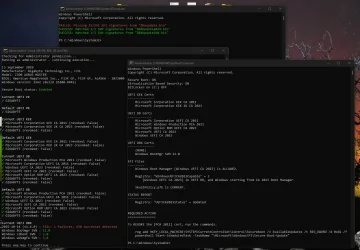
So I've not run your update file yet, but I now have you latest files. So first one I used was check-Uefi.bat and this is what I got.
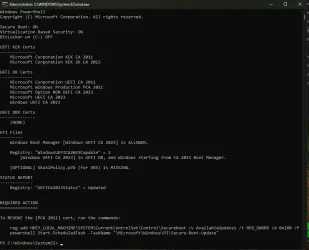
1789129375859.webp
So I'm missing a SKu?

What has lead me to this. But think its smarter to wait for your advice.
Update_UEFI-CA2023.ps1 missing
 
Last edited:

My Computer My Computer

At a glance

Windows 11 ProIntel i7 9700k OC 5.0ghz32gb Gskill 3200mhz OC 3600mhzNvidia RTX 4070 Super FE
OS
Windows 11 Pro
Computer type
PC/Desktop
Manufacturer/Model
Self built
CPU
Intel i7 9700k OC 5.0ghz
Motherboard
Gigabyte Z390 Master, Rev1.0, F13f GF
Memory
32gb Gskill 3200mhz OC 3600mhz
Graphics Card(s)
Nvidia RTX 4070 Super FE
Sound Card
Onboard ESS Saber
Monitor(s) Displays
QHD LG 27" 165hz, OC 180hz, Asus 27" 144hz
Screen Resolution
2k
Hard Drives
Nvme SSD Samsung 990 Pro 2TB, 970 echo plus 1tb + 970 echo 256gb.
PSU
EVGA SuperNova platinum 800w
Case
NZXT H500 sweat box, modified.
Cooling
NZXT Kraken x63.
Keyboard
Logitech G810
Mouse
Logitech G403
Internet Speed
1.1gb down 110mb up

So I'm missing a SKu?
SkuSiPolicy is an optional policy that can be used with Virtualization Based Security. If you can use, it helps increase the Windows security level. But it can interfere in dual-boot setups, or if you're using USB recovery drives which are not regularly updated.

You can install it using:
Code:
Update-UEFI.bat -SkuSiPolicy
 

My Computer My Computer

At a glance

Windows 7
OS
Windows 7
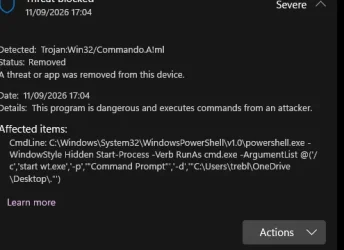
Not related but i have a script, that i put in the reg, and now that i could right click and open CMD. windows is now reporting this as a trojan?
1789143165495.webp

I run the command Update-UEFI.bat -SkuSiPolicy, rebooted, and check and now, that error is not there, thanks. will check 1-2 bits then try the revokeing again.
 
Last edited:

My Computer My Computer

At a glance

Windows 11 ProIntel i7 9700k OC 5.0ghz32gb Gskill 3200mhz OC 3600mhzNvidia RTX 4070 Super FE
OS
Windows 11 Pro
Computer type
PC/Desktop
Manufacturer/Model
Self built
CPU
Intel i7 9700k OC 5.0ghz
Motherboard
Gigabyte Z390 Master, Rev1.0, F13f GF
Memory
32gb Gskill 3200mhz OC 3600mhz
Graphics Card(s)
Nvidia RTX 4070 Super FE
Sound Card
Onboard ESS Saber
Monitor(s) Displays
QHD LG 27" 165hz, OC 180hz, Asus 27" 144hz
Screen Resolution
2k
Hard Drives
Nvme SSD Samsung 990 Pro 2TB, 970 echo plus 1tb + 970 echo 256gb.
PSU
EVGA SuperNova platinum 800w
Case
NZXT H500 sweat box, modified.
Cooling
NZXT Kraken x63.
Keyboard
Logitech G810
Mouse
Logitech G403
Internet Speed
1.1gb down 110mb up

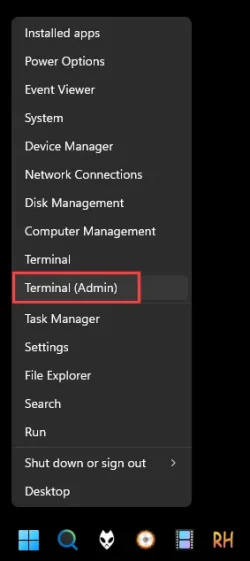
Not related but i have a script, that i put in the reg, and now that i could right click and open CMD


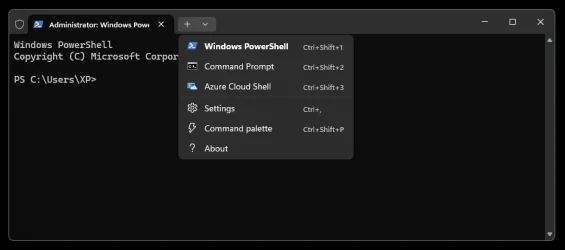
This opens Terminal in Powershell, and there's a drop down for Command Prompt... both running as Admin...
And it has Tabs as well.

Image1.webp Image1.webp
 

My Computers My Computers

  • At a glance

    Win 11 Home ♦♦♦26300.9457 ♦♦♦♦♦♦♦26H2AMD Ryzen 7 3700XG.Skill (F4-3200C14D-16GTZKW)EVGA RTX 2070 (08G-P4-2171-KR)
    OS
    Win 11 Home ♦♦♦26300.9457 ♦♦♦♦♦♦♦26H2
    Computer type
    PC/Desktop
    Manufacturer/Model
    Built by Ghot® [May 2020]
    CPU
    AMD Ryzen 7 3700X
    Motherboard
    Asus Pro WS X570-ACE (BIOS 5302)
    Memory
    G.Skill (F4-3200C14D-16GTZKW)
    Graphics Card(s)
    EVGA RTX 2070 (08G-P4-2171-KR)
    Sound Card
    Realtek ALC1220P / ALC S1220A
    Monitor(s) Displays
    Dell U3011 30"
    Screen Resolution
    2560 x 1600
    Hard Drives
    2x Samsung 860 EVO 500GB,
    WD 4TB Black FZBX - SATA III,
    WD 8TB Black FZBX - SATA III,
    DRW-24B1ST CD/DVD Burner
    PSU
    PC Power & Cooling 750W Quad EPS12V
    Case
    Cooler Master ATCS 840 Tower
    Cooling
    CM Hyper 212 EVO (push/pull)
    Keyboard
    Ducky DK9008 Shine II Blue LED
    Mouse
    Logitech Optical M-100
    Internet Speed
    300/300
    Browser
    Firefox (latest)
    Antivirus
    Bitdefender Total Security
    Other Info
    Speakers: Klipsch Pro Media 2.1
  • At a glance

    Windows XP Pro 32bit w/SP3AMD Athlon 64 X2 5000+ (OC'd @ 3.2Ghz)TWIN2X2048-6400C4DHX (2 x 1GB, DDR2 800)EVGA 256-P2-N758-TR GeForce 8600GT SSC
    Operating System
    Windows XP Pro 32bit w/SP3
    Computer type
    PC/Desktop
    Manufacturer/Model
    Built by Ghot® (not in use)
    CPU
    AMD Athlon 64 X2 5000+ (OC'd @ 3.2Ghz)
    Motherboard
    ASUS M2N32-SLI Deluxe Wireless Edition
    Memory
    TWIN2X2048-6400C4DHX (2 x 1GB, DDR2 800)
    Graphics card(s)
    EVGA 256-P2-N758-TR GeForce 8600GT SSC
    Sound Card
    Onboard
    Monitor(s) Displays
    ViewSonic G90FB Black 19" Professional (CRT)
    Screen Resolution
    up to 2048 x 1536
    Hard Drives
    WD 36GB 10,000rpm Raptor SATA
    Seagate 80GB 7200rpm SATA
    Lite-On LTR-52246S CD/RW
    Lite-On LH-18A1P CD/DVD Burner
    PSU
    PC Power & Cooling Silencer 750 Quad EPS12V
    Case
    Generic Beige case, 80mm fans
    Cooling
    ZALMAN 9500A 92mm CPU Cooler
    Keyboard
    Logitech Classic Keybooard 200
    Mouse
    Logitech Optical M-BT96a
    Internet Speed
    300/300
    Browser
    Firefox 3.x ??
    Antivirus
    Symantec (Norton)
    Other Info
    Still assembled, still runs. Haven't turned it on for 15 years?
Aye but why is my script getting flaged as a trojan?

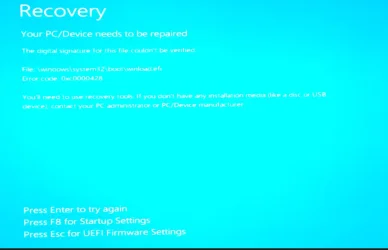
also after running the above i tried the Win install USB and i got this error.
1789144258403.webp

Sorry for the bad picture quality.
 

My Computer My Computer

At a glance

Windows 11 ProIntel i7 9700k OC 5.0ghz32gb Gskill 3200mhz OC 3600mhzNvidia RTX 4070 Super FE
OS
Windows 11 Pro
Computer type
PC/Desktop
Manufacturer/Model
Self built
CPU
Intel i7 9700k OC 5.0ghz
Motherboard
Gigabyte Z390 Master, Rev1.0, F13f GF
Memory
32gb Gskill 3200mhz OC 3600mhz
Graphics Card(s)
Nvidia RTX 4070 Super FE
Sound Card
Onboard ESS Saber
Monitor(s) Displays
QHD LG 27" 165hz, OC 180hz, Asus 27" 144hz
Screen Resolution
2k
Hard Drives
Nvme SSD Samsung 990 Pro 2TB, 970 echo plus 1tb + 970 echo 256gb.
PSU
EVGA SuperNova platinum 800w
Case
NZXT H500 sweat box, modified.
Cooling
NZXT Kraken x63.
Keyboard
Logitech G810
Mouse
Logitech G403
Internet Speed
1.1gb down 110mb up

Aye but why is my script getting flaged as a trojan?

also after running the above i tried the Win install USB and i got this error.
Your USB drive has an older version of winload.efi, which is now banned by SkuSiPolicy. Either find an updated ISO, or temporarily disable Secure Boot while performing an install or recovery operation.
 

My Computer My Computer

At a glance

Windows 7
OS
Windows 7
I see, so would running the media creation tool, make a working copy?

The other issue I will deal with another time for now I removed the reg entry.

p.s
@garlin or has the above corrupted the winload.efi. as after doing the above it should know its just updated, yet making a new USB worked?

I will now try revoking the 2011 certs, I have backed up the bios DBX.
 
Last edited:

My Computer My Computer

At a glance

Windows 11 ProIntel i7 9700k OC 5.0ghz32gb Gskill 3200mhz OC 3600mhzNvidia RTX 4070 Super FE
OS
Windows 11 Pro
Computer type
PC/Desktop
Manufacturer/Model
Self built
CPU
Intel i7 9700k OC 5.0ghz
Motherboard
Gigabyte Z390 Master, Rev1.0, F13f GF
Memory
32gb Gskill 3200mhz OC 3600mhz
Graphics Card(s)
Nvidia RTX 4070 Super FE
Sound Card
Onboard ESS Saber
Monitor(s) Displays
QHD LG 27" 165hz, OC 180hz, Asus 27" 144hz
Screen Resolution
2k
Hard Drives
Nvme SSD Samsung 990 Pro 2TB, 970 echo plus 1tb + 970 echo 256gb.
PSU
EVGA SuperNova platinum 800w
Case
NZXT H500 sweat box, modified.
Cooling
NZXT Kraken x63.
Keyboard
Logitech G810
Mouse
Logitech G403
Internet Speed
1.1gb down 110mb up

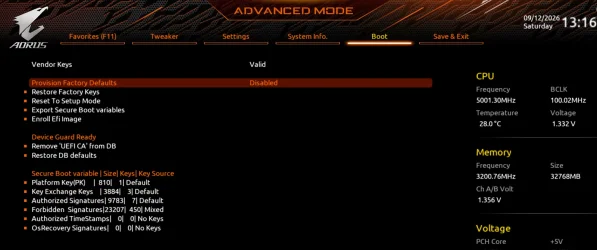
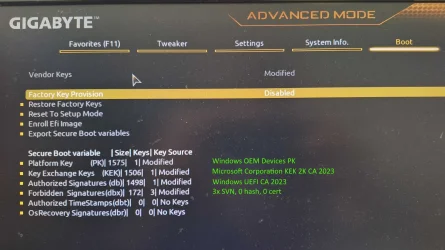
So I updated the Certs and went to the bios to check and all looked good.
1789216773492.webp
I then tried booting from a newly created USB, and I got the cert invalid, pop up like before. So its as soon as the old get revoked as you had said, went in to bios, also notice that at the top its now modified after using the USB. so I will now get on to gigabyte with the info at hand.

Thanks.
 

My Computer My Computer

At a glance

Windows 11 ProIntel i7 9700k OC 5.0ghz32gb Gskill 3200mhz OC 3600mhzNvidia RTX 4070 Super FE
OS
Windows 11 Pro
Computer type
PC/Desktop
Manufacturer/Model
Self built
CPU
Intel i7 9700k OC 5.0ghz
Motherboard
Gigabyte Z390 Master, Rev1.0, F13f GF
Memory
32gb Gskill 3200mhz OC 3600mhz
Graphics Card(s)
Nvidia RTX 4070 Super FE
Sound Card
Onboard ESS Saber
Monitor(s) Displays
QHD LG 27" 165hz, OC 180hz, Asus 27" 144hz
Screen Resolution
2k
Hard Drives
Nvme SSD Samsung 990 Pro 2TB, 970 echo plus 1tb + 970 echo 256gb.
PSU
EVGA SuperNova platinum 800w
Case
NZXT H500 sweat box, modified.
Cooling
NZXT Kraken x63.
Keyboard
Logitech G810
Mouse
Logitech G403
Internet Speed
1.1gb down 110mb up
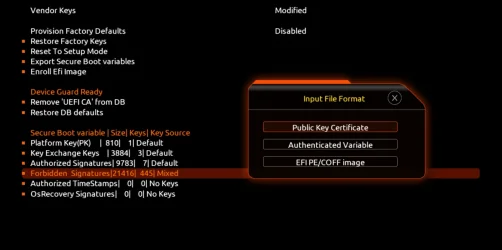
So I have two more question.
I backed up the forbidden Signatures, now when I go to restore, what option should I pick.
1789220124311.webp

I was thinking Authenticated variable???

the other question is.
Above it says device guard ready, and remove UEFI CA, Should I of done that, as from what I can tell is that my system is device guard supported??
 

My Computer My Computer

At a glance

Windows 11 ProIntel i7 9700k OC 5.0ghz32gb Gskill 3200mhz OC 3600mhzNvidia RTX 4070 Super FE
OS
Windows 11 Pro
Computer type
PC/Desktop
Manufacturer/Model
Self built
CPU
Intel i7 9700k OC 5.0ghz
Motherboard
Gigabyte Z390 Master, Rev1.0, F13f GF
Memory
32gb Gskill 3200mhz OC 3600mhz
Graphics Card(s)
Nvidia RTX 4070 Super FE
Sound Card
Onboard ESS Saber
Monitor(s) Displays
QHD LG 27" 165hz, OC 180hz, Asus 27" 144hz
Screen Resolution
2k
Hard Drives
Nvme SSD Samsung 990 Pro 2TB, 970 echo plus 1tb + 970 echo 256gb.
PSU
EVGA SuperNova platinum 800w
Case
NZXT H500 sweat box, modified.
Cooling
NZXT Kraken x63.
Keyboard
Logitech G810
Mouse
Logitech G403
Internet Speed
1.1gb down 110mb up
No, you need the reg file to prevent the Secure Boot task from being allowed to
So I have two more question.
I backed up the forbidden Signatures, now when I go to restore, what option should I pick.

I was thinking Authenticated variable???
When you back up an UEFI variable it's an Authenticated variable (or ESL).

the other question is.
Above it says device guard ready, and remove UEFI CA, Should I of done that, as from what I can tell is that my system is device guard supported??
DeviceGuard means it can support VBS by enabling specific HW features which are required by VBS. That has nothing to do with boot devices.
 

My Computer My Computer

At a glance

Windows 7
OS
Windows 7
But for my system far as can tell most of device guard is enabled, yet I have that key in secure boot, saying should remove, so i guess i should.

@garlin Thanks you for all the help and support.
 

My Computer My Computer

At a glance

Windows 11 ProIntel i7 9700k OC 5.0ghz32gb Gskill 3200mhz OC 3600mhzNvidia RTX 4070 Super FE
OS
Windows 11 Pro
Computer type
PC/Desktop
Manufacturer/Model
Self built
CPU
Intel i7 9700k OC 5.0ghz
Motherboard
Gigabyte Z390 Master, Rev1.0, F13f GF
Memory
32gb Gskill 3200mhz OC 3600mhz
Graphics Card(s)
Nvidia RTX 4070 Super FE
Sound Card
Onboard ESS Saber
Monitor(s) Displays
QHD LG 27" 165hz, OC 180hz, Asus 27" 144hz
Screen Resolution
2k
Hard Drives
Nvme SSD Samsung 990 Pro 2TB, 970 echo plus 1tb + 970 echo 256gb.
PSU
EVGA SuperNova platinum 800w
Case
NZXT H500 sweat box, modified.
Cooling
NZXT Kraken x63.
Keyboard
Logitech G810
Mouse
Logitech G403
Internet Speed
1.1gb down 110mb up
The script is reporting whether DeviceGuard is enabled, because you have:
- VBS enabled​
- HW features to support VBS enabled from BIOS​
- reg key or Group Policy setting for UEFI lock (extra security)​

On some newer systems, DeviceGuard can be automatically enabled by Windows if your HW and Secure Boot requirements are met.
 

My Computer My Computer

At a glance

Windows 7
OS
Windows 7
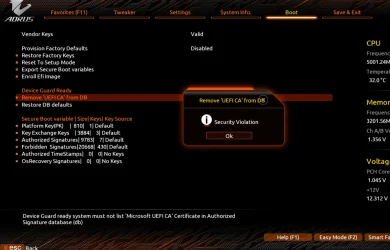
I tried the Device Guard Ready and removed the UEFI CA, I then reboot! the pc mother board speaker beeps 5 times then I don't get any bios screen or anything, but windows will load after x time, only way to get in bios was to reset comos, once I entered I went to check what happen, now if I try to remove or restore I get a security violation error see picture.
1789227292921.webp


If I try to import my DBX, it then reports the vendor keys as modified, yet doing via windows never caused this.
If i tried EFI PE my DBX would not load.
 

My Computer My Computer

At a glance

Windows 11 ProIntel i7 9700k OC 5.0ghz32gb Gskill 3200mhz OC 3600mhzNvidia RTX 4070 Super FE
OS
Windows 11 Pro
Computer type
PC/Desktop
Manufacturer/Model
Self built
CPU
Intel i7 9700k OC 5.0ghz
Motherboard
Gigabyte Z390 Master, Rev1.0, F13f GF
Memory
32gb Gskill 3200mhz OC 3600mhz
Graphics Card(s)
Nvidia RTX 4070 Super FE
Sound Card
Onboard ESS Saber
Monitor(s) Displays
QHD LG 27" 165hz, OC 180hz, Asus 27" 144hz
Screen Resolution
2k
Hard Drives
Nvme SSD Samsung 990 Pro 2TB, 970 echo plus 1tb + 970 echo 256gb.
PSU
EVGA SuperNova platinum 800w
Case
NZXT H500 sweat box, modified.
Cooling
NZXT Kraken x63.
Keyboard
Logitech G810
Mouse
Logitech G403
Internet Speed
1.1gb down 110mb up
Why do you need to remove UEFI CA from DB? That's a required cert unless you're in a pure Linux setup. Now you're just randomly touching BIOS settings.

Don't play with Device Guard. All that's acknowledging is BIOS support is present for Device Guard to work.
 

My Computer My Computer

At a glance

Windows 7
OS
Windows 7
I testing so I can report back, but removing uefi should not make the pc beep, and not showing the post screen. Also its now blocking any DBX updats via windows. The pc did not like me doing that.

I had to reflash the bios.

@garlin this is what I have now,
1789300045672.webp

Noticed the windows Bootmgr SVN is now Ver 11, was ver 9.
I should leave it like this untill gigabyte sort my revokeing issue?
 
Last edited:

My Computer My Computer

At a glance

Windows 11 ProIntel i7 9700k OC 5.0ghz32gb Gskill 3200mhz OC 3600mhzNvidia RTX 4070 Super FE
OS
Windows 11 Pro
Computer type
PC/Desktop
Manufacturer/Model
Self built
CPU
Intel i7 9700k OC 5.0ghz
Motherboard
Gigabyte Z390 Master, Rev1.0, F13f GF
Memory
32gb Gskill 3200mhz OC 3600mhz
Graphics Card(s)
Nvidia RTX 4070 Super FE
Sound Card
Onboard ESS Saber
Monitor(s) Displays
QHD LG 27" 165hz, OC 180hz, Asus 27" 144hz
Screen Resolution
2k
Hard Drives
Nvme SSD Samsung 990 Pro 2TB, 970 echo plus 1tb + 970 echo 256gb.
PSU
EVGA SuperNova platinum 800w
Case
NZXT H500 sweat box, modified.
Cooling
NZXT Kraken x63.
Keyboard
Logitech G810
Mouse
Logitech G403
Internet Speed
1.1gb down 110mb up
"By default, BCDBoot creates a Windows Boot Manager entry in the NVRAM on the firmware to identify the boot files on the system partition. If the /s option is used, then this entry is not created."

I tested this documented behavior in a virtual machine.

Note that running bcdboot with the /v option (verbose mode) does not explicitly report a message such as "Updating NVRAM." However, its behavior can be tested, for example, by modifying the description of the firmware "Windows Boot Manager" entry.

Run as Administrator:
bcdedit /enum firmware

If the output confirms that {bootmgr} identifies the Windows Boot Manager entry, change its description:

Command Prompt:
bcdedit /set {bootmgr} description "TEST Windows Boot Manager"

or

PowerShell:
bcdedit /set "{bootmgr}" description "TEST Windows Boot Manager"

Then verify the change:
bcdedit /enum firmware

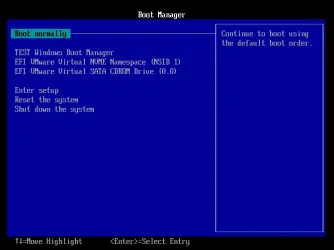
Image below: Rebooting into the firmware Boot Manager confirmed that the entry was displayed as "TEST Windows Boot Manager."

TEST Windows Boot Manager.webp

In my test, the following bcdboot command (with the /s option) did not update the existing Windows Boot Manager firmware entry:

bcdboot c:\windows /s z:

(Z: was the drive letter assigned to the EFI system partition.)

The following bcdboot command (without the /s option) did update the existing Windows Boot Manager firmware entry:

bcdboot c:\windows

Rebooting into the firmware Boot Manager again confirmed that the entry had been restored to "Windows Boot Manager."


The default bcdboot behavior (without the /s option) creates a Windows Boot Manager entry in UEFI NVRAM if necessary. As demonstrated by this test, it can also update an existing Windows Boot Manager firmware entry; in this case, bcdboot restored its standard description ("Windows Boot Manager").
 

My Computers My Computers

  • At a glance

    Windows 11 ProAMD Ryzen 9 9950X3DKingston FURY Beast 64GB (2x32GB) DDR5 6000MT/sASUS TUF Gaming Radeon RX 9070 OC Edition 16G...
    OS
    Windows 11 Pro
    Computer type
    PC/Desktop
    CPU
    AMD Ryzen 9 9950X3D
    Motherboard
    ASRock B650E Taichi Lite
    Memory
    Kingston FURY Beast 64GB (2x32GB) DDR5 6000MT/s
    Graphics Card(s)
    ASUS TUF Gaming Radeon RX 9070 OC Edition 16GB GDDR6
    Hard Drives
    Solidigm P44 Pro 2TB M.2 NVMe SSD
  • At a glance

    Windows 11 HomeIntel Core Ultra 9 275HX64GB (2x 32GB) DDR5-6400NVIDIA GeForce RTX 5080 16GB GDDR7 Laptop GPU
    Operating System
    Windows 11 Home
    Computer type
    Laptop
    Manufacturer/Model
    Lenovo Legion Pro 7i Gen 10 16"
    CPU
    Intel Core Ultra 9 275HX
    Memory
    64GB (2x 32GB) DDR5-6400
    Graphics card(s)
    NVIDIA GeForce RTX 5080 16GB GDDR7 Laptop GPU
    Hard Drives
    2x 1TB M.2 NVMe SSD (SK Hynix)
@TrebleTA

Minimalism is the best.
On my PC, this is enough :-)

PK: Windows OEM Devices PK
KEK: Microsoft Corporation KEK 2K CA 2023
DB: Windows UEFI CA 2023
DBX: 3x SVN, 0 hash, 0 certs
SkuSiPolicy.p7b, bootmgfw.efi and SVN are current

uefi.webp
 

My Computer My Computer

At a glance

Windows 11AMD32 GBRadeon Vega
OS
Windows 11
Computer type
PC/Desktop
Manufacturer/Model
Gigabyte
CPU
AMD
Motherboard
Gigabyte
Memory
32 GB
Graphics Card(s)
Radeon Vega
The bios is broken for me. If SNV are update, or If any certs are updated, I get strange things happening.
Not sure if its a cache error or it's not implemented correctly.

Noticed mainly with a windows install USB.
last issue With a USB install it added a partition to the d drive 16mb, Not sure why. Then the windows USB or C: would just boot, back in to bios, a bios reflash was only way to get to boot correctly again. this was after adding just the SVN.

@Monika1491
How did you get your's like that?

@Celery thanks
 
Last edited:

My Computer My Computer

At a glance

Windows 11 ProIntel i7 9700k OC 5.0ghz32gb Gskill 3200mhz OC 3600mhzNvidia RTX 4070 Super FE
OS
Windows 11 Pro
Computer type
PC/Desktop
Manufacturer/Model
Self built
CPU
Intel i7 9700k OC 5.0ghz
Motherboard
Gigabyte Z390 Master, Rev1.0, F13f GF
Memory
32gb Gskill 3200mhz OC 3600mhz
Graphics Card(s)
Nvidia RTX 4070 Super FE
Sound Card
Onboard ESS Saber
Monitor(s) Displays
QHD LG 27" 165hz, OC 180hz, Asus 27" 144hz
Screen Resolution
2k
Hard Drives
Nvme SSD Samsung 990 Pro 2TB, 970 echo plus 1tb + 970 echo 256gb.
PSU
EVGA SuperNova platinum 800w
Case
NZXT H500 sweat box, modified.
Cooling
NZXT Kraken x63.
Keyboard
Logitech G810
Mouse
Logitech G403
Internet Speed
1.1gb down 110mb up
So I have done a bit more searching and well google come up with something interesting.

The "Invalid Signature Detected" error occurs because a recent Windows Update forced a database change for Microsoft certificates (revoking old 2011 certificates and requiring new 2023 ones). When your Gigabyte motherboard has its updated Secure Boot policies active but lacks the matching updated factory keys stored in its NVRAM, it blocks Microsoft's own brand-new Media Creation Tool boot files.(revoking old 2011 certificates and requiring new 2023 ones). When your Gigabyte motherboard has its updated Secure Boot policies active but lacks the matching updated factory keys stored in its NVRAM, it blocks Microsoft's own brand-new Media Creation Tool boot files.
@garlin
Can this be manually fixed by installing certs PK myself or is it a NVram issue, that I need to get gigabyte to deal with. I have forward the other info now to gigabyte.
I can see if modifying the NVram would work.

P.S another work around is using Rufus USB tool, yet i want it correct if gigabyte are trying to help and fix
 
Last edited:

My Computer My Computer

At a glance

Windows 11 ProIntel i7 9700k OC 5.0ghz32gb Gskill 3200mhz OC 3600mhzNvidia RTX 4070 Super FE
OS
Windows 11 Pro
Computer type
PC/Desktop
Manufacturer/Model
Self built
CPU
Intel i7 9700k OC 5.0ghz
Motherboard
Gigabyte Z390 Master, Rev1.0, F13f GF
Memory
32gb Gskill 3200mhz OC 3600mhz
Graphics Card(s)
Nvidia RTX 4070 Super FE
Sound Card
Onboard ESS Saber
Monitor(s) Displays
QHD LG 27" 165hz, OC 180hz, Asus 27" 144hz
Screen Resolution
2k
Hard Drives
Nvme SSD Samsung 990 Pro 2TB, 970 echo plus 1tb + 970 echo 256gb.
PSU
EVGA SuperNova platinum 800w
Case
NZXT H500 sweat box, modified.
Cooling
NZXT Kraken x63.
Keyboard
Logitech G810
Mouse
Logitech G403
Internet Speed
1.1gb down 110mb up
There are two reasons for "Invalid Signature", and it's probably not the better case for your PC.

When the UEFI reads a boot file, it extracts the file's signing cert and tries to validate it. PK validates a set of KEK's -> KEK's validate a set of DB's -> DB's validate a boot file's cert. This end-to-end chain has to work correctly for the boot file to be allowed.

Presuming the chain works, the wrong boot file (because its DB cert is missing, or is banned) returns an "Invalid Signature".

Equally, when the chain is broken because your BIOS has corruption or firmware issues, it also fails to authenticate and returns "Invalid Signature". Your BIOS won't inform you which of the two cases is happening. Other than you're sure that all your certs are properly installed and you have the correct boot file, but it still doesn't work any way.

Unfortunately, in this thread (or forum) we only have a sample size of one (you) for this specific motherboard. We don't have anyone else reporting they got CA 2023 working on the same model. We've had other users reporting success for other Gigabyte boards, but it's not clear how close are those motherboards are to yours in relative age and design features.

As we don't have widespread complaints of Gigabyte motherboards failing updates, it's either this firmware is problematic or you have a defective BIOS chip. Normally you'd swap out the motherboard and confirm if the problem follows, but I'd imagine there aren't many units available to perform this swap.
 

My Computer My Computer

At a glance

Windows 7
OS
Windows 7

Latest Support Threads

Back
Top Bottom