Security Processor Appears and Disappears


Secrios

New member
Local time
8:58 AM
Posts
26
OS
Windows 11
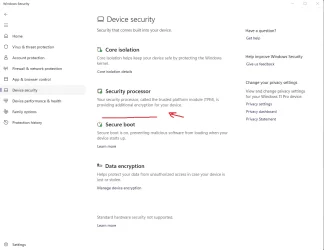
Ever since the update I have been getting this strange behaviour in my security.
Secure 1.webp
Secure 2.webp
I can still access the TPM via search on both security and msc. I wonder why Windows Security is acting like this?
 
Windows Build/Version
Windows 11 25h2 26200.6899

My Computer

System One

  • OS
    Windows 11
    Computer type
    PC/Desktop
    Manufacturer/Model
    Asus
The latest update for this app introduced this bug. I have it as does another user on the forum. I posted alternatives to check TPM status. From my observations it is a display bug.


My Computer

System One

  • OS
    Windows 11 Home 25H2 26200.6901
    Computer type
    PC/Desktop
    Manufacturer/Model
    Custom
    CPU
    AMD 9800X3D
    Motherboard
    MSI B850 Gaming Plus Wifi
    Memory
    Patriot Viper
    Graphics Card(s)
    EVGA GeForce RTX 3070 Ti FTW3 ULTRA GAMING
    Sound Card
    Realtek 7.1 Surround Sound High Definition Audio CODEC (Built-in w/ Motherboard)
    Monitor(s) Displays
    ACER XG270HU
    Screen Resolution
    2560x1440 144hz
    Hard Drives
    Samsung 980 PRO NVMe M.2 PCI-E x4 SSD, 1TB for OS/Apps
    Western Digital Blue Series 3D NAND SATA III 2.5in Solid State Drive, 2TB (Games)
    PSU
    Corsair RM White Series RM850 80+ Gold Modular ATX Power Supply, 850W
    Case
    NXZT H9 Flow
    Cooling
    Be Quiet Light Loop 360
    Keyboard
    Razer Cynosa V2
    Mouse
    Razer Naga Trinity
    Internet Speed
    Cable 934Mbps download 50Mbps Upload
    Browser
    Edge/Chrome
    Antivirus
    Windows Antivirus/Defender. Bitdefender when not Troubleshooting
Back
Top Bottom