Solved Sendto function broken in Windows 11 24H2


... if I change Mapimail to open with Thunderbird, it gets empty and broken.
Leave the mapimail think alone! Thunderbird is not capable of handling that In-built protocol.
Reset your defaults again, choose MAILTO for the Thunderbird default...

0007842.jpg

It'll work fine!

0007847.jpg
 

My Computers My Computers

  • At a glance

    Windows 11 Pro
    OS
    Windows 11 Pro
    Computer type
    PC/Desktop
    Manufacturer/Model
    ASUS ROG Strix
  • At a glance

    Windows 11 Pro
    Operating System
    Windows 11 Pro
    Computer type
    Laptop
    Manufacturer/Model
    ASUS VivoBook
  • ASUS VivoBook 'Lite' ~ Windows 11 Home

My Computer My Computer

At a glance

WIndows 11 24H2Core i7 8650u16 GBIntel UHD 630
OS
WIndows 11 24H2
Computer type
Laptop
Manufacturer/Model
DELL 5590
CPU
Core i7 8650u
Memory
16 GB
Graphics Card(s)
Intel UHD 630
Sound Card
Realtek
Screen Resolution
1980x1020
Internet Speed
1000/40
Leave the mapimail think alone! Thunderbird is not capable of handling that In-built protocol.
Reset your defaults again, choose MAILTO for the Thunderbird default...


It'll work fine!
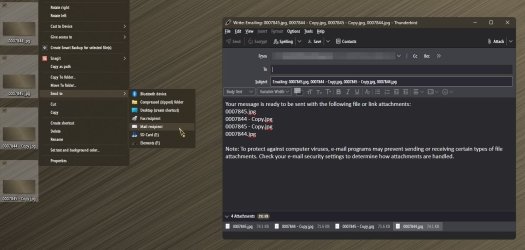
Not, on my side. It opens Outlook for me, even if I set MAILTO to Thunderbird
 

My Computer My Computer

At a glance

WIndows 11 24H2Core i7 8650u16 GBIntel UHD 630
OS
WIndows 11 24H2
Computer type
Laptop
Manufacturer/Model
DELL 5590
CPU
Core i7 8650u
Memory
16 GB
Graphics Card(s)
Intel UHD 630
Sound Card
Realtek
Screen Resolution
1980x1020
Internet Speed
1000/40
Not, on my side. It opens Outlook for me, even if I set MAILTO to Thunderbird
Check the Set as Default setting in Thunderbird...

0007850.jpg
 

My Computers My Computers

  • At a glance

    Windows 11 Pro
    OS
    Windows 11 Pro
    Computer type
    PC/Desktop
    Manufacturer/Model
    ASUS ROG Strix
  • At a glance

    Windows 11 Pro
    Operating System
    Windows 11 Pro
    Computer type
    Laptop
    Manufacturer/Model
    ASUS VivoBook
  • ASUS VivoBook 'Lite' ~ Windows 11 Home

My Computer My Computer

At a glance

WIndows 11 24H2Core i7 8650u16 GBIntel UHD 630
OS
WIndows 11 24H2
Computer type
Laptop
Manufacturer/Model
DELL 5590
CPU
Core i7 8650u
Memory
16 GB
Graphics Card(s)
Intel UHD 630
Sound Card
Realtek
Screen Resolution
1980x1020
Internet Speed
1000/40

My Computers My Computers

  • At a glance

    Windows 11 Pro
    OS
    Windows 11 Pro
    Computer type
    PC/Desktop
    Manufacturer/Model
    ASUS ROG Strix
  • At a glance

    Windows 11 Pro
    Operating System
    Windows 11 Pro
    Computer type
    Laptop
    Manufacturer/Model
    ASUS VivoBook
  • ASUS VivoBook 'Lite' ~ Windows 11 Home

My Computer My Computer

At a glance

WIndows 11 24H2Core i7 8650u16 GBIntel UHD 630
OS
WIndows 11 24H2
Computer type
Laptop
Manufacturer/Model
DELL 5590
CPU
Core i7 8650u
Memory
16 GB
Graphics Card(s)
Intel UHD 630
Sound Card
Realtek
Screen Resolution
1980x1020
Internet Speed
1000/40
Interestingly after several reinstalls, now the default setting worked in Thunderbird

BIG_01.jpg
This option was always greyed for me, but after completely removing and reinstalling Thunderbird it was empty upon the first run and could be checked. (After that it is grey now on the screenshot)
Now the sendto function seems to be working in File Explorer and Total Commander again.
Thanks for the tips, everybody
 

My Computer My Computer

At a glance

WIndows 11 24H2Core i7 8650u16 GBIntel UHD 630
OS
WIndows 11 24H2
Computer type
Laptop
Manufacturer/Model
DELL 5590
CPU
Core i7 8650u
Memory
16 GB
Graphics Card(s)
Intel UHD 630
Sound Card
Realtek
Screen Resolution
1980x1020
Internet Speed
1000/40

My Computer My Computer

At a glance

WIndows 11 24H2Core i7 8650u16 GBIntel UHD 630
OS
WIndows 11 24H2
Computer type
Laptop
Manufacturer/Model
DELL 5590
CPU
Core i7 8650u
Memory
16 GB
Graphics Card(s)
Intel UHD 630
Sound Card
Realtek
Screen Resolution
1980x1020
Internet Speed
1000/40
Leave the mapimail think alone! Thunderbird is not capable of handling that In-built protocol.
Reset your defaults again, choose MAILTO for the Thunderbird default...

View attachment 115758

It'll work fine!

View attachment 115759
For the record: this was the solution. You should NOT associate Thunderbird with the Mapimail file in Sendto because it breaks the Send to Mail Recipient function.
 

My Computer My Computer

At a glance

WIndows 11 24H2Core i7 8650u16 GBIntel UHD 630
OS
WIndows 11 24H2
Computer type
Laptop
Manufacturer/Model
DELL 5590
CPU
Core i7 8650u
Memory
16 GB
Graphics Card(s)
Intel UHD 630
Sound Card
Realtek
Screen Resolution
1980x1020
Internet Speed
1000/40
Horigyuri and others, how do you uninstall and reinstall Thunderbird without losing all your past emails?
 

My Computers My Computers

  • At a glance

    Windows 11 ProIntel
    OS
    Windows 11 Pro
    Computer type
    Laptop
    Manufacturer/Model
    Lenovo X1 Extreme 21CS
    CPU
    Intel
    Hard Drives
    2 TB SSD
    Internet Speed
    9 Kbps (rural Internet!)
    Browser
    Firefox
    Antivirus
    Windows Defender
  • At a glance

    Windows 11 ProIntel
    Operating System
    Windows 11 Pro
    Computer type
    Laptop
    Manufacturer/Model
    Lenovo X1 Extreme 21CB
    CPU
    Intel
    Motherboard
    OEM
I am not sure if this applies to Thunderbird, but in Microsoft Outlook you just uninstall the old version and install the new. Your data are not lost. However, I don't know if this applies to Thunderbird. If I remember correctly, you can export your data to a file. Do it just in case before uninstalling.
 

My Computers My Computers

  • At a glance

    Windows 11 Pro 23H2 (5699), 25H2 (8655)Mobile DualCore Intel Core 2 Duo T7250, 2000 MHz4GBMobile Intel(R) GMA 4500M (Mobile 4 series)
    OS
    Windows 11 Pro 23H2 (5699), 25H2 (8655)
    Computer type
    Laptop
    Manufacturer/Model
    Acer Extensa 5630EZ
    CPU
    Mobile DualCore Intel Core 2 Duo T7250, 2000 MHz
    Motherboard
    Acer Extensa 5630
    Memory
    4GB
    Graphics Card(s)
    Mobile Intel(R) GMA 4500M (Mobile 4 series)
    Sound Card
    Realtek ALC268 @ Intel 82801IB ICH9 - High Definition Audio Controller
    Monitor(s) Displays
    1
    Screen Resolution
    1280x800
    Hard Drives
    Samsung SSD 850 EVO 250GB SATA Device (250 GB, SATA-III)
    Internet Speed
    VDSL 50 Mbps
    Browser
    MICROSOFT EDGE
    Antivirus
    WINDOWS DEFENDER
    Other Info
    Legacy MBR installation, no TPM, no Secure Boot, no WDDM 2.0 graphics drivers, no SSE4.2, cannot get more unsupported ;) This is only my test laptop. I had installed Windows 11 here before upgrading my main PC. For my main PC I use everyday see my 2nd system specs.
  • At a glance

    Windows 11 Pro v25H2 (build 26200.8655)Intel Core-i7 3770 3.40GHz s1155 (3rd generat...2x Kingston Hyper-X Blu 8GB DDR3-1600GIGABYTE GeForce RTX 3050 WINDFORCE OC V2 6GB...
    Operating System
    Windows 11 Pro v25H2 (build 26200.8655)
    Computer type
    PC/Desktop
    Manufacturer/Model
    Custom-built PC
    CPU
    Intel Core-i7 3770 3.40GHz s1155 (3rd generation)
    Motherboard
    Asus P8H61 s1155 ATX
    Memory
    2x Kingston Hyper-X Blu 8GB DDR3-1600
    Graphics card(s)
    GIGABYTE GeForce RTX 3050 WINDFORCE OC V2 6GB (GV-N3050WF2OCV2-6GD)
    Sound Card
    Realtek HD audio (ALC887)
    Monitor(s) Displays
    Sony Bravia KDL-19L4000 19" LCD TV via VGA
    Screen Resolution
    1440x900 32-bit 60Hz
    Hard Drives
    WD Blue SA510 2.5 1000GB SSD as system disk, Western Digital Caviar Purple 4TB SATA III (WD40PURZ) as second
    PSU
    Thermaltake Litepower RGB 550W Full Wired
    Case
    SUPERCASE MIDI-TOWER
    Cooling
    Deepcool Gamma Archer CPU cooler, 1x 8cm fan at the back
    Keyboard
    Mitsumi 101-key PS/2
    Mouse
    Sunnyline OptiEye PS/2
    Internet Speed
    100Mbps
    Browser
    Microsoft Edge, Mozilla Firefox
    Antivirus
    Microsoft Windows Defender
    Other Info
    Legacy BIOS (MBR) installation, no TPM, no Secure Boot, WDDM 3.0 graphics drivers, WEI score 7.4
I have tried a lot of the suggestions here when SendTo wasn't in the menu. I got it into the menu but it will not open Thunderbird no matter what I've done. What did improve was the Picasa email function. Previously it was not working at all. Now it's working as expected, even though SendTo is not working.

I am wondering what might happen if I deleted or renamed the SendTo folder and rebooted. Would Windows recreate a new SendTo folder that might work correctly?

Here's what my SendTo folder looks like now, after Picasa started working. Note that I do not have Outlook on my PC.
 

Attachments

  • Screen Shot 04-02-25 at 09.38 PM.webp
    Screen Shot 04-02-25 at 09.38 PM.webp
    36.1 KB · Views: 2

My Computers My Computers

  • At a glance

    Windows 11 ProIntel
    OS
    Windows 11 Pro
    Computer type
    Laptop
    Manufacturer/Model
    Lenovo X1 Extreme 21CS
    CPU
    Intel
    Hard Drives
    2 TB SSD
    Internet Speed
    9 Kbps (rural Internet!)
    Browser
    Firefox
    Antivirus
    Windows Defender
  • At a glance

    Windows 11 ProIntel
    Operating System
    Windows 11 Pro
    Computer type
    Laptop
    Manufacturer/Model
    Lenovo X1 Extreme 21CB
    CPU
    Intel
    Motherboard
    OEM
If you delete the Sent To folder you will lose all your Sent to options and probably introduce an issue that would cause File Explorer to malfunction. I wouldn't do that. Also why it is so important to do it with right-click and Sent to? Just create a new email in whatever application you use, click on the Attach button and select multiple files. Holding the SHIFT key selects all the files between the first and the last, holding the CTRL key allows you to select out of order files by clicking on each to mark it. Just like you do it in File Explorer. If you need to select all files with a specific attribute, such as all files created a specific date, just change the view to sort by date and then use the SHIFT button to select them all in order. Probably you can also do it from File Explorer, just select the files you want to attach, but instead of right-click, drag and drop them into the attachment area of your new email message.

PS: Now I saw your screenshot, as mentioned before the "Mapimail" association doesn't work. See post #61 for details.
 

My Computers My Computers

  • At a glance

    Windows 11 Pro 23H2 (5699), 25H2 (8655)Mobile DualCore Intel Core 2 Duo T7250, 2000 MHz4GBMobile Intel(R) GMA 4500M (Mobile 4 series)
    OS
    Windows 11 Pro 23H2 (5699), 25H2 (8655)
    Computer type
    Laptop
    Manufacturer/Model
    Acer Extensa 5630EZ
    CPU
    Mobile DualCore Intel Core 2 Duo T7250, 2000 MHz
    Motherboard
    Acer Extensa 5630
    Memory
    4GB
    Graphics Card(s)
    Mobile Intel(R) GMA 4500M (Mobile 4 series)
    Sound Card
    Realtek ALC268 @ Intel 82801IB ICH9 - High Definition Audio Controller
    Monitor(s) Displays
    1
    Screen Resolution
    1280x800
    Hard Drives
    Samsung SSD 850 EVO 250GB SATA Device (250 GB, SATA-III)
    Internet Speed
    VDSL 50 Mbps
    Browser
    MICROSOFT EDGE
    Antivirus
    WINDOWS DEFENDER
    Other Info
    Legacy MBR installation, no TPM, no Secure Boot, no WDDM 2.0 graphics drivers, no SSE4.2, cannot get more unsupported ;) This is only my test laptop. I had installed Windows 11 here before upgrading my main PC. For my main PC I use everyday see my 2nd system specs.
  • At a glance

    Windows 11 Pro v25H2 (build 26200.8655)Intel Core-i7 3770 3.40GHz s1155 (3rd generat...2x Kingston Hyper-X Blu 8GB DDR3-1600GIGABYTE GeForce RTX 3050 WINDFORCE OC V2 6GB...
    Operating System
    Windows 11 Pro v25H2 (build 26200.8655)
    Computer type
    PC/Desktop
    Manufacturer/Model
    Custom-built PC
    CPU
    Intel Core-i7 3770 3.40GHz s1155 (3rd generation)
    Motherboard
    Asus P8H61 s1155 ATX
    Memory
    2x Kingston Hyper-X Blu 8GB DDR3-1600
    Graphics card(s)
    GIGABYTE GeForce RTX 3050 WINDFORCE OC V2 6GB (GV-N3050WF2OCV2-6GD)
    Sound Card
    Realtek HD audio (ALC887)
    Monitor(s) Displays
    Sony Bravia KDL-19L4000 19" LCD TV via VGA
    Screen Resolution
    1440x900 32-bit 60Hz
    Hard Drives
    WD Blue SA510 2.5 1000GB SSD as system disk, Western Digital Caviar Purple 4TB SATA III (WD40PURZ) as second
    PSU
    Thermaltake Litepower RGB 550W Full Wired
    Case
    SUPERCASE MIDI-TOWER
    Cooling
    Deepcool Gamma Archer CPU cooler, 1x 8cm fan at the back
    Keyboard
    Mitsumi 101-key PS/2
    Mouse
    Sunnyline OptiEye PS/2
    Internet Speed
    100Mbps
    Browser
    Microsoft Edge, Mozilla Firefox
    Antivirus
    Microsoft Windows Defender
    Other Info
    Legacy BIOS (MBR) installation, no TPM, no Secure Boot, WDDM 3.0 graphics drivers, WEI score 7.4
Back
Top Bottom