setting up new PC - why so many Dell components?


hershey4

Active member
Local time
6:14 PM
Posts
34
OS
Windows 11 Pro
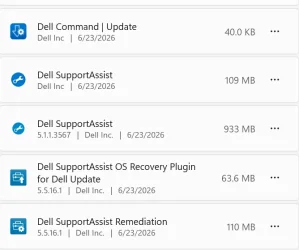
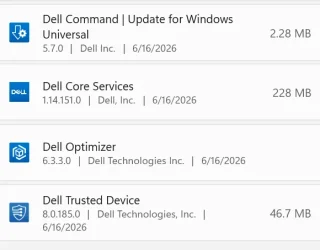
9 apps? Really? I doubt I need them all. I am a strong believer in Less is More. I've seen the domino affect way too many times. How many updates have inadvertently broken something subtle way down the line. Give me clean and lean all day long. I don't want all this protection/hand-holding. Very cynical of software competency these days. I was going to uninstall DellSupportAssist but ran into this article which slowed me down.


even that uninstall has caveats. Why do these hardware manufacturers have to make stuff so complicated? Just let Windows do Windows. Its good enough.
Or give me the choice at startup before your crap is installed and explain what it does and why I need/want it (in plain speak not marketing speak) and what it depends on, if anything. I miss my W7 waaaaaaaaah. :-(

Any words of advice on this topic in general and these particular services?
1783804115989.webp
1783804151365.webp
 

My Computers My Computers

  • At a glance

    Windows 11 ProIntel Ultra 516GB
    OS
    Windows 11 Pro
    Computer type
    PC/Desktop
    Manufacturer/Model
    Dell Pro Slim QCS1250
    CPU
    Intel Ultra 5
    Memory
    16GB
  • At a glance

    Windows 7I78GB
    Operating System
    Windows 7
    Computer type
    PC/Desktop
    Manufacturer/Model
    Dell XPS Studio
    CPU
    I7
    Memory
    8GB
  • Windows 10 Dell Inspiron laptop
I had the same issue , just be careful of what you remove from The Dell software. Some things if you remove them will break your system. In 11/2025 I was advised that the only way to rid yourself would be to perform a Clean Install of Windows. That could be an issue with your Dell Support Warranty. I did not do that as I did not see it as that big of an issue. Just be careful going forward and that would mean restore points and image backups before any action.
 

My Computers My Computers

  • At a glance

    Windows11 Pro 26200.8737Intel Core i9 14900F (24 -Core, 68 MB Total C...32GB DDR5RTX 4080 Super w/610.74
    OS
    Windows11 Pro 26200.8737
    Computer type
    PC/Desktop
    Manufacturer/Model
    Dell Alienware Aurora R16
    CPU
    Intel Core i9 14900F (24 -Core, 68 MB Total Cache)
    Motherboard
    Dell Alienware
    Memory
    32GB DDR5
    Graphics Card(s)
    RTX 4080 Super w/610.74
    Sound Card
    Realtec
    Monitor(s) Displays
    Corsair XENEON 32QHD165
    Screen Resolution
    2560 X 1440
    Hard Drives
    1-2TB Samsung 990 Pro PCIe NVMe M2 SSD
    1-4TB Samsung 990 Pro PCIe NVMe M2 SSD
    PSU
    1000 Watt Platinum Dell
    Case
    Alienware
    Cooling
    Liquid Closed Loop
    Keyboard
    Corsair Strafe RGB
    Mouse
    Logitech MK270 Wireless
    Internet Speed
    100Gb's Down-20 Up
    Browser
    Firefox 152.0.5
    Antivirus
    Defender
    Other Info
    Very Quiet And Fast
    CyberPower UPS CP1500PFCLCD
  • At a glance

    PClinuxOS Mate (2025.7)13th Gen Inter(R) Core(TM) i3-1315U64 GB DDR4 @3200 MHz.Internal
    Operating System
    PClinuxOS Mate (2025.7)
    Computer type
    PC/Desktop
    Manufacturer/Model
    Intel
    CPU
    13th Gen Inter(R) Core(TM) i3-1315U
    Motherboard
    Intel
    Memory
    64 GB DDR4 @3200 MHz.
    Graphics card(s)
    Internal
    Sound Card
    None
    Monitor(s) Displays
    Dell 2419HGCF
    Screen Resolution
    1920 X 1080
    Hard Drives
    SAMSUNG 980 PRO SSD 2TB, PCIe 4.0 M.2 2280
    PSU
    Chicony 30 Watt
    Case
    Small
    Keyboard
    Dell
    Mouse
    Razor
    Internet Speed
    1GB
    Browser
    Slimjet

Latest Support Threads

Back
Top Bottom