Several BSOD crashes when running my newly installed system


pk1984

Member
Local time
11:18 AM
Posts
5
OS
Windows 11
Hello,
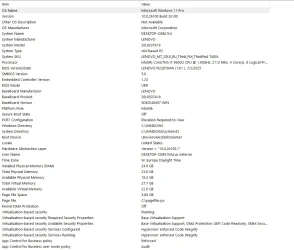
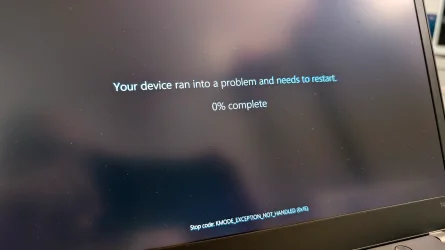
I'm having an issue with my newly installed Lenovo T480S running Windows 11 Pro. After booting up, the Windows UI completely freezes. After a few moments, the Blue Screen of Death appears with the error code "KMODE_EXCEPTION_NOT_HANDLED (0x1E)." After rebooting, the system may run normally but freezes occasionally. The problem particularly seems to appear when running on battery.
Things I've done so far:
- Fresh install of Windows 11 Pro with the latest Microsoft drivers
- Changed the Microsoft Intel Graphics Driver to the official Lenovo Intel UHD 620 version provided on their website.
- Did the latest BIOS update
- MemTest86 with 4 passes overnight, no issues.

Thanks a lot, in advance.
 
Windows Build/Version
Windows 11 Pro 24H2 (OS Build 26.100.4770)

Attachments
Last edited:

My Computer My Computer

OS
Windows 11
Computer type
Laptop
Manufacturer/Model
Lenovo T480s
CPU
i7-8650U
Memory
24 GB
Graphics Card(s)
Intel UHD Graphics 620
Sound Card
Realtek High Definition Audio
Monitor(s) Displays
14" IPS touchscreen
Screen Resolution
1920 x 1080 px
Hard Drives
ADATA Legend 860 \\ 1TB \\ NVMe
Browser
Chrome
Antivirus
Windows Defender
Please perform the following steps:


1) Add WMIC:


2) Run Tuneup plus > post a share link


Batch files for use in BSOD debugging - Windows 10 Help Forums

Batch files for use in BSOD debugging - Windows 10 Help Forums


3) Open event viewer > system and application > post share links


4) Create a new restore point:

Create System Restore Point in Windows 10


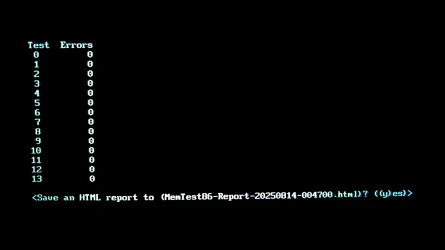
5) Run Memtest86+ for 8 or more passes > take pictures > post images or share links

Memtest86+ | The Open-Source Memory Testing Tool

Just 1 error is a test fail and testing can be aborted.

The more the passes the better the testing conditions.

It sometimes takes passes into the 20's to detect malfunctioning RAM.

The RAM can be tested all at one time or one at a time in the same DIMM.

Memtest86+ | The Open-Source Memory Testing Tool

MemTest86+ - Test


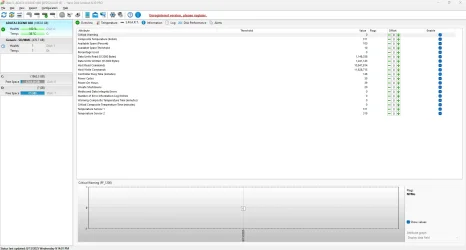
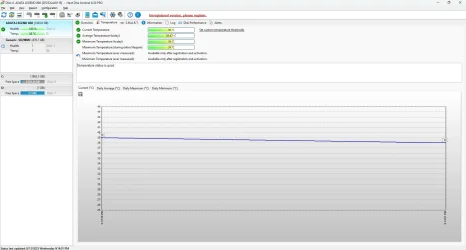
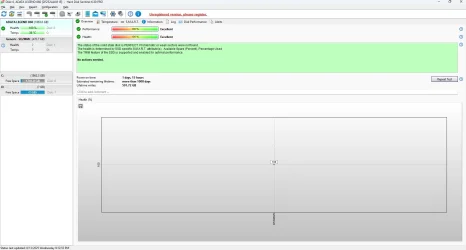
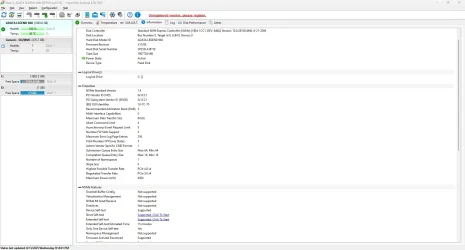
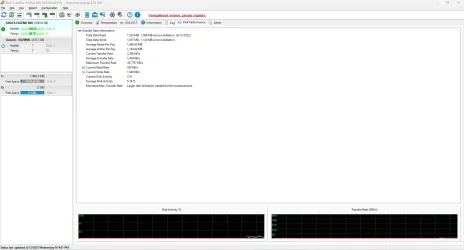
6) Run HD Sentinel > post images or share link
https://www.hdsentinel.com/index.php
a) Overview
b) Temperature
c) SMART
 

My Computer My Computer

OS
Windows 10
Computer type
Laptop
Manufacturer/Model
HP
CPU
Intel(R) Core(TM) i7-4800MQ CPU @ 2.70GHz
Motherboard
Product : 190A Version : KBC Version 94.56
Memory
16 GB Total: Manufacturer : Samsung MemoryType : DDR3 FormFactor : SODIMM Capacity : 8GB Speed : 1600
Graphics Card(s)
NVIDIA Quadro K3100M; Intel(R) HD Graphics 4600
Sound Card
IDT High Definition Audio CODEC; PNP Device ID HDAUDIO\FUNC_01&VEN_111D&DEV_76E0
Hard Drives
Model Hitachi HTS727575A9E364
Antivirus
Microsoft Defender
Other Info
Mobile Workstation
Hello zBook,
thanks for your suggestions I am on it, and will report back asap.
 

My Computer My Computer

OS
Windows 11
Computer type
Laptop
Manufacturer/Model
Lenovo T480s
CPU
i7-8650U
Memory
24 GB
Graphics Card(s)
Intel UHD Graphics 620
Sound Card
Realtek High Definition Audio
Monitor(s) Displays
14" IPS touchscreen
Screen Resolution
1920 x 1080 px
Hard Drives
ADATA Legend 860 \\ 1TB \\ NVMe
Browser
Chrome
Antivirus
Windows Defender
Hello again,
so I've done all the steps but number (5). I'll let the Memtest run with 20 passes over night (and next day probably :LOL:, 24GB are a lot to handle I guess).
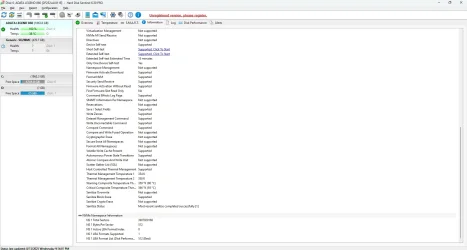
Please find attached all the required information.
Thanks a lot for your help zBook!
 

Attachments

  • LocaleMetaData.zip
    LocaleMetaData.zip
    591.3 KB · Views: 1
  • event_viewer_logs.zip
    event_viewer_logs.zip
    1.1 MB · Views: 1
  • hdd_sentinel_pro_003.webp
    hdd_sentinel_pro_003.webp
    81.8 KB · Views: 2
  • hdd_sentinel_pro_002.webp
    hdd_sentinel_pro_002.webp
    127.4 KB · Views: 1
  • hdd_sentinel_pro_001.webp
    hdd_sentinel_pro_001.webp
    64.3 KB · Views: 1
  • hdd_sentinel_pro_004.webp
    hdd_sentinel_pro_004.webp
    88.1 KB · Views: 1
  • hdd_sentinel_pro_005.webp
    hdd_sentinel_pro_005.webp
    97.4 KB · Views: 1
  • hdd_sentinel_pro_007.webp
    hdd_sentinel_pro_007.webp
    16.8 KB · Views: 1
  • hdd_sentinel_pro_006.webp
    hdd_sentinel_pro_006.webp
    76 KB · Views: 1
  • LocaleMetaData.zip
    LocaleMetaData.zip
    591.3 KB · Views: 1
  • Tuneup_log 2025-08-13 at 18-49-11.zip
    Tuneup_log 2025-08-13 at 18-49-11.zip
    2.3 KB · Views: 1

My Computer My Computer

OS
Windows 11
Computer type
Laptop
Manufacturer/Model
Lenovo T480s
CPU
i7-8650U
Memory
24 GB
Graphics Card(s)
Intel UHD Graphics 620
Sound Card
Realtek High Definition Audio
Monitor(s) Displays
14" IPS touchscreen
Screen Resolution
1920 x 1080 px
Hard Drives
ADATA Legend 860 \\ 1TB \\ NVMe
Browser
Chrome
Antivirus
Windows Defender
1) After completing Memtest86+ > post a share link


2) Enter the computer serial number into the Lenovo website > reinstall the newest BIOS:


3) Run GSmart Control (all drives) (if supported)


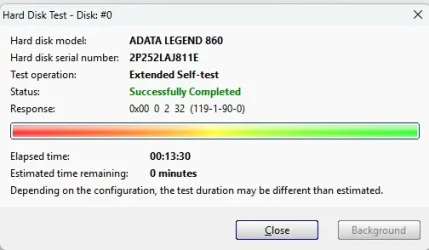
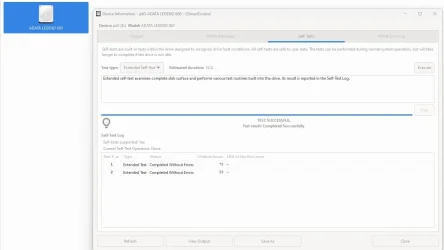
Click Self-Tests tab > Test type > Extended Self-test > Execute (run overnight)

Copy and paste the results > post a share link

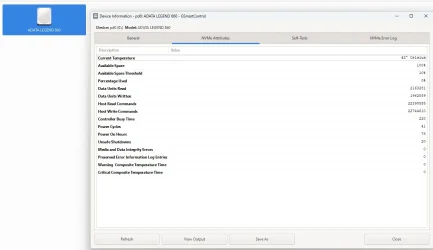
Also view the Attributes tab and if there are any entries highlighted in red or pink > take a picture of the GSmartControl window > post images or share links
(do not save using GSmart control software to save)


4) For any new BSOD post a new V2 share link into the newest post


Two share links (duplicates): The event viewer was saved in a format that could not be opened: MTA
The EVTX link was viewable.

Code:
Windows Resource Protection found corrupt files and successfully repaired them.

Code:
Defender\Definition Updates\Default\\MpAvDlta.vdm from store
2025-08-13 18:42:18, Info                  CSI    000002a9 [SR] Repairing file \??\C:\ProgramData\Microsoft\Windows Defender\Definition Updates\Default\\MpEngine.dll from store


Code:
The driver detected a controller error on \Device\Harddisk1\DR1.

Code:
: The embedded controller (EC) returned data when none was requested. 
The BIOS might be trying to access the EC without synchronizing with the operating system. 
This data will be ignored. 
No further action is necessary; however, you should check with your computer manufacturer for an upgraded BIOS.
 
Last edited:

My Computer My Computer

OS
Windows 10
Computer type
Laptop
Manufacturer/Model
HP
CPU
Intel(R) Core(TM) i7-4800MQ CPU @ 2.70GHz
Motherboard
Product : 190A Version : KBC Version 94.56
Memory
16 GB Total: Manufacturer : Samsung MemoryType : DDR3 FormFactor : SODIMM Capacity : 8GB Speed : 1600
Graphics Card(s)
NVIDIA Quadro K3100M; Intel(R) HD Graphics 4600
Sound Card
IDT High Definition Audio CODEC; PNP Device ID HDAUDIO\FUNC_01&VEN_111D&DEV_76E0
Hard Drives
Model Hitachi HTS727575A9E364
Antivirus
Microsoft Defender
Other Info
Mobile Workstation
All right, I hope I did everything you suggested.
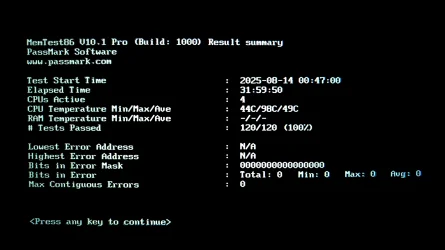
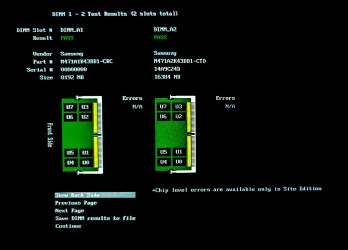
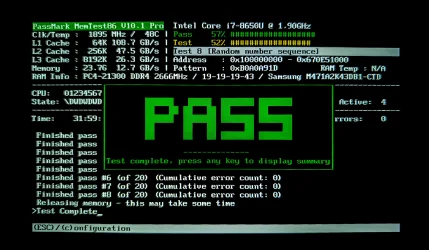
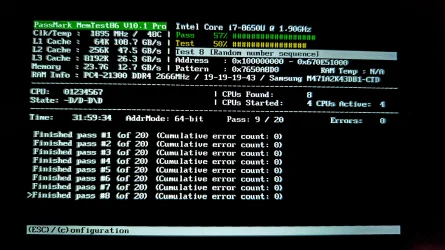
Unfortunately, I had to shut down the laptop during MemTest, so I only managed to complete eight passes. If it's absolutely necessary, I'll try to finish all 20, but it will most likely take up to several days.

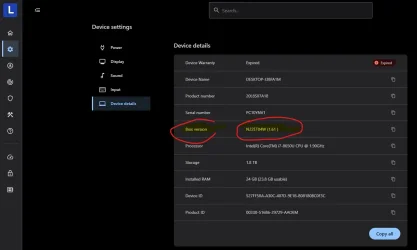
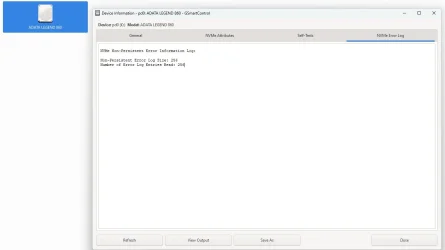
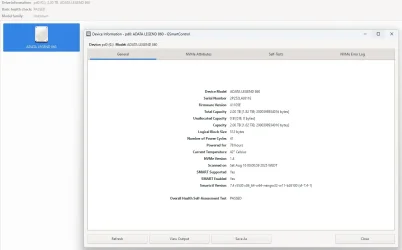
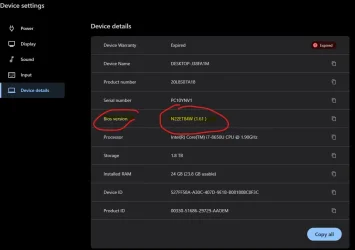
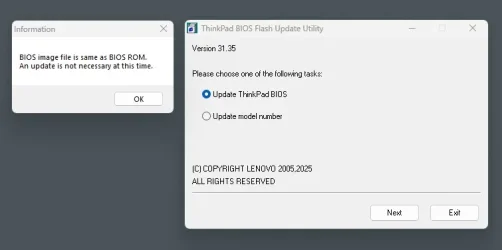
Attached are screenshots of GSmartControl (there are no errors, as far as I can see), the MemTest report, and the V2 log. I've also rechecked the BIOS version through the Lenovo website and by downloading the Update Utility, but I think I already had the BIOS installed (I did it right after the laptop arrived).
I can't say for certain, but it seems to me that the error is gone. Now, when I start the laptop on battery and let it run for more than 20 minutes, I don't see any freezing.

I will continue to monitor the laptops behavior closely, but as long as the logs and reports look okay to you, I would say the issue is solved.
Thank you so much for all the great help and insights, ZBook. I've learned quite a lot about diagnostics along the way.
 

Attachments

  • memTest86_005.webp
    memTest86_005.webp
    94 KB · Views: 3
  • memTest86_004.webp
    memTest86_004.webp
    279.4 KB · Views: 1
  • memTest86_003.webp
    memTest86_003.webp
    200.5 KB · Views: 1
  • memTest86_002.webp
    memTest86_002.webp
    636.4 KB · Views: 1
  • memTest86_001.webp
    memTest86_001.webp
    633 KB · Views: 2
  • lenovo_t480s_latestBios.webp
    lenovo_t480s_latestBios.webp
    32.4 KB · Views: 1
  • gSmartControl_004.webp
    gSmartControl_004.webp
    19.7 KB · Views: 1
  • gSmartControl_003.webp
    gSmartControl_003.webp
    32.9 KB · Views: 1
  • gSmartControl_002.webp
    gSmartControl_002.webp
    39.4 KB · Views: 1
  • gSmartControl_001.webp
    gSmartControl_001.webp
    37.7 KB · Views: 1
  • bios_vrersion.webp
    bios_vrersion.webp
    27.9 KB · Views: 1
  • bios_update_not_required.webp
    bios_update_not_required.webp
    13.4 KB · Views: 1
  • DESKTOP-J38FA1M-(2025-08-16_15-28-59).zip
    DESKTOP-J38FA1M-(2025-08-16_15-28-59).zip
    957.3 KB · Views: 1

My Computer My Computer

OS
Windows 11
Computer type
Laptop
Manufacturer/Model
Lenovo T480s
CPU
i7-8650U
Memory
24 GB
Graphics Card(s)
Intel UHD Graphics 620
Sound Card
Realtek High Definition Audio
Monitor(s) Displays
14" IPS touchscreen
Screen Resolution
1920 x 1080 px
Hard Drives
ADATA Legend 860 \\ 1TB \\ NVMe
Browser
Chrome
Antivirus
Windows Defender
Today is 08/16.

Was there a flash drive or another drive connected to the laptop on 08/15?

Was this the same or different drive that had been connected on 08/13, 08/12, and 08/10?


Code:
Event[7956]
  Log Name: System
  Source: disk
  Date: 2025-08-15T16:46:10.5450000Z
  Event ID: 51
  Task: None
  Level: Warning
  Opcode: N/A
  Keyword: Classic,
  User: N/A
  User Name: N/A
  Computer: DESKTOP-J38FA1M
  Description:
An error was detected on device \Device\Harddisk1\DR4 during a paging operation.

Event[7957]
  Log Name: System
  Source: disk
  Date: 2025-08-15T16:46:10.5450000Z
  Event ID: 51
  Task: None
  Level: Warning
  Opcode: N/A
  Keyword: Classic,
  User: N/A
  User Name: N/A
  Computer: DESKTOP-J38FA1M
  Description:
An error was detected on device \Device\Harddisk1\DR4 during a paging operation.


Code:
Event[7940]
  Log Name: System
  Source: VDS Basic Provider
  Date: 2025-08-15T16:23:18.2110000Z
  Event ID: 5
  Task: None
  Level: Error
  Opcode: N/A
  Keyword: Classic,
  User: N/A
  User Name: N/A
  Computer: DESKTOP-J38FA1M
  Description:
Cannot zero sectors on disk \\?\PhysicalDrive1. Error code: 5@01010012


Code:
Event[6586]
  Log Name: System
  Source: disk
  Date: 2025-08-13T18:19:29.1960000Z
  Event ID: 11
  Task: None
  Level: Error
  Opcode: N/A
  Keyword: Classic,
  User: N/A
  User Name: N/A
  Computer: DESKTOP-J38FA1M
  Description:
The driver detected a controller error on \Device\Harddisk1\DR1.

Event[6587]
  Log Name: System
  Source: disk
  Date: 2025-08-13T18:19:30.2000000Z
  Event ID: 11
  Task: None
  Level: Error
  Opcode: N/A
  Keyword: Classic,
  User: N/A
  User Name: N/A
  Computer: DESKTOP-J38FA1M
  Description:
The driver detected a controller error on \Device\Harddisk1\DR1.

Event[6588]
  Log Name: System
  Source: disk
  Date: 2025-08-13T18:19:30.7010000Z
  Event ID: 11
  Task: None
  Level: Error
  Opcode: N/A
  Keyword: Classic,
  User: N/A
  User Name: N/A
  Computer: DESKTOP-J38FA1M
  Description:
The driver detected a controller error on \Device\Harddisk1\DR1.


Code:
Event[6141]
  Log Name: System
  Source: disk
  Date: 2025-08-12T23:45:50.0920000Z
  Event ID: 11
  Task: None
  Level: Error
  Opcode: N/A
  Keyword: Classic,
  User: N/A
  User Name: N/A
  Computer: DESKTOP-J38FA1M
  Description:
The driver detected a controller error on \Device\Harddisk1\DR1.

Event[6142]
  Log Name: System
  Source: disk
  Date: 2025-08-12T23:45:51.1200000Z
  Event ID: 11
  Task: None
  Level: Error
  Opcode: N/A
  Keyword: Classic,
  User: N/A
  User Name: N/A
  Computer: DESKTOP-J38FA1M
  Description:
The driver detected a controller error on \Device\Harddisk1\DR1.

Event[6143]
  Log Name: System
  Source: disk
  Date: 2025-08-12T23:45:51.6310000Z
  Event ID: 11
  Task: None
  Level: Error
  Opcode: N/A
  Keyword: Classic,
  User: N/A
  User Name: N/A
  Computer: DESKTOP-J38FA1M
  Description:
The driver detected a controller error on \Device\Harddisk1\DR1.


Code:
Event[5718]
  Log Name: System
  Source: disk
  Date: 2025-08-12T17:53:51.2090000Z
  Event ID: 11
  Task: None
  Level: Error
  Opcode: N/A
  Keyword: Classic,
  User: N/A
  User Name: N/A
  Computer: DESKTOP-J38FA1M
  Description:
The driver detected a controller error on \Device\Harddisk1\DR1.

Event[5719]
  Log Name: System
  Source: disk
  Date: 2025-08-12T17:53:52.2130000Z
  Event ID: 11
  Task: None
  Level: Error
  Opcode: N/A
  Keyword: Classic,
  User: N/A
  User Name: N/A
  Computer: DESKTOP-J38FA1M
  Description:
The driver detected a controller error on \Device\Harddisk1\DR1.

Event[5720]
  Log Name: System
  Source: disk
  Date: 2025-08-12T17:53:53.2190000Z
  Event ID: 11
  Task: None
  Level: Error
  Opcode: N/A
  Keyword: Classic,
  User: N/A
  User Name: N/A
  Computer: DESKTOP-J38FA1M
  Description:
The driver detected a controller error on \Device\Harddisk1\DR1.


Code:
Event[3265]
  Log Name: System
  Source: disk
  Date: 2025-08-10T21:24:50.1350000Z
  Event ID: 11
  Task: None
  Level: Error
  Opcode: N/A
  Keyword: Classic,
  User: N/A
  User Name: N/A
  Computer: DESKTOP-J38FA1M
  Description:
The driver detected a controller error on \Device\Harddisk1\DR1.

Event[3266]
  Log Name: System
  Source: disk
  Date: 2025-08-10T21:24:50.6430000Z
  Event ID: 11
  Task: None
  Level: Error
  Opcode: N/A
  Keyword: Classic,
  User: N/A
  User Name: N/A
  Computer: DESKTOP-J38FA1M
  Description:
The driver detected a controller error on \Device\Harddisk1\DR1.

Event[3267]
  Log Name: System
  Source: disk
  Date: 2025-08-10T21:24:51.1500000Z
  Event ID: 11
  Task: None
  Level: Error
  Opcode: N/A
  Keyword: Classic,
  User: N/A
  User Name: N/A
  Computer: DESKTOP-J38FA1M
  Description:
The driver detected a controller error on \Device\Harddisk1\DR1.
 

My Computer My Computer

OS
Windows 10
Computer type
Laptop
Manufacturer/Model
HP
CPU
Intel(R) Core(TM) i7-4800MQ CPU @ 2.70GHz
Motherboard
Product : 190A Version : KBC Version 94.56
Memory
16 GB Total: Manufacturer : Samsung MemoryType : DDR3 FormFactor : SODIMM Capacity : 8GB Speed : 1600
Graphics Card(s)
NVIDIA Quadro K3100M; Intel(R) HD Graphics 4600
Sound Card
IDT High Definition Audio CODEC; PNP Device ID HDAUDIO\FUNC_01&VEN_111D&DEV_76E0
Hard Drives
Model Hitachi HTS727575A9E364
Antivirus
Microsoft Defender
Other Info
Mobile Workstation
Was there a flash drive or another drive connected to the laptop on 08/15?


Event[7957]
Log Name: System
Source: disk
Date: 2025-08-15T16:46:10.5450000Z
Event ID: 51
Task: None
Level: Warning
Opcode: N/A
Keyword: Classic,
User: N/A
User Name: N/A
Computer: DESKTOP-J38FA1M
Description:
An error was detected on device \Device\Harddisk1\DR4 during a paging operation.
[/CODE]


Event[7940]
Log Name: System
Source: VDS Basic Provider
Level: Error

Description:
Cannot zero sectors on disk
That does indeed look like a USB stick was inserted. It means poor connection and needs to be pulled out an reinserted.
(Except for the "Cannot zero sectors on disk" error message, which appears to be a bug in Windows, where you must pull out the USB stick, reinsert it then run "clean all" in diskpart again to wipe a USB flash drive.) (I encountered that error with USB drive wiping countless times!)
The error of source "VDS Basic Provider" is what I know as the "must insert the USB flash drive twice to wipe the USB flash drive" bug.
 

My Computers My Computers

System One System Two

  • OS
    Windows 11 Pro x64 24H2
    Computer type
    PC/Desktop
    CPU
    Ryzen 9 5900X
    Motherboard
    ASRock B550 PG Velocita (UEFI-BIOS 3.90)
    Memory
    64 GB G.Skill RipJaws V F4-3200C16D-64GVK
    Graphics Card(s)
    ASRock Steel Legend Arc B580 12 GB
    Monitor(s) Displays
    Alienware AW3423DWF OLED ultrawide
    Hard Drives
    Samsung 990 Pro 1 TB NVMe SSD
    PSU
    eVGA Supernova 750 G3
    Case
    Corsair 275R
    Internet Speed
    VTel FTTH 1 Gb down and 1 Gb up
  • Operating System
    Windows 11 Home x64 25H2
    Computer type
    PC/Desktop
    CPU
    Ryzen 7 5800X3D
    Motherboard
    Asus ROG Strix B550-F Gaming (UEFI-BIOS version 3636)
    Memory
    32 GB (2x16 GB G.Skill TridentZ Neo)
    Graphics card(s)
    Sapphire Nitro+ Radeon RX 6750 XT
    Hard Drives
    Samsung 970 Pro 512 GB NVMe SSD
    PSU
    Corsair RM850x
    Case
    Fractal Focus G
Yes, there was indeed a USB stick inserted.

I've been using the laptop continuously for two days, switching between AC and battery power and performing heavy-duty tasks such as 3D rendering, image editing, and AI calculations, all of which affect CPU, RAM, and HDD usage. So far, I haven't experienced any freezing.
I would say the solution was one of the following:
  • an updated Windows 11, BIOS, and drivers. I might have missed some updates before starting this thread.
  • Switching to "Best Performance" mode. Several people reported the same freezing issue. Some people found that letting their laptop run on maximum performance solved the issue. This drastically reduces the battery lifespan (in my case, from three to two hours), but I can live with it. It remains to be seen whether this setting affects the freezing. I'll have to switch to "Best Power Efficiency" at some point to test it.
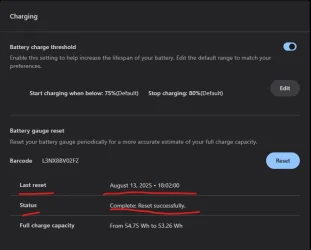
  • I also reset the battery gauge through the Lenovo Vantage application. While this might not be directly related, I now have a much better estimate of the true remaining battery charge.
Thank you all for your help. We can close the topic now.
 

Attachments

  • battery_reset.webp
    battery_reset.webp
    23 KB · Views: 2
  • best_performance.webp
    best_performance.webp
    7.1 KB · Views: 1
Last edited:

My Computer My Computer

OS
Windows 11
Computer type
Laptop
Manufacturer/Model
Lenovo T480s
CPU
i7-8650U
Memory
24 GB
Graphics Card(s)
Intel UHD Graphics 620
Sound Card
Realtek High Definition Audio
Monitor(s) Displays
14" IPS touchscreen
Screen Resolution
1920 x 1080 px
Hard Drives
ADATA Legend 860 \\ 1TB \\ NVMe
Browser
Chrome
Antivirus
Windows Defender
Back
Top Bottom