ShareX - no audio, online help shows outdated configuration screens


PhilB

Well-known member
Member
VIP
Local time
10:24 PM
Posts
719
Location
Western USA
OS
Windows 11 2H25
I'm trying to get ShareX 18 to record an online video. The video itself records properly but no sound. As I said in the subject line, all the online help I consulted shows a "System" top level menu, with a subfolder for sound. But ShareX 18 doesn't have a System menu.

What to do?
 
Windows Build/Version
26100.6584

My Computer

System One

  • OS
    Windows 11 2H25
    Computer type
    PC/Desktop
    Manufacturer/Model
    DIY
    CPU
    AMD 9900X
    Motherboard
    MSI X870E Carbon
    Memory
    64 GB
    Graphics Card(s)
    AMD 9070 XT
    Sound Card
    built-in
    Monitor(s) Displays
    Dell 24"
    Hard Drives
    Sabrent 1 TB NVMe, 4 x SSD (need to check models), 4 x 3.5" HDD, 8-16 TB, all WD
    PSU
    Seasonic 850
    Case
    Fractal Design North XL (which I likw)
    Cooling
    Corsair AIO for CPU, fans for case
    Keyboard
    Das Keyboard 4
    Mouse
    Corsair M65 (white)
    Internet Speed
    1 TB download
    Browser
    Firefox
    Antivirus
    Bitdefender
    Other Info
    Also have Lenovo T14S laptop (me) and Lenovo Slim 71 (wife)

My Computers

System One System Two

  • OS
    Windows 11 Pro
    Computer type
    PC/Desktop
    Manufacturer/Model
    ASUS ROG Strix
  • Operating System
    Windows 11 Pro
    Computer type
    Laptop
    Manufacturer/Model
    ASUS VivoBook
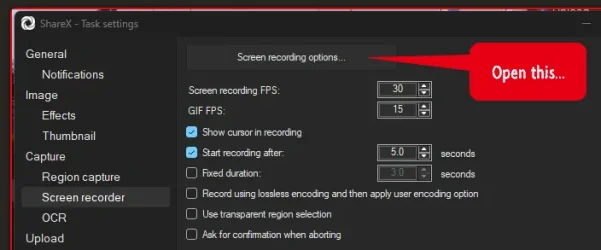
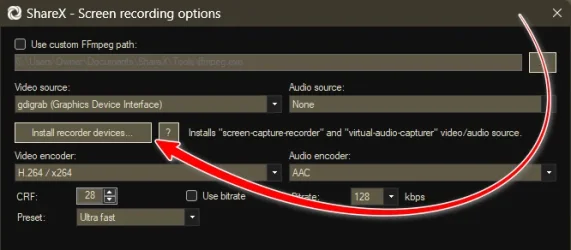
Go to Task Settings>Screen Recorder>Screen Recording Options..., install recorder devices:

View attachment 145696
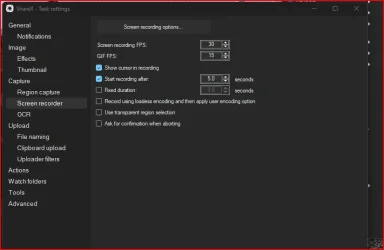
My version of ShareX lacks any options to download FFmpeg. Or is something hiding in plain sight that I don't see. A search on ShareX 18 sound recording wasn't helpful.

1758243776517.webp
 

My Computer

System One

  • OS
    Windows 11 2H25
    Computer type
    PC/Desktop
    Manufacturer/Model
    DIY
    CPU
    AMD 9900X
    Motherboard
    MSI X870E Carbon
    Memory
    64 GB
    Graphics Card(s)
    AMD 9070 XT
    Sound Card
    built-in
    Monitor(s) Displays
    Dell 24"
    Hard Drives
    Sabrent 1 TB NVMe, 4 x SSD (need to check models), 4 x 3.5" HDD, 8-16 TB, all WD
    PSU
    Seasonic 850
    Case
    Fractal Design North XL (which I likw)
    Cooling
    Corsair AIO for CPU, fans for case
    Keyboard
    Das Keyboard 4
    Mouse
    Corsair M65 (white)
    Internet Speed
    1 TB download
    Browser
    Firefox
    Antivirus
    Bitdefender
    Other Info
    Also have Lenovo T14S laptop (me) and Lenovo Slim 71 (wife)
My Computers

System One System Two

  • OS
    Windows 11 Pro
    Computer type
    PC/Desktop
    Manufacturer/Model
    ASUS ROG Strix
  • Operating System
    Windows 11 Pro
    Computer type
    Laptop
    Manufacturer/Model
    ASUS VivoBook

My Computer

System One

  • OS
    Windows 11 2H25
    Computer type
    PC/Desktop
    Manufacturer/Model
    DIY
    CPU
    AMD 9900X
    Motherboard
    MSI X870E Carbon
    Memory
    64 GB
    Graphics Card(s)
    AMD 9070 XT
    Sound Card
    built-in
    Monitor(s) Displays
    Dell 24"
    Hard Drives
    Sabrent 1 TB NVMe, 4 x SSD (need to check models), 4 x 3.5" HDD, 8-16 TB, all WD
    PSU
    Seasonic 850
    Case
    Fractal Design North XL (which I likw)
    Cooling
    Corsair AIO for CPU, fans for case
    Keyboard
    Das Keyboard 4
    Mouse
    Corsair M65 (white)
    Internet Speed
    1 TB download
    Browser
    Firefox
    Antivirus
    Bitdefender
    Other Info
    Also have Lenovo T14S laptop (me) and Lenovo Slim 71 (wife)
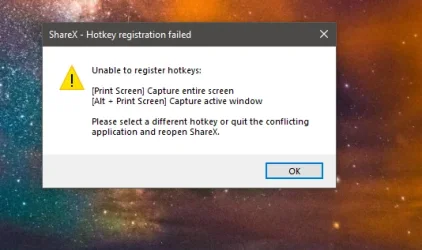
how to disable this message in shareX.
shareX-Error on windows-10-Screenshot 2026-01-11 124435.webp
 

My Computer

System One

  • OS
    window 10 version 22H2 (OS Build 19045.6466
    Computer type
    Laptop
    Manufacturer/Model
    Dell/E6400
    CPU
    Intel Core i7 @2.80GHz 57 °C Sandy Bridge 32nm Tech
    Motherboard
    Dell Inc. 0K0DNP (CPU 1)
    Memory
    4.00GB Dual-Channel DDR3 @ 665MHz (9-9-9-24)
    Graphics Card(s)
    Intel HD Graphics 3000
    Sound Card
    High Definition Audio Device
    Monitor(s) Displays
    single
    Screen Resolution
    1366x768 pixels
    Hard Drives
    WDC WD2500BPVT-75JJ5T0
    Keyboard
    Device Name Standard PS/2 Keyboard
    Mouse
    PS/2 Compatible Mouse
    Internet Speed
    10mb
    Browser
    ms edge
    Antivirus
    win defender
how to disable this message in shareX.
You have some other application using those hotkey settings..., either quit that application or change the hotkeys within ShareX.
 

My Computers

System One System Two

  • OS
    Windows 11 Pro
    Computer type
    PC/Desktop
    Manufacturer/Model
    ASUS ROG Strix
  • Operating System
    Windows 11 Pro
    Computer type
    Laptop
    Manufacturer/Model
    ASUS VivoBook
yes.there is another application skip and skitch in windows 10.
 

My Computer

System One

  • OS
    window 10 version 22H2 (OS Build 19045.6466
    Computer type
    Laptop
    Manufacturer/Model
    Dell/E6400
    CPU
    Intel Core i7 @2.80GHz 57 °C Sandy Bridge 32nm Tech
    Motherboard
    Dell Inc. 0K0DNP (CPU 1)
    Memory
    4.00GB Dual-Channel DDR3 @ 665MHz (9-9-9-24)
    Graphics Card(s)
    Intel HD Graphics 3000
    Sound Card
    High Definition Audio Device
    Monitor(s) Displays
    single
    Screen Resolution
    1366x768 pixels
    Hard Drives
    WDC WD2500BPVT-75JJ5T0
    Keyboard
    Device Name Standard PS/2 Keyboard
    Mouse
    PS/2 Compatible Mouse
    Internet Speed
    10mb
    Browser
    ms edge
    Antivirus
    win defender
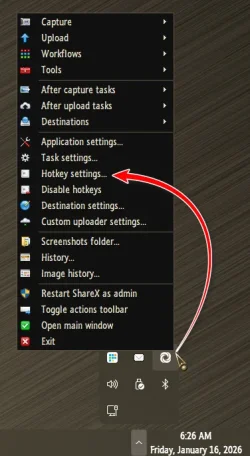
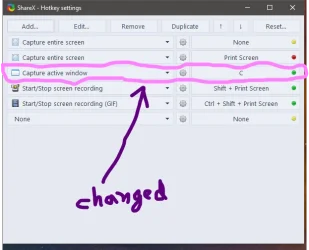
How to change the hotkeys in shareX. I searched the settings but was unsuccessful.
 

My Computer

System One

  • OS
    window 10 version 22H2 (OS Build 19045.6466
    Computer type
    Laptop
    Manufacturer/Model
    Dell/E6400
    CPU
    Intel Core i7 @2.80GHz 57 °C Sandy Bridge 32nm Tech
    Motherboard
    Dell Inc. 0K0DNP (CPU 1)
    Memory
    4.00GB Dual-Channel DDR3 @ 665MHz (9-9-9-24)
    Graphics Card(s)
    Intel HD Graphics 3000
    Sound Card
    High Definition Audio Device
    Monitor(s) Displays
    single
    Screen Resolution
    1366x768 pixels
    Hard Drives
    WDC WD2500BPVT-75JJ5T0
    Keyboard
    Device Name Standard PS/2 Keyboard
    Mouse
    PS/2 Compatible Mouse
    Internet Speed
    10mb
    Browser
    ms edge
    Antivirus
    win defender

My Computers

System One System Two

  • OS
    Windows 11 Pro
    Computer type
    PC/Desktop
    Manufacturer/Model
    ASUS ROG Strix
  • Operating System
    Windows 11 Pro
    Computer type
    Laptop
    Manufacturer/Model
    ASUS VivoBook

My Computers

System One System Two

  • OS
    Windows 11 Pro
    Computer type
    PC/Desktop
    Manufacturer/Model
    ASUS ROG Strix
  • Operating System
    Windows 11 Pro
    Computer type
    Laptop
    Manufacturer/Model
    ASUS VivoBook
Screenshot 2026-01-16 211227.webp
 

My Computer

System One

  • OS
    window 10 version 22H2 (OS Build 19045.6466
    Computer type
    Laptop
    Manufacturer/Model
    Dell/E6400
    CPU
    Intel Core i7 @2.80GHz 57 °C Sandy Bridge 32nm Tech
    Motherboard
    Dell Inc. 0K0DNP (CPU 1)
    Memory
    4.00GB Dual-Channel DDR3 @ 665MHz (9-9-9-24)
    Graphics Card(s)
    Intel HD Graphics 3000
    Sound Card
    High Definition Audio Device
    Monitor(s) Displays
    single
    Screen Resolution
    1366x768 pixels
    Hard Drives
    WDC WD2500BPVT-75JJ5T0
    Keyboard
    Device Name Standard PS/2 Keyboard
    Mouse
    PS/2 Compatible Mouse
    Internet Speed
    10mb
    Browser
    ms edge
    Antivirus
    win defender
Screen-recorded videos using ShareX automatically uploads to a cloud drive (Mega), but when setting YouTube as the auto-uploaded screen-recorded videos target in ShareX, it does not work. i.e the screen recorded videos does not auto uploads to youtube,google drive and others.
 

My Computer

System One

  • OS
    window 10 version 22H2 (OS Build 19045.6466
    Computer type
    Laptop
    Manufacturer/Model
    Dell/E6400
    CPU
    Intel Core i7 @2.80GHz 57 °C Sandy Bridge 32nm Tech
    Motherboard
    Dell Inc. 0K0DNP (CPU 1)
    Memory
    4.00GB Dual-Channel DDR3 @ 665MHz (9-9-9-24)
    Graphics Card(s)
    Intel HD Graphics 3000
    Sound Card
    High Definition Audio Device
    Monitor(s) Displays
    single
    Screen Resolution
    1366x768 pixels
    Hard Drives
    WDC WD2500BPVT-75JJ5T0
    Keyboard
    Device Name Standard PS/2 Keyboard
    Mouse
    PS/2 Compatible Mouse
    Internet Speed
    10mb
    Browser
    ms edge
    Antivirus
    win defender
Screen-recorded videos using ShareX automatically uploads to a cloud drive (Mega), but when setting YouTube as the auto-uploaded screen-recorded videos target in ShareX, it does not work. i.e the screen recorded videos does not auto uploads to youtube,google drive and others.

Hi gaffar,

I suggest you start a new thread.

Kind regards,

tecknot
 

My Computer

System One

  • OS
    Windows 11 Pro 25H2 build 26200.8457
    Computer type
    Laptop
    Manufacturer/Model
    Lenovo ThinkPad Workstation P72
    CPU
    Intel i7 8750H @ 2.2 GHz
    Motherboard
    Lenovo 01YU291
    Memory
    16 GB (all Samsung) DDR4-3200 SODIMM (non-ECC) PCIe 3
    Graphics Card(s)
    Intel UHD Graphics 630 & NVIDIA Quadro P600
    Sound Card
    Realtek ALC3286 & Focusrite Saffire 24 Pro DSP
    Monitor(s) Displays
    17.3"
    Screen Resolution
    3840x2160
    Hard Drives
    1TB SSD Samsung 860 EVO SATA 3
    1TB SSD Samsung 970 EVO M.2 NVMe PCIe 3 x 4
    2TB SSD Samsung 990 PRO M.2 NVMe PCIe 3 x 4
    PSU
    230W
    Cooling
    fan
    Keyboard
    UltraNav
    Mouse
    Kensington wireless Orbit
    Internet Speed
    640Mbps
    Browser
    DuckDuckGo and Firefox
    Antivirus
    Defender
    Other Info
    CM246 Chipset

Latest Support Threads

Back
Top Bottom