Solved Show battery level on laptop Login screen?


TryingHard

Active member
Member
Local time
4:16 PM
Posts
109
OS
Windows 11 home version 10.0.22631 Build 22631
Is it possible to have the login screen show the remaining battery level on a laptop?
It currently appears after I login. But it would be nice to have it show on the login screen which appears when I lift the lid before I login.
 

My Computer

System One

  • OS
    Windows 11 home version 10.0.22631 Build 22631
    Computer type
    Laptop
    Manufacturer/Model
    Asus/zenbook 14 UX34055MA Q425MA
    CPU
    Intel 7 ultra 155H, 3800 Mhz, 16 Cores, 22 logical proc
    Motherboard
    ASUTEK
    Memory
    16
    Hard Drives
    1TB
Battery level is usually shown on pre-login screen, i.e. lock screen. Unfortunately, if you have already clicked through to the login screen, it appears there's no way to return to the lock screen without actually logging in.
 

My Computer

System One

  • OS
    Windows 11 Pro
    Computer type
    PC/Desktop
    CPU
    Intel(R) Core(TM) i7-5930K CPU @ 3.50GHz
    Motherboard
    EVGA X99 Micro
    Graphics Card(s)
    NVIDIA GeForce GTX 970
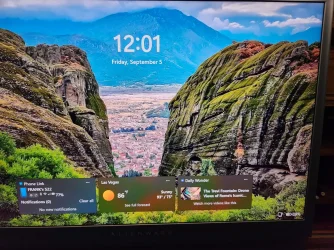
You mean like this? This is the new battery indicator using vivetool?20250905_1154.webp
 

My Computers

System One System Two

  • OS
    Windows 11 25H2
    Computer type
    Laptop
    Manufacturer/Model
    Alienware 18 Area-51
    CPU
    Intel Core Ultra 9 275HX (24-Core)
    Motherboard
    Alienware
    Memory
    64GB DDR5 6400MT/s
    Graphics Card(s)
    NVIDIA GeForce RTX 5080 and Intel UHD Graphics
    Sound Card
    Onboard, Realtek high-performance Audio chips (ALC3329 & ALC1708))
    Monitor(s) Displays
    300HZ 18-inch QHD 500 nit Comfort View+
    Screen Resolution
    2560 x 1600
    Hard Drives
    2TB NVMe M.2 PCIe Gen 5 SSD
    Case
    Magnesium Alloy
    Cooling
    Advanced Cryo-Tech Quad-Fan Cooling system & large vapor chamber
    Keyboard
    Cherry MX ultra low profile mechanical keyboard with per key AlienFX RGB lighting
    Mouse
    Logitech MX Master 4
    Browser
    Vivaldi (main), Firefox, Chrome, Edge
    Antivirus
    MS Defender and Malwarebytes Free
  • Operating System
    Windows 11 25H2
    Computer type
    Laptop
    Manufacturer/Model
    Microsoft Surface Laptop 7
    CPU
    Qualcomm Snapdragon X Elite (12 Core) ARM based CPU
    Motherboard
    Microsoft Corp.
    Memory
    16GB LPDDR5
    Graphics card(s)
    Qualcomm Adreno X1-85
    Sound Card
    Omnisonic speakers with Dolby Atmos spatial sound
    Monitor(s) Displays
    120 Hz 13.8-inch 600 nit PixelSense Flow touchscreen
    Screen Resolution
    2304x1536
    Hard Drives
    1TB NVMe Gen 4 SSD
    Case
    Anodized Aluminum
    Cooling
    Traditional active cooling fan system
    Keyboard
    Mechanical QWERTY, backlit when in use
    Mouse
    Logitech MX Master 4 and Surface Arc Mouse
    Browser
    Vivaldi (main), Firefox, Chrome, Edge
    Antivirus
    MS Defender and Malwarebytes Free
Battery level is usually shown on pre-login screen, i.e. lock screen. Unfortunately, if you have already clicked through to the login screen, it appears there's no way to return to the lock screen without actually logging in.
Unfortunately, battery level is not shown on my pre-login screen. That's why I was asking.
If I could take a screenshot of my prelogin screen I would be able to show it here.
 

My Computer

System One

  • OS
    Windows 11 home version 10.0.22631 Build 22631
    Computer type
    Laptop
    Manufacturer/Model
    Asus/zenbook 14 UX34055MA Q425MA
    CPU
    Intel 7 ultra 155H, 3800 Mhz, 16 Cores, 22 logical proc
    Motherboard
    ASUTEK
    Memory
    16
    Hard Drives
    1TB
Starting with Windows 11 build 26200.5761 (Dev 25H2) and build 26120.5761 (Beta 24H2), Microsoft is bringing the new and improved battery icons to the lock screen. They have been designed to communicate the battery status of your PC with just a quick glance.


My Computers

System One System Two

  • OS
    Windows 11 Pro for Workstations
    Computer type
    PC/Desktop
    Manufacturer/Model
    Custom self build
    CPU
    Intel i7-8700K 5 GHz
    Motherboard
    ASUS ROG Maximus XI Formula Z390
    Memory
    64 GB (4x16GB) G.SKILL TridentZ RGB DDR4 3600 MHz (F4-3600C18D-32GTZR)
    Graphics Card(s)
    ASUS ROG-STRIX-GTX1080TI-O11G-GAMING (11GB GDDR5X)
    Sound Card
    Integrated Digital Audio (S/PDIF)
    Monitor(s) Displays
    2 x Samsung Odyssey G75 27"
    Screen Resolution
    2560x1440
    Hard Drives
    1TB Samsung 990 PRO M.2,
    4TB Samsung 990 PRO M.2,
    TerraMaster F8 SSD Plus NAS
    PSU
    Seasonic Prime Titanium 850W
    Case
    Thermaltake Core P3 wall mounted
    Cooling
    Corsair Hydro H115i
    Keyboard
    Amazon Basics Wired Full Keyboard MD005
    Mouse
    Logitech MX Master 4
    Internet Speed
    2 Gbps Download and 100 Mbps Upload
    Browser
    Chrome and Edge
    Antivirus
    Microsoft Defender
    Other Info
    Logitech Z625 speaker system,
    Logitech BRIO 4K Pro webcam,
    HP Color LaserJet Pro MFP M477fdn,
    CyberPower CP1500PFCLCD
    Galaxy S23 Plus phone
  • Operating System
    Windows 11 Pro
    Computer type
    Laptop
    Manufacturer/Model
    Surface Laptop 7 Copilot+ PC
    CPU
    Snapdragon X Elite (12 core) 3.42 GHz
    Memory
    16 GB LPDDR5x-7467 MHz
    Monitor(s) Displays
    15" HDR
    Screen Resolution
    2496 x 1664
    Hard Drives
    1 TB SSD
    Internet Speed
    Wi-Fi 7 and Bluetooth 5.4
    Browser
    Chrome and Edge
    Antivirus
    Microsoft Defender

My Computer

System One

  • OS
    Windows 11 home version 10.0.22631 Build 22631
    Computer type
    Laptop
    Manufacturer/Model
    Asus/zenbook 14 UX34055MA Q425MA
    CPU
    Intel 7 ultra 155H, 3800 Mhz, 16 Cores, 22 logical proc
    Motherboard
    ASUTEK
    Memory
    16
    Hard Drives
    1TB
Here's a full shot for perspective
That would be nice.
What vivetool command allowede you to do that?
Here ya go, bottom is just for lock screen. I use them on all three of my machines. They seem to work on any build.

Task bar - vivetool /enable /id:56328729

Lock Screen - vivetool /enable /id:55467432,55648925
 

Attachments

  • 20250905_120103 (Large).webp
    20250905_120103 (Large).webp
    447.6 KB · Views: 4

My Computers

System One System Two

  • OS
    Windows 11 25H2
    Computer type
    Laptop
    Manufacturer/Model
    Alienware 18 Area-51
    CPU
    Intel Core Ultra 9 275HX (24-Core)
    Motherboard
    Alienware
    Memory
    64GB DDR5 6400MT/s
    Graphics Card(s)
    NVIDIA GeForce RTX 5080 and Intel UHD Graphics
    Sound Card
    Onboard, Realtek high-performance Audio chips (ALC3329 & ALC1708))
    Monitor(s) Displays
    300HZ 18-inch QHD 500 nit Comfort View+
    Screen Resolution
    2560 x 1600
    Hard Drives
    2TB NVMe M.2 PCIe Gen 5 SSD
    Case
    Magnesium Alloy
    Cooling
    Advanced Cryo-Tech Quad-Fan Cooling system & large vapor chamber
    Keyboard
    Cherry MX ultra low profile mechanical keyboard with per key AlienFX RGB lighting
    Mouse
    Logitech MX Master 4
    Browser
    Vivaldi (main), Firefox, Chrome, Edge
    Antivirus
    MS Defender and Malwarebytes Free
  • Operating System
    Windows 11 25H2
    Computer type
    Laptop
    Manufacturer/Model
    Microsoft Surface Laptop 7
    CPU
    Qualcomm Snapdragon X Elite (12 Core) ARM based CPU
    Motherboard
    Microsoft Corp.
    Memory
    16GB LPDDR5
    Graphics card(s)
    Qualcomm Adreno X1-85
    Sound Card
    Omnisonic speakers with Dolby Atmos spatial sound
    Monitor(s) Displays
    120 Hz 13.8-inch 600 nit PixelSense Flow touchscreen
    Screen Resolution
    2304x1536
    Hard Drives
    1TB NVMe Gen 4 SSD
    Case
    Anodized Aluminum
    Cooling
    Traditional active cooling fan system
    Keyboard
    Mechanical QWERTY, backlit when in use
    Mouse
    Logitech MX Master 4 and Surface Arc Mouse
    Browser
    Vivaldi (main), Firefox, Chrome, Edge
    Antivirus
    MS Defender and Malwarebytes Free
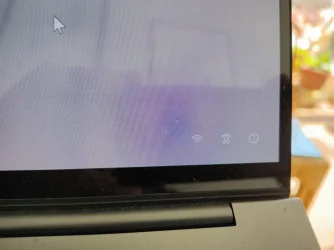
I used my phone to take a picture of my lockscreen.
As one can see, the 3 icons on the bottom right do not include anything about the remaining battery charge.
Can the battery icon (percentage preferred) be included?
How? Thank you.
IMG_20250906_132722.webp
 

My Computer

System One

  • OS
    Windows 11 home version 10.0.22631 Build 22631
    Computer type
    Laptop
    Manufacturer/Model
    Asus/zenbook 14 UX34055MA Q425MA
    CPU
    Intel 7 ultra 155H, 3800 Mhz, 16 Cores, 22 logical proc
    Motherboard
    ASUTEK
    Memory
    16
    Hard Drives
    1TB
I used my phone to take a picture of my lockscreen.
As one can see, the 3 icons on the bottom right do not include anything about the remaining battery charge.
Can the battery icon (percentage preferred) be included?
How? Thank you.
View attachment 144562
As someone mentioned already, you can't put it on this second portion of the login screen.
 

My Computers

System One System Two

  • OS
    Windows 11 25H2
    Computer type
    Laptop
    Manufacturer/Model
    Alienware 18 Area-51
    CPU
    Intel Core Ultra 9 275HX (24-Core)
    Motherboard
    Alienware
    Memory
    64GB DDR5 6400MT/s
    Graphics Card(s)
    NVIDIA GeForce RTX 5080 and Intel UHD Graphics
    Sound Card
    Onboard, Realtek high-performance Audio chips (ALC3329 & ALC1708))
    Monitor(s) Displays
    300HZ 18-inch QHD 500 nit Comfort View+
    Screen Resolution
    2560 x 1600
    Hard Drives
    2TB NVMe M.2 PCIe Gen 5 SSD
    Case
    Magnesium Alloy
    Cooling
    Advanced Cryo-Tech Quad-Fan Cooling system & large vapor chamber
    Keyboard
    Cherry MX ultra low profile mechanical keyboard with per key AlienFX RGB lighting
    Mouse
    Logitech MX Master 4
    Browser
    Vivaldi (main), Firefox, Chrome, Edge
    Antivirus
    MS Defender and Malwarebytes Free
  • Operating System
    Windows 11 25H2
    Computer type
    Laptop
    Manufacturer/Model
    Microsoft Surface Laptop 7
    CPU
    Qualcomm Snapdragon X Elite (12 Core) ARM based CPU
    Motherboard
    Microsoft Corp.
    Memory
    16GB LPDDR5
    Graphics card(s)
    Qualcomm Adreno X1-85
    Sound Card
    Omnisonic speakers with Dolby Atmos spatial sound
    Monitor(s) Displays
    120 Hz 13.8-inch 600 nit PixelSense Flow touchscreen
    Screen Resolution
    2304x1536
    Hard Drives
    1TB NVMe Gen 4 SSD
    Case
    Anodized Aluminum
    Cooling
    Traditional active cooling fan system
    Keyboard
    Mechanical QWERTY, backlit when in use
    Mouse
    Logitech MX Master 4 and Surface Arc Mouse
    Browser
    Vivaldi (main), Firefox, Chrome, Edge
    Antivirus
    MS Defender and Malwarebytes Free
I used my phone to take a picture of my lockscreen.
As one can see, the 3 icons on the bottom right do not include anything about the remaining battery charge.
Can the battery icon (percentage preferred) be included?
How? Thank you.
View attachment 144562

Which W11 build do you currently have installed on that laptop?

It will not be on the sign-in screen that you see after dismissing the lock screen (Win+L). Only on the lock screen like below.

lock_screen_battery-webp.144551
 
Last edited:

My Computers

System One System Two

  • OS
    Windows 11 Pro for Workstations
    Computer type
    PC/Desktop
    Manufacturer/Model
    Custom self build
    CPU
    Intel i7-8700K 5 GHz
    Motherboard
    ASUS ROG Maximus XI Formula Z390
    Memory
    64 GB (4x16GB) G.SKILL TridentZ RGB DDR4 3600 MHz (F4-3600C18D-32GTZR)
    Graphics Card(s)
    ASUS ROG-STRIX-GTX1080TI-O11G-GAMING (11GB GDDR5X)
    Sound Card
    Integrated Digital Audio (S/PDIF)
    Monitor(s) Displays
    2 x Samsung Odyssey G75 27"
    Screen Resolution
    2560x1440
    Hard Drives
    1TB Samsung 990 PRO M.2,
    4TB Samsung 990 PRO M.2,
    TerraMaster F8 SSD Plus NAS
    PSU
    Seasonic Prime Titanium 850W
    Case
    Thermaltake Core P3 wall mounted
    Cooling
    Corsair Hydro H115i
    Keyboard
    Amazon Basics Wired Full Keyboard MD005
    Mouse
    Logitech MX Master 4
    Internet Speed
    2 Gbps Download and 100 Mbps Upload
    Browser
    Chrome and Edge
    Antivirus
    Microsoft Defender
    Other Info
    Logitech Z625 speaker system,
    Logitech BRIO 4K Pro webcam,
    HP Color LaserJet Pro MFP M477fdn,
    CyberPower CP1500PFCLCD
    Galaxy S23 Plus phone
  • Operating System
    Windows 11 Pro
    Computer type
    Laptop
    Manufacturer/Model
    Surface Laptop 7 Copilot+ PC
    CPU
    Snapdragon X Elite (12 core) 3.42 GHz
    Memory
    16 GB LPDDR5x-7467 MHz
    Monitor(s) Displays
    15" HDR
    Screen Resolution
    2496 x 1664
    Hard Drives
    1 TB SSD
    Internet Speed
    Wi-Fi 7 and Bluetooth 5.4
    Browser
    Chrome and Edge
    Antivirus
    Microsoft Defender
OK. It was a misunderstanding on my part.
On my laptop, as soon as I lift the laptop cover I immediately get to the screen I pictured above. No prior screen. Because the prior screen does not appear I forgot that it may have once existed. So we were talking across each other. The screen I imaged above is for me the first screen I see. That explains my confusion.

I now understand that the battery percentage does not appear on that screen. That's OK. I was just wondering if it was possible and nnow I know it is not.

Thank you all for helping despite my using the wrong term to describe my opening screen.

Brink, you asked:
Edition Windows 11 Pro
Version 24H2
Installed on ‎12/‎13/‎2024
OS build 26100.4946
Experience Windows Feature Experience Pack 1000.26100.197.0
 

My Computer

System One

  • OS
    Windows 11 home version 10.0.22631 Build 22631
    Computer type
    Laptop
    Manufacturer/Model
    Asus/zenbook 14 UX34055MA Q425MA
    CPU
    Intel 7 ultra 155H, 3800 Mhz, 16 Cores, 22 logical proc
    Motherboard
    ASUTEK
    Memory
    16
    Hard Drives
    1TB
:shawn:
 

My Computers

System One System Two

  • OS
    Windows 11 Pro for Workstations
    Computer type
    PC/Desktop
    Manufacturer/Model
    Custom self build
    CPU
    Intel i7-8700K 5 GHz
    Motherboard
    ASUS ROG Maximus XI Formula Z390
    Memory
    64 GB (4x16GB) G.SKILL TridentZ RGB DDR4 3600 MHz (F4-3600C18D-32GTZR)
    Graphics Card(s)
    ASUS ROG-STRIX-GTX1080TI-O11G-GAMING (11GB GDDR5X)
    Sound Card
    Integrated Digital Audio (S/PDIF)
    Monitor(s) Displays
    2 x Samsung Odyssey G75 27"
    Screen Resolution
    2560x1440
    Hard Drives
    1TB Samsung 990 PRO M.2,
    4TB Samsung 990 PRO M.2,
    TerraMaster F8 SSD Plus NAS
    PSU
    Seasonic Prime Titanium 850W
    Case
    Thermaltake Core P3 wall mounted
    Cooling
    Corsair Hydro H115i
    Keyboard
    Amazon Basics Wired Full Keyboard MD005
    Mouse
    Logitech MX Master 4
    Internet Speed
    2 Gbps Download and 100 Mbps Upload
    Browser
    Chrome and Edge
    Antivirus
    Microsoft Defender
    Other Info
    Logitech Z625 speaker system,
    Logitech BRIO 4K Pro webcam,
    HP Color LaserJet Pro MFP M477fdn,
    CyberPower CP1500PFCLCD
    Galaxy S23 Plus phone
  • Operating System
    Windows 11 Pro
    Computer type
    Laptop
    Manufacturer/Model
    Surface Laptop 7 Copilot+ PC
    CPU
    Snapdragon X Elite (12 core) 3.42 GHz
    Memory
    16 GB LPDDR5x-7467 MHz
    Monitor(s) Displays
    15" HDR
    Screen Resolution
    2496 x 1664
    Hard Drives
    1 TB SSD
    Internet Speed
    Wi-Fi 7 and Bluetooth 5.4
    Browser
    Chrome and Edge
    Antivirus
    Microsoft Defender
I used my phone to take a picture of my lockscreen.
As one can see, the 3 icons on the bottom right do not include anything about the remaining battery charge.
Can the battery icon (percentage preferred) be included?
How? Thank you.
View attachment 144562

This is not your lock screen. This is a picture of your login screen (the next one after the lock screen). But what does your lock screen look like? Can you take a picture of that? I.e. log in, then press Win+L and then take a picture without touching any other key.
 

My Computer

System One

  • OS
    Windows 11 Pro
    Computer type
    PC/Desktop
    CPU
    Intel(R) Core(TM) i7-5930K CPU @ 3.50GHz
    Motherboard
    EVGA X99 Micro
    Graphics Card(s)
    NVIDIA GeForce GTX 970

Latest Support Threads

Back
Top Bottom