
- Local time
- 3:48 AM
- Posts
- 176
- OS
- Windows 11 Pro Version 25H2 (OS Build 26200.9445)
Hi All -
I wasn't sure where to put this, or if this is even a Win 11 problem, but here it is: I updated my Nvidia RTX 3060 12GB video graphics driver today, as my video editing program, DaVinci Resolve, would not update without the updated driver. A few minor (hopefully temporary glitches happened afterwards, like the notepad program refusing to close, and a blank screen after the lock screen on startup for a scary amount of time), but otherwise everything seems to be happy but one thing. I have a shortcut on my desktop to trigger my ribbons.scr Windows screensaver (in system32), and use a keyboard shortcut of cntrl-alt-x to trigger it. The shortcut itself works if I double-click it, or click it and hit enter, but the shortcut keys for the screensaver now do not work. I have tried completely replacing the shortcut, and re-installing the shortcut keys, and starting and restarting the computer, to no avail. The results are the same. Is this a Windows 11 problem? Or an Nvidia problem? Is there a fix?
I wasn't sure where to put this, or if this is even a Win 11 problem, but here it is: I updated my Nvidia RTX 3060 12GB video graphics driver today, as my video editing program, DaVinci Resolve, would not update without the updated driver. A few minor (hopefully temporary glitches happened afterwards, like the notepad program refusing to close, and a blank screen after the lock screen on startup for a scary amount of time), but otherwise everything seems to be happy but one thing. I have a shortcut on my desktop to trigger my ribbons.scr Windows screensaver (in system32), and use a keyboard shortcut of cntrl-alt-x to trigger it. The shortcut itself works if I double-click it, or click it and hit enter, but the shortcut keys for the screensaver now do not work. I have tried completely replacing the shortcut, and re-installing the shortcut keys, and starting and restarting the computer, to no avail. The results are the same. Is this a Windows 11 problem? Or an Nvidia problem? Is there a fix?
- Windows Build/Version
- Windows 11 Pro Version 24H2 (OS Build 26100.4946)
Attachments
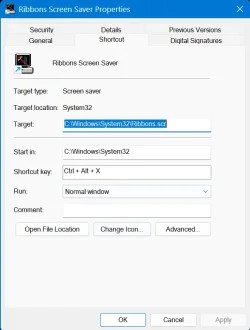
My Computers
-
At a glance
Windows 11 Pro Version 25H2 (OS Build 26200.9...i9 12th Generation64GBPNY 3060 12GB- OS
- Windows 11 Pro Version 25H2 (OS Build 26200.9445)
- Computer type
- PC/Desktop
- Manufacturer/Model
- Dell 8950
- CPU
- i9 12th Generation
- Memory
- 64GB
- Graphics Card(s)
- PNY 3060 12GB
- Monitor(s) Displays
- NEC EA27IU
- Screen Resolution
- 3840X2160
- Hard Drives
- SSD internal, external drives
- Cooling
- Advanced Air Cooling
- Keyboard
- Microsoft
- Mouse
- Logitech
- Internet Speed
- High-Speed
- Browser
- MS Edge
- Antivirus
- Norton 360
-
At a glance
Win 11 Pro 25H2 (OS Build 26200.9168)Intel Ultra 7 265 (20 cores) processor32GB DDR5 RamBuilt-in Intel UHD Graphics- Operating System
- Win 11 Pro 25H2 (OS Build 26200.9168)
- Computer type
- PC/Desktop
- Manufacturer/Model
- Dell Tower ECT1250
- CPU
- Intel Ultra 7 265 (20 cores) processor
- Memory
- 32GB DDR5 Ram
- Graphics card(s)
- Built-in Intel UHD Graphics
- Sound Card
- Built-in
- Screen Resolution
- 1920X1080
- Hard Drives
- 2TB internal SSD
- Case
- Tower






