
Since Updating Nvidia driver, shortcut keys to screensaver inoperative ...


archfoto

Well-known member
Member
VIP
Local time
10:25 PM
Posts
167
OS
Windows 11 Pro Version 25H2 (OS Build 26200.8457)
Hi All -
I wasn't sure where to put this, or if this is even a Win 11 problem, but here it is: I updated my Nvidia RTX 3060 12GB video graphics driver today, as my video editing program, DaVinci Resolve, would not update without the updated driver. A few minor (hopefully temporary glitches happened afterwards, like the notepad program refusing to close, and a blank screen after the lock screen on startup for a scary amount of time), but otherwise everything seems to be happy but one thing. I have a shortcut on my desktop to trigger my ribbons.scr Windows screensaver (in system32), and use a keyboard shortcut of cntrl-alt-x to trigger it. The shortcut itself works if I double-click it, or click it and hit enter, but the shortcut keys for the screensaver now do not work. I have tried completely replacing the shortcut, and re-installing the shortcut keys, and starting and restarting the computer, to no avail. The results are the same. Is this a Windows 11 problem? Or an Nvidia problem? Is there a fix?
 
Windows Build/Version
Windows 11 Pro Version 24H2 (OS Build 26100.4946)

Attachments
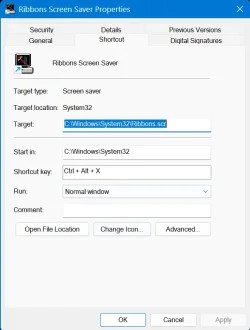
  • Screenshot 2025-08-20 160256.webp
    Screenshot 2025-08-20 160256.webp
    29.6 KB · Views: 3

My Computers

System One System Two

  • OS
    Windows 11 Pro Version 25H2 (OS Build 26200.8457)
    Computer type
    PC/Desktop
    Manufacturer/Model
    Dell 8950
    CPU
    i9 12th Generation
    Memory
    64GB
    Graphics Card(s)
    PNY 3060 12GB
    Monitor(s) Displays
    NEC EA27IU
    Screen Resolution
    3840X2160
    Hard Drives
    SSD internal, external drives
    Cooling
    Advanced Air Cooling
    Keyboard
    Microsoft
    Mouse
    Logitech
    Internet Speed
    High-Speed
    Browser
    MS Edge
    Antivirus
    Norton 360
  • Operating System
    Win 11 Pro 25H2 (OS Build 26200.8457)
    Computer type
    PC/Desktop
    Manufacturer/Model
    Dell Tower ECT1250
    CPU
    Intel Ultra 7 265 (20 cores) processor
    Memory
    32GB DDR5 Ram
    Graphics card(s)
    Built-in Intel UHD Graphics
    Sound Card
    Built-in
    Screen Resolution
    1920X1080
    Hard Drives
    2TB internal SSD
    Case
    Tower
Or an Nvidia problem?

One way to find out would be to roll back the last update that you recall the shortcut stopped working.

Is this a Windows 11 problem?

Probably goes the same for the last Windows Cumulative Update, also.

I’d probably try the Nvidia update first.
 

My Computers

System One System Two

  • OS
    Windows 11 Pro 25H2 Build 26200.8655
    Computer type
    PC/Desktop
    Manufacturer/Model
    Sin-built 2013
    CPU
    Intel(R) Core(TM) i7-4770K CPU @ 3.50GHz
    Motherboard
    ASUS ROG Maximus VI Formula
    Memory
    32.0 GB of I forget and the box is in storage.
    Graphics Card(s)
    Gigabyte nVidia GeForce GTX 1660 Super OC 6GB
    Sound Card
    Onboard thingy
    Monitor(s) Displays
    5 x LG 25MS500-B - 1 x 24MK430H-B - 1 x Wacom Pro 22" Touch Screen Tablet
    Screen Resolution
    All over the place
    Hard Drives
    Too many to list.
    OS on Samsung 1TB 870 QVO SATA
    PSU
    Silverstone 1500
    Case
    NZXT Phantom 820 Full-Tower Case
    Cooling
    Noctua NH-D15 Elite Class Dual Tower CPU Cooler / 6 x EziDIY 120mm / 2 x Corsair 140mm somethings / 1 x 140mm Thermaltake something / 2 x 200mm Corsair.
    Keyboard
    Corsair K95 / Logitech diNovo Edge Wireless
    Mouse
    Logitech: G402 / G502 / Mx Masters / Mx Air Cordless
    Internet Speed
    2000/500Mbps
    Browser
    All sorts
    Antivirus
    Kaspersky Premium
    Other Info
    ㅤㅤㅤㅤㅤㅤㅤㅤㅤㅤㅤㅤㅤㅤㅤㅤㅤㅤㅤㅤㅤㅤㅤㅤㅤㅤㅤㅤㅤㅤㅤㅤㅤㅤㅤㅤㅤㅤㅤㅤ⠀⠀⠀⠀⠀⠀⠀⠀⠀⠀
    TP-Link BE9300 WiFi 7 Bluetooth 5.4 (Archer TBE550E)
    TP-Link TX201 V1 2.5GB Lan

    Grandstream HT812 - VoIP
    ASUS DSL-AX82U - Mesh
    ASUS RT-AC68U - Mesh
    ASUS RT-BE88U Router

    Brother MFC-L2880DW Printer

    I’m on a horse.
  • Operating System
    Windows 11 Pro 25H2 Build 26200.8655
    Computer type
    Laptop
    Manufacturer/Model
    LENOVO Yoga 7 14IRL8 - 7i EVO OLED 14" Touchscreen i5 12 Core 16GB/512GB
    CPU
    Intel Core 12th Gen i5-1240P Processor (1.7 - 4.4GHz)
    Memory
    16GB LPDDR5 RAM
    Graphics card(s)
    Intel Iris Xe Graphics Processor
    Sound Card
    Optimized with Dolby Atmos®
    Screen Resolution
    QHD 2880 x 1800 OLED
    Hard Drives
    M.2 512GB
    Antivirus
    Defender / Malwarebytes
    Other Info
    …still on a horse.
Hi antspants-

Thanks.

I don't know if I had the problem after the last Win update (I've actually had 2 in 2 days) a short while ago. It is an automatic thing when I am leaving my home computer for a few minutes, I normally just use one hand to trip all three keys, and the screensaver shows up. So, I don't necessarily want to roll back the update. I can't roll back today's driver update as I will lose the update on my video editing program which is part of my workflow. Everything else seems to be working at the moment.

Here's what is strange: If I open properties on the desktop, like the screenshot I posted on the forum, the shortcut keys will work, but if properties are closed, then, no screensaver. If I am in Google Chrome (full screen or windows), or in my email client, or other programs, the screensaver will be triggered. This is the weirdest problem! It just won't trigger if I am on the desktop only!
While I would like a fix for this, I may just have to adapt to this weirdness. I was hoping someone had run across this strange problem before, and found a fix. Sometimes subsequent updates will fix these things, like for several months last year, I would get a momentary black and white small checkerboard showing up in some graphics, then disappear. I haven't seen that one for a while.

Thanks again.
 

My Computers

System One System Two

  • OS
    Windows 11 Pro Version 25H2 (OS Build 26200.8457)
    Computer type
    PC/Desktop
    Manufacturer/Model
    Dell 8950
    CPU
    i9 12th Generation
    Memory
    64GB
    Graphics Card(s)
    PNY 3060 12GB
    Monitor(s) Displays
    NEC EA27IU
    Screen Resolution
    3840X2160
    Hard Drives
    SSD internal, external drives
    Cooling
    Advanced Air Cooling
    Keyboard
    Microsoft
    Mouse
    Logitech
    Internet Speed
    High-Speed
    Browser
    MS Edge
    Antivirus
    Norton 360
  • Operating System
    Win 11 Pro 25H2 (OS Build 26200.8457)
    Computer type
    PC/Desktop
    Manufacturer/Model
    Dell Tower ECT1250
    CPU
    Intel Ultra 7 265 (20 cores) processor
    Memory
    32GB DDR5 Ram
    Graphics card(s)
    Built-in Intel UHD Graphics
    Sound Card
    Built-in
    Screen Resolution
    1920X1080
    Hard Drives
    2TB internal SSD
    Case
    Tower
Funny you mention this as I noticed my screen saver short cut key and the keyboard macro key with the same short cut keys in it won't work any longer. My last NVIDIA driver is 573.24 from the Dell Support Site though. The screen saver still functions fine on an idle timer though.
 

My Computers

System One System Two

  • OS
    Windows 11 25H2
    Computer type
    Laptop
    Manufacturer/Model
    Alienware 18 Area-51
    CPU
    Intel Core Ultra 9 275HX (24-Core)
    Motherboard
    Alienware
    Memory
    64GB DDR5 6400MT/s
    Graphics Card(s)
    NVIDIA GeForce RTX 5080 and Intel UHD Graphics
    Sound Card
    Onboard, Realtek high-performance Audio chips (ALC3329 & ALC1708))
    Monitor(s) Displays
    300HZ 18-inch QHD 500 nit Comfort View+
    Screen Resolution
    2560 x 1600
    Hard Drives
    2TB NVMe M.2 PCIe Gen 5 SSD
    Case
    Magnesium Alloy
    Cooling
    Advanced Cryo-Tech Quad-Fan Cooling system & large vapor chamber
    Keyboard
    Cherry MX ultra low profile mechanical keyboard with per key AlienFX RGB lighting
    Mouse
    Logitech MX Master 4
    Browser
    Vivaldi (main), Firefox, Chrome, Edge
    Antivirus
    MS Defender and Malwarebytes Free
  • Operating System
    Windows 11 25H2
    Computer type
    Laptop
    Manufacturer/Model
    Microsoft Surface Laptop 7
    CPU
    Qualcomm Snapdragon X Elite (12 Core) ARM based CPU
    Motherboard
    Microsoft Corp.
    Memory
    16GB LPDDR5
    Graphics card(s)
    Qualcomm Adreno X1-85
    Sound Card
    Omnisonic speakers with Dolby Atmos spatial sound
    Monitor(s) Displays
    120 Hz 13.8-inch 600 nit PixelSense Flow touchscreen
    Screen Resolution
    2304x1536
    Hard Drives
    1TB NVMe Gen 4 SSD
    Case
    Anodized Aluminum
    Cooling
    Traditional active cooling fan system
    Keyboard
    Mechanical QWERTY, backlit when in use
    Mouse
    Logitech MX Master 4 and Surface Arc Mouse
    Browser
    Vivaldi (main), Firefox, Chrome, Edge
    Antivirus
    MS Defender and Malwarebytes Free
By the way to make it weirder I just discovered that while it won't work with just the desktop showing it will work if there is any open window on the screen when you hotkey. You may want to check if that happens with yours.

Edit: just had time to read your whole response and see yours behaves exactly the same way .
 
Last edited:

My Computers

System One System Two

  • OS
    Windows 11 25H2
    Computer type
    Laptop
    Manufacturer/Model
    Alienware 18 Area-51
    CPU
    Intel Core Ultra 9 275HX (24-Core)
    Motherboard
    Alienware
    Memory
    64GB DDR5 6400MT/s
    Graphics Card(s)
    NVIDIA GeForce RTX 5080 and Intel UHD Graphics
    Sound Card
    Onboard, Realtek high-performance Audio chips (ALC3329 & ALC1708))
    Monitor(s) Displays
    300HZ 18-inch QHD 500 nit Comfort View+
    Screen Resolution
    2560 x 1600
    Hard Drives
    2TB NVMe M.2 PCIe Gen 5 SSD
    Case
    Magnesium Alloy
    Cooling
    Advanced Cryo-Tech Quad-Fan Cooling system & large vapor chamber
    Keyboard
    Cherry MX ultra low profile mechanical keyboard with per key AlienFX RGB lighting
    Mouse
    Logitech MX Master 4
    Browser
    Vivaldi (main), Firefox, Chrome, Edge
    Antivirus
    MS Defender and Malwarebytes Free
  • Operating System
    Windows 11 25H2
    Computer type
    Laptop
    Manufacturer/Model
    Microsoft Surface Laptop 7
    CPU
    Qualcomm Snapdragon X Elite (12 Core) ARM based CPU
    Motherboard
    Microsoft Corp.
    Memory
    16GB LPDDR5
    Graphics card(s)
    Qualcomm Adreno X1-85
    Sound Card
    Omnisonic speakers with Dolby Atmos spatial sound
    Monitor(s) Displays
    120 Hz 13.8-inch 600 nit PixelSense Flow touchscreen
    Screen Resolution
    2304x1536
    Hard Drives
    1TB NVMe Gen 4 SSD
    Case
    Anodized Aluminum
    Cooling
    Traditional active cooling fan system
    Keyboard
    Mechanical QWERTY, backlit when in use
    Mouse
    Logitech MX Master 4 and Surface Arc Mouse
    Browser
    Vivaldi (main), Firefox, Chrome, Edge
    Antivirus
    MS Defender and Malwarebytes Free
By the way to make it weirder I just discovered that while it won't work with just the desktop showing it will work if there is any open window on the screen when you hotkey. You may want to check if that happens with yours.

Edit: just had time to read your whole response and see yours behaves exactly the same way .
Hi FrancoDT -

Thanks for your input.

It's somehow good to know I'm not alone, because this anomaly sounds crazy. One of the reasons I had to update is because DaVinci Resolve has some new, powerful features that I think have to do with AI, and the old driver just wasn't adequate. I watched something on YouTube, suggesting this. I also wrote feedback to Nvidia, to see if they had the answer. If I get an answer, I will post it here.
 

My Computers

System One System Two

  • OS
    Windows 11 Pro Version 25H2 (OS Build 26200.8457)
    Computer type
    PC/Desktop
    Manufacturer/Model
    Dell 8950
    CPU
    i9 12th Generation
    Memory
    64GB
    Graphics Card(s)
    PNY 3060 12GB
    Monitor(s) Displays
    NEC EA27IU
    Screen Resolution
    3840X2160
    Hard Drives
    SSD internal, external drives
    Cooling
    Advanced Air Cooling
    Keyboard
    Microsoft
    Mouse
    Logitech
    Internet Speed
    High-Speed
    Browser
    MS Edge
    Antivirus
    Norton 360
  • Operating System
    Win 11 Pro 25H2 (OS Build 26200.8457)
    Computer type
    PC/Desktop
    Manufacturer/Model
    Dell Tower ECT1250
    CPU
    Intel Ultra 7 265 (20 cores) processor
    Memory
    32GB DDR5 Ram
    Graphics card(s)
    Built-in Intel UHD Graphics
    Sound Card
    Built-in
    Screen Resolution
    1920X1080
    Hard Drives
    2TB internal SSD
    Case
    Tower

Latest Support Threads

Back
Top Bottom




