Snipping Tool for Win 11


Pnokio

Well-known member
Member
Local time
12:10 AM
Posts
360
Location
Scotland UK
OS
Windows 11 Home 25H2 64-Bit
Is it accessible?
 

My Computer My Computer

At a glance

Windows 11 Home 25H2 64-BitIntel(R) Core(TM) i5-1035G1 CPU @ 1.00GHz 1.1...8.00GB HDDStandard Monitor on Intel UHD Graphics
OS
Windows 11 Home 25H2 64-Bit
Computer type
Laptop
Manufacturer/Model
asus f515ja
CPU
Intel(R) Core(TM) i5-1035G1 CPU @ 1.00GHz 1.19 GHz
Motherboard
ASUSTeK COMPUTER INC. X515JA (U3E1)
Memory
8.00GB HDD
Graphics Card(s)
Standard Monitor on Intel UHD Graphics
Sound Card
Realtek HDA
Screen Resolution
1366 x 768 x 60
Hard Drives
1HDD 2 Partitions
Mouse
Logitech Cordless
Internet Speed
38mbps
Browser
Chrome+FF
Antivirus
Malwarebytes (Premium)
Other Info
When I find it.
It works for me.
 

My Computers My Computers

  • At a glance

    Windows 11 Pro 25H2 26200.9168i9-10900 10 core 20 threads32 gbnone-Intel UHD Graphics 630
    OS
    Windows 11 Pro 25H2 26200.9168
    Computer type
    PC/Desktop
    Manufacturer/Model
    Dell Optiplex 7080
    CPU
    i9-10900 10 core 20 threads
    Motherboard
    DELL 0J37VM
    Memory
    32 gb
    Graphics Card(s)
    none-Intel UHD Graphics 630
    Sound Card
    Integrated Realtek
    Monitor(s) Displays
    Benq 27
    Screen Resolution
    2560x1440
    Hard Drives
    2x1tb Solidigm m.2 nvme /External drives 512gb Samsung m.2 sata+2tb Kingston m2.nvme
    PSU
    500w
    Case
    MT
    Cooling
    Dell Premium
    Keyboard
    Logitech wired
    Mouse
    Logitech wireless
    Internet Speed
    so slow I'm too embarrassed to tell
    Browser
    #1 Edge #2 Firefox
    Antivirus
    Defender+MWB Premium
  • At a glance

    Windows 11 Pro 24H2 26200.9168AMD Ryzen 7 6800U32 gbintegrated
    Operating System
    Windows 11 Pro 24H2 26200.9168
    Computer type
    PC/Desktop
    Manufacturer/Model
    Beelink Mini PC SER5
    CPU
    AMD Ryzen 7 6800U
    Memory
    32 gb
    Graphics card(s)
    integrated
    Sound Card
    integrated
    Monitor(s) Displays
    Benq 27
    Screen Resolution
    2560x1440
    Hard Drives
    1TB Crucial nvme
    Keyboard
    Logitech wired
    Mouse
    Logitech wireless
    Internet Speed
    still too embarrassed to tell
    Browser
    Firefox
    Antivirus
    Defender
  • System 3 is non compliant Dell 9020 i7-4770/24gb ram Win11 PRO 26200.9168

My Computers My Computers

  • At a glance

    Windows 11 HomeAMD Athlon Silver 3050U8GBRadeon Graphics
    OS
    Windows 11 Home
    Computer type
    Laptop
    Manufacturer/Model
    Acer Aspire 3 A315-23-R9VY
    CPU
    AMD Athlon Silver 3050U
    Memory
    8GB
    Graphics Card(s)
    Radeon Graphics
    Monitor(s) Displays
    laptop screen
    Screen Resolution
    1366x768 native resolution, up to 2560x1440 with Radeon Virtual Super Resolution
    Hard Drives
    1TB Samsung EVO 870 SSD (from April 2026: 250GB EVO 850)
    Internet Speed
    150 Mbps
    Browser
    Edge, Firefox
    Antivirus
    Defender
    Other Info
    UPDATE - 11 April 2026: due to lid hinges starting to break up this laptop has been retired from active duty. The OS with all software and files has been migrated to my System Seven in 'Other systems' to carry on as my general purpose 'main machine'.

    I've now clean installed 25H2 and used Garlin's scripts to update Secure Boot to CA 2023 and revoke the PCA 2011 certificates. It's new role is to test secure boot issues.

    Info for 2021-2026:
    fully 'Windows 11 ready' laptop. Windows 10 C: partition migrated from my old unsupported 'main machine' then upgraded to 11. A test migration ran Insider builds for 2 months. When 11 was released on 5th October 2021 it was re-imaged back to 10 and was offered the upgrade in Windows Update on 20th October. Windows Update offered the 22H2 Feature Update on 20th September 2022. It got the 23H2 Feature Update on 4th November 2023 through Windows Update, 24H2 on 3rd October 2024 through Windows Update by setting the Target Release Version for 24H2, and 25H2 on 30th September 2025 through Windows Update by setting the Target Release Version for 25H2.
  • At a glance

    Windows 11 ProIntel® Core™ i5-520M8GB(integrated graphics) Intel HD Graphics
    Operating System
    Windows 11 Pro
    Computer type
    Laptop
    Manufacturer/Model
    Dell Latitude E4310
    CPU
    Intel® Core™ i5-520M
    Motherboard
    0T6M8G
    Memory
    8GB
    Graphics card(s)
    (integrated graphics) Intel HD Graphics
    Screen Resolution
    1366x768
    Hard Drives
    500GB Crucial MX500 SSD
    Browser
    Firefox, Edge
    Antivirus
    Defender
    Other Info
    unsupported machine: Legacy bios, MBR, TPM 1.2, upgraded from W10 to W11 using W10/W11 hybrid install media workaround.

    In-place upgrade to 22H2 using ISO and a workaround.
    Feature Update to 23H2 by manually installing the Enablement Package.
    In-place upgrade to 24H2 using hybrid 23H2/24H2 install media.
    Upgraded to 25H2 by Enablement Package.

    Also running Insider Experimental 263xx and 29xxx builds and Windows 10 as native boot .vhdx.
  • My SYSTEM THREE is a Dell Latitude 5410, i7-10610U, 32GB RAM, 512GB NVMe ssd, supported device running Windows 11 Pro.

    My SYSTEM FOUR was a 2-in-1 convertible Lenovo Yoga 11e (1st gen) type 20DA, Celeron N2930, 8GB RAM, 256GB ssd. Unsupported device. This has now been sold. It has been replaced by my System Eight.

    My SYSTEM FIVE is a Dell Latitude 3190 2-in-1, Pentium Silver N5030, 8GB RAM, 1TB NVMe ssd, supported device running Windows 11 Pro, plus Insider Beta, Experimental 263xx and 29xxx builds (and a few others) as a native boot .vhdx.

    My SYSTEM SIX is a Dell Latitude 5550, Core Ultra 7 165H, 64GB RAM, 1TB NVMe SSD, supported device, Windows 11 Pro, Hyper-V host machine. Updated to 25H2 on 30th September 2025.

    My SYSTEM SEVEN is a Lenovo Thinkpad T580, 1920x1080 touchscreen, Intel Core i7-8650U, 16GB RAM, 512GB NVMe SSD + 2nd 512GB NVMe SSD, a supported device for Windows 11. This is my current general purpose 'main machine'. The installed Windows 11 Home from my System One has been migrated to this machine. As its new home has an existing digital licence for Pro I've been able to upgrade the migrated OS from Home to Pro.

    My SYSTEM EIGHT is a 2-in-1 convertible Lenovo Yoga 11e (5th gen) type 20LN, Celeron N4120, 8GB RAM, 512GB NVMe ssd, a supported device for Windows 11. Currently running Windows 11 Pro, plus Insider Beta, Experimental 263xx and 29xxx builds as native boot vhdx.

Hey, Yeah it works fine for me at the minute, Not had any issues previous to be fair either
 

My Computer My Computer

At a glance

11[email protected]Viper Steelseries 32gb@ 3600mhzGigabyte 2070 Super 8GB, +200 core + 600 memory
OS
11
Computer type
PC/Desktop
Manufacturer/Model
Custom
CPU
[email protected]
Motherboard
Gigabyte Gaming X Z490
Memory
Viper Steelseries 32gb@ 3600mhz
Graphics Card(s)
Gigabyte 2070 Super 8GB, +200 core + 600 memory
Monitor(s) Displays
ASUS 4k HDR, Two 1080p Benq and Samsung
Screen Resolution
3840x2160/2560x1440/1920x1080
Hard Drives
Adata XPG SX8200 PRO 1tb
Samsung EVO 870 500GB
PSU
Corsair RX 650
Case
NZXT h510
Cooling
CM HYPER 212 RGB
Keyboard
Razer Ornata Chroma
Mouse
Steelseries Rival 710
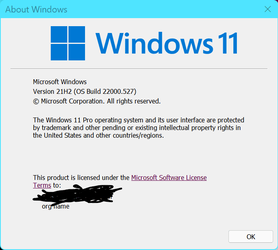
In earlier versions of 11 there were bugs in the snipping tool. Make sure you are running the latest build of 11
 

Attachments

  • version.png
    version.png
    11.9 KB · Views: 0

My Computers My Computers

  • At a glance

    Windows 11 Pro 25H2 26200.9168i9-10900 10 core 20 threads32 gbnone-Intel UHD Graphics 630
    OS
    Windows 11 Pro 25H2 26200.9168
    Computer type
    PC/Desktop
    Manufacturer/Model
    Dell Optiplex 7080
    CPU
    i9-10900 10 core 20 threads
    Motherboard
    DELL 0J37VM
    Memory
    32 gb
    Graphics Card(s)
    none-Intel UHD Graphics 630
    Sound Card
    Integrated Realtek
    Monitor(s) Displays
    Benq 27
    Screen Resolution
    2560x1440
    Hard Drives
    2x1tb Solidigm m.2 nvme /External drives 512gb Samsung m.2 sata+2tb Kingston m2.nvme
    PSU
    500w
    Case
    MT
    Cooling
    Dell Premium
    Keyboard
    Logitech wired
    Mouse
    Logitech wireless
    Internet Speed
    so slow I'm too embarrassed to tell
    Browser
    #1 Edge #2 Firefox
    Antivirus
    Defender+MWB Premium
  • At a glance

    Windows 11 Pro 24H2 26200.9168AMD Ryzen 7 6800U32 gbintegrated
    Operating System
    Windows 11 Pro 24H2 26200.9168
    Computer type
    PC/Desktop
    Manufacturer/Model
    Beelink Mini PC SER5
    CPU
    AMD Ryzen 7 6800U
    Memory
    32 gb
    Graphics card(s)
    integrated
    Sound Card
    integrated
    Monitor(s) Displays
    Benq 27
    Screen Resolution
    2560x1440
    Hard Drives
    1TB Crucial nvme
    Keyboard
    Logitech wired
    Mouse
    Logitech wireless
    Internet Speed
    still too embarrassed to tell
    Browser
    Firefox
    Antivirus
    Defender
  • System 3 is non compliant Dell 9020 i7-4770/24gb ram Win11 PRO 26200.9168
Yup
1645078962464.png
 

My Computers My Computers

  • At a glance

    Win 11 Pro 25H2 26200.9168Intel® Core™ i7-14700KG.SKILL Ripjaws S5 Series 64GB (2 x 32GB) DDR5ASUS GeForce RTX 4070 Super 12GB
    OS
    Win 11 Pro 25H2 26200.9168
    Computer type
    PC/Desktop
    Manufacturer/Model
    Self Built
    CPU
    Intel® Core™ i7-14700K
    Motherboard
    ASUS TUF Z690-PLUS WIFI (BIOS 4505)
    Memory
    G.SKILL Ripjaws S5 Series 64GB (2 x 32GB) DDR5
    Graphics Card(s)
    ASUS GeForce RTX 4070 Super 12GB
    Sound Card
    Sound Blaster AE-5 Plus
    Monitor(s) Displays
    ASUS TUF Gaming 27" 2K HDR Gaming
    Screen Resolution
    2560 x 1440
    Hard Drives
    Samsung 990 Pro 1TB NVMe (Win 11 25H2)
    SK hynix P41 500GB NVMe
    SK hynix P41 2TB NVMe (x3)
    Crucial P3 Plus 4TB
    PSU
    Corsair RM850x Shift
    Case
    Antec Dark Phantom DP502 FLUX
    Cooling
    Corsair Nautilus 360 RS AIO
    Keyboard
    Logitech MK 320
    Mouse
    Razer Basilisk V3
    Internet Speed
    750Mbs
    Browser
    Firefox
    Antivirus
    Winows Security
    Other Info
    MR 8.1 Home
  • At a glance

    Win 11 Pro 25H2 26200.9168Intel Core i5-1140064 GB DDR4MSI GeForce RTX 3060 Ventus 2X 12GB
    Operating System
    Win 11 Pro 25H2 26200.9168
    Computer type
    PC/Desktop
    Manufacturer/Model
    Self Built
    CPU
    Intel Core i5-11400
    Motherboard
    Asus TUF Gaming Z590 Plus WiFi (BIOS 2803)
    Memory
    64 GB DDR4
    Graphics card(s)
    MSI GeForce RTX 3060 Ventus 2X 12GB
    Sound Card
    SoundBlaster Audigy Fx V2
    Monitor(s) Displays
    Samsung F27T350
    Screen Resolution
    1920x1080
    Hard Drives
    Samsung 980 Pro 1TB
    Samsung 970 EVO Plus 2TB
    Samsung 870 EVO 500GB SSD
    PSU
    Corsair HX750
    Case
    Cougar MX330-G Window
    Cooling
    Thermalright Frozen Edge 240 Black AIO
    Internet Speed
    350Mbps
    Browser
    Firefox
    Antivirus
    Windows Security
  • System Three
    Win 11 Pro 25H2 26200.9168
    ASUS PRIME Z370-P II BIOS 3004 7/12/21
    Intel Core i7-8700 CPU @ 3.20GHz
    32GB DDR4 RAM (4x8)
    iGPU Intel UHD Graphics 630
    Cooler Master Hyper 212
    Mid-Tower Desktop
Thanks to all for your help. I thought I was destined to use PrtSc then edit it with 'Paint'
 

My Computer My Computer

At a glance

Windows 11 Home 25H2 64-BitIntel(R) Core(TM) i5-1035G1 CPU @ 1.00GHz 1.1...8.00GB HDDStandard Monitor on Intel UHD Graphics
OS
Windows 11 Home 25H2 64-Bit
Computer type
Laptop
Manufacturer/Model
asus f515ja
CPU
Intel(R) Core(TM) i5-1035G1 CPU @ 1.00GHz 1.19 GHz
Motherboard
ASUSTeK COMPUTER INC. X515JA (U3E1)
Memory
8.00GB HDD
Graphics Card(s)
Standard Monitor on Intel UHD Graphics
Sound Card
Realtek HDA
Screen Resolution
1366 x 768 x 60
Hard Drives
1HDD 2 Partitions
Mouse
Logitech Cordless
Internet Speed
38mbps
Browser
Chrome+FF
Antivirus
Malwarebytes (Premium)
Other Info
When I find it.
There is a setting in Settings -> Accessibility -> Keyboard that will allow you to use the "prt sc" key to open screen snipping. I tried it and it seems to work fine. You can snip a screen, window, self defined area. The snipping is in your clipboard. I didn't leave key set to snip, because I accidentally hit that key too often.

I don't have Snipping Tool in my Windows menu. I think I may have uninstalled it some time ago. But I don't use it, so I haven't bothered reinstalling it. Even though it is not installed, the "prt sc" setting still works.

Personally, for graphic editing, I use IrFanVeiw. I have been using it for a lot of years. Within IrFanView you can easily clip, resize, create panoramic views, etc.. Anything you want.
 

My Computers My Computers

  • At a glance

    Windows 11 Home, 25H2, Latest OS BuildIntel(R) Core(TM) i3-8145U CPU @ 2.10GHz 2.30...8GB
    OS
    Windows 11 Home, 25H2, Latest OS Build
    Computer type
    Laptop
    Manufacturer/Model
    HP 15-dw0xx
    CPU
    Intel(R) Core(TM) i3-8145U CPU @ 2.10GHz 2.30 GHz
    Memory
    8GB
    Screen Resolution
    1366 x 768
    Hard Drives
    930 GB
    Keyboard
    Built In
    Mouse
    Wireless Logitech M325S
    Browser
    Chrome 139.0.7258.128
    Antivirus
    Windows Defender
    Other Info
    Cygwin64
  • At a glance

    Windows 10 Home, Version 22H2, Build19045.3693AMD E-300 with Radeon HD Graphics 1.30 GHz10GBRadeon HD Graphics 1.30 GHz
    Operating System
    Windows 10 Home, Version 22H2, Build19045.3693
    Computer type
    PC/Desktop
    Manufacturer/Model
    HP Pavilion
    CPU
    AMD E-300 with Radeon HD Graphics 1.30 GHz
    Memory
    10GB
    Graphics card(s)
    Radeon HD Graphics 1.30 GHz
    Sound Card
    Realtek
    Monitor(s) Displays
    15"
    Screen Resolution
    1280 x 1024
    Hard Drives
    700 GB
    Keyboard
    Wireless
    Mouse
    Wireless
    Browser
    Chrome
    Antivirus
    Windows Defender
    Other Info
    This computer is connected to my IC-735 radio.
Hi

K7MEM I have got snipping tool to work by pressing PrtSc button. I also have a snipping tool installed but its far to advance for me. Sniptool 2.0​


My Computer My Computer

At a glance

Windows 11 Home 25H2 64-BitIntel(R) Core(TM) i5-1035G1 CPU @ 1.00GHz 1.1...8.00GB HDDStandard Monitor on Intel UHD Graphics
OS
Windows 11 Home 25H2 64-Bit
Computer type
Laptop
Manufacturer/Model
asus f515ja
CPU
Intel(R) Core(TM) i5-1035G1 CPU @ 1.00GHz 1.19 GHz
Motherboard
ASUSTeK COMPUTER INC. X515JA (U3E1)
Memory
8.00GB HDD
Graphics Card(s)
Standard Monitor on Intel UHD Graphics
Sound Card
Realtek HDA
Screen Resolution
1366 x 768 x 60
Hard Drives
1HDD 2 Partitions
Mouse
Logitech Cordless
Internet Speed
38mbps
Browser
Chrome+FF
Antivirus
Malwarebytes (Premium)
Other Info
When I find it.
Hi

K7MEM I have got snipping tool to work by pressing PrtSc button. I also have a snipping tool installed but its far to advance for me. Sniptool 2.0​

Well then you might want to try IrFanView (linked in previous post). Although, I have never used Sniptool, so I don't know which one is easier to use.

The best you can do, with either one, is experiment. Grab a image and open it up. They start working around the menus to see what you can do. After a while it all makes sense. And remember, whatever you do to an image, you can always back out with a "undo".
 

My Computers My Computers

  • At a glance

    Windows 11 Home, 25H2, Latest OS BuildIntel(R) Core(TM) i3-8145U CPU @ 2.10GHz 2.30...8GB
    OS
    Windows 11 Home, 25H2, Latest OS Build
    Computer type
    Laptop
    Manufacturer/Model
    HP 15-dw0xx
    CPU
    Intel(R) Core(TM) i3-8145U CPU @ 2.10GHz 2.30 GHz
    Memory
    8GB
    Screen Resolution
    1366 x 768
    Hard Drives
    930 GB
    Keyboard
    Built In
    Mouse
    Wireless Logitech M325S
    Browser
    Chrome 139.0.7258.128
    Antivirus
    Windows Defender
    Other Info
    Cygwin64
  • At a glance

    Windows 10 Home, Version 22H2, Build19045.3693AMD E-300 with Radeon HD Graphics 1.30 GHz10GBRadeon HD Graphics 1.30 GHz
    Operating System
    Windows 10 Home, Version 22H2, Build19045.3693
    Computer type
    PC/Desktop
    Manufacturer/Model
    HP Pavilion
    CPU
    AMD E-300 with Radeon HD Graphics 1.30 GHz
    Memory
    10GB
    Graphics card(s)
    Radeon HD Graphics 1.30 GHz
    Sound Card
    Realtek
    Monitor(s) Displays
    15"
    Screen Resolution
    1280 x 1024
    Hard Drives
    700 GB
    Keyboard
    Wireless
    Mouse
    Wireless
    Browser
    Chrome
    Antivirus
    Windows Defender
    Other Info
    This computer is connected to my IC-735 radio.
My first operating system was Windows XP and have been using the built-in Paint & Snipping Tool.
 

My Computer My Computer

At a glance

Windows 11 Home 25H2 64-BitIntel(R) Core(TM) i5-1035G1 CPU @ 1.00GHz 1.1...8.00GB HDDStandard Monitor on Intel UHD Graphics
OS
Windows 11 Home 25H2 64-Bit
Computer type
Laptop
Manufacturer/Model
asus f515ja
CPU
Intel(R) Core(TM) i5-1035G1 CPU @ 1.00GHz 1.19 GHz
Motherboard
ASUSTeK COMPUTER INC. X515JA (U3E1)
Memory
8.00GB HDD
Graphics Card(s)
Standard Monitor on Intel UHD Graphics
Sound Card
Realtek HDA
Screen Resolution
1366 x 768 x 60
Hard Drives
1HDD 2 Partitions
Mouse
Logitech Cordless
Internet Speed
38mbps
Browser
Chrome+FF
Antivirus
Malwarebytes (Premium)
Other Info
When I find it.
I don't know what the OS was, on the first system I had access to. I was in college (late 60's) and we only had several 50 baud telephone connections to a computer. We didn't know what kind of computer or were it was located. We only knew the phone number. On our end, all we had was a ASR-33 and a dial telephone (oh yea, and a chair). When we connected to the computer, we could only work on, and run, one program. There wasn't any login. Once you connected, you were good to go. Then you could enter your program (Fortran) and run it. But there was no "save" command. Our only storage medium was punched paper tape. Those were fun days.
 

My Computers My Computers

  • At a glance

    Windows 11 Home, 25H2, Latest OS BuildIntel(R) Core(TM) i3-8145U CPU @ 2.10GHz 2.30...8GB
    OS
    Windows 11 Home, 25H2, Latest OS Build
    Computer type
    Laptop
    Manufacturer/Model
    HP 15-dw0xx
    CPU
    Intel(R) Core(TM) i3-8145U CPU @ 2.10GHz 2.30 GHz
    Memory
    8GB
    Screen Resolution
    1366 x 768
    Hard Drives
    930 GB
    Keyboard
    Built In
    Mouse
    Wireless Logitech M325S
    Browser
    Chrome 139.0.7258.128
    Antivirus
    Windows Defender
    Other Info
    Cygwin64
  • At a glance

    Windows 10 Home, Version 22H2, Build19045.3693AMD E-300 with Radeon HD Graphics 1.30 GHz10GBRadeon HD Graphics 1.30 GHz
    Operating System
    Windows 10 Home, Version 22H2, Build19045.3693
    Computer type
    PC/Desktop
    Manufacturer/Model
    HP Pavilion
    CPU
    AMD E-300 with Radeon HD Graphics 1.30 GHz
    Memory
    10GB
    Graphics card(s)
    Radeon HD Graphics 1.30 GHz
    Sound Card
    Realtek
    Monitor(s) Displays
    15"
    Screen Resolution
    1280 x 1024
    Hard Drives
    700 GB
    Keyboard
    Wireless
    Mouse
    Wireless
    Browser
    Chrome
    Antivirus
    Windows Defender
    Other Info
    This computer is connected to my IC-735 radio.
My first operating system was Windows XP and have been using the built-in Paint & Snipping Tool.

Was just playing around in my XP VM last night...the memories...

1645213629161.png
 

My Computers My Computers

  • At a glance

    Win 11 Pro 25H2 26200.9168Intel® Core™ i7-14700KG.SKILL Ripjaws S5 Series 64GB (2 x 32GB) DDR5ASUS GeForce RTX 4070 Super 12GB
    OS
    Win 11 Pro 25H2 26200.9168
    Computer type
    PC/Desktop
    Manufacturer/Model
    Self Built
    CPU
    Intel® Core™ i7-14700K
    Motherboard
    ASUS TUF Z690-PLUS WIFI (BIOS 4505)
    Memory
    G.SKILL Ripjaws S5 Series 64GB (2 x 32GB) DDR5
    Graphics Card(s)
    ASUS GeForce RTX 4070 Super 12GB
    Sound Card
    Sound Blaster AE-5 Plus
    Monitor(s) Displays
    ASUS TUF Gaming 27" 2K HDR Gaming
    Screen Resolution
    2560 x 1440
    Hard Drives
    Samsung 990 Pro 1TB NVMe (Win 11 25H2)
    SK hynix P41 500GB NVMe
    SK hynix P41 2TB NVMe (x3)
    Crucial P3 Plus 4TB
    PSU
    Corsair RM850x Shift
    Case
    Antec Dark Phantom DP502 FLUX
    Cooling
    Corsair Nautilus 360 RS AIO
    Keyboard
    Logitech MK 320
    Mouse
    Razer Basilisk V3
    Internet Speed
    750Mbs
    Browser
    Firefox
    Antivirus
    Winows Security
    Other Info
    MR 8.1 Home
  • At a glance

    Win 11 Pro 25H2 26200.9168Intel Core i5-1140064 GB DDR4MSI GeForce RTX 3060 Ventus 2X 12GB
    Operating System
    Win 11 Pro 25H2 26200.9168
    Computer type
    PC/Desktop
    Manufacturer/Model
    Self Built
    CPU
    Intel Core i5-11400
    Motherboard
    Asus TUF Gaming Z590 Plus WiFi (BIOS 2803)
    Memory
    64 GB DDR4
    Graphics card(s)
    MSI GeForce RTX 3060 Ventus 2X 12GB
    Sound Card
    SoundBlaster Audigy Fx V2
    Monitor(s) Displays
    Samsung F27T350
    Screen Resolution
    1920x1080
    Hard Drives
    Samsung 980 Pro 1TB
    Samsung 970 EVO Plus 2TB
    Samsung 870 EVO 500GB SSD
    PSU
    Corsair HX750
    Case
    Cougar MX330-G Window
    Cooling
    Thermalright Frozen Edge 240 Black AIO
    Internet Speed
    350Mbps
    Browser
    Firefox
    Antivirus
    Windows Security
  • System Three
    Win 11 Pro 25H2 26200.9168
    ASUS PRIME Z370-P II BIOS 3004 7/12/21
    Intel Core i7-8700 CPU @ 3.20GHz
    32GB DDR4 RAM (4x8)
    iGPU Intel UHD Graphics 630
    Cooler Master Hyper 212
    Mid-Tower Desktop
Simply use the following keyboard combination on Windows 11:

WIN+SHIFT+S
 

My Computer My Computer

At a glance

Windows 11
OS
Windows 11
I have found a portable snipping tool and will play with it for a day or two.
 

My Computer My Computer

At a glance

Windows 11 Home 25H2 64-BitIntel(R) Core(TM) i5-1035G1 CPU @ 1.00GHz 1.1...8.00GB HDDStandard Monitor on Intel UHD Graphics
OS
Windows 11 Home 25H2 64-Bit
Computer type
Laptop
Manufacturer/Model
asus f515ja
CPU
Intel(R) Core(TM) i5-1035G1 CPU @ 1.00GHz 1.19 GHz
Motherboard
ASUSTeK COMPUTER INC. X515JA (U3E1)
Memory
8.00GB HDD
Graphics Card(s)
Standard Monitor on Intel UHD Graphics
Sound Card
Realtek HDA
Screen Resolution
1366 x 768 x 60
Hard Drives
1HDD 2 Partitions
Mouse
Logitech Cordless
Internet Speed
38mbps
Browser
Chrome+FF
Antivirus
Malwarebytes (Premium)
Other Info
When I find it.
1645234907363.png
 

My Computer My Computer

At a glance

Windows 11 ProIntel Core i7 @ 1.80GHz16gbIntel UHD Graphics 620 and NVIDIA GeForce MX150
OS
Windows 11 Pro
Computer type
Laptop
Manufacturer/Model
HP/Envy-17T
CPU
Intel Core i7 @ 1.80GHz
Motherboard
HP - 8485 (U3E1)
Memory
16gb
Graphics Card(s)
Intel UHD Graphics 620 and NVIDIA GeForce MX150
Sound Card
Realtek High Definition Audio / Intel Display Audio / NVIDIA Virtual Audio Device (Wave Extensible) (WDM)
Monitor(s) Displays
Generic PnP Monitor on Intel UHD Graphics 620
Screen Resolution
1536x864 pixels
Hard Drives
KBG30ZMV256G TOSHIBA (SSD)
ST1000LM049-2GH172 (SSD)
PSU
HP Standard
Cooling
HP CoolSense
Keyboard
Standard PS/2 Keyboard
Mouse
Anker
Internet Speed
95Mbps
Browser
FireFox
Antivirus
WebRoot

My Computers My Computers

  • At a glance

    Windows 11 Pro
    OS
    Windows 11 Pro
    Computer type
    PC/Desktop
    Manufacturer/Model
    ASUS ROG Strix
  • At a glance

    Windows 11 Pro
    Operating System
    Windows 11 Pro
    Computer type
    Laptop
    Manufacturer/Model
    ASUS VivoBook
  • ASUS VivoBook 'Lite' ~ Windows 11 Home

My Computers My Computers

  • At a glance

    windows Eleven HomeINTEL (R) CORE(TM) i3-8100 CPU @3.60GHz 3.60GHz8.00GB (7.86 GB usable)Integrated Intel UHD Graphics
    OS
    windows Eleven Home
    Computer type
    PC/Desktop
    Manufacturer/Model
    HP PAVILION DESKTOP 590-pOxxx
    CPU
    INTEL (R) CORE(TM) i3-8100 CPU @3.60GHz 3.60GHz
    Motherboard
    HP 843B (U3E1)
    Memory
    8.00GB (7.86 GB usable)
    Graphics Card(s)
    Integrated Intel UHD Graphics
    Sound Card
    (Realtec High Definition Audio) Intel Display Audio
    Monitor(s) Displays
    24W
    Screen Resolution
    1280x720 pixels work 1280x672 pixels
    Hard Drives
    WINDOWS(C:)BASIC NTFS 913.42 GB /WINDOWS (C) (G) BASIC-2794.52
    RECOVERY (D:) 16.85 GB?DISK PARTITION 1) ( E 260 MB0)DISK (4) R0980MB
    Cooling
    42-Celious
    Keyboard
    HP
    Mouse
    LOGITECH (M705
    Internet Speed
    5940 RPM
    Browser
    FIRE FOX 106.0.4
    Antivirus
    WINDOWS SECURITY
    Other Info
    desktop pc #2 PROCESSOR AMD A8-7410 APU WITH AMD RADEON R5 GRAPHICS 2.20 GHZ INSTALLED RAM 4.00 GB(3.45 GB USABLE) DEVICE ID 5c27474D-FCBA-4D)D-89E8-89E8-071DCOAB36AC PRODUCT ID 00325-80450-35140-AAOEM SYSTEM TYPE 64-BIT OPERATING SYSTEM,X64-BASED PROCESSOR PEN AND TOUCH WITH 10 TOUCH POINTS everything else as pc above

    #3 desktop Dell windows 10 home ver 21h1 Intel(R) Pention(R)cpu G2020@ 2.90 GHZ 2.90 GHZ 64 BIT operating System,x 64based Processor Everything else as the 2 pc's above
    Toshiba External Hard Drive--3TB:oin HDWC 130XK3J1
  • At a glance

    WindowsAMD A8-74104.00 GBAMD RADEON R5 GRAPHICS
    Operating System
    Windows
    Computer type
    PC/Desktop
    CPU
    AMD A8-7410
    Memory
    4.00 GB
    Graphics card(s)
    AMD RADEON R5 GRAPHICS
Case closed as I am back on Windows 10
 

My Computer My Computer

At a glance

Windows 11 Home 25H2 64-BitIntel(R) Core(TM) i5-1035G1 CPU @ 1.00GHz 1.1...8.00GB HDDStandard Monitor on Intel UHD Graphics
OS
Windows 11 Home 25H2 64-Bit
Computer type
Laptop
Manufacturer/Model
asus f515ja
CPU
Intel(R) Core(TM) i5-1035G1 CPU @ 1.00GHz 1.19 GHz
Motherboard
ASUSTeK COMPUTER INC. X515JA (U3E1)
Memory
8.00GB HDD
Graphics Card(s)
Standard Monitor on Intel UHD Graphics
Sound Card
Realtek HDA
Screen Resolution
1366 x 768 x 60
Hard Drives
1HDD 2 Partitions
Mouse
Logitech Cordless
Internet Speed
38mbps
Browser
Chrome+FF
Antivirus
Malwarebytes (Premium)
Other Info
When I find it.

My Computers My Computers

  • At a glance

    Windows 11 Pro
    OS
    Windows 11 Pro
    Computer type
    PC/Desktop
    Manufacturer/Model
    ASUS ROG Strix
  • At a glance

    Windows 11 Pro
    Operating System
    Windows 11 Pro
    Computer type
    Laptop
    Manufacturer/Model
    ASUS VivoBook
  • ASUS VivoBook 'Lite' ~ Windows 11 Home

Latest Support Threads

Back
Top Bottom