Having annoying issue with Snipping Tool on Windows 11


wojtekmazgaj

New member
Local time
11:36 PM
Posts
7
OS
Windows 11
Hi everyone,
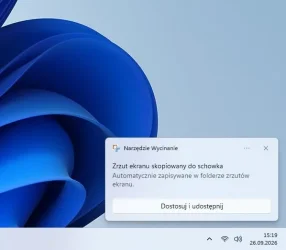
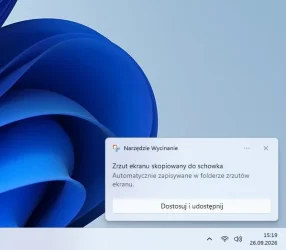
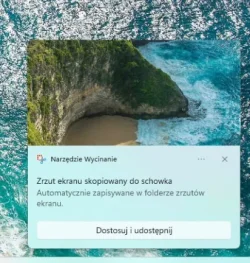
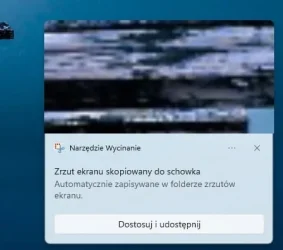
For the past few weeks, I've been having an annoying issue with the Snipping Tool on Windows 11. When I take a screenshot, the system notification pops up, but it only contains text, without the visual thumbnail preview of the crop like it used to.
I have checked all notification settings (everything is turned on). I've also tried repairing, resetting, and even fully uninstalling and reinstalling the Snipping Tool from the Microsoft Store. I even rolled back some settings to default, but nothing helped.
Is this a known bug from a recent Windows 11 update? Do any of you experience the same thing?
I'm attaching two screenshots: the first one shows how it looked a few weeks ago (with the preview), and the second one shows how it looks right now (just text).
Any help or workarounds would be highly appreciated. Thanks!
 

Attachments
  • 64fc8e82-2732-4f0d-8ba1-a6300f8c4d64.webp
    64fc8e82-2732-4f0d-8ba1-a6300f8c4d64.webp
    14.3 KB · Views: 1
  • 1.webp
    1.webp
    15.9 KB · Views: 1

My Computer My Computer

At a glance

Windows 11
OS
Windows 11
Computer type
PC/Desktop
Hello @wojtekmazgaj and welcome to ElevenForum. :-)


The following has nothing to do with your issue, but you may find it helpful in the future...


My Computers My Computers

  • At a glance

    Win 11 Home ♦♦♦26300.9550 ♦♦♦♦♦♦♦26H2AMD Ryzen 7 3700XG.Skill (F4-3200C14D-16GTZKW)EVGA RTX 2070 (08G-P4-2171-KR)
    OS
    Win 11 Home ♦♦♦26300.9550 ♦♦♦♦♦♦♦26H2
    Computer type
    PC/Desktop
    Manufacturer/Model
    Built by Ghot® [May 2020]
    CPU
    AMD Ryzen 7 3700X
    Motherboard
    Asus Pro WS X570-ACE (BIOS 5302)
    Memory
    G.Skill (F4-3200C14D-16GTZKW)
    Graphics Card(s)
    EVGA RTX 2070 (08G-P4-2171-KR)
    Sound Card
    Realtek ALC1220P / ALC S1220A
    Monitor(s) Displays
    Dell U3011 30"
    Screen Resolution
    2560 x 1600
    Hard Drives
    2x Samsung 860 EVO 500GB,
    WD 4TB Black FZBX - SATA III,
    WD 8TB Black FZBX - SATA III,
    DRW-24B1ST CD/DVD Burner
    PSU
    PC Power & Cooling 750W Quad EPS12V
    Case
    Cooler Master ATCS 840 Tower
    Cooling
    CM Hyper 212 EVO (push/pull)
    Keyboard
    Ducky DK9008 Shine II Blue LED
    Mouse
    Logitech Optical M-100
    Internet Speed
    300/300
    Browser
    Firefox (latest)
    Antivirus
    Bitdefender Total Security
    Other Info
    Speakers: Klipsch Pro Media 2.1
  • At a glance

    Windows XP Pro 32bit w/SP3AMD Athlon 64 X2 5000+ (OC'd @ 3.2Ghz)TWIN2X2048-6400C4DHX (2 x 1GB, DDR2 800)EVGA 256-P2-N758-TR GeForce 8600GT SSC
    Operating System
    Windows XP Pro 32bit w/SP3
    Computer type
    PC/Desktop
    Manufacturer/Model
    Built by Ghot® (not in use)
    CPU
    AMD Athlon 64 X2 5000+ (OC'd @ 3.2Ghz)
    Motherboard
    ASUS M2N32-SLI Deluxe Wireless Edition
    Memory
    TWIN2X2048-6400C4DHX (2 x 1GB, DDR2 800)
    Graphics card(s)
    EVGA 256-P2-N758-TR GeForce 8600GT SSC
    Sound Card
    Onboard
    Monitor(s) Displays
    ViewSonic G90FB Black 19" Professional (CRT)
    Screen Resolution
    up to 2048 x 1536
    Hard Drives
    WD 36GB 10,000rpm Raptor SATA
    Seagate 80GB 7200rpm SATA
    Lite-On LTR-52246S CD/RW
    Lite-On LH-18A1P CD/DVD Burner
    PSU
    PC Power & Cooling Silencer 750 Quad EPS12V
    Case
    Generic Beige case, 80mm fans
    Cooling
    ZALMAN 9500A 92mm CPU Cooler
    Keyboard
    Logitech Classic Keybooard 200
    Mouse
    Logitech Optical M-BT96a
    Internet Speed
    300/300
    Browser
    Firefox 3.x ??
    Antivirus
    Symantec (Norton)
    Other Info
    Still assembled, still runs. Haven't turned it on for 15 years?
Hi everyone,
For the past few weeks, I've been having an annoying issue with the Snipping Tool on Windows 11. When I take a screenshot, the system notification pops up, but it only contains text, without the visual thumbnail preview of the crop like it used to.
I have checked all notification settings (everything is turned on). I've also tried repairing, resetting, and even fully uninstalling and reinstalling the Snipping Tool from the Microsoft Store. I even rolled back some settings to default, but nothing helped.
Is this a known bug from a recent Windows 11 update? Do any of you experience the same thing?
I'm attaching two screenshots: the first one shows how it looked a few weeks ago (with the preview), and the second one shows how it looks right now (just text).
Any help or workarounds would be highly appreciated. Thanks!

Check those notification settings
 

My Computer My Computer

At a glance

Windows 11 Pro
OS
Windows 11 Pro
So, is it the fault of the September update? Because a fix for the new update's bug is supposed to arrive on October 13th. Are some users also missing the preview?
 

My Computer My Computer

At a glance

Windows 11
OS
Windows 11
Computer type
PC/Desktop
Is this a known bug from a recent Windows 11 update? Do any of you experience the same thing?

FWIW: 26300.9457 - for me, it's fine- graphic preview is shown.

Could be worth you looking at the ideas in post #3 - click the 'screenshot' as it appears to be
 

My Computer My Computer

At a glance

Windows 11 Proi7-8650U16GBIntel UHD 620
OS
Windows 11 Pro
Computer type
Laptop
Manufacturer/Model
Lenovo t480s
CPU
i7-8650U
Memory
16GB
Graphics Card(s)
Intel UHD 620
Screen Resolution
1920x1080
Hard Drives
C SN810 SDCPNRY-512G-1006
Browser
Edge, Firefox
Antivirus
Defender
Enable clipboard history (WIN + V - turn on) and take a few screenshots. Go to Windows settings - Apps - installed Apps - Snipping Tool - advanced options and try repair then reset. Check your results again.

Snipaste_2026-10-02_07-22-31.webp
 

My Computers My Computers

  • At a glance

    Win 11 ProAMD Ryzen™ 7 7730U24GB Dual-Channel DDR4 @ 1596MHz (22-22-22-52)512MB ATI AMD Radeon Graphics (ASUStek Comput...
    OS
    Win 11 Pro
    Computer type
    Laptop
    Manufacturer/Model
    ASUS Vivobook
    CPU
    AMD Ryzen™ 7 7730U
    Motherboard
    M1605YA
    Memory
    24GB Dual-Channel DDR4 @ 1596MHz (22-22-22-52)
    Graphics Card(s)
    512MB ATI AMD Radeon Graphics (ASUStek Computer Inc)
    Monitor(s) Displays
    Generic PnP Monitor (1920x1200@60Hz) - P1 PLUS (1920x1080@59Hz)
    Screen Resolution
    1920 X 1200
    Hard Drives
    953GB Western Digital WD
    PSU
    45 Watts
    Mouse
    Lenovo Bluetooth.
    Internet Speed
    500 Mbps
    Browser
    Edge
    Antivirus
    Defender
  • At a glance

    Windows 11AMD Ryzen 7 5800H / 3.2 GHz32 GB DDR4 SDRAM 3200 MHzNVIDIA GeForce RTX 3060 6 GB GDDR6 SDRAM
    Operating System
    Windows 11
    Computer type
    Laptop
    Manufacturer/Model
    ACER NITRO
    CPU
    AMD Ryzen 7 5800H / 3.2 GHz
    Motherboard
    CZ Scala_CAS (FP6)
    Memory
    32 GB DDR4 SDRAM 3200 MHz
    Graphics card(s)
    NVIDIA GeForce RTX 3060 6 GB GDDR6 SDRAM
    Sound Card
    Realtek Audio. NVIDIA High Definition Audio
    Monitor(s) Displays
    15.6" LED backlight 1920 x 1080 (Full HD) 144 Hz
    Screen Resolution
    1920 x 1080 (Full HD)
    Hard Drives
    Samsung 970 Evo Plus 2TB NVMe M.2
    PSU
    180 Watt, 19.5 V
    Mouse
    Lenovo Bluetooth
    Internet Speed
    500 Mbps
    Browser
    Edge
    Antivirus
    Defender
(Should be able to review recent screenshots in the notification area too - Win key + N or click taskbar clock)
 

My Computer My Computer

At a glance

Windows 11 Proi7-8650U16GBIntel UHD 620
OS
Windows 11 Pro
Computer type
Laptop
Manufacturer/Model
Lenovo t480s
CPU
i7-8650U
Memory
16GB
Graphics Card(s)
Intel UHD 620
Screen Resolution
1920x1080
Hard Drives
C SN810 SDCPNRY-512G-1006
Browser
Edge, Firefox
Antivirus
Defender
I am having a problem with the Snipping Tool in Windows 11. After taking a screenshot, only a small text notification appears in the bottom-right corner of the screen, stating: "Screenshot copied to clipboard. Automatically saved to the screenshots folder" (as shown in the attached screenshot #1).
However, the large graphical preview of the screenshot—which allows for quick editing and cropping (like the one in photo #2)—does not appear. Interestingly, clicking on that small notification triggers no system response and does not open the application.
I performed a clean installation of Windows 11 (from scratch), yet the problem persists.
I created a second, new user account on the same computer, and everything works perfectly there—the large preview appears.
The issue occurs exclusively on my main account with administrator privileges. Why is the administrator account blocking this preview, and how can I fix it? Is it a matter of a specific registry entry or a profile permission error?
I would be very grateful for any tips or help in resolving this issue, as it is incredibly frustrating for my daily work.

Edit (from AI): The absence of the large preview (the editable window) after clicking the notification is a common issue in Windows 11. It usually stems from corrupted application data within your user profile or incorrect protocol associations, rather than a system-wide registry error. Since everything works correctly on the other account, the system itself and its files are intact, and the problem is confined entirely to your user profile.
 

Attachments

  • 572f9f21-8517-416b-9f34-6f08c024c451.webp
    572f9f21-8517-416b-9f34-6f08c024c451.webp
    15.9 KB · Views: 1
  • Zrzut ekranu 2026-10-02 163242.webp
    Zrzut ekranu 2026-10-02 163242.webp
    49.3 KB · Views: 1

My Computer My Computer

At a glance

Windows 11
OS
Windows 11
Computer type
PC/Desktop
And thank you for your ...er... kind reply.

I created a second, new user account on the same computer, and everything works perfectly there
Good diagnostic step. Now you know generalised Windows repairs will NOT help as it's an issue specific to your user account.

Thus it's up to you to try a process of elimination.

Unfortunately the snipping tool does not work in Safe Mode, so try a clean boot as your first diagnostic step.

We can't see your PC so it's rather up to you to try to find out what's interfering, but it's possible something's changed a setting or the registry as you suggest.


For the past few weeks,
- so you don't now have the option of a System Restore point.

You might look to see what was installed around the time this started- or maybe it's even an effect of syncing your account, if that's applicable, esp. as you say

I performed a clean installation of Windows 11 (from scratch), yet the problem persists.
 

My Computer My Computer

At a glance

Windows 11 Proi7-8650U16GBIntel UHD 620
OS
Windows 11 Pro
Computer type
Laptop
Manufacturer/Model
Lenovo t480s
CPU
i7-8650U
Memory
16GB
Graphics Card(s)
Intel UHD 620
Screen Resolution
1920x1080
Hard Drives
C SN810 SDCPNRY-512G-1006
Browser
Edge, Firefox
Antivirus
Defender
Or perhaps it’s due to a Windows 11 update? A new Windows 11 update—a bug fix—is coming on October 13th, and that’s when the preview (like the one I attached in the second photo above) should appear. Will the preview return after the October 13th update (part of the "Patch Tuesday" cycle)?
 

My Computer My Computer

At a glance

Windows 11
OS
Windows 11
Computer type
PC/Desktop
Obviously not, since you yourself stated this is not a problem on a different account.

And see my post #5 - not a problem with that build. Yours is not stated.
 

My Computer My Computer

At a glance

Windows 11 Proi7-8650U16GBIntel UHD 620
OS
Windows 11 Pro
Computer type
Laptop
Manufacturer/Model
Lenovo t480s
CPU
i7-8650U
Memory
16GB
Graphics Card(s)
Intel UHD 620
Screen Resolution
1920x1080
Hard Drives
C SN810 SDCPNRY-512G-1006
Browser
Edge, Firefox
Antivirus
Defender
Back
Top Bottom