wojtekmazgaj
New member
- Local time
- 10:29 PM
- Posts
- 1
- OS
- Windows 11
Hi everyone,
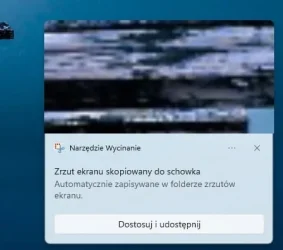
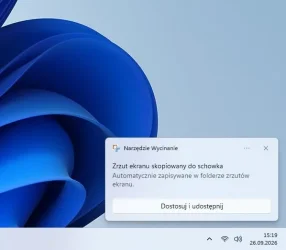
For the past few weeks, I've been having an annoying issue with the Snipping Tool on Windows 11. When I take a screenshot, the system notification pops up, but it only contains text, without the visual thumbnail preview of the crop like it used to.
I have checked all notification settings (everything is turned on). I've also tried repairing, resetting, and even fully uninstalling and reinstalling the Snipping Tool from the Microsoft Store. I even rolled back some settings to default, but nothing helped.
Is this a known bug from a recent Windows 11 update? Do any of you experience the same thing?
I'm attaching two screenshots: the first one shows how it looked a few weeks ago (with the preview), and the second one shows how it looks right now (just text).
Any help or workarounds would be highly appreciated. Thanks!
For the past few weeks, I've been having an annoying issue with the Snipping Tool on Windows 11. When I take a screenshot, the system notification pops up, but it only contains text, without the visual thumbnail preview of the crop like it used to.
I have checked all notification settings (everything is turned on). I've also tried repairing, resetting, and even fully uninstalling and reinstalling the Snipping Tool from the Microsoft Store. I even rolled back some settings to default, but nothing helped.
Is this a known bug from a recent Windows 11 update? Do any of you experience the same thing?
I'm attaching two screenshots: the first one shows how it looked a few weeks ago (with the preview), and the second one shows how it looks right now (just text).
Any help or workarounds would be highly appreciated. Thanks!
Attachments
My Computer
At a glance
Windows 11
- OS
- Windows 11
- Computer type
- PC/Desktop