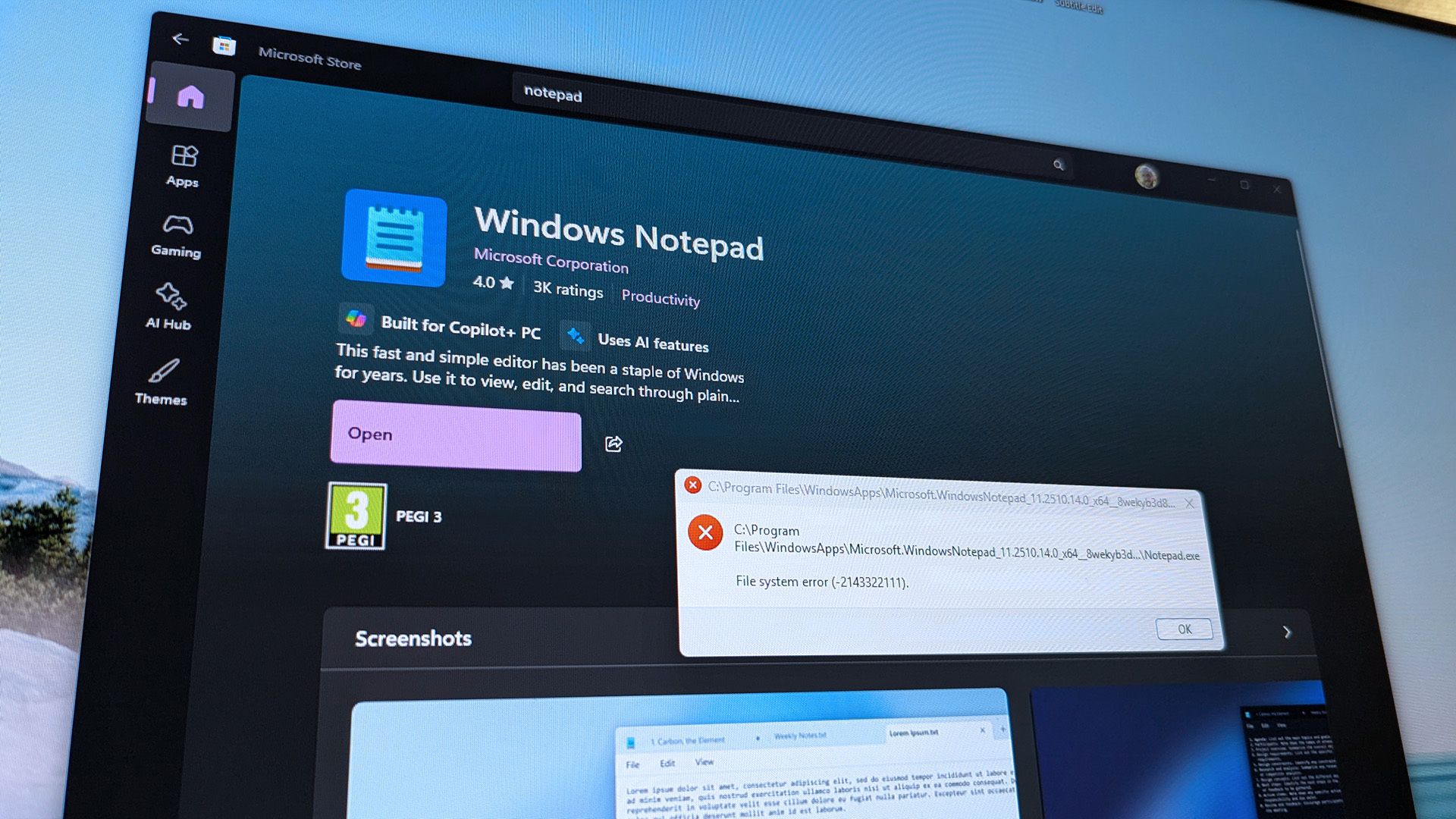
Solved Snipping tool.......keeps needing to be fixed to work


No, but it seems to happen a lot with MS apps!
I'd stick with ShareX, but that's me! :cool:


Thanks for mentioning Share X, and thanks for MS in making such a fragile app, as I would not have needed to consider alternatives. ShareX is pretty decent, understatement...!
 

My Computers

System One System Two

  • OS
    Windows 11 Pro build 25H2
    Computer type
    PC/Desktop
    Manufacturer/Model
    Home brew
    CPU
    Intel 265k
    Motherboard
    Gigabyte Z890 Aorus Elite
    Memory
    32GB DDR5 Corsair Dominator 7200Mhz
    Graphics Card(s)
    FE Edition 4080
    Sound Card
    onboard
    Monitor(s) Displays
    Acer 32" 4k IPS monitor
    Screen Resolution
    4k
    Hard Drives
    Various NVME and two SSD's
    PSU
    Antec ATX 3.1 1200w
    Case
    Meshify 2 XL
    Cooling
    Corsair Nautilus 360 AIO
    Keyboard
    Mechanical blue switch
    Mouse
    G502 Lightspeed Wireless
    Internet Speed
    FTTP 500Mb
    Browser
    Edge
    Antivirus
    Microsoft
  • Operating System
    Windows 11 Pro 24h2
    Computer type
    PC/Desktop
    Manufacturer/Model
    NUC N100 type model and System 3 but an N150 CPU
    CPU
    Alder Lake 3.4Ghz 4 Core
    Motherboard
    built in SOC
    Memory
    16GB DDR4 3200Ghz
    Graphics card(s)
    Internal GPU to the CPU
    Sound Card
    nah
    Monitor(s) Displays
    Samsung Syncmaster 913n VGA but used headless mainly.
    Screen Resolution
    1280x1024
    Hard Drives
    NVME 512GB and a SATA SSD at 1TB
    PSU
    I reckon so, external type
    Case
    yup it has one of those
    Cooling
    probably
    Keyboard
    only attached for rare local access
    Mouse
    not really needed but attached. Old Logitech, with a ball...!
    Internet Speed
    FTTC 500GB.
    Browser
    Edge
Thanks for mentioning Share X, and thanks for MS in making such a fragile app, as I would not have needed to consider alternatives. ShareX is pretty decent, understatement...!
Works OK here on 25H2 W11 Pro 26200.7171

It does what it need to do simply and quickly -- OK if you want more sophisticated / feature filled products there are loads around but for a quick unsophisticated screen capture it works.

Cheers
jimbo
 

My Computer

System One

  • OS
    Windows XP,11 Linux Fedora Rawhide pre-release 45
    Computer type
    PC/Desktop
    CPU
    2 X Intel i7
    Screen Resolution
    4KUHD X 2
Thanks for mentioning Share X, and thanks for MS in making such a fragile app, as I would not have needed to consider alternatives. ShareX is pretty decent, understatement...!
I haven't used Snipping Tool for ages, but, from what I remember, it was an annoyingly clumsy and convoluted process...,
You had to:
• go to Start
• select Snipping Tool
• select New
• select region to capture
• go back to Start
• select Paint
• paste into Paint
• make your adjustments or annotations
• click Save
• choose a destination
• give it a name
• click Save
• close Paint
• close Snipping Tool......

Are you kidding me!!! :facepalm:
 

My Computers

System One System Two

  • OS
    Windows 11 Pro
    Computer type
    PC/Desktop
    Manufacturer/Model
    ASUS ROG Strix
  • Operating System
    Windows 11 Pro
    Computer type
    Laptop
    Manufacturer/Model
    ASUS VivoBook
Hi @Vimes,

I am just curious, did you do an update to 25H2 or did you do a clean install? Same question to you, @nikki605?

Kind regards,

tecknot
I upgraded (System 1) my laptop from Windows 10 to Windows 11 24H2 back in June and then to 25H2 when Microsoft released it. My desktop (System 2) does not have the same problem with ST and it is unsupported hardware. More specific upgrade information for both PCs can be found in the Other Info sections under My Computers.
 

My Computers

System One System Two

  • OS
    Windows 11 Pro 25H2
    Computer type
    Laptop
    Manufacturer/Model
    Lenovo T490 (2020 Hardware)
    CPU
    i7-8565U
    Motherboard
    20N20028US
    Memory
    16GB
    Graphics Card(s)
    Intel UHD Graphics 620
    Sound Card
    Realtec Audio
    Monitor(s) Displays
    ASUS VE248
    Screen Resolution
    1920 X 1080
    Hard Drives
    Samsung SSD 970 PRO 512GB NVMe
    Internet Speed
    Frontier fiber 1GB
    Browser
    Chrome, Firefox, Edge
    Antivirus
    Norton 360 Deluxe Plus
    Other Info
    Supported hardware, upgraded from Windows 10 Pro to Windows 11 Pro version 24H2 on 06/01/2025 using the Windows 11 ISO file. Used the enablement package to upgrade to version 25H2 on 10/07/2025. Secure boot enabled. Secure Boot CA 2023 updated.
  • Operating System
    Windows 11 Pro 25H2
    Computer type
    PC/Desktop
    Manufacturer/Model
    Lenovo ThinkCentre M83 (2014 Hardware)
    CPU
    i7-4770 (with SSE4.2, and POPCNT)
    Motherboard
    10AL000GUS
    Memory
    16GB
    Graphics card(s)
    Intel HD Graphics 4600
    Sound Card
    Realtec High Definition Audio
    Monitor(s) Displays
    ASUS VE248
    Screen Resolution
    1920 X 1080
    Hard Drives
    Samsung SSD 860 PRO 1TB SATA
    Internet Speed
    Frontier fiber 1GB
    Browser
    Chrome, Firefox, Edge
    Antivirus
    Norton 360 Deluxe Plus
    Other Info
    Unsupported hardware, upgraded from Windows 10 Pro (TPM 1.2 & unsupported CPU, but does have SSE4.2, and POPCNT) to Windows 11 Pro version 24H2 on 06/15/2025. Added Registry Key HKEY_LOCAL_MACHINE\SYSTEM\Setup\MoSetup – AllowUpgradesWithUnsupportedTPMOrCPU=1 to allow installation using the Windows 11 ISO file. Used the enablement package to upgrade to version 25H2 on 10/08/2025. Secure boot enabled. Secure Boot CA 2023 updated.
@cheaterslick Now that would be tempting to try the old one.....But, it is like having vanilla plain cake and then finding one with icing and sprinkles......using ShareX :)

I look for the easiest way out and I don't need all the bells & whistles. Just something small and simple to do the job with.
 

My Computers

System One System Two

  • OS
    Windows 11 Pro 25H2 build: (26200.7623)
    Computer type
    Laptop
    Manufacturer/Model
    Microsoft Surface Pro
    Memory
    32GB
  • Operating System
    Microsoft 25H2 Pro
    Computer type
    Laptop
    Manufacturer/Model
    Dell Pro 14 - PC14250
    CPU
    Intel Core Ultra 7
    Memory
    64GB
    Graphics card(s)
    Intel Integrated Graphics
    Hard Drives
    Micron 1TB SSD
I upgraded (System 1) my laptop from Windows 10 to Windows 11 24H2 back in June and then to 25H2 when Microsoft released it. My desktop (System 2) does not have the same problem with ST and it is unsupported hardware. More specific upgrade information for both PCs can be found in the Other Info sections under My Computers.

Hi nikki605,

Thanks for the response. I was guessing that problems with 25H2 may be the result of going the update route. I did a clean install myself and don't have or at least haven't run into any problems I've been reading about. Even my network and sharing is working.

Kind regards,

tecknot
 

My Computer

System One

  • OS
    Windows 11 Pro 25H2 build 26200.8457
    Computer type
    Laptop
    Manufacturer/Model
    Lenovo ThinkPad Workstation P72
    CPU
    Intel i7 8750H @ 2.2 GHz
    Motherboard
    Lenovo 01YU291
    Memory
    16 GB (all Samsung) DDR4-3200 SODIMM (non-ECC) PCIe 3
    Graphics Card(s)
    Intel UHD Graphics 630 & NVIDIA Quadro P600
    Sound Card
    Realtek ALC3286 & Focusrite Saffire 24 Pro DSP
    Monitor(s) Displays
    17.3"
    Screen Resolution
    3840x2160
    Hard Drives
    1TB SSD Samsung 860 EVO SATA 3
    1TB SSD Samsung 970 EVO M.2 NVMe PCIe 3 x 4
    2TB SSD Samsung 990 PRO M.2 NVMe PCIe 3 x 4
    PSU
    230W
    Cooling
    fan
    Keyboard
    UltraNav
    Mouse
    Kensington wireless Orbit
    Internet Speed
    640Mbps
    Browser
    DuckDuckGo and Firefox
    Antivirus
    Defender
    Other Info
    CM246 Chipset
Hi nikki605,

Thanks for the response. I was guessing that problems with 25H2 may be the result of going the update route. I did a clean install myself and don't have or at least haven't run into any problems I've been reading about. Even my network and sharing is working.

Kind regards,

tecknot
I had problems with ST and Notepad when I first upgraded from Win10 to Win11 24H2 back in June.
 

My Computers

System One System Two

  • OS
    Windows 11 Pro 25H2
    Computer type
    Laptop
    Manufacturer/Model
    Lenovo T490 (2020 Hardware)
    CPU
    i7-8565U
    Motherboard
    20N20028US
    Memory
    16GB
    Graphics Card(s)
    Intel UHD Graphics 620
    Sound Card
    Realtec Audio
    Monitor(s) Displays
    ASUS VE248
    Screen Resolution
    1920 X 1080
    Hard Drives
    Samsung SSD 970 PRO 512GB NVMe
    Internet Speed
    Frontier fiber 1GB
    Browser
    Chrome, Firefox, Edge
    Antivirus
    Norton 360 Deluxe Plus
    Other Info
    Supported hardware, upgraded from Windows 10 Pro to Windows 11 Pro version 24H2 on 06/01/2025 using the Windows 11 ISO file. Used the enablement package to upgrade to version 25H2 on 10/07/2025. Secure boot enabled. Secure Boot CA 2023 updated.
  • Operating System
    Windows 11 Pro 25H2
    Computer type
    PC/Desktop
    Manufacturer/Model
    Lenovo ThinkCentre M83 (2014 Hardware)
    CPU
    i7-4770 (with SSE4.2, and POPCNT)
    Motherboard
    10AL000GUS
    Memory
    16GB
    Graphics card(s)
    Intel HD Graphics 4600
    Sound Card
    Realtec High Definition Audio
    Monitor(s) Displays
    ASUS VE248
    Screen Resolution
    1920 X 1080
    Hard Drives
    Samsung SSD 860 PRO 1TB SATA
    Internet Speed
    Frontier fiber 1GB
    Browser
    Chrome, Firefox, Edge
    Antivirus
    Norton 360 Deluxe Plus
    Other Info
    Unsupported hardware, upgraded from Windows 10 Pro (TPM 1.2 & unsupported CPU, but does have SSE4.2, and POPCNT) to Windows 11 Pro version 24H2 on 06/15/2025. Added Registry Key HKEY_LOCAL_MACHINE\SYSTEM\Setup\MoSetup – AllowUpgradesWithUnsupportedTPMOrCPU=1 to allow installation using the Windows 11 ISO file. Used the enablement package to upgrade to version 25H2 on 10/08/2025. Secure boot enabled. Secure Boot CA 2023 updated.
I haven't used Snipping Tool for ages, but, from what I remember, it was an annoyingly clumsy and convoluted process...,
You had to:
• go to Start
• select Snipping Tool
• select New
• select region to capture
• go back to Start
• select Paint
• paste into Paint
• make your adjustments or annotations
• click Save
• choose a destination
• give it a name
• click Save
• close Paint
• close Snipping Tool......

Are you kidding me!!! :facepalm:
I use snipping tool all the time. Don't need to do that anymore. The new one is really good.
 

My Computers

System One System Two

  • OS
    Windows 11 Pro
    Computer type
    PC/Desktop
    Manufacturer/Model
    Custom Built
    CPU
    Ryzen 7 5700 X3D
    Motherboard
    MSI MPG B550 GAMING PLUS
    Memory
    64 GB DDR4 3600mhz Gskill Ripjaws V
    Graphics Card(s)
    RTX 4070 Super , 12GB VRAM Asus EVO Overclock
    Monitor(s) Displays
    Gigabyte M27Q (rev. 2.0) 2560 x 1440 @ 170hz HDR
    Hard Drives
    2TB Samsung nvme ssd
    4TB Western Digital nvme ssd
    PSU
    CORSAIR RMx SHIFT Series™ RM750x 80 PLUS Gold Fully Modular ATX Power Supply
    Case
    CORSAIR 3500X ARGB Mid-Tower ATX PC Case – Black
    Cooling
    ID-COOLING FROSTFLOW X 240 CPU Water Cooler
    Keyboard
    Logitech G213
    Mouse
    Logitech G203
    Internet Speed
    1.2gbps Fiber 😎
  • Operating System
    Chrome OS
    Computer type
    Laptop
    Manufacturer/Model
    HP Chromebook
    CPU
    Intel Pentium Quad Core
    Memory
    4GB LPDDR4
    Monitor(s) Displays
    14 Inch HD SVA anti glare micro edge display
    Hard Drives
    64 GB emmc
having some what of an issue also, i used to be able to open up prnt screen when in games to snip certain parts and have no issues but now it seems like it only works when im outside of a game in normal desktop mode/browsing internet etc, windows 25h2 here.
 

My Computer

System One

  • OS
    Windows 11 25H2.
    Computer type
    PC/Desktop
    CPU
    5900x
    Motherboard
    b550
    Memory
    16gb ddr4 OC 3800.
    Graphics Card(s)
    9070xt
having some what of an issue also, i used to be able to open up prnt screen when in games to snip certain parts and have no issues but now it seems like it only works when im outside of a game in normal desktop mode/browsing internet etc, windows 25h2 here.

That started to happen to me, but then it got to the point of it not working more often than not.
I hope that you get it resolved, I ended up removing it and used ShareX.
 

My Computers

System One System Two

  • OS
    Windows 11 Pro build 25H2
    Computer type
    PC/Desktop
    Manufacturer/Model
    Home brew
    CPU
    Intel 265k
    Motherboard
    Gigabyte Z890 Aorus Elite
    Memory
    32GB DDR5 Corsair Dominator 7200Mhz
    Graphics Card(s)
    FE Edition 4080
    Sound Card
    onboard
    Monitor(s) Displays
    Acer 32" 4k IPS monitor
    Screen Resolution
    4k
    Hard Drives
    Various NVME and two SSD's
    PSU
    Antec ATX 3.1 1200w
    Case
    Meshify 2 XL
    Cooling
    Corsair Nautilus 360 AIO
    Keyboard
    Mechanical blue switch
    Mouse
    G502 Lightspeed Wireless
    Internet Speed
    FTTP 500Mb
    Browser
    Edge
    Antivirus
    Microsoft
  • Operating System
    Windows 11 Pro 24h2
    Computer type
    PC/Desktop
    Manufacturer/Model
    NUC N100 type model and System 3 but an N150 CPU
    CPU
    Alder Lake 3.4Ghz 4 Core
    Motherboard
    built in SOC
    Memory
    16GB DDR4 3200Ghz
    Graphics card(s)
    Internal GPU to the CPU
    Sound Card
    nah
    Monitor(s) Displays
    Samsung Syncmaster 913n VGA but used headless mainly.
    Screen Resolution
    1280x1024
    Hard Drives
    NVME 512GB and a SATA SSD at 1TB
    PSU
    I reckon so, external type
    Case
    yup it has one of those
    Cooling
    probably
    Keyboard
    only attached for rare local access
    Mouse
    not really needed but attached. Old Logitech, with a ball...!
    Internet Speed
    FTTC 500GB.
    Browser
    Edge
I use Hypersnap for a very long time and really like it. But new very is not cheap. I now use Greenshot. For me it works great, easy. I tried the rest, and most were bloated. note: my video and photo editing go back ages, I used to use Matrox video cards with built in encodes, decoders and special software. I am not new to it, but haven't done that stuff in ages. Now I just want to take snapshots on pages and websites. I don't want the bloat. FYI.
 

My Computer

System One

  • OS
    Win11
    Computer type
    PC/Desktop
    Manufacturer/Model
    Asus Home built
    CPU
    i9-13900
    Motherboard
    ASUS Strix Z790-H
    Memory
    64 GB
    Graphics Card(s)
    Nvidia RTX 5070 TI OC
    Monitor(s) Displays
    Sony 55"
    Hard Drives
    SSD
    PSU
    850 watt EVGA
    Case
    Cooler Master Haf 932
    Cooling
    CoolerMaster
    Keyboard
    RedDragon
    Mouse
    CoolerMaster
    Internet Speed
    300/300
    Antivirus
    Defender
    Other Info
    VR, Virtual Reality
An article here includes how, for some, the snipping tool has fallen victim of a pushed MS update...


ShareX, for screens and animated gifs of screen actions, has been great for me.
 

My Computers

System One System Two

  • OS
    Windows 11 Pro build 25H2
    Computer type
    PC/Desktop
    Manufacturer/Model
    Home brew
    CPU
    Intel 265k
    Motherboard
    Gigabyte Z890 Aorus Elite
    Memory
    32GB DDR5 Corsair Dominator 7200Mhz
    Graphics Card(s)
    FE Edition 4080
    Sound Card
    onboard
    Monitor(s) Displays
    Acer 32" 4k IPS monitor
    Screen Resolution
    4k
    Hard Drives
    Various NVME and two SSD's
    PSU
    Antec ATX 3.1 1200w
    Case
    Meshify 2 XL
    Cooling
    Corsair Nautilus 360 AIO
    Keyboard
    Mechanical blue switch
    Mouse
    G502 Lightspeed Wireless
    Internet Speed
    FTTP 500Mb
    Browser
    Edge
    Antivirus
    Microsoft
  • Operating System
    Windows 11 Pro 24h2
    Computer type
    PC/Desktop
    Manufacturer/Model
    NUC N100 type model and System 3 but an N150 CPU
    CPU
    Alder Lake 3.4Ghz 4 Core
    Motherboard
    built in SOC
    Memory
    16GB DDR4 3200Ghz
    Graphics card(s)
    Internal GPU to the CPU
    Sound Card
    nah
    Monitor(s) Displays
    Samsung Syncmaster 913n VGA but used headless mainly.
    Screen Resolution
    1280x1024
    Hard Drives
    NVME 512GB and a SATA SSD at 1TB
    PSU
    I reckon so, external type
    Case
    yup it has one of those
    Cooling
    probably
    Keyboard
    only attached for rare local access
    Mouse
    not really needed but attached. Old Logitech, with a ball...!
    Internet Speed
    FTTC 500GB.
    Browser
    Edge
An article here includes how, for some, the snipping tool has fallen victim of a pushed MS update...


ShareX, for screens and animated gifs of screen actions, has been great for me.

I haven't gotten that error yet, but it looks like they're working on it so we'll wait.
 

My Computers

System One System Two

  • OS
    Windows 11 Pro 25H2 build: (26200.7623)
    Computer type
    Laptop
    Manufacturer/Model
    Microsoft Surface Pro
    Memory
    32GB
  • Operating System
    Microsoft 25H2 Pro
    Computer type
    Laptop
    Manufacturer/Model
    Dell Pro 14 - PC14250
    CPU
    Intel Core Ultra 7
    Memory
    64GB
    Graphics card(s)
    Intel Integrated Graphics
    Hard Drives
    Micron 1TB SSD
There was a time when Windows updates generally meant positive things, or at least that it what it seems now.
I can find it is not just about what is broken but also about what has changed, to then figure out why things that previously worked no longer function.
 

My Computers

System One System Two

  • OS
    Windows 11 Pro build 25H2
    Computer type
    PC/Desktop
    Manufacturer/Model
    Home brew
    CPU
    Intel 265k
    Motherboard
    Gigabyte Z890 Aorus Elite
    Memory
    32GB DDR5 Corsair Dominator 7200Mhz
    Graphics Card(s)
    FE Edition 4080
    Sound Card
    onboard
    Monitor(s) Displays
    Acer 32" 4k IPS monitor
    Screen Resolution
    4k
    Hard Drives
    Various NVME and two SSD's
    PSU
    Antec ATX 3.1 1200w
    Case
    Meshify 2 XL
    Cooling
    Corsair Nautilus 360 AIO
    Keyboard
    Mechanical blue switch
    Mouse
    G502 Lightspeed Wireless
    Internet Speed
    FTTP 500Mb
    Browser
    Edge
    Antivirus
    Microsoft
  • Operating System
    Windows 11 Pro 24h2
    Computer type
    PC/Desktop
    Manufacturer/Model
    NUC N100 type model and System 3 but an N150 CPU
    CPU
    Alder Lake 3.4Ghz 4 Core
    Motherboard
    built in SOC
    Memory
    16GB DDR4 3200Ghz
    Graphics card(s)
    Internal GPU to the CPU
    Sound Card
    nah
    Monitor(s) Displays
    Samsung Syncmaster 913n VGA but used headless mainly.
    Screen Resolution
    1280x1024
    Hard Drives
    NVME 512GB and a SATA SSD at 1TB
    PSU
    I reckon so, external type
    Case
    yup it has one of those
    Cooling
    probably
    Keyboard
    only attached for rare local access
    Mouse
    not really needed but attached. Old Logitech, with a ball...!
    Internet Speed
    FTTC 500GB.
    Browser
    Edge
Back
Top Bottom