Software to open png files with transparent background


k0065126

Well-known member
Local time
5:24 PM
Posts
53
OS
Windows 11
I can create png files which have a transparent background and open them in Paint which shows that the background is transparent, but cannot find any image viewers which do not turn the background black.
I have tried Microsoft Photos, Irfanview, Imageglass, and FastStone but they all display a black background.
Does anyone know of an image viewer which will display the images correctly?
 
Windows Build/Version
windows 11 home 22H2 (OS build 22621.2428)

My Computer My Computer

At a glance

Windows 11Intel(R) Core(TM) i7-8700 CPU @ 3.20GHz 3.19 GHz32.0 GBNvidia Quadro P400 graphics card
OS
Windows 11
Computer type
PC/Desktop
Manufacturer/Model
Self build
CPU
Intel(R) Core(TM) i7-8700 CPU @ 3.20GHz 3.19 GHz
Motherboard
Gigabyte Technology Co., Ltd. Z390 AORUS PRO-CF
Memory
32.0 GB
Graphics Card(s)
Nvidia Quadro P400 graphics card
Monitor(s) Displays
iiyama
Screen Resolution
2560 x 1440
I can create png files which have a transparent background and open them in Paint which shows that the background is transparent, but cannot find any image viewers which do not turn the background black.
I have tried Microsoft Photos, Irfanview, Imageglass, and FastStone but they all display a black background.
Does anyone know of an image viewer which will display the images correctly?
You could possibly associate .png with a web browser? Chrome/Firefox etc. I’ve not tried it, but…
 

My Computers My Computers

  • At a glance

    Windows 11 Pro 25H2 Build 26200.8655Intel(R) Core(TM) i7-4770K CPU @ 3.50GHz32.0 GB of I forget and the box is in storage.Gigabyte nVidia GeForce GTX 1660 Super OC 6GB
    OS
    Windows 11 Pro 25H2 Build 26200.8655
    Computer type
    PC/Desktop
    Manufacturer/Model
    Sin-built 2013
    CPU
    Intel(R) Core(TM) i7-4770K CPU @ 3.50GHz
    Motherboard
    ASUS ROG Maximus VI Formula
    Memory
    32.0 GB of I forget and the box is in storage.
    Graphics Card(s)
    Gigabyte nVidia GeForce GTX 1660 Super OC 6GB
    Sound Card
    Onboard thingy
    Monitor(s) Displays
    5 x LG 25MS500-B - 1 x 24MK430H-B - 1 x Wacom Pro 22" Touch Screen Tablet
    Screen Resolution
    All over the place
    Hard Drives
    Too many to list.
    OS on Samsung 1TB 870 QVO SATA
    PSU
    Silverstone 1500
    Case
    NZXT Phantom 820 Full-Tower Case
    Cooling
    Noctua NH-D15 Elite Class Dual Tower CPU Cooler / 6 x EziDIY 120mm / 2 x Corsair 140mm somethings / 1 x 140mm Thermaltake something / 2 x 200mm Corsair.
    Keyboard
    Corsair K95 / Logitech diNovo Edge Wireless
    Mouse
    Logitech: G402 / G502 / Mx Masters / Mx Air Cordless
    Internet Speed
    2000/500Mbps
    Browser
    All sorts
    Antivirus
    Kaspersky Premium
    Other Info
    ㅤㅤㅤㅤㅤㅤㅤㅤㅤㅤㅤㅤㅤㅤㅤㅤㅤㅤㅤㅤㅤㅤㅤㅤㅤㅤㅤㅤㅤㅤㅤㅤㅤㅤㅤㅤㅤㅤㅤㅤ⠀⠀⠀⠀⠀⠀⠀⠀⠀⠀
    TP-Link BE9300 WiFi 7 Bluetooth 5.4 (Archer TBE550E)
    TP-Link TX201 V1 2.5GB Lan

    Grandstream HT812 - VoIP
    ASUS DSL-AX82U - Mesh
    ASUS RT-AC68U - Mesh
    ASUS RT-BE88U Router

    Brother MFC-L2880DW Printer

    I’m on a horse.
  • At a glance

    Windows 11 Pro 25H2 Build 26200.8655Intel Core 12th Gen i5-1240P Processor (1.7 -...16GB LPDDR5 RAMIntel Iris Xe Graphics Processor
    Operating System
    Windows 11 Pro 25H2 Build 26200.8655
    Computer type
    Laptop
    Manufacturer/Model
    LENOVO Yoga 7 14IRL8 - 7i EVO OLED 14" Touchscreen i5 12 Core 16GB/512GB
    CPU
    Intel Core 12th Gen i5-1240P Processor (1.7 - 4.4GHz)
    Memory
    16GB LPDDR5 RAM
    Graphics card(s)
    Intel Iris Xe Graphics Processor
    Sound Card
    Optimized with Dolby Atmos®
    Screen Resolution
    QHD 2880 x 1800 OLED
    Hard Drives
    M.2 512GB
    Antivirus
    Defender / Malwarebytes
    Other Info
    …still on a horse.
I can create png files which have a transparent background and open them in Paint which shows that the background is transparent, but cannot find any image viewers which do not turn the background black.
I have tried Microsoft Photos, Irfanview, Imageglass, and FastStone but they all display a black background.
Does anyone know of an image viewer which will display the images correctly?
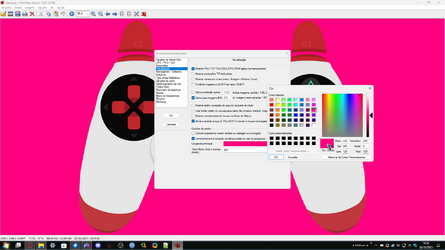
you can select the background color you want to see in irfanview 64

1698361293618.png
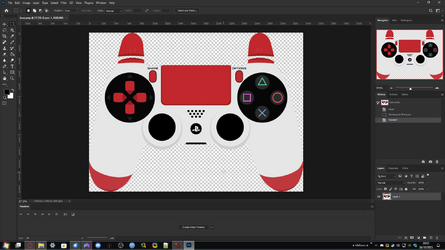
Or use Photoshop

1698361463170.png
 

Attachments

  • 1698361129994.png
    1698361129994.png
    80.3 KB · Views: 3

My Computer My Computer

At a glance

Windows 11, Pro for Workstations, 22631.2861 ...Amd Ryzen 5 5500 ("Zen 3") (3.6GHz,45-65W,L3:...DDR4 OLOy Owl Black, 8GB, 3200MHZ, (x2)Colorful GeForce GTX 1650 Super
OS
Windows 11, Pro for Workstations, 22631.2861 (23H2)
Computer type
PC/Desktop
Manufacturer/Model
Custom
CPU
Amd Ryzen 5 5500 ("Zen 3") (3.6GHz,45-65W,L3:16M,6/12)
Motherboard
Asus Prime B450M Gaming/BR Chipset B450 AMD AM4 mATX DDR4 - BIOS 4002
Memory
DDR4 OLOy Owl Black, 8GB, 3200MHZ, (x2)
Graphics Card(s)
Colorful GeForce GTX 1650 Super
Sound Card
-
Monitor(s) Displays
Philips TV 43PFG5102/78
Screen Resolution
1920x1080
Hard Drives
SSD: 120GB, Sata III, Leitura 560MBs e Gravação 540MBs
HD: Seagate Barracuda 1TB, Sata III, 7200RPM, 64MB
PSU
Corsair ATX CV550 550W, 80 Plus Bronze, PFC Ativo
Case
Wheel Jack, Mid Tower, Vidro Temperado, Black
Cooling
default
Keyboard
common
Mouse
commom
Internet Speed
600mb
Browser
Opera
Antivirus
Windows Defender
Does anyone know of an image viewer which will display the images correctly?
What do you mean by correctly?
Most image viewers have to create a canvas to function...,
the only way to witness a transparent background on it's own is in Explorer itself...

0005472.png

Most show the canvas as checkered...

5525.png
 
Last edited:

My Computers My Computers

  • At a glance

    Windows 11 Pro
    OS
    Windows 11 Pro
    Computer type
    PC/Desktop
    Manufacturer/Model
    ASUS ROG Strix
  • At a glance

    Windows 11 Pro
    Operating System
    Windows 11 Pro
    Computer type
    Laptop
    Manufacturer/Model
    ASUS VivoBook

My Computers My Computers

  • At a glance

    Windows 11 Pro
    OS
    Windows 11 Pro
    Computer type
    PC/Desktop
    Manufacturer/Model
    ASUS ROG Strix
  • At a glance

    Windows 11 Pro
    Operating System
    Windows 11 Pro
    Computer type
    Laptop
    Manufacturer/Model
    ASUS VivoBook

My Computers My Computers

  • At a glance

    Windows 11 Pro
    OS
    Windows 11 Pro
    Computer type
    PC/Desktop
    Manufacturer/Model
    ASUS ROG Strix
  • At a glance

    Windows 11 Pro
    Operating System
    Windows 11 Pro
    Computer type
    Laptop
    Manufacturer/Model
    ASUS VivoBook
You could possibly associate .png with a web browser? Chrome/Firefox etc. I’ve not tried it, but…
Thanks for the suggestion. What I forgot to mention was that I want the image to be full screen for projecting it.
 

My Computer My Computer

At a glance

Windows 11Intel(R) Core(TM) i7-8700 CPU @ 3.20GHz 3.19 GHz32.0 GBNvidia Quadro P400 graphics card
OS
Windows 11
Computer type
PC/Desktop
Manufacturer/Model
Self build
CPU
Intel(R) Core(TM) i7-8700 CPU @ 3.20GHz 3.19 GHz
Motherboard
Gigabyte Technology Co., Ltd. Z390 AORUS PRO-CF
Memory
32.0 GB
Graphics Card(s)
Nvidia Quadro P400 graphics card
Monitor(s) Displays
iiyama
Screen Resolution
2560 x 1440
you can select the background color you want to see in irfanview 64

View attachment 75515
Or use Photoshop

View attachment 75516
Thanks, but what I want is to project the image with the transparent parts of the image being transparent on the object which I am projecting onto. So what I want is a total absence of any colour in the background.
 

My Computer My Computer

At a glance

Windows 11Intel(R) Core(TM) i7-8700 CPU @ 3.20GHz 3.19 GHz32.0 GBNvidia Quadro P400 graphics card
OS
Windows 11
Computer type
PC/Desktop
Manufacturer/Model
Self build
CPU
Intel(R) Core(TM) i7-8700 CPU @ 3.20GHz 3.19 GHz
Motherboard
Gigabyte Technology Co., Ltd. Z390 AORUS PRO-CF
Memory
32.0 GB
Graphics Card(s)
Nvidia Quadro P400 graphics card
Monitor(s) Displays
iiyama
Screen Resolution
2560 x 1440

My Computer My Computer

At a glance

Windows 11Intel(R) Core(TM) i7-8700 CPU @ 3.20GHz 3.19 GHz32.0 GBNvidia Quadro P400 graphics card
OS
Windows 11
Computer type
PC/Desktop
Manufacturer/Model
Self build
CPU
Intel(R) Core(TM) i7-8700 CPU @ 3.20GHz 3.19 GHz
Motherboard
Gigabyte Technology Co., Ltd. Z390 AORUS PRO-CF
Memory
32.0 GB
Graphics Card(s)
Nvidia Quadro P400 graphics card
Monitor(s) Displays
iiyama
Screen Resolution
2560 x 1440
Thanks for your suggestions, what I am trying to achieve is project an image with some areas transparent onto an object so that the non transparent parts of the image show over the object I am projecting onto, but where the image is transparent then I see the object itself, not a colour. It looks as if I am trying to achieve the impossible.
 

My Computer My Computer

At a glance

Windows 11Intel(R) Core(TM) i7-8700 CPU @ 3.20GHz 3.19 GHz32.0 GBNvidia Quadro P400 graphics card
OS
Windows 11
Computer type
PC/Desktop
Manufacturer/Model
Self build
CPU
Intel(R) Core(TM) i7-8700 CPU @ 3.20GHz 3.19 GHz
Motherboard
Gigabyte Technology Co., Ltd. Z390 AORUS PRO-CF
Memory
32.0 GB
Graphics Card(s)
Nvidia Quadro P400 graphics card
Monitor(s) Displays
iiyama
Screen Resolution
2560 x 1440

My Computers My Computers

  • At a glance

    Windows 11 Pro
    OS
    Windows 11 Pro
    Computer type
    PC/Desktop
    Manufacturer/Model
    ASUS ROG Strix
  • At a glance

    Windows 11 Pro
    Operating System
    Windows 11 Pro
    Computer type
    Laptop
    Manufacturer/Model
    ASUS VivoBook
With an actual screen projector, or within an app, or what?
I am using a XuanPad Mini Projector and connecting my laptop to it and displaying images and mp4 files on the laptop. A shame that mp4 does not support transparency, although I believe that FLV files do, and that is the only video format with transparency which the projector supports. I do not feel justified in purchasing software to create FLV files.
 

My Computer My Computer

At a glance

Windows 11Intel(R) Core(TM) i7-8700 CPU @ 3.20GHz 3.19 GHz32.0 GBNvidia Quadro P400 graphics card
OS
Windows 11
Computer type
PC/Desktop
Manufacturer/Model
Self build
CPU
Intel(R) Core(TM) i7-8700 CPU @ 3.20GHz 3.19 GHz
Motherboard
Gigabyte Technology Co., Ltd. Z390 AORUS PRO-CF
Memory
32.0 GB
Graphics Card(s)
Nvidia Quadro P400 graphics card
Monitor(s) Displays
iiyama
Screen Resolution
2560 x 1440
Back
Top Bottom