Solved Sorting drives by drive letter in file explorer and changing search menu


PBzeer

Active member
Local time
11:13 AM
Posts
45
OS
Windows 11 Home
Is there a way to change the sort order for Drives? As I recall, they were sorted by drive letter prior to 11, rather than alphabetical by device name. Not a big deal really, I just find myself expecting them to be by drive letter.

When I click on the search box in the taskbar, is there a way to change the menu that pops up, so that it opens to this:search.webp
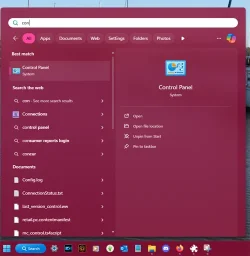
I've gone through the settings and explorerpatcher, but I'm not seeing anything to change this.
 
Windows Build/Version
25H2 Build 26200.6725

My Computers

System One System Two

  • OS
    Windows 11 Home
    Computer type
    PC/Desktop
    Manufacturer/Model
    IBuyPower/SMI7N5701
    CPU
    Intel Core i7 14700F
    Motherboard
    ASUS PRIME B760M-A AX6 II
    Memory
    32gb DDR5 5200MHz
    Graphics Card(s)
    Nvidia RTX 5070 12gb
    Sound Card
    Toshiba Dynadock Audio
    Monitor(s) Displays
    Dell P2214h
    Screen Resolution
    1920 x 1080
    Hard Drives
    AGI AI818 M.2 PCIe Gen4 SSD
    PSU
    750W 80 PLUS Gold PSU
    Case
    iBUYPOWER Slate 8 Mesh Pro
    Cooling
    Air Cooled
  • Operating System
    Windows 11 Pro upgraded from 10
    Computer type
    PC/Desktop
    Manufacturer/Model
    Intel/NUC 10i7FNH
    CPU
    i7 10710U
    Memory
    16GB
    Graphics card(s)
    Integrated Intel UHD Graphics 620
    Sound Card
    On board
    Monitor(s) Displays
    Dell P2214h
    Screen Resolution
    1920 x 1080
Hello, :alien:

Check your "Sort" settings below to see if it is set to "Type" instead of "Name".


My Computers

System One System Two

  • OS
    Windows 11 Pro for Workstations
    Computer type
    PC/Desktop
    Manufacturer/Model
    Custom self build
    CPU
    Intel i7-8700K 5 GHz
    Motherboard
    ASUS ROG Maximus XI Formula Z390
    Memory
    64 GB (4x16GB) G.SKILL TridentZ RGB DDR4 3600 MHz (F4-3600C18D-32GTZR)
    Graphics Card(s)
    ASUS ROG-STRIX-GTX1080TI-O11G-GAMING (11GB GDDR5X)
    Sound Card
    Integrated Digital Audio (S/PDIF)
    Monitor(s) Displays
    2 x Samsung Odyssey G75 27"
    Screen Resolution
    2560x1440
    Hard Drives
    1TB Samsung 990 PRO M.2,
    4TB Samsung 990 PRO M.2,
    TerraMaster F8 SSD Plus NAS
    PSU
    Seasonic Prime Titanium 850W
    Case
    Thermaltake Core P3 wall mounted
    Cooling
    Corsair Hydro H115i
    Keyboard
    Amazon Basics Wired Full Keyboard MD005
    Mouse
    Logitech MX Master 4
    Internet Speed
    2 Gbps Download and 100 Mbps Upload
    Browser
    Chrome and Edge
    Antivirus
    Microsoft Defender
    Other Info
    Logitech Z625 speaker system,
    Logitech BRIO 4K Pro webcam,
    HP Color LaserJet Pro MFP M477fdn,
    CyberPower CP1500PFCLCD
    Galaxy S23 Plus phone
  • Operating System
    Windows 11 Pro
    Computer type
    Laptop
    Manufacturer/Model
    Surface Laptop 7 Copilot+ PC
    CPU
    Snapdragon X Elite (12 core) 3.42 GHz
    Memory
    16 GB LPDDR5x-7467 MHz
    Monitor(s) Displays
    15" HDR
    Screen Resolution
    2496 x 1664
    Hard Drives
    1 TB SSD
    Internet Speed
    Wi-Fi 7 and Bluetooth 5.4
    Browser
    Chrome and Edge
    Antivirus
    Microsoft Defender
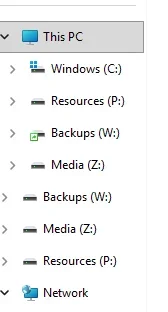
That sorts them under This PC, but with 11, I now have a list of the drives separate from This PC but don't see how I can change the sort there, nor remove the duplicate listing.

list.webp
 

My Computers

System One System Two

  • OS
    Windows 11 Home
    Computer type
    PC/Desktop
    Manufacturer/Model
    IBuyPower/SMI7N5701
    CPU
    Intel Core i7 14700F
    Motherboard
    ASUS PRIME B760M-A AX6 II
    Memory
    32gb DDR5 5200MHz
    Graphics Card(s)
    Nvidia RTX 5070 12gb
    Sound Card
    Toshiba Dynadock Audio
    Monitor(s) Displays
    Dell P2214h
    Screen Resolution
    1920 x 1080
    Hard Drives
    AGI AI818 M.2 PCIe Gen4 SSD
    PSU
    750W 80 PLUS Gold PSU
    Case
    iBUYPOWER Slate 8 Mesh Pro
    Cooling
    Air Cooled
  • Operating System
    Windows 11 Pro upgraded from 10
    Computer type
    PC/Desktop
    Manufacturer/Model
    Intel/NUC 10i7FNH
    CPU
    i7 10710U
    Memory
    16GB
    Graphics card(s)
    Integrated Intel UHD Graphics 620
    Sound Card
    On board
    Monitor(s) Displays
    Dell P2214h
    Screen Resolution
    1920 x 1080
Removable drives are shown as separate groups in the navigation pane of File Explorer by default in addition to being shown under the This PC group in the navigation pane.

You can use the method in the tutorial below to remove them.


My Computers

System One System Two

  • OS
    Windows 11 Pro for Workstations
    Computer type
    PC/Desktop
    Manufacturer/Model
    Custom self build
    CPU
    Intel i7-8700K 5 GHz
    Motherboard
    ASUS ROG Maximus XI Formula Z390
    Memory
    64 GB (4x16GB) G.SKILL TridentZ RGB DDR4 3600 MHz (F4-3600C18D-32GTZR)
    Graphics Card(s)
    ASUS ROG-STRIX-GTX1080TI-O11G-GAMING (11GB GDDR5X)
    Sound Card
    Integrated Digital Audio (S/PDIF)
    Monitor(s) Displays
    2 x Samsung Odyssey G75 27"
    Screen Resolution
    2560x1440
    Hard Drives
    1TB Samsung 990 PRO M.2,
    4TB Samsung 990 PRO M.2,
    TerraMaster F8 SSD Plus NAS
    PSU
    Seasonic Prime Titanium 850W
    Case
    Thermaltake Core P3 wall mounted
    Cooling
    Corsair Hydro H115i
    Keyboard
    Amazon Basics Wired Full Keyboard MD005
    Mouse
    Logitech MX Master 4
    Internet Speed
    2 Gbps Download and 100 Mbps Upload
    Browser
    Chrome and Edge
    Antivirus
    Microsoft Defender
    Other Info
    Logitech Z625 speaker system,
    Logitech BRIO 4K Pro webcam,
    HP Color LaserJet Pro MFP M477fdn,
    CyberPower CP1500PFCLCD
    Galaxy S23 Plus phone
  • Operating System
    Windows 11 Pro
    Computer type
    Laptop
    Manufacturer/Model
    Surface Laptop 7 Copilot+ PC
    CPU
    Snapdragon X Elite (12 core) 3.42 GHz
    Memory
    16 GB LPDDR5x-7467 MHz
    Monitor(s) Displays
    15" HDR
    Screen Resolution
    2496 x 1664
    Hard Drives
    1 TB SSD
    Internet Speed
    Wi-Fi 7 and Bluetooth 5.4
    Browser
    Chrome and Edge
    Antivirus
    Microsoft Defender
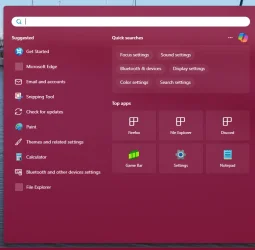
That did it. How about the search menu? It currently opens to Suggested, Quick Searches, Top Apps and I don't see anything in Search settings to change it to the view in the OP, other than by typing in the box.
 

My Computers

System One System Two

  • OS
    Windows 11 Home
    Computer type
    PC/Desktop
    Manufacturer/Model
    IBuyPower/SMI7N5701
    CPU
    Intel Core i7 14700F
    Motherboard
    ASUS PRIME B760M-A AX6 II
    Memory
    32gb DDR5 5200MHz
    Graphics Card(s)
    Nvidia RTX 5070 12gb
    Sound Card
    Toshiba Dynadock Audio
    Monitor(s) Displays
    Dell P2214h
    Screen Resolution
    1920 x 1080
    Hard Drives
    AGI AI818 M.2 PCIe Gen4 SSD
    PSU
    750W 80 PLUS Gold PSU
    Case
    iBUYPOWER Slate 8 Mesh Pro
    Cooling
    Air Cooled
  • Operating System
    Windows 11 Pro upgraded from 10
    Computer type
    PC/Desktop
    Manufacturer/Model
    Intel/NUC 10i7FNH
    CPU
    i7 10710U
    Memory
    16GB
    Graphics card(s)
    Integrated Intel UHD Graphics 620
    Sound Card
    On board
    Monitor(s) Displays
    Dell P2214h
    Screen Resolution
    1920 x 1080
Not aware of anything for the Start menu and Search other than possibly some 3rd party apps.
 

My Computers

System One System Two

  • OS
    Windows 11 Pro for Workstations
    Computer type
    PC/Desktop
    Manufacturer/Model
    Custom self build
    CPU
    Intel i7-8700K 5 GHz
    Motherboard
    ASUS ROG Maximus XI Formula Z390
    Memory
    64 GB (4x16GB) G.SKILL TridentZ RGB DDR4 3600 MHz (F4-3600C18D-32GTZR)
    Graphics Card(s)
    ASUS ROG-STRIX-GTX1080TI-O11G-GAMING (11GB GDDR5X)
    Sound Card
    Integrated Digital Audio (S/PDIF)
    Monitor(s) Displays
    2 x Samsung Odyssey G75 27"
    Screen Resolution
    2560x1440
    Hard Drives
    1TB Samsung 990 PRO M.2,
    4TB Samsung 990 PRO M.2,
    TerraMaster F8 SSD Plus NAS
    PSU
    Seasonic Prime Titanium 850W
    Case
    Thermaltake Core P3 wall mounted
    Cooling
    Corsair Hydro H115i
    Keyboard
    Amazon Basics Wired Full Keyboard MD005
    Mouse
    Logitech MX Master 4
    Internet Speed
    2 Gbps Download and 100 Mbps Upload
    Browser
    Chrome and Edge
    Antivirus
    Microsoft Defender
    Other Info
    Logitech Z625 speaker system,
    Logitech BRIO 4K Pro webcam,
    HP Color LaserJet Pro MFP M477fdn,
    CyberPower CP1500PFCLCD
    Galaxy S23 Plus phone
  • Operating System
    Windows 11 Pro
    Computer type
    Laptop
    Manufacturer/Model
    Surface Laptop 7 Copilot+ PC
    CPU
    Snapdragon X Elite (12 core) 3.42 GHz
    Memory
    16 GB LPDDR5x-7467 MHz
    Monitor(s) Displays
    15" HDR
    Screen Resolution
    2496 x 1664
    Hard Drives
    1 TB SSD
    Internet Speed
    Wi-Fi 7 and Bluetooth 5.4
    Browser
    Chrome and Edge
    Antivirus
    Microsoft Defender
That did it. How about the search menu? It currently opens to Suggested, Quick Searches, Top Apps and I don't see anything in Search settings to change it to the view in the OP, other than by typing in the box.
post a screenshot of what you're referring to
 

My Computer

System One

  • OS
    Windows 11 Pro
post a screenshot of what you're referring to
I posted a shot of how I want it to open in the original post. Do you mean a shot of what it currently opens to?
 

My Computers

System One System Two

  • OS
    Windows 11 Home
    Computer type
    PC/Desktop
    Manufacturer/Model
    IBuyPower/SMI7N5701
    CPU
    Intel Core i7 14700F
    Motherboard
    ASUS PRIME B760M-A AX6 II
    Memory
    32gb DDR5 5200MHz
    Graphics Card(s)
    Nvidia RTX 5070 12gb
    Sound Card
    Toshiba Dynadock Audio
    Monitor(s) Displays
    Dell P2214h
    Screen Resolution
    1920 x 1080
    Hard Drives
    AGI AI818 M.2 PCIe Gen4 SSD
    PSU
    750W 80 PLUS Gold PSU
    Case
    iBUYPOWER Slate 8 Mesh Pro
    Cooling
    Air Cooled
  • Operating System
    Windows 11 Pro upgraded from 10
    Computer type
    PC/Desktop
    Manufacturer/Model
    Intel/NUC 10i7FNH
    CPU
    i7 10710U
    Memory
    16GB
    Graphics card(s)
    Integrated Intel UHD Graphics 620
    Sound Card
    On board
    Monitor(s) Displays
    Dell P2214h
    Screen Resolution
    1920 x 1080
search 2.webp
 

My Computers

System One System Two

  • OS
    Windows 11 Home
    Computer type
    PC/Desktop
    Manufacturer/Model
    IBuyPower/SMI7N5701
    CPU
    Intel Core i7 14700F
    Motherboard
    ASUS PRIME B760M-A AX6 II
    Memory
    32gb DDR5 5200MHz
    Graphics Card(s)
    Nvidia RTX 5070 12gb
    Sound Card
    Toshiba Dynadock Audio
    Monitor(s) Displays
    Dell P2214h
    Screen Resolution
    1920 x 1080
    Hard Drives
    AGI AI818 M.2 PCIe Gen4 SSD
    PSU
    750W 80 PLUS Gold PSU
    Case
    iBUYPOWER Slate 8 Mesh Pro
    Cooling
    Air Cooled
  • Operating System
    Windows 11 Pro upgraded from 10
    Computer type
    PC/Desktop
    Manufacturer/Model
    Intel/NUC 10i7FNH
    CPU
    i7 10710U
    Memory
    16GB
    Graphics card(s)
    Integrated Intel UHD Graphics 620
    Sound Card
    On board
    Monitor(s) Displays
    Dell P2214h
    Screen Resolution
    1920 x 1080

pin attached exe to your taskbar to launch search to that screen. its an ahk script compiled to exe. may have to allow it in defender, may not have to

code:
Code:
#NoEnv
SendMode Input
SetWorkingDir %A_ScriptDir%

Send, #s
Sleep, 50

Clipboard := Chr(0x200B)
Send, ^v

*Edit - just so you know, if you want to use ahk to make your own modified version... replace Chr(0x200B) with any text you want wrapped in quotation marks (example - "Adobe" ). this will let you open the search directly to a prefilled result
 

Attachments

My Computer

System One

  • OS
    Windows 11 Pro
Thanks.
 

My Computers

System One System Two

  • OS
    Windows 11 Home
    Computer type
    PC/Desktop
    Manufacturer/Model
    IBuyPower/SMI7N5701
    CPU
    Intel Core i7 14700F
    Motherboard
    ASUS PRIME B760M-A AX6 II
    Memory
    32gb DDR5 5200MHz
    Graphics Card(s)
    Nvidia RTX 5070 12gb
    Sound Card
    Toshiba Dynadock Audio
    Monitor(s) Displays
    Dell P2214h
    Screen Resolution
    1920 x 1080
    Hard Drives
    AGI AI818 M.2 PCIe Gen4 SSD
    PSU
    750W 80 PLUS Gold PSU
    Case
    iBUYPOWER Slate 8 Mesh Pro
    Cooling
    Air Cooled
  • Operating System
    Windows 11 Pro upgraded from 10
    Computer type
    PC/Desktop
    Manufacturer/Model
    Intel/NUC 10i7FNH
    CPU
    i7 10710U
    Memory
    16GB
    Graphics card(s)
    Integrated Intel UHD Graphics 620
    Sound Card
    On board
    Monitor(s) Displays
    Dell P2214h
    Screen Resolution
    1920 x 1080

Latest Support Threads

Back
Top Bottom