Windows Update Specify Target Feature Update Version in Windows 11

  • Thread starter Thread starter Brink
  • Start date Published: Start date Updated Updated:

Windows_Update_banner.png

This tutorial will show you how to specify a TargetReleaseVersion version of Windows 11 you want to move to or stay on in Windows Update until it reaches end of service in Windows 11 Pro, Enterprise, or Education.

Windows Update keeps Windows 11 updated by automatically downloading and installing the latest updates, drivers, and hotfixes released by Microsoft.

Feature updates are released annually. Feature updates add new features and functionality to Windows 11. Because they are delivered frequently (rather than every 3-5 years), they are easier to manage.

The TargetReleaseVersion policy allows you to specify which feature update version of Windows 11 you would like your computer to move to and/or stay on until the version reaches end of service or you reconfigure this policy.

If you don't update this policy before the device reaches end of service, the device will automatically be updated once it is 60 days past end of service for its version.

If you specify a TargetReleaseVersion the same as the current version, Windows 11 will stay on this version until it reaches end of service.

If you specify a TargetReleaseVersion higher than the current version, Windows 11 will directly update only to the specified version even if a higher version is available.

Reference:


You must be signed in as an administrator to specify a TargetReleaseVersion version for your Windows 11 computer.


This policy will not work for the Windows 11 Home edition, but only for the limited case where your target is a newer version than the one installed.


Contents

  • Option One: Specify Target Feature Update Version in Local Group Policy Editor
  • Option Two: Specify Target Feature Update Version using REG file
  • Option Three: Specify Target Feature Update Version in Registry Editor


OPTION ONE

Specify Target Feature Update Version in Local Group Policy Editor


1 Open the Local Group Policy Editor (gpedit.msc).

2 Navigate to the location below in the left pane of Local Group Policy Editor. (see screenshot below)

Computer Configuration > Administrative Templates > Windows Components > Windows Update > Manage updates offered from Windows Update

Select_the_target_Feature_Update_version_gpedit-1.png

3 In the right pane of Manage updates offered from Windows Update in Local Group Policy Editor, double click/tap on the Select the target Feature Update version policy to edit it. (see screenshot above)

4 Do step 5 (specify) or step 6 (undo) below for what you would like to do.

5 To Specify Target Feature Update Version

A) Select (dot) Enabled. (see screenshot below)​

B) Perform the following steps under Options:​
  • Type Windows 11 in the Which Windows product version would you like to receive feature updates for box.
  • Type the version (ex: "22H2") you want to specify in the Target Version for Feature Updates box.

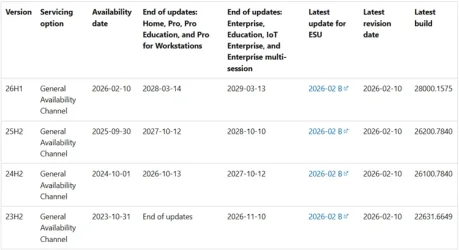
You can see a full list of available Windows 11 versions to use as a value in the Windows 11 release information table.
Windows11_servicing_channels.webp


C} Click/tap on OK, and go to step 7 below.​

Select_the_target_Feature_Update_version_gpedit-3.png

6 To Undo Specify Target Feature Update Version

A) Select (dot) Not Configured. (see screenshot below)​

B} Click/tap on OK, and go to step 7 below.​

Select_the_target_Feature_Update_version_gpedit-2.png

7 You can now close the Local Group Policy Editor if you like.


OPTION TWO

Specify Target Feature Update Version using REG file


1 Do step 2 (specify) or step 3 (undo - default) below for what you want.

2 To Specify Target Feature Update Version

A) Click/tap on the Download button below for the version (ex: 22H2) you want to specify, and go to step 4.​

Specify_target_Feature_Update_version_to_Windows11_21H2.reg


(Contents of .reg file for reference)
Code:
Windows Registry Editor Version 5.00

[HKEY_LOCAL_MACHINE\SOFTWARE\Policies\Microsoft\Windows\WindowsUpdate]
"ProductVersion"="Windows 11"
"TargetReleaseVersion"=dword:00000001
"TargetReleaseVersionInfo"="21H2"

OR​

Specify_target_Feature_Update_version_to_Windows11_22H2.reg


(Contents of .reg file for reference)
Code:
Windows Registry Editor Version 5.00

[HKEY_LOCAL_MACHINE\SOFTWARE\Policies\Microsoft\Windows\WindowsUpdate]
"ProductVersion"="Windows 11"
"TargetReleaseVersion"=dword:00000001
"TargetReleaseVersionInfo"="22H2"

OR​

Specify_target_Feature_Update_version_to_Windows11_23H2.reg


(Contents of .reg file for reference)
Code:
Windows Registry Editor Version 5.00

[HKEY_LOCAL_MACHINE\SOFTWARE\Policies\Microsoft\Windows\WindowsUpdate]
"ProductVersion"="Windows 11"
"TargetReleaseVersion"=dword:00000001
"TargetReleaseVersionInfo"="23H2"

OR​

Specify_target_Feature_Update_version_to_Windows11_24H2.reg


(Contents of .reg file for reference)
Code:
Windows Registry Editor Version 5.00

[HKEY_LOCAL_MACHINE\SOFTWARE\Policies\Microsoft\Windows\WindowsUpdate]
"ProductVersion"="Windows 11"
"TargetReleaseVersion"=dword:00000001
"TargetReleaseVersionInfo"="24H2"

OR​

Specify_target_Feature_Update_version_to_Windows11_25H2.reg


(Contents of .reg file for reference)
Code:
Windows Registry Editor Version 5.00

[HKEY_LOCAL_MACHINE\SOFTWARE\Policies\Microsoft\Windows\WindowsUpdate]
"ProductVersion"="Windows 11"
"TargetReleaseVersion"=dword:00000001
"TargetReleaseVersionInfo"="25H2"

OR​

Specify_target_Feature_Update_version_to_Windows11_26H1.reg


(Contents of .reg file for reference)
Code:
Windows Registry Editor Version 5.00

[HKEY_LOCAL_MACHINE\SOFTWARE\Policies\Microsoft\Windows\WindowsUpdate]
"ProductVersion"="Windows 11"
"TargetReleaseVersion"=dword:00000001
"TargetReleaseVersionInfo"="26H1"


3 To Undo Specify Target Feature Update Version

A) Click/tap on the Download button below to download the file below, and go to step 4.​

Undo_specify_target_Feature_Update_version.reg


(Contents of .reg file for reference)
Code:
Windows Registry Editor Version 5.00

[HKEY_LOCAL_MACHINE\SOFTWARE\Policies\Microsoft\Windows\WindowsUpdate]
"ProductVersion"=-
"TargetReleaseVersion"=-
"TargetReleaseVersionInfo"=-

4 Save the .reg file to your desktop.

5 If you have Smart App Control turned on, you will need to unblock the downloaded REG file.

6 Double click/tap on the downloaded .reg file to merge it.

7 When prompted, click/tap on Run, Yes (UAC), Yes, and OK to approve the merge.

8 You can now delete the downloaded .reg file if you like.


OPTION THREE

Specify Target Feature Update Version in Registry Editor


1 Do step 2 in Option Two to add the needed registry key and values to edit for this option.

2 Open Registry Editor (regedit.exe).

3 Navigate to the key below in the left pane of Registry Editor. (see screenshot below)

HKEY_LOCAL_MACHINE\SOFTWARE\Policies\Microsoft\Windows\WindowsUpdate

Select_the_target_Feature_Update_version_regedit-1.png

4 In the right pane of the WindowsUpdate key, double click/tap on the TargetReleaseVersionInfo string value (REG_SZ) to modify it. (see screenshot above)

5 Type the version (ex; "21H2") you want to specify in the Value data box, and click/tap on OK. (see screenshot below)

You can see a full list of available Windows 11 versions to use as a value in the Windows 11 release information table.

Windows11_servicing_channels.webp


Select_the_target_Feature_Update_version_regedit-2.png

6 You can now close Registry Editor. You are done.

You can use step 3 in Option Two to undo this if needed or wanted.


That's it,
Shawn Brink


Attachments

Last edited:
I just tried this on my 23H2 to avoid getting 24H2 as I was feeling that there are probably some serious updates I should get whilst not getting 24H2. So I tried the commands above and briefly disabled Shawn's brilliant disable-all-updates feature. Strangely, I noticed a couple of cumulative updates (including KB5055523 which has a few zero-day fixes). What's unusual is that the two versions I got were marked with being applicable to 24H2. I thought they'd have a 23H2 version of both of those updates. Am I being wrongly paranoid? Probably not, but just to be sure I paused updates again.

View attachment 130820

The important thing is that even though I'm on Windows Home, I didn't get offered the full 24H2 download. Thanks to @garlin for that .reg file in this thread. Btw, the schtasks command was a bit wrong, it needs /change before the /disable.

I disabled it (and another appraiser related task in the task scheduler directly).


View attachment 130819

Hey there...

It is strange that you're seeing 24H2 cumulative updates; I can't see how that would be possible if you're not running 24H2. The term "cumulative" is what I can't get my head around (I'm still waking up, lol). " Cumulative" would imply that the update service seems to "think" you're on 24H2; I can't see why you would be getting cumulative updates otherwise. Weird.

It sounds like you've verified that you're running 23H2, so it's odd. I think it's likely related to being on Windows 11 Home.

Go to SETTINGS > WINDOWS UPDATE > ADVANCED OPTIONS > CONFIGURED UPDATE POLICIES.

If the GPEDIT tweak worked and is in effect, you should see this:

1744280925062.webp


I just got up (morning here in Houston, TX) and did a random check for updates, and it scanned for a second and then returned to this screen:

1744280991146.webp


There has been no mention (yet) of anything related to 24H2. However, I'm on Windows 11 Pro and have been running it for several years.

There are a few "Optional Updates" available, but they are driver updates like the Bluetooth driver and "Intel—net—23.120.0.3," the latter likely associated with either my Intel NIC or .Net Framework. It is probably the Intel network driver, as the .Net packages are generally named explicitly.

1744281176066.webp

A few days ago, when I was still stuck on the loathsome, quirky, buggy, demonic 24H2 update, well past the window to remove it, I was also seeing only cumulative updates for 24H2.

I have seen a couple of cumulative updates for 23H2 and installed those, but never anything related to 24H2.

The only thing that saved me from the cost of a Win 11 loT Ent 23H2 license (which I'll eventually get later this year) was finding that Dec 2024 system image, which happened to be 23H2. Then I did the GPEDIT tweak, and things seem locked in now, according to the Configured Update Policies page above.

Have you considered just getting a Win 11 Pro license? They can be found very cheap. My last two licenses were found on Groupon (of all places). I paid about $17.00 for each Pro license, which were then applied to my mostly identical dual office workstations.

Otherwise, Win 11 Pro licenses can be found easily in the $25.00 range if you bang about the interwebz a bit. In fact, my other (backup) workstation is running 24H2, so I'll likely get this newly restored main rig Win 11 Pro 23H2 system trimmed and properly set up and then image/restore it to my backup rig.

If problems still occur, you might consider a clean install; get a current 23H2 ISO, unplug your network cable, and install as a local user (not via a Microsoft Account)—unless, for some reason, you need a Microsoft login.

I prefer using a local account myself, but it seems Microsoft is making moves towards forcing everyone to use an MS account, so I'll be staying on 23H2 or 23H2 Win loT Enterprise as long as I can.

Best of luck...

~s
 

My Computers

System One System Two

  • OS
    Windows 11 Pro 23H2
    Computer type
    PC/Desktop
    Manufacturer/Model
    Asus Z790 Apex Encore
    CPU
    i9 14900K @ 57p/45e ALL CORE
    Motherboard
    Asus Z790 Apex Encore
    Memory
    48gb Corsair Dom Titanium (dual) 7200mhz
    Graphics Card(s)
    Asus TUF RTX 5090
    Sound Card
    Creative SXFI Carrier Atmos soundbar
    Monitor(s) Displays
    x1 LG C5 42" OLED (main) / KTC 27" mini-LED (side)
    Screen Resolution
    3840x1600 / 4K (LG C5) / 2560x1440 (KTC mini-LED)
    Hard Drives
    x2 4TB SN850X NVMEs C:/D: DRIVES / x2 4TB SN850X RAID0 (8TB RAID0) E:\GAMESLUT\DRIVE / x6 EVO 8TB SSDs in RAiD5 via Areca 1883i PCIe RAID controller (40TB USEABLE/8TB PARITY)
    PSU
    BeQuiet! DARK 1300w
    Case
    Corsair 780T w/ dual 140mm exhaust fans modded into acrylic side panel
    Cooling
    EK Nucleus 360 AIO (PUSH/PULL/TOP INTAKE)
    Keyboard
    Logitech G915 Lightspeed TKL
    Mouse
    Roccat Kone XP AIR
    Internet Speed
    2.5 gbs
    Browser
    Brave
    Antivirus
    Windows Defender (for now)
    Other Info
    Also have a new Area 51 18 laptop w/ 275HX CPU and RTX 5090m GPU - as well as - one of the 2021 Area51m R2 laptops with desktop 10700K and 200w 2080 Super GPU.
  • Operating System
    Win 11 Pro 23H2
    Computer type
    PC/Desktop
    Manufacturer/Model
    Asus Z790 Dark Hero
    CPU
    14900K @ 5.7ghz p cores / 4.5 ghz e cores
    Motherboard
    Asus Z790 Dark Hero
    Memory
    64gb DDR5 6600mhz
    Graphics card(s)
    Asus TUF RTX 4090
    Sound Card
    Creative SXFI Carrier Dolby Atmos Soundbar
    Monitor(s) Displays
    LG C1 48" OLED / AW3821DW 38" Ultrawide
    Screen Resolution
    3840x1600
    Hard Drives
    x3 2TB 990 Pro NVMEs / x1 2TB EVO SSD
    PSU
    Seasonic Prime 1000w
    Case
    Corsair 5000D
    Cooling
    EK Nucleus CR360 AIO PUSH/PULL Exhaust
    Keyboard
    Logitech G915 Lightspeed
    Mouse
    Roccatt Kone XP AIR
    Internet Speed
    2.5gbs
    Browser
    Comet
    Antivirus
    Defender
    Other Info
    Also have a new Area 51 18 laptop w/ 275HX CPU and RTX 5090m GPU - as well as - one of the 2021 Area51m R2 laptops with desktop 10700K and 200w 2080 Super GPU.
It is strange that you're seeing 24H2 cumulative updates; I can't see how that would be possible if you're not running 24H2.

Well now I'm completely confused. I was 110% sure that I was on 23H2 because when I accidentally let 24H2 get installed, I started getting BSOD's within a couple of hours, so I uninstalled the 24H2 update. All went well. I then immediately implemented Shawn's update-blocking (super long pause updates value) and I never got another update since then.

SOMEHOW, despite uninstalling 24H2 successfully and having no BSOD's since then, I just checked and guess what...

1744283680873.webp


How on earth ? I don't know if I've really got 24H2 or if during the uninstall of 24H2 it really did uninstall it but forgot to update a field in the registry so it does actually think I'm on 24H2. So it's understandable why I'd be offered the cumulative updates. If I somehow am on full 24H2 but magically without the BSOD's it brought, then great, bring on the cumulative updates. But if I'm actually on 23H2 but identifying as 24H2, then those cumulative updates might be seriously bad.

If anyone knows a way I can check "for reals" if I've got it, I'll know if I'm safe to do the updates. Maybe there are some new files that I'd only have if I'm genuinely on 24H2 I could look for.
 

My Computer

System One

  • OS
    Win11 Pro 25H2
    Computer type
    Laptop
    Manufacturer/Model
    Lenovo ThinkBook 16p G6 IAX
    CPU
    Intel Core Ultra 9 275HX
    Memory
    32GB
    Graphics Card(s)
    NVIDIA® GeForce RTX™ 5060 Laptop GPU
    Monitor(s) Displays
    3 external monitors, Samsung 43" super widescreen (providing 2x 1080p via separate inputs), 1x LG 27" 1080p
    Screen Resolution
    2560x1600 and 3x 1920x1080
    Hard Drives
    1TB SSD internal, 2x4TB SSD external
    Keyboard
    Logitech illuminated and silent thing
    Mouse
    Traditional MS Intellimouse
    Internet Speed
    256Mb down/50Mb up
    Browser
    Chrome mostly, Edge for PDF's, Brave for YouTube
    Antivirus
    MalwareBytes/Defender
    Other Info
    Also an m4 Mac Mini for work dev stuff that I operate remotely via HelpWire.
If anyone knows a way I can check "for reals" if I've got it, I'll know if I'm safe to do the updates. Maybe there are some new files that I'd only have if I'm genuinely on 24H2 I could look for.

Ah, interesting.

What you say about some weird systemic misinformation being left about the registry is certainly possible.

Follow the steps mentioned at the start of my previous post, and then look at what your "Configured update policies" screen says (unless Win 11 Home doesn't have that screen).

Otherwise, an alternate means of checking your current Win 11 version/build (probably pulls from the same registry key as your other method):

Press Windows key + R (win + R), and type winver
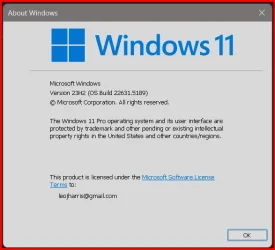
This is what I see when I do the WIN KEY + R / winver method:

1744284582541.webp


I'm sorry about the issue you're having. It might seem weird to non-computer-based workers, but my rig generally operates perfectly for years at a time, never a single blue screen or crash.

This is primarily due to using the same tools/apps for many years and not messing around with software I'm just curious about; I have a beater rig for that kind of thing, while my primary two workstations need/must remain near ~100% static and non-changing.

Suddenly, having everything go upside down is traumatic, as work, writing, personal design and sound projects, and gaming all come to a grinding halt.

The last two weeks have been among the most stressful of my past two years due to that ridiculously flawed 24H2 update. So, I feel the pain lol.

ded_profile_100x100.webp

~s
 

Attachments

  • 1744284477211.webp
    1744284477211.webp
    19.6 KB · Views: 58

My Computers

System One System Two

  • OS
    Windows 11 Pro 23H2
    Computer type
    PC/Desktop
    Manufacturer/Model
    Asus Z790 Apex Encore
    CPU
    i9 14900K @ 57p/45e ALL CORE
    Motherboard
    Asus Z790 Apex Encore
    Memory
    48gb Corsair Dom Titanium (dual) 7200mhz
    Graphics Card(s)
    Asus TUF RTX 5090
    Sound Card
    Creative SXFI Carrier Atmos soundbar
    Monitor(s) Displays
    x1 LG C5 42" OLED (main) / KTC 27" mini-LED (side)
    Screen Resolution
    3840x1600 / 4K (LG C5) / 2560x1440 (KTC mini-LED)
    Hard Drives
    x2 4TB SN850X NVMEs C:/D: DRIVES / x2 4TB SN850X RAID0 (8TB RAID0) E:\GAMESLUT\DRIVE / x6 EVO 8TB SSDs in RAiD5 via Areca 1883i PCIe RAID controller (40TB USEABLE/8TB PARITY)
    PSU
    BeQuiet! DARK 1300w
    Case
    Corsair 780T w/ dual 140mm exhaust fans modded into acrylic side panel
    Cooling
    EK Nucleus 360 AIO (PUSH/PULL/TOP INTAKE)
    Keyboard
    Logitech G915 Lightspeed TKL
    Mouse
    Roccat Kone XP AIR
    Internet Speed
    2.5 gbs
    Browser
    Brave
    Antivirus
    Windows Defender (for now)
    Other Info
    Also have a new Area 51 18 laptop w/ 275HX CPU and RTX 5090m GPU - as well as - one of the 2021 Area51m R2 laptops with desktop 10700K and 200w 2080 Super GPU.
  • Operating System
    Win 11 Pro 23H2
    Computer type
    PC/Desktop
    Manufacturer/Model
    Asus Z790 Dark Hero
    CPU
    14900K @ 5.7ghz p cores / 4.5 ghz e cores
    Motherboard
    Asus Z790 Dark Hero
    Memory
    64gb DDR5 6600mhz
    Graphics card(s)
    Asus TUF RTX 4090
    Sound Card
    Creative SXFI Carrier Dolby Atmos Soundbar
    Monitor(s) Displays
    LG C1 48" OLED / AW3821DW 38" Ultrawide
    Screen Resolution
    3840x1600
    Hard Drives
    x3 2TB 990 Pro NVMEs / x1 2TB EVO SSD
    PSU
    Seasonic Prime 1000w
    Case
    Corsair 5000D
    Cooling
    EK Nucleus CR360 AIO PUSH/PULL Exhaust
    Keyboard
    Logitech G915 Lightspeed
    Mouse
    Roccatt Kone XP AIR
    Internet Speed
    2.5gbs
    Browser
    Comet
    Antivirus
    Defender
    Other Info
    Also have a new Area 51 18 laptop w/ 275HX CPU and RTX 5090m GPU - as well as - one of the 2021 Area51m R2 laptops with desktop 10700K and 200w 2080 Super GPU.
It's confirmed (and I feel so stoopid now) - I do have 24H2 still. I watched this youtube video where it went through a bunch of the changes and I've got all of them. Cumulative updates here I come.
 

My Computer

System One

  • OS
    Win11 Pro 25H2
    Computer type
    Laptop
    Manufacturer/Model
    Lenovo ThinkBook 16p G6 IAX
    CPU
    Intel Core Ultra 9 275HX
    Memory
    32GB
    Graphics Card(s)
    NVIDIA® GeForce RTX™ 5060 Laptop GPU
    Monitor(s) Displays
    3 external monitors, Samsung 43" super widescreen (providing 2x 1080p via separate inputs), 1x LG 27" 1080p
    Screen Resolution
    2560x1600 and 3x 1920x1080
    Hard Drives
    1TB SSD internal, 2x4TB SSD external
    Keyboard
    Logitech illuminated and silent thing
    Mouse
    Traditional MS Intellimouse
    Internet Speed
    256Mb down/50Mb up
    Browser
    Chrome mostly, Edge for PDF's, Brave for YouTube
    Antivirus
    MalwareBytes/Defender
    Other Info
    Also an m4 Mac Mini for work dev stuff that I operate remotely via HelpWire.
It's confirmed (and I feel so stoopid now) - I do have 24H2 still. I watched this youtube video where it went through a bunch of the changes and I've got all of them. Cumulative updates here I come.

Suxor.

You can always clean-install 23H2 and get a cheap license for Pro.

BTW, does your taskbar show up if hidden on 2H42? That was one of the most annoying things, especially if working on the OLED panel. On 24H2, I had to press the Windows keyboard key or a mapped mouse key to get the hidden taskbar to show.

~s
 

My Computers

System One System Two

  • OS
    Windows 11 Pro 23H2
    Computer type
    PC/Desktop
    Manufacturer/Model
    Asus Z790 Apex Encore
    CPU
    i9 14900K @ 57p/45e ALL CORE
    Motherboard
    Asus Z790 Apex Encore
    Memory
    48gb Corsair Dom Titanium (dual) 7200mhz
    Graphics Card(s)
    Asus TUF RTX 5090
    Sound Card
    Creative SXFI Carrier Atmos soundbar
    Monitor(s) Displays
    x1 LG C5 42" OLED (main) / KTC 27" mini-LED (side)
    Screen Resolution
    3840x1600 / 4K (LG C5) / 2560x1440 (KTC mini-LED)
    Hard Drives
    x2 4TB SN850X NVMEs C:/D: DRIVES / x2 4TB SN850X RAID0 (8TB RAID0) E:\GAMESLUT\DRIVE / x6 EVO 8TB SSDs in RAiD5 via Areca 1883i PCIe RAID controller (40TB USEABLE/8TB PARITY)
    PSU
    BeQuiet! DARK 1300w
    Case
    Corsair 780T w/ dual 140mm exhaust fans modded into acrylic side panel
    Cooling
    EK Nucleus 360 AIO (PUSH/PULL/TOP INTAKE)
    Keyboard
    Logitech G915 Lightspeed TKL
    Mouse
    Roccat Kone XP AIR
    Internet Speed
    2.5 gbs
    Browser
    Brave
    Antivirus
    Windows Defender (for now)
    Other Info
    Also have a new Area 51 18 laptop w/ 275HX CPU and RTX 5090m GPU - as well as - one of the 2021 Area51m R2 laptops with desktop 10700K and 200w 2080 Super GPU.
  • Operating System
    Win 11 Pro 23H2
    Computer type
    PC/Desktop
    Manufacturer/Model
    Asus Z790 Dark Hero
    CPU
    14900K @ 5.7ghz p cores / 4.5 ghz e cores
    Motherboard
    Asus Z790 Dark Hero
    Memory
    64gb DDR5 6600mhz
    Graphics card(s)
    Asus TUF RTX 4090
    Sound Card
    Creative SXFI Carrier Dolby Atmos Soundbar
    Monitor(s) Displays
    LG C1 48" OLED / AW3821DW 38" Ultrawide
    Screen Resolution
    3840x1600
    Hard Drives
    x3 2TB 990 Pro NVMEs / x1 2TB EVO SSD
    PSU
    Seasonic Prime 1000w
    Case
    Corsair 5000D
    Cooling
    EK Nucleus CR360 AIO PUSH/PULL Exhaust
    Keyboard
    Logitech G915 Lightspeed
    Mouse
    Roccatt Kone XP AIR
    Internet Speed
    2.5gbs
    Browser
    Comet
    Antivirus
    Defender
    Other Info
    Also have a new Area 51 18 laptop w/ 275HX CPU and RTX 5090m GPU - as well as - one of the 2021 Area51m R2 laptops with desktop 10700K and 200w 2080 Super GPU.
Suxor.

You can always clean-install 23H2 and get a cheap license for Pro.

BTW, does your taskbar show up if hidden on 2H42? That was one of the most annoying things, especially if working on the OLED panel. On 24H2, I had to press the Windows keyboard key or a mapped mouse key to get the hidden taskbar to show.

~s
I normally have the taskbar there permanently but I just tried turning on auto-hide. It auto-hid, and when I moused to where it should be, it unhid itself in the normal way. Not sure what you mean by "the OLED panel". If I've got one, I don't use it. I use an external USB mouse and keyboard 100% of the time.
 

My Computer

System One

  • OS
    Win11 Pro 25H2
    Computer type
    Laptop
    Manufacturer/Model
    Lenovo ThinkBook 16p G6 IAX
    CPU
    Intel Core Ultra 9 275HX
    Memory
    32GB
    Graphics Card(s)
    NVIDIA® GeForce RTX™ 5060 Laptop GPU
    Monitor(s) Displays
    3 external monitors, Samsung 43" super widescreen (providing 2x 1080p via separate inputs), 1x LG 27" 1080p
    Screen Resolution
    2560x1600 and 3x 1920x1080
    Hard Drives
    1TB SSD internal, 2x4TB SSD external
    Keyboard
    Logitech illuminated and silent thing
    Mouse
    Traditional MS Intellimouse
    Internet Speed
    256Mb down/50Mb up
    Browser
    Chrome mostly, Edge for PDF's, Brave for YouTube
    Antivirus
    MalwareBytes/Defender
    Other Info
    Also an m4 Mac Mini for work dev stuff that I operate remotely via HelpWire.
I normally have the taskbar there permanently but I just tried turning on auto-hide. It auto-hid, and when I moused to where it should be, it unhid itself in the normal way. Not sure what you mean by "the OLED panel". If I've got one, I don't use it. I use an external USB mouse and keyboard 100% of the time.
OLED is display, not a mouse
 

My Computer

System One

  • OS
    Windows 11 Pro
OLED is display, not a mouse
Yeah, I was assuming it was some kind of OLED panel on the keyboard used as a trackpad perhaps.
 

My Computer

System One

  • OS
    Win11 Pro 25H2
    Computer type
    Laptop
    Manufacturer/Model
    Lenovo ThinkBook 16p G6 IAX
    CPU
    Intel Core Ultra 9 275HX
    Memory
    32GB
    Graphics Card(s)
    NVIDIA® GeForce RTX™ 5060 Laptop GPU
    Monitor(s) Displays
    3 external monitors, Samsung 43" super widescreen (providing 2x 1080p via separate inputs), 1x LG 27" 1080p
    Screen Resolution
    2560x1600 and 3x 1920x1080
    Hard Drives
    1TB SSD internal, 2x4TB SSD external
    Keyboard
    Logitech illuminated and silent thing
    Mouse
    Traditional MS Intellimouse
    Internet Speed
    256Mb down/50Mb up
    Browser
    Chrome mostly, Edge for PDF's, Brave for YouTube
    Antivirus
    MalwareBytes/Defender
    Other Info
    Also an m4 Mac Mini for work dev stuff that I operate remotely via HelpWire.
View attachment 130830

How on earth ? I don't know if I've really got 24H2 or if during the uninstall of 24H2 it really did uninstall it but forgot to update a field in the registry so it does actually think I'm on 24H2. So it's understandable why I'd be offered the cumulative updates. If I somehow am on full 24H2 but magically without the BSOD's it brought, then great, bring on the cumulative updates. But if I'm actually on 23H2 but identifying as 24H2, then those cumulative updates might be seriously bad.
No, it looks like 24H2 is actually installed. Before you tried the reg change, do you remember if Windows said it was ready to install 24H2? The question is whether Windows Update downloaded 24H2 ahead of time and staged it locally.
 

My Computer

System One

  • OS
    Windows 7
No, it looks like 24H2 is actually installed. Before you tried the reg change, do you remember if Windows said it was ready to install 24H2? The question is whether Windows Update downloaded 24H2 ahead of time and staged it locally.

Tricky to remember now. I know 24H2 was installed and I started getting BSOD's, so I wanted to (and thought I had) uninstalled it. But perhaps I actually uninstalled a cumulative update to 24H2 that was actually the problem and happily thought I'd uninstalled 24H2. Difficult to know now. Happy now though :-)
 

My Computer

System One

  • OS
    Win11 Pro 25H2
    Computer type
    Laptop
    Manufacturer/Model
    Lenovo ThinkBook 16p G6 IAX
    CPU
    Intel Core Ultra 9 275HX
    Memory
    32GB
    Graphics Card(s)
    NVIDIA® GeForce RTX™ 5060 Laptop GPU
    Monitor(s) Displays
    3 external monitors, Samsung 43" super widescreen (providing 2x 1080p via separate inputs), 1x LG 27" 1080p
    Screen Resolution
    2560x1600 and 3x 1920x1080
    Hard Drives
    1TB SSD internal, 2x4TB SSD external
    Keyboard
    Logitech illuminated and silent thing
    Mouse
    Traditional MS Intellimouse
    Internet Speed
    256Mb down/50Mb up
    Browser
    Chrome mostly, Edge for PDF's, Brave for YouTube
    Antivirus
    MalwareBytes/Defender
    Other Info
    Also an m4 Mac Mini for work dev stuff that I operate remotely via HelpWire.
@Brink ,

Thank you for this Tutorial. My laptop (Spec 2) has stubbornly refused to offer 24H2 via Windows Update for over six months, despite manually checking over and over again. My desktop (Spec 1) got 24H2 offered within two weeks of the release last October, and it is a year older than the laptop.

I implemented your GPEDIT solution earlier this afternoon, rebooted, checked for Windows Update. Low and behold, Windows 24H2 was offered for download. It is downloading now. It should be a long afternoon . . . Wish me luck!

Thanks again, and have a great day.

Best Regards,
Phil
 

My Computers

System One System Two

  • OS
    Windows 11 Pro Version 25H2 (Build 26200.8457
    Computer type
    PC/Desktop
    Manufacturer/Model
    Dell XPS8930 SE
    CPU
    Intel i7-9700K 4700 MHz
    Motherboard
    Dell XPS 8930
    Memory
    32 GB (4 x 8GB SK Hynix DDR4 @1333 MHz) (2666 MHz)
    Graphics Card(s)
    NVIDIA GeForce RTX 2060 (6 GB) GDDR6 300 MHz
    Sound Card
    None
    Monitor(s) Displays
    Dell UltraSharp U2518D 25"
    Screen Resolution
    2560 x 1440
    Hard Drives
    NVMe Intel 1024 TB
    Seagate 2 TB, SATA-III
    Western Digital Black 4TB
    PSU
    850 W Gold Standard
    Case
    Dell XPS 8930 Base (Special Edition)
    Cooling
    Air
    Keyboard
    Dell 0G4D2W
    Mouse
    Dell MOCZUL
    Internet Speed
    Download 553 Mbps, Upload 686 Mbps
    Browser
    Google Chrome
    Antivirus
    ESET Smart Security Premium, plus Malwarebytes Premium
    Other Info
    BIOS Version 1.1.31
  • Operating System
    Windows 11 Pro Version 25H2 (Build 26200.8457)
    Computer type
    Laptop
    Manufacturer/Model
    Dell XPS 15 7590
    CPU
    i7-9750H 4.5 GHz
    Motherboard
    Dell XPS 15 7590
    Memory
    16 GB (2 x 8GB @ 1333 MHz) DDR4-2666 MHz
    Graphics card(s)
    NVIDIA GeForce 1650 4 GB GDDR5
    Sound Card
    None
    Monitor(s) Displays
    Dell XPS 15 7590, 15.6" InfinityEdge Anti-Glare, Non-Touch
    Screen Resolution
    1920 x 1080
    Hard Drives
    512 GB M.2 PCle NVMe SK Hynix
    PSU
    130W Power Adapter
    Case
    Dell XPS 15 7590
    Cooling
    Air
    Keyboard
    Laptop
    Mouse
    Logitech M510
    Internet Speed
    Download: 400 Mbps, Upload: 203 Mbps
    Browser
    Google Chrome
    Antivirus
    ESET Smart Security Premium, plus Malwarebytes Premium
    Other Info
    BIOS Version 1.35.0
@Brink ,

Thank you for this Tutorial. My laptop (Spec 2) has stubbornly refused to offer 24H2 via Windows Update for over six months, despite manually checking over and over again. My desktop (Spec 1) got 24H2 offered within two weeks of the release last October, and it is a year older than the laptop.

I implemented your GPEDIT solution earlier this afternoon, rebooted, checked for Windows Update. Low and behold, Windows 24H2 was offered for download. It is downloading now. It should be a long afternoon . . . Wish me luck!

Thanks again, and have a great day.

Best Regards,
Phil

Great news Phil. I hope it goes smoothly. :shawn:
 

My Computers

System One System Two

  • OS
    Windows 11 Pro for Workstations
    Computer type
    PC/Desktop
    Manufacturer/Model
    Custom self build
    CPU
    Intel i7-8700K 5 GHz
    Motherboard
    ASUS ROG Maximus XI Formula Z390
    Memory
    64 GB (4x16GB) G.SKILL TridentZ RGB DDR4 3600 MHz (F4-3600C18D-32GTZR)
    Graphics Card(s)
    ASUS ROG-STRIX-GTX1080TI-O11G-GAMING (11GB GDDR5X)
    Sound Card
    Integrated Digital Audio (S/PDIF)
    Monitor(s) Displays
    2 x Samsung Odyssey G75 27"
    Screen Resolution
    2560x1440
    Hard Drives
    1TB Samsung 990 PRO M.2,
    4TB Samsung 990 PRO M.2,
    TerraMaster F8 SSD Plus NAS
    PSU
    Seasonic Prime Titanium 850W
    Case
    Thermaltake Core P3 wall mounted
    Cooling
    Corsair Hydro H115i
    Keyboard
    Amazon Basics Wired Full Keyboard MD005
    Mouse
    Logitech MX Master 4
    Internet Speed
    2 Gbps Download and 100 Mbps Upload
    Browser
    Chrome and Edge
    Antivirus
    Microsoft Defender
    Other Info
    Logitech Z625 speaker system,
    Logitech BRIO 4K Pro webcam,
    HP Color LaserJet Pro MFP M477fdn,
    CyberPower CP1500PFCLCD
    Galaxy S23 Plus phone
  • Operating System
    Windows 11 Pro
    Computer type
    Laptop
    Manufacturer/Model
    Surface Laptop 7 Copilot+ PC
    CPU
    Snapdragon X Elite (12 core) 3.42 GHz
    Memory
    16 GB LPDDR5x-7467 MHz
    Monitor(s) Displays
    15" HDR
    Screen Resolution
    2496 x 1664
    Hard Drives
    1 TB SSD
    Internet Speed
    Wi-Fi 7 and Bluetooth 5.4
    Browser
    Chrome and Edge
    Antivirus
    Microsoft Defender
@Brink ,

It was a long afternoon, but 24H2 is installed on my laptop (Spec 2 - updated). It took out my desktop background picture and switched my taskbar to the dark theme, but other than that I had no issues to correct, so far. I only turn the laptop when needed for clients (on-site visits), and on every Friday to keep it updated, scanned, and imaged.

I ran SFC and DISM checks. Those passed. I then did a Disk Cleanup to reclaim the 13 GB. I never go backwards, but I do have weekly system images if I were to need to.

I followed the Tutorial to reverse what I had done and make the GP "Not configured", but Windows Update is now telling me that my "organization" prevents me from selecting Updates as soon as they are available, not that I would want to, but I was wondering if you had encountered that issue . . . ?

Next Friday, I will test again, this time Enable the GP, reboot, Disable the GP, reboot and see if the "organization" message disappears. I ran out of time yesterday. I just wanted to check the validity of the 24H2 system files, and then do a full system image of all partitions before shutting down for the day.

Thanks again for the Tutorial. (y) It was the solution for me. Have a great day.

Best Regards,
Phil
 

My Computers

System One System Two

  • OS
    Windows 11 Pro Version 25H2 (Build 26200.8457
    Computer type
    PC/Desktop
    Manufacturer/Model
    Dell XPS8930 SE
    CPU
    Intel i7-9700K 4700 MHz
    Motherboard
    Dell XPS 8930
    Memory
    32 GB (4 x 8GB SK Hynix DDR4 @1333 MHz) (2666 MHz)
    Graphics Card(s)
    NVIDIA GeForce RTX 2060 (6 GB) GDDR6 300 MHz
    Sound Card
    None
    Monitor(s) Displays
    Dell UltraSharp U2518D 25"
    Screen Resolution
    2560 x 1440
    Hard Drives
    NVMe Intel 1024 TB
    Seagate 2 TB, SATA-III
    Western Digital Black 4TB
    PSU
    850 W Gold Standard
    Case
    Dell XPS 8930 Base (Special Edition)
    Cooling
    Air
    Keyboard
    Dell 0G4D2W
    Mouse
    Dell MOCZUL
    Internet Speed
    Download 553 Mbps, Upload 686 Mbps
    Browser
    Google Chrome
    Antivirus
    ESET Smart Security Premium, plus Malwarebytes Premium
    Other Info
    BIOS Version 1.1.31
  • Operating System
    Windows 11 Pro Version 25H2 (Build 26200.8457)
    Computer type
    Laptop
    Manufacturer/Model
    Dell XPS 15 7590
    CPU
    i7-9750H 4.5 GHz
    Motherboard
    Dell XPS 15 7590
    Memory
    16 GB (2 x 8GB @ 1333 MHz) DDR4-2666 MHz
    Graphics card(s)
    NVIDIA GeForce 1650 4 GB GDDR5
    Sound Card
    None
    Monitor(s) Displays
    Dell XPS 15 7590, 15.6" InfinityEdge Anti-Glare, Non-Touch
    Screen Resolution
    1920 x 1080
    Hard Drives
    512 GB M.2 PCle NVMe SK Hynix
    PSU
    130W Power Adapter
    Case
    Dell XPS 15 7590
    Cooling
    Air
    Keyboard
    Laptop
    Mouse
    Logitech M510
    Internet Speed
    Download: 400 Mbps, Upload: 203 Mbps
    Browser
    Google Chrome
    Antivirus
    ESET Smart Security Premium, plus Malwarebytes Premium
    Other Info
    BIOS Version 1.35.0
@Brink ,

It was a long afternoon, but 24H2 is installed on my laptop (Spec 2 - updated). It took out my desktop background picture and switched my taskbar to the dark theme, but other than that I had no issues to correct, so far. I only turn the laptop when needed for clients (on-site visits), and on every Friday to keep it updated, scanned, and imaged.

I ran SFC and DISM checks. Those passed. I then did a Disk Cleanup to reclaim the 13 GB. I never go backwards, but I do have weekly system images if I were to need to.

I followed the Tutorial to reverse what I had done and make the GP "Not configured", but Windows Update is now telling me that my "organization" prevents me from selecting Updates as soon as they are available, not that I would want to, but I was wondering if you had encountered that issue . . . ?

Next Friday, I will test again, this time Enable the GP, reboot, Disable the GP, reboot and see if the "organization" message disappears. I ran out of time yesterday. I just wanted to check the validity of the 24H2 system files, and then do a full system image of all partitions before shutting down for the day.

Thanks again for the Tutorial. (y) It was the solution for me. Have a great day.

Best Regards,
Phil

You can double check below to see if it's for the same policy causing the "Managed by your organization" type message.


My Computers

System One System Two

  • OS
    Windows 11 Pro for Workstations
    Computer type
    PC/Desktop
    Manufacturer/Model
    Custom self build
    CPU
    Intel i7-8700K 5 GHz
    Motherboard
    ASUS ROG Maximus XI Formula Z390
    Memory
    64 GB (4x16GB) G.SKILL TridentZ RGB DDR4 3600 MHz (F4-3600C18D-32GTZR)
    Graphics Card(s)
    ASUS ROG-STRIX-GTX1080TI-O11G-GAMING (11GB GDDR5X)
    Sound Card
    Integrated Digital Audio (S/PDIF)
    Monitor(s) Displays
    2 x Samsung Odyssey G75 27"
    Screen Resolution
    2560x1440
    Hard Drives
    1TB Samsung 990 PRO M.2,
    4TB Samsung 990 PRO M.2,
    TerraMaster F8 SSD Plus NAS
    PSU
    Seasonic Prime Titanium 850W
    Case
    Thermaltake Core P3 wall mounted
    Cooling
    Corsair Hydro H115i
    Keyboard
    Amazon Basics Wired Full Keyboard MD005
    Mouse
    Logitech MX Master 4
    Internet Speed
    2 Gbps Download and 100 Mbps Upload
    Browser
    Chrome and Edge
    Antivirus
    Microsoft Defender
    Other Info
    Logitech Z625 speaker system,
    Logitech BRIO 4K Pro webcam,
    HP Color LaserJet Pro MFP M477fdn,
    CyberPower CP1500PFCLCD
    Galaxy S23 Plus phone
  • Operating System
    Windows 11 Pro
    Computer type
    Laptop
    Manufacturer/Model
    Surface Laptop 7 Copilot+ PC
    CPU
    Snapdragon X Elite (12 core) 3.42 GHz
    Memory
    16 GB LPDDR5x-7467 MHz
    Monitor(s) Displays
    15" HDR
    Screen Resolution
    2496 x 1664
    Hard Drives
    1 TB SSD
    Internet Speed
    Wi-Fi 7 and Bluetooth 5.4
    Browser
    Chrome and Edge
    Antivirus
    Microsoft Defender
@Brink ,

Many thanks for your prompt and helpful reply. I checked, and as you surmised, there were two policies dealing with version updates.


Update Policies.webp


Somehow Windows Update "remembered" that I had enabled the policy for 24H2, even though I set it back to "Not configured." I used GPEDIT to Disable the policy, rebooted, and both GP "feature update" entries were gone, and I now again have the choice to get updates as soon as they are released.

To test further, I rebooted and used GPEDIT to change the feature update policy from "Disabled" to "Not Configured." I rebooted the computer, and both "feature update" policies remained gone, so we are good to go now. It appears, at least for that computer, that you have to disable the policy first, reboot, and then set it to "Not configured" to fully undo the change from "Enabled" back to "Not configured." Go figure! ;-)

Thanks again. Your Tutorials are a wealth of information. I commend you for all of your hard work! (y)

Have a great day.

Best Regards,
Phil
 

My Computers

System One System Two

  • OS
    Windows 11 Pro Version 25H2 (Build 26200.8457
    Computer type
    PC/Desktop
    Manufacturer/Model
    Dell XPS8930 SE
    CPU
    Intel i7-9700K 4700 MHz
    Motherboard
    Dell XPS 8930
    Memory
    32 GB (4 x 8GB SK Hynix DDR4 @1333 MHz) (2666 MHz)
    Graphics Card(s)
    NVIDIA GeForce RTX 2060 (6 GB) GDDR6 300 MHz
    Sound Card
    None
    Monitor(s) Displays
    Dell UltraSharp U2518D 25"
    Screen Resolution
    2560 x 1440
    Hard Drives
    NVMe Intel 1024 TB
    Seagate 2 TB, SATA-III
    Western Digital Black 4TB
    PSU
    850 W Gold Standard
    Case
    Dell XPS 8930 Base (Special Edition)
    Cooling
    Air
    Keyboard
    Dell 0G4D2W
    Mouse
    Dell MOCZUL
    Internet Speed
    Download 553 Mbps, Upload 686 Mbps
    Browser
    Google Chrome
    Antivirus
    ESET Smart Security Premium, plus Malwarebytes Premium
    Other Info
    BIOS Version 1.1.31
  • Operating System
    Windows 11 Pro Version 25H2 (Build 26200.8457)
    Computer type
    Laptop
    Manufacturer/Model
    Dell XPS 15 7590
    CPU
    i7-9750H 4.5 GHz
    Motherboard
    Dell XPS 15 7590
    Memory
    16 GB (2 x 8GB @ 1333 MHz) DDR4-2666 MHz
    Graphics card(s)
    NVIDIA GeForce 1650 4 GB GDDR5
    Sound Card
    None
    Monitor(s) Displays
    Dell XPS 15 7590, 15.6" InfinityEdge Anti-Glare, Non-Touch
    Screen Resolution
    1920 x 1080
    Hard Drives
    512 GB M.2 PCle NVMe SK Hynix
    PSU
    130W Power Adapter
    Case
    Dell XPS 15 7590
    Cooling
    Air
    Keyboard
    Laptop
    Mouse
    Logitech M510
    Internet Speed
    Download: 400 Mbps, Upload: 203 Mbps
    Browser
    Google Chrome
    Antivirus
    ESET Smart Security Premium, plus Malwarebytes Premium
    Other Info
    BIOS Version 1.35.0
@Brink ,

Many thanks for your prompt and helpful reply. I checked, and as you surmised, there were two policies dealing with version updates.


View attachment 131063


Somehow Windows Update "remembered" that I had enabled the policy for 24H2, even though I set it back to "Not configured." I used GPEDIT to Disable the policy, rebooted, and both GP "feature update" entries were gone, and I now again have the choice to get updates as soon as they are released.

To test further, I rebooted and used GPEDIT to change the feature update policy from "Disabled" to "Not Configured." I rebooted the computer, and both "feature update" policies remained gone, so we are good to go now. It appears, at least for that computer, that you have to disable the policy first, reboot, and then set it to "Not configured" to fully undo the change from "Enabled" back to "Not configured." Go figure! ;-)

Thanks again. Your Tutorials are a wealth of information. I commend you for all of your hard work! (y)

Have a great day.

Best Regards,
Phil

:shawn:
 

My Computers

System One System Two

  • OS
    Windows 11 Pro for Workstations
    Computer type
    PC/Desktop
    Manufacturer/Model
    Custom self build
    CPU
    Intel i7-8700K 5 GHz
    Motherboard
    ASUS ROG Maximus XI Formula Z390
    Memory
    64 GB (4x16GB) G.SKILL TridentZ RGB DDR4 3600 MHz (F4-3600C18D-32GTZR)
    Graphics Card(s)
    ASUS ROG-STRIX-GTX1080TI-O11G-GAMING (11GB GDDR5X)
    Sound Card
    Integrated Digital Audio (S/PDIF)
    Monitor(s) Displays
    2 x Samsung Odyssey G75 27"
    Screen Resolution
    2560x1440
    Hard Drives
    1TB Samsung 990 PRO M.2,
    4TB Samsung 990 PRO M.2,
    TerraMaster F8 SSD Plus NAS
    PSU
    Seasonic Prime Titanium 850W
    Case
    Thermaltake Core P3 wall mounted
    Cooling
    Corsair Hydro H115i
    Keyboard
    Amazon Basics Wired Full Keyboard MD005
    Mouse
    Logitech MX Master 4
    Internet Speed
    2 Gbps Download and 100 Mbps Upload
    Browser
    Chrome and Edge
    Antivirus
    Microsoft Defender
    Other Info
    Logitech Z625 speaker system,
    Logitech BRIO 4K Pro webcam,
    HP Color LaserJet Pro MFP M477fdn,
    CyberPower CP1500PFCLCD
    Galaxy S23 Plus phone
  • Operating System
    Windows 11 Pro
    Computer type
    Laptop
    Manufacturer/Model
    Surface Laptop 7 Copilot+ PC
    CPU
    Snapdragon X Elite (12 core) 3.42 GHz
    Memory
    16 GB LPDDR5x-7467 MHz
    Monitor(s) Displays
    15" HDR
    Screen Resolution
    2496 x 1664
    Hard Drives
    1 TB SSD
    Internet Speed
    Wi-Fi 7 and Bluetooth 5.4
    Browser
    Chrome and Edge
    Antivirus
    Microsoft Defender
Hi all, I read that Microsoft have fixed the audio issues in 24H2, so I want to give it a try, seeing as 23H2 is EOL in the next month or so.
However, the target release policy I set to "23H2" stubbornly refuses to go.

I've deleted the reg keys and rebooted, but Windows Update still reports the policy to limit it to 23H2 is in place. Same after DISM check and sfc/scannow just in case.

The only thing left I can think of to do is to 'Disable' the policy - rather than set it to 'Not Configured'. I honestly thought deleting the reg keys would do the trick.

EDIT: Disabling the target release policy didn't work either. Looks like I'm stuck on 23H2.

EDIT2: I changed the policy to 'Enabled', but with blank (i.e. empty) values, applied that, then set it to 'Not Configured'. Now it's downloading 24H2.
Hope that helps someone :)
 
Last edited:

My Computer

System One

  • OS
    Windows 11
    Computer type
    PC/Desktop
    CPU
    Ryzen 9 5900X
    Motherboard
    MSI MAG X570 Tomahawk Wifi
    Memory
    32GB 3600
    Graphics Card(s)
    RX580
    Hard Drives
    2x NVME Firecuda 530
    Cooling
    Arctic Liquid Freezer II 360
Hi all, I read that Microsoft have fixed the audio issues in 24H2, so I want to give it a try, seeing as 23H2 is EOL in the next month or so.
However, the target release policy I set to "23H2" stubbornly refuses to go.

How did you get win 11 installed with that mobo?

I just migrated to 24H2 on pc #1 and haven't had any issues. We use MSI mobos with the onboard realtek audio too, though it's a newer version then yours.
 

My Computers

System One System Two

  • OS
    Windroid 11 Pro / Win 10 Pro
    Computer type
    PC/Desktop
    Manufacturer/Model
    MSI
    CPU
    Intel Core i9-14900K Raptor Lake Refreshed 6.0 GHZ
    Motherboard
    MSI MAG Z790 Tomahawk WiFi
    Memory
    32GB (2x16) GSKILL Trident Z5 RGB Series (Intel XMP 3.0) DDR5 RAM 6700MT/s
    Graphics Card(s)
    MSI Gaming GeForce RTX 4070 12GB
    Sound Card
    Onboard Realtek® ALC4080 Codec
    Monitor(s) Displays
    Monitor #1 Samsung Odyssey G50A WQHD G-Sync HDR10 Monitor #2 HP LA1911
    Screen Resolution
    2560x1440 and 1280x1024
    Hard Drives
    Samsung 980 PRO SSD 1TB PCIe 4.0 NVMe Gen 4 Gaming M.2 (145GB Win11/100GB Win10/685GB More Games)
    Crucial CT2000MX500SSD1 2TB (Games)
    Western Digital Blue WD60EZAZ 6TB (Data/Backup)
    Western Digital Blue WD60EZAZ 6TB (Media)
    Western Digital Blue WD80EAAZ 8TB (Storage)
    PSU
    Rosewill Hive-750S
    Case
    Cooler Master Elite 430 Mid Tower
    Cooling
    Cooler Master ML240L V2 Liquid CPU cooler + 3x120mm in + Isolated PSU Standard upward flow
    Keyboard
    Microsoft Natural Elite White PS/2 (with usb adapter)
    Mouse
    Microsoft D67-00001 Trackball Optical Mouse (rebuilt with ceramic bearings)
    Internet Speed
    450Mb/s hard wired
    Browser
    FF, Mullvad, Tor
    Antivirus
    Win Def
    Other Info
    Razer Tartarus V2 Gaming Keypad
    Logitech Z-906 5.1 THX 500w (Original 8" Sub with Polk Audio satellites)
  • Operating System
    Windows 11 Pro
    Computer type
    PC/Desktop
    Manufacturer/Model
    MSI
    CPU
    Intel Core i9-14900K Raptor Lake Refreshed 6.0 GHz FCLGA1700 (Gen 14)
    Motherboard
    MSI MAG Z790 Tomahawk WiFi
    Memory
    32GB (2x16) GSKILL Trident Z5 RGB Series (Intel XMP 3.0) DDR5 RAM 6700MT/s
    Graphics card(s)
    MSI Gaming GeForce RTX 3060Ti 8GB
    Sound Card
    Onboard Realtek® ALC4080 Codec
    Monitor(s) Displays
    Monitor #1 Samsung Odyssey G50A WQHD G-Sync HDR10 Monitor #2 Samsung TU7000 55" TV
    Screen Resolution
    2560x1440 and 3840x2160
    Hard Drives
    Samsung 980 PRO SSD 1TB PCIe 4.0 NVMe Gen 4 Gaming M.2 (System)
    Samsung 980 PRO SSD 2TB PCIe 4.0 NVMe Gen 4 Gaming M.2 (Games)
    Crucial CT1000MX500SSD1 1TB (More Games)
    WD Green WD20EZRX 2TB (Data/Backup)
    WD Blue WD60EZAZ 6TB (Media)
    PSU
    Rosewill Hive-750S
    Case
    Cooler Master N400 NSE-400-KKN2 Mid-Tower
    Cooling
    Cooler Master ML240L V2 Liquid CPU cooler + 3x120mm in + 2x120mm + Isolated PSU Reverse flow front exhaust
    Keyboard
    Logitech MK345 Wireless
    Mouse
    MSI G20 Elite and Logitech MK345 Wireless
    Internet Speed
    450Mb/s hard wired
    Browser
    FF
    Antivirus
    Win Def
    Other Info
    Razer Tartarus Gaming Keypad
    MSI GC30 Gaming Controller (Xbox style)
How did you get win 11 installed with that mobo?
Originally I used a Windows 10 iso on a USB stick. Nothing out of the ordinary. Seems an odd question!

I don't use Realtek audio, but I do use USB audio interfaces and there were many reports of 24H2 borking people's audio interfaces/DAWs, hence my waiting.

I haven't had any problems with 24H2 - yet. I also have a system disk image of 23H2 ready in case I need to revert.
 

My Computer

System One

  • OS
    Windows 11
    Computer type
    PC/Desktop
    CPU
    Ryzen 9 5900X
    Motherboard
    MSI MAG X570 Tomahawk Wifi
    Memory
    32GB 3600
    Graphics Card(s)
    RX580
    Hard Drives
    2x NVME Firecuda 530
    Cooling
    Arctic Liquid Freezer II 360
Can a specific build number be set, such as 26200 ?
 

My Computer

System One

  • OS
    Windows 11 Pro 25H2 (RP channel)
    Computer type
    PC/Desktop
    Manufacturer/Model
    MSI
    CPU
    AMD Ryzen 7 9800X3D 8-core
    Motherboard
    MEG X870E Godlike
    Memory
    64GB Corsair Titanium 6000/CL30
    Graphics Card(s)
    MSI Suprim 5080 SOC
    Sound Card
    Soundblaster AE-9
    Monitor(s) Displays
    ASUS TUF Gaming VG289Q
    Screen Resolution
    3840x2160
    Hard Drives
    Samsung 9100 Pro 4TB (gen 5 x4, system drive/games)
    Samsung 990 Pro 2TB
    Samsung 980 Pro 2TB
    Samsung 870 Evo 4TB
    Samsung 870 Evo 2TB
    Samsung T9 4TB
    PSU
    Seasonic PX-2200
    Case
    Bequiet! Dark Base Pro 901
    Cooling
    Noctua NH-D15S Chromax black
    Keyboard
    Logitech G915 X (wired)
    Mouse
    Logitech G903 with PowerPlay charger
    Internet Speed
    900Mb/sec
    Browser
    Microsoft Edge
    Antivirus
    Windows Defender
Back
Top Bottom