stardock start11


shonauk

Member
Local time
11:31 PM
Posts
18
OS
windows 11
Acer predator neo nitro 18
Windows 11
RTX 5070 Ti
Core Ultra 9 275HX 2.70 GHz

Hi, I have a couple of issues
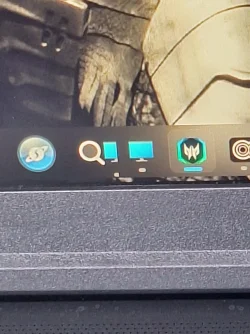
First I have the home page blurring out
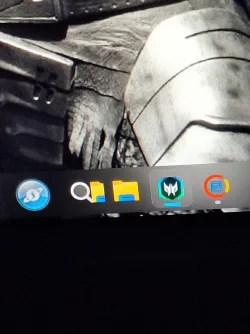
Second I have taskbar icons splitting
I have enclosed some images, any help welcome
 

Attachments
  • 20260910_210219.webp
    20260910_210219.webp
    194.2 KB · Views: 6
  • 20260911_131213.webp
    20260911_131213.webp
    184.9 KB · Views: 5
  • 20260918_121934.webp
    20260918_121934.webp
    112.6 KB · Views: 3

My Computer My Computer

At a glance

windows 11
OS
windows 11
Computer type
Laptop
Manufacturer/Model
predator 17
Uninstall Stardock start11 and restart. If everything clears up using Windows native GUI, then there is an issue with Stardock. Maybe it needs updating or is corrupted, .
 

My Computers My Computers

  • At a glance

    Windows 11 Pro 26H2 26300.9457i9-10900 10 core 20 threads32 gbnone-Intel UHD Graphics 630
    OS
    Windows 11 Pro 26H2 26300.9457
    Computer type
    PC/Desktop
    Manufacturer/Model
    Dell Optiplex 7080
    CPU
    i9-10900 10 core 20 threads
    Motherboard
    DELL 0J37VM
    Memory
    32 gb
    Graphics Card(s)
    none-Intel UHD Graphics 630
    Sound Card
    Integrated Realtek
    Monitor(s) Displays
    Benq 27
    Screen Resolution
    2560x1440
    Hard Drives
    2x1tb Solidigm m.2 nvme /External drives 512gb Samsung m.2 sata+2tb Kingston m2.nvme
    PSU
    500w
    Case
    MT
    Cooling
    Dell Premium
    Keyboard
    Logitech wired
    Mouse
    Logitech wireless
    Internet Speed
    so slow I'm too embarrassed to tell
    Browser
    #1 Edge #2 Firefox
    Antivirus
    Defender+MWB Premium
  • At a glance

    Windows 11 Pro 24H2 26200.9457AMD Ryzen 7 6800U32 gbintegrated
    Operating System
    Windows 11 Pro 24H2 26200.9457
    Computer type
    PC/Desktop
    Manufacturer/Model
    Beelink Mini PC SER5
    CPU
    AMD Ryzen 7 6800U
    Memory
    32 gb
    Graphics card(s)
    integrated
    Sound Card
    integrated
    Monitor(s) Displays
    Benq 27
    Screen Resolution
    2560x1440
    Hard Drives
    1TB Crucial nvme
    Keyboard
    Logitech wired
    Mouse
    Logitech wireless
    Internet Speed
    still too embarrassed to tell
    Browser
    Firefox
    Antivirus
    Defender
  • System 3 is non compliant Dell 9020 i7-4770/24gb ram Win11 PRO 26200.9457
Acer predator neo nitro 18
Windows 11
RTX 5070 Ti
Core Ultra 9 275HX 2.70 GHz

Hi, I have a couple of issues
First I have the home page blurring out
Second I have taskbar icons splitting
I have enclosed some images, any help welcome
Have you updated to the latest build?
From Google.

1. Fix the Splitting Icons (Taskbar Overlap)
When icons split or overlap, Start11 and Windows are both trying to draw the taskbar.
    • Open Start11 Settings.
    • Navigate to the Taskbar section. [1]
    • Scroll down to the advanced options and locate "Let Start11 enhance the taskbar". [1]
    • Toggle this setting off and on again. If the issue persists, leave it turned Off. This forces Windows to handle the icon positioning natively, stopping the splitting effect. [1]
    • Alternative: If you use a touch-screen device, scroll to the bottom of the Taskbar menu and change the setting to "Force touch taskbar" instead of "Automatic" to correct icon placement. [1]

2. Resolve the Homepage Blurring
The homepage or start menu losing its sharp resolution or turning entirely transparent/blurry is tied to conflicting OS graphics settings. [1, 2]
    • Open your Windows Settings app (Press Win + I).
    • Go to Personalization > Colors.
    • Locate Transparency effects and toggle them Off, then back On.
    • If you are running multiple monitors with different scaling levels (e.g., one at 100% and another at 150%), try temporarily setting both displays to the same scaling percentage in Settings > System > Display to see if the blur resolves. [1, 2, 3]
 

My Computer My Computer

At a glance

Windows 11AMD Ryzen 8700G64 GBOnboard
OS
Windows 11
Computer type
PC/Desktop
Manufacturer/Model
Generic
CPU
AMD Ryzen 8700G
Motherboard
Gigabyte B650 UD AC
Memory
64 GB
Graphics Card(s)
Onboard
Sound Card
Onboard
Monitor(s) Displays
Del U2723QE
Screen Resolution
3840 x 2160
Hard Drives
Corsiar MP600 1TB
PSU
Silverstone 750 GOLD
Case
Silverstone FARA 513
Everything on my PC is up to date.

Excellent tutorial for fix, worked perfect, cheers for the help

No split icons so far, blur only happens once or twice a day, so far its all good
 

My Computer My Computer

At a glance

windows 11
OS
windows 11
Computer type
Laptop
Manufacturer/Model
predator 17
Back
Top Bottom