
I just installed Windows 11, and it's fully updated to 25H2 build 26200.7462. The Start Menu was the new one at first, but reverted to the old style but I got that resolved thanks to @Ghot!
First question about the Start Menu: It's showing me "suggestions" of programs I had installed on Windows 10 that I don't need anymore, but there is no way to remove them from the Start Menu. I was able to right-click on some and select "Uninstall," but that only worked for a few. How can I get rid of the others?
Second 2-part question about Phone Link:
Thanks to everyone in advance!
First question about the Start Menu: It's showing me "suggestions" of programs I had installed on Windows 10 that I don't need anymore, but there is no way to remove them from the Start Menu. I was able to right-click on some and select "Uninstall," but that only worked for a few. How can I get rid of the others?
Second 2-part question about Phone Link:
- It's very slow to show notifications, like 5 to 10 seconds after I get a text. It's fast on my laptop which is also Windows 11 and was fast on this same computer with Windows 10. Any ideas?
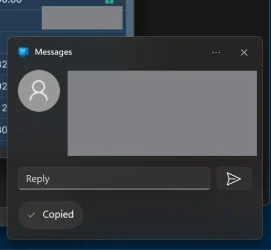
- If I send a reply from the notification (see attached image), the reply seems to be sent, but the text isn't actually ever sent and doesn't show up on my phone or in Phone Link. This used to happen on my laptop as well, but then one day magically started working. Any ideas how I can fix this?
Thanks to everyone in advance!
- Windows Build/Version
- 25H2 build 26200.7462
My Computer
At a glance
Windows 11
- OS
- Windows 11
- Computer type
- Laptop
- Manufacturer/Model
- Lenovo






