Start Menu is crashing


TheVisitor

Well-known member
Member
VIP
Local time
1:41 AM
Posts
306
OS
Windows 11 Intel i5 10400 HD630 graphics chip
Event viewer showing crash ID 1000
Faulting application name: StartMenuExperienceHost.exe, version: 10.0.26100.8115, time stamp: 0x36a2c273
Faulting module name: ntdll.dll, version: 10.0.26100.8246, time stamp: 0xf7576e9e
Exception code: 0xc000071f
Fault offset: 0x00000000000772b9
Faulting process id: 0x3A48
Faulting application start time: 0x1DCD0C6A1D1D906
Faulting application path: C:\WINDOWS\SystemApps\Microsoft.Windows.StartMenuExperienceHost_cw5n1h2txyewy\StartMenuExperienceHost.exe
Faulting module path: C:\WINDOWS\SYSTEM32\ntdll.dll
Report Id: 5e0d4a5b-11d7-4031-8bcc-38fa006fa063
Faulting package full name: Microsoft.Windows.StartMenuExperienceHost_10.0.26100.4768_neutral_neutral_cw5n1h2txyewy
Faulting package-relative application ID: FullTrustApp

I have run sfc, DISM, Repair Install all to no avail. I created a temp user and it works there. I can't figure out how to create a new Profile without having to re-install a ton of stuff. I can run my programs etc from the 'search' box and things seem to be Okay. Just the stupid crash with the start button.
I can't see why it would but I tried to create a boot usb using Rufus last night while I was sleeping, and this morning the Start button is crashing with the above event.
 

My Computer

System One

  • OS
    Windows 11 Intel i5 10400 HD630 graphics chip
    Computer type
    PC/Desktop
    Manufacturer/Model
    HP
    CPU
    i5-10400
    Memory
    12 gb
    Graphics Card(s)
    HD630 chipset
    Monitor(s) Displays
    LG 24inch
    Hard Drives
    SSD, external usb drive 1tb for files/backups
    Keyboard
    wireless Logi
    Mouse
    ms 4000 wireless mouse
    Internet Speed
    10meg
    Browser
    Firefox
    Antivirus
    Defender
    Other Info
    Win11 Home 25h2 26200.8655 06/09/2026
Event viewer showing crash ID 1000
Faulting application name: StartMenuExperienceHost.exe, version: 10.0.26100.8115, time stamp: 0x36a2c273
Faulting module name: ntdll.dll, version: 10.0.26100.8246, time stamp: 0xf7576e9e
Exception code: 0xc000071f
Fault offset: 0x00000000000772b9
Faulting process id: 0x3A48
Faulting application start time: 0x1DCD0C6A1D1D906
Faulting application path: C:\WINDOWS\SystemApps\Microsoft.Windows.StartMenuExperienceHost_cw5n1h2txyewy\StartMenuExperienceHost.exe
Faulting module path: C:\WINDOWS\SYSTEM32\ntdll.dll
Report Id: 5e0d4a5b-11d7-4031-8bcc-38fa006fa063
Faulting package full name: Microsoft.Windows.StartMenuExperienceHost_10.0.26100.4768_neutral_neutral_cw5n1h2txyewy
Faulting package-relative application ID: FullTrustApp

I have run sfc, DISM, Repair Install all to no avail. I created a temp user and it works there. I can't figure out how to create a new Profile without having to re-install a ton of stuff. I can run my programs etc from the 'search' box and things seem to be Okay. Just the stupid crash with the start button.
I can't see why it would but I tried to create a boot usb using Rufus last night while I was sleeping, and this morning the Start button is crashing with the above event.
have you tried resetting the package? powershell as admin:

Code:
Get-AppxPackage Microsoft.Windows.StartMenuExperienceHost | Reset-AppxPackage

then re-register it

Code:
Get-AppxPackage Microsoft.Windows.ShellExperienceHost | Foreach {Add-AppxPackage -DisableDevelopmentMode -Register "$($_.InstallLocation)\AppXManifest.xml"}
 

My Computer

System One

  • OS
    Windows 11 Pro
Thanks, but the PS commands did not fix the problem. Did a restart to be sure and its sill crashing.
 

My Computer

System One

  • OS
    Windows 11 Intel i5 10400 HD630 graphics chip
    Computer type
    PC/Desktop
    Manufacturer/Model
    HP
    CPU
    i5-10400
    Memory
    12 gb
    Graphics Card(s)
    HD630 chipset
    Monitor(s) Displays
    LG 24inch
    Hard Drives
    SSD, external usb drive 1tb for files/backups
    Keyboard
    wireless Logi
    Mouse
    ms 4000 wireless mouse
    Internet Speed
    10meg
    Browser
    Firefox
    Antivirus
    Defender
    Other Info
    Win11 Home 25h2 26200.8655 06/09/2026
Thanks, but the PS commands did not fix the problem. Did a restart to be sure and its sill crashing.


You can always do an In-Place Upgrade. I recommend Option Two (ISO method)...


My Computers

System One System Two

  • OS
    Win 11 Home ♦♦♦26200.8655 ♦♦♦♦♦♦♦25H2
    Computer type
    PC/Desktop
    Manufacturer/Model
    Built by Ghot® [May 2020]
    CPU
    AMD Ryzen 7 3700X
    Motherboard
    Asus Pro WS X570-ACE (BIOS 5302)
    Memory
    G.Skill (F4-3200C14D-16GTZKW)
    Graphics Card(s)
    EVGA RTX 2070 (08G-P4-2171-KR)
    Sound Card
    Realtek ALC1220P / ALC S1220A
    Monitor(s) Displays
    Dell U3011 30"
    Screen Resolution
    2560 x 1600
    Hard Drives
    2x Samsung 860 EVO 500GB,
    WD 4TB Black FZBX - SATA III,
    WD 8TB Black FZBX - SATA III,
    DRW-24B1ST CD/DVD Burner
    PSU
    PC Power & Cooling 750W Quad EPS12V
    Case
    Cooler Master ATCS 840 Tower
    Cooling
    CM Hyper 212 EVO (push/pull)
    Keyboard
    Ducky DK9008 Shine II Blue LED
    Mouse
    Logitech Optical M-100
    Internet Speed
    300/300
    Browser
    Firefox (latest)
    Antivirus
    Bitdefender Total Security
    Other Info
    Speakers: Klipsch Pro Media 2.1
  • Operating System
    Windows XP Pro 32bit w/SP3
    Computer type
    PC/Desktop
    Manufacturer/Model
    Built by Ghot® (not in use)
    CPU
    AMD Athlon 64 X2 5000+ (OC'd @ 3.2Ghz)
    Motherboard
    ASUS M2N32-SLI Deluxe Wireless Edition
    Memory
    TWIN2X2048-6400C4DHX (2 x 1GB, DDR2 800)
    Graphics card(s)
    EVGA 256-P2-N758-TR GeForce 8600GT SSC
    Sound Card
    Onboard
    Monitor(s) Displays
    ViewSonic G90FB Black 19" Professional (CRT)
    Screen Resolution
    up to 2048 x 1536
    Hard Drives
    WD 36GB 10,000rpm Raptor SATA
    Seagate 80GB 7200rpm SATA
    Lite-On LTR-52246S CD/RW
    Lite-On LH-18A1P CD/DVD Burner
    PSU
    PC Power & Cooling Silencer 750 Quad EPS12V
    Case
    Generic Beige case, 80mm fans
    Cooling
    ZALMAN 9500A 92mm CPU Cooler
    Keyboard
    Logitech Classic Keybooard 200
    Mouse
    Logitech Optical M-BT96a
    Internet Speed
    300/300
    Browser
    Firefox 3.x ??
    Antivirus
    Symantec (Norton)
    Other Info
    Still assembled, still runs. Haven't turned it on for 15 years?
Thanks Ghot but I already did a Repair Install, did not help. I'll try the ISO in a bit and see it that works.
 

My Computer

System One

  • OS
    Windows 11 Intel i5 10400 HD630 graphics chip
    Computer type
    PC/Desktop
    Manufacturer/Model
    HP
    CPU
    i5-10400
    Memory
    12 gb
    Graphics Card(s)
    HD630 chipset
    Monitor(s) Displays
    LG 24inch
    Hard Drives
    SSD, external usb drive 1tb for files/backups
    Keyboard
    wireless Logi
    Mouse
    ms 4000 wireless mouse
    Internet Speed
    10meg
    Browser
    Firefox
    Antivirus
    Defender
    Other Info
    Win11 Home 25h2 26200.8655 06/09/2026
Thanks Ghot but I already did a Repair Install, did not help. I'll try the ISO in a bit and see it that works.


The In-Place with the ISO, is about the most stable of the options.
Also, if you're using any 3rd party tweakers like StartAllBack or the like... they may be the cause of the problem, and the In-Place won't correct anything BUT Windows issues.
 

My Computers

System One System Two

  • OS
    Win 11 Home ♦♦♦26200.8655 ♦♦♦♦♦♦♦25H2
    Computer type
    PC/Desktop
    Manufacturer/Model
    Built by Ghot® [May 2020]
    CPU
    AMD Ryzen 7 3700X
    Motherboard
    Asus Pro WS X570-ACE (BIOS 5302)
    Memory
    G.Skill (F4-3200C14D-16GTZKW)
    Graphics Card(s)
    EVGA RTX 2070 (08G-P4-2171-KR)
    Sound Card
    Realtek ALC1220P / ALC S1220A
    Monitor(s) Displays
    Dell U3011 30"
    Screen Resolution
    2560 x 1600
    Hard Drives
    2x Samsung 860 EVO 500GB,
    WD 4TB Black FZBX - SATA III,
    WD 8TB Black FZBX - SATA III,
    DRW-24B1ST CD/DVD Burner
    PSU
    PC Power & Cooling 750W Quad EPS12V
    Case
    Cooler Master ATCS 840 Tower
    Cooling
    CM Hyper 212 EVO (push/pull)
    Keyboard
    Ducky DK9008 Shine II Blue LED
    Mouse
    Logitech Optical M-100
    Internet Speed
    300/300
    Browser
    Firefox (latest)
    Antivirus
    Bitdefender Total Security
    Other Info
    Speakers: Klipsch Pro Media 2.1
  • Operating System
    Windows XP Pro 32bit w/SP3
    Computer type
    PC/Desktop
    Manufacturer/Model
    Built by Ghot® (not in use)
    CPU
    AMD Athlon 64 X2 5000+ (OC'd @ 3.2Ghz)
    Motherboard
    ASUS M2N32-SLI Deluxe Wireless Edition
    Memory
    TWIN2X2048-6400C4DHX (2 x 1GB, DDR2 800)
    Graphics card(s)
    EVGA 256-P2-N758-TR GeForce 8600GT SSC
    Sound Card
    Onboard
    Monitor(s) Displays
    ViewSonic G90FB Black 19" Professional (CRT)
    Screen Resolution
    up to 2048 x 1536
    Hard Drives
    WD 36GB 10,000rpm Raptor SATA
    Seagate 80GB 7200rpm SATA
    Lite-On LTR-52246S CD/RW
    Lite-On LH-18A1P CD/DVD Burner
    PSU
    PC Power & Cooling Silencer 750 Quad EPS12V
    Case
    Generic Beige case, 80mm fans
    Cooling
    ZALMAN 9500A 92mm CPU Cooler
    Keyboard
    Logitech Classic Keybooard 200
    Mouse
    Logitech Optical M-BT96a
    Internet Speed
    300/300
    Browser
    Firefox 3.x ??
    Antivirus
    Symantec (Norton)
    Other Info
    Still assembled, still runs. Haven't turned it on for 15 years?
ertutil /error 0xc000071f
0xc000071f (NT: 0xc000071f STATUS_CALLBACK_RETURNED_LANG) -- 3221227295 (-1073740001)
Error message text: A threadpool worker thread enter a callback, which left with preferred languages set.
This is unexpected, indicating that the callback missed clearing them.
CertUtil: -error command completed successfully.
 

My Computer

System One

  • OS
    Windows 11
    Computer type
    PC/Desktop
    Manufacturer/Model
    HP Pavilion
    CPU
    AMD Ryzen 7 5700G
    Motherboard
    Erica6
    Memory
    Micron Technology DDR4-3200 16GB
    Graphics Card(s)
    NVIDIA GeForce RTX 3060
    Sound Card
    Realtek ALC671
    Monitor(s) Displays
    Samsung SyncMaster U28E590
    Screen Resolution
    3840 x 2160
    Hard Drives
    SAMSUNG MZVLQ1T0HALB-000H1
@TheVisitor

You could also restore from a backup... assuming you have a recent one.
 

My Computers

System One System Two

  • OS
    Win 11 Home ♦♦♦26200.8655 ♦♦♦♦♦♦♦25H2
    Computer type
    PC/Desktop
    Manufacturer/Model
    Built by Ghot® [May 2020]
    CPU
    AMD Ryzen 7 3700X
    Motherboard
    Asus Pro WS X570-ACE (BIOS 5302)
    Memory
    G.Skill (F4-3200C14D-16GTZKW)
    Graphics Card(s)
    EVGA RTX 2070 (08G-P4-2171-KR)
    Sound Card
    Realtek ALC1220P / ALC S1220A
    Monitor(s) Displays
    Dell U3011 30"
    Screen Resolution
    2560 x 1600
    Hard Drives
    2x Samsung 860 EVO 500GB,
    WD 4TB Black FZBX - SATA III,
    WD 8TB Black FZBX - SATA III,
    DRW-24B1ST CD/DVD Burner
    PSU
    PC Power & Cooling 750W Quad EPS12V
    Case
    Cooler Master ATCS 840 Tower
    Cooling
    CM Hyper 212 EVO (push/pull)
    Keyboard
    Ducky DK9008 Shine II Blue LED
    Mouse
    Logitech Optical M-100
    Internet Speed
    300/300
    Browser
    Firefox (latest)
    Antivirus
    Bitdefender Total Security
    Other Info
    Speakers: Klipsch Pro Media 2.1
  • Operating System
    Windows XP Pro 32bit w/SP3
    Computer type
    PC/Desktop
    Manufacturer/Model
    Built by Ghot® (not in use)
    CPU
    AMD Athlon 64 X2 5000+ (OC'd @ 3.2Ghz)
    Motherboard
    ASUS M2N32-SLI Deluxe Wireless Edition
    Memory
    TWIN2X2048-6400C4DHX (2 x 1GB, DDR2 800)
    Graphics card(s)
    EVGA 256-P2-N758-TR GeForce 8600GT SSC
    Sound Card
    Onboard
    Monitor(s) Displays
    ViewSonic G90FB Black 19" Professional (CRT)
    Screen Resolution
    up to 2048 x 1536
    Hard Drives
    WD 36GB 10,000rpm Raptor SATA
    Seagate 80GB 7200rpm SATA
    Lite-On LTR-52246S CD/RW
    Lite-On LH-18A1P CD/DVD Burner
    PSU
    PC Power & Cooling Silencer 750 Quad EPS12V
    Case
    Generic Beige case, 80mm fans
    Cooling
    ZALMAN 9500A 92mm CPU Cooler
    Keyboard
    Logitech Classic Keybooard 200
    Mouse
    Logitech Optical M-BT96a
    Internet Speed
    300/300
    Browser
    Firefox 3.x ??
    Antivirus
    Symantec (Norton)
    Other Info
    Still assembled, still runs. Haven't turned it on for 15 years?
try these 2 in admin ps:

Code:
Add-AppxPackage -Path "C:\Windows\SystemApps\Microsoft.Windows.StartMenuExperienceHost_cw5n1h2txyewy\AppxManifest.xml" -Register -DisableDevelopmentMode

Code:
Add-AppxPackage -Path "C:\Windows\SystemApps\ShellExperienceHost_cw5n1h2txyewy\AppxManifest.xml" -Register -DisableDevelopmentMode

reboot

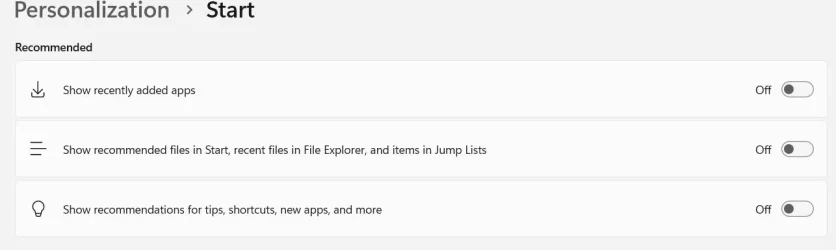
then Settings > Personalization > Start

Toggle OFF all
1776694260611.webp

reboot

if its not doing it, turn on whichever radio buttons you had on before and it will rebuild those from then on

IF it still crashes,

%LocalAppData%\Packages

and delete:

Microsoft.Windows.StartMenuExperienceHost_cw5n1h2txyewy

reboot
 

My Computer

System One

  • OS
    Windows 11 Pro
@dacrone

Between reinstall with repair ISO and your tips the issue seems to be fixed. Now I have to turn on the Personalization items. I was dumb and did not write them down , so will turn on some later after I'm sure all is good.

Thanks to all who replied and helped out.
 

My Computer

System One

  • OS
    Windows 11 Intel i5 10400 HD630 graphics chip
    Computer type
    PC/Desktop
    Manufacturer/Model
    HP
    CPU
    i5-10400
    Memory
    12 gb
    Graphics Card(s)
    HD630 chipset
    Monitor(s) Displays
    LG 24inch
    Hard Drives
    SSD, external usb drive 1tb for files/backups
    Keyboard
    wireless Logi
    Mouse
    ms 4000 wireless mouse
    Internet Speed
    10meg
    Browser
    Firefox
    Antivirus
    Defender
    Other Info
    Win11 Home 25h2 26200.8655 06/09/2026
I had more simple issue with "Start" It would close after a split second.


Uninstalling upgrade KBxxxx769 cured the problem.
 

My Computer

System One

  • OS
    windows 11 ,Ubuntu Cinnamon - for tinkering only
    Computer type
    PC/Desktop
    Manufacturer/Model
    No Name - Assembled by a Compute shop in a Strip Mall.
    CPU
    Intel i511400
    Motherboard
    ASUS PRIME B560-PLUS motherboard
    Memory
    16 GB
    Graphics Card(s)
    0
    Sound Card
    0
    Monitor(s) Displays
    25 in BenQ
    Screen Resolution
    1920 x 1080
    Hard Drives
    9 SSDs 4 Nvme, 2 in M.2 slot and 2 in PCIE with adapter + 5 Sata. DVD drive
    PSU
    600w
    Case
    Antec- VSK4000E-U3 Mid Tower
    Internet Speed
    Bell pure fibre optic. 3 GB package. 6E Wireless adapter 750/500
    Browser
    Firefox, Microsoft Edge
    Antivirus
    Defender
The problem recurred

Uninstall Macrium 8 free. Problem cured.

Install version 7 free. No issues.
 
Last edited:

My Computer

System One

  • OS
    windows 11 ,Ubuntu Cinnamon - for tinkering only
    Computer type
    PC/Desktop
    Manufacturer/Model
    No Name - Assembled by a Compute shop in a Strip Mall.
    CPU
    Intel i511400
    Motherboard
    ASUS PRIME B560-PLUS motherboard
    Memory
    16 GB
    Graphics Card(s)
    0
    Sound Card
    0
    Monitor(s) Displays
    25 in BenQ
    Screen Resolution
    1920 x 1080
    Hard Drives
    9 SSDs 4 Nvme, 2 in M.2 slot and 2 in PCIE with adapter + 5 Sata. DVD drive
    PSU
    600w
    Case
    Antec- VSK4000E-U3 Mid Tower
    Internet Speed
    Bell pure fibre optic. 3 GB package. 6E Wireless adapter 750/500
    Browser
    Firefox, Microsoft Edge
    Antivirus
    Defender
Follow up from another thread.

Cache overfilling problem.

Another solution.

Settings -> Personalisation -> Start -> turn off items in screen captue
 

Attachments

  • Screen Shot 04-27-26 at 01.58 PM.webp
    Screen Shot 04-27-26 at 01.58 PM.webp
    16.8 KB · Views: 4
Last edited:

My Computer

System One

  • OS
    windows 11 ,Ubuntu Cinnamon - for tinkering only
    Computer type
    PC/Desktop
    Manufacturer/Model
    No Name - Assembled by a Compute shop in a Strip Mall.
    CPU
    Intel i511400
    Motherboard
    ASUS PRIME B560-PLUS motherboard
    Memory
    16 GB
    Graphics Card(s)
    0
    Sound Card
    0
    Monitor(s) Displays
    25 in BenQ
    Screen Resolution
    1920 x 1080
    Hard Drives
    9 SSDs 4 Nvme, 2 in M.2 slot and 2 in PCIE with adapter + 5 Sata. DVD drive
    PSU
    600w
    Case
    Antec- VSK4000E-U3 Mid Tower
    Internet Speed
    Bell pure fibre optic. 3 GB package. 6E Wireless adapter 750/500
    Browser
    Firefox, Microsoft Edge
    Antivirus
    Defender
When you say crashing, do you perhaps mean you try to launch it and it closes immediately?

If so, are you perhaps using Macrium 8 (free edition)?
 

My Computer

System One

  • OS
    Windows 11 Pro
    Computer type
    Laptop
    Manufacturer/Model
    Lenovo t480s
    CPU
    i7-8650U
    Memory
    16GB
    Graphics Card(s)
    Intel UHD 620
    Screen Resolution
    1920x1080
    Hard Drives
    C SN810 SDCPNRY-512G-1006
    Browser
    Edge, Firefox
    Antivirus
    Defender
For anyone still having this problem, here's the easy fix:

-Go to Settings > Personalization > Start
-Turn any options that are currently "On" to "Off"
-Open Start menu (should function correctly)
-Turn any settings back on that you desire

The list of used apps/files/whatever can get corrupted/outdated, causing the start menu to crash. Disabling these options clears all old entries, which usually fixes the start menu.

I would also recommend opening Indexing Options > Advanced > Rebuild to, well, rebuild the index. Leave the indexing option window open until it's complete. Your start menu should be much snappier, and the search results will actually work.
 

My Computers

System One System Two

  • OS
    Windows 11 Pro
    Computer type
    PC/Desktop
    Manufacturer/Model
    Built
    CPU
    AMD Ryzen 7 5700X
    Motherboard
    ASRock B450M Pro4 Micro
    Memory
    ADATA XPG GAMMIX D20 16 GB (2 x 8 GB) DDR4-3200 CL16
    Graphics Card(s)
    PowerColor Reaper Radeon RX 9060 XT 16 GB
    Monitor(s) Displays
    Samsung 65RU9000
    Screen Resolution
    4096×2160(60hz), 2560×1440(120hz)
    Hard Drives
    Gigabyte AORUS Gen4 7300 1 TB (boot)
    Seagate BarraCuda 4 TB 3.5" 5400 RPM
    Seagate BarraCuda 1 TB 3.5" 7200 RPM
    PSU
    Cooler Master MasterWatt 550W 80+ Bronze Semi-modular ATX
    Case
    Fractal Design Node 804 MicroATX Mid Tower
    Cooling
    AMD Wraith Prism
    Keyboard
    Corsair K63 Lapboard (MX Red), Logitech K400 Plus
    Mouse
    Logitech G603 Wireless
    Internet Speed
    75mbps down, 25mbps up
    Browser
    Firefox
    Antivirus
    Windows Security
    Other Info
    Silverstone SST-SOB02 Blu-Ray/DVD/CD Writer
    HyperX Cloud Stinger Headset
    HAUPPAUGE WinTV-quadHD PCI Express TV Tuner Card 1609
  • Operating System
    Windows 11 Pro
    Computer type
    PC/Desktop
    Manufacturer/Model
    Built
    CPU
    AMD Ryzen 5 5600
    Motherboard
    Gigabyte B450 I AORUS PRO WIFI Mini ITX AM4
    Memory
    PNY XLR8 16 GB (2 x 8 GB) DDR4-3200 CL16
    Graphics card(s)
    XFX RX-57XL8MFG6 Radeon RX 5700 8 GB
    Monitor(s) Displays
    Dell S2719DGF 27"
    Screen Resolution
    2560x1440(155hz)
    Hard Drives
    Mushkin PILOT 1TB M.2-2280 PCIe 3.0 X4 NVME
    PSU
    Corsair SF450 80+ Gold Fully Modular SFX Power Supply
    Case
    Fractal Design Node 202 HTPC Case
    Cooling
    Custom AMD Wraith Spire with Noctua NF-A12x15 Black
    Keyboard
    Corsair K68 RGB Wired
    Mouse
    Logitech G900 CHAOS SPECTRUM Wireless
    Internet Speed
    75mbps down, 25mbps up
    Browser
    Firefox
    Antivirus
    Windows Security
    Other Info
    Logitech G533 7.1 Channel Headset
No reply after all this time to my post (14) so I'm unsubscribing. Goodbye.
 

My Computer

System One

  • OS
    Windows 11 Pro
    Computer type
    Laptop
    Manufacturer/Model
    Lenovo t480s
    CPU
    i7-8650U
    Memory
    16GB
    Graphics Card(s)
    Intel UHD 620
    Screen Resolution
    1920x1080
    Hard Drives
    C SN810 SDCPNRY-512G-1006
    Browser
    Edge, Firefox
    Antivirus
    Defender
I'm new to the forums.

For anyone with Windows 11 Start Menu problems, try this...

Try installing Winaero Tweaker and in the search box (of Winaero Tweaker) type "Restart start", then click on the one result and use the checkbox to add "Restart Start Menu" to Desktop context menu. Then on a blank area of your desktop, right click and use the "Restart Start Menu" option (in the context menu that appears when right clicking).

It might not work but it's worth trying. It worked for me.
 

My Computer

System One

  • OS
    Windows 11
    Computer type
    PC/Desktop
    Manufacturer/Model
    Dell

Latest Support Threads

Back
Top Bottom