The Task Manager On The Start Menu Is Not Working


1) delete the task manager shortcut from your appdata group(whatever number) folder
2) restart explorer or log out/in
3) check winx menu and task manager should be gone
4) once its no longer in the list, run winx editor app and reset it to default again. that will create a new shortcut completely.

if that doesnt work, you can run a repair install of windows, so as to not lose anything


My Computer My Computer

At a glance

Windows 11 Pro
OS
Windows 11 Pro
Posted the repair install multiple times, HDL is hesitant. I know they’ll get to it though. Sometimes stuff is daunting.
I kind of think it’s a USER issue but we won’t know until HDL is willing to create another user account (Which is just as easily removed, HDL)
 

My Computers My Computers

  • At a glance

    Windows 11 Pro 25H2 Build 26200.9168Intel(R) Core(TM) i7-4770K CPU @ 3.50GHz32.0 GB of I forget and the box is in storage.Gigabyte nVidia GeForce GTX 1660 Super OC 6GB
    OS
    Windows 11 Pro 25H2 Build 26200.9168
    Computer type
    PC/Desktop
    Manufacturer/Model
    Sin-built 2013
    CPU
    Intel(R) Core(TM) i7-4770K CPU @ 3.50GHz
    Motherboard
    ASUS ROG Maximus VI Formula
    Memory
    32.0 GB of I forget and the box is in storage.
    Graphics Card(s)
    Gigabyte nVidia GeForce GTX 1660 Super OC 6GB
    Sound Card
    ROG SupremeFX Formula 8-Channel High Definition Audio
    Monitor(s) Displays
    5 x LG 25MS500-B - 1 x 24MK430H-B - 1 x Wacom Pro 22" Touch Screen Tablet
    Screen Resolution
    All over the place
    Hard Drives
    Too many to list. OS on Samsung 1TB 870 QVO SATA
    PSU
    Silverstone 1500
    Case
    NZXT Phantom 820 Full-Tower Case
    Cooling
    Noctua NH-D15 Elite Class Dual Tower CPU Cooler / 6 x EziDIY 120mm / 2 x Corsair 140mm somethings / 1 x 140mm Thermaltake something / 2 x 200mm Corsair.
    Keyboard
    Corsair K95 / Logitech diNovo Edge Wireless
    Mouse
    Logitech: G402 / G502 / Mx Masters / Mx Air Cordless
    Internet Speed
    2000/500Mbps
    Browser
    All sorts
    Antivirus
    Kaspersky Premium
    Other Info
    ㅤㅤㅤㅤㅤㅤㅤㅤㅤㅤㅤㅤㅤㅤㅤㅤㅤㅤㅤㅤㅤㅤㅤㅤㅤㅤㅤㅤㅤㅤㅤㅤㅤㅤㅤㅤㅤㅤㅤㅤ⠀⠀⠀⠀⠀⠀⠀⠀⠀⠀
    TP-Link BE9300 WiFi 7 Bluetooth 5.4 (Archer TBE550E)
    TP-Link TX201 V1 2.5GB Lan

    Grandstream HT812 - VoIP
    ASUS DSL-AX82U - Mesh
    ASUS RT-AC68U - Mesh
    ASUS RT-BE88U Router

    Brother MFC-L2880DW Printer

    I’m on a horse.
  • At a glance

    Windows 11 Pro 25H2 Build 26200.9168 (Wifes)13th Generation Intel® Core™ i5-1340P Process...16GB LPDDR5-52001x Intel® Iris® Xe Graphics
    Operating System
    Windows 11 Pro 25H2 Build 26200.9168 (Wifes)
    Computer type
    Laptop
    Manufacturer/Model
    LENOVO Yoga 7 14IRL8 - Type 82YL
    CPU
    13th Generation Intel® Core™ i5-1340P Processor(Core™ i5-1340P)
    Memory
    16GB LPDDR5-5200
    Graphics card(s)
    1x Intel® Iris® Xe Graphics
    Sound Card
    Optimized with Dolby Atmos®
    Screen Resolution
    QHD 2880 x 1800 OLED
    Hard Drives
    M.2 512 GB SSD PCIe
    Mouse
    Logiteck MX Master 3S
    Internet Speed
    2000/500
    Antivirus
    Defender / Malwarebytes
    Other Info
    …still on a horse.


    Wireless Network: Wi-Fi 6E 2x2 AX; Bluetooth® 5.1 or above
    Ports: 1x 1 Novo button; 2 in 1 Audio Combo jack; Micro SD Card Reader; HDMI 1.4b; 2 x USB Type-C (TBT4)
    USB 3.2 Gen 2 DP 1.4a
    PD 3.0); 1 x USB 3.2 Gen1 Type A
    Camera
    1x 1080P FHD IR/RGB Hybrid with Privacy Shutter and Dual Array Microphone
    Graphics
    1x Intel® Iris® Xe Graphics
    Monitor
    14" WUXGA
    Form Factor
    Convertible Notebook
  • Windows 11 Pro 25H2 Build 26200.9168 (Wifes)

    Yoga 7 2-in-1 14IML9 - Type 83DJ

    Processor: Intel® Core™ Ultra 7 155H Processor(Core™ Ultra 7 155H)

    Memory: 32GB LPD5X-7467

    Hard Drive: 1 TB SSD PCIe

    Wireless Network: 1x Wi-Fi 6E 2x2 AX; Bluetooth® 5.1 or above

    Ports: 1 x HDMI 2.1 TMDS; 1 x Novo Button; 1 x Combo Audio Jack
    2 x USB-C (USB 4.0)
    1 x USB-A 3.2 Gen 1

    Camera: 1080P FHD IR Hybrid with Dual Microphone

    Graphics: Intel® Arc™ Graphics

    Monitor: 14" 2.8K

    ...Where's my horse?
Short of my other suggestion of testing with a new user account, a repair is the way to go.
I did that with the hidden Admin account. It acted the same.

I'm just very leery of my machine not coming back up with all my Desktop shortcuts to installed programs and Internet sites. I know the last time I tried it on a Win 10 Pro, that is what happened.
 

My Computer My Computer

At a glance

Windows 11 Pro ver. 24H212th Grn. Intel i7-12700K 3600 Mhz 12 Cores64 GB DDR5NVIDIA GeForce GTX 1650
OS
Windows 11 Pro ver. 24H2
Computer type
PC/Desktop
Manufacturer/Model
ACPI x64-based PC
CPU
12th Grn. Intel i7-12700K 3600 Mhz 12 Cores
Motherboard
ASUSTeK - Prime Z690-P WIFI
Memory
64 GB DDR5
Graphics Card(s)
NVIDIA GeForce GTX 1650
Sound Card
NVIDIA High Definition Audio
Monitor(s) Displays
ViewSonic
Screen Resolution
1920 x 1080
Hard Drives
HDS72252 5VLAT80 2 Tb ssd Hard drive
PSU
850 Watt Power Supply
Case
19" high desktop
Cooling
A lot of fans
Keyboard
Logitech
Mouse
Logitech
Internet Speed
500 Mg
Browser
FF
Antivirus
Windows Defendor & Malwarebytes
Other Info
2 Asus Blu-Ray burners - BW - 16D1HT
I did that with the hidden Admin account. It acted the same.

I’m not quite sure that’s the same as creayting another user accout, but honestly I actually don’t know.

I'm just very leery of my machine not coming back up with all my Desktop shortcuts to installed programs and Internet sites. I know the last time I tried it on a Win 10 Pro, that is what happened.

I’ve not had that happen but an easy way I would think to fix that would be to copy everything in your Desktop Folder (Links and all) to a USB, just in case.
Paste them back if needed. At worst you may have to arrange them on the desktop.
 

My Computers My Computers

  • At a glance

    Windows 11 Pro 25H2 Build 26200.9168Intel(R) Core(TM) i7-4770K CPU @ 3.50GHz32.0 GB of I forget and the box is in storage.Gigabyte nVidia GeForce GTX 1660 Super OC 6GB
    OS
    Windows 11 Pro 25H2 Build 26200.9168
    Computer type
    PC/Desktop
    Manufacturer/Model
    Sin-built 2013
    CPU
    Intel(R) Core(TM) i7-4770K CPU @ 3.50GHz
    Motherboard
    ASUS ROG Maximus VI Formula
    Memory
    32.0 GB of I forget and the box is in storage.
    Graphics Card(s)
    Gigabyte nVidia GeForce GTX 1660 Super OC 6GB
    Sound Card
    ROG SupremeFX Formula 8-Channel High Definition Audio
    Monitor(s) Displays
    5 x LG 25MS500-B - 1 x 24MK430H-B - 1 x Wacom Pro 22" Touch Screen Tablet
    Screen Resolution
    All over the place
    Hard Drives
    Too many to list. OS on Samsung 1TB 870 QVO SATA
    PSU
    Silverstone 1500
    Case
    NZXT Phantom 820 Full-Tower Case
    Cooling
    Noctua NH-D15 Elite Class Dual Tower CPU Cooler / 6 x EziDIY 120mm / 2 x Corsair 140mm somethings / 1 x 140mm Thermaltake something / 2 x 200mm Corsair.
    Keyboard
    Corsair K95 / Logitech diNovo Edge Wireless
    Mouse
    Logitech: G402 / G502 / Mx Masters / Mx Air Cordless
    Internet Speed
    2000/500Mbps
    Browser
    All sorts
    Antivirus
    Kaspersky Premium
    Other Info
    ㅤㅤㅤㅤㅤㅤㅤㅤㅤㅤㅤㅤㅤㅤㅤㅤㅤㅤㅤㅤㅤㅤㅤㅤㅤㅤㅤㅤㅤㅤㅤㅤㅤㅤㅤㅤㅤㅤㅤㅤ⠀⠀⠀⠀⠀⠀⠀⠀⠀⠀
    TP-Link BE9300 WiFi 7 Bluetooth 5.4 (Archer TBE550E)
    TP-Link TX201 V1 2.5GB Lan

    Grandstream HT812 - VoIP
    ASUS DSL-AX82U - Mesh
    ASUS RT-AC68U - Mesh
    ASUS RT-BE88U Router

    Brother MFC-L2880DW Printer

    I’m on a horse.
  • At a glance

    Windows 11 Pro 25H2 Build 26200.9168 (Wifes)13th Generation Intel® Core™ i5-1340P Process...16GB LPDDR5-52001x Intel® Iris® Xe Graphics
    Operating System
    Windows 11 Pro 25H2 Build 26200.9168 (Wifes)
    Computer type
    Laptop
    Manufacturer/Model
    LENOVO Yoga 7 14IRL8 - Type 82YL
    CPU
    13th Generation Intel® Core™ i5-1340P Processor(Core™ i5-1340P)
    Memory
    16GB LPDDR5-5200
    Graphics card(s)
    1x Intel® Iris® Xe Graphics
    Sound Card
    Optimized with Dolby Atmos®
    Screen Resolution
    QHD 2880 x 1800 OLED
    Hard Drives
    M.2 512 GB SSD PCIe
    Mouse
    Logiteck MX Master 3S
    Internet Speed
    2000/500
    Antivirus
    Defender / Malwarebytes
    Other Info
    …still on a horse.


    Wireless Network: Wi-Fi 6E 2x2 AX; Bluetooth® 5.1 or above
    Ports: 1x 1 Novo button; 2 in 1 Audio Combo jack; Micro SD Card Reader; HDMI 1.4b; 2 x USB Type-C (TBT4)
    USB 3.2 Gen 2 DP 1.4a
    PD 3.0); 1 x USB 3.2 Gen1 Type A
    Camera
    1x 1080P FHD IR/RGB Hybrid with Privacy Shutter and Dual Array Microphone
    Graphics
    1x Intel® Iris® Xe Graphics
    Monitor
    14" WUXGA
    Form Factor
    Convertible Notebook
  • Windows 11 Pro 25H2 Build 26200.9168 (Wifes)

    Yoga 7 2-in-1 14IML9 - Type 83DJ

    Processor: Intel® Core™ Ultra 7 155H Processor(Core™ Ultra 7 155H)

    Memory: 32GB LPD5X-7467

    Hard Drive: 1 TB SSD PCIe

    Wireless Network: 1x Wi-Fi 6E 2x2 AX; Bluetooth® 5.1 or above

    Ports: 1 x HDMI 2.1 TMDS; 1 x Novo Button; 1 x Combo Audio Jack
    2 x USB-C (USB 4.0)
    1 x USB-A 3.2 Gen 1

    Camera: 1080P FHD IR Hybrid with Dual Microphone

    Graphics: Intel® Arc™ Graphics

    Monitor: 14" 2.8K

    ...Where's my horse?
I did that with the hidden Admin account. It acted the same.

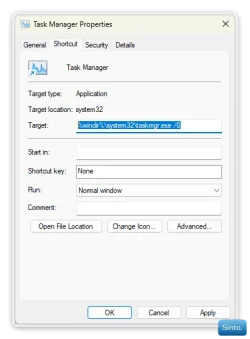
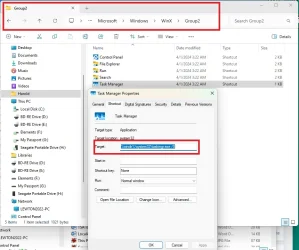
on yours or the admin... go to

%AppData%\Microsoft\Windows\WinX\Group2

and check the properties of the task manager shorcut. what does it show?
%windir%\system32\taskmgr.exe /0
or something different?
 

My Computer My Computer

At a glance

Windows 11 Pro
OS
Windows 11 Pro
  • Like
Reactions: HDL
on yours or the admin... go to

%AppData%\Microsoft\Windows\WinX\Group2

and check the properties of the task manager shorcut. what does it show?
%windir%\system32\taskmgr.exe /0
or something different?

Asked them that also, I don’t think I got a reply.

IMG_5498.webp

We’re going in circles now.
 

My Computers My Computers

  • At a glance

    Windows 11 Pro 25H2 Build 26200.9168Intel(R) Core(TM) i7-4770K CPU @ 3.50GHz32.0 GB of I forget and the box is in storage.Gigabyte nVidia GeForce GTX 1660 Super OC 6GB
    OS
    Windows 11 Pro 25H2 Build 26200.9168
    Computer type
    PC/Desktop
    Manufacturer/Model
    Sin-built 2013
    CPU
    Intel(R) Core(TM) i7-4770K CPU @ 3.50GHz
    Motherboard
    ASUS ROG Maximus VI Formula
    Memory
    32.0 GB of I forget and the box is in storage.
    Graphics Card(s)
    Gigabyte nVidia GeForce GTX 1660 Super OC 6GB
    Sound Card
    ROG SupremeFX Formula 8-Channel High Definition Audio
    Monitor(s) Displays
    5 x LG 25MS500-B - 1 x 24MK430H-B - 1 x Wacom Pro 22" Touch Screen Tablet
    Screen Resolution
    All over the place
    Hard Drives
    Too many to list. OS on Samsung 1TB 870 QVO SATA
    PSU
    Silverstone 1500
    Case
    NZXT Phantom 820 Full-Tower Case
    Cooling
    Noctua NH-D15 Elite Class Dual Tower CPU Cooler / 6 x EziDIY 120mm / 2 x Corsair 140mm somethings / 1 x 140mm Thermaltake something / 2 x 200mm Corsair.
    Keyboard
    Corsair K95 / Logitech diNovo Edge Wireless
    Mouse
    Logitech: G402 / G502 / Mx Masters / Mx Air Cordless
    Internet Speed
    2000/500Mbps
    Browser
    All sorts
    Antivirus
    Kaspersky Premium
    Other Info
    ㅤㅤㅤㅤㅤㅤㅤㅤㅤㅤㅤㅤㅤㅤㅤㅤㅤㅤㅤㅤㅤㅤㅤㅤㅤㅤㅤㅤㅤㅤㅤㅤㅤㅤㅤㅤㅤㅤㅤㅤ⠀⠀⠀⠀⠀⠀⠀⠀⠀⠀
    TP-Link BE9300 WiFi 7 Bluetooth 5.4 (Archer TBE550E)
    TP-Link TX201 V1 2.5GB Lan

    Grandstream HT812 - VoIP
    ASUS DSL-AX82U - Mesh
    ASUS RT-AC68U - Mesh
    ASUS RT-BE88U Router

    Brother MFC-L2880DW Printer

    I’m on a horse.
  • At a glance

    Windows 11 Pro 25H2 Build 26200.9168 (Wifes)13th Generation Intel® Core™ i5-1340P Process...16GB LPDDR5-52001x Intel® Iris® Xe Graphics
    Operating System
    Windows 11 Pro 25H2 Build 26200.9168 (Wifes)
    Computer type
    Laptop
    Manufacturer/Model
    LENOVO Yoga 7 14IRL8 - Type 82YL
    CPU
    13th Generation Intel® Core™ i5-1340P Processor(Core™ i5-1340P)
    Memory
    16GB LPDDR5-5200
    Graphics card(s)
    1x Intel® Iris® Xe Graphics
    Sound Card
    Optimized with Dolby Atmos®
    Screen Resolution
    QHD 2880 x 1800 OLED
    Hard Drives
    M.2 512 GB SSD PCIe
    Mouse
    Logiteck MX Master 3S
    Internet Speed
    2000/500
    Antivirus
    Defender / Malwarebytes
    Other Info
    …still on a horse.


    Wireless Network: Wi-Fi 6E 2x2 AX; Bluetooth® 5.1 or above
    Ports: 1x 1 Novo button; 2 in 1 Audio Combo jack; Micro SD Card Reader; HDMI 1.4b; 2 x USB Type-C (TBT4)
    USB 3.2 Gen 2 DP 1.4a
    PD 3.0); 1 x USB 3.2 Gen1 Type A
    Camera
    1x 1080P FHD IR/RGB Hybrid with Privacy Shutter and Dual Array Microphone
    Graphics
    1x Intel® Iris® Xe Graphics
    Monitor
    14" WUXGA
    Form Factor
    Convertible Notebook
  • Windows 11 Pro 25H2 Build 26200.9168 (Wifes)

    Yoga 7 2-in-1 14IML9 - Type 83DJ

    Processor: Intel® Core™ Ultra 7 155H Processor(Core™ Ultra 7 155H)

    Memory: 32GB LPD5X-7467

    Hard Drive: 1 TB SSD PCIe

    Wireless Network: 1x Wi-Fi 6E 2x2 AX; Bluetooth® 5.1 or above

    Ports: 1 x HDMI 2.1 TMDS; 1 x Novo Button; 1 x Combo Audio Jack
    2 x USB-C (USB 4.0)
    1 x USB-A 3.2 Gen 1

    Camera: 1080P FHD IR Hybrid with Dual Microphone

    Graphics: Intel® Arc™ Graphics

    Monitor: 14" 2.8K

    ...Where's my horse?
i was going to say take the /0 out if so.

/1 opens it to settings. no number or any other 0-9 (excluding 1 obv.) opens it to processes
 

My Computer My Computer

At a glance

Windows 11 Pro
OS
Windows 11 Pro
I'm just very leery of my machine not coming back up with all my Desktop shortcuts to installed programs and Internet sites. I know the last time I tried it on a Win 10 Pro, that is what happened.

Ultimately, every user of Windows should really have an external (or internal) drive so as to be able to create a “System Image” so if things go pear shaped (which they can often do) a system restore can be performed.

i was going to say take the /0 out if so.

/1 opens it to settings. no number or any other 0-9 (excluding 1 obv.) opens it to processes

I just find it bizarre that the app you posted doesn’t work for them. I made a point of totally screwing up my WinX menu and it effortlessly (and instantly) restored everything to perfect defaults.
That included replacing the Shutdown and Run that was removed due to an error in the script I posted.
 

My Computers My Computers

  • At a glance

    Windows 11 Pro 25H2 Build 26200.9168Intel(R) Core(TM) i7-4770K CPU @ 3.50GHz32.0 GB of I forget and the box is in storage.Gigabyte nVidia GeForce GTX 1660 Super OC 6GB
    OS
    Windows 11 Pro 25H2 Build 26200.9168
    Computer type
    PC/Desktop
    Manufacturer/Model
    Sin-built 2013
    CPU
    Intel(R) Core(TM) i7-4770K CPU @ 3.50GHz
    Motherboard
    ASUS ROG Maximus VI Formula
    Memory
    32.0 GB of I forget and the box is in storage.
    Graphics Card(s)
    Gigabyte nVidia GeForce GTX 1660 Super OC 6GB
    Sound Card
    ROG SupremeFX Formula 8-Channel High Definition Audio
    Monitor(s) Displays
    5 x LG 25MS500-B - 1 x 24MK430H-B - 1 x Wacom Pro 22" Touch Screen Tablet
    Screen Resolution
    All over the place
    Hard Drives
    Too many to list. OS on Samsung 1TB 870 QVO SATA
    PSU
    Silverstone 1500
    Case
    NZXT Phantom 820 Full-Tower Case
    Cooling
    Noctua NH-D15 Elite Class Dual Tower CPU Cooler / 6 x EziDIY 120mm / 2 x Corsair 140mm somethings / 1 x 140mm Thermaltake something / 2 x 200mm Corsair.
    Keyboard
    Corsair K95 / Logitech diNovo Edge Wireless
    Mouse
    Logitech: G402 / G502 / Mx Masters / Mx Air Cordless
    Internet Speed
    2000/500Mbps
    Browser
    All sorts
    Antivirus
    Kaspersky Premium
    Other Info
    ㅤㅤㅤㅤㅤㅤㅤㅤㅤㅤㅤㅤㅤㅤㅤㅤㅤㅤㅤㅤㅤㅤㅤㅤㅤㅤㅤㅤㅤㅤㅤㅤㅤㅤㅤㅤㅤㅤㅤㅤ⠀⠀⠀⠀⠀⠀⠀⠀⠀⠀
    TP-Link BE9300 WiFi 7 Bluetooth 5.4 (Archer TBE550E)
    TP-Link TX201 V1 2.5GB Lan

    Grandstream HT812 - VoIP
    ASUS DSL-AX82U - Mesh
    ASUS RT-AC68U - Mesh
    ASUS RT-BE88U Router

    Brother MFC-L2880DW Printer

    I’m on a horse.
  • At a glance

    Windows 11 Pro 25H2 Build 26200.9168 (Wifes)13th Generation Intel® Core™ i5-1340P Process...16GB LPDDR5-52001x Intel® Iris® Xe Graphics
    Operating System
    Windows 11 Pro 25H2 Build 26200.9168 (Wifes)
    Computer type
    Laptop
    Manufacturer/Model
    LENOVO Yoga 7 14IRL8 - Type 82YL
    CPU
    13th Generation Intel® Core™ i5-1340P Processor(Core™ i5-1340P)
    Memory
    16GB LPDDR5-5200
    Graphics card(s)
    1x Intel® Iris® Xe Graphics
    Sound Card
    Optimized with Dolby Atmos®
    Screen Resolution
    QHD 2880 x 1800 OLED
    Hard Drives
    M.2 512 GB SSD PCIe
    Mouse
    Logiteck MX Master 3S
    Internet Speed
    2000/500
    Antivirus
    Defender / Malwarebytes
    Other Info
    …still on a horse.


    Wireless Network: Wi-Fi 6E 2x2 AX; Bluetooth® 5.1 or above
    Ports: 1x 1 Novo button; 2 in 1 Audio Combo jack; Micro SD Card Reader; HDMI 1.4b; 2 x USB Type-C (TBT4)
    USB 3.2 Gen 2 DP 1.4a
    PD 3.0); 1 x USB 3.2 Gen1 Type A
    Camera
    1x 1080P FHD IR/RGB Hybrid with Privacy Shutter and Dual Array Microphone
    Graphics
    1x Intel® Iris® Xe Graphics
    Monitor
    14" WUXGA
    Form Factor
    Convertible Notebook
  • Windows 11 Pro 25H2 Build 26200.9168 (Wifes)

    Yoga 7 2-in-1 14IML9 - Type 83DJ

    Processor: Intel® Core™ Ultra 7 155H Processor(Core™ Ultra 7 155H)

    Memory: 32GB LPD5X-7467

    Hard Drive: 1 TB SSD PCIe

    Wireless Network: 1x Wi-Fi 6E 2x2 AX; Bluetooth® 5.1 or above

    Ports: 1 x HDMI 2.1 TMDS; 1 x Novo Button; 1 x Combo Audio Jack
    2 x USB-C (USB 4.0)
    1 x USB-A 3.2 Gen 1

    Camera: 1080P FHD IR Hybrid with Dual Microphone

    Graphics: Intel® Arc™ Graphics

    Monitor: 14" 2.8K

    ...Where's my horse?
on yours or the admin... go to

%AppData%\Microsoft\Windows\WinX\Group2

and check the properties of the task manager shorcut. what does it show?
%windir%\system32\taskmgr.exe /0
or something different?
The attachment is what it shows now and it is the exact same as it was before I ran the program to fix it. If I double click on it, it opens Task Manager from with in the folder but not from the Win X menu.
Properties.webp

I have a desktop short cut to Task Manager and it has a 7 in places of the 0. I tried that and it too did not open from the Win X menu. This is all strange because it should work. My machine seems very healthy otherwise.

Once again referring to my post above about running Restore on my Win 10 Pro machine, in addition to messing up some of my shortcuts, it did not fix the problem. Sorry I can't remember what the problem was but that gave me very little confidence in Windows' Restore.
 

My Computer My Computer

At a glance

Windows 11 Pro ver. 24H212th Grn. Intel i7-12700K 3600 Mhz 12 Cores64 GB DDR5NVIDIA GeForce GTX 1650
OS
Windows 11 Pro ver. 24H2
Computer type
PC/Desktop
Manufacturer/Model
ACPI x64-based PC
CPU
12th Grn. Intel i7-12700K 3600 Mhz 12 Cores
Motherboard
ASUSTeK - Prime Z690-P WIFI
Memory
64 GB DDR5
Graphics Card(s)
NVIDIA GeForce GTX 1650
Sound Card
NVIDIA High Definition Audio
Monitor(s) Displays
ViewSonic
Screen Resolution
1920 x 1080
Hard Drives
HDS72252 5VLAT80 2 Tb ssd Hard drive
PSU
850 Watt Power Supply
Case
19" high desktop
Cooling
A lot of fans
Keyboard
Logitech
Mouse
Logitech
Internet Speed
500 Mg
Browser
FF
Antivirus
Windows Defendor & Malwarebytes
Other Info
2 Asus Blu-Ray burners - BW - 16D1HT
BTW I am signing off and traveling tomorrow. I probably won't be able to reply to this thread as far as trying anything because the problem is on a Desktop machine. I travel with my laptop. Again, thank you.
 

My Computer My Computer

At a glance

Windows 11 Pro ver. 24H212th Grn. Intel i7-12700K 3600 Mhz 12 Cores64 GB DDR5NVIDIA GeForce GTX 1650
OS
Windows 11 Pro ver. 24H2
Computer type
PC/Desktop
Manufacturer/Model
ACPI x64-based PC
CPU
12th Grn. Intel i7-12700K 3600 Mhz 12 Cores
Motherboard
ASUSTeK - Prime Z690-P WIFI
Memory
64 GB DDR5
Graphics Card(s)
NVIDIA GeForce GTX 1650
Sound Card
NVIDIA High Definition Audio
Monitor(s) Displays
ViewSonic
Screen Resolution
1920 x 1080
Hard Drives
HDS72252 5VLAT80 2 Tb ssd Hard drive
PSU
850 Watt Power Supply
Case
19" high desktop
Cooling
A lot of fans
Keyboard
Logitech
Mouse
Logitech
Internet Speed
500 Mg
Browser
FF
Antivirus
Windows Defendor & Malwarebytes
Other Info
2 Asus Blu-Ray burners - BW - 16D1HT
Something deepseeded is broken. A repair install is not a restore. Essentially you’re installing the same build of windows on top of itself. It will fix system corruptions.
 

My Computer My Computer

At a glance

Windows 11 Pro
OS
Windows 11 Pro
Once again referring to my post above about running Restore on my Win 10 Pro machine, in addition to messing up some of my shortcuts, it did not fix the problem. Sorry I can't remember what the problem was but that gave me very little confidence in Windows' Restore.

It doesn’t always work but it’s more often than not, the best option to try.

I still have a feeling it’s a user account issue. See how you go when you get back. Depending on how important it is to you.

You could always create a Taskbar Shortcut and place it next to the Start Button.
 

My Computers My Computers

  • At a glance

    Windows 11 Pro 25H2 Build 26200.9168Intel(R) Core(TM) i7-4770K CPU @ 3.50GHz32.0 GB of I forget and the box is in storage.Gigabyte nVidia GeForce GTX 1660 Super OC 6GB
    OS
    Windows 11 Pro 25H2 Build 26200.9168
    Computer type
    PC/Desktop
    Manufacturer/Model
    Sin-built 2013
    CPU
    Intel(R) Core(TM) i7-4770K CPU @ 3.50GHz
    Motherboard
    ASUS ROG Maximus VI Formula
    Memory
    32.0 GB of I forget and the box is in storage.
    Graphics Card(s)
    Gigabyte nVidia GeForce GTX 1660 Super OC 6GB
    Sound Card
    ROG SupremeFX Formula 8-Channel High Definition Audio
    Monitor(s) Displays
    5 x LG 25MS500-B - 1 x 24MK430H-B - 1 x Wacom Pro 22" Touch Screen Tablet
    Screen Resolution
    All over the place
    Hard Drives
    Too many to list. OS on Samsung 1TB 870 QVO SATA
    PSU
    Silverstone 1500
    Case
    NZXT Phantom 820 Full-Tower Case
    Cooling
    Noctua NH-D15 Elite Class Dual Tower CPU Cooler / 6 x EziDIY 120mm / 2 x Corsair 140mm somethings / 1 x 140mm Thermaltake something / 2 x 200mm Corsair.
    Keyboard
    Corsair K95 / Logitech diNovo Edge Wireless
    Mouse
    Logitech: G402 / G502 / Mx Masters / Mx Air Cordless
    Internet Speed
    2000/500Mbps
    Browser
    All sorts
    Antivirus
    Kaspersky Premium
    Other Info
    ㅤㅤㅤㅤㅤㅤㅤㅤㅤㅤㅤㅤㅤㅤㅤㅤㅤㅤㅤㅤㅤㅤㅤㅤㅤㅤㅤㅤㅤㅤㅤㅤㅤㅤㅤㅤㅤㅤㅤㅤ⠀⠀⠀⠀⠀⠀⠀⠀⠀⠀
    TP-Link BE9300 WiFi 7 Bluetooth 5.4 (Archer TBE550E)
    TP-Link TX201 V1 2.5GB Lan

    Grandstream HT812 - VoIP
    ASUS DSL-AX82U - Mesh
    ASUS RT-AC68U - Mesh
    ASUS RT-BE88U Router

    Brother MFC-L2880DW Printer

    I’m on a horse.
  • At a glance

    Windows 11 Pro 25H2 Build 26200.9168 (Wifes)13th Generation Intel® Core™ i5-1340P Process...16GB LPDDR5-52001x Intel® Iris® Xe Graphics
    Operating System
    Windows 11 Pro 25H2 Build 26200.9168 (Wifes)
    Computer type
    Laptop
    Manufacturer/Model
    LENOVO Yoga 7 14IRL8 - Type 82YL
    CPU
    13th Generation Intel® Core™ i5-1340P Processor(Core™ i5-1340P)
    Memory
    16GB LPDDR5-5200
    Graphics card(s)
    1x Intel® Iris® Xe Graphics
    Sound Card
    Optimized with Dolby Atmos®
    Screen Resolution
    QHD 2880 x 1800 OLED
    Hard Drives
    M.2 512 GB SSD PCIe
    Mouse
    Logiteck MX Master 3S
    Internet Speed
    2000/500
    Antivirus
    Defender / Malwarebytes
    Other Info
    …still on a horse.


    Wireless Network: Wi-Fi 6E 2x2 AX; Bluetooth® 5.1 or above
    Ports: 1x 1 Novo button; 2 in 1 Audio Combo jack; Micro SD Card Reader; HDMI 1.4b; 2 x USB Type-C (TBT4)
    USB 3.2 Gen 2 DP 1.4a
    PD 3.0); 1 x USB 3.2 Gen1 Type A
    Camera
    1x 1080P FHD IR/RGB Hybrid with Privacy Shutter and Dual Array Microphone
    Graphics
    1x Intel® Iris® Xe Graphics
    Monitor
    14" WUXGA
    Form Factor
    Convertible Notebook
  • Windows 11 Pro 25H2 Build 26200.9168 (Wifes)

    Yoga 7 2-in-1 14IML9 - Type 83DJ

    Processor: Intel® Core™ Ultra 7 155H Processor(Core™ Ultra 7 155H)

    Memory: 32GB LPD5X-7467

    Hard Drive: 1 TB SSD PCIe

    Wireless Network: 1x Wi-Fi 6E 2x2 AX; Bluetooth® 5.1 or above

    Ports: 1 x HDMI 2.1 TMDS; 1 x Novo Button; 1 x Combo Audio Jack
    2 x USB-C (USB 4.0)
    1 x USB-A 3.2 Gen 1

    Camera: 1080P FHD IR Hybrid with Dual Microphone

    Graphics: Intel® Arc™ Graphics

    Monitor: 14" 2.8K

    ...Where's my horse?
  • Like
Reactions: HDL
It doesn’t always work but it’s more often than not, the best option to try.

I still have a feeling it’s a user account issue. See how you go when you get back. Depending on how important it is to you.

You could always create a Taskbar Shortcut and place it next to the Start Button.
I have that and I also created a folder called Start Menu Right Click Items. In it I have shortcuts to the 5 Win X menu items that won't open from the Win X menu - Computer Management, Device Manager, Disk Management, Event Viewer, and Task Manager. I took notice when I created that folder that all but Event Viewer had something to do with Management. So with that solution I still don't want to Repair windows unless it is absolutely necessary down the road.

I know all the Group 1, Group 2, and Group 3 folders have the correct shortcuts in them because I tested everyone of them when I opened their folders. That was even before I ran that program WinXEditor.

Now I must go because I am leaving on my trip within the hour. I will check back when I get to the hotel but won't have this computer with me.
 

My Computer My Computer

At a glance

Windows 11 Pro ver. 24H212th Grn. Intel i7-12700K 3600 Mhz 12 Cores64 GB DDR5NVIDIA GeForce GTX 1650
OS
Windows 11 Pro ver. 24H2
Computer type
PC/Desktop
Manufacturer/Model
ACPI x64-based PC
CPU
12th Grn. Intel i7-12700K 3600 Mhz 12 Cores
Motherboard
ASUSTeK - Prime Z690-P WIFI
Memory
64 GB DDR5
Graphics Card(s)
NVIDIA GeForce GTX 1650
Sound Card
NVIDIA High Definition Audio
Monitor(s) Displays
ViewSonic
Screen Resolution
1920 x 1080
Hard Drives
HDS72252 5VLAT80 2 Tb ssd Hard drive
PSU
850 Watt Power Supply
Case
19" high desktop
Cooling
A lot of fans
Keyboard
Logitech
Mouse
Logitech
Internet Speed
500 Mg
Browser
FF
Antivirus
Windows Defendor & Malwarebytes
Other Info
2 Asus Blu-Ray burners - BW - 16D1HT
1) delete the task manager shortcut from your appdata group(whatever number) folder
2) restart explorer or log out/in
3) check winx menu and task manager should be gone
4) once its no longer in the list, run winx editor app and reset it to default again. that will create a new shortcut completely.

if that doesnt work, you can run a repair install of windows, so as to not lose anything

I'm sorry but I believe I forgot to reply to this or thank you for posting. First thank you.

I just wanted to let you know that I did try what you suggested, I deleted Task Manager from the Win X menu in Group 2, I even rebooted yet Task Manager still showed up in the Win X menu. I know I need to create a new account to test this and I'm still working on that but I want my computer builder on the line with me before I mess this machine up any further. If I reach him and try this, I'll report back.
 

My Computer My Computer

At a glance

Windows 11 Pro ver. 24H212th Grn. Intel i7-12700K 3600 Mhz 12 Cores64 GB DDR5NVIDIA GeForce GTX 1650
OS
Windows 11 Pro ver. 24H2
Computer type
PC/Desktop
Manufacturer/Model
ACPI x64-based PC
CPU
12th Grn. Intel i7-12700K 3600 Mhz 12 Cores
Motherboard
ASUSTeK - Prime Z690-P WIFI
Memory
64 GB DDR5
Graphics Card(s)
NVIDIA GeForce GTX 1650
Sound Card
NVIDIA High Definition Audio
Monitor(s) Displays
ViewSonic
Screen Resolution
1920 x 1080
Hard Drives
HDS72252 5VLAT80 2 Tb ssd Hard drive
PSU
850 Watt Power Supply
Case
19" high desktop
Cooling
A lot of fans
Keyboard
Logitech
Mouse
Logitech
Internet Speed
500 Mg
Browser
FF
Antivirus
Windows Defendor & Malwarebytes
Other Info
2 Asus Blu-Ray burners - BW - 16D1HT
Well now I believe I have tried everything suggested here except running a Windows repair. Last night, with the aid of the fellow who builds my computers, another user account was created. The Win X shortcuts were still dead even in that account. I felt more comfortable with him remotely attached to my computer and he too saw what I'm experiencing.

So, apparently the only thing left to do is a Windows repair but I'm still not comfortable doing that. Still I want to thank everyone for their help.
 

My Computer My Computer

At a glance

Windows 11 Pro ver. 24H212th Grn. Intel i7-12700K 3600 Mhz 12 Cores64 GB DDR5NVIDIA GeForce GTX 1650
OS
Windows 11 Pro ver. 24H2
Computer type
PC/Desktop
Manufacturer/Model
ACPI x64-based PC
CPU
12th Grn. Intel i7-12700K 3600 Mhz 12 Cores
Motherboard
ASUSTeK - Prime Z690-P WIFI
Memory
64 GB DDR5
Graphics Card(s)
NVIDIA GeForce GTX 1650
Sound Card
NVIDIA High Definition Audio
Monitor(s) Displays
ViewSonic
Screen Resolution
1920 x 1080
Hard Drives
HDS72252 5VLAT80 2 Tb ssd Hard drive
PSU
850 Watt Power Supply
Case
19" high desktop
Cooling
A lot of fans
Keyboard
Logitech
Mouse
Logitech
Internet Speed
500 Mg
Browser
FF
Antivirus
Windows Defendor & Malwarebytes
Other Info
2 Asus Blu-Ray burners - BW - 16D1HT
Back
Top Bottom