My start menu is usually 8-columns / 8-icons wide, but I've noticed it changing on its own accord to 6-columns / 6-icons, and then later... back again! I can't tell what is causing this. I think perhaps it's due to certain games (Overwatch) momentarily altering the desktop resolution or something? Even though that game also uses my default resolution.
The other day when this happened, restarting explorer.exe fixed it and reverted it back to 8-column.
This was annoying then, but now it seems to have become stuck on the 6-column width, as per the screenshot. So now it's maddening, as there's no way to change it!
I want the 8-column width, but it's stuck. I don't want to resort to any sort of third-party tools because I'd much rather figure out the actual root cause.
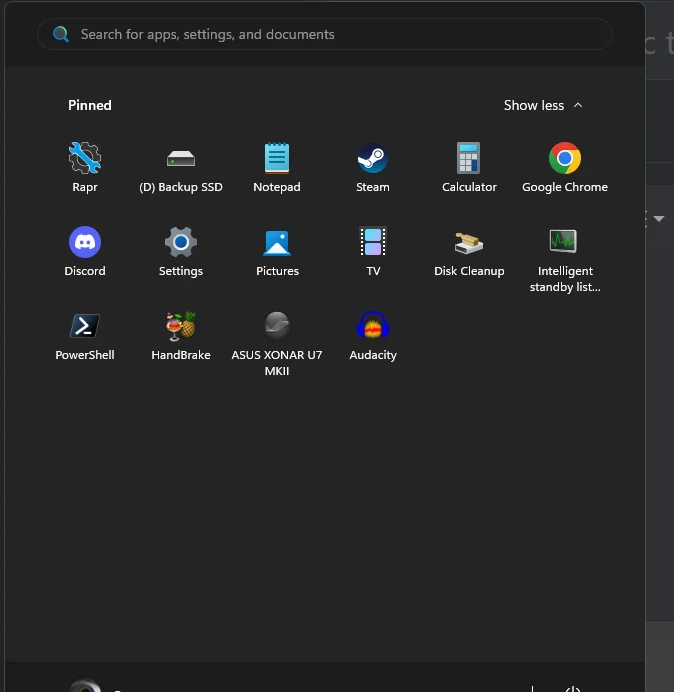
The other day when this happened, restarting explorer.exe fixed it and reverted it back to 8-column.
This was annoying then, but now it seems to have become stuck on the 6-column width, as per the screenshot. So now it's maddening, as there's no way to change it!
I want the 8-column width, but it's stuck. I don't want to resort to any sort of third-party tools because I'd much rather figure out the actual root cause.
- Windows 11, 2560x1440 resolution (1440p), Windows set at default 100% scaling
My Computer
At a glance
Windows 11
- OS
- Windows 11
- Computer type
- PC/Desktop