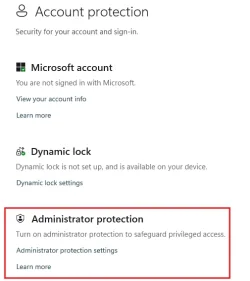
Solved Still no Administrator protection on 25h2?


seems to be working now. just tested on 25H2 26200.7171 with local account

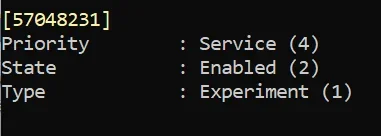
vivetool /enable /id:57048231

reboot

gpedit:
Computer Config > Windows Settings > Security Settings > Local Policies > Security Options

User Account Control: Configure Type of Admin Approval Mode = Admin Approval Mode with Administrator Protection

User Account Control: Behavior of the Elevation Prompt for Administrators Running with Administrator Protection = Prompt for Credentials


what i'm curious about is.... how does this differ from this setup?:

User Account Control: Behavior of the Elevation Prompt for Administrators Running with Administrator Protection = Prompt for Credentials on secure desktop
User Account Control: Behavior of the Elevation Prompt for standard users = Prompt for Credentials on secure desktop

HKLM\Software\Microsoft\Windows\CurrentVersion\Policies\System\
DWORD: ConsentPromptBehaviorAdmin = 1

(just fyi: 0 = no prompt; 1 = password on secure desktop; 2 = prompt on secure desktop; 3 = password; 4 = prompt; 5 = prompt for consent for non-windows binaries)

*also - if you want further admin lockdown to go with this:

HKLM\Software\Microsoft\Windows\CurrentVersion\Policies\CredUI\
DWORD: EnumerateAdministrators = 0
This ID is enabled on latest Build 26200.7462, perhaps you could try with that build. 😉

1765343918351.webp

. 🤷‍♂️
 

My Computer My Computer

At a glance

Windows 11 Pro 25H2Intel I9-9900K64GBNVIDIA RTX 2060
OS
Windows 11 Pro 25H2
Computer type
PC/Desktop
Manufacturer/Model
Dell XPS 8930
CPU
Intel I9-9900K
Memory
64GB
Graphics Card(s)
NVIDIA RTX 2060
Sound Card
NVIDIA High Definition Audio
Monitor(s) Displays
4k Samsung
Screen Resolution
3840 x 2160
Hard Drives
512GB NVMe, ADATA SU 800, 2TB HDD
This ID is enabled on latest Build 26200.7462, perhaps you could try with that build. 😉
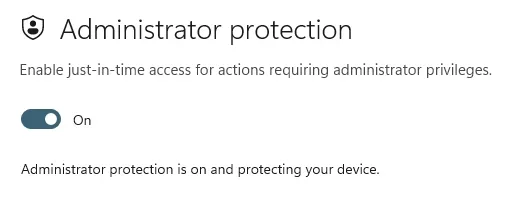
I enabled it on the build I posted and it works just fine

Looks like it will be disabled in canary builds soon though. Not sure if vive will work on those anymore

28000.1340 (Canary)
Admin Protection has been temporarily disabled in Canary builds.
 
Last edited:

My Computer My Computer

At a glance

Windows 11 Pro
OS
Windows 11 Pro
I enabled it on the build I posted and it works just fine

Looks like it will be disabled in canary builds soon though. Not sure if vive will work on those anymore

28000.1340 (Canary)
Admin Protection has been temporarily disabled in Canary builds.
Who knows?
I liked it better when they had the option in Security Settings, but they keep changing and experimenting with this feature.
Just creating more confusion. 😵‍💫😝🤷‍♂️
 

My Computer My Computer

At a glance

Windows 11 Pro 25H2Intel I9-9900K64GBNVIDIA RTX 2060
OS
Windows 11 Pro 25H2
Computer type
PC/Desktop
Manufacturer/Model
Dell XPS 8930
CPU
Intel I9-9900K
Memory
64GB
Graphics Card(s)
NVIDIA RTX 2060
Sound Card
NVIDIA High Definition Audio
Monitor(s) Displays
4k Samsung
Screen Resolution
3840 x 2160
Hard Drives
512GB NVMe, ADATA SU 800, 2TB HDD
Anyone had success enabling it again on Beta builds?
It has been completely disabled since build 7752. I'm on 7934 now and still unable to have it back, even with ViveTool and security policy enabled.
 

My Computer My Computer

At a glance

Windows 11Intel(R) Core(TM) i7-1065G732 GBIntel Iris Plus / NVidia GeForce 1660 Ti Max-Q
OS
Windows 11
Computer type
Laptop
Manufacturer/Model
Microsoft Surface Book 3
CPU
Intel(R) Core(TM) i7-1065G7
Memory
32 GB
Graphics Card(s)
Intel Iris Plus / NVidia GeForce 1660 Ti Max-Q
Thanks, but it does not work as it should.
1773783470197.webp


1773783762520.webp
Edit:
I enabled it, but it is not asking for credentials. as it used to do, they are probably not done with it yet.
I'll let Microsoft decide when they want to enable it.
That feature ID puts back the option in settings, but the feature enabled is not working correctly. 😵‍💫🤷‍♂️
 
Last edited:

My Computer My Computer

At a glance

Windows 11 Pro 25H2Intel I9-9900K64GBNVIDIA RTX 2060
OS
Windows 11 Pro 25H2
Computer type
PC/Desktop
Manufacturer/Model
Dell XPS 8930
CPU
Intel I9-9900K
Memory
64GB
Graphics Card(s)
NVIDIA RTX 2060
Sound Card
NVIDIA High Definition Audio
Monitor(s) Displays
4k Samsung
Screen Resolution
3840 x 2160
Hard Drives
512GB NVMe, ADATA SU 800, 2TB HDD

My Computer My Computer

At a glance

Windows 11Intel(R) Core(TM) i7-1065G732 GBIntel Iris Plus / NVidia GeForce 1660 Ti Max-Q
OS
Windows 11
Computer type
Laptop
Manufacturer/Model
Microsoft Surface Book 3
CPU
Intel(R) Core(TM) i7-1065G7
Memory
32 GB
Graphics Card(s)
Intel Iris Plus / NVidia GeForce 1660 Ti Max-Q
It worked for me (still without displaying the setting in Windows Security), thank
Weird, it worked on one machine for me too, but not the 1st one I tried. 😵‍💫🤷‍♂️

Edit:
Tried again today and it works on one machine, but not the other. withe exact same settings. 😵‍💫
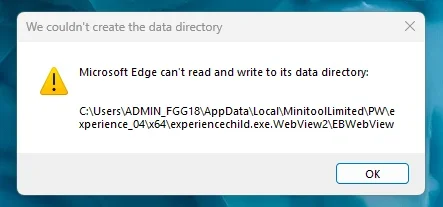
Also, I get this message on both machines 🤷‍♂️

1773855818163.webp
 
Last edited:

My Computer My Computer

At a glance

Windows 11 Pro 25H2Intel I9-9900K64GBNVIDIA RTX 2060
OS
Windows 11 Pro 25H2
Computer type
PC/Desktop
Manufacturer/Model
Dell XPS 8930
CPU
Intel I9-9900K
Memory
64GB
Graphics Card(s)
NVIDIA RTX 2060
Sound Card
NVIDIA High Definition Audio
Monitor(s) Displays
4k Samsung
Screen Resolution
3840 x 2160
Hard Drives
512GB NVMe, ADATA SU 800, 2TB HDD

Latest Support Threads

Back
Top Bottom