Stop Update


MitchInHome

Well-known member
Member
VIP
Local time
7:54 PM
Posts
92
OS
Win 11 Pro 25H2 26200 8655
By accident I clicked on a MS update (just one) that I don't want due to other computer problems.
Is there any way I can stop it ? I find nothing in task manager that seems to stop / abort it

TIA Mitch (my profile is up to date)
 

My Computer My Computer

At a glance

Win 11 Pro 25H2 26200 8655Intel Core I9 12900K32 GBNvidia GeForce RTX 3060 24GB
OS
Win 11 Pro 25H2 26200 8655
Computer type
PC/Desktop
Manufacturer/Model
HP Omen45L
CPU
Intel Core I9 12900K
Motherboard
HP 8917
Memory
32 GB
Graphics Card(s)
Nvidia GeForce RTX 3060 24GB
Sound Card
HP
Monitor(s) Displays
2 HP 27 & 23
Screen Resolution
3840x2160
Hard Drives
2 TB Samsung 990 EVO 2 TB Samsung 1 TB SATA ST1000
PSU
HP 800 Watt
Case
HP
Cooling
Water
Keyboard
Logo Tech G 213
Mouse
Logi Tech 502
Browser
FireFox
Antivirus
MS Defender / Malwarebytes Prem.
Other Info
Omen 45SL purchased from HP 12 2022 - Brother Printer MFC-L2700DW APC 500 Back UPS Macrium Reflect Home 8.1 25H2 Oct 2025 KEK CA 2023 cert April 2026
By accident I clicked on a MS update (just one) that I don't want due to other computer problems.
Is there any way I can stop it ? I find nothing in task manager that seems to stop / abort it

TIA Mitch (my profile is up to date)
If you haven't rebooted the machine yet you can hit pause updates to stop it for now while you figure things out.
 

My Computers My Computers

  • At a glance

    Windows 11 25H2Intel Core Ultra 9 275HX (24-Core)64GB DDR5 6400MT/sNVIDIA GeForce RTX 5080 and Intel UHD Graphics
    OS
    Windows 11 25H2
    Computer type
    Laptop
    Manufacturer/Model
    Alienware 18 Area-51
    CPU
    Intel Core Ultra 9 275HX (24-Core)
    Motherboard
    Alienware
    Memory
    64GB DDR5 6400MT/s
    Graphics Card(s)
    NVIDIA GeForce RTX 5080 and Intel UHD Graphics
    Sound Card
    Onboard, Realtek high-performance Audio chips (ALC3329 & ALC1708))
    Monitor(s) Displays
    300HZ 18-inch QHD 500 nit Comfort View+
    Screen Resolution
    2560 x 1600
    Hard Drives
    2TB NVMe M.2 PCIe Gen 5 SSD
    Case
    Magnesium Alloy
    Cooling
    Advanced Cryo-Tech Quad-Fan Cooling system & large vapor chamber
    Keyboard
    Cherry MX ultra low profile mechanical keyboard with per key AlienFX RGB lighting
    Mouse
    Logitech MX Master 4
    Browser
    Vivaldi (main), Firefox, Chrome, Edge
    Antivirus
    MS Defender and Malwarebytes Free
  • At a glance

    Windows 11 25H2Qualcomm Snapdragon X Elite (12 Core) ARM bas...16GB LPDDR5Qualcomm Adreno X1-85
    Operating System
    Windows 11 25H2
    Computer type
    Laptop
    Manufacturer/Model
    Microsoft Surface Laptop 7
    CPU
    Qualcomm Snapdragon X Elite (12 Core) ARM based CPU
    Motherboard
    Microsoft Corp.
    Memory
    16GB LPDDR5
    Graphics card(s)
    Qualcomm Adreno X1-85
    Sound Card
    Omnisonic speakers with Dolby Atmos spatial sound
    Monitor(s) Displays
    120 Hz 13.8-inch 600 nit PixelSense Flow touchscreen
    Screen Resolution
    2304x1536
    Hard Drives
    1TB NVMe Gen 4 SSD
    Case
    Anodized Aluminum
    Cooling
    Traditional active cooling fan system
    Keyboard
    Mechanical QWERTY, backlit when in use
    Mouse
    Logitech MX Master 4 and Surface Arc Mouse
    Browser
    Vivaldi (main), Firefox, Chrome, Edge
    Antivirus
    MS Defender and Malwarebytes Free
As far as being safe to do it, I would think it would depend on where in the sequence of update events the process is. What update are you referring to?
 

My Computers My Computers

  • At a glance

    Windows 11 Pro 25H2 26200.8655i9-10900 10 core 20 threads32 gbnone-Intel UHD Graphics 630
    OS
    Windows 11 Pro 25H2 26200.8655
    Computer type
    PC/Desktop
    Manufacturer/Model
    Dell Optiplex 7080
    CPU
    i9-10900 10 core 20 threads
    Motherboard
    DELL 0J37VM
    Memory
    32 gb
    Graphics Card(s)
    none-Intel UHD Graphics 630
    Sound Card
    Integrated Realtek
    Monitor(s) Displays
    Benq 27
    Screen Resolution
    2560x1440
    Hard Drives
    2x1tb Solidigm m.2 nvme /External drives 512gb Samsung m.2 sata+2tb Kingston m2.nvme
    PSU
    500w
    Case
    MT
    Cooling
    Dell Premium
    Keyboard
    Logitech wired
    Mouse
    Logitech wireless
    Internet Speed
    so slow I'm too embarrassed to tell
    Browser
    #1 Edge #2 Firefox
    Antivirus
    Defender+MWB Premium
  • At a glance

    Windows 11 Pro 24H2 26200.8457AMD Ryzen 7 6800U32 gbintegrated
    Operating System
    Windows 11 Pro 24H2 26200.8457
    Computer type
    PC/Desktop
    Manufacturer/Model
    Beelink Mini PC SER5
    CPU
    AMD Ryzen 7 6800U
    Memory
    32 gb
    Graphics card(s)
    integrated
    Sound Card
    integrated
    Monitor(s) Displays
    Benq 27
    Screen Resolution
    2560x1440
    Hard Drives
    1TB Crucial nvme
    Keyboard
    Logitech wired
    Mouse
    Logitech wireless
    Internet Speed
    still too embarrassed to tell
    Browser
    Firefox
    Antivirus
    Defender
    Other Info
    System 3 is non compliant Dell 9020 i7-4770/24gb ram Win11 PRO 26200.8457
Just go for it. It wasn't a bad update for most.
 

My Computers My Computers

  • At a glance

    Win 11 Home ♦♦♦26200.8737 ♦♦♦♦♦♦♦25H2AMD Ryzen 7 3700XG.Skill (F4-3200C14D-16GTZKW)EVGA RTX 2070 (08G-P4-2171-KR)
    OS
    Win 11 Home ♦♦♦26200.8737 ♦♦♦♦♦♦♦25H2
    Computer type
    PC/Desktop
    Manufacturer/Model
    Built by Ghot® [May 2020]
    CPU
    AMD Ryzen 7 3700X
    Motherboard
    Asus Pro WS X570-ACE (BIOS 5302)
    Memory
    G.Skill (F4-3200C14D-16GTZKW)
    Graphics Card(s)
    EVGA RTX 2070 (08G-P4-2171-KR)
    Sound Card
    Realtek ALC1220P / ALC S1220A
    Monitor(s) Displays
    Dell U3011 30"
    Screen Resolution
    2560 x 1600
    Hard Drives
    2x Samsung 860 EVO 500GB,
    WD 4TB Black FZBX - SATA III,
    WD 8TB Black FZBX - SATA III,
    DRW-24B1ST CD/DVD Burner
    PSU
    PC Power & Cooling 750W Quad EPS12V
    Case
    Cooler Master ATCS 840 Tower
    Cooling
    CM Hyper 212 EVO (push/pull)
    Keyboard
    Ducky DK9008 Shine II Blue LED
    Mouse
    Logitech Optical M-100
    Internet Speed
    300/300
    Browser
    Firefox (latest)
    Antivirus
    Bitdefender Total Security
    Other Info
    Speakers: Klipsch Pro Media 2.1
  • At a glance

    Windows XP Pro 32bit w/SP3AMD Athlon 64 X2 5000+ (OC'd @ 3.2Ghz)TWIN2X2048-6400C4DHX (2 x 1GB, DDR2 800)EVGA 256-P2-N758-TR GeForce 8600GT SSC
    Operating System
    Windows XP Pro 32bit w/SP3
    Computer type
    PC/Desktop
    Manufacturer/Model
    Built by Ghot® (not in use)
    CPU
    AMD Athlon 64 X2 5000+ (OC'd @ 3.2Ghz)
    Motherboard
    ASUS M2N32-SLI Deluxe Wireless Edition
    Memory
    TWIN2X2048-6400C4DHX (2 x 1GB, DDR2 800)
    Graphics card(s)
    EVGA 256-P2-N758-TR GeForce 8600GT SSC
    Sound Card
    Onboard
    Monitor(s) Displays
    ViewSonic G90FB Black 19" Professional (CRT)
    Screen Resolution
    up to 2048 x 1536
    Hard Drives
    WD 36GB 10,000rpm Raptor SATA
    Seagate 80GB 7200rpm SATA
    Lite-On LTR-52246S CD/RW
    Lite-On LH-18A1P CD/DVD Burner
    PSU
    PC Power & Cooling Silencer 750 Quad EPS12V
    Case
    Generic Beige case, 80mm fans
    Cooling
    ZALMAN 9500A 92mm CPU Cooler
    Keyboard
    Logitech Classic Keybooard 200
    Mouse
    Logitech Optical M-BT96a
    Internet Speed
    300/300
    Browser
    Firefox 3.x ??
    Antivirus
    Symantec (Norton)
    Other Info
    Still assembled, still runs. Haven't turned it on for 15 years?
What update are you referring to?
It was the 25H2 update but due to other problems (a week ago) I just want to stop it for now Thanks
 

My Computer My Computer

At a glance

Win 11 Pro 25H2 26200 8655Intel Core I9 12900K32 GBNvidia GeForce RTX 3060 24GB
OS
Win 11 Pro 25H2 26200 8655
Computer type
PC/Desktop
Manufacturer/Model
HP Omen45L
CPU
Intel Core I9 12900K
Motherboard
HP 8917
Memory
32 GB
Graphics Card(s)
Nvidia GeForce RTX 3060 24GB
Sound Card
HP
Monitor(s) Displays
2 HP 27 & 23
Screen Resolution
3840x2160
Hard Drives
2 TB Samsung 990 EVO 2 TB Samsung 1 TB SATA ST1000
PSU
HP 800 Watt
Case
HP
Cooling
Water
Keyboard
Logo Tech G 213
Mouse
Logi Tech 502
Browser
FireFox
Antivirus
MS Defender / Malwarebytes Prem.
Other Info
Omen 45SL purchased from HP 12 2022 - Brother Printer MFC-L2700DW APC 500 Back UPS Macrium Reflect Home 8.1 25H2 Oct 2025 KEK CA 2023 cert April 2026
It was the 25H2 update but due to other problems (a week ago) I just want to stop it for now Thanks


You can set the target version at 24H2. That can be removed later if desired.


Or you can do 25H2 now. It takes 3 seconds and a reboot with the Enablement Package.


My Computers My Computers

  • At a glance

    Win 11 Home ♦♦♦26200.8737 ♦♦♦♦♦♦♦25H2AMD Ryzen 7 3700XG.Skill (F4-3200C14D-16GTZKW)EVGA RTX 2070 (08G-P4-2171-KR)
    OS
    Win 11 Home ♦♦♦26200.8737 ♦♦♦♦♦♦♦25H2
    Computer type
    PC/Desktop
    Manufacturer/Model
    Built by Ghot® [May 2020]
    CPU
    AMD Ryzen 7 3700X
    Motherboard
    Asus Pro WS X570-ACE (BIOS 5302)
    Memory
    G.Skill (F4-3200C14D-16GTZKW)
    Graphics Card(s)
    EVGA RTX 2070 (08G-P4-2171-KR)
    Sound Card
    Realtek ALC1220P / ALC S1220A
    Monitor(s) Displays
    Dell U3011 30"
    Screen Resolution
    2560 x 1600
    Hard Drives
    2x Samsung 860 EVO 500GB,
    WD 4TB Black FZBX - SATA III,
    WD 8TB Black FZBX - SATA III,
    DRW-24B1ST CD/DVD Burner
    PSU
    PC Power & Cooling 750W Quad EPS12V
    Case
    Cooler Master ATCS 840 Tower
    Cooling
    CM Hyper 212 EVO (push/pull)
    Keyboard
    Ducky DK9008 Shine II Blue LED
    Mouse
    Logitech Optical M-100
    Internet Speed
    300/300
    Browser
    Firefox (latest)
    Antivirus
    Bitdefender Total Security
    Other Info
    Speakers: Klipsch Pro Media 2.1
  • At a glance

    Windows XP Pro 32bit w/SP3AMD Athlon 64 X2 5000+ (OC'd @ 3.2Ghz)TWIN2X2048-6400C4DHX (2 x 1GB, DDR2 800)EVGA 256-P2-N758-TR GeForce 8600GT SSC
    Operating System
    Windows XP Pro 32bit w/SP3
    Computer type
    PC/Desktop
    Manufacturer/Model
    Built by Ghot® (not in use)
    CPU
    AMD Athlon 64 X2 5000+ (OC'd @ 3.2Ghz)
    Motherboard
    ASUS M2N32-SLI Deluxe Wireless Edition
    Memory
    TWIN2X2048-6400C4DHX (2 x 1GB, DDR2 800)
    Graphics card(s)
    EVGA 256-P2-N758-TR GeForce 8600GT SSC
    Sound Card
    Onboard
    Monitor(s) Displays
    ViewSonic G90FB Black 19" Professional (CRT)
    Screen Resolution
    up to 2048 x 1536
    Hard Drives
    WD 36GB 10,000rpm Raptor SATA
    Seagate 80GB 7200rpm SATA
    Lite-On LTR-52246S CD/RW
    Lite-On LH-18A1P CD/DVD Burner
    PSU
    PC Power & Cooling Silencer 750 Quad EPS12V
    Case
    Generic Beige case, 80mm fans
    Cooling
    ZALMAN 9500A 92mm CPU Cooler
    Keyboard
    Logitech Classic Keybooard 200
    Mouse
    Logitech Optical M-BT96a
    Internet Speed
    300/300
    Browser
    Firefox 3.x ??
    Antivirus
    Symantec (Norton)
    Other Info
    Still assembled, still runs. Haven't turned it on for 15 years?
I'll mark this solved for now after reading this - Need to stop this Windows update!

I'll be taking this thing in or have someone come over here (I'm a disable Vet) for some major SSD/HD OS soon as I can. I've throw my hands up as to whats happening with it :eek1:
 
Last edited:

My Computer My Computer

At a glance

Win 11 Pro 25H2 26200 8655Intel Core I9 12900K32 GBNvidia GeForce RTX 3060 24GB
OS
Win 11 Pro 25H2 26200 8655
Computer type
PC/Desktop
Manufacturer/Model
HP Omen45L
CPU
Intel Core I9 12900K
Motherboard
HP 8917
Memory
32 GB
Graphics Card(s)
Nvidia GeForce RTX 3060 24GB
Sound Card
HP
Monitor(s) Displays
2 HP 27 & 23
Screen Resolution
3840x2160
Hard Drives
2 TB Samsung 990 EVO 2 TB Samsung 1 TB SATA ST1000
PSU
HP 800 Watt
Case
HP
Cooling
Water
Keyboard
Logo Tech G 213
Mouse
Logi Tech 502
Browser
FireFox
Antivirus
MS Defender / Malwarebytes Prem.
Other Info
Omen 45SL purchased from HP 12 2022 - Brother Printer MFC-L2700DW APC 500 Back UPS Macrium Reflect Home 8.1 25H2 Oct 2025 KEK CA 2023 cert April 2026
I am assuming you are referring to KB5054156 Feature Update. Is that correct?
That update was an enablement package which applied in less than 15 seconds for me. If it has already applied and awaiting a restart, I don't think you can stop it safely. However you can uninstall it afterwards.
To be safe, I would restart and let it complete and then uninstall it..
To uninstall Windows 11 25H2, open Settings > Windows Update > Update history, click “Uninstall updates,” and click “Uninstall” for the “Feature Update to Windows 25H2 via Enablement Packages” update.

I looked back at your thread about partitions and saw where you restored a Macrium image from 2023. Did you not have a more recent image? At some point you would have had to go from 23h2 to 24h2. Otherwise you would not have been offered the enablement package. Did you manually upgrade from 23h2 to 24h2 since last week?

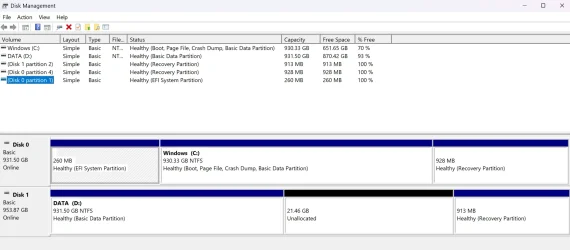
So I am very confused exactly what situation your system AND the partitions are in now. Something is very wrong if it take you to 8 minutes to boot from an ssd. I do notice something strange when looking at the screenshot you gave of your partitions.
Somehow the recovery partition from disk 0 has been duplicated on disk 1 (has exact same size). Was disk 1 an old system drive that you cloned at some point?
---------------------------------------
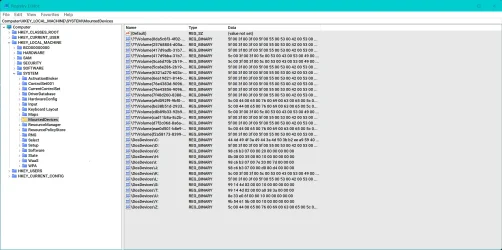
You could have solved the issue with your data drive letter being wrong by using the registry to manipulate your drive letters.. See my screenshot.
If D was unassignable in disk management, SOMETHING was assigned to D in the registry. You could have found what was assigned to D and deleted it. Thus leaving D available to use in disk management for your data partition OR you could have done the same thing using the registry.

You can assign a disk drive letter by modifying the registry at HKEY_LOCAL_MACHINE\SYSTEM\MOUNTEDDEVICES. To do this, open the Registry Editor, find the binary value for your drive (e.g., \DosDevices\E:), and rename it to the desired letter followed by a colon (e.g., \DosDevices\D:). After saving, you must sign out and back in, or restart your computer, for the change to take effect.
-----------------------

Then you still have to address the extra long boot time and Global.wsw Searching process. IMO it's malware and could very well attribute to the long boot time.. Here;s what copilot says about it's history.

  • Global.sw/wsw is not a standard Windows process.
  • In Windows ME, it was tied to System Restore.
  • In Windows 10/11, it may be suspicious or third‑party, and should be investigated with tools like Process Explorer and antivirus scans.
  • Do not ignore it if it causes lag or high resource usage — treat it as potentially unwanted software.

With all these issues at once, had it been me, the recovery partition on the secondary drive would have been deleted, then the drive disconnected and a clean install incoming on the primary drive. If you restored a 2 year old image and that mystery process was there then, you've had it a long time.

 

Attachments

  • Screenshot 2025-11-09 172009.webp
    Screenshot 2025-11-09 172009.webp
    241.7 KB · Views: 2
Last edited:

My Computers My Computers

  • At a glance

    Windows 11 Pro 25H2 26200.8655i9-10900 10 core 20 threads32 gbnone-Intel UHD Graphics 630
    OS
    Windows 11 Pro 25H2 26200.8655
    Computer type
    PC/Desktop
    Manufacturer/Model
    Dell Optiplex 7080
    CPU
    i9-10900 10 core 20 threads
    Motherboard
    DELL 0J37VM
    Memory
    32 gb
    Graphics Card(s)
    none-Intel UHD Graphics 630
    Sound Card
    Integrated Realtek
    Monitor(s) Displays
    Benq 27
    Screen Resolution
    2560x1440
    Hard Drives
    2x1tb Solidigm m.2 nvme /External drives 512gb Samsung m.2 sata+2tb Kingston m2.nvme
    PSU
    500w
    Case
    MT
    Cooling
    Dell Premium
    Keyboard
    Logitech wired
    Mouse
    Logitech wireless
    Internet Speed
    so slow I'm too embarrassed to tell
    Browser
    #1 Edge #2 Firefox
    Antivirus
    Defender+MWB Premium
  • At a glance

    Windows 11 Pro 24H2 26200.8457AMD Ryzen 7 6800U32 gbintegrated
    Operating System
    Windows 11 Pro 24H2 26200.8457
    Computer type
    PC/Desktop
    Manufacturer/Model
    Beelink Mini PC SER5
    CPU
    AMD Ryzen 7 6800U
    Memory
    32 gb
    Graphics card(s)
    integrated
    Sound Card
    integrated
    Monitor(s) Displays
    Benq 27
    Screen Resolution
    2560x1440
    Hard Drives
    1TB Crucial nvme
    Keyboard
    Logitech wired
    Mouse
    Logitech wireless
    Internet Speed
    still too embarrassed to tell
    Browser
    Firefox
    Antivirus
    Defender
    Other Info
    System 3 is non compliant Dell 9020 i7-4770/24gb ram Win11 PRO 26200.8457
Sorry Mitch, I forgot to add my screenshot to my last post. I have added it.
 

My Computers My Computers

  • At a glance

    Windows 11 Pro 25H2 26200.8655i9-10900 10 core 20 threads32 gbnone-Intel UHD Graphics 630
    OS
    Windows 11 Pro 25H2 26200.8655
    Computer type
    PC/Desktop
    Manufacturer/Model
    Dell Optiplex 7080
    CPU
    i9-10900 10 core 20 threads
    Motherboard
    DELL 0J37VM
    Memory
    32 gb
    Graphics Card(s)
    none-Intel UHD Graphics 630
    Sound Card
    Integrated Realtek
    Monitor(s) Displays
    Benq 27
    Screen Resolution
    2560x1440
    Hard Drives
    2x1tb Solidigm m.2 nvme /External drives 512gb Samsung m.2 sata+2tb Kingston m2.nvme
    PSU
    500w
    Case
    MT
    Cooling
    Dell Premium
    Keyboard
    Logitech wired
    Mouse
    Logitech wireless
    Internet Speed
    so slow I'm too embarrassed to tell
    Browser
    #1 Edge #2 Firefox
    Antivirus
    Defender+MWB Premium
  • At a glance

    Windows 11 Pro 24H2 26200.8457AMD Ryzen 7 6800U32 gbintegrated
    Operating System
    Windows 11 Pro 24H2 26200.8457
    Computer type
    PC/Desktop
    Manufacturer/Model
    Beelink Mini PC SER5
    CPU
    AMD Ryzen 7 6800U
    Memory
    32 gb
    Graphics card(s)
    integrated
    Sound Card
    integrated
    Monitor(s) Displays
    Benq 27
    Screen Resolution
    2560x1440
    Hard Drives
    1TB Crucial nvme
    Keyboard
    Logitech wired
    Mouse
    Logitech wireless
    Internet Speed
    still too embarrassed to tell
    Browser
    Firefox
    Antivirus
    Defender
    Other Info
    System 3 is non compliant Dell 9020 i7-4770/24gb ram Win11 PRO 26200.8457
Re marking this thread with the help from forum Guru Glasskutter. She was able to give me directions about the Drive C and D problem using reg edit and it seems to have worked. (Screen Shot 9 am today) Disk Manage.webp

But something is still causing the system to drag when I try to down load, check email, or browser. I have limited knowledge but
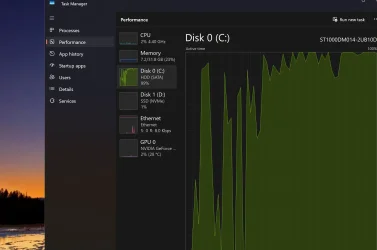
(1) I think it may be that my drive C is shown as a HDD Sata and drive D is a SSD NVMe.
My original in 2023 was C was SSD NVMe and D was HDD Sata Screen shot Task Mgr performance.webp

(2) When I rebooted update 25H2 was installing - I did not click install. It did install but the time was really slow.
Also Do not disturb in task bar shows on when I had it off . These are minor and Glasskutter said I can uninstall 25H2.

(3) My Reflect program is missing - I Lost any back up capability. Maybe when I can get the download slowness corrected I'll re install.

I have 2 posts in Eleven forums about this ongoing problem 1st at After Reset problems
originally started when I tried to do a repair install.

Thanks for any help Mitch Denver CO
 

My Computer My Computer

At a glance

Win 11 Pro 25H2 26200 8655Intel Core I9 12900K32 GBNvidia GeForce RTX 3060 24GB
OS
Win 11 Pro 25H2 26200 8655
Computer type
PC/Desktop
Manufacturer/Model
HP Omen45L
CPU
Intel Core I9 12900K
Motherboard
HP 8917
Memory
32 GB
Graphics Card(s)
Nvidia GeForce RTX 3060 24GB
Sound Card
HP
Monitor(s) Displays
2 HP 27 & 23
Screen Resolution
3840x2160
Hard Drives
2 TB Samsung 990 EVO 2 TB Samsung 1 TB SATA ST1000
PSU
HP 800 Watt
Case
HP
Cooling
Water
Keyboard
Logo Tech G 213
Mouse
Logi Tech 502
Browser
FireFox
Antivirus
MS Defender / Malwarebytes Prem.
Other Info
Omen 45SL purchased from HP 12 2022 - Brother Printer MFC-L2700DW APC 500 Back UPS Macrium Reflect Home 8.1 25H2 Oct 2025 KEK CA 2023 cert April 2026
I Lost any back up capability
No you haven't. Macrium does not have to be installed, You can create offline backups by booting from your Macrium recovery media and I strongly suggest that you immediately do so. Image each drive separately and make sure you keep track of which image is which. Do not include both drives in the same image.
And yes, it appears that your data is indeed on the m.2 nvme SSD and Windows is on the HDD.
 

My Computers My Computers

  • At a glance

    Windows 11 Pro 25H2 26200.8655i9-10900 10 core 20 threads32 gbnone-Intel UHD Graphics 630
    OS
    Windows 11 Pro 25H2 26200.8655
    Computer type
    PC/Desktop
    Manufacturer/Model
    Dell Optiplex 7080
    CPU
    i9-10900 10 core 20 threads
    Motherboard
    DELL 0J37VM
    Memory
    32 gb
    Graphics Card(s)
    none-Intel UHD Graphics 630
    Sound Card
    Integrated Realtek
    Monitor(s) Displays
    Benq 27
    Screen Resolution
    2560x1440
    Hard Drives
    2x1tb Solidigm m.2 nvme /External drives 512gb Samsung m.2 sata+2tb Kingston m2.nvme
    PSU
    500w
    Case
    MT
    Cooling
    Dell Premium
    Keyboard
    Logitech wired
    Mouse
    Logitech wireless
    Internet Speed
    so slow I'm too embarrassed to tell
    Browser
    #1 Edge #2 Firefox
    Antivirus
    Defender+MWB Premium
  • At a glance

    Windows 11 Pro 24H2 26200.8457AMD Ryzen 7 6800U32 gbintegrated
    Operating System
    Windows 11 Pro 24H2 26200.8457
    Computer type
    PC/Desktop
    Manufacturer/Model
    Beelink Mini PC SER5
    CPU
    AMD Ryzen 7 6800U
    Memory
    32 gb
    Graphics card(s)
    integrated
    Sound Card
    integrated
    Monitor(s) Displays
    Benq 27
    Screen Resolution
    2560x1440
    Hard Drives
    1TB Crucial nvme
    Keyboard
    Logitech wired
    Mouse
    Logitech wireless
    Internet Speed
    still too embarrassed to tell
    Browser
    Firefox
    Antivirus
    Defender
    Other Info
    System 3 is non compliant Dell 9020 i7-4770/24gb ram Win11 PRO 26200.8457

My Computer My Computer

At a glance

Win 11 Pro 25H2 26200 8655Intel Core I9 12900K32 GBNvidia GeForce RTX 3060 24GB
OS
Win 11 Pro 25H2 26200 8655
Computer type
PC/Desktop
Manufacturer/Model
HP Omen45L
CPU
Intel Core I9 12900K
Motherboard
HP 8917
Memory
32 GB
Graphics Card(s)
Nvidia GeForce RTX 3060 24GB
Sound Card
HP
Monitor(s) Displays
2 HP 27 & 23
Screen Resolution
3840x2160
Hard Drives
2 TB Samsung 990 EVO 2 TB Samsung 1 TB SATA ST1000
PSU
HP 800 Watt
Case
HP
Cooling
Water
Keyboard
Logo Tech G 213
Mouse
Logi Tech 502
Browser
FireFox
Antivirus
MS Defender / Malwarebytes Prem.
Other Info
Omen 45SL purchased from HP 12 2022 - Brother Printer MFC-L2700DW APC 500 Back UPS Macrium Reflect Home 8.1 25H2 Oct 2025 KEK CA 2023 cert April 2026
Back
Top Bottom