Solved Windows 11 Pro stopped updating


Pebble

Active member
Member
Local time
10:59 AM
Posts
25
OS
Windows 11 Pro
I've been stuck with KB5007651 for a few weeks and cant stop it reappearing. I have 3 other updates that also fail to download.
KB 5007651 is in the list of installed updates.
I've tried various suggestions in forums but it's persist and wont go away.
 

My Computer My Computer

At a glance

Windows 11 Proi7 14700KF32Gb DDR58GB Nvidia Geforce RTX 3050
OS
Windows 11 Pro
Computer type
PC/Desktop
Manufacturer/Model
Asus ROG Strix
CPU
i7 14700KF
Motherboard
Asus Rog Strix Z790
Memory
32Gb DDR5
Graphics Card(s)
8GB Nvidia Geforce RTX 3050
Sound Card
Creative Soundblaster Audigy RX
Monitor(s) Displays
Asus VA24EHF
Screen Resolution
1080
Hard Drives
500Gb Samsung 980
2TB Seagate Barracuda SATA 3
PSU
Corsair 650 CX
Cooling
PCS FrostFlow 200 Series High Performance CPU Cooler
Keyboard
Logitech
Please perform the following steps:


1) Add WMIC:

DISM /Online /Add-Capability /CapabilityName:WMIC~~~~


2) Run Tuneup plus > post a share link


3) Run upgrade_failure_info.bat > post a share link


4) Run the V2 log collector > post a share link


My Computer My Computer

At a glance

Windows 10Intel(R) Core(TM) i7-4800MQ CPU @ 2.70GHz16 GB Total: Manufacturer : Samsung MemoryTyp...NVIDIA Quadro K3100M; Intel(R) HD Graphics 4600
OS
Windows 10
Computer type
Laptop
Manufacturer/Model
HP
CPU
Intel(R) Core(TM) i7-4800MQ CPU @ 2.70GHz
Motherboard
Product : 190A Version : KBC Version 94.56
Memory
16 GB Total: Manufacturer : Samsung MemoryType : DDR3 FormFactor : SODIMM Capacity : 8GB Speed : 1600
Graphics Card(s)
NVIDIA Quadro K3100M; Intel(R) HD Graphics 4600
Sound Card
IDT High Definition Audio CODEC; PNP Device ID HDAUDIO\FUNC_01&VEN_111D&DEV_76E0
Hard Drives
Model Hitachi HTS727575A9E364
Antivirus
Microsoft Defender
Other Info
Mobile Workstation
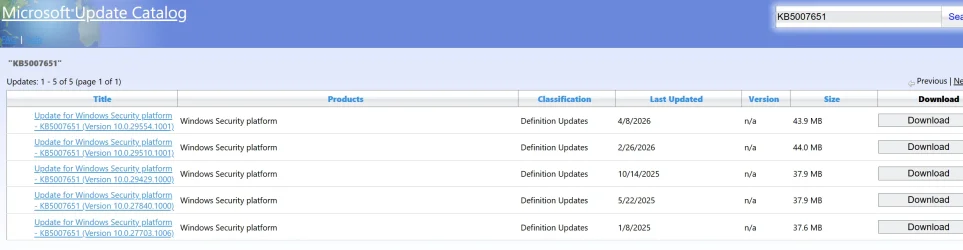
KB5007651 is a RECURRING update for Windows Security Platform. As you can see from the attached screenshot that same KB # was used 3 times in 2025 and already twice in 2026. I feel sure you are probably using a 3rd party AV. See this FIXED: KB5007651 constantly showing in Windows Update
 

Attachments

  • Screenshot 2026-04-22 192508.webp
    Screenshot 2026-04-22 192508.webp
    99 KB · Views: 1

My Computers My Computers

  • At a glance

    Windows 11 Pro 25H2 26200.8655i9-10900 10 core 20 threads32 gbnone-Intel UHD Graphics 630
    OS
    Windows 11 Pro 25H2 26200.8655
    Computer type
    PC/Desktop
    Manufacturer/Model
    Dell Optiplex 7080
    CPU
    i9-10900 10 core 20 threads
    Motherboard
    DELL 0J37VM
    Memory
    32 gb
    Graphics Card(s)
    none-Intel UHD Graphics 630
    Sound Card
    Integrated Realtek
    Monitor(s) Displays
    Benq 27
    Screen Resolution
    2560x1440
    Hard Drives
    2x1tb Solidigm m.2 nvme /External drives 512gb Samsung m.2 sata+2tb Kingston m2.nvme
    PSU
    500w
    Case
    MT
    Cooling
    Dell Premium
    Keyboard
    Logitech wired
    Mouse
    Logitech wireless
    Internet Speed
    so slow I'm too embarrassed to tell
    Browser
    #1 Edge #2 Firefox
    Antivirus
    Defender+MWB Premium
  • At a glance

    Windows 11 Pro 24H2 26200.8457AMD Ryzen 7 6800U32 gbintegrated
    Operating System
    Windows 11 Pro 24H2 26200.8457
    Computer type
    PC/Desktop
    Manufacturer/Model
    Beelink Mini PC SER5
    CPU
    AMD Ryzen 7 6800U
    Memory
    32 gb
    Graphics card(s)
    integrated
    Sound Card
    integrated
    Monitor(s) Displays
    Benq 27
    Screen Resolution
    2560x1440
    Hard Drives
    1TB Crucial nvme
    Keyboard
    Logitech wired
    Mouse
    Logitech wireless
    Internet Speed
    still too embarrassed to tell
    Browser
    Firefox
    Antivirus
    Defender
    Other Info
    System 3 is non compliant Dell 9020 i7-4770/24gb ram Win11 PRO 26200.8457
Logs
 

Attachments

My Computer My Computer

At a glance

Windows 11 Proi7 14700KF32Gb DDR58GB Nvidia Geforce RTX 3050
OS
Windows 11 Pro
Computer type
PC/Desktop
Manufacturer/Model
Asus ROG Strix
CPU
i7 14700KF
Motherboard
Asus Rog Strix Z790
Memory
32Gb DDR5
Graphics Card(s)
8GB Nvidia Geforce RTX 3050
Sound Card
Creative Soundblaster Audigy RX
Monitor(s) Displays
Asus VA24EHF
Screen Resolution
1080
Hard Drives
500Gb Samsung 980
2TB Seagate Barracuda SATA 3
PSU
Corsair 650 CX
Cooling
PCS FrostFlow 200 Series High Performance CPU Cooler
Keyboard
Logitech
Only post #2 step #4 was seen

Please update the progress with steps #1 - #3.


These were some findings:

a) BSODs

b) Old BIOS


1) The BIOS Version/Date American Megatrends Inc. 0904, 23/01/2024

Upgrade the BIOS: 0904 > 2107


2) Run Sea Tools Long generic test (all drives) > post images or share links


3) Run HD Sentinel (all drives) > post images or share links (do not run until posting results for each steps 5, 6, 7 and 8)

Hard Disk Sentinel - HDD health and temperature monitoring
a) Overview
b) Temperature
c) SMART


4) Run administrative PS: > post share links

wevtutil epl Application "$env:USERPROFILE\Desktop\application.evtx" /ow:true

wevtutil epl System "$env:USERPROFILE\Desktop\system.evtx" /ow:true


5) Read this link on Windows Driver Verifier (WDV): (Please do not run the tool until completing the steps in post #2)

Enable and Disable Driver Verifier in Windows 10


6) Create a new restore point:


7) Learn the methods to recover from BSOD caused by WDV by booting into safe mode and running one or more of these commands:

verifier /reset

verifier /bootmode resetonbootfail


(option nine and seven)


8) Plan to run the tool with various customized test settings.

a) Test all non-Microsoft drivers

b) Test no Microsoft drivers

c) For the first run of WDV select the 3 customized tests displayed in the TF tutorial


9) Whenever the WDV tool is started if there is no immediate BSOD then open administrative command prompt and copy and paste:

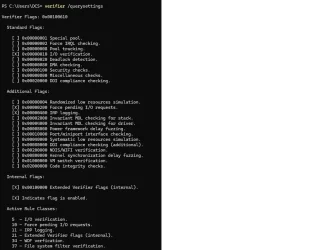
verifier /querysettings

Post a share link.


Customized tests will then be posted for the next run of WDV.


WDV can run continuously during the testing.


For any BSOD post a new V2 share link into the newest post.


Code:
HotFixID  Description     InstalledOn    
--------  -----------     -----------    
KB5054156 Update          02/03/2026
KB5082417 Update          20/04/2026
KB5083769 Security Update 20/04/2026
KB5088467 Security Update 20/04/2026


Code:
Event[6013]
  Log Name: System
  Source: Service Control Manager
  Date: 2026-04-23T00:37:14.0820000Z
  Event ID: 7000
  Task: N/A
  Level: Error
  Opcode: N/A
  Keyword: Classic,
  User: N/A
  User Name: N/A
  Computer: Dave
  Description:
The Windows Update service failed to start due to the following error:
The service did not respond to the start or control request in a timely fashion.


Code:
Event[2546]
  Log Name: System
  Source: volmgr
  Date: 2026-04-20T03:13:34.5530000Z
  Event ID: 46
  Task: None
  Level: Error
  Opcode: N/A
  Keyword: Classic,
  User: N/A
  User Name: N/A
  Computer: Dave
  Description:
Crash dump initialization failed!

 

My Computer My Computer

At a glance

Windows 10Intel(R) Core(TM) i7-4800MQ CPU @ 2.70GHz16 GB Total: Manufacturer : Samsung MemoryTyp...NVIDIA Quadro K3100M; Intel(R) HD Graphics 4600
OS
Windows 10
Computer type
Laptop
Manufacturer/Model
HP
CPU
Intel(R) Core(TM) i7-4800MQ CPU @ 2.70GHz
Motherboard
Product : 190A Version : KBC Version 94.56
Memory
16 GB Total: Manufacturer : Samsung MemoryType : DDR3 FormFactor : SODIMM Capacity : 8GB Speed : 1600
Graphics Card(s)
NVIDIA Quadro K3100M; Intel(R) HD Graphics 4600
Sound Card
IDT High Definition Audio CODEC; PNP Device ID HDAUDIO\FUNC_01&VEN_111D&DEV_76E0
Hard Drives
Model Hitachi HTS727575A9E364
Antivirus
Microsoft Defender
Other Info
Mobile Workstation
Tuneup log
 

Attachments

My Computer My Computer

At a glance

Windows 11 Proi7 14700KF32Gb DDR58GB Nvidia Geforce RTX 3050
OS
Windows 11 Pro
Computer type
PC/Desktop
Manufacturer/Model
Asus ROG Strix
CPU
i7 14700KF
Motherboard
Asus Rog Strix Z790
Memory
32Gb DDR5
Graphics Card(s)
8GB Nvidia Geforce RTX 3050
Sound Card
Creative Soundblaster Audigy RX
Monitor(s) Displays
Asus VA24EHF
Screen Resolution
1080
Hard Drives
500Gb Samsung 980
2TB Seagate Barracuda SATA 3
PSU
Corsair 650 CX
Cooling
PCS FrostFlow 200 Series High Performance CPU Cooler
Keyboard
Logitech
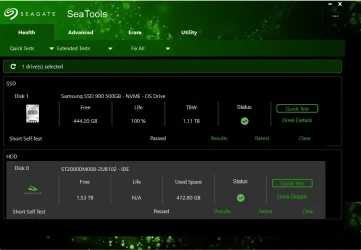
Drives
 

Attachments

  • Untitled.webp
    Untitled.webp
    41.7 KB · Views: 1

My Computer My Computer

At a glance

Windows 11 Proi7 14700KF32Gb DDR58GB Nvidia Geforce RTX 3050
OS
Windows 11 Pro
Computer type
PC/Desktop
Manufacturer/Model
Asus ROG Strix
CPU
i7 14700KF
Motherboard
Asus Rog Strix Z790
Memory
32Gb DDR5
Graphics Card(s)
8GB Nvidia Geforce RTX 3050
Sound Card
Creative Soundblaster Audigy RX
Monitor(s) Displays
Asus VA24EHF
Screen Resolution
1080
Hard Drives
500Gb Samsung 980
2TB Seagate Barracuda SATA 3
PSU
Corsair 650 CX
Cooling
PCS FrostFlow 200 Series High Performance CPU Cooler
Keyboard
Logitech
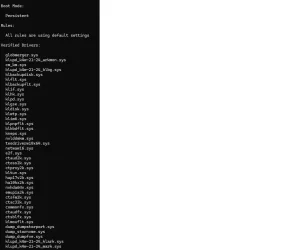
Driver Verifier
 

Attachments

  • Verifier1.webp
    Verifier1.webp
    68.2 KB · Views: 1
  • Verifier2.webp
    Verifier2.webp
    35.2 KB · Views: 1
  • Verifier3.webp
    Verifier3.webp
    7.8 KB · Views: 1

My Computer My Computer

At a glance

Windows 11 Proi7 14700KF32Gb DDR58GB Nvidia Geforce RTX 3050
OS
Windows 11 Pro
Computer type
PC/Desktop
Manufacturer/Model
Asus ROG Strix
CPU
i7 14700KF
Motherboard
Asus Rog Strix Z790
Memory
32Gb DDR5
Graphics Card(s)
8GB Nvidia Geforce RTX 3050
Sound Card
Creative Soundblaster Audigy RX
Monitor(s) Displays
Asus VA24EHF
Screen Resolution
1080
Hard Drives
500Gb Samsung 980
2TB Seagate Barracuda SATA 3
PSU
Corsair 650 CX
Cooling
PCS FrostFlow 200 Series High Performance CPU Cooler
Keyboard
Logitech
Please make sure that the page file is on C: during the troubleshooting.


Then rerun Tuneup plus > post a share link into the newest post.


When available update the progress with:

Post #2 step#3

Post #5 steps #1 - #4


Also test this flash drive:

Device manufacturer: ASMT
Device model: 2115


Code:
------------------------
Disk & DVD/CD-ROM Drives
------------------------
      Drive: C:
 Free Space: 422.9 GB
Total Space: 476.0 GB
File System: NTFS
      Model: Samsung SSD 980 500GB

      Drive: D:
 Free Space: 25.7 GB
Total Space: 40.0 GB
File System: NTFS
      Model: ST2000DM008-2UB102

      Drive: E:
 Free Space: 8.3 GB
Total Space: 20.0 GB
File System: NTFS
      Model: ST2000DM008-2UB102

      Drive: F:
 Free Space: 14.8 GB
Total Space: 20.0 GB
File System: NTFS
      Model: ST2000DM008-2UB102

      Drive: G:
 Free Space: 96.0 GB
Total Space: 100.0 GB
File System: NTFS
      Model: ST2000DM008-2UB102

      Drive: H:
 Free Space: 99.7 GB
Total Space: 100.0 GB
File System: NTFS
      Model: ST2000DM008-2UB102

      Drive: I:
 Free Space: 96.1 GB
Total Space: 100.0 GB
File System: NTFS
      Model: ST2000DM008-2UB102

      Drive: J:
 Free Space: 98.8 GB
Total Space: 100.0 GB
File System: NTFS
      Model: ST2000DM008-2UB102

      Drive: K:
 Free Space: 209.3 GB
Total Space: 227.7 GB
File System: NTFS
      Model: ST2000DM008-2UB102

      Drive: L:
 Free Space: 808.5 GB
Total Space: 1200.0 GB
File System: NTFS
      Model: ST2000DM008-2UB102
 
Last edited:

My Computer My Computer

At a glance

Windows 10Intel(R) Core(TM) i7-4800MQ CPU @ 2.70GHz16 GB Total: Manufacturer : Samsung MemoryTyp...NVIDIA Quadro K3100M; Intel(R) HD Graphics 4600
OS
Windows 10
Computer type
Laptop
Manufacturer/Model
HP
CPU
Intel(R) Core(TM) i7-4800MQ CPU @ 2.70GHz
Motherboard
Product : 190A Version : KBC Version 94.56
Memory
16 GB Total: Manufacturer : Samsung MemoryType : DDR3 FormFactor : SODIMM Capacity : 8GB Speed : 1600
Graphics Card(s)
NVIDIA Quadro K3100M; Intel(R) HD Graphics 4600
Sound Card
IDT High Definition Audio CODEC; PNP Device ID HDAUDIO\FUNC_01&VEN_111D&DEV_76E0
Hard Drives
Model Hitachi HTS727575A9E364
Antivirus
Microsoft Defender
Other Info
Mobile Workstation
I turned my page file off, Surprised to see it back on again.

Device manufacturer: ASMT
Device model: 2115

Works ok my Linux laptops, But Windows 11 will not mount it for more than a few seconds.
 

My Computer My Computer

At a glance

Windows 11 Proi7 14700KF32Gb DDR58GB Nvidia Geforce RTX 3050
OS
Windows 11 Pro
Computer type
PC/Desktop
Manufacturer/Model
Asus ROG Strix
CPU
i7 14700KF
Motherboard
Asus Rog Strix Z790
Memory
32Gb DDR5
Graphics Card(s)
8GB Nvidia Geforce RTX 3050
Sound Card
Creative Soundblaster Audigy RX
Monitor(s) Displays
Asus VA24EHF
Screen Resolution
1080
Hard Drives
500Gb Samsung 980
2TB Seagate Barracuda SATA 3
PSU
Corsair 650 CX
Cooling
PCS FrostFlow 200 Series High Performance CPU Cooler
Keyboard
Logitech
The page file is needed during the BSOD troubleshooting.

Please make sure that it is on C: then run Tuneup plus > post a share link


When available update the progress with:

Post #2 step#3

Post #5 steps #1 - #4


Code:
Event[3474]
  Log Name: System
  Source: Microsoft-Windows-Ntfs
  Date: 2026-04-20T09:08:11.6970000Z
  Event ID: 140
  Task: N/A
  Level: Warning
  Opcode: Info
  Keyword: N/A
  User: S-1-5-18
  User Name: NT AUTHORITY\SYSTEM
  Computer: Dave
  Description:
The system failed to flush data to the transaction log. Corruption may occur in VolumeId: L:, DeviceName: \Device\HarddiskVolume15.

           Failure status: A device which does not exist was specified.

           Device GUID: {15f6245a-ac71-4fa1-2df7-1723a1f7758d}
           Device manufacturer: ASMT  
           Device model: 2115          
           Device revision: 0  
           Device serial number: 00000000000000000000
           Bus type: USB

           Adapter serial number:


Code:
Event[3687]
  Log Name: System
  Source: Microsoft-Windows-Ntfs
  Date: 2026-04-20T17:13:43.2340000Z
  Event ID: 140
  Task: N/A
  Level: Warning
  Opcode: Info
  Keyword: N/A
  User: N/A
  User Name: N/A
  Computer: Dave
  Description:
The system failed to flush data to the transaction log. Corruption may occur in VolumeId: M:, DeviceName: \Device\HarddiskVolume15.

           Failure status: A device which does not exist was specified.

           Device GUID: {15f6245a-ac71-4fa1-2df7-1723a1f7758d}
           Device manufacturer: ASMT  
           Device model: 2115          
           Device revision: 0  
           Device serial number: 00000000000000000000
           Bus type: USB

           Adapter serial number:
 

My Computer My Computer

At a glance

Windows 10Intel(R) Core(TM) i7-4800MQ CPU @ 2.70GHz16 GB Total: Manufacturer : Samsung MemoryTyp...NVIDIA Quadro K3100M; Intel(R) HD Graphics 4600
OS
Windows 10
Computer type
Laptop
Manufacturer/Model
HP
CPU
Intel(R) Core(TM) i7-4800MQ CPU @ 2.70GHz
Motherboard
Product : 190A Version : KBC Version 94.56
Memory
16 GB Total: Manufacturer : Samsung MemoryType : DDR3 FormFactor : SODIMM Capacity : 8GB Speed : 1600
Graphics Card(s)
NVIDIA Quadro K3100M; Intel(R) HD Graphics 4600
Sound Card
IDT High Definition Audio CODEC; PNP Device ID HDAUDIO\FUNC_01&VEN_111D&DEV_76E0
Hard Drives
Model Hitachi HTS727575A9E364
Antivirus
Microsoft Defender
Other Info
Mobile Workstation
Not sure which step it was but i noticed something different after i ran one of the test's.
Windows update is now up and running again.

Thank's for your help.
 
Last edited:

My Computer My Computer

At a glance

Windows 11 Proi7 14700KF32Gb DDR58GB Nvidia Geforce RTX 3050
OS
Windows 11 Pro
Computer type
PC/Desktop
Manufacturer/Model
Asus ROG Strix
CPU
i7 14700KF
Motherboard
Asus Rog Strix Z790
Memory
32Gb DDR5
Graphics Card(s)
8GB Nvidia Geforce RTX 3050
Sound Card
Creative Soundblaster Audigy RX
Monitor(s) Displays
Asus VA24EHF
Screen Resolution
1080
Hard Drives
500Gb Samsung 980
2TB Seagate Barracuda SATA 3
PSU
Corsair 650 CX
Cooling
PCS FrostFlow 200 Series High Performance CPU Cooler
Keyboard
Logitech

Latest Support Threads

Back
Top Bottom