Update KB5089573 fails to install-multiple of times


CharlieDog

Well-known member
Local time
4:11 AM
Posts
28
OS
Windows 11 Pro Version 25H2
I've lost count of the number of times I have tried to install this update on my Dell Optiplex 5060, 25H2, 8th gen. I7, plenty of ram, SSD, secure boot, tpm 2.0 etc., etc.
It installed without problems on several other computers in our household, but fails every time I try it on my primary desktop. I've never had a problem with a Windows update on this computer before.
I've Googled the error code 0x800705b9 and tried several different sets of instructions with no luck. I went to Microsoft's download for the update and got the error message that I didn't have the right computer for the download, almost as if it didn't recognize that I didn't have an ARM machine, and I was not running 24H2.
Open to suggestions, TIA.
 

My Computers

System One System Two

  • OS
    Windows 11 Pro Version 25H2
    Computer type
    PC/Desktop
    Manufacturer/Model
    Dell OptiPlex 5060
    CPU
    Core i7-8700
    Memory
    32 GB DDR4-2666
    Graphics Card(s)
    Zotac Gaming GeForce GTX 1650 OC
    Hard Drives
    Silicon Power UD90 M.2 NVMe 1TB
    Mouse
    Several Logitech mice
    Internet Speed
    1 GB/S
    Browser
    Chrome
    Antivirus
    Windows Defender
  • Operating System
    Windows 11 Home Version 22H2 Build 222621.963
    Computer type
    Laptop
    Manufacturer/Model
    HP Laptop14-cf1020od
    CPU
    i3-8145U
    Memory
    16 GB DDR4-2666
    Hard Drives
    WD Blue 250 GB M.2 SATA SSD
1. What is your present full build number?
2. How have you tried to install it.. it sounds like manually using something you've downloaded - have you tried manually via check fo updates in Settings? And why not use normal sheduled Windows Update?

I went to Microsoft's download for the update
- why not simply run Windows Update as that should avoid any basic incompatibility?

If you have disabled the normal check for Windows Update (have you?) then why not use e.g. WUMT (free) to scan for and then select the update you wish to apply?

Note: a better way to control Windows Update with Pro is to use Group Policy and set updates to 'Notify'.

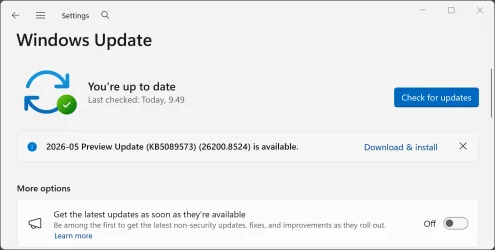
This is the update you mention:

May 26, 2026 - KB5089573 (OS Builds 26200.8524 and 26100.8524) Preview​


My Computer

System One

  • OS
    Windows 11 Pro
    Computer type
    Laptop
    Manufacturer/Model
    Lenovo t480s
    CPU
    i7-8650U
    Memory
    16GB
    Graphics Card(s)
    Intel UHD 620
    Screen Resolution
    1920x1080
    Hard Drives
    C SN810 SDCPNRY-512G-1006
    Browser
    Edge, Firefox
    Antivirus
    Defender
You may need to do what I did.


See the last post in the thread
 

My Computers

System One System Two

  • OS
    Windows 11 Pro 25H2 build: (26200.7623)
    Computer type
    Laptop
    Manufacturer/Model
    Microsoft Surface Pro
    Memory
    32GB
  • Operating System
    Microsoft 25H2 Pro
    Computer type
    Laptop
    Manufacturer/Model
    Dell Pro 14 - PC14250
    CPU
    Intel Core Ultra 7
    Memory
    64GB
    Graphics card(s)
    Intel Integrated Graphics
    Hard Drives
    Micron 1TB SSD
General troubleshooting WINDOWS UPDATE PROBLEMS things to try

1. Run troubleshooter-settings-system-troubleshoot-other troubleshooters-windows update-RUN.

2. Reset Windows update using Brink's tutorial Reset Windows Update in Windows 11 Tutorial

3. Open command prompt as administrator. Enter this command.
dism /online /cleanup-image /restorehealth
When complete, Restart computer

Then open command prompt as admin again and run sfc /scannow
Pay attention to the scan results to see if SFC found anything it could not repair

4. CLEAN UP COMPONENT STORE - dism /online /cleanup-image /startcomponentcleanup
Analyze and Clean Up Component Store (WinSxS folder) in Windows 11 Tutorial

5. Do a repair install. This usually works when nothing else will. Repair Install Windows 11 with an In-place Upgrade Tutorial
 

My Computers

System One System Two

  • OS
    Windows 11 Pro 25H2
    Computer type
    PC/Desktop
    Manufacturer/Model
    Dell Optiplex 7080
    CPU
    i9-10900 10 core 20 threads
    Motherboard
    DELL 0J37VM
    Memory
    32 gb
    Graphics Card(s)
    none-Intel UHD Graphics 630
    Sound Card
    Integrated Realtek
    Monitor(s) Displays
    Benq 27
    Screen Resolution
    2560x1440
    Hard Drives
    2x1tb Solidigm m.2 nvme /External drives 512gb Samsung m.2 sata+2tb Kingston m2.nvme
    PSU
    500w
    Case
    MT
    Cooling
    Dell Premium
    Keyboard
    Logitech wired
    Mouse
    Logitech wireless
    Internet Speed
    so slow I'm too embarrassed to tell
    Browser
    #1 Edge #2 Firefox
    Antivirus
    Defender+MWB Premium
  • Operating System
    Windows 11 Pro 24H2 26200.8457
    Computer type
    PC/Desktop
    Manufacturer/Model
    Beelink Mini PC SER5
    CPU
    AMD Ryzen 7 6800U
    Memory
    32 gb
    Graphics card(s)
    integrated
    Sound Card
    integrated
    Monitor(s) Displays
    Benq 27
    Screen Resolution
    2560x1440
    Hard Drives
    1TB Crucial nvme
    Keyboard
    Logitech wired
    Mouse
    Logitech wireless
    Internet Speed
    still too embarrassed to tell
    Browser
    Firefox
    Antivirus
    Defender
    Other Info
    System 3 is non compliant Dell 9020 i7-4770/24gb ram Win11 PRO 26200.8457
KB5089573 is a Preview type update so there is no need to install it. It is not a security update so not important. Save yourself the trouble and forget about it. Wait for the stable Patch Tuesday update, which is due on 9th/10th June next. That will be a security update and hopefully that will install okay. If it doesn't install then you do need to take action to fix it as others have suggested above.
 

My Computers

System One System Two

  • OS
    Windows 11 Pro
    Computer type
    PC/Desktop
    Manufacturer/Model
    GMKtec K11
    CPU
    AMD Ryzen 9 8945HS
    Memory
    32GB DDR5 SO-DIMM
    Graphics Card(s)
    Integrated AMD Radeon 780M (4.00 GHz)
    Monitor(s) Displays
    Benq 2250HM
    Screen Resolution
    1920 x 1080
    Hard Drives
    1 TB PCIe 4.0 NVMe M.2 SSD
  • Operating System
    Windows 11 Home
    Computer type
    Laptop
    Manufacturer/Model
    ASUS Zenbook 14 OLED 14" Laptop - UX3405CA-QL192W
    CPU
    Intel® Core™ Ultra 7 - 255H processor
    Memory
    16 GB LPDDR5 SDRAM
    Graphics card(s)
    Intel Arc 140T onboard graphics
    Screen Resolution
    1920 x 1200 (16:10 WUXGA resolution) OLED Touchscreen
    Hard Drives
    1TB SSD
With the reported issue of Explorer Patcher crashing on 8524, its better to pause Windows Update until the next Super Tuesday stable update. Microsoft squashes bugs by then.
 

My Computers

System One System Two

  • OS
    Windows 11 Education For 25H2
    Computer type
    Laptop
    Manufacturer/Model
    HP ZBook G2
    CPU
    Intel® Core i7 5500u
    Motherboard
    HP
    Memory
    8 GB
    Graphics Card(s)
    Intel HD Family Graphics 5500 AMD Firepro 4150M
    Sound Card
    Realtek High Audio
    Hard Drives
    1 TB SSD
    Mouse
    HP USB Mouse
    Antivirus
    Windows Defender
  • Operating System
    Windows 11 Pro For Workstations 25H2
    Computer type
    Laptop
    Manufacturer/Model
    HP Zbook G4
    CPU
    Xeon 1535m v6
    Motherboard
    HP
    Memory
    32 GB
    Graphics card(s)
    AMD Quadro Pro 4100
    Sound Card
    Bang and Olufson Audio
    Hard Drives
    1TB SSD
    Mouse
    HP USB Mouse
    Antivirus
    Windows Defender
N.B if you have Pro, you can set a group policy to ignore and not receive preview updates.
 

My Computer

System One

  • OS
    Windows 11 Pro
    Computer type
    Laptop
    Manufacturer/Model
    Lenovo t480s
    CPU
    i7-8650U
    Memory
    16GB
    Graphics Card(s)
    Intel UHD 620
    Screen Resolution
    1920x1080
    Hard Drives
    C SN810 SDCPNRY-512G-1006
    Browser
    Edge, Firefox
    Antivirus
    Defender

My Computers

System One System Two

  • OS
    Win 11 Pro 25H2 26200.8524
    Computer type
    PC/Desktop
    Manufacturer/Model
    Self Built
    CPU
    Intel® Core™ i7-14700K
    Motherboard
    ASUS TUF Z690-PLUS WIFI BIOS 4505 11/29/25
    Memory
    G.SKILL Ripjaws S5 Series 64GB (2 x 32GB) DDR5
    Graphics Card(s)
    ASUS GeForce RTX 4070 Super 12GB
    Sound Card
    Sound Blaster AE-5 Plus
    Monitor(s) Displays
    ASUS TUF Gaming 27" 2K HDR Gaming
    Screen Resolution
    2560 x 1440
    Hard Drives
    Samsung 990 Pro 1TB NVMe (Win 11 25H2)
    SK hynix P41 500GB NVMe 25H2 DEV/Games
    SK hynix P41 2TB NVMe (x3)
    Crucial P3 Plus 4TB
    PSU
    Corsair RM850x Shift
    Case
    Antec Dark Phantom DP502 FLUX
    Cooling
    Corsair Nautilus 360 RS AIO
    Keyboard
    Logitech MK 320
    Mouse
    Razer Basilisk V3
    Internet Speed
    350Mbs
    Browser
    Firefox
    Antivirus
    Winows Security
    Other Info
    MR 8.1 Home

    System 3 Specs
    Win 11 Pro 25H2 26200.8524
    ASUS PRIME Z370-P II BIOS 3004 7/12/21
    Intel Core i7-8700 CPU @ 3.20GHz
    32GB DDR4 RAM (4x8)
    iGPU Intel UHD Graphics 630
  • Operating System
    Win 11 Pro 25H2 26200.8524
    Computer type
    PC/Desktop
    Manufacturer/Model
    Self Built
    CPU
    Intel Core i7-11700F
    Motherboard
    Asus TUF Gaming Z590 Plus WiFi (BIOS 2803)
    Memory
    64 GB DDR4
    Graphics card(s)
    MSI GeForce RTX 3060 Ventus 2X 12GB
    Sound Card
    SoundBlaster Audigy Fx V2
    Monitor(s) Displays
    Samsung F27T350
    Screen Resolution
    1920x1080
    Hard Drives
    Samsung 980 Pro 1TB
    Samsung 970 EVO Plus 2TB
    Samsung 870 EVO 500GB SSD
    PSU
    Corsair HX750
    Case
    Cougar MX330-G Window
    Cooling
    Thermalright Frozen Edge 240 Black AIO
    Internet Speed
    350Mbps
    Browser
    Firefox
    Antivirus
    Windows Security
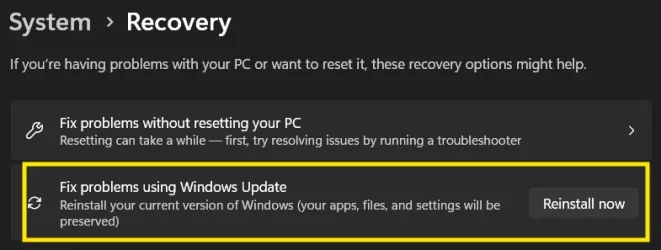
Thanks for all the responses, an in place repair/re-install fixed whatever was preventing the update from installing. After doing that and re-checking for updates, the cumulative update downloaded and installed without a problem. The build is now 26200.8524, it was 8328. This can be marked as solved.
 

My Computers

System One System Two

  • OS
    Windows 11 Pro Version 25H2
    Computer type
    PC/Desktop
    Manufacturer/Model
    Dell OptiPlex 5060
    CPU
    Core i7-8700
    Memory
    32 GB DDR4-2666
    Graphics Card(s)
    Zotac Gaming GeForce GTX 1650 OC
    Hard Drives
    Silicon Power UD90 M.2 NVMe 1TB
    Mouse
    Several Logitech mice
    Internet Speed
    1 GB/S
    Browser
    Chrome
    Antivirus
    Windows Defender
  • Operating System
    Windows 11 Home Version 22H2 Build 222621.963
    Computer type
    Laptop
    Manufacturer/Model
    HP Laptop14-cf1020od
    CPU
    i3-8145U
    Memory
    16 GB DDR4-2666
    Hard Drives
    WD Blue 250 GB M.2 SATA SSD

Good. Only you can do that, as the thread starter....
 

My Computer

System One

  • OS
    Windows 11 Pro
    Computer type
    Laptop
    Manufacturer/Model
    Lenovo t480s
    CPU
    i7-8650U
    Memory
    16GB
    Graphics Card(s)
    Intel UHD 620
    Screen Resolution
    1920x1080
    Hard Drives
    C SN810 SDCPNRY-512G-1006
    Browser
    Edge, Firefox
    Antivirus
    Defender
I am sick and tired of having to do in-place upgrades or /restorehealth to install updates.
Those things mess up all my modification, settings and start menu :-(
Is it so very hard to make the updates work? Never a problem on Windows 10.
 
Last edited:

My Computers

System One System Two

  • OS
    Windows 10
    Computer type
    PC/Desktop
    Manufacturer/Model
    Asus
    CPU
    Intel Core i5-6600 3.30Ghz
    Motherboard
    Asus B150M
    Memory
    16 GB
    Graphics Card(s)
    Asus Nvidia GeForce GTX 960
    Sound Card
    Onboard
    Monitor(s) Displays
    Samsung
    Hard Drives
    Samsung SSD 850 EBO 128 GB
    WDC WD1003FZEX-00MK2A0
  • Operating System
    Windows 11
    Computer type
    Laptop
    Manufacturer/Model
    Asus ExpertBook
    CPU
    11the Gen Intel Core i5-1135G7 2.40 GHz
    Memory
    8 GB
    Graphics card(s)
    Intel Xe
    Sound Card
    Onboard
    Hard Drives
    NVMe WDC PC SN530 SDBPNPZ 256 GB
Thankfully that's not my experience.

(Note: I'm very careful to ensure the changes I make are such as to withstand updates etc as far as reasonably possible).
 

My Computer

System One

  • OS
    Windows 11 Pro
    Computer type
    Laptop
    Manufacturer/Model
    Lenovo t480s
    CPU
    i7-8650U
    Memory
    16GB
    Graphics Card(s)
    Intel UHD 620
    Screen Resolution
    1920x1080
    Hard Drives
    C SN810 SDCPNRY-512G-1006
    Browser
    Edge, Firefox
    Antivirus
    Defender
Back
Top Bottom